navigation system VAUXHALL MOVANO_B 2015.5 Infotainment system
[x] Cancel search | Manufacturer: VAUXHALL, Model Year: 2015.5, Model line: MOVANO_B, Model: VAUXHALL MOVANO_B 2015.5Pages: 139, PDF Size: 1.84 MB
Page 77 of 139
Navigation77
6. Direction and distance to nextchange of direction
7. Exterior temperature (depending on vehicle)
8. Journey information, e.g. estimated arrival time, total
remaining distance
9. Current location
10. Audio system information
11. Compass To access the map screen at any
time, press the MAP 2D/3D button.
Ensure any changes made are
confirmed with the
soft buttons ( ⌞ and ⌟) before switching
to the map screen, otherwise the
changes will be lost.
In the map screen, press the
MAP 2D/3D button again to switch
between 2D/3D map modes.
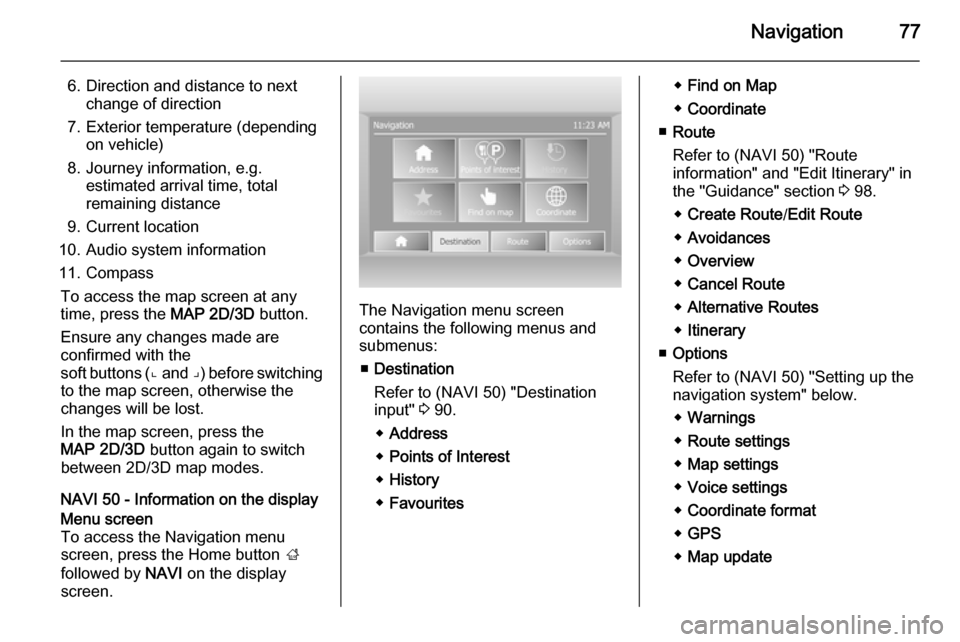
NAVI 50 - Information on the displayMenu screen
To access the Navigation menu
screen, press the Home button ;
followed by NAVI on the display
screen.
The Navigation menu screen
contains the following menus and
submenus:
■ Destination
Refer to (NAVI 50) "Destination
input" 3 90.
◆ Address
◆ Points of Interest
◆ History
◆ Favourites
◆Find on Map
◆ Coordinate
■ Route
Refer to (NAVI 50) "Route
information" and "Edit Itinerary" in
the "Guidance" section 3 98.
◆ Create Route /Edit Route
◆ Avoidances
◆ Overview
◆ Cancel Route
◆ Alternative Routes
◆ Itinerary
■ Options
Refer to (NAVI 50) "Setting up the
navigation system" below.
◆ Warnings
◆ Route settings
◆ Map settings
◆ Voice settings
◆ Coordinate format
◆ GPS
◆ Map update
Page 78 of 139
78Navigation
Map screen
To access the map screen without navigation, press the Home
button ; followed by MAP on the
display screen. Refer to (NAVI 50)
"Browse map" in the "Guidance"
section 3 98.
Press anywhere on the map. The
cursor indicates the current selected
position. To scroll within the map,
drag the cursor in the required
direction.
To access the map screen with
navigation, press the Home
button ; followed by NAVI on the
display screen and enter a
destination. Refer to (NAVI 50)
"Destination input" 3 90.
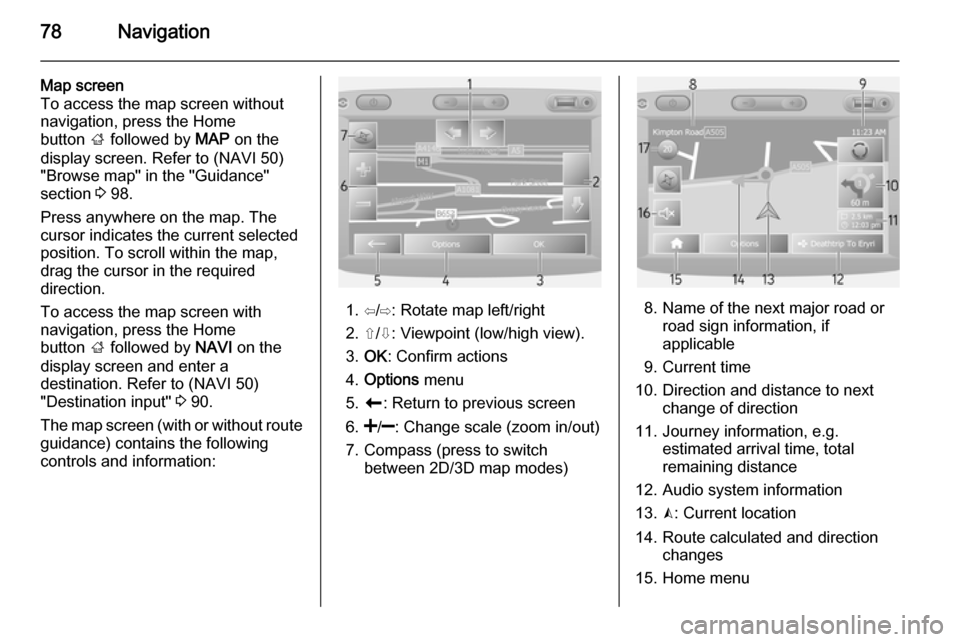
The map screen (with or without route
guidance) contains the following
controls and information:
1. ⇦/⇨: Rotate map left/right
2. ⇧/⇩: Viewpoint (low/high view).
3. OK : Confirm actions
4. Options menu
5. r : Return to previous screen
6.
7. Compass (press to switch between 2D/3D map modes)8. Name of the next major road orroad sign information, if
applicable
9. Current time
10. Direction and distance to next change of direction
11. Journey information, e.g. estimated arrival time, total
remaining distance
12. Audio system information
13. K: Current location
14. Route calculated and direction changes
15. Home menu
Page 80 of 139

80Navigation
5.SETTINGS
Refer to (NAVI 80) "Setting up the
navigation system" below.
◆ Turn off voice guidance
◆ Route planning
◆ Show POI on map
◆ Manage POIs
◆ Voice
◆ EV settings
◆ Set home location
◆ Manage saved locations
◆ Switch map
◆ Change map colours
◆ Car symbol
◆ Advanced
6. NAVIGATION SERVICES
Refer to (NAVI 80) "LIVE
services" below.
◆ Traffic
◆ Speed Cameras
◆ Local search
◆ My TomTom live
◆ Weather7. ITINERARIES
Refer to (NAVI 80) "Edit Itinerary"
in the "Guidance" section 3 98.
8. r : Return to previous screenMap screen
To access the map screen without navigation, on the Home page press
MENU , then Navigation followed by
View Map on the display screen.
Press anywhere on the map. The
cursor indicates the current selected
position. To scroll within the map,
drag the cursor in the required
direction.
To access the map screen with
navigation, on the Home page press
MENU followed by Navigation on the
display screen and enter a
destination. Refer to (NAVI 80)
"Destination input" 3 90.
The map screen (with or without route guidance) contains the following
controls and information:
1. Speed limit (illuminates red and flashes if speed limit is exceeded)
2. o: Change scale (zoom in/out)
3. Name of the next major road or road sign information, if
applicable
4. ô Outside air quality
5. g : Phone information
6. Outside temperature
7. Clock
8. Traffic information, e.g. route incidents, reception indicator,
traffic map
Page 81 of 139

Navigation81
9. Journey information, e.g.estimated arrival time, total
remaining distance, journey
status (green flag/red flag)
Route summary
10. Compass (press to switch between 2D/3D map modes)
11. Change volume of guidance instructions
12. <: Pop-up menu
13. Direction and distance to next change of direction
14. Audio system information
15. K: Current location (cursor)
Route calculated and direction
changes
16. r: Return to previous screenLane images
During route guidance, before each
major road change, a 3D view of the
junction (with a turn arrow and road
signs) is automatically displayed. The
normal view is resumed after passing the junction.To switch off the lane images view,
refer to (NAVI 80) "Advanced
Settings" in "Setting up the navigation system" below.Automatic zoom
During route guidance, before each
change of direction a close-up view of
the junction is automatically
displayed. The normal view is
resumed after passing the junction.
To switch off the automatic zoom
feature, refer to (NAVI 80) "Advanced
Settings" in "Setting up the navigation system" below.
OPERATING KEYBOARDS IN
THE DISPLAY
NAVI 50
To move within and to enter
characters in both the alphabetical and numerical keyboards, make the
appropriate selection by touching the
display screen.
■ Select Options to change the
keyboard type (e.g. Qwerty, ABC).
■ Select 1^& to switch to numbers
and symbols.
■ Select the drop down menu icon ó
to display a list of results for the
current operation (e.g. destination
input).
■ Entries can be corrected during input with the k keyboard
character.
■ Press the r button to stop using
the keyboard and return to the
previous screen.
Notice
When making an entry, certain
letters and numbers are unavailable
for selection (grayed-out) based on
the information stored in the
Navigation system.
NAVI 80
To move within and to enter
characters in both the alphabetical and numerical keyboards, make the
appropriate selection by touching the
display screen.
Page 82 of 139

82Navigation
■ Entries can be corrected duringinput with the k keyboard
character.
■ Press the r button to stop using
the keyboard and return to the
previous screen.
GUIDED TOURS
CD35 BT USB NAVI
The system offers tutorials to enable
quick familiarisation with the different
functions.
Select Guided tours in the main
menu, then the required tour:
■ Remote control operation
■ Driving view
■ Menu options
■ Browse map
■ Route planning
■ Itinerary planning
■ Traffic information
■ Warnings and notifications
■ Quick menu
■ TomTom HOMELIVE SERVICES
CD35 BT USB NAVI - Live services
Live services includes road safety
alerts, up-to-date traffic information
with HD Traffic™, local search with
Google™ and a weather forecast.
These features are available for a free
3 month trial period, after which a
subscription is required. Visit the
TomTom website and refer to the
Services section to subscribe to LIVE
services .
Notice
LIVE services are not available in
some countries or regions.
To check the status of your
subscription at any time, select My
Services in the LIVE services menu.
Some features will not be available for
selection in the main menu until a
subscription to live services has been
set up. To access these features,
select LIVE services from the
Navigation system main menu.Safety alerts
This service includes the location of
mobile speed cameras in real-time,
fixed speed cameras and accident
blackspots.
The latest fixed camera updates can
be downloaded via the
TomTom HOME™ website.
This service can be activated or
deactivated at any time via Safety
Alerts in the LIVE services menu.HD Traffic™
To only receive up-to-date, real-time
traffic information and to plan the best
route to your destination, select HD
Traffic in the LIVE services menu.
Notice
The HD Traffic service is named
Traffic if a subscription has not been
activated.Google™ local search
This service allows you to use a
keyword to quickly find any Point of
Interest (POI) and set it as a
destination.
Page 83 of 139

Navigation83
Weather
The weather forecast service
provides up to 5 days of weather
reports for your current location and
your chosen destination.
NAVI 80 - Live services
In addition to the free navigation
services ( e.g. traffic information, fixed
speed cameras), extra features can
be added by subscribing to paid LIVE services.
LIVE services include up-to-date
traffic information with "HD Traffic™ ",
updates and locations of fixed and
mobile speed cameras, local search,
weather forecast and the "My
TomTom LIVE" subscription status.
Notice
LIVE services are not available in
some countries or regions.
The following menus are displayed: ■ Traffic /HD Traffic
Select to receive up-to-date, real-
time traffic information.Notice
The HD Traffic service is named
Traffic if a subscription has not been
activated.
■ Speed cameras
Displays alerts and location of
mobile speed cameras in real-time, fixed speed cameras and accident
blackspots.
Notice
Speed camera information is
updated online by the entire
community of system users.
Switch function off via the "Speed
Cameras" menu in "LIVE services", if required.
Notice
In certain countries it is illegal to
download and activate the camera warning option and this could lead to
prosecution.
■ Local search
This service allows you to use a keyword to quickly find any Point of
Interest (POI) and set it as a
destination.■ My TomTom LIVE
Displays expiry date of subscribed services. Renew subscriptions via
the Store.
Notice
A valid email address must be
entered to use this service.
Notice
Invoices are sent to the entered
email address, with (if necessary) the install instructions and user
information for the applications,
services or other downloaded
content.
■ Weather
The weather forecast service
provides up to 5 days of weather
reports for your current location and your chosen destination.
IMAGE VIEWER
CD35 BT USB NAVI - IMAGE
VIEWER
The system can be used to view
images. Select Image viewer in the
main menu; the image gallery opens
and an image can be selected.
Page 84 of 139

84Navigation
To scroll through the images in
slideshow mode, select Slideshow
using the right soft button ⌟ and set
the seconds-per-slide when
prompted, using the directional
buttons.
To set the slideshow to manual mode, select Manual by moving to the far
right of the seconds-per-slide display,
then use the directional buttons to
scroll through the images manually.
Start the slideshow by pressing the
right soft button ⌟.
Images can be added or deleted
when updating the Navigation
system.
Compatible image formats are: ■ JPG: Greyscale and RGB
■ BMP: 1-bit, 2 colours; 4-bit, 16 colours; 8-bit, 256 colours and24-bit, 16.7 million coloursSETTING UP THE
NAVIGATION SYSTEM
CD35 BT USB NAVI - Setting up the
navigation systemNavigation volume
To change the volume during a voice
instruction, turn the X knob or press
< or ].
Alternatively, press button ! or # on
the steering column controls to change the volume.
To repeat a voice instruction, press
the left soft button ⌞.System preferences
The system can be adjusted to suit
personal requirements. Select
Change preferences in the main
menu to view the adjustable
preferences.
Certain menu items can also be found more quickly in the Quick menu.
Press the central button on the
remote control to open the Quick
menu .Change Home location
To change the location of your
designated home.Manage favourites
To delete stored favourite
destinations. Select the desired entry followed by Done using the soft
button to delete the entry.Switch map
Used if installing several maps on the
SD card. To change map, select
Switch map , then select the map
required.Voice preferences
To select a voice used to give voice
instructions and to select either
human or synthesised voices.
The human voice instructions provide
simplified guidance only, while the
synthesised voice instructions
provide road directions plus
additional information (e.g. traffic
signs and traffic information etc.).Disable voice
To deactivate the voice instructions
and use only the map screen for
guidance.
Page 85 of 139

Navigation85
Turn off sound
To deactivate all sound, including
voice instructions and alerts etc.. To
turn the sound back on, select Turn
on sound .Safety preferences
To activate sound warnings during
driving (e.g. when exceeding a set
speed or when approaching schools
etc.). This option can also be used to
simplify the menus.Planning preferences
Five types of planning preferences
are selectable. The recommended
preference is Fastest route.
After having selected the planning
criteria, the system permits the
activation of the IQ Routes™
function. If activated, this function
plans the best route taking the actual road speeds into account.
Toll road preferences: After having
entered a destination, the system
asks if you wish to change this
request. Select one of the 3 types of
planning preferences, then finish
using the right soft button ⌟.Road types: Select preferences in
terms of particular sections of the
journey, such as unmade roads and
ferry transfers.Show lane images
When approaching a major road
change, the system may switch to a
close-up view of the junction with a
turn arrow and road signs. This
feature can be deactivated, if
preferred.Automatic zooming
During guidance, the display
gradually zooms in before each
change of direction. If preferred, this mode can be deactivated.Show POI on map
To select the points of interest (POIs) which appear on the map.Manage POIs
To add, modify or delete points of
interest (POIs) or POI categories.Set units
Units of distance: Select Miles or
Kilometres , then select Done using
the soft button.Clock display : Select from the 3 clock
display mode options, then select
Done using the soft button to move to
the next step.
Coordinates : Select from the 3
latitude and longitude display options, then select Done using the soft button
to move to the next step.Show/hide tips
When using the Navigation system,
the system will display tips to help get
the best use of the functions. These
can be deactivated by selecting Hide
tips . To reactivate, select Show tips.Change car symbol
Changes the style of the car symbol.2D map settings
To change the default map settings
between 2D and 3D.Compass preferences
Changes the compass display on the
map screen.Status bar preferences
Add to the list of options that appear
on the navigation map status bar.
Page 86 of 139

86Navigation
Name preferences
To display street and house numbers on the map.Use day/night colours
In the default automatic mode, the
system will automatically switch
between day and night modes.
If manual mode is preferred,
automatic mode can be deactivated
by selecting Use day colours or Use
night colours .
Automatic switching can be
reactivated using the Brightness
preferences menu.Change map colours
New colours can also be
downloaded. To select a downloaded colour, select an additional colour
scheme, then the colour required.Brightness preferences
Adjust the screen brightness to suit
the external lighting conditions.Set clock
When the clocks change in summer
or winter, or when travelling abroad,
the time on the system will need
adjusting. Select Set clock; thesystem offers three display modes.
Select the desired mode, then Done
using the soft button. Set the clock,
then select Done.
Clock synchronisation: The
synchronisation option allows the time to be set directly using GPS
information. Select the Sync option
with the left soft button ⌞.Start-up preferences
Used to change the system start-up
settings and also the start-up page by
customising it with a chosen photo.Show fewer menu options
Allows simplification of the menu to
facilitate better use. To reactivate all
options, select this icon again.Change language
To change language, select
Language: , the required language
can then be selected from the list.Reset factory settings
To reset all system parameters and delete all personal data.
Select Reset factory settings in the
main menu, then follow the on-screen instructions using the soft buttons.Partial reset: allows the deletion of allpersonal data (favourites, recent
destinations, etc.).
After resetting, the system will restart
in English.
NAVI 50 - Setting up the navigation
system
The Options menu allows you to
check and update the following map
and navigation settings:
■ Warnings
■ Route settings
■ Map settings
■ Voice settings
■ Coordinate format
■ GPS
■ Map updateWarnings
Press the Home button ; followed by
NAVI , Options then Warnings to
access the following:
■ Warn when speeding (On/Off)
■ Speed limit always visible (On/Off)
■ Alert point warnings (On/Off)
Page 89 of 139

Navigation89
Specific content or all map content
can be updated. Select one of the
options first or press Options then
Update . Wait for the update to
complete.
Refer to (NAVI 50) "USB memory
stick", "Updating the USB memory
stick and Navigation system" in the
"General information" section 3 69.
NAVI 80 - Setting up the navigation
system
To access the Navigation settings
menu from the Home page, press
MENU then Navigation , followed by
Settings on the display screen. The
following settings submenus are
displayed:
■ Turn off voice guidance :
Switch on/off voice guidance during navigation.
■ Route planning :
Select a planning preference type;
"Fastest route" is recommended.
The eco-route is designed to save
the most fuel.
Then switch on/off " iQ routes™" as
required. iQ routes™ enablesroutes to be calculated according to
average traffic levels during a
particular day and time, and also
the best route according to actual
traffic speeds.
■ Show POI on map :
Show or hide categories of POI
markers on the map.
■ Manage POIs :
Add, change or delete POIs or POI
categories.
■ Voice :
Select synthesised voice or a male
or female human voice (for the voice instructions) from the
available list.
Human voices provide more
simplified voice guidance
instructions and are not available
when using the Voice recognition
function 3 110.
■ EV settings :
Not used.
■ Set home location :
Change the home or most used
destination address.■ Manage saved locations :
Delete or rename saved destination
addresses.
To rename, select an address from the displayed list, press Rename
then enter a new name. Press
Done to confirm. To delete a
selected address, press Delete and
confirm when prompted.
■ Switch map :
If more than one map is installed on
the SD card, use this option to
switch between the saved maps.
Select "Change map" then choose the desired map from the options
available.
■ Change map colours :
Change day and night colours used on Navigation map
For downloaded new colours;
choose a new colour, select
additional colour scheme, then
choose the desired colour from the
options available.