audio VAUXHALL MOVANO_B 2015.5 Infotainment system
[x] Cancel search | Manufacturer: VAUXHALL, Model Year: 2015.5, Model line: MOVANO_B, Model: VAUXHALL MOVANO_B 2015.5Pages: 139, PDF Size: 1.84 MB
Page 56 of 139
56USB portUSB portGeneral information.....................56
Playing saved audio files .............57General information
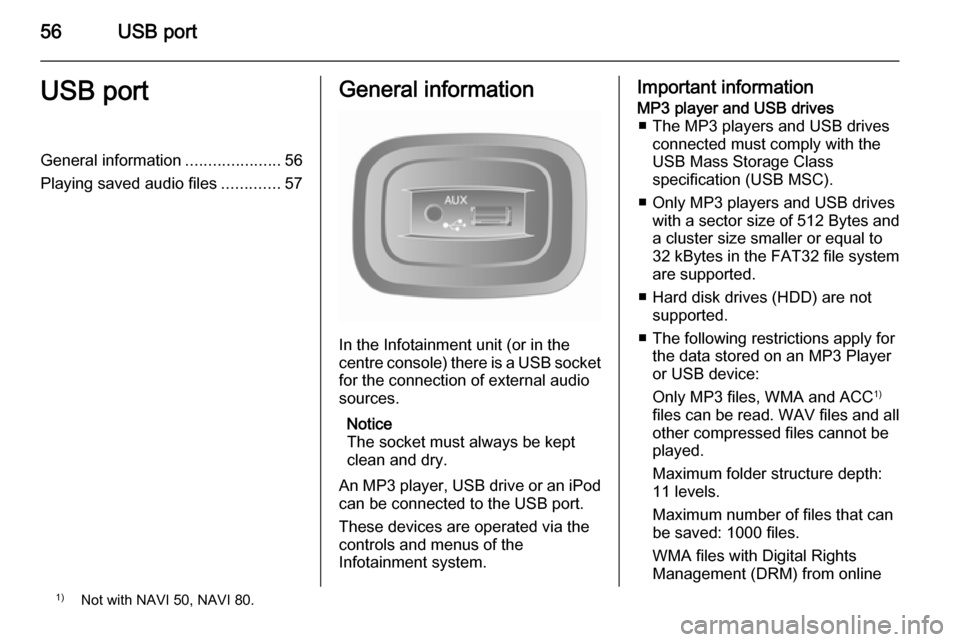
In the Infotainment unit (or in the
centre console) there is a USB socket
for the connection of external audio
sources.
Notice
The socket must always be kept
clean and dry.
An MP3 player, USB drive or an iPod
can be connected to the USB port.
These devices are operated via the
controls and menus of the
Infotainment system.
Important informationMP3 player and USB drives ■ The MP3 players and USB drives connected must comply with the
USB Mass Storage Class
specification (USB MSC).
■ Only MP3 players and USB drives with a sector size of 512 Bytes and
a cluster size smaller or equal to 32 kBytes in the FAT32 file system
are supported.
■ Hard disk drives (HDD) are not supported.
■ The following restrictions apply for the data stored on an MP3 Player
or USB device:
Only MP3 files, WMA and ACC 1)
files can be read. WAV files and all other compressed files cannot be
played.
Maximum folder structure depth:
11 levels.
Maximum number of files that can
be saved: 1000 files.
WMA files with Digital Rights
Management (DRM) from online1) Not with NAVI 50, NAVI 80.
Page 57 of 139

USB port57
music shops may not play correctly
or not at all.
Applicable playlist
extensions: .m3u, .pls.
Playlist entries must be in the form
of relative paths.
Playing saved audio files
Once connected, it is only possible to use the controls and menus of the
Infotainment system to operate the
audio device.
R15 BT USB, R16 BT USB,
CD16 BT USB, CD18 BT USB -
Playing music via USB socket
MP3 player / iPod / USB drives
The system detects the audio device
when a USB device is connected and
the current track is displayed
automatically.
When a new audio device is
connected, the first track in the first
folder is played automatically. When
reconnecting the device, the
previously played track is resumed.Depending on the audio device
connected, select a folder (MP3
player, USB drive) or a playlist
(portable digital music player).
The operation of data sources
connected via USB is generally the
same as for an audio/MP3/WMA CD
3 51.
Selecting a track
To select tracks directly (and change
folders), first access the audio device
menu structure by pressing the OK rotary knob during playback. Select
tracks and change folders by turning
and pressing the knob.
CD35 BT USB - Playing music
via USB socket
MP3 player / iPod / USB drives
The system detects the audio device when a USB device is connected and
the first track in the first folder is
played automatically. When
reconnecting the device, the
previously played track is resumed.Depending on the audio device
connected, select a folder (MP3
player, USB drive) or a playlist
(portable digital music player).
The operation of data sources
connected via USB is generally the
same as for an audio/MP3/WMA CD
3 51.
Selecting a track
To select tracks directly (and change
folders), first access the audio device menu structure by pressing the
central rotary knob during playback
(with iPod, turn the knob to access
menu). Select tracks and change
folders by turning and pressing the
knob.
NAVI 50 - Playing music via USB socket
MP3 player / iPod / USB drives
The system detects the audio device when a USB device is connected and
the current track is displayed
automatically.
Page 58 of 139

58USB port
When the MEDIA menu is active, the
following submenus are available:
■ Player
■ List
■ Options
To switch between audio sources,
press S in top left corner. The
following options are available:
■ USB : Select to change the audio
source to USB mode.
■ iPod : Select to change the audio
source to USB mode.
■ BT : Refer to NAVI 50 "Bluetooth
music" 3 60.
■ AUX : Refer to NAVI 50 "Aux input"
3 54.Player
Press to display the current track. In this display screen, the following
options are available:
■ l (press to skip to previous track,
press and hold to fast rewind)
■ =/l (press to pause/play)
■ m (press to skip to next track,
press and hold to fast forward)List
Displays a list of the tracks in the
current album/folder. Press a
particular track to play it directly.
Notice
By default, albums are listed in
alphabetical order.
If a USB drive is connected, all the
folders will be at the same level on
the tree structure.
To return to the previous level on the
folder tree structure, press ò.Options
Press to display the following options:
■ Repeat (Off/Track/Folder/All)
■ Shuffle (On/Off)
NAVI 80 - Playing music via
USB socket
MP3 player / USB drives
Change the audio source to USB
mode to playback files from a
connected USB device.
To access the media menu from the
Home page, press MENU then
Multimedia , followed by Media on the
display screen.
Press < to open a pop-up menu. The
following options are available:
■ USB : Change the audio source to
USB mode.
■ Auxiliary socket : Refer to NAVI 80
"AUX input" 3 54.
■ Bluetooth connection : Refer to
NAVI 80 "Bluetooth music" 3 60.
■ SD card
■ CD player : Refer to NAVI 80 "AUX
input" 3 54.
When USB mode is selected, the display includes the following options:
■ t or v: Move to previous/next
track
■ =: Pause track
■ Scroll bar for time elapsed: Scroll through tracks
■ New selection : Choose another
track from the connected audio
source
Page 59 of 139

USB port59
■Current playlist : Access the current
playback list
■ r : Return to previous screen
■ <: Open pop-up menu; To change
the audio source or access the
track settings (e.g. switch on/off
shuffle or repeat, show current
track details, and access sound
settings).
Disconnecting from USB socket
Playback is stopped immediately
when the audio device is withdrawn
from the USB socket.
Page 60 of 139

60Bluetooth musicBluetooth musicGeneral information.....................60
Operation ..................................... 60General information
Bluetooth-enabled auxiliary audio sources (e.g. music mobile phones,
MP3 players etc.), which support
Bluetooth music protocol A2DP, can
be connected wirelessly to the
Infotainment system.
Important information ■ The Infotainment system only connects to Bluetooth devices that
support A2DP (Advanced Audio
Distribution Profile). Connection
issues may arise with early
versions.
■ The Bluetooth device must support
AVRCP (Audio Video Remote
Control Profile) version 1.0 or
higher. If the device does not
support AVRCP, only the volume
can be controlled via the
Infotainment system.
■ Before connecting the Bluetooth device to the Infotainment system,
become acquainted with its
operating instructions for Bluetooth functions.Operation
Prerequisites
The following prerequisites must be
met, in order to control a Bluetooth-
enabled audio device via the
Infotainment system:
■ The Bluetooth function of the Infotainment system must be
activated.
Refer to "Bluetooth connection" in
the "Phone" section 3 118.
■ The Bluetooth function of the Bluetooth-enabled auxiliary audio
source must be activated (see
audio device operating
instructions).
■ Dependent upon the audio source, it may be required to set that deviceto "visible" (see audio device
operating instructions).
■ The audio source must be paired and connected to the Infotainment
system.
Page 61 of 139

Bluetooth music61
R15 BT USB, R16 BT USB,CD16 BT USB, CD18 BT USB -Playing music via Bluetooth
Bluetooth connection
A connection must be set up between the audio device and the Infotainmentsystem via Bluetooth, i.e. the device
must be paired to the vehicle before
using it.
Refer to "Bluetooth connection" in the
"Phone" section 3 118.
■ A maximum of 5 audio devices can
be paired and saved in the device
list, but only one can be connected
at a time.
■ If the device has both audio player and telephone functions, both
functions will be paired. Pairing a
mobile phone 3 115.
■ Phone functions will remain active while the audio player is in use, and
audio playback will be suspended
during phone use.Pairing an auxiliary audio device to
the Infotainment system
To pair the audio device, press the
TEL button and select Pair device by
turning and pressing the OK rotary
knob. The Ready to Pair screen is
displayed.
Then, on the audio device, search for
Bluetooth equipment in the vicinity of
the device.
Select My Radio (i.e. the name of the
system) from the list on the audio
device, then, if applicable, on the
audio device keypad enter the pairing
code shown on the Infotainment
system display screen.
Notice
If the audio device does not have a
screen, enter the default pairing
code on the device, then on the
Infotainment system. Refer to the
operating instructions for this default audio device pairing code, usually
0000 . Depending on the device, the
pairing code may need to be entered
in reverse order, i.e. on the
Infotainment system first.If pairing fails, the system returns to
the previous menu and a
corresponding message is displayed. Repeat procedure if necessary.
When pairing is completed, a
confirmation message followed by the
name of the paired audio device is shown on the Infotainment system
display screen.
Notice
When a Bluetooth connection is
active, controlling the audio device
via the Infotainment system will
discharge the audio device battery more rapidly.
Connecting an audio device
Audio devices are automatically
connected to the Infotainment system
after the pairing procedure is
completed.
To connect any audio device that has been paired, or to connect to a
different paired audio device than the
current one, press the TEL button and
select the Select Device menu. The
device list shows the audio devices already paired.
Page 62 of 139

62Bluetooth music
Select the desired device from the list
and confirm by pressing the OK rotary
knob. A display message confirms
connection.
Disconnecting an audio device
To disconnect an audio device from
the Infotainment system, press the
TEL button (or the SETUP button)
and select Bluetooth connection .
Select the desired device from the
device list then select Disconnect the
device by turning and pressing the
OK rotary knob. A display message
confirms disconnection.
Switching off the audio device or
deactivating the Bluetooth function on the audio device also disconnects the
device from the Infotainment system.
Unpairing an auxiliary audio device
from the Infotainment system
If the list of paired audio devices is full, a new device can only be paired if an
existing device is unpaired.
To unpair, i.e. to delete an audio
device from the system memory,
press the TEL button and select
Delete device . Select the desiredaudio device from the list and press
the OK rotary knob to confirm deletion
when prompted.
Operation via Infotainment system
When paired and connected
wirelessly, audio playback begins
automatically.
The audio device can then be
operated via the Infotainment system
function buttons, rotary knobs and
display menus.
The range of accessible functions
that can be operated via the
Infotainment system depends on the
type of audio player.
The operation of the audio device
when connected wirelessly is similar
to the operations for the CD player
3 51.CD35 BT USB - Playing music
via Bluetooth
Bluetooth connection
A connection must be set up between
the audio device and the Infotainment system via Bluetooth, i.e. the device
must be paired to the vehicle before
using it.
Refer to (CD35 BT USB) "Bluetooth connection" in the "Phone" section
3 118.
■ A maximum of 5 audio devices can
be paired and saved in the device
list, but only one can be connected
at a time.
■ If the device has both audio player and telephone functions, one or
both functions can be paired.
Pairing a mobile phone 3 115.
■ Phone functions will remain active while the audio player is in use, andaudio playback will be suspended
during phone use.
Page 63 of 139

Bluetooth music63
Pairing an auxiliary audio device tothe Infotainment system
To pair the audio device, press the
SETUP / TEXT button and select
Bluetooth connection . Select an
empty slot by turning the central
rotary knob and press the knob to
display the next menu.
Select Pair device by turning and
pressing the rotary knob, then, on the
audio device, search for Bluetooth
equipment in the vicinity of the device.
Select My_Radio (i.e. the name of the
system) from the list on the audio
device, then, if applicable, on the
audio device keypad enter the pairing code shown on the Infotainment
system display screen.
Notice
If the audio device does not have a
screen, enter the default pairing
code on the device, then on the
Infotainment system. Refer to the
operating instructions for this default audio device pairing code, usually
0000 . Depending on the device, thepairing code may need to be entered
in reverse order, i.e. on the
Infotainment system first.
If pairing fails, the message Pairing
failed is displayed. Repeat procedure
if necessary.
When pairing is completed, a
confirmation message followed by the
name of the paired audio device is
shown on the Infotainment system
display screen.
Notice
When a Bluetooth connection is
active, controlling the audio device
via the Infotainment system will
discharge the audio device battery more rapidly.
Connecting an audio device
Audio devices are automatically
connected to the Infotainment system after the pairing procedure is
completed.
To connect any audio device that has been paired, or to connect to a
different paired audio device than the
current one, press the
SETUP / TEXT button and selectBluetooth connection (or press the
TEL button when no device is
connected). The device list shows the
audio devices already paired.
Select the desired device from the list
and confirm by pressing the central
rotary knob. A display message
confirms connection.
Disconnecting an audio device
To disconnect an audio device from
the Infotainment system, select the
desired device from the Bluetooth
connection menu then select
Disconnect the device by turning and
pressing the central rotary knob. A
display message confirms
disconnection.
Switching off the audio device or
deactivating the Bluetooth function on the audio device also disconnects the
device from the Infotainment system.
Unpairing an auxiliary audio device
from the Infotainment system
If the list of paired audio devices is full,
a new device can only be paired if an
existing device is unpaired.
Page 64 of 139

64Bluetooth music
To unpair, i.e. to delete an audio
device from the system memory,
press the SETUP / TEXT button and
select Bluetooth connection . Select
the desired audio device from the list, press the central rotary knob and
select Delete.
Operation via Infotainment system
When paired and connected
wirelessly, audio playback begins
automatically.
The audio device can then be
operated via the Infotainment system
function buttons, rotary knobs and
display menus.
The range of accessible functions
that can be operated via the
Infotainment system depends on the
type of audio player.
The operation of the audio device
when connected wirelessly is similar
to the operations for the CD player
3 51.NAVI 50 - Playing music via
Bluetooth
Bluetooth connection
A connection must be set up between the audio device and the Infotainment
system via Bluetooth, i.e. the device
must be paired to the vehicle before
using it.
Refer to (NAVI 50) "Bluetooth
connection" in the "Phone" section
3 118.
■ A maximum of 8 audio devices can
be paired and saved in the device
list, but only one can be connected
at a time.
■ If the device has both audio player and telephone functions, both
functions will be paired. Pairing a
mobile phone 3 115.
■ Phone functions will remain active while the audio player is in use, and
audio playback will be suspended
during phone use.Pairing an auxiliary audio device to
the Infotainment system
To pair the audio device, press the
Home button ; followed by
SETTINGS on the display screen.
Select Bluetooth then either Search
for Bluetooth device or External
device authorisation .
On the audio device, search for
Bluetooth equipment in the vicinity of
the device.
Select MEDIA-NAV (i.e. the name of
the Infotainment system) from the list
on the audio device, then (if required), on the audio device keypad, enter the pairing code shown on the
Infotainment system display screen.
The default pairing code is 0000. To
change this pairing code before the
pairing procedure is started, select
Change passkey to update.
Notice
If the audio device does not have a
screen, enter the default pairing
code on the device, then on the
Infotainment system. Refer to the
operating instructions for this default
Page 65 of 139

Bluetooth music65
audio device pairing code, usually
0000 . Depending on the device, the
pairing code may need to be entered
in reverse order, i.e. on the
Infotainment system first.
If pairing fails, repeat procedure if
necessary.
Notice
When a Bluetooth connection is
active, controlling the audio device
via the Infotainment system will
discharge the audio device battery more rapidly.
Connecting an audio device
Audio devices are automatically
connected to the Infotainment system after the pairing procedure is
completed.
To change the audio device
connected, press the Home
button ; followed by SETTINGS on
the display screen.
Then select Bluetooth followed by
View Bluetooth device list . The device
list shows the audio devices already
paired.Select the desired audio device from
the list and confirm by pressing OK.
Disconnecting an audio device
Switching off the audio device or
deactivating the Bluetooth function on
the audio device disconnects the
device from the Infotainment system.
Unpairing an auxiliary audio device
from the Infotainment system
If the list of paired audio devices is full, a new device can only be paired if an
existing device is unpaired.
To unpair, i.e. to delete an audio
device from the system memory,
press the Home button ; followed by
SETTINGS on the display screen.
Select Bluetooth then View Bluetooth
device list .
Select the desired audio device from
the list, the press ë to delete the
device. If required, delete all devices
in the list by pressing Options
followed by Delete all. Confirm with
the OK button.Operation via Infotainment system
When paired and connected
wirelessly, audio playback begins
automatically.
The audio device can then be
operated via the Infotainment system
display options.
The range of accessible functions
that can be operated via the
Infotainment system depends on the
type of audio player.
For operation of the audio device
when connected wirelessly, refer to
(NAVI 50) "Playing saved audio files"
in the "USB port" section 3 57.
NAVI 80 - Playing music via
Bluetooth
Bluetooth connection
A connection must be set up between the audio device and the Infotainment
system via Bluetooth, i.e. the device
must be paired to the vehicle before
using it.