start stop button VAUXHALL MOVANO_B 2015.5 User Guide
[x] Cancel search | Manufacturer: VAUXHALL, Model Year: 2015.5, Model line: MOVANO_B, Model: VAUXHALL MOVANO_B 2015.5Pages: 215, PDF Size: 5.11 MB
Page 125 of 215
Driving and operating123To reduce the operating forces of
the parking brake, depress the
foot brake at the same time.
Control indicator R 3 81.
Parking 3 114.
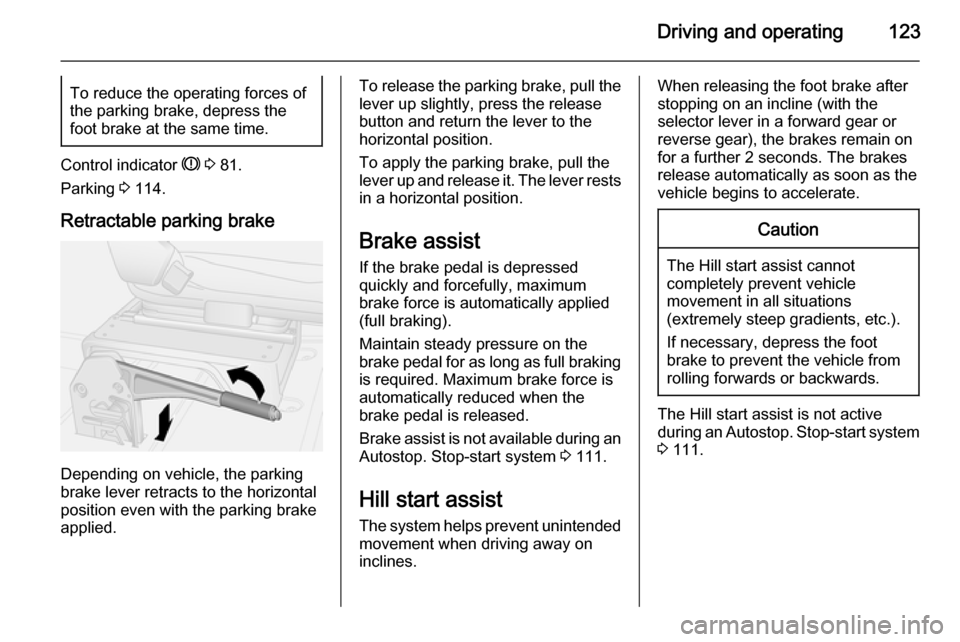
Retractable parking brake
Depending on vehicle, the parking
brake lever retracts to the horizontal
position even with the parking brake
applied.
To release the parking brake, pull the
lever up slightly, press the release
button and return the lever to the
horizontal position.
To apply the parking brake, pull the
lever up and release it. The lever rests
in a horizontal position.
Brake assist
If the brake pedal is depressed
quickly and forcefully, maximum
brake force is automatically applied
(full braking).
Maintain steady pressure on the
brake pedal for as long as full braking
is required. Maximum brake force is
automatically reduced when the
brake pedal is released.
Brake assist is not available during an
Autostop. Stop-start system 3 111.
Hill start assist The system helps prevent unintendedmovement when driving away on
inclines.When releasing the foot brake after
stopping on an incline (with the
selector lever in a forward gear or
reverse gear), the brakes remain on
for a further 2 seconds. The brakes
release automatically as soon as the
vehicle begins to accelerate.Caution
The Hill start assist cannot
completely prevent vehicle
movement in all situations
(extremely steep gradients, etc.).
If necessary, depress the foot
brake to prevent the vehicle from
rolling forwards or backwards.
The Hill start assist is not active
during an Autostop. Stop-start system
3 111.
Page 134 of 215
132Driving and operating
The camera is typically installed
under the number plate moulding with a display monitor fitted to the driver's
sun visor.
Functionality
The rear view camera system
enables the driver to view the rear of
the vehicle in the display monitor
whilst reversing.
The system can be activated or
deactivated by selecting the
Start/Stop button located on the right-
hand side of the display monitor.
The remaining buttons on the monitor enable the user to select source
AV1 or AV2 and adjust the brightness
and contrast of the display monitor.
To achieve the optimum visibility, the
rear view camera must not be
obscured by dirt, snow or ice.9 Warning
The system is intended as a
reversing aid and does not replace driver vision.
Do not let this feature tempt you
into take risks when reversing.
Failure to use proper care when
reversing may result in damage to
the vehicle, injury, or death.
Always check the outside,
rearview mirrors and glance over
your shoulder before reversing.
The driver assistance systems do not relieve the driver from full
responsibility for vehicle
operation.Fuel
Fuel for diesel enginesOnly use diesel fuel that complies
with EN 590. The fuel must have low
sulphur content (max. 10 ppm).
Equivalent standardised fuels with a
biodiesel (= FAME according to
EN14214) content of max. 7% by
volume (like DIN 51628 or equivalent
standards) may be used.
In countries outside the European
Union use Euro-Diesel fuel with a
sulphur concentration below 50 ppm.Caution
Use of fuel that does not comply to EN 590 or similar can lead to
engine powerloss, increased wear
or engine damage and may affect
your warranty.
Do not use marine diesel oils, heating
oils or entirely plant-based diesel
fuels, such as rape seed oil or bio