reset VAUXHALL MOVANO_B 2015.5 Owner's Manual
[x] Cancel search | Manufacturer: VAUXHALL, Model Year: 2015.5, Model line: MOVANO_B, Model: VAUXHALL MOVANO_B 2015.5Pages: 215, PDF Size: 5.11 MB
Page 20 of 215

18Keys, doors and windowsKeys, doors and
windowsKeys, locks ................................... 18
Doors ........................................... 24
Vehicle security ............................ 28
Exterior mirrors ............................ 30
Interior mirrors ............................. 32
Windows ...................................... 33
Roof ............................................. 35Keys, locks
Keys Replacement keys
The key number is specified in the
Car Pass or on a detachable tag.
The key number must be quoted
when ordering replacement keys as it
is a component of the immobiliser
system.
Locks 3 175.
Lock cylinders
Designed to free-wheel if they are
forcefully rotated without the correct
key or if the correct key is not fully
inserted. To reset, turn cylinder with
the correct key until its slot is vertical, remove key and then re-insert it. If the
cylinder still free-wheels, turn the key through 180° and repeat operation.
Car Pass
The Car Pass contains security
related vehicle data and should
therefore be kept in a safe place.When the vehicle is taken to a
workshop, this vehicle data is needed in order to perform certain operations.
Radio remote control
Used to operate: ■ Central locking system
■ Anti-theft locking system
■ Anti-theft alarm system
Depending on model, the vehicle may use a 2-button or 3-button remote
control.
Page 28 of 215
26Keys, doors and windows
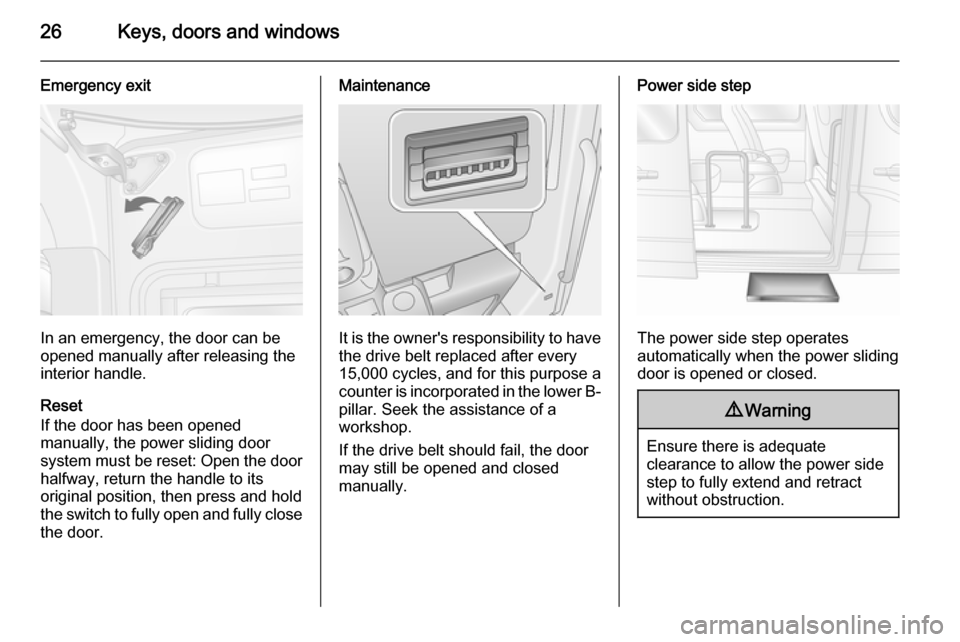
Emergency exit
In an emergency, the door can be
opened manually after releasing the
interior handle.
Reset
If the door has been opened
manually, the power sliding door
system must be reset: Open the door
halfway, return the handle to its
original position, then press and hold the switch to fully open and fully close the door.
Maintenance
It is the owner's responsibility to have
the drive belt replaced after every
15,000 cycles, and for this purpose a
counter is incorporated in the lower B- pillar. Seek the assistance of a
workshop.
If the drive belt should fail, the door
may still be opened and closed
manually.
Power side step
The power side step operates
automatically when the power sliding
door is opened or closed.
9 Warning
Ensure there is adequate
clearance to allow the power side
step to fully extend and retract
without obstruction.
Page 54 of 215
52Seats, restraints9Danger
Risk of fatal injury for a child using
a child restraint system together
with activated front passenger
airbag.
Risk of fatal injury for an adult
person with deactivated front
passenger airbag.
As long as control indicator W is not
illuminated, the airbag systems for
the front passenger seat will inflate in the event of a collision.
If control indicator A remains
illuminated together with v, this
indicates a fault within the system.
The switch position may have been
changed inadvertently with the
ignition on. Turn ignition off and on
again and reset the switch position. If
A and v still remain illuminated,
seek the assistance of a workshop.
Change status only when the vehicle
is stopped with the ignition off. Status remains until the next change.
Control indicator W for airbag
deactivation 3 79.Child restraints
Child restraint systems
We recommend the Vauxhall child
restraint system which is tailored
specifically to the vehicle.
When a child restraint system is being
used, pay attention to the following
usage and installation instructions
and also those supplied with the child restraint system.
Always comply with local or national
regulations. In some countries, the
use of child restraint systems is
forbidden on certain seats.9 Warning
When using a child restraint
system on the front passenger
seat, the airbag systems for the
front passenger seat must be
Page 76 of 215
74Instruments and controlsWarning lights, gauges
and indicators
Instrument cluster In some versions, the needles of the
instruments briefly rotate to the end
position when the ignition is switched
on.
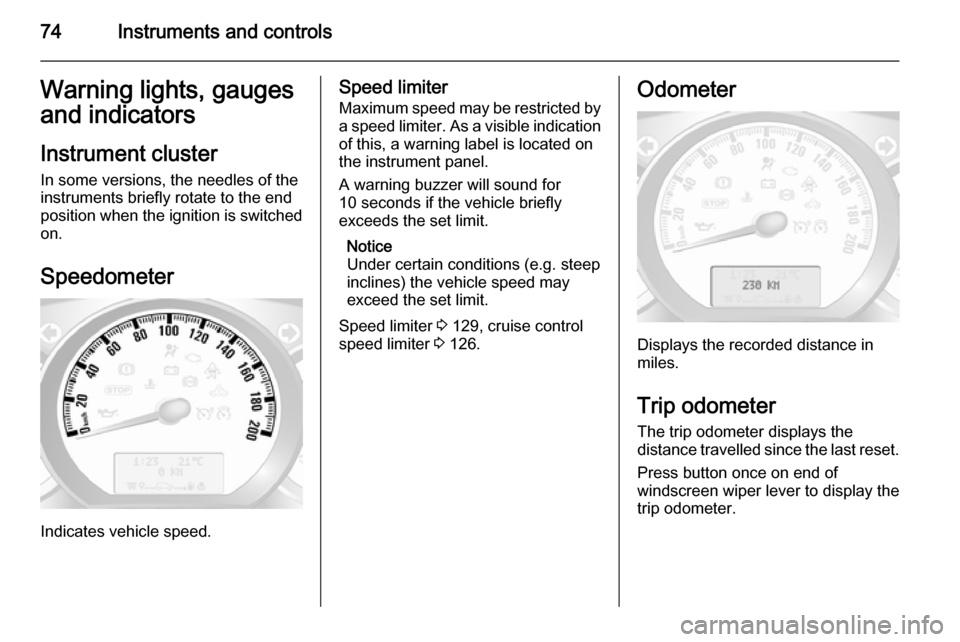
Speedometer
Indicates vehicle speed.
Speed limiter
Maximum speed may be restricted by a speed limiter. As a visible indication
of this, a warning label is located on
the instrument panel.
A warning buzzer will sound for
10 seconds if the vehicle briefly
exceeds the set limit.
Notice
Under certain conditions (e.g. steep
inclines) the vehicle speed may
exceed the set limit.
Speed limiter 3 129, cruise control
speed limiter 3 126.Odometer
Displays the recorded distance in
miles.
Trip odometer The trip odometer displays the
distance travelled since the last reset.
Press button once on end of
windscreen wiper lever to display the
trip odometer.
Page 77 of 215
Instruments and controls75
To reset, with the trip odometer
displayed, press and hold button for a few seconds with the ignition on. The
display will flash and the value will
reset to zero.
Tachograph 3 88.
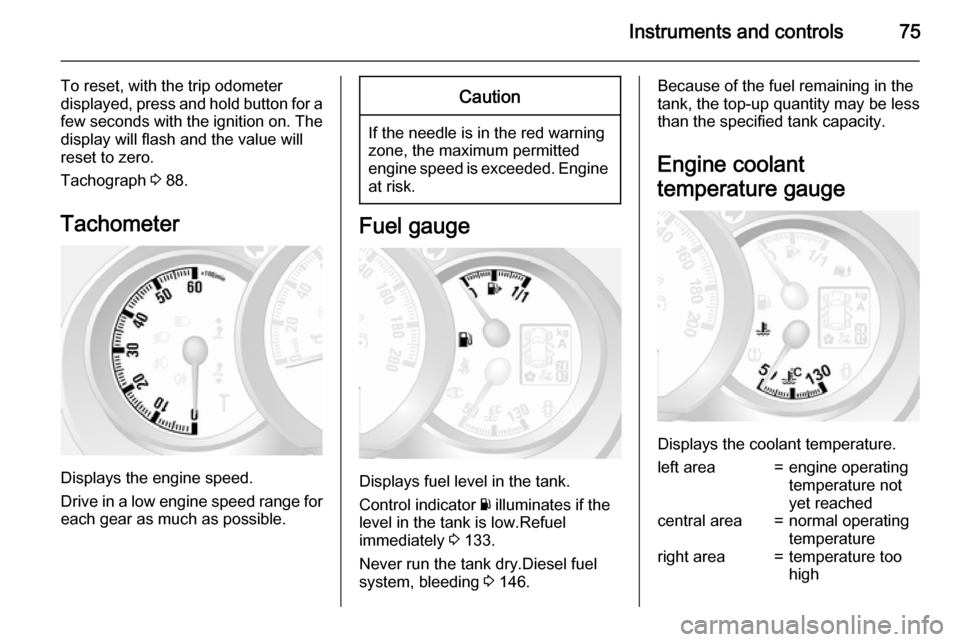
Tachometer
Displays the engine speed.
Drive in a low engine speed range for each gear as much as possible.
Caution
If the needle is in the red warning
zone, the maximum permitted
engine speed is exceeded. Engine at risk.
Fuel gauge
Displays fuel level in the tank.
Control indicator Y illuminates if the
level in the tank is low.Refuel
immediately 3 133.
Never run the tank dry.Diesel fuel
system, bleeding 3 146.
Because of the fuel remaining in the
tank, the top-up quantity may be less
than the specified tank capacity.
Engine coolant
temperature gauge
Displays the coolant temperature.
left area=engine operating
temperature not
yet reachedcentral area=normal operating
temperatureright area=temperature too
high
Page 78 of 215

76Instruments and controls
Control indicator W illuminates if the
temperature is too high 3 80,
3 82.Caution
If engine coolant temperature is
too high, stop vehicle, switch off
engine. Danger to engine. Check
coolant level.
For physical reasons, the coolant
temperature gauge shows the coolant temperature only if the coolant level is adequate.
Engine oil level monitor
The engine oil level monitor is correct
only if the vehicle is parked on a level
surface with a cold engine.
If the engine oil level is correct when
the ignition is switched on OIL LEVEL
CORRECT appears briefly in the
Driver Information Centre.
If the engine oil is above the minimum level, press the trip computer button
on the end of the wiper lever within
30 seconds of switching on the
ignition. The message OIL LEVEL is
displayed in combination with the squares that correspond to the oil
level.
As the oil level diminishes, the
squares in the display are replaced
with dashes.▢▢▢▢▢▢=Maximum level▢▢▢- - -=Intermediate level- - - - - -=Minimum level
If the minimum engine oil level is
reached TOP-UP OIL LEVEL is
displayed in combination with control
indicator A after the ignition is
switched on for 30 seconds. Check
and top up engine oil 3 140.
To exit the oil level monitor display,
press either trip computer button.
Trip computer 3 86.
Service display
When the ignition is switched on, the
remaining distance before the next
service is due may be shown briefly in the Driver Information Centre. Based
on driving conditions, the interval at
which a service will be indicated can
vary considerably.
When the remaining distance before
the next service is less than
1800 miles or 2 months, SERVICE
IN appears in the Driver Information
Centre.
When the distance reaches 0 miles or
the service date is due, control
indicators o and A illuminate in the
instrument cluster and SERVICE
DUE appears in the Driver
Information Centre.
The vehicle needs a service. Seek the assistance of a workshop.
Resetting the service display After a service, the service displaymust be reset: if available, select the
distance before service display in the
Driver Information Centre, then press and hold button on end of wiper lever
for approx. 10 seconds until the
distance before service is displayed
continuously.
Trip computer 3 86.
Driver Information Centre 3 84.
Page 89 of 215

Instruments and controls87
■ Distance travelled
■ Average speed
■ Distance before service 3 76
■ Clock 3 72
■ Cruise control and speed limiter stored speed 3 126
■ Tyre pressures 3 160
■ Fault and information messages
Fuel used
Displays the amount of fuel
consumed since the last reset.
The measurement can be restarted at
any time by pressing and holding the
button on the end of the wiper lever.
Average consumption
The value is displayed after driving a
distance of 0.25 miles.
Average consumption is displayed,
taking into consideration the distance
travelled and the fuel used since the
last reset.
The measurement can be restarted at
any time.Instantaneous consumption
The value is displayed after reaching
a speed of 20 mph.
Range
The value is displayed after driving a
distance of 0.25 miles.
The range is calculated from the
current contents of the fuel tank and
the average consumption since the
last reset.
The range will not display if control
indicator Y is illuminated in the
instrument cluster 3 83.
The measurement can be restarted at
any time.
Distance travelled Displays the distance driven since the
last reset.
The measurement can be restarted at
any time.
Average speed The value is displayed after driving adistance of 0.25 miles.
The average speed since the last
reset is displayed.The measurement can be restarted at
any time.
Interruptions in the journey with the
ignition off are not included in the
calculations.
Reset trip computer information
To reset the trip computer, select one
of its functions then press and hold
button on end of wiper lever.
The following trip computer
information will be reset:
■ Fuel used
■ Average consumption
■ Range
■ Distance travelled
■ Average speed
The trip computer will reset
automatically when the maximum
value of any of the parameters is
exceeded.
Page 107 of 215

Climate control105
AddE teaches the current remote
control unit exclusively and blocks all
previously configured units. Add
teaches up to 4 remote control units, but only one unit can operate the
system at any one time.
Operation
Heating Y
Select Y in the menu bar and confirm.
The predetermined heating duration,
e.g. L 30, flashes in the display. The
factory setting is 30 minutes.
To temporarily adjust the heating
duration, adjust with the q or r
button and confirm. The value can be
set from 10 to 120 minutes. Due to the
power consumption, note the heating duration.
To switch off, select Y in the menu bar
again and confirm.
Ventilation x
Select x in the menu bar and confirm.
The ventilation duration can be
accepted or adjusted. The duration
shown is accepted without
confirmation.To switch off, select x in the menu bar
again and confirm.
Programming P
Up to 3 preset departure times can be
programmed, either during one day or
over one week.
■ Select P in the menu bar and
confirm
■ Select desired preset memory number 1, 2 or 3 and confirm
■ Select day and confirm
■ Select hour and confirm
■ Select minutes and confirm
■ Select Y or x and confirm
■ If necessary, adjust the runtime duration prior to departure andconfirm
The next preset memory number to
be activated is underlined and the
weekday is displayed. Repeat the
procedure to programme the other
preset memory numbers.
Pressing button X during the
procedure will exit without storing programme adjustments.To delete a preset departure time,
follow the steps for programming until
heating symbol Y flashes. Press
button q or r until oFF appears in
the display and confirm.
Heating stops automatically
5 minutes after the programmed
departure time.
Notice
The remote control system features
a temperature sensor which
calculates the runtime according to
the ambient temperature and the desired heating level (ECO or
HIGH). The system starts
automatically between 5 and
60 minutes prior to the programmed
departure time.
Set weekday, time and heating
duration Ö
If the vehicle battery is disconnected
or its voltage is too low, the unit will
need to be reset.
■ Select Ö and confirm
■ Select weekday and confirm
■ Change hours and confirm
Page 130 of 215

128Driving and operating
Increase speedWith cruise control active, the vehicle
speed can be increased continuously or in small increments by holding
down or tapping switch < repeatedly.
When the switch is released the
current speed is stored and
maintained.
Alternatively, accelerate to the
desired speed and store by pressing
switch <.
Reduce speed With cruise control active, the vehicle
speed can be decreased
continuously or in small increments
by holding down or tapping switch ]
repeatedly.
When the switch is released the
current speed is stored and
maintained.
Deactivation
Press switch §: cruise control is
deactivated and the green control
indicator m extinguishes in the
instrument cluster.Automatic deactivation:
■ Vehicle speed drops below 20 mph,
■ The brake pedal is depressed,
■ The clutch pedal is depressed,
■ Selector lever in N.
The speed is stored and a
corresponding message appears in
the Driver Information Centre.
Reactivation
Press switch R at a speed above
20 mph.
If the stored speed is much higher
than the current speed, the vehicle
will accelerate powerfully until the
stored speed is obtained.
Pressing switch < will also reactivate
the cruise control function, but at the
current vehicle speed only, not the
stored speed.
Deleting the stored speed Press switch m: Green control
indicators U and m extinguish in the
instrument cluster.Cruise control speed limiter
The speed limiter prevents the
vehicle exceeding a preset maximum
speed above 20 mph.
Activation
Press switch U, control indicator U
illuminates yellow in the instrument
cluster.
Cruise control speed limiter function
is now in standby mode and a
corresponding message appears in
the Driver Information Centre.