display VAUXHALL MOVANO_B 2017.5 Owner's Guide
[x] Cancel search | Manufacturer: VAUXHALL, Model Year: 2017.5, Model line: MOVANO_B, Model: VAUXHALL MOVANO_B 2017.5Pages: 259, PDF Size: 6.15 MB
Page 144 of 259

142Driving and operating
Additionally, control indicator Õ
illuminates continuously together with a warning chime.
Refill the AdBlue tank as soon as
possible. Refer to "Refilling AdBlue"
below.
If AdBlue is not refilled within a certain
distance, further level warnings are
displayed in the Driver Information
Centre depending on the current
AdBlue level.
Engine restarts prevented
Subsequent requests to refill AdBlue
and finally the announcement that an engine restart will be prevented are
displayed in the Driver Information
Centre.Notice
These restrictions are a legal
requirement.
Before the prevention of an engine
restart, a warning message with
0 miles is displayed in the Driver
Information Centre, indicating that after switching off the ignition an
engine restart will be prohibited.
After the prevention of an engine
start, a warning message is displayed in the Driver Information Centre
reminding the driver that AdBlue level
is insufficient.
To allow the engine to be restarted,
the tank should be refilled completely
or with a volume of at least ten litres
of AdBlue, depending on AdBlue
consumption.Warning stages: level warnings,
engine restarts prevented 1. Y illuminates after the ignition is
switched on with warning
message LEVEL ADBLUE LOW :
Driving is possible without any
restrictions.
Refill the AdBlue tank as soon as
possible.2. Y illuminates during driving with
warning message TOP UP
ADBLUE :
Possible loss of engine power.
Refill the AdBlue tank as soon as
possible.
3. Y illuminates during driving with
warning message XXX KM STOP
ADD ADBLUE :
Vehicle speed may be limited to
12 mph after switching the engine off and on again until the range is
reduced to 0 miles.
Refill the tank completely or with a
volume of at least ten litres of
AdBlue (depending on AdBlue
consumption) as soon as
possible.
4. Y illuminates during driving with
warning message 0 KM STOP
ADD ADBLUE :
The engine cannot be restarted
after switching off the ignition.
To allow the engine to be
restarted, refill the tank
completely or with a volume of at
least ten litres of AdBlue
(depending on AdBlue
Page 145 of 259

Driving and operating143consumption) as soon as
possible.
Illumination of control indicator Y may
be accompanied by a warning chime.
Warning chimes 3 101.High emission warnings
If the exhaust emission rises above a
certain value, warnings similar to the
range warnings as described above
will be displayed in the Driver
Information Centre. Control indicator
Õ illuminates continuously together
with A 3 95 and a warning chime.
Requests to have the exhaust system checked and finally the
announcement that an engine restart
will be prevented are displayed in the Driver Information Centre.
Notice
These restrictions are a legal
requirement.
At an AdBlue range of approx.
680 miles, a warning message is
displayed in the Driver Information Centre showing the remaining
distance the vehicle can travel beforeengine restarts are prevented. This
warning message is repeated approx.
every 60 miles.
Seek the assistance of a workshop as soon as possible.Warning stages: high emission
warnings 1. Y and A illuminate with warning
message CHECK ANTI-
POLLUTION :
Fault in the system that may result in a loss of engine power.
Seek the assistance of a
workshop as soon as possible.
2. Y and A illuminate with warning
message ANTIPOLLUTION xxx
KM FAIL :
Indicates that in less than
680 miles an engine restart will be
prohibited after switching off the
ignition.
This warning message will be
repeated every 60 miles.
Vehicle speed may be limited to
12 mph after switching the engine off and on again until the range is
reduced to 0 miles.Seek the assistance of a
workshop as soon as possible.
3. Y and A illuminate with warning
message ANTIPOLLUTION 0 KM
FAILURE :
The engine cannot be restarted
after switching off the ignition.
Seek the assistance of a
workshop.
Illumination of control indicators Y
and A may be accompanied by a
warning chime.
Warning chimes 3 101.
Version without level warnings in the Driver Information Centre
Page 150 of 259
148Driving and operatingManual transmission
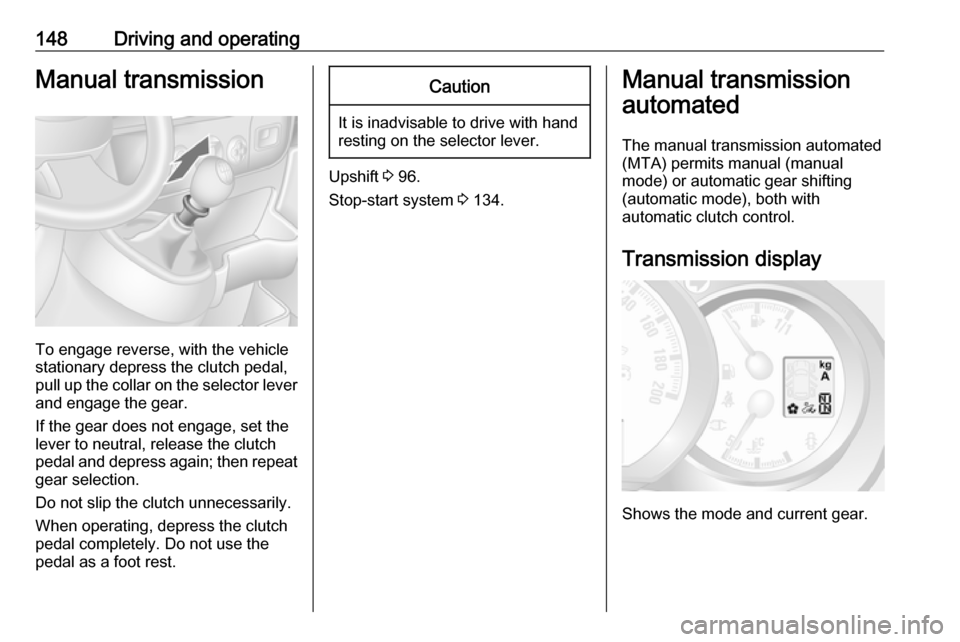
To engage reverse, with the vehicle
stationary depress the clutch pedal, pull up the collar on the selector lever
and engage the gear.
If the gear does not engage, set the
lever to neutral, release the clutch
pedal and depress again; then repeat
gear selection.
Do not slip the clutch unnecessarily.
When operating, depress the clutch pedal completely. Do not use the
pedal as a foot rest.
Caution
It is inadvisable to drive with hand
resting on the selector lever.
Upshift 3 96.
Stop-start system 3 134.
Manual transmission
automated
The manual transmission automated (MTA) permits manual (manual
mode) or automatic gear shifting
(automatic mode), both with
automatic clutch control.
Transmission display
Shows the mode and current gear.
Page 151 of 259
Driving and operating149Starting the engine
Depress the brake pedal when
starting the engine. If the brake pedal
is not depressed, T illuminates in the
transmission display and the engine
cannot be started.
When the brake pedal is depressed,
the transmission automatically shifts
to N (neutral); "N" appears in the
transmission display and the engine
can be started. There may be a slight delay.
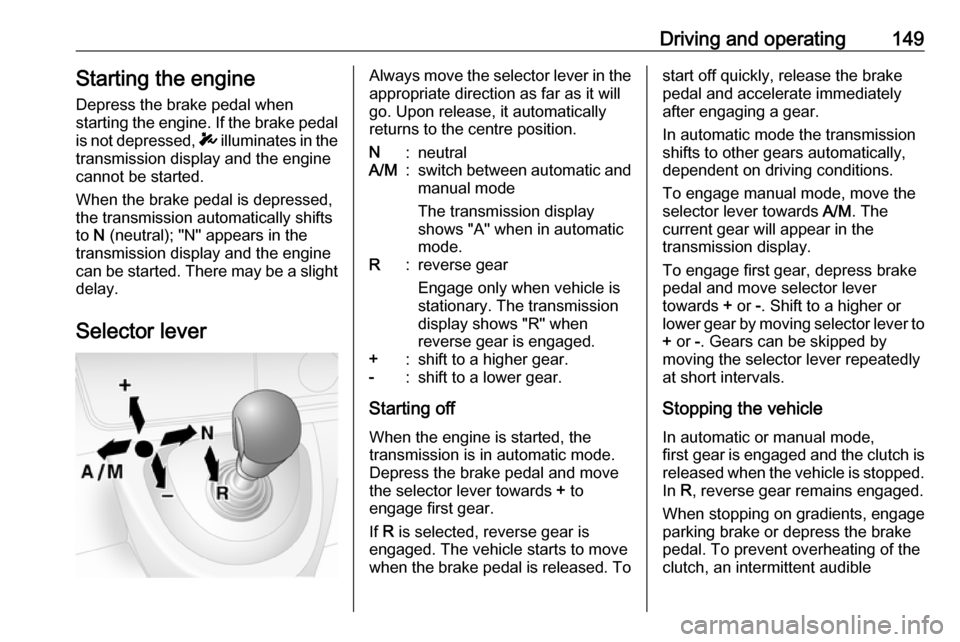
Selector leverAlways move the selector lever in the
appropriate direction as far as it will
go. Upon release, it automatically
returns to the centre position.N:neutralA/M:switch between automatic and manual mode
The transmission display
shows "A" when in automatic
mode.R:reverse gear
Engage only when vehicle is
stationary. The transmission
display shows "R" when
reverse gear is engaged.+:shift to a higher gear.-:shift to a lower gear.
Starting off
When the engine is started, the
transmission is in automatic mode. Depress the brake pedal and move
the selector lever towards + to
engage first gear.
If R is selected, reverse gear is
engaged. The vehicle starts to move
when the brake pedal is released. To
start off quickly, release the brake pedal and accelerate immediately
after engaging a gear.
In automatic mode the transmission
shifts to other gears automatically,
dependent on driving conditions.
To engage manual mode, move the
selector lever towards A/M. The
current gear will appear in the
transmission display.
To engage first gear, depress brake
pedal and move selector lever
towards + or -. Shift to a higher or
lower gear by moving selector lever to + or -. Gears can be skipped by
moving the selector lever repeatedly
at short intervals.
Stopping the vehicle In automatic or manual mode,
first gear is engaged and the clutch is
released when the vehicle is stopped.
In R, reverse gear remains engaged.
When stopping on gradients, engage
parking brake or depress the brake
pedal. To prevent overheating of the
clutch, an intermittent audible
Page 152 of 259
150Driving and operatingwarning may sound as a signal to
depress the brake pedal or apply the
parking brake.
Switch off engine if stopping for a
lengthy period, e.g. in traffic jams.
When the vehicle is parked and the
driver's door is opened, a warning
chime will sound if neutral is not
selected or the brake pedal has not
been depressed.
Engine braking
Automatic mode
When driving downhill, the manual
transmission automated does not
shift into higher gears until a fairly
high engine speed has been reached. It shifts down in good time when
braking.
Manual mode
To utilise the engine braking effect,
select a lower gear in good time when
driving downhill.Rocking the vehicle
Rocking the vehicle is only
permissible if the vehicle is stuck in
sand, mud, snow or a hole. Move the
selector lever between R and A/M (or
between + and -) in a repeat pattern,
while applying light pressure to the
accelerator pedal. Do not race the
engine and avoid sudden
acceleration.
Parking
Apply the parking brake. The most
recently engaged gear (see
transmission display) remains
engaged. With N, no gear is engaged.
When the ignition is switched off, the
transmission no longer responds to
movement of the selector lever.
If the ignition is not switched off, or the
parking brake has not been applied, a
warning chime will sound upon
opening the driver's door.
Manual mode If a higher gear is selected when the
engine speed is too low, or a lower
gear when the speed is too high, theshift is not executed. This prevents
the engine from running at too low or too high an engine speed.
If engine speed is too low, the
transmission automatically shifts to a
lower gear.
If engine speed is too high, the
transmission only switches to a higher gear via kickdown.
Electronic driving programmes
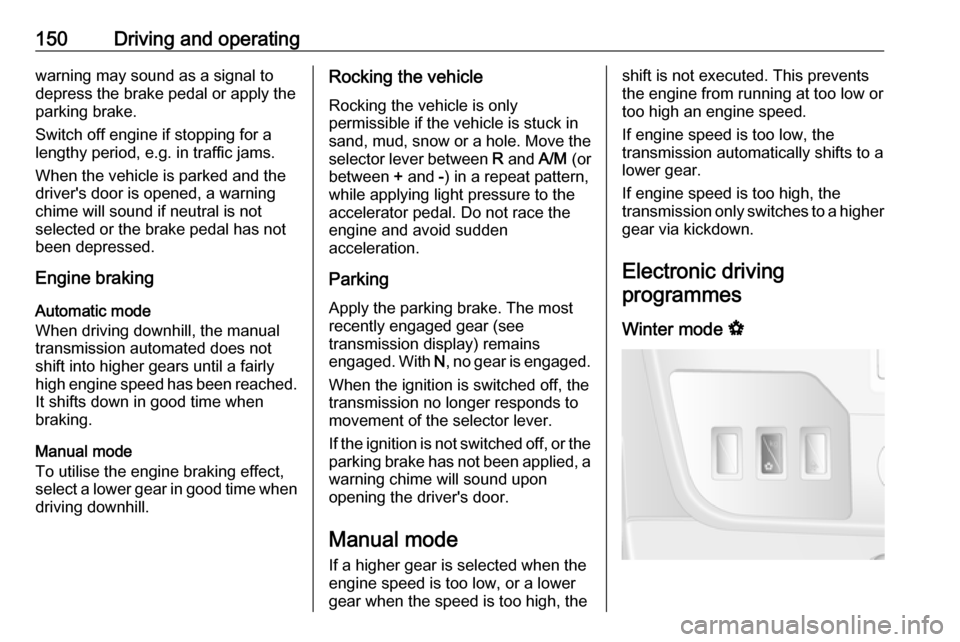
Winter mode V
Page 153 of 259
Driving and operating151Activate the Winter mode if you have
problems starting off on a slippery
road surface.
Activation
Press V. Control indicator V is shown
in the transmission display. The
transmission switches to automatic
mode and the vehicle starts off in a
suitable gear.
Deactivation
The Winter mode is switched off by:
● pressing V again
● turning off the ignition
● switching to manual mode
In order to protect the transmission at
extremely high clutch temperatures,
an intermittent audible warning may
sound. In such cases, depress the
brake pedal, select "N" and apply the parking brake to allow the clutch to
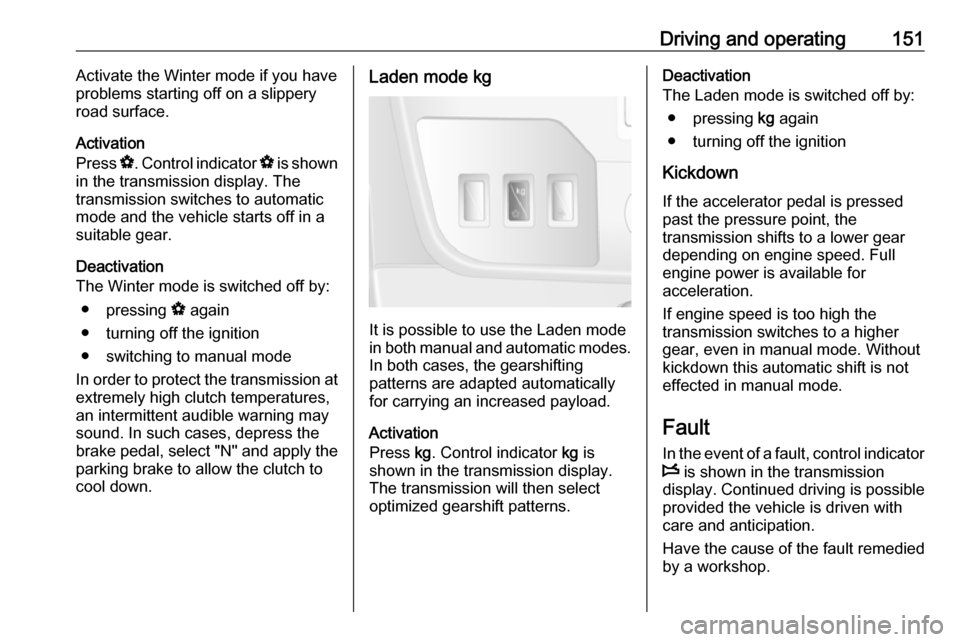
cool down.Laden mode kg
It is possible to use the Laden mode
in both manual and automatic modes. In both cases, the gearshifting
patterns are adapted automatically
for carrying an increased payload.
Activation
Press kg. Control indicator kg is
shown in the transmission display.
The transmission will then select
optimized gearshift patterns.
Deactivation
The Laden mode is switched off by:
● pressing kg again
● turning off the ignition
Kickdown If the accelerator pedal is pressed
past the pressure point, the
transmission shifts to a lower gear
depending on engine speed. Full
engine power is available for
acceleration.
If engine speed is too high the
transmission switches to a higher
gear, even in manual mode. Without
kickdown this automatic shift is not
effected in manual mode.
Fault
In the event of a fault, control indicator W is shown in the transmission
display. Continued driving is possible
provided the vehicle is driven with
care and anticipation.
Have the cause of the fault remedied
by a workshop.
Page 165 of 259
Driving and operating163Caution
Performance of the sensors can
be reduced when sensors are
covered, e.g. by ice or snow.
Performance of the parking assist
system can be reduced due to
heavy loading.
Special conditions apply if there
are taller vehicles involved (e.g.
off-road vehicles, mini vans,
vans). Object identification in the
upper part of these vehicles
cannot be guaranteed.
Objects with a very small reflection
cross-section, e.g. objects of
narrow size or soft materials, may
not be detected by the system.
The parking assist system will not
detect objects which are out of the detection range of the sensors.
Rear view camera
The rear view camera assists the
driver when reversing by displaying a view of the area behind the vehicle in
either the interior mirror or the
Infotainment system display screen.
9 Warning
The rear view camera does not
replace driver vision. Note that
objects that are outside the
camera's field of view, e.g. below
the bumper or underneath the
vehicle, are not displayed.
Do not reverse the vehicle by only looking at the display and checkthe surrounding area behind and
around the vehicle before
reversing.
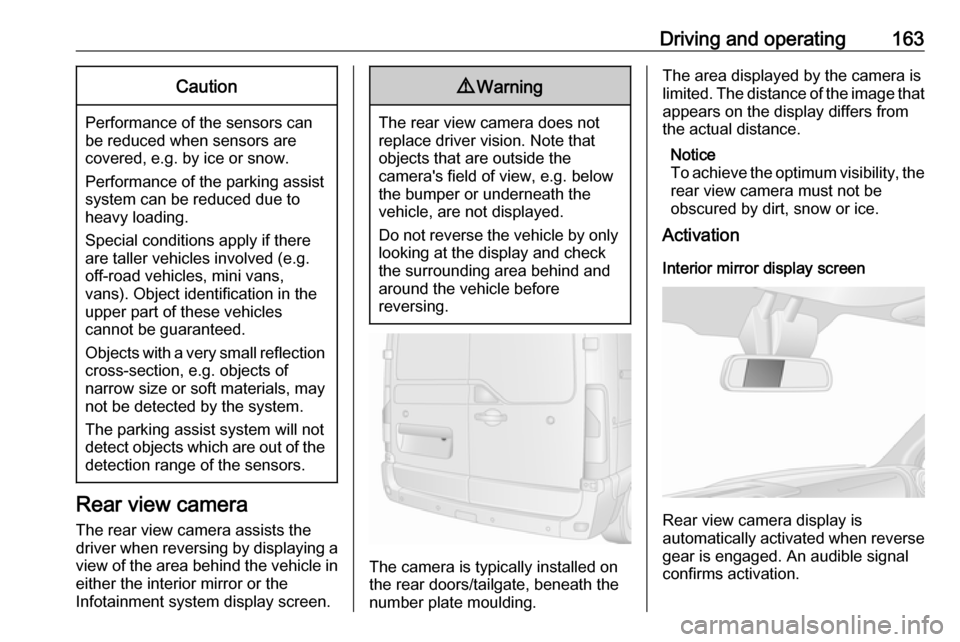
The camera is typically installed on
the rear doors/tailgate, beneath the
number plate moulding.
The area displayed by the camera is
limited. The distance of the image that
appears on the display differs from
the actual distance.
Notice
To achieve the optimum visibility, the rear view camera must not be
obscured by dirt, snow or ice.
Activation
Interior mirror display screen
Rear view camera display is
automatically activated when reverse
gear is engaged. An audible signal
confirms activation.
Page 166 of 259
164Driving and operatingInfotainment system display screen
In vehicles with Navigation system,
the rear view camera display is shown
on the Infotainment system display
screen.
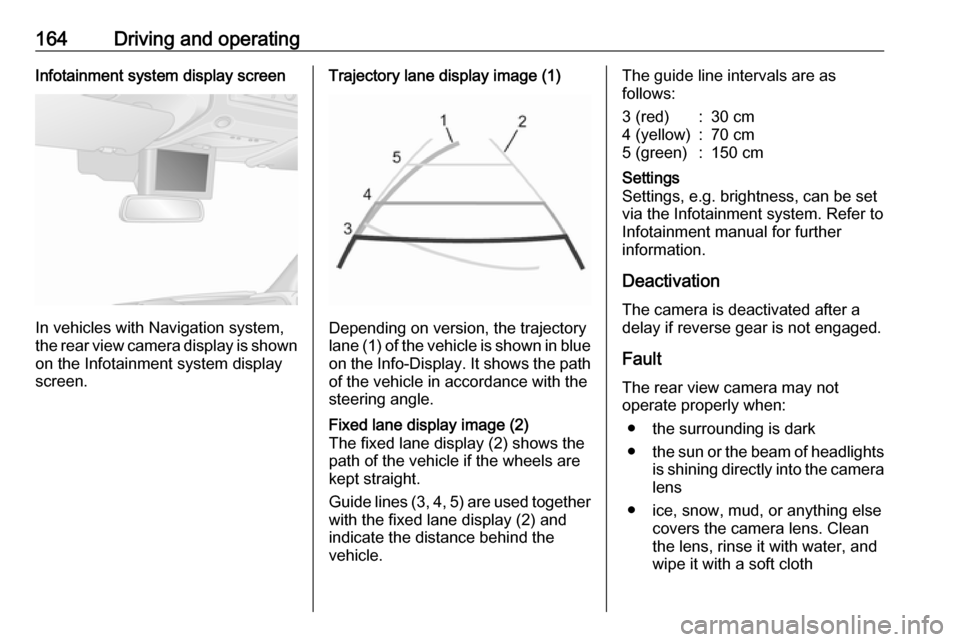
Trajectory lane display image (1)
Depending on version, the trajectory
lane (1) of the vehicle is shown in blue
on the Info-Display. It shows the path of the vehicle in accordance with the
steering angle.
Fixed lane display image (2)
The fixed lane display (2) shows the
path of the vehicle if the wheels are
kept straight.
Guide lines (3, 4, 5) are used together
with the fixed lane display (2) and indicate the distance behind the
vehicle.The guide line intervals are as
follows:3 (red):30 cm4 (yellow):70 cm5 (green):150 cmSettings
Settings, e.g. brightness, can be set
via the Infotainment system. Refer to
Infotainment manual for further
information.
Deactivation
The camera is deactivated after a
delay if reverse gear is not engaged.
Fault
The rear view camera may not
operate properly when:
● the surrounding is dark
● the sun or the beam of headlights
is shining directly into the camera lens
● ice, snow, mud, or anything else covers the camera lens. Clean
the lens, rinse it with water, and
wipe it with a soft cloth
Page 203 of 259

Vehicle care201After a puncture has been repaired
and the driver has inflated the tyres to
the correct tyre pressure, the tyre
pressure monitoring system needs to
recalculate.
Tyre pressure 3 243, Tyre repair kit
3 202.
During driving, select the tyre
pressure menu in the Driver
Information Centre by pressing button on end of wiper lever. Press and holdbutton for approx. five seconds to
initialise recalculation. A
corresponding message appears in
the Driver Information Centre.
Several minutes of driving at a speed
above 25 mph may be required to
complete the relearn process. The system can only provide limited
information during this time.
If problems occur during the relearn
process, control indicator w remains
illuminated and a warning message is displayed in the Driver Information
Centre.
Driver Information Centre 3 100.
Vehicle messages 3 101.General information
The use of tyre chains or
commercially available liquid tyre
repair kits can impair the function of
the system. Factory-approved tyre
repair kits can be used.
Tyre repair kit 3 202, Tyre chains
3 202.
External high-power radio equipment
could disrupt the tyre pressure
monitoring system.
Each time the tyres are replaced, the
tyre pressure monitoring system
sensors must be dismounted and
serviced by a workshop.
Tread depth Check tread depth at regular
intervals.
Tyres should be replaced for safety
reasons at a tread depth of two-
three mm (four mm for winter tyres).
For safety reasons it is recommended
that the tread depth of the tyres on
one axle should not vary by more than two mm.
The legally permissible minimum
tread depth (1.6 mm) has been
reached when the tread has worn
down as far as one of the tread wear
indicators (TWI). Their position is
indicated by markings on the
sidewall.
Tyres age, even if they are not used.
We recommend tyre replacement
every six years.
Changing tyre and wheelsize
If tyres of a different size than those fitted at the factory are used, it may be necessary to reprogramme the
Page 219 of 259

Vehicle care217The instrument cluster and the
displays should only be cleaned using
a soft damp cloth. If necessary use a
weak soap solution.
Clean fabric upholstery with a
vacuum cleaner and brush. Remove
stains with an upholstery cleaner.
Clothing fabrics may not be
colourfast. This could cause visible
discolourations, especially on light- coloured upholstery. Removable
stains and discolourations should be
cleaned as soon as possible.
Clean seat belts with lukewarm water or interior cleaner.Caution
Close Velcro fasteners as open
Velcro fasteners on clothing could damage seat upholstery.
The same applies to clothing with
sharp-edged objects, like zips or
belts or studded jeans.
Plastic and rubber parts
Plastic and rubber parts can be
cleaned with the same cleaner as
used to clean the body. Use interior cleaner if necessary. Do not use any
other agent. Avoid solvents and petrol in particular. Do not use high-
pressure jet cleaners.