lock VAUXHALL MOVANO_B 2018 Owner's Guide
[x] Cancel search | Manufacturer: VAUXHALL, Model Year: 2018, Model line: MOVANO_B, Model: VAUXHALL MOVANO_B 2018Pages: 261, PDF Size: 6.3 MB
Page 65 of 261

Seats, restraints63Notice
Do not affix anything on the child
restraint systems and do not cover
them with any other materials.
A child restraint system which has
been subjected to stress in an
accident must be replaced.
Child locks 3 26.
Page 78 of 261
76Storage
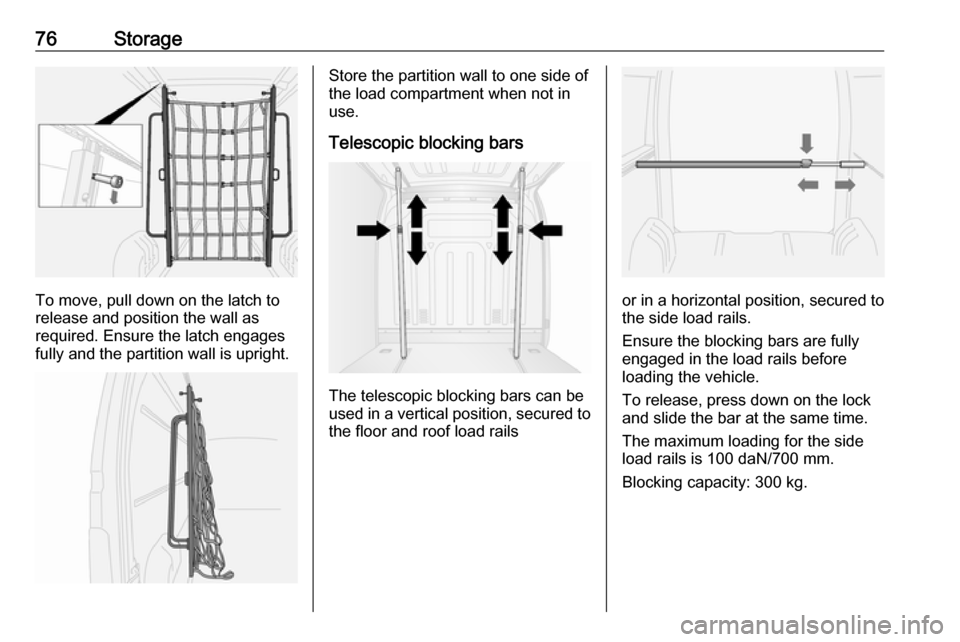
To move, pull down on the latch to
release and position the wall as
required. Ensure the latch engages fully and the partition wall is upright.
Store the partition wall to one side of
the load compartment when not in
use.
Telescopic blocking bars
The telescopic blocking bars can be
used in a vertical position, secured to the floor and roof load rails
or in a horizontal position, secured to
the side load rails.
Ensure the blocking bars are fully
engaged in the load rails before
loading the vehicle.
To release, press down on the lock
and slide the bar at the same time.
The maximum loading for the side
load rails is 100 daN/700 mm.
Blocking capacity: 300 kg.
Page 79 of 261
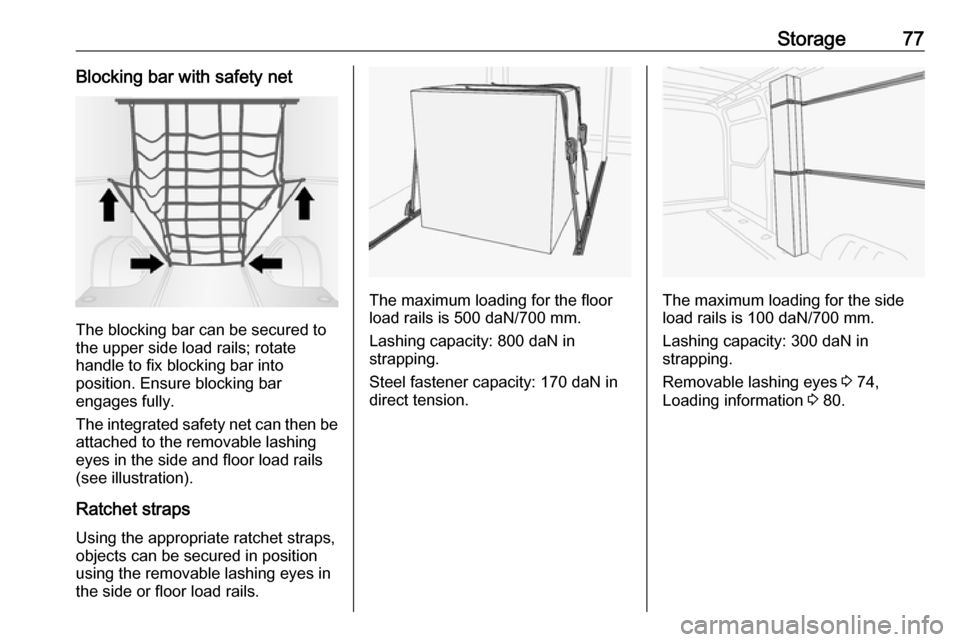
Storage77Blocking bar with safety net
The blocking bar can be secured to
the upper side load rails; rotate
handle to fix blocking bar into
position. Ensure blocking bar
engages fully.
The integrated safety net can then be attached to the removable lashing
eyes in the side and floor load rails
(see illustration).
Ratchet straps Using the appropriate ratchet straps,
objects can be secured in position
using the removable lashing eyes in
the side or floor load rails.
The maximum loading for the floor
load rails is 500 daN/700 mm.
Lashing capacity: 800 daN instrapping.
Steel fastener capacity: 170 daN in
direct tension.The maximum loading for the side
load rails is 100 daN/700 mm.
Lashing capacity: 300 daN in strapping.
Removable lashing eyes 3 74,
Loading information 3 80.
Page 84 of 261

82Instruments and controlsInstruments and
controlsControls ....................................... 83
Steering wheel adjustment ........83
Steering wheel controls .............83
Horn ........................................... 83
Steering column controls ...........83
Windscreen wiper/washer .........84
Outside temperature ..................85
Clock ......................................... 86
Power outlets ............................. 86
Cigarette lighter ......................... 88
Ashtrays .................................... 88
Warning lights, gauges and indi‐ cators ........................................... 88
Instrument cluster ......................88
Speedometer ............................. 88
Odometer .................................. 89
Trip odometer ............................ 89
Tachometer ............................... 89
Fuel gauge ................................ 90
AdBlue gauge ............................ 90
Engine coolant temperature gauge ....................................... 90
Engine oil level monitor .............91
Service display .......................... 91Transmission display .................92
Control indicators ......................92
Turn signal ................................. 95
Seat belt reminder .....................95
Airbag and belt tensioners .........95
Airbag deactivation ....................95
Charging system .......................96
Malfunction indicator light ..........96
Service vehicle soon .................96
Stop engine ............................... 97
Brake system ............................. 97
Antilock brake system (ABS) .....97
Upshift ....................................... 97
Lane departure warning ............97
Electronic Stability Program ......98
Electronic Stability Program off ............................................. 98
Engine coolant temperature ......98
Preheating ................................. 98
AdBlue ....................................... 98
Tyre pressure monitoring system ...................................... 98
Engine oil pressure ....................99
Low fuel ..................................... 99
Stop-start system ......................99
Exterior light ............................ 100
High beam ............................... 100
High beam assist .....................100
Fog light ................................... 100
Rear fog light ........................... 100Cruise control.......................... 100
Tachograph ............................. 100
Door open ................................ 100
Information displays ...................101
Driver Information Centre ........101
Info display .............................. 101
Vehicle messages ......................102
Warning chimes .......................102
Trip computer ............................. 103
Tachograph ................................ 105
Page 85 of 261
Instruments and controls83Controls
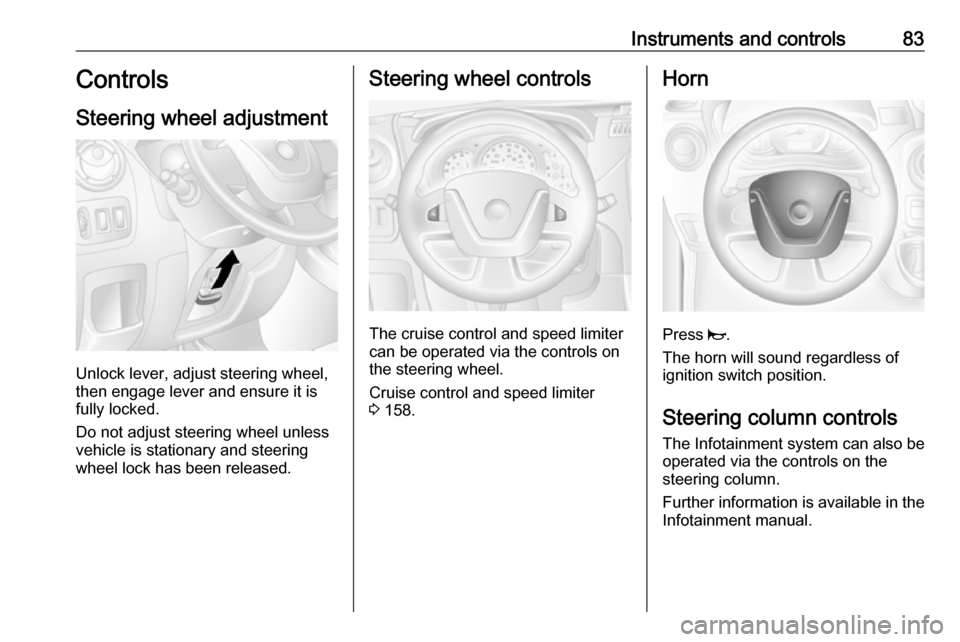
Steering wheel adjustment
Unlock lever, adjust steering wheel,
then engage lever and ensure it is fully locked.
Do not adjust steering wheel unless
vehicle is stationary and steering
wheel lock has been released.
Steering wheel controls
The cruise control and speed limiter
can be operated via the controls on
the steering wheel.
Cruise control and speed limiter
3 158.
Horn
Press j.
The horn will sound regardless of
ignition switch position.
Steering column controls The Infotainment system can also be
operated via the controls on the
steering column.
Further information is available in the
Infotainment manual.
Page 88 of 261
86Instruments and controls9Warning
The road surface may already be
icy even though the display
indicates a few degrees above 0
°C.
Clock
Depending on vehicle, the current
time and/or date may appear in the information display 3 101 or the
Driver Information Centre 3 101.
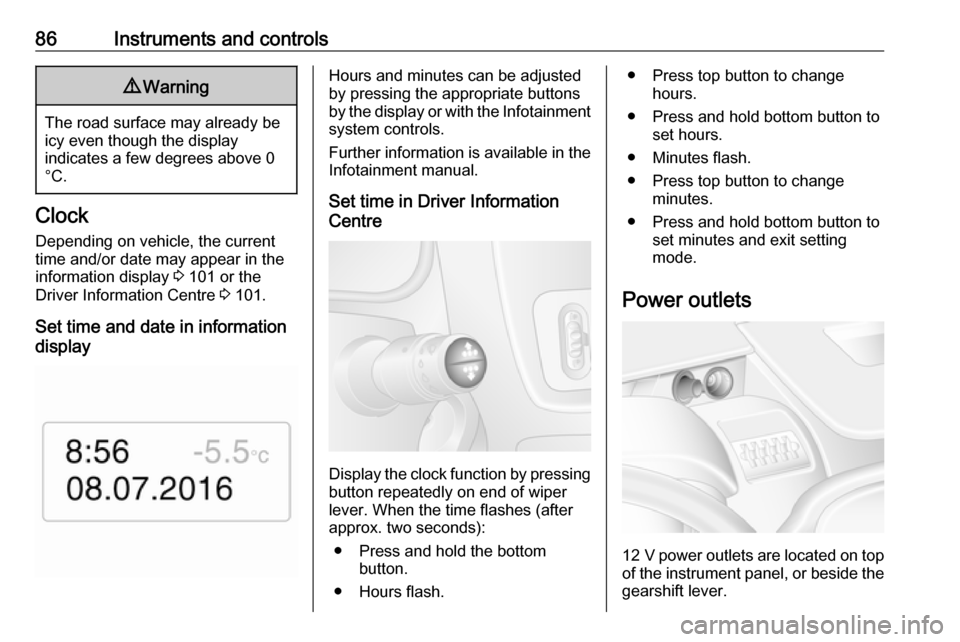
Set time and date in information
display
Hours and minutes can be adjusted
by pressing the appropriate buttons
by the display or with the Infotainment
system controls.
Further information is available in the
Infotainment manual.
Set time in Driver Information
Centre
Display the clock function by pressing button repeatedly on end of wiper
lever. When the time flashes (after
approx. two seconds):
● Press and hold the bottom button.
● Hours flash.
● Press top button to change hours.
● Press and hold bottom button to set hours.
● Minutes flash.
● Press top button to change minutes.
● Press and hold bottom button to set minutes and exit setting
mode.
Power outlets
12 V power outlets are located on top
of the instrument panel, or beside the gearshift lever.
Page 96 of 261

94Instruments and controlsControl indicators in the
instrument panel
Control indicators in the roof
console
OverviewOTurn signal 3 95XSeat belt reminder 3 95vAirbag and belt tensioners
3 95WAirbag deactivation 3 95pCharging system 3 96ZMalfunction indicator light
3 96AService vehicle soon 3 96oService display 3 96CStop engine 3 97RBrake system 3 97uAntilock brake system (ABS)
3 97kjUpshift, downshift 3 97ìLane departure warning 3 97RElectronic Stability Program
3 98ØElectronic Stability Program off
3 98WEngine coolant temperature
3 98!Preheating 3 98YAdBlue 3 98wTyre pressure monitoring
system 3 98IEngine oil pressure 3 99YLow fuel 3 99DAutostop (Stop-start system)
3 99\Autostop inhibited (Stop-start
system) 3 999Exterior light 3 100CHigh beam 3 100íHigh beam assist 3 100>Fog light 3 100øRear fog light 3 100mCruise control 3 100
Page 99 of 261
Instruments and controls97The message SERVICE DUE also
appears in the Driver Information
Centre.
Service display 3 91.
Stop engine
C illuminates red.
Illuminates briefly when the ignition is
switched on.
If C illuminates (possibly in
combination with W and/or R), stop
vehicle and switch off engine as soon as possible.9 Warning
Have the cause of the fault
remedied immediately by a
workshop.
Depending on the type of fault, a
warning message may also appear in the Driver Information Centre 3 101.
Brake system
R illuminates red.
Control indicator R remains
illuminated after the ignition is
switched on if the parking brake is
applied and extinguishes when the
parking brake is released 3 154.
When the parking brake is released, R illuminates (possibly in
combination with C) if the brake fluid
level is too low 3 180.9 Warning
Stop. Do not continue your
journey. Consult a workshop.
Brake system 3 153.
Antilock brake system (ABS)
u illuminates yellow.
Illuminates briefly when the ignition is
switched on. The system is ready for
operation when u extinguishes.
If control indicators u and A
illuminate with the messages CHECK
ABS and CHECK ESP in the Driver
Information Centre 3 101, there is a
fault in the ABS. The brake system
remains operational but without ABS
regulation.
If control indicators u, A , R and
C illuminate, the ABS and ESP are
deactivated and the message
BRAKING FAULT is displayed. Seek
the assistance of a workshop.
Antilock brake system 3 153.
Upshift
k or j illuminates yellow.
Illuminates when gearshifting is
recommended for fuel saving
reasons.
ECO mode 3 132.
Lane departure warning
ì illuminates white.
Illuminates briefly when the ignition is switched on and the system is ready
to operate.
A warning chime sounds in
conjunction with ì when the system
recognises an unintended lane
change.
Page 101 of 261
Instruments and controls99Illuminates
Tyre pressure loss. Stop immediately and check tyre pressure.
Control indicator w illuminates
together with C 3 97 and a
corresponding message appears in
the Driver Information Centre when a
puncture or severely under-inflated
tyre is detected.
Flashes
Fault in system. After a delay the
control indicator illuminates
continuously. Consult a workshop.
Control indicator w illuminates
together with A 3 96 and a
corresponding message appears in
the Driver Information Centre when a tyre without a pressure sensor is
mounted (e.g. spare wheel).
Tyre pressure monitoring system
3 200.
Engine oil pressure
I illuminates red.
Illuminates briefly when the ignition is
switched on.Illuminates when the engine is
runningCaution
Engine lubrication may be
interrupted. This may result in
damage to the engine and/or
locking of the drive wheels.
1. Depress clutch.
2. Select neutral gear, set selector lever to N.
3. Move out of the flow of traffic as quickly as possible without
impeding other vehicles.
4. Switch off ignition.
9 Warning
When the engine is off,
considerably more force is needed
to brake and steer. During an
Autostop the brake servo unit will still be operational.
Do not remove key until vehicle is
stationary, otherwise the steeringwheel lock could engage
unexpectedly.
Check oil level before seeking
assistance of a workshop 3 176.
Low fuel
Y illuminates yellow.
Illuminates when the ignition is
switched on and extinguishes shortly
after the engine starts.
Illuminates when the engine is
running
Fuel level in the tank is too low. Refuel
immediately.
Never run the tank dry.
Refuelling 3 168.
Catalytic converter 3 141.
Bleeding the diesel fuel system
3 183.
Stop-start system
\
Page 103 of 261
Instruments and controls101Information displays
Driver Information Centre
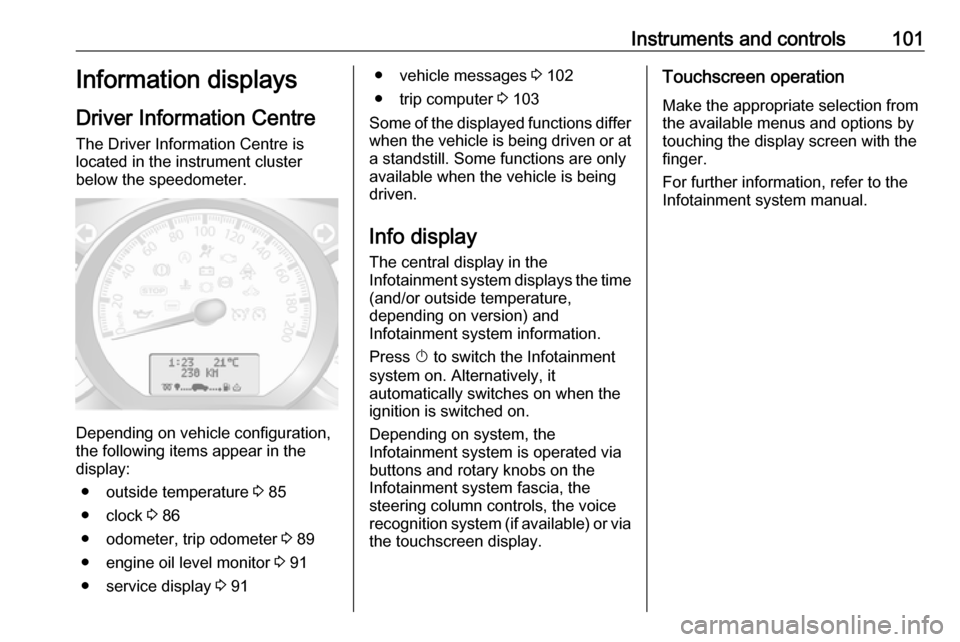
The Driver Information Centre is
located in the instrument cluster
below the speedometer.
Depending on vehicle configuration,
the following items appear in the
display:
● outside temperature 3 85
● clock 3 86
● odometer, trip odometer 3 89
● engine oil level monitor 3 91
● service display 3 91
● vehicle messages 3 102
● trip computer 3 103
Some of the displayed functions differ
when the vehicle is being driven or at a standstill. Some functions are only
available when the vehicle is being
driven.
Info display
The central display in the
Infotainment system displays the time (and/or outside temperature,
depending on version) and
Infotainment system information.
Press X to switch the Infotainment
system on. Alternatively, it
automatically switches on when the
ignition is switched on.
Depending on system, the
Infotainment system is operated via
buttons and rotary knobs on the
Infotainment system fascia, the
steering column controls, the voice
recognition system (if available) or via
the touchscreen display.Touchscreen operation
Make the appropriate selection from
the available menus and options by
touching the display screen with the
finger.
For further information, refer to the
Infotainment system manual.