Radio VAUXHALL MOVANO_B 2020 User Guide
[x] Cancel search | Manufacturer: VAUXHALL, Model Year: 2020, Model line: MOVANO_B, Model: VAUXHALL MOVANO_B 2020Pages: 351, PDF Size: 9.32 MB
Page 126 of 351

124Infotainment system1æ: Darken screen (only
clock and audio system
information are displayed) ..128
2 ñRadio : Change audio
source to radio ....................143
3 üMedia : Change audio
source - USB, iPod .............152
BT (Bluetooth) .....................155
AUX ..................................... 150
4 Outside temperature
(depending on version) .......128
5 yPhone : Telephone menu . 192
6 Clock ................................... 128
7 X: Switch on/off ..................128
Increase / decrease volume 128
8 M USB port .......................... 152
9 AUX input ............................ 150
10 ÿSettings : Audio settings,
e.g. Tone settings ...............136
Volume settings ..................137
Connectivity settings ...........128
Display settings ...................128
System settings ................... 13811 ýNav : Navigation menu ......163
12 _Map : Display the map ....163
Page 128 of 351
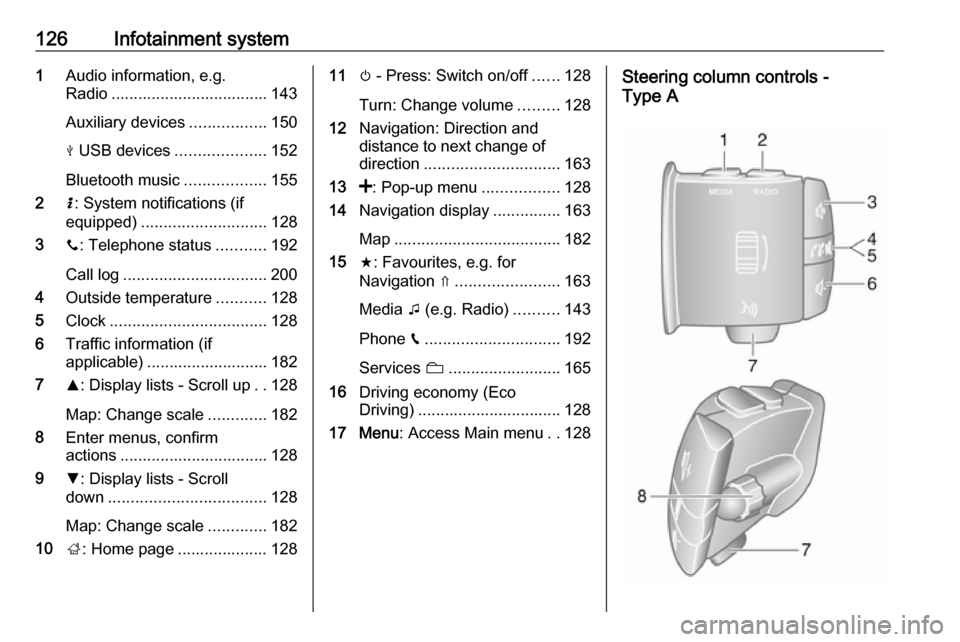
126Infotainment system1Audio information, e.g.
Radio ................................... 143
Auxiliary devices .................150
M USB devices ....................152
Bluetooth music ..................155
2 H: System notifications (if
equipped) ............................ 128
3 y: Telephone status ...........192
Call log ................................ 200
4 Outside temperature ...........128
5 Clock ................................... 128
6 Traffic information (if
applicable) ........................... 182
7 R: Display lists - Scroll up ..128
Map: Change scale .............182
8 Enter menus, confirm
actions ................................. 128
9 S: Display lists - Scroll
down ................................... 128
Map: Change scale .............182
10 ;: Home page .................... 12811 m - Press: Switch on/off ......128
Turn: Change volume .........128
12 Navigation: Direction and
distance to next change of
direction .............................. 163
13 <: Pop-up menu .................128
14 Navigation display ...............163
Map ..................................... 182
15 f: Favourites, e.g. for
Navigation ⇑ ....................... 163
Media t (e.g. Radio) ..........143
Phone g.............................. 192
Services N......................... 165
16 Driving economy (Eco
Driving) ................................ 128
17 Menu : Access Main menu ..128Steering column controls -
Type A
Page 129 of 351
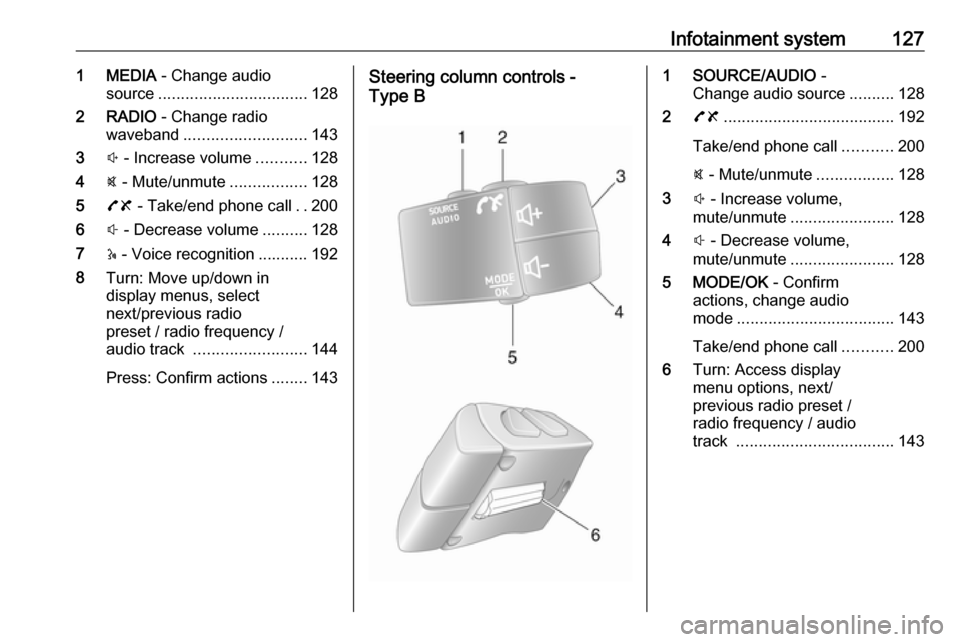
Infotainment system1271 MEDIA - Change audio
source ................................. 128
2 RADIO - Change radio
waveband ........................... 143
3 ! - Increase volume ...........128
4 @ - Mute/unmute .................128
5 78 - Take/end phone call ..200
6 # - Decrease volume ..........128
7 5 - Voice recognition ........... 192
8 Turn: Move up/down in
display menus, select
next/previous radio
preset / radio frequency /
audio track ......................... 144
Press: Confirm actions ........143Steering column controls -
Type B1 SOURCE/AUDIO -
Change audio source ..........128
2 78 ...................................... 192
Take/end phone call ...........200
@ - Mute/unmute .................128
3 ! - Increase volume,
mute/unmute ....................... 128
4 # - Decrease volume,
mute/unmute ....................... 128
5 MODE/OK - Confirm
actions, change audio
mode ................................... 143
Take/end phone call ...........200
6 Turn: Access display
menu options, next/
previous radio preset /
radio frequency / audio
track ................................... 143
Page 131 of 351

Infotainment system129a short period after the last user input.
Depending on Infotainment system,
automatic switch-off occurs after
approx. 5 to 20 minutes.
Pressing X again will allow the
Infotainment system to remain on for a further 5 to 20 minutes, depending
on Infotainment system.
Setting the volumeTurn X / volume rotary knob.
Alternatively (with the steering
column controls), press ! or #.NAVI 50 IntelliLink:
Depending on version, it is possible to
set various volume levels individually (including audio players, traffic
announcements, navigation
instructions, phone calls and
ringtone).
From the Home page, touch
ÿ Settings then Audio followed by
Sound .
Refer to (NAVI 50 IntelliLink) "Volume
settings" 3 137.NAVI 80 IntelliLink:
To set various volume levels
individually (e.g. navigation
instructions, traffic announcements, phone calls) from the Home page,
touch MENU then System followed by
Sound .
Refer to (NAVI 80 IntelliLink) "System settings" 3 138.
Stored volume
When the Infotainment system is
switched off, the current volume is
stored.
Speed dependent volume
When speed dependent volume
( 3 138) is activated, the volume is
adapted automatically to compensate
for road and wind noise.
Mute
To mute the current audio source
(depending on Infotainment system),
press X briefly or turn knob fully
anticlockwise.
Alternatively (with the steering
column controls), press @ or 8 or
press ! and # simultaneously.Unmute
To unmute (depending on
Infotainment system), briefly press
X again or turn clockwise.
Alternatively (with the steering
column controls): Press @ again or
press ! and # simultaneously again.
Notice
When a traffic announcement is
broadcast, the system is
automatically unmuted.
For further information, refer to
"Radio data system" 3 147.
Display screen operation
Radio 15 USB ● To move up/down in the display: Turn OK.
● To confirm actions: Press OK.
● To cancel actions (and return to previous menu): Press /.
Page 132 of 351
130Infotainment systemNAVI 50 IntelliLink
Use the touchscreen for the following
displayed menus as described in
each section:
● ñ Radio
Refer to "Radio" section 3 143.
● üMedia
Refer to "USB port" section
3 152.
● yPhone
Refer to "Phone" section 3 192.
● _Map
Refer to "Navigation" section
3 163.
● ýNav
Refer to "Navigation" section 3 163.
● ÿSettings
Refer to (NAVI 50 IntelliLink)
"Tone settings" 3 136, "Volume
settings" 3 137 and "System
settings" 3 138.Notice
Depending on software version, the menus available on the display
screen may differ from those listed
above.
When the Home page 7 is displayed,
it is possible to hide these menus from the display (only clock and audio
system information may be shown) by
touching æ. Touch anywhere on the
screen to display these menus again.
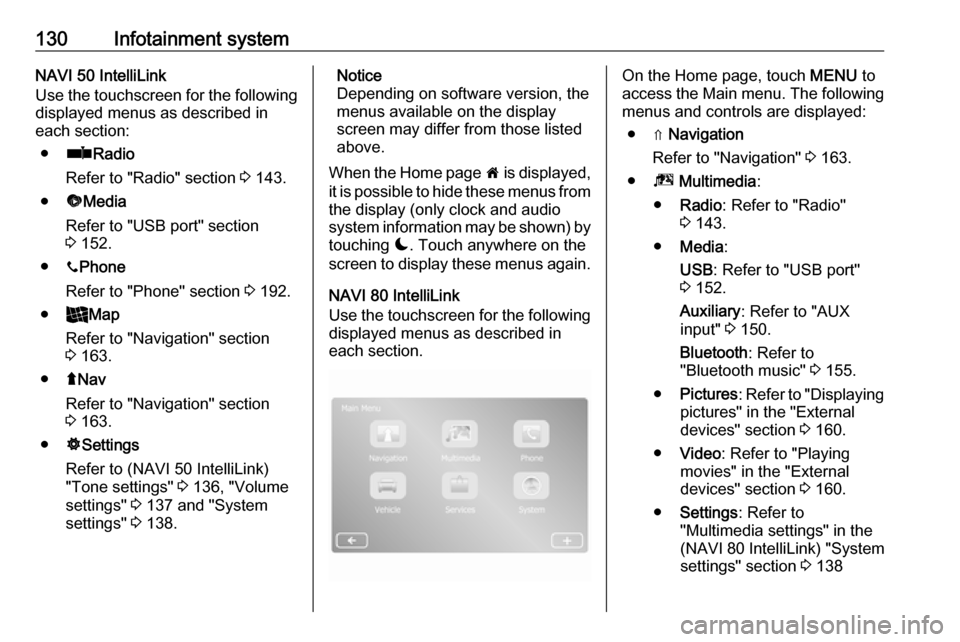
NAVI 80 IntelliLink
Use the touchscreen for the following displayed menus as described in
each section.On the Home page, touch MENU to
access the Main menu. The following menus and controls are displayed:
● ⇑ Navigation
Refer to "Navigation" 3 163.
● ª Multimedia :
● Radio : Refer to "Radio"
3 143.
● Media :
USB : Refer to "USB port"
3 152.
Auxiliary : Refer to "AUX
input" 3 150.
Bluetooth : Refer to
"Bluetooth music" 3 155.
● Pictures : Refer to "Displaying
pictures" in the "External
devices" section 3 160.
● Video : Refer to "Playing
movies" in the "External
devices" section 3 160.
● Settings : Refer to
"Multimedia settings" in the
(NAVI 80 IntelliLink) "System
settings" section 3 138
Page 133 of 351

Infotainment system131●g Phone
Refer to "Phone" 3 192.
● J Vehicle
Touch to open Eco Driving, Onboard computer and Settings
menus.
Refer to (NAVI 80 IntelliLink)
"Modes of operation" below.
● ¯ Services
Touch to open Navigation
services and Settings menus.
Refer to (NAVI 80 IntelliLink)
"Modes of operation" below.
● ± System
Refer to (NAVI 80 IntelliLink)
"System settings" 3 138.
Notice
Depending on software version, the menus on the display screen may
differ from the illustrations shown.
● I/←: Move to previous page
● j/→: Move to next page
● ↑: Display lists; Scroll up
● ↓: Display lists; Scroll down● <: Open pop-up menu
● r: Return to previous menu
The display screen can also be
operated using the controls on the
Infotainment system fascia.
Notice
Depending on version, some
controls available on the
Infotainment system fascia do not
operate the features on the display
screen.
Notice
Depending on vehicle, operation of
the touchscreen may be restricted
during driving.
Modes of operation
Radio 15 USB:
To change the audio source to radio,
press RADIO .NAVI 50 IntelliLink:
To access the radio menu at any time, touch 7 followed by ñRadio .NAVI 80 IntelliLink:
To access the radio menu from the
Home page, touch MENU then
Multimedia followed by Radio.Detailed description of the radio
functions 3 143.
Audio players
To change the audio source to USB,
AUX , Bluetooth or iPod (where
applicable), touch MEDIA.
NAVI 50 IntelliLink : To access the
menu for connected auxiliary devices
( USB , iPod , BT (Bluetooth), Video or
AUX ) at any time, touch 7 followed
by üMedia . Touch = in top left
corner and select auxiliary source.
NAVI 80 IntelliLink : To access the
menu for auxiliary devices (e.g. USB,
AUX input, Bluetooth) from the Home page, touch MENU then Multimedia
followed by Media. Select auxiliary
source from the display list.Radio 15 USB
Detailed descriptions of:
● AUX input functions 3 151
● USB port functions 3 152
● Bluetooth music operation 3 155
Page 134 of 351

132Infotainment systemNAVI 50 IntelliLink
Detailed descriptions of:
● AUX input functions 3 151
● USB port (including iPod) functions 3 152
● Bluetooth music operation 3 155NAVI 80 IntelliLink
Detailed descriptions of:
● AUX input functions 3 151
● USB port functions 3 152
● Bluetooth music operation 3 155
Navigation, Map (NAVI 50 IntelliLink,
NAVI 80 IntelliLink)
Detailed description of the navigation
system 3 163, Browse map 3 182.
Phone
Use the display options in the
following menus to connect mobile
phones, make telephone calls, create
contacts lists and adjust various
settings.
Detailed description of the handsfree
phone system functions 3 192.
Radio 15 USB
To access the Phone menu: Press
6 or TEL .
To access the phone settings menu: Press TEL and select Phone settings .NAVI 50 IntelliLink
To access the Phone menu at any
time: Touch 7 followed by yPhone .NAVI 80 IntelliLink
To access the Phone menu from the
Home page, touch MENU followed by
Phone .
Vehicle information
To access the Vehicle menu from the Home page, touch MENU followed by
Vehicle .
Depending on vehicle, the following
menus are displayed:
● Eco Driving
● Onboard computer
● Settings
Eco Driving
The following features are available:
● Trip report
Displays the following data from the last journey:Average fuel consumption,
average speed, total fuel
consumption, total distance, etc.
Within the trip report, Eco
scoring provides an overall score
out of 100 for driving economy.
Higher figures indicate better
driving economy. Ratings are
also given for average
environmental driving
performance (Acceleration),
gearchanging efficiency
(Gearbox) and brake control
(Anticipation).
To save journey data: Touch
'Save' then select the journey
type from the following list:
Home/work, holiday/vacation,
weekend, trip/tour, personal.
To reset journey data: Touch
'Reset'. Confirm or cancel with
'Yes' or 'No'.
Touch < to open pop-up menu
where trip reports can be compared or to show/hide
reports after the completion of a
journey.
Page 136 of 351

134Infotainment system● Driving style indicator (fueleconomy gauge) (switch on/
off).
● Eco score (switch on/off).
● Show report after trip (switch on/off).
After the settings are changed, touch
Done to confirm.
Services (NAVI 80 IntelliLink)
To access the Services menu from
the Home page, touch MENU
followed by Services.
The following menus are displayed: ● Navigation services
● SettingsNavigation services
In addition to the navigation services
(e.g. traffic information, fixed speed
cameras), extra features can be
added by subscribing to LIVE
services.
Refer to (NAVI 80 IntelliLink) "LIVE
services" in the "Navigation" section
3 165.Settings
The following menus are displayed:
● Applications manager
Select to manage Bluetooth
auxiliary devices.
● Navigation services
Select to access navigation
related features, e.g. traffic,
speed cameras, local search,
My TomTom LIVE, weather.
Refer to (NAVI 80 IntelliLink)
"LIVE services" in the
"Navigation" section 3 165.
Notice
A compatible SD card must be
inserted to access LIVE services.
● Update applications
Select to update current
applications.
● Data sharing settings
Select to switch data sharing on/
off.
Notice
When data sharing is switched off, certain features may not operate
correctly.Favourites (NAVI 80 IntelliLink)
When the Home page is displayed,
touch f to view, add or delete
favourites for the following features:
● ⇑ Navigation 3 163.
● ª Multimedia - refer to "Radio"
3 143.
● g Phone 3 192.
● ¯ Services 3 165.Navigation favourites
Select an empty slot in the display or
touch < (to open a pop-up menu),
then select Add Favourite .
Choose from the displayed list to add a saved destination to the favourites.
For further information, refer to
(NAVI 80 IntelliLink) "Destination
input" in the "Navigation" section
3 176.Multimedia favourites
Select an empty slot in the display or
touch < (to open a pop-up menu),
then Add Favourite .
Choose from the displayed list to add
a preset FM radio station to the
favourites.
Page 138 of 351

136Infotainment systemScrolling listsIf there are more items available than
presentable on the screen, the list
must be scrolled.
To scroll through a list of menu items, touch S or R at the top and at the
bottom of the scroll bar.
Touch and hold S or R to fast scroll
through a list.
Notice
In subsequent chapters, the
operating steps for scrolling to a list
item via the touch screen will be described as "...scroll to
Scrolling within a map
Touch anywhere on the map. The
cursor indicates the current position.
To scroll within the map, drag the map in the required direction.
Notice
Constant pressure must be applied and the finger must be moved at
constant speed.Pop-up menus
To open pop-up menus with
additional options, touch <.
To exit a pop-up menu without
accessing any options or making any
changes, touch any part of the screen outside the pop-up menu.
Tone settings
Radio 15 USB
In the audio settings menu, the tone
characteristics can be set.
Press SETUP to access the settings
menu.
Select Audio settings , then Sound
and turn OK until the desired setting
is selected from:
● BASS (bass)
● TREBLE (treble)
● FADER (front/rear balance)
● BALANCE (left/right balance)
The display indicates the type of
setting followed by the adjustment
value.Set the desired value by turning OK
and press the knob to confirm
selections.
To exit the audio settings menu,
press /.
Notice
If there is no activity, the system will exit the audio settings menu
automatically.
Setting bass and treble
Select Bass or Treble .
Set the desired value by turning OK
and press the knob to confirm setting.
Depending on version,
BASS BOOST setting is also
available.
Setting the volume distribution
between right - left
Select Balance .
Set the desired value by turning OK
and press the knob to confirm setting.
Setting the volume distribution
between front - rear
Available depending on version.
Select Fader.
Page 139 of 351

Infotainment system137Set the desired value by turning OK
and press the knob to confirm setting.
NAVI 50 IntelliLink To access the settings menu at any
time, touch 7 followed by ÿSettings .
The following settings submenus are displayed at the bottom of the screen:
● Audio
See "Audio settings" below.
● Display
Refer to (NAVI 50 IntelliLink)
"System settings" 3 138.
● Connectivity
Refer to (NAVI 50 IntelliLink) "System settings" 3 138.
● System
Refer to (NAVI 50 IntelliLink)
"System settings" 3 138.Audio settings
Select Audio to display the following
options:
● Vol/Speed (Off/1/2/3/4/5)
Speed dependent volume control
- refer to (NAVI 50 IntelliLink)
"Volume settings" 3 137.● Loudness (On/Off)
Switch loudness on to increase
bass and treble levels.
● BAL/FAD
Depending on version, touch l
to open the volume distribution
balance and tone settings
submenu.
On the left side of the display,
adjust the right/left balance with
k /l and the front/rear balance
with R/S (if available).
On the right side of the display,
adjust the Bass, Mid and Treble
tone characteristics (between
-5 to +5) with k/l .
Touch OK to confirm changes.
● Sound
Sound settings (where volumes can be set individually for a list of
audio types), refer to
(NAVI 50 IntelliLink) "Volume
settings" 3 137.
NAVI 80 IntelliLink Refer to (NAVI 80 IntelliLink) "System
settings" 3 138.Volume settings
Radio 15 USB
Press SETUP to access the settings
menu.
Select Audio settings , then Speed
vol. and turn OK until the desired
setting is selected.
NAVI 50 IntelliLink
To access the settings menu at any time, touch 7 followed by ÿSettings .
The following settings submenus are displayed:
● Audio
See "Audio settings" below.
● Display
Refer to (NAVI 50 IntelliLink)
"System settings" 3 138.
● Connectivity
Refer to (NAVI 50 IntelliLink)
"System settings" 3 138.
● System
Refer to (NAVI 50 IntelliLink)
"System settings" 3 138.