navigation system VAUXHALL MOVANO_B 2020 User Guide
[x] Cancel search | Manufacturer: VAUXHALL, Model Year: 2020, Model line: MOVANO_B, Model: VAUXHALL MOVANO_B 2020Pages: 351, PDF Size: 9.32 MB
Page 141 of 351

Infotainment system139●Connectivity : See below.
● System : See below.Display
Select Display to display the following
options:
● Brightness (Low/Mid/High)
● Map mode (Auto/Day/Night)
● Auto : Day and night mode
are changed automatically.
● Day : The map screen is
always displayed with bright colours.
● Night : The map screen is
always displayed with dark
colours.
● Background (Dark/Light)
Available depending on version. Switch between a dark or light
display mode (available
depending on vehicle).
● Parking assistance
Touch l to open a submenu:
● Rear view camera (On/Off)
● Obstacle detection
Touch l to open a submenu
for activation or deactivationof the front parking sensors
and rear parking sensors.Connectivity
Select Connectivity to display the
following options:
● View Bluetooth device list
● Search for Bluetooth device
● External device authorization
● Change passkey (for pairing of
Bluetooth devices with the
Infotainment system)
● Smartphone
Available depending on version. For help with activating and
operating voice controls - refer to
"Voice recognition" 3 190.
For further information on Bluetooth
settings, refer to (NAVI 50 IntelliLink)
"Bluetooth music" 3 155 and
"Bluetooth connection" in the "Phone" section 3 196.System
Select System to display the following
options:
● Language
Change display language and voice instruction language for the navigation system. Press OK to
confirm selection.
● Clock/Units
The following settings can be
changed:
● Time Format (12H/24H)
● Nav Units (km/miles)
● Temperature (°C/°F)
● Time Setting
Press l to open the Time
set submenu containing the
following options:
Auto /Manual
If Auto time setting is
selected, the time is set
automatically by GPS.
If Manual time setting is
selected, adjust as
appropriate.
Page 142 of 351

140Infotainment systemNotice
Navigation maps for the current
country must be installed on the
system to ensure the local time is
correct.
● Factory settings
The following settings can be
reset to the factory default:
● All
● Phone - Smartphone
● Navigation
● Audio-Media-Radio-System
● Navigation (On/Off)
● System version (displays
Infotainment system software
version number)
When system setting adjustments
have been made, touch 7 (and select
another menu on the display) to exit
the settings menu and save changes.
The system also saves and exits
automatically after a delay.
NAVI 80 IntelliLink To access the system settings menufrom the Home page, touch MENU
followed by System.The following settings submenus are
displayed:
● Language
● Display
● Sound
● Clock
● Safety warnings
● Home screen
● Keyboards
● Set units
● Status & Information
● Remove SD-card
● Restore factory settings
● Android Auto Settings ™
After system settings are changed,
touch Done to confirm.Language
To change Infotainment system
language then voice type (depending on version).Display
The following settings are displayed:
● Daytime brightness : Change
screen brightness to suit external light levels (daylight).During low external light levels,
the display screen is easier to
view when the display is not too
bright.
● Nighttime brightness /Night
brightness : Change screen
brightness to suit external light
levels (night light).
During low external light levels,
the display screen is easier to
view when the display is not too
bright.
● Automatic day/night mode /
Change to night colours : To
activate automatic switching
between daytime/night
brightness.
Night mode is activated during
low external light levels and when
the headlights are switched on.
● Force night mode /Use night
colours : To activate night mode.
Page 143 of 351

Infotainment system141Sound
The following settings submenus are
displayed:
● Sound levels : To change volume
and sounds for the main volume,
handsfree phone system, phone
ringtone, navigation instructions,
system/computer voice, traffic
information, and park assist
(depending on version).
● Alerts : To adjust alert volume,
and switch on/off alerts when
display screen is switched off.
● Speed sensitivity volume : To set
volume adjustment based on
vehicle speed.
● Voice output settings : Adjust
types of information to be given
by the Infotainment system voice
(e.g. "Read aloud motorway lane instructions").
● Voice : Change the voice used by
the Infotainment system (if
available).Clock
To set the system clock and the time display format.Keeping the automatic time
adjustment setting switched on is recommended.Safety warnings
To switch on/off various alerts
provided by the Infotainment system
(e.g. "Warn when driving faster than
allowed"). Check appropriate boxes
to switch on.Home screen
To change the home page
configuration.
Select from list of options to see a
preview of each home page layout.Keyboards
To change first the alphabet type (e.g. Latin, Greek) then the keyboard type
(e.g. QWERTY, ABCD).Set units
To change the units of measurement,
for e.g. distance (km/miles), co-
ordinates (degrees, minutes,
seconds), temperature (℃, ℉) and
barometric units (if available).Status & Information
To display system information, e.g. version, GPS status, network status,
licences and copyright information.Remove SD-card
To eject the SD card safely.Restore factory settings
To delete all Infotainment system
information. Follow the instructions on the display.
Notice
Afterwards, the Infotainment system
will restart in English by default. If
necessary, select Language in the
System menu to change language.Android Auto Settings ™
To set the preferences for the
“Android Auto™” application and
access the instruction tutorial for the
application on the Infotainment
system.
Multimedia settings
To access the Multimedia settings
menu from the Home page, touch
MENU then Multimedia , followed by
Settings .
The following settings submenus are displayed:
● Sound
● Radio
● Media
Page 164 of 351

162Infotainment systemUsing smartphone
applications
The phone projection applications
Apple CarPlay™ and Android™ Auto
display selected apps from your
smartphone on the display screen
and allow their operation directly via
the Infotainment controls.
Check with the device's manufacturer
if this function is compatible with your
smartphone and if this application is
available in the country you are in.
Android Auto is available for
NAVI 50 IntelliLink and
NAVI 80 IntelliLink. Apple CarPlay is available for NAVI 50 IntelliLink.
Notice
While using navigation and music
applications via phone projection,
similar applications integrated in the Infotainment system will be
replaced.
NAVI 50 IntelliLink
Preparing the smartphone
Android phone: Download the
Android Auto app to the smartphone from the Google Play™ Store.iPhone: Make sure Siri ®
is activated
on the smartphone.
Connecting the mobile phone
Connect the smartphone to the USB
port 3 152.
Starting phone projection
Android phone: Touch the Android
Auto button on the main screen of the Infotainment system and accept the
requests on the smartphone in order
to use the Android Auto app.
iPhone: Touch the CarPlay button on
the main screen of the Infotainment
system.
The phone projection screen
displayed depends on the
smartphone and software version.
To access a tutorial on smartphone
connectivity, go to the Settings menu,
select Connectivity and scroll through
the list.
Returning to the home screen
Touch the home button.NAVI 80 IntelliLink
Preparing the smartphone
Download the Android Auto app to the smartphone from the Google Play™
Store.
Activating phone projection 1. Connect the smartphone to the USB port 3 152.
2. Accept the request on the display screen.
3. Touch û on the display screen
and accept the confidentiality
clauses. As a first time user look
out for system requests on the
mobile device to continue.
4. Touch û again.
Phone projection can now be used.
Using phone projection ● Touch û on the display screen to
access the Android Auto menu of the connected smartphone.
● Press and hold 5 on the steering
column to access voice controls.
Returning to the display screen
Press ;.
Page 165 of 351

Infotainment system163Navigation
General information9 Warning
The navigation system is an aid to
your navigational abilities and
does not replace them. Drive with
due care and attention and adopt
a safe, vigilant attitude.
If a navigation system instruction
contradicts traffic regulations, the
traffic regulations always apply.
The navigation system will reliably
guide to the chosen destination
without the need for physical road
maps.
If the Traffic info service is available
in your country or region, the current
traffic situation is also considered in
route calculations. The system
receives traffic messages in the
current reception area.
To receive the most up-to-date, real-
time traffic information possible,
subscribe to the Live services facility.
Notice
Only available with
NAVI 80 IntelliLink.
Functioning of the navigation
system
The position and movement of the vehicle are detected by the navigation system using sensors.
The distance travelled is determined
by the vehicle's speedometer signal,
and turning movements on bends are
determined by a gyro sensor. The
position is determined by GPS
(Global Positioning System)
satellites.
By comparing these sensor signals
with the digital maps on the
navigation system, it is possible to
accurately determine the position of
the vehicle.
When using the vehicle for the first
time, or after a ferry trip, etc., the
system will self-calibrate. It is,
therefore, normal if it does not provide
an exact location until the vehicle has
travelled for some distance.After the entry of the destination
address or point of interest (nearest
petrol station, hotel, etc.) the route is
calculated from the current location to
the selected destination.
Route guidance is provided by voice
output and the display screen.9 Warning
Areas such as one-way streets
and pedestrian zones are not
marked on the navigation system map. In such areas, the system
may issue a warning that must be
accepted. Therefore, pay
particular attention to one-way
streets and other roads and
entrances that must not be driven
into.
Notice
Depending on Infotainment system, radio reception may be interrupted
during voice guidance and before
each change of direction.
Page 166 of 351

164Infotainment systemUSB memory stick
(NAVI 50 IntelliLink)
A USB memory stick is required for
the navigation system, to contain,
among other things, a digital map of
the towns and roads in your country.
Notice
Use a USB memory stick, formatted
to FAT32 format, with a minimum
4 GB and maximum 32 GB of
storage capacity.
After driving the first 60 miles, it is
possible to check for free digital map
updates within a period of 90 days.
Notice
To avoid possible technical issues,
only use a compatible USB memory stick for operating and updating the
navigation system. Do not insert
USB memory stick in any other
device (e.g. digital camera, mobile
phone, etc.), or in another vehicle.
Software installation
To update the digital maps and to
benefit from exclusive downloadable
services, an account must be createdon the vauxhall.naviextras.com
website and the free software must be
installed.Creating an account
Create your internet account via the
vauxhall.naviextras.com website.
Select e.g., the "Register" option on
the web page and enter the
appropriate details.Installing the software
Install the software on your computer
by downloading from
vauxhall.naviextras.com.
Follow the on-screen instructions to
install the software and launch the
online application.Registering the navigation system
The navigation system must be
registered with your new internet
account.
Insert an empty USB memory stick in
the navigation system's USB slot.
Touch 7 then select ýNav , followed
by Options then Map update .To ensure all content is saved in the
navigation system's memory, select Options then Update . Wait for the
update to complete before ejecting the USB memory stick.
Then insert the USB memory stick in
your computer's USB slot while
connected to the Internet. When the
online application is launched and the
USB memory stick is recognised, the
system (or software) name appears in the application window. The
navigation system is registered into
your user profile.
After the initial set-up, the USB
memory stick is automatically
recognised by the navigation system
and by the online application.
Updating the USB memory stick and
navigation system
Updates are issued regularly, e.g. for
map and safety camera revisions.
Notice
In certain countries it is illegal to
download and activate the camera
warning option and this could lead to prosecution.
Page 167 of 351

Infotainment system165These updates are only available via
the online application catalogue, which is accessed via the USB
memory stick.
Using the online application, it is
possible to:
● update the navigation system (maps, safety cameras etc.)
● upgrade to premium POI content
● add or delete data
● customise the system
The online application menus guide you through these operations.System update
To get the best from the navigation
system, update it as often as
possible.
To update the system, start the
vehicle and do not switch off the
engine while data is loading.
Insert the USB memory stick in the
navigation system's USB slot.
Available updates on the USB
memory stick are recognised by the
navigation system and the 'Update'
screen is displayed automatically.Select Update to begin installing the
updates to the navigation system.
Notice
The navigation system may restart
automatically during the update
process.
Notice
Touch r to go back to the previous
screen.
Alternatively, touch 7 followed by
ý Nav , Options then Map update .
Then select Options followed by
Update to install updates to the
navigation system.
Wait for the update to complete
before performing any other
operation or ejecting the USB
memory stick.
SD card (NAVI 80 IntelliLink)
An SD card is supplied with the
navigation system and contains, among other things, a digital map of
the towns and roads in the country.
Consult a workshop to purchase a
new SD card with updated digital
map.Notice
To avoid possible technical issues,
only use a compatible SD card for
operating the navigation system. Do not insert SD card in any other
device (e.g. digital camera, mobile phone, etc.), or in another vehicle.
Usage
USB memory stick
NAVI 50 IntelliLinkInserting the USB memory stick
Switch off the navigation system and insert the USB memory stick in theUSB slot on the Infotainment system
fascia. The USB memory stick is
fragile; treat it with care.Removing the USB memory stick
Switch off the navigation system and
remove the USB memory stick from the USB slot on the Infotainment
system fascia.
Page 168 of 351
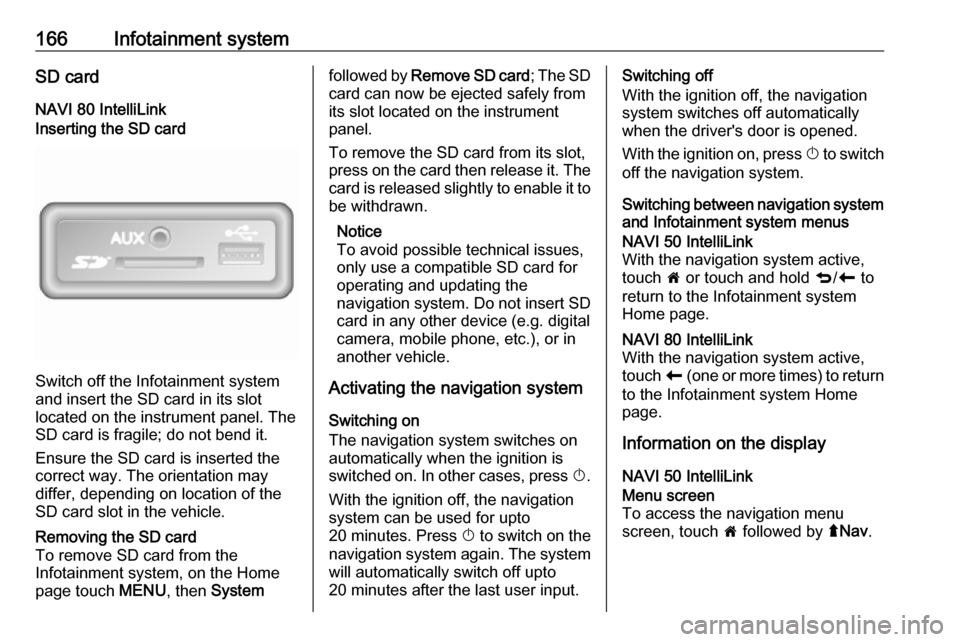
166Infotainment systemSD cardNAVI 80 IntelliLinkInserting the SD card
Switch off the Infotainment system
and insert the SD card in its slot
located on the instrument panel. The
SD card is fragile; do not bend it.
Ensure the SD card is inserted the
correct way. The orientation may
differ, depending on location of the
SD card slot in the vehicle.
Removing the SD card
To remove SD card from the
Infotainment system, on the Home
page touch MENU, then Systemfollowed by Remove SD card ; The SD
card can now be ejected safely from its slot located on the instrument
panel.
To remove the SD card from its slot,
press on the card then release it. The
card is released slightly to enable it to be withdrawn.
Notice
To avoid possible technical issues,
only use a compatible SD card for
operating and updating the
navigation system. Do not insert SD
card in any other device (e.g. digital
camera, mobile phone, etc.), or in
another vehicle.
Activating the navigation system
Switching on
The navigation system switches on
automatically when the ignition is
switched on. In other cases, press X.
With the ignition off, the navigation
system can be used for upto
20 minutes. Press X to switch on the
navigation system again. The system
will automatically switch off upto
20 minutes after the last user input.Switching off
With the ignition off, the navigation system switches off automatically
when the driver's door is opened.
With the ignition on, press X to switch
off the navigation system.
Switching between navigation system and Infotainment system menusNAVI 50 IntelliLink
With the navigation system active,
touch 7 or touch and hold q/r to
return to the Infotainment system
Home page.NAVI 80 IntelliLink
With the navigation system active,
touch r (one or more times) to return
to the Infotainment system Home page.
Information on the display
NAVI 50 IntelliLink
Menu screen
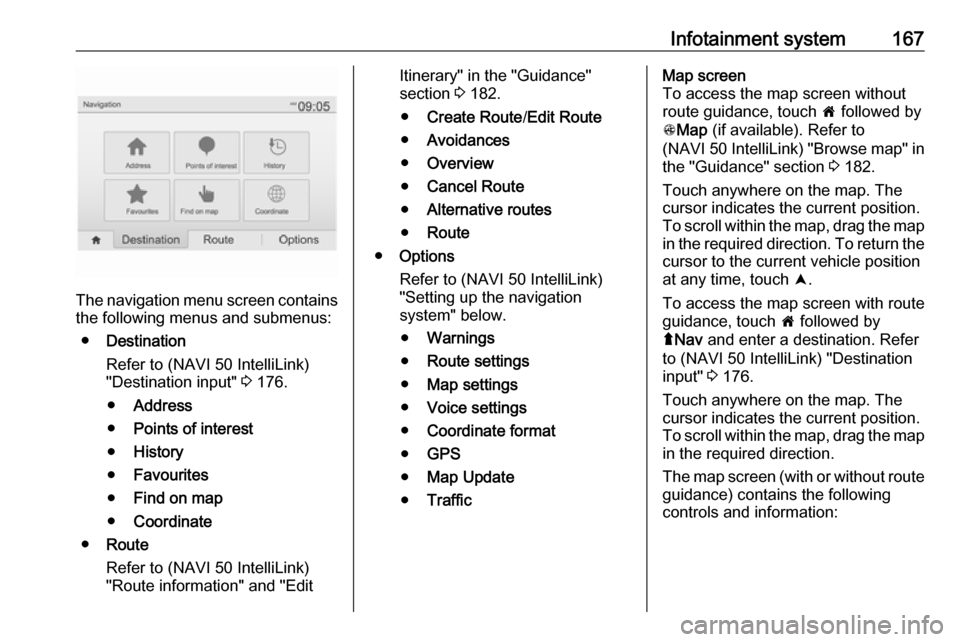
To access the navigation menu
screen, touch 7 followed by ýNav .
Page 169 of 351
Infotainment system167
The navigation menu screen contains
the following menus and submenus:
● Destination
Refer to (NAVI 50 IntelliLink)
"Destination input" 3 176.
● Address
● Points of interest
● History
● Favourites
● Find on map
● Coordinate
● Route
Refer to (NAVI 50 IntelliLink)
"Route information" and "Edit
Itinerary" in the "Guidance"
section 3 182.
● Create Route /Edit Route
● Avoidances
● Overview
● Cancel Route
● Alternative routes
● Route
● Options
Refer to (NAVI 50 IntelliLink)
"Setting up the navigation
system" below.
● Warnings
● Route settings
● Map settings
● Voice settings
● Coordinate format
● GPS
● Map Update
● TrafficMap screen
To access the map screen without route guidance, touch 7 followed by
s Map (if available). Refer to
(NAVI 50 IntelliLink) "Browse map" in the "Guidance" section 3 182.
Touch anywhere on the map. The
cursor indicates the current position.
To scroll within the map, drag the map
in the required direction. To return the
cursor to the current vehicle position
at any time, touch =.
To access the map screen with route
guidance, touch 7 followed by
ý Nav and enter a destination. Refer
to (NAVI 50 IntelliLink) "Destination
input" 3 176.
Touch anywhere on the map. The
cursor indicates the current position.
To scroll within the map, drag the map in the required direction.
The map screen (with or without route
guidance) contains the following
controls and information:
Page 171 of 351
Infotainment system169displayed. The normal view is
resumed after passing the
intersection.Motorway view
During route guidance, before each
motorway junction a 3D view of the
junction is automatically displayed.
The normal view is resumed after
passing the junction.
Notice
For some motorway junctions, only
a small turn arrow may appear on
the map.
NAVI 80 IntelliLink
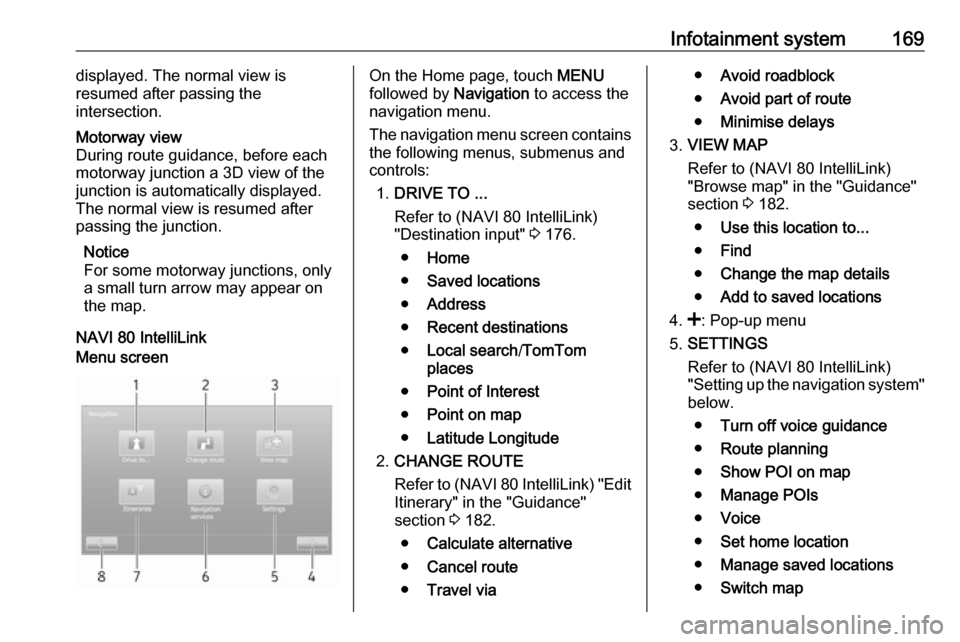
Menu screenOn the Home page, touch MENU
followed by Navigation to access the
navigation menu.
The navigation menu screen contains
the following menus, submenus and
controls:
1. DRIVE TO ...
Refer to (NAVI 80 IntelliLink)
"Destination input" 3 176.
● Home
● Saved locations
● Address
● Recent destinations
● Local search /TomTom
places
● Point of Interest
● Point on map
● Latitude Longitude
2. CHANGE ROUTE
Refer to (NAVI 80 IntelliLink) "Edit Itinerary" in the "Guidance"
section 3 182.
● Calculate alternative
● Cancel route
● Travel via●Avoid roadblock
● Avoid part of route
● Minimise delays
3. VIEW MAP
Refer to (NAVI 80 IntelliLink)
"Browse map" in the "Guidance"
section 3 182.
● Use this location to...
● Find
● Change the map details
● Add to saved locations
4. <: Pop-up menu
5. SETTINGS
Refer to (NAVI 80 IntelliLink)
"Setting up the navigation system" below.
● Turn off voice guidance
● Route planning
● Show POI on map
● Manage POIs
● Voice
● Set home location
● Manage saved locations
● Switch map