warning lights VAUXHALL MOVANO_B 2020 User Guide
[x] Cancel search | Manufacturer: VAUXHALL, Model Year: 2020, Model line: MOVANO_B, Model: VAUXHALL MOVANO_B 2020Pages: 351, PDF Size: 9.32 MB
Page 98 of 351
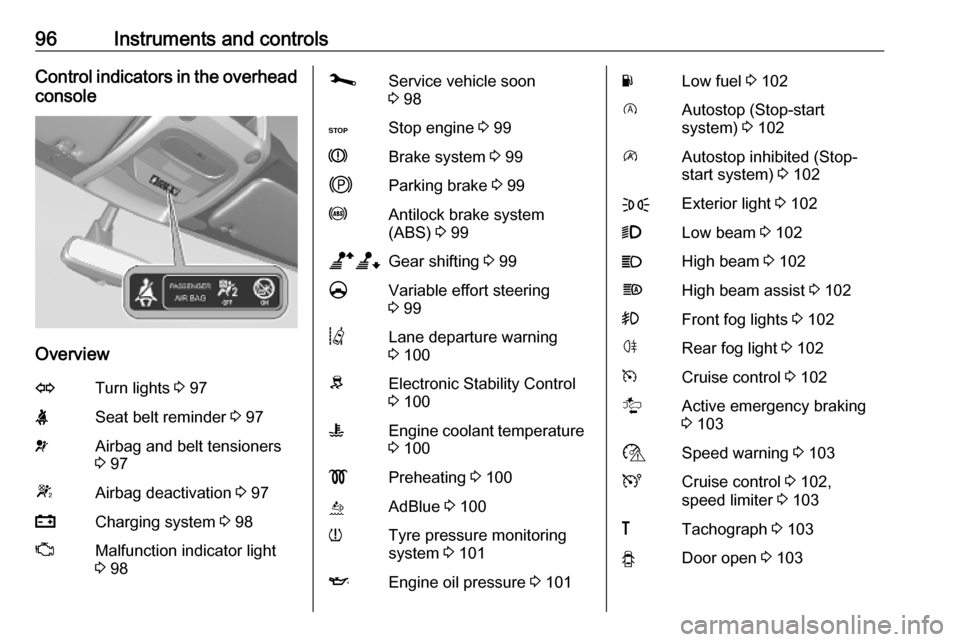
96Instruments and controlsControl indicators in the overhead
console
Overview
OTurn lights 3 97XSeat belt reminder 3 97vAirbag and belt tensioners
3 97WAirbag deactivation 3 97pCharging system 3 98ZMalfunction indicator light
3 98jService vehicle soon
3 98CStop engine 3 99RBrake system 3 99jParking brake 3 99uAntilock brake system
(ABS) 3 99baGear shifting 3 99§Variable effort steering
3 99QLane departure warning
3 100RElectronic Stability Control
3 100WEngine coolant temperature
3 100!Preheating 3 100úAdBlue 3 100wTyre pressure monitoring
system 3 101IEngine oil pressure 3 101YLow fuel 3 102DAutostop (Stop-start
system) 3 102\Autostop inhibited (Stop-
start system) 3 102FExterior light 3 1029Low beam 3 102CHigh beam 3 102fHigh beam assist 3 102>Front fog lights 3 102øRear fog light 3 102mCruise control 3 102lActive emergency braking
3 103$Speed warning 3 103UCruise control 3 102,
speed limiter 3 103&Tachograph 3 103yDoor open 3 103
Page 99 of 351
Instruments and controls97Turn lights
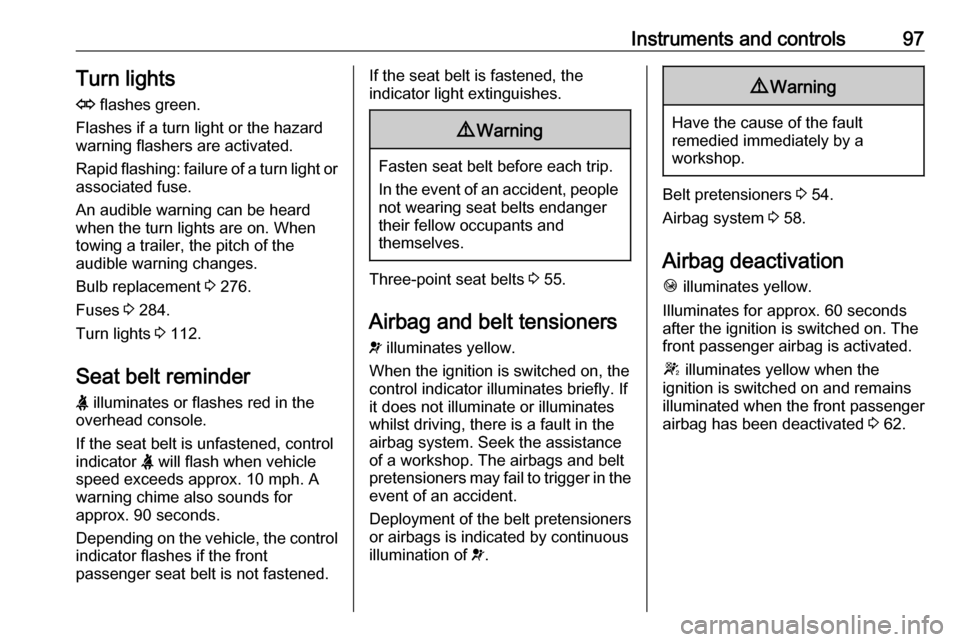
O flashes green.
Flashes if a turn light or the hazard
warning flashers are activated.
Rapid flashing: failure of a turn light or associated fuse.
An audible warning can be heard
when the turn lights are on. When
towing a trailer, the pitch of the
audible warning changes.
Bulb replacement 3 276.
Fuses 3 284.
Turn lights 3 112.
Seat belt reminder
X illuminates or flashes red in the
overhead console.
If the seat belt is unfastened, control
indicator X will flash when vehicle
speed exceeds approx. 10 mph. A warning chime also sounds for
approx. 90 seconds.
Depending on the vehicle, the control
indicator flashes if the front
passenger seat belt is not fastened.If the seat belt is fastened, the
indicator light extinguishes.9 Warning
Fasten seat belt before each trip.
In the event of an accident, people
not wearing seat belts endanger their fellow occupants and
themselves.
Three-point seat belts 3 55.
Airbag and belt tensioners
v illuminates yellow.
When the ignition is switched on, the control indicator illuminates briefly. If
it does not illuminate or illuminates
whilst driving, there is a fault in the
airbag system. Seek the assistance
of a workshop. The airbags and belt
pretensioners may fail to trigger in the event of an accident.
Deployment of the belt pretensioners
or airbags is indicated by continuous
illumination of v.
9 Warning
Have the cause of the fault
remedied immediately by a
workshop.
Belt pretensioners 3 54.
Airbag system 3 58.
Airbag deactivation Ó illuminates yellow.
Illuminates for approx. 60 seconds
after the ignition is switched on. The
front passenger airbag is activated.
W illuminates yellow when the
ignition is switched on and remains
illuminated when the front passenger
airbag has been deactivated 3 62.
Page 104 of 351

102Instruments and controls9Warning
When the engine is off,
considerably more force is needed
to brake and steer. During an
Autostop the brake servo unit will still be operational.
Do not remove key until vehicle is stationary, otherwise the steeringwheel lock could engage
unexpectedly.
Check engine oil level 3 270.
Keep engine turned off and let the
vehicle be towed to a workshop.
Low fuel Y illuminates yellow.
Illuminates when the ignition is
switched on and extinguishes shortly
after the engine starts.
Illuminates when the engine is
running
Fuel level in the tank is too low. Refuel
immediately.
Never run the tank dry.
Refuelling 3 262.
Catalytic converter 3 233.
Bleeding the diesel fuel system
3 275.
Stop-start system \ illuminates when an Autostop is
inhibited when certain conditions are
not fulfilled.
Ï illuminates during an Autostop.
Ï flashes if the clutch is not released
sufficiently.
Stop-start system 3 227.
Exterior light
F illuminates green.
Illuminated when the side lights are
on 3 109.
Low beam
9 illuminates or flashes green.
Illuminates
Illuminated when the headlights are on 3 109.Flashes
Fault in the lighting.
High beam P illuminates blue.
Illuminated when high beam is on and during headlight flash 3 110.
High beam assist f illuminates when the high beam
assist is activated 3 110.
Front fog lights
> illuminates green.
Illuminated when the front fog lights
are on 3 112.
Rear fog light ø illuminates yellow.
Illuminated when the rear fog light is on 3 113.
Cruise control
U , m illuminate green.
Page 108 of 351

106Instruments and controlsWarning chimesIf several warnings appear at the
same time, only one warning chime
will sound.
When starting the engine or whilst driving
The warning chime regarding unfastened seat belts has priority
over any other warning chime.
● If seat belt is not fastened 3 55.
● If a certain speed is exceeded with the parking brake applied
3 244.
● If the parking assist detects an object or a fault is present
3 254.
● If the vehicle has manual transmission automated and the
clutch temperature is too high
3 240.
● If the vehicle speed briefly exceeds a set limit 3 90.
● During closing of the power sliding door 3 29.
● If the sliding door is open and the
parking brake is released 3 29.● During activation and
deactivation of alarm monitoring
of vehicle inclination 3 35.
● If the AdBlue level falls below a certain amount or a fault is
present 3 233.
● If the lane departure warning system detects an unintended
lane change and when the
system is activated 3 260.
When the vehicle is parked and /
or the driver's door is opened
● When the key is in the ignition switch.
● With exterior lights on 3 109.
● There is a fault with the power door lock system 3 28.
● If the vehicle has manual transmission automated 3 240,
the parking brake has not been
applied, neutral is not selected or
the brake pedal has not been
depressed. A corresponding
message may also appear in the
Driver Information Centre 3 104.● If the sliding side door exterior
handle is in the open position
when unlocking the vehicle 3 29.
● If the parking brake is not applied
when the power sliding door
switch is pressed 3 29.
● If the power sliding door is locked
from the inside with the child lock
active 3 29.
● If the engine is in an Autostop but
not switched off. Stop-start
system 3 227.
Page 111 of 351
Lighting109LightingExterior lighting.......................... 109
Light switch .............................. 109
Automatic light control .............109
High beam ............................... 110
High beam assist .....................110
Headlight flash ......................... 111
Headlight range adjustment ....111
Headlights when driving abroad .................................... 111
Daytime running lights .............112
Hazard warning flashers ..........112
Turn lights ................................ 112
Front fog lights ......................... 112
Rear fog light ........................... 113
Reversing lights .......................113
Misted light covers ...................113
Interior lighting ........................... 113
Interior lights ............................ 113
Load compartment lighting ......114
Reading lights .......................... 115
Lighting features ........................115
Exit lighting .............................. 115
Battery discharge protection ....116Exterior lighting
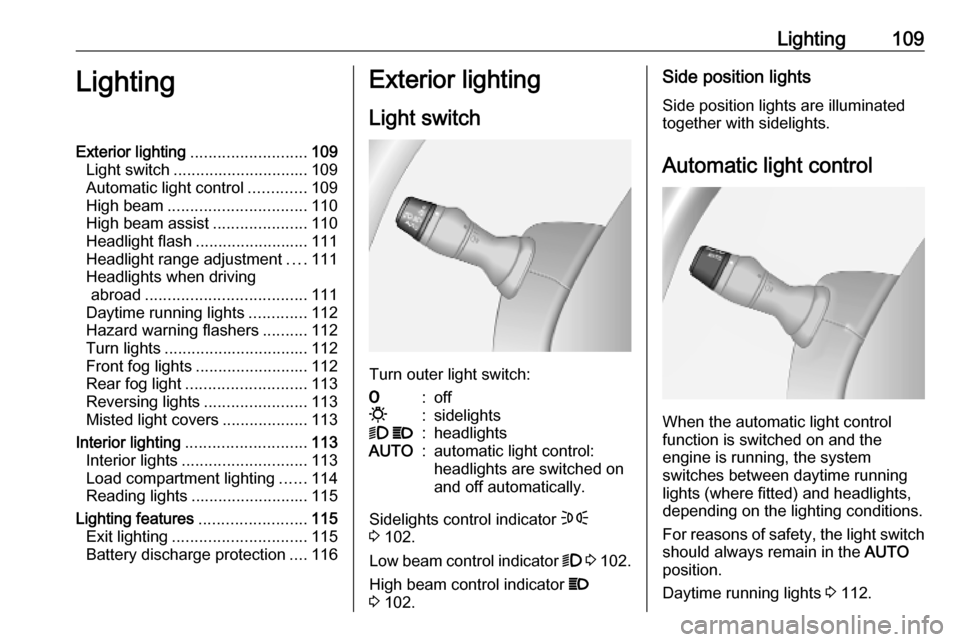
Light switch
Turn outer light switch:
7:off0:sidelights9 P:headlightsAUTO:automatic light control:
headlights are switched on
and off automatically.
Sidelights control indicator F
3 102.
Low beam control indicator 9 3 102.
High beam control indicator P
3 102.
Side position lights
Side position lights are illuminated
together with sidelights.
Automatic light control
When the automatic light control
function is switched on and the
engine is running, the system
switches between daytime running
lights (where fitted) and headlights,
depending on the lighting conditions.
For reasons of safety, the light switch
should always remain in the AUTO
position.
Daytime running lights 3 112.
Page 114 of 351
112LightingDaytime running lights
Daytime running lights increase
visibility of the vehicle during daylight.
The lights operate automatically
when the ignition is switched on.
If the vehicle is equipped with the
automatic light control function, the
system switches between daytime running lights and headlights
automatically depending on the
lighting conditions.
Automatic light control 3 109.
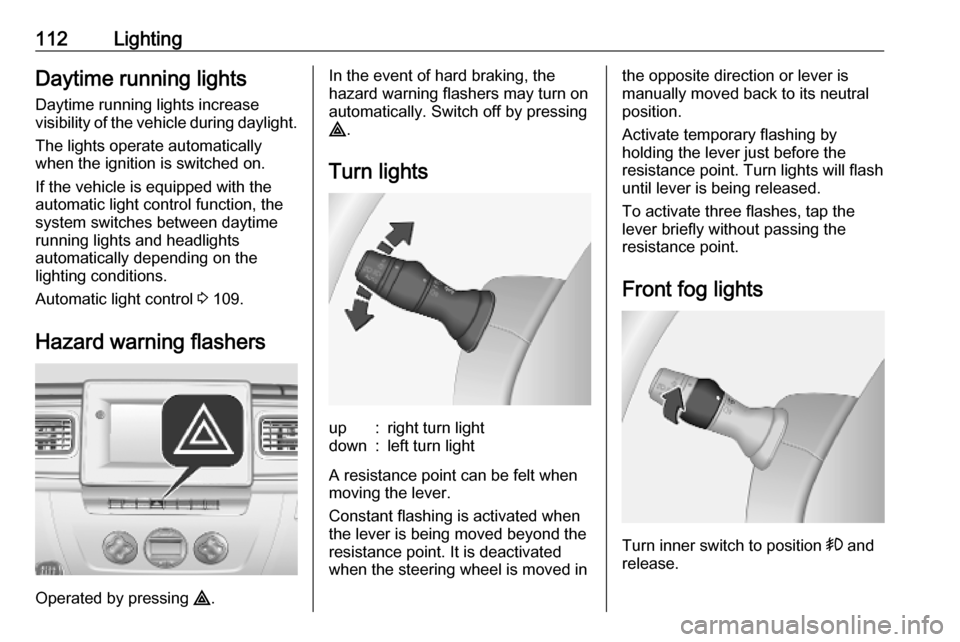
Hazard warning flashers
Operated by pressing ¨.
In the event of hard braking, the
hazard warning flashers may turn on automatically. Switch off by pressing
¨ .
Turn lightsup:right turn lightdown:left turn light
A resistance point can be felt when
moving the lever.
Constant flashing is activated when
the lever is being moved beyond the
resistance point. It is deactivated
when the steering wheel is moved in
the opposite direction or lever is
manually moved back to its neutral
position.
Activate temporary flashing by
holding the lever just before the
resistance point. Turn lights will flash
until lever is being released.
To activate three flashes, tap the
lever briefly without passing the
resistance point.
Front fog lights
Turn inner switch to position > and
release.
Page 142 of 351

140Infotainment systemNotice
Navigation maps for the current
country must be installed on the
system to ensure the local time is
correct.
● Factory settings
The following settings can be
reset to the factory default:
● All
● Phone - Smartphone
● Navigation
● Audio-Media-Radio-System
● Navigation (On/Off)
● System version (displays
Infotainment system software
version number)
When system setting adjustments
have been made, touch 7 (and select
another menu on the display) to exit
the settings menu and save changes.
The system also saves and exits
automatically after a delay.
NAVI 80 IntelliLink To access the system settings menufrom the Home page, touch MENU
followed by System.The following settings submenus are
displayed:
● Language
● Display
● Sound
● Clock
● Safety warnings
● Home screen
● Keyboards
● Set units
● Status & Information
● Remove SD-card
● Restore factory settings
● Android Auto Settings ™
After system settings are changed,
touch Done to confirm.Language
To change Infotainment system
language then voice type (depending on version).Display
The following settings are displayed:
● Daytime brightness : Change
screen brightness to suit external light levels (daylight).During low external light levels,
the display screen is easier to
view when the display is not too
bright.
● Nighttime brightness /Night
brightness : Change screen
brightness to suit external light
levels (night light).
During low external light levels,
the display screen is easier to
view when the display is not too
bright.
● Automatic day/night mode /
Change to night colours : To
activate automatic switching
between daytime/night
brightness.
Night mode is activated during
low external light levels and when
the headlights are switched on.
● Force night mode /Use night
colours : To activate night mode.
Page 190 of 351

188Infotainment systemThis menu option contains the
following information:
● speed limits
● phone country code (International dialling code, e.g.
+49)
● emergency number (e.g. 112)
● legal restrictions, e.g.: ● vehicle equipment requirements, e.g. warning
triangle, first aid kit, fire
extinguisher, spare bulbs,
high-visibility jacket etc.
● headlights legislation
● maximum blood alcohol level
● snow chains legislation
● winter tyres legislationHelp Nearby
This function allows you to search for
assistance near the current location.
When the Where am I? screen is
displayed, touch Help Nearby.This menu option contains the
following information:
● Car repair around here (Vehicle
repair services)
● Health around here (Medical and
emergency services)
● Police around here (Police
stations)
● Petrol station around here (Fuel
stations)
Select the appropriate option to
access a list of local Points of Interest (POI).
For information on Points of Interest
(POI), refer to (NAVI 50 IntelliLink)
"Destination input" 3 176.
Traffic information NAVI 50 IntelliLink
Available depending on version, up-
to-date traffic information from local
sources can be received. Information
is provided for the current route or for
the current vehicle location.
During route guidance, touch
Options then select Current traffic , or
touch the traffic icon Ö on the mapscreen. Traffic incidents along the
route and estimated delay times are
displayed.
The following options are available: ● Event list : Select to change event
display settings.
● Offer detour : Create an
alternative route to the selected
destination.
● Options : Access traffic options.
To access these traffic options at any time, touch 7 followed by yNAVI /
ý Nav then Options . Then select
Ö Traffic .
Touch q to return to route guidance.
NAVI 80 IntelliLink
Allows up-to-date traffic information from local sources to be received.
From the Home page, touch MENU
then Navigation , followed by
Navigation Services . Then select
Traffic /HD Traffic .
The navigation system indicates
traffic incidents with voice messages, the traffic information bar and also by
displaying symbols on the map.
Page 256 of 351
254Driving and operatingpedal to override the automatic
braking if the situation and the
surroundings permit.
In the following cases, active
emergency braking performance is limited:
● driving on winding or hilly roads
● detecting all vehicles, especially vehicles with a trailer, tractors,
muddy vehicles, etc.
● detecting a vehicle when weather
limits visibility, such as in fog,
rain, or snow
● driving during nighttime
● sensor in the windscreen or radar
unit behind the front bumper blocked by snow, ice, slush, mud, dirt, etc.
● windscreen damaged or affected
by foreign objects, e.g. stickers
Complete attention is always required
while driving, and you should be
ready to take action and apply the
brakes and / or steer the vehicle to
avoid crashes.Fault
In case the system requires a service, a message is displayed in the Driver
Information Centre.
Additionally, warning lights l and
j illuminate at the same time.
When the system detects that its
function is not available, warning light
l or j illuminates and stays on.
Additionally, a message in the Driver
Information Centre appears. The system may be temporarily disrupted
(for example: radar or camera
obscured by dirt, mud, snow etc.). In
this case, park the vehicle and switch off the engine. Clean the windscreen
area around the camera and the
detection zone of the radar in the front bumper. When the warning lights and
messages still appear after starting
the vehicle again, seek the
assistance of a workshop.Parking assist9 Warning
It is the driver who bears full
responsibility for the parking
manoeuvre.
Always check the surrounding
area while reversing and using the rear parking assist system.
The parking assist measures the
distance between the vehicle and
obstacles behind and, if available, in
front of the vehicle. It informs and
warns the driver by giving acoustic
signals.
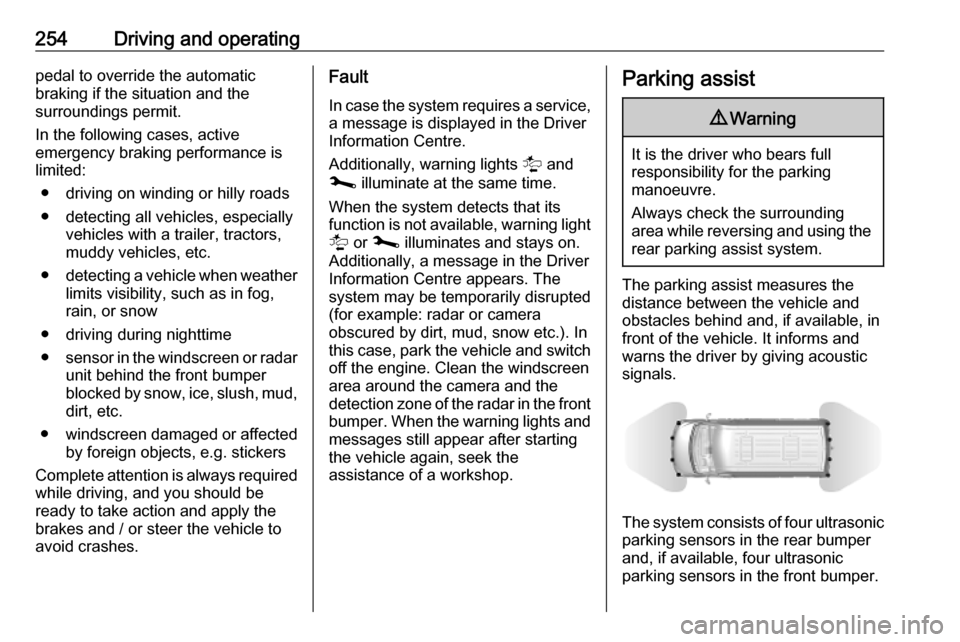
The system consists of four ultrasonic parking sensors in the rear bumper
and, if available, four ultrasonic
parking sensors in the front bumper.
Page 259 of 351
Driving and operating257Deactivation
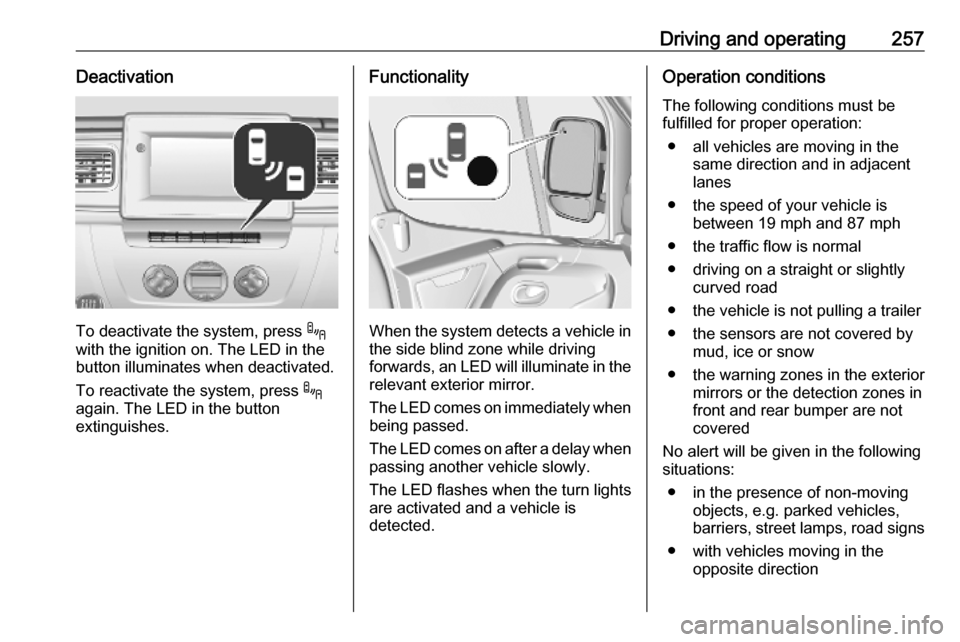
To deactivate the system, press .
with the ignition on. The LED in the
button illuminates when deactivated.
To reactivate the system, press .
again. The LED in the button
extinguishes.
Functionality
When the system detects a vehicle in the side blind zone while driving
forwards, an LED will illuminate in the
relevant exterior mirror.
The LED comes on immediately when being passed.
The LED comes on after a delay when
passing another vehicle slowly.
The LED flashes when the turn lights
are activated and a vehicle is
detected.
Operation conditions
The following conditions must be
fulfilled for proper operation:
● all vehicles are moving in the same direction and in adjacent
lanes
● the speed of your vehicle is between 19 mph and 87 mph
● the traffic flow is normal
● driving on a straight or slightly curved road
● the vehicle is not pulling a trailer ● the sensors are not covered by mud, ice or snow
● the warning zones in the exterior mirrors or the detection zones in
front and rear bumper are not
covered
No alert will be given in the following
situations:
● in the presence of non-moving objects, e.g. parked vehicles,
barriers, street lamps, road signs
● with vehicles moving in the opposite direction