USB VAUXHALL MOVANO_B 2020 Owner's Guide
[x] Cancel search | Manufacturer: VAUXHALL, Model Year: 2020, Model line: MOVANO_B, Model: VAUXHALL MOVANO_B 2020Pages: 351, PDF Size: 9.32 MB
Page 154 of 351
152Infotainment systemTouch < to open a pop-up menu
(depending on version). The following
options are available:
● Auxiliary socket : Change the
audio source to AUX mode, then
switch on the auxiliary device.
● USB : Refer to
(NAVI 80 IntelliLink) "USB port"
3 152.
● Bluetooth connection : Refer to
(NAVI 80 IntelliLink) "Bluetooth
music" 3 155USB port
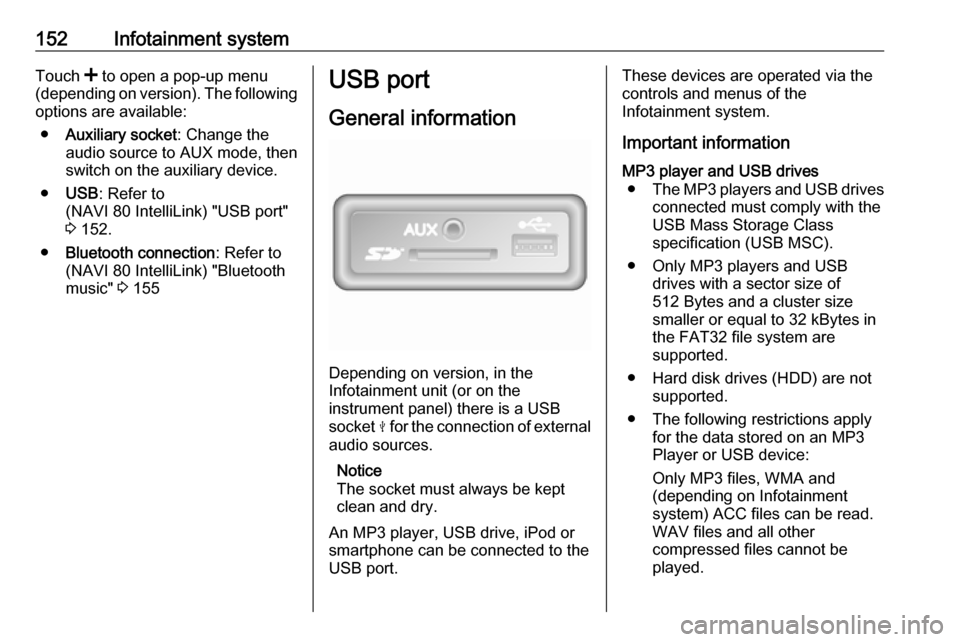
General information
Depending on version, in the
Infotainment unit (or on the
instrument panel) there is a USB
socket M for the connection of external
audio sources.
Notice
The socket must always be kept
clean and dry.
An MP3 player, USB drive, iPod or
smartphone can be connected to the
USB port.
These devices are operated via the
controls and menus of the
Infotainment system.
Important informationMP3 player and USB drives ● The MP3 players and USB drives
connected must comply with the
USB Mass Storage Class
specification (USB MSC).
● Only MP3 players and USB drives with a sector size of
512 Bytes and a cluster size smaller or equal to 32 kBytes in
the FAT32 file system are
supported.
● Hard disk drives (HDD) are not supported.
● The following restrictions apply for the data stored on an MP3
Player or USB device:
Only MP3 files, WMA and
(depending on Infotainment
system) ACC files can be read.
WAV files and all other
compressed files cannot be
played.
Page 155 of 351

Infotainment system153Maximum folder structure depth:
eleven levels.
Maximum number of files that can be saved: 1000 files.
NAVI 50 IntelliLink : Minimum
recommended storage capacity
of USB drive is 4 GB.
Recommended maximum
storage capacity is 32 GB.
WMA files with Digital Rights
Management (DRM) from online music shops may not play
correctly or not at all.
Applicable playlist
extensions: .m3u, .pls.
Playlist entries must be in the
form of relative paths.
Playing saved audio files
Once connected, it is only possible to use the controls and menus of the
Infotainment system to operate the
audio device.Radio 15 USB
MP3 player / iPod / USB drives
The system detects the audio device when a USB device is connected and
the current track is displayed
automatically.
When a new audio device is
connected, the first track in the first
folder is played automatically. When
reconnecting the device, the
previously played track is resumed.
Depending on the audio device
connected, select a folder (MP3
player, USB drive) or a playlist
(portable digital music player).
Selecting a track
To select tracks directly (and change
folders), first access the audio device
menu structure by pressing OK
during playback. Select tracks and
change folders by turning and
pressing the knob.NAVI 50 IntelliLink
MP3 player / USB drives / iPod
The system detects the audio device when a USB device is connected and
the current track is displayed
automatically. The device type (MP3
player/USB drive or iPod) is also
recognised and the relevant audio
source mode (USB or iPod) is
selected automatically.
When the t/ü MEDIA menu is
active, the following submenus are
available:
● Main /Player
● List
● Options
To switch between audio sources,
touch S in top left corner. The
following options are available:
● USB : Select to change the audio
source to USB mode.
Notice
During use, the battery of a
connected USB device is charged or maintained.
Page 156 of 351

154Infotainment system●iPod : Select to change the audio
source to iPod mode.
● BT: Refer to
(NAVI 50 IntelliLink) "Playing music via Bluetooth" - 3 155.
● AUX : Refer to
(NAVI 50 IntelliLink) "Aux input
usage" 3 151.Main/Player
Select to display the current track. In
this display screen, the following
options are available:
● l (skip to previous track, press
and hold to fast rewind)
● =/l (pause/play)
● m (skip to next track, press and
hold to fast forward)List
Displays a list of the tracks in the
current album/folder. Select a
particular track to play it directly.
Notice
By default, albums are listed in
alphabetical order.
If a USB drive is connected, all the
folders will be at the same level on
the tree structure.To return to the previous level on the
folder tree structure, touch ò.Options
Select to display the following
options:
● Repeat (Off/Track/Folder/All)
● Shuffle (On/Off)
NAVI 80 IntelliLink
MP3 player / USB drives
Change the audio source to USB
mode to playback files from a
connected USB device.
To access the media menu from the
Home page, select MENU then
Multimedia , followed by Media.
Touch < to open a pop-up menu
(depending on version). The following
options are available:
● USB : Change the audio source to
USB mode.
● Auxiliary socket : Refer to
(NAVI 80 IntelliLink) "AUX input"
3 150.
● Bluetooth connection : Refer to
(NAVI 80 IntelliLink) "Playing music via Bluetooth" 3 155.
● SD card
When USB mode is selected, the
display includes the following options:
● t or v: Move to previous/next
track.
● =: Pause track.
● Scroll bar for time elapsed: Scroll
through tracks.
● New selection : Choose another
track from the connected audio
source.
● Current playlist : Access the
current playback list.
● r: Return to previous screen.
● <: Open pop-up menu; To
change the audio source or
access the track settings (e.g.
switch on/off shuffle or repeat,
show current track details, and
access sound settings).
Page 157 of 351

Infotainment system155Disconnecting from USB socketPlayback is stopped immediately
when the audio device is withdrawn
from the USB socket.Bluetooth music
General information
Bluetooth-enabled auxiliary audio
sources (e.g. music mobile phones,
MP3 players etc.) can be connected
wirelessly to the Infotainment system.
Important information ● The Infotainment system only connects to Bluetooth devices
that support A2DP (Advanced Audio Distribution Profile).
Connection issues may arise with
early versions.
● The Bluetooth device must support AVRCP (Audio VideoRemote Control Profile)
version 1.0 or higher. If the
device does not support AVRCP, only the volume can be controlled via the Infotainment system.
● Before connecting the Bluetooth device to the Infotainment
system, become acquainted with
its operating instructions for
Bluetooth functions.Operation
Prerequisites The following prerequisites must be
met, in order to control a Bluetooth-
enabled audio device via the
Infotainment system:
● The Bluetooth function of the Infotainment system must be
activated.
Refer to "Bluetooth connection"
in the "Phone" section 3 196.
● The Bluetooth function of the Bluetooth-enabled auxiliary
audio source must be activated
(see audio device operating
instructions).
● Dependent upon the audio source, it may be required to set
that device to "visible" (see audio
device operating instructions).
● The audio source must be paired
and connected to the
Infotainment system.
Page 158 of 351

156Infotainment systemRadio 15 USB
Bluetooth connection
A connection must be set up between the audio device and the Infotainment
system via Bluetooth, i.e. the device
must be paired to the vehicle before
using it.
Refer to "Bluetooth connection" in the "Phone" section 3 196.
● A maximum of five audio devices
can be paired and saved in the
device list, but only one can be
connected at a time.
● If the device has both audio player and telephone functions,
both functions will be paired. Pairing a mobile phone 3 194.
● Phone functions will remain active while the audio player is inuse, and audio playback will be
suspended during phone use.
Pairing an auxiliary audio device to the Infotainment system
To pair the audio device, press TEL
and select Pair device by turning and
pressing OK. The Ready to Pair
screen is displayed.Then, on the audio device, search for
Bluetooth equipment in the vicinity of
the device.
Select My Radio (i.e. the name of the
system) from the list on the audio
device, then, if applicable, on the
audio device keypad enter the pairing code shown on the Infotainment
system display screen.
Notice
If the audio device does not have a
screen, enter the default pairing
code on the device, then on the
Infotainment system. Refer to the
operating instructions for this default
audio device pairing code, usually
0000 . Depending on the device, the
pairing code may need to be entered
in reverse order, i.e. on the
Infotainment system first.
If pairing fails, the system returns to
the previous menu and a
corresponding message is displayed. Repeat procedure if necessary.
When pairing is completed, a
confirmation message followed by the
name of the paired audio device is
shown on the Infotainment system
display screen.Notice
When a Bluetooth connection is
active, controlling the audio device
via the Infotainment system will
discharge the audio device battery more rapidly.
Connecting an audio device
Audio devices are automatically
connected to the Infotainment system after the pairing procedure is
completed.
To connect any audio device that has
been paired, or to connect to a
different paired audio device than the
current one, press TEL and select the
Select Device menu. The device list
shows the audio devices already
paired.
Select the desired device from the list
and confirm by pressing OK. A
display message confirms
connection.
Disconnecting an audio device
To disconnect an audio device from the Infotainment system, press TEL
(or SETUP ) and select Bluetooth
connection . Select the desired device
from the device list then select
Page 160 of 351

158Infotainment systemThe default pairing code is 0000. To
change this pairing code before the
pairing procedure is started, select
Change passkey to update.
Notice
If the audio device does not have a
screen, enter the default pairing
code on the device, then on the
Infotainment system. Refer to the
operating instructions for this default
audio device pairing code, usually
0000 . Depending on the device, the
pairing code may need to be entered
in reverse order, i.e. on the
Infotainment system first.
If pairing fails, repeat procedure if
necessary.
Notice
When a Bluetooth connection is
active, controlling the audio device
via the Infotainment system will
discharge the audio device battery
more rapidly.
Connecting an audio device
Audio devices are automatically
connected to the Infotainment system after the pairing procedure is
completed.To change the audio device
connected, touch 7 followed by
ÿ Settings .
Then select Connectivity followed by
View Bluetooth device list . The device
list shows the audio devices already paired.
Select the desired audio device from
the list and confirm by touching OK.
Disconnecting an audio device Switching off the audio device or
deactivating the Bluetooth function on
the audio device disconnects the
device from the Infotainment system.
Unpairing an auxiliary audio device
from the Infotainment system
If the list of paired audio devices is full, a new device can only be paired if an
existing device is unpaired.
To unpair, i.e. to delete an audio
device from the system memory,
touch 7 followed by ÿSettings .
Select Connectivity then View
Bluetooth device list .
Select the desired audio device from
the list, then touch ë to delete the
device. If required, delete all devicesin the list by selecting Options
followed by Delete all. Confirm with
OK .
Operation via Infotainment system
When paired and connected
wirelessly, audio playback begins
automatically.
The audio device can then be
operated via the Infotainment system
display options.
The range of accessible functions
that can be operated via the
Infotainment system depends on the
type of audio player.
The operation of the audio device when connected wirelessly is similarto the operations for playing saved
audio files via the USB socket. Refer
to (NAVI 50 IntelliLink) "Playing music
via USB socket" in the "USB port"
section 3 153.
Page 162 of 351

160Infotainment system●Disconnect all devices : Select to
disconnect all currently
connected devices from the
Infotainment system without
deleting/unpairing them.
● Delete device(s) : Select to unpair
a device from the Infotainment
system.
The unpairing procedure is similar to unpairing a mobile phone. Refer to
(NAVI 80 IntelliLink) "Bluetooth
connection" in the "Phone" section
3 196.
Operation via Infotainment system When paired and connected
wirelessly, audio playback may begin automatically.
The audio device can then be
operated via the Infotainment system
display options.
The range of accessible functions
that can be operated via the
Infotainment system depends on the
type of audio player.
The operation of the audio device
when connected wirelessly is similar
to the operations for playing saved
audio files via the USB socket. Referto (NAVI 80 IntelliLink) "Playing music
via USB socket" in the "USB port"
section 3 153.External devices
Displaying picturesNAVI 80 IntelliLink
To access the "Pictures" menu from
the Home page, touch MENU then
Multimedia , followed by Pictures.
Notice
Playback is only possible when the
vehicle is stationary.
Select the connected source device (e.g. USB) to access individual
photos or present a slideshow of all
compatible photos on the device.
The display includes the following
options:
● N or O: Move to previous/next
photo.
● Thumbnails : Switch between full
screen and minimised view.
● New selection : Choose another
photo from the connected source
device.
● <: Open pop-up menu; To
change the source device or
access the photo settings.
Page 163 of 351

Infotainment system161When viewing a photo/
slideshow, the pop-up menu also allows to set zoom level and
display all photos in thumbnail
form.
Photo settings - refer to
(NAVI 80 IntelliLink) "System
settings" 3 138.
Playing movies
NAVI 50 IntelliLink
To access the "Video" menu from the Home page, touch Media and then
Video .
Notice
Playback is only possible when the vehicle is stationary.
The following three tabs are
available:
● Player : Display the video screen.
● List: Display a list of all available
videos.
● Options : Display the playback
settings and detailed video
information.The video screen includes the
following options:
● Scroll bar for time elapsed: Scroll
through videos.
● %: Play video from the
beginning / play previous video /
fast rewind.
● & : Pause video.
● /: Play next video / fast forward.
● (: Adjust the brightness. To
continue the video playback,
touch the screen.
● ): View the video in full screen.
NAVI 80 IntelliLink
To access the "Videos" menu from
the Home page, touch MENU and
then Multimedia , followed by Video.
Notice
Playback is only possible when the
vehicle is stationary.
Select the connected source device (e.g. USB) to access individual or all
compatible videos on the device.The display includes the following
options:
● t or v: Move to previous/next
video.
● =: Pause video.
● Scroll bar for time elapsed: Scroll
through videos.
● New selection : Choose another
video from the connected source
device.
● Full screen : Switch to full screen
display.
● r: Return to previous screen.
● <: Open pop-up menu; To
change the source device or
access the video settings.
During video playback, the pop-
up menu also allows to return to
the list of videos.
Video settings - refer to
(NAVI 80 IntelliLink) "System
settings" 3 138.
Page 164 of 351

162Infotainment systemUsing smartphone
applications
The phone projection applications
Apple CarPlay™ and Android™ Auto
display selected apps from your
smartphone on the display screen
and allow their operation directly via
the Infotainment controls.
Check with the device's manufacturer
if this function is compatible with your
smartphone and if this application is
available in the country you are in.
Android Auto is available for
NAVI 50 IntelliLink and
NAVI 80 IntelliLink. Apple CarPlay is available for NAVI 50 IntelliLink.
Notice
While using navigation and music
applications via phone projection,
similar applications integrated in the Infotainment system will be
replaced.
NAVI 50 IntelliLink
Preparing the smartphone
Android phone: Download the
Android Auto app to the smartphone from the Google Play™ Store.iPhone: Make sure Siri ®
is activated
on the smartphone.
Connecting the mobile phone
Connect the smartphone to the USB
port 3 152.
Starting phone projection
Android phone: Touch the Android
Auto button on the main screen of the Infotainment system and accept the
requests on the smartphone in order
to use the Android Auto app.
iPhone: Touch the CarPlay button on
the main screen of the Infotainment
system.
The phone projection screen
displayed depends on the
smartphone and software version.
To access a tutorial on smartphone
connectivity, go to the Settings menu,
select Connectivity and scroll through
the list.
Returning to the home screen
Touch the home button.NAVI 80 IntelliLink
Preparing the smartphone
Download the Android Auto app to the smartphone from the Google Play™
Store.
Activating phone projection 1. Connect the smartphone to the USB port 3 152.
2. Accept the request on the display screen.
3. Touch û on the display screen
and accept the confidentiality
clauses. As a first time user look
out for system requests on the
mobile device to continue.
4. Touch û again.
Phone projection can now be used.
Using phone projection ● Touch û on the display screen to
access the Android Auto menu of the connected smartphone.
● Press and hold 5 on the steering
column to access voice controls.
Returning to the display screen
Press ;.
Page 166 of 351

164Infotainment systemUSB memory stick
(NAVI 50 IntelliLink)
A USB memory stick is required for
the navigation system, to contain,
among other things, a digital map of
the towns and roads in your country.
Notice
Use a USB memory stick, formatted
to FAT32 format, with a minimum
4 GB and maximum 32 GB of
storage capacity.
After driving the first 60 miles, it is
possible to check for free digital map
updates within a period of 90 days.
Notice
To avoid possible technical issues,
only use a compatible USB memory stick for operating and updating the
navigation system. Do not insert
USB memory stick in any other
device (e.g. digital camera, mobile
phone, etc.), or in another vehicle.
Software installation
To update the digital maps and to
benefit from exclusive downloadable
services, an account must be createdon the vauxhall.naviextras.com
website and the free software must be
installed.Creating an account
Create your internet account via the
vauxhall.naviextras.com website.
Select e.g., the "Register" option on
the web page and enter the
appropriate details.Installing the software
Install the software on your computer
by downloading from
vauxhall.naviextras.com.
Follow the on-screen instructions to
install the software and launch the
online application.Registering the navigation system
The navigation system must be
registered with your new internet
account.
Insert an empty USB memory stick in
the navigation system's USB slot.
Touch 7 then select ýNav , followed
by Options then Map update .To ensure all content is saved in the
navigation system's memory, select Options then Update . Wait for the
update to complete before ejecting the USB memory stick.
Then insert the USB memory stick in
your computer's USB slot while
connected to the Internet. When the
online application is launched and the
USB memory stick is recognised, the
system (or software) name appears in the application window. The
navigation system is registered into
your user profile.
After the initial set-up, the USB
memory stick is automatically
recognised by the navigation system
and by the online application.
Updating the USB memory stick and
navigation system
Updates are issued regularly, e.g. for
map and safety camera revisions.
Notice
In certain countries it is illegal to
download and activate the camera
warning option and this could lead to prosecution.