audio VAUXHALL MOVANO_B 2020 Owner's Guide
[x] Cancel search | Manufacturer: VAUXHALL, Model Year: 2020, Model line: MOVANO_B, Model: VAUXHALL MOVANO_B 2020Pages: 351, PDF Size: 9.32 MB
Page 153 of 351

Infotainment system151UsageAn audio source that is connected to
the AUX input can only be operated
via the controls on the audio source,
i.e. not via the Infotainment system.
Only select a track directly on the
audio source when the vehicle is
stationary.Caution
Before connecting or
disconnecting an auxiliary device,
e.g. a portable CD player, switch off the player and the Infotainment system, to avoid sound quality
issues and possible damage to the equipment.
Upon connection via the jack plug, thesystem detects the audio source
automatically. Depending on the
recording volume, there may be a
delay before the audio source is
heard.
The artist or track name are not
shown on the display screen.
Notice
Ensure the auxiliary device is
securely stowed during driving.
Vehicle occupants could be injured
by objects being thrown around in
the event of hard braking, a sudden
change in direction or an accident.
Radio 15 USB
Press MEDIA to change the audio
source to AUX mode, then switch on
the auxiliary device. AUX appears on
the display screen.
AUX settings
Press SETUP to access the settings
menu.
Select AUX IN and turn OK until the
desired setting is selected from:
● HI (300 mV)
● MID (600 mV)
● LO (1200 mV)
NAVI 50 IntelliLink
To access the media menu at any
time, touch 7 followed by t/
ü MEDIA .To switch between auxiliary sources,
touch S in top left corner. The
following options are available:
● USB : Refer to
(NAVI 50 IntelliLink) "USB port"
3 152.
● iPod : Refer to
(NAVI 50 IntelliLink) "USB port" 3 152.
● BT: Refer to
(NAVI 50 IntelliLink) "Bluetooth music" 3 155.
● Video : Refer to
(NAVI 50 IntelliLink) "Video"
3 161.
● AUX : Select to change the audio
source to AUX mode, then switch
on the auxiliary device.
NAVI 80 IntelliLink
Change the audio source to AUX
mode to playback content from a
connected auxiliary device.
To access the media menu from the Home page, touch MENU then
Multimedia , followed by Media.
Page 154 of 351
152Infotainment systemTouch < to open a pop-up menu
(depending on version). The following
options are available:
● Auxiliary socket : Change the
audio source to AUX mode, then
switch on the auxiliary device.
● USB : Refer to
(NAVI 80 IntelliLink) "USB port"
3 152.
● Bluetooth connection : Refer to
(NAVI 80 IntelliLink) "Bluetooth
music" 3 155USB port
General information
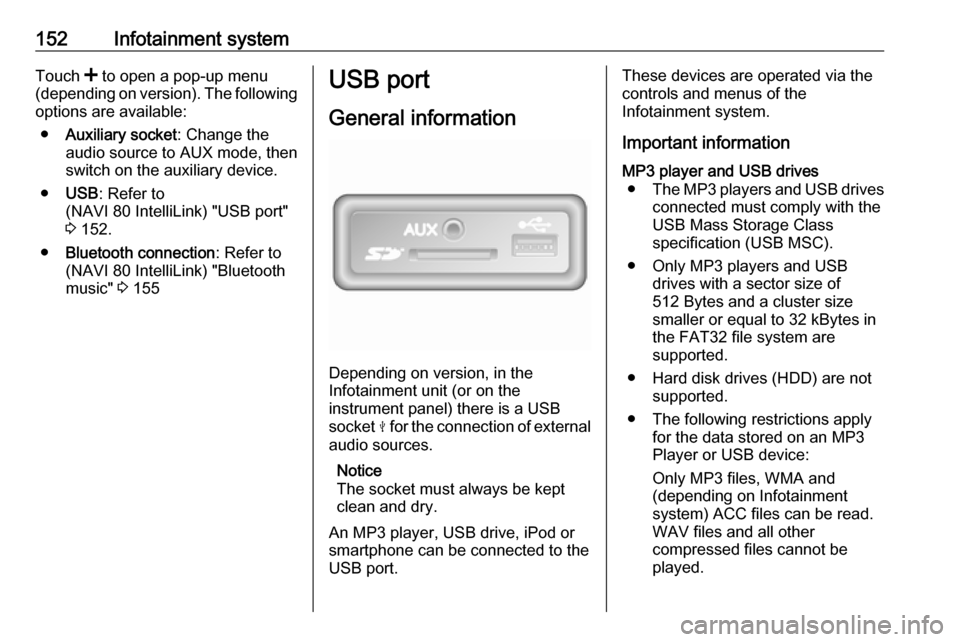
Depending on version, in the
Infotainment unit (or on the
instrument panel) there is a USB
socket M for the connection of external
audio sources.
Notice
The socket must always be kept
clean and dry.
An MP3 player, USB drive, iPod or
smartphone can be connected to the
USB port.
These devices are operated via the
controls and menus of the
Infotainment system.
Important informationMP3 player and USB drives ● The MP3 players and USB drives
connected must comply with the
USB Mass Storage Class
specification (USB MSC).
● Only MP3 players and USB drives with a sector size of
512 Bytes and a cluster size smaller or equal to 32 kBytes in
the FAT32 file system are
supported.
● Hard disk drives (HDD) are not supported.
● The following restrictions apply for the data stored on an MP3
Player or USB device:
Only MP3 files, WMA and
(depending on Infotainment
system) ACC files can be read.
WAV files and all other
compressed files cannot be
played.
Page 155 of 351

Infotainment system153Maximum folder structure depth:
eleven levels.
Maximum number of files that can be saved: 1000 files.
NAVI 50 IntelliLink : Minimum
recommended storage capacity
of USB drive is 4 GB.
Recommended maximum
storage capacity is 32 GB.
WMA files with Digital Rights
Management (DRM) from online music shops may not play
correctly or not at all.
Applicable playlist
extensions: .m3u, .pls.
Playlist entries must be in the
form of relative paths.
Playing saved audio files
Once connected, it is only possible to use the controls and menus of the
Infotainment system to operate the
audio device.Radio 15 USB
MP3 player / iPod / USB drives
The system detects the audio device when a USB device is connected and
the current track is displayed
automatically.
When a new audio device is
connected, the first track in the first
folder is played automatically. When
reconnecting the device, the
previously played track is resumed.
Depending on the audio device
connected, select a folder (MP3
player, USB drive) or a playlist
(portable digital music player).
Selecting a track
To select tracks directly (and change
folders), first access the audio device
menu structure by pressing OK
during playback. Select tracks and
change folders by turning and
pressing the knob.NAVI 50 IntelliLink
MP3 player / USB drives / iPod
The system detects the audio device when a USB device is connected and
the current track is displayed
automatically. The device type (MP3
player/USB drive or iPod) is also
recognised and the relevant audio
source mode (USB or iPod) is
selected automatically.
When the t/ü MEDIA menu is
active, the following submenus are
available:
● Main /Player
● List
● Options
To switch between audio sources,
touch S in top left corner. The
following options are available:
● USB : Select to change the audio
source to USB mode.
Notice
During use, the battery of a
connected USB device is charged or maintained.
Page 156 of 351

154Infotainment system●iPod : Select to change the audio
source to iPod mode.
● BT: Refer to
(NAVI 50 IntelliLink) "Playing music via Bluetooth" - 3 155.
● AUX : Refer to
(NAVI 50 IntelliLink) "Aux input
usage" 3 151.Main/Player
Select to display the current track. In
this display screen, the following
options are available:
● l (skip to previous track, press
and hold to fast rewind)
● =/l (pause/play)
● m (skip to next track, press and
hold to fast forward)List
Displays a list of the tracks in the
current album/folder. Select a
particular track to play it directly.
Notice
By default, albums are listed in
alphabetical order.
If a USB drive is connected, all the
folders will be at the same level on
the tree structure.To return to the previous level on the
folder tree structure, touch ò.Options
Select to display the following
options:
● Repeat (Off/Track/Folder/All)
● Shuffle (On/Off)
NAVI 80 IntelliLink
MP3 player / USB drives
Change the audio source to USB
mode to playback files from a
connected USB device.
To access the media menu from the
Home page, select MENU then
Multimedia , followed by Media.
Touch < to open a pop-up menu
(depending on version). The following
options are available:
● USB : Change the audio source to
USB mode.
● Auxiliary socket : Refer to
(NAVI 80 IntelliLink) "AUX input"
3 150.
● Bluetooth connection : Refer to
(NAVI 80 IntelliLink) "Playing music via Bluetooth" 3 155.
● SD card
When USB mode is selected, the
display includes the following options:
● t or v: Move to previous/next
track.
● =: Pause track.
● Scroll bar for time elapsed: Scroll
through tracks.
● New selection : Choose another
track from the connected audio
source.
● Current playlist : Access the
current playback list.
● r: Return to previous screen.
● <: Open pop-up menu; To
change the audio source or
access the track settings (e.g.
switch on/off shuffle or repeat,
show current track details, and
access sound settings).
Page 157 of 351

Infotainment system155Disconnecting from USB socketPlayback is stopped immediately
when the audio device is withdrawn
from the USB socket.Bluetooth music
General information
Bluetooth-enabled auxiliary audio
sources (e.g. music mobile phones,
MP3 players etc.) can be connected
wirelessly to the Infotainment system.
Important information ● The Infotainment system only connects to Bluetooth devices
that support A2DP (Advanced Audio Distribution Profile).
Connection issues may arise with
early versions.
● The Bluetooth device must support AVRCP (Audio VideoRemote Control Profile)
version 1.0 or higher. If the
device does not support AVRCP, only the volume can be controlled via the Infotainment system.
● Before connecting the Bluetooth device to the Infotainment
system, become acquainted with
its operating instructions for
Bluetooth functions.Operation
Prerequisites The following prerequisites must be
met, in order to control a Bluetooth-
enabled audio device via the
Infotainment system:
● The Bluetooth function of the Infotainment system must be
activated.
Refer to "Bluetooth connection"
in the "Phone" section 3 196.
● The Bluetooth function of the Bluetooth-enabled auxiliary
audio source must be activated
(see audio device operating
instructions).
● Dependent upon the audio source, it may be required to set
that device to "visible" (see audio
device operating instructions).
● The audio source must be paired
and connected to the
Infotainment system.
Page 158 of 351

156Infotainment systemRadio 15 USB
Bluetooth connection
A connection must be set up between the audio device and the Infotainment
system via Bluetooth, i.e. the device
must be paired to the vehicle before
using it.
Refer to "Bluetooth connection" in the "Phone" section 3 196.
● A maximum of five audio devices
can be paired and saved in the
device list, but only one can be
connected at a time.
● If the device has both audio player and telephone functions,
both functions will be paired. Pairing a mobile phone 3 194.
● Phone functions will remain active while the audio player is inuse, and audio playback will be
suspended during phone use.
Pairing an auxiliary audio device to the Infotainment system
To pair the audio device, press TEL
and select Pair device by turning and
pressing OK. The Ready to Pair
screen is displayed.Then, on the audio device, search for
Bluetooth equipment in the vicinity of
the device.
Select My Radio (i.e. the name of the
system) from the list on the audio
device, then, if applicable, on the
audio device keypad enter the pairing code shown on the Infotainment
system display screen.
Notice
If the audio device does not have a
screen, enter the default pairing
code on the device, then on the
Infotainment system. Refer to the
operating instructions for this default
audio device pairing code, usually
0000 . Depending on the device, the
pairing code may need to be entered
in reverse order, i.e. on the
Infotainment system first.
If pairing fails, the system returns to
the previous menu and a
corresponding message is displayed. Repeat procedure if necessary.
When pairing is completed, a
confirmation message followed by the
name of the paired audio device is
shown on the Infotainment system
display screen.Notice
When a Bluetooth connection is
active, controlling the audio device
via the Infotainment system will
discharge the audio device battery more rapidly.
Connecting an audio device
Audio devices are automatically
connected to the Infotainment system after the pairing procedure is
completed.
To connect any audio device that has
been paired, or to connect to a
different paired audio device than the
current one, press TEL and select the
Select Device menu. The device list
shows the audio devices already
paired.
Select the desired device from the list
and confirm by pressing OK. A
display message confirms
connection.
Disconnecting an audio device
To disconnect an audio device from the Infotainment system, press TEL
(or SETUP ) and select Bluetooth
connection . Select the desired device
from the device list then select
Page 159 of 351

Infotainment system157Disconnect the device by turning and
pressing OK. A display message
confirms disconnection.
Switching off the audio device or
deactivating the Bluetooth function on the audio device also disconnects the
device from the Infotainment system.
Unpairing an auxiliary audio device
from the Infotainment system
If the list of paired audio devices is full, a new device can only be paired if an
existing device is unpaired.
To unpair, i.e. to delete an audio
device from the system memory,
press TEL and select Delete device .
Select the desired audio device from
the list and press OK to confirm
deletion when prompted.
Operation via Infotainment system
When paired and connected
wirelessly, audio playback begins
automatically.
The audio device can then be
operated via the Infotainment system
function buttons, rotary knobs and
display menus.The range of accessible functions
that can be operated via the
Infotainment system depends on the
type of audio player.
NAVI 50 IntelliLink
Bluetooth connection
A connection must be set up between the audio device and the Infotainmentsystem via Bluetooth, i.e. the device
must be paired to the vehicle before
using it.
Refer to (NAVI 50 IntelliLink)
"Bluetooth connection" in the "Phone"
section 3 196.
● A maximum of five audio devices
can be paired and saved in the
device list, but only one can be
connected at a time (depending
on version, up to eight audio
devices may be paired).● If the device has both audio player and telephone functions,
both functions will be paired.
Pairing a mobile phone 3 194.
● Phone functions will remain active while the audio player is inuse, and audio playback will be
suspended during phone use.
Pairing an auxiliary audio device to the Infotainment system
To pair the audio device, touch 7
followed by ÿSettings .
Select Connectivity then either
Search for Bluetooth device or
External device authorization .
On the audio device, search for Bluetooth equipment in the vicinity of the device.
Select the name of the Infotainment
system (e.g. Media Nav Evolution )
from the list on the audio device, then (if required), on the audio device
keypad, enter the pairing code shown
on the Infotainment system display
screen.
Page 160 of 351

158Infotainment systemThe default pairing code is 0000. To
change this pairing code before the
pairing procedure is started, select
Change passkey to update.
Notice
If the audio device does not have a
screen, enter the default pairing
code on the device, then on the
Infotainment system. Refer to the
operating instructions for this default
audio device pairing code, usually
0000 . Depending on the device, the
pairing code may need to be entered
in reverse order, i.e. on the
Infotainment system first.
If pairing fails, repeat procedure if
necessary.
Notice
When a Bluetooth connection is
active, controlling the audio device
via the Infotainment system will
discharge the audio device battery
more rapidly.
Connecting an audio device
Audio devices are automatically
connected to the Infotainment system after the pairing procedure is
completed.To change the audio device
connected, touch 7 followed by
ÿ Settings .
Then select Connectivity followed by
View Bluetooth device list . The device
list shows the audio devices already paired.
Select the desired audio device from
the list and confirm by touching OK.
Disconnecting an audio device Switching off the audio device or
deactivating the Bluetooth function on
the audio device disconnects the
device from the Infotainment system.
Unpairing an auxiliary audio device
from the Infotainment system
If the list of paired audio devices is full, a new device can only be paired if an
existing device is unpaired.
To unpair, i.e. to delete an audio
device from the system memory,
touch 7 followed by ÿSettings .
Select Connectivity then View
Bluetooth device list .
Select the desired audio device from
the list, then touch ë to delete the
device. If required, delete all devicesin the list by selecting Options
followed by Delete all. Confirm with
OK .
Operation via Infotainment system
When paired and connected
wirelessly, audio playback begins
automatically.
The audio device can then be
operated via the Infotainment system
display options.
The range of accessible functions
that can be operated via the
Infotainment system depends on the
type of audio player.
The operation of the audio device when connected wirelessly is similarto the operations for playing saved
audio files via the USB socket. Refer
to (NAVI 50 IntelliLink) "Playing music
via USB socket" in the "USB port"
section 3 153.
Page 161 of 351

Infotainment system159NAVI 80 IntelliLinkBluetooth connection
A connection must be set up between
the audio device and the Infotainment system via Bluetooth, i.e. the device
must be paired to the vehicle before
using it.
● There is a maximum number of audio devices that can be paired
and saved in the device list, but
only one can be connected at a
time.
● If the device has both audio player and telephone functions,
both functions will be paired.
Pairing a mobile phone 3 194.
● Phone functions will remain active while the audio player is inuse, and audio playback will be
suspended during phone use.
Pairing an auxiliary audio device to
the Infotainment system
From the Home page, touch MENU
then Multimedia , followed by
Settings .Select Media to access the media
settings menu, then select the "Manage Bluetooth
devices"/"Configure Bluetooth
connection" option.
The pairing procedure is similar to
pairing a mobile phone. Refer to (NAVI 80 IntelliLink) "Bluetooth
connection" in the "Phone" section
3 196.
Connecting an audio device
Audio devices are automatically
connected to the Infotainment system
after the pairing procedure is
completed.
At any time, change the audio source to Bluetooth mode to playback files
from a connected Bluetooth device.
From the Home page, select MENU
then Multimedia , followed by Media.
Depending on version, touch < (to
open a pop-up menu). Select Bluetooth /Bluetooth connection to
change the audio source to
Bluetooth.Disconnecting an audio device
Switching off the audio device or
deactivating the Bluetooth function on
the audio device disconnects the
device from the Infotainment system.
Unpairing an auxiliary audio device
from the Infotainment system
To unpair, i.e. to delete a device from
the system memory:
From the Home page, touch MENU
then Multimedia , followed by
Settings .
Select Media to access the media
settings menu, then select the
"Manage Bluetooth
devices"/"Configure Bluetooth
connection" option.
Press < to open a pop-up menu. The
following options are available:
● Disable Bluetooth : Select to
deactivate the Bluetooth function
on the Infotainment system.
● Set TomTom visible : Select to
make the Infotainment system
"visible" to other Bluetooth
devices, allowing them to be paired to the system.
Page 162 of 351

160Infotainment system●Disconnect all devices : Select to
disconnect all currently
connected devices from the
Infotainment system without
deleting/unpairing them.
● Delete device(s) : Select to unpair
a device from the Infotainment
system.
The unpairing procedure is similar to unpairing a mobile phone. Refer to
(NAVI 80 IntelliLink) "Bluetooth
connection" in the "Phone" section
3 196.
Operation via Infotainment system When paired and connected
wirelessly, audio playback may begin automatically.
The audio device can then be
operated via the Infotainment system
display options.
The range of accessible functions
that can be operated via the
Infotainment system depends on the
type of audio player.
The operation of the audio device
when connected wirelessly is similar
to the operations for playing saved
audio files via the USB socket. Referto (NAVI 80 IntelliLink) "Playing music
via USB socket" in the "USB port"
section 3 153.External devices
Displaying picturesNAVI 80 IntelliLink
To access the "Pictures" menu from
the Home page, touch MENU then
Multimedia , followed by Pictures.
Notice
Playback is only possible when the
vehicle is stationary.
Select the connected source device (e.g. USB) to access individual
photos or present a slideshow of all
compatible photos on the device.
The display includes the following
options:
● N or O: Move to previous/next
photo.
● Thumbnails : Switch between full
screen and minimised view.
● New selection : Choose another
photo from the connected source
device.
● <: Open pop-up menu; To
change the source device or
access the photo settings.