remote control VAUXHALL MOVANO_B 2020 Owner's Guide
[x] Cancel search | Manufacturer: VAUXHALL, Model Year: 2020, Model line: MOVANO_B, Model: VAUXHALL MOVANO_B 2020Pages: 351, PDF Size: 9.32 MB
Page 233 of 351
Driving and operating231For further information on the air
suspension system, refer to the
operating instructions supplied.
Master switchCaution
The air suspension system must
be switched off when the vehicle is being towed, jump‐started, raised
off the ground or transported.
Do not switch off the air
suspension system when driving.
Jump starting 3 303.
Towing the vehicle 3 305.
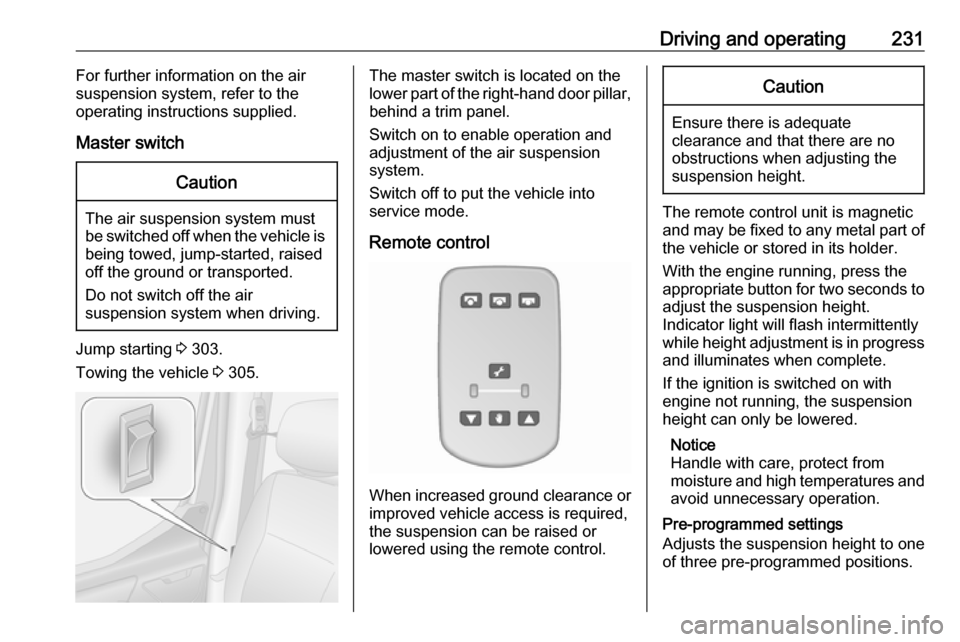
The master switch is located on the
lower part of the right-hand door pillar,
behind a trim panel.
Switch on to enable operation and
adjustment of the air suspension
system.
Switch off to put the vehicle into
service mode.
Remote control
When increased ground clearance or improved vehicle access is required,
the suspension can be raised or
lowered using the remote control.
Caution
Ensure there is adequate
clearance and that there are no
obstructions when adjusting the
suspension height.
The remote control unit is magnetic
and may be fixed to any metal part of the vehicle or stored in its holder.
With the engine running, press the appropriate button for two seconds to
adjust the suspension height.
Indicator light will flash intermittently
while height adjustment is in progress
and illuminates when complete.
If the ignition is switched on with
engine not running, the suspension
height can only be lowered.
Notice
Handle with care, protect from
moisture and high temperatures and
avoid unnecessary operation.
Pre-programmed settings
Adjusts the suspension height to one
of three pre-programmed positions.
Page 319 of 351

Customer information317Customer
informationCustomer information ................317
Declaration of conformity .........317
REACH .................................... 321
Registered trademarks ............321
Vehicle data recording and pri‐ vacy ........................................... 321
Event data recorders ...............321
Radio Frequency Identification (RFID) ..................................... 324Customer information
Declaration of conformity
Radio transmission systems
This vehicle has systems that
transmit and / or receive radio waves
subject to Directive 2014/53/EU. The
manufacturers of the systems listed
below declare conformity with
Directive 2014/53/EU. The full text of
the EU declaration of conformity for each system is available at the
following internet address:
www.opel.com/conformity.
Importer is
Opel / Vauxhall, Bahnhofsplatz,
65423 Ruesselsheim am Main,
Germany.
Radio remote control receiver Visteon Electronics
04 Rue Nelson Mandela, Zone
Industrielle Borj Cedria, 2055 Bir El
Bey, Tunisia
Operation frequency: 433 MHz
Maximum output: 10 mW ERPRadio remote control transmitter
Visteon Electronics
04 Rue Nelson Mandela, Zone
Industrielle Borj Cedria, 2055 Bir El
Bey, Tunisia
Operation frequency: 433 MHz
Maximum output: 10 mW ERP
Electronic key transmitter
ALPS ELECTRIC EUROPE GmbH
Ohmstrasse 4, 85716
Unterschleissheim, Germany
Operation frequency: 433 MHz
Maximum output: 10 mW ERP
Immobiliser
Visteon Electronics
04 Rue Nelson Mandela, Zone
Industrielle Borj Cedria, 2055 Bir El
Bey, Tunisia
Operation frequency: 125 kHz
Maximum output:
42 dBμA/m @ 10 m
Immobiliser
ALPS ELECTRIC EUROPE GmbH
Page 320 of 351

318Customer informationOhmstrasse 4, 85716
Unterschleissheim, Germany
Operation frequency: 125 kHz
Maximum output:
42 dBμA/m @ 10 m
Infotainment system NAVI 80
IntelliLink
TomTom Int’l BV
De Ruijterkade 154, 1011 AC
Amsterdam, The Netherlands
Operation frequency:
2400 - 2483.5 MHz
Maximum output: 100 mW EIRP
Infotainment system NAVI 50
IntelliLink
LG Electronics
LG Electronics European Shared
Service Center B.V., Krijgsman 1,
1186 DM Amstelveen, The
Netherlands
Operation frequency: 2.4 GHz
Maximum output: 100 mW EIRP
Infotainment system Radio 15
Visteon Electronics04 Rue Nelson Mandela, Zone
Industrielle Borj Cedria, 2055 Bir El
Bey, Tunisia
Operation frequency:
2400 – 2483,5 MHz
Maximum output: 100 mW EIRP
Parking heater remote control
receiver
Eberspaecher Climate Control
Systems GmbH & Co. KG
Eberspaecherstrasse 24, 73730
Esslingen, Germany
Operation frequency: N/A
Maximum output: N/A
Parking heater remote control
transmitter
Eberspaecher Climate Control
Systems GmbH & Co. KG
Eberspaecherstrasse 24, 73730
Esslingen, Germany
Operation frequency: 434,6 MHz
Maximum output: 10dBm
Telematics control unit
Continental Automotive1 Rue de Clairefontaine, 78120
Rambouillet, France
Operation frequency:
2400 – 2483,5 MHz
Maximum output: 100 mW EIRP
Telematics display
MASTERNAUT INTERNATIONAL
4 rue Charles Cros 27400 Louviers,
FranceOperation
frequency (MHz)Maximum output
(dBm)900 MHz33 dBm1800 MHz30 dBm
Tyre pressure monitoring receiver
Schrader Electronics
Trooperslane Industrial Estate, 2
Meadowbank Rd, Carrickfergus
BT38 8YF, United Kingdom
Operation frequency: N/A
Maximum output: N/A
Tyre pressure sensors
Schrader Electronics
Page 326 of 351

324Customer informationOnline servicesIf your vehicle has a radio networkconnection, this allows data to be
exchanged between your vehicle and other systems. The radio network
connection is made possible by
means of a transmitter device in your
vehicle or a mobile device provided
by you (e.g. a smartphone). Online
functions can be used via this radio
network connection. These include
online services and applications /
apps provided to you by the
manufacturer or other providers.
Proprietary services
In the case of the manufacturer's
online services, the relevant functions are described by the manufacturer in
an appropriate location (e.g. Owner's
Manual, the manufacturer's website) and the associated data protection
information is provided. Personal
data may be used to provide online
services. Data exchange for this
purpose takes place via a protected
connection, e.g. using the
manufacturer's IT systems provided
for the purpose. Collection,processing and use of personal data
for the purposes of preparation of services take place solely on the
basis of legal permission, e.g. in the
case of a legally prescribed
emergency communication system or a contractual agreement, or by virtue
of consent.
You can activate or deactivate the services and functions (which are
subject to charges to some extent)
and, in some cases, the vehicle's
entire radio network connection. This
does not include statutory functions
and services such as an emergency
communication system.
Third party services If you make use of online services
from other providers (third parties),
these services are subject to the
liability and data protection and usage conditions of the provider in question.
The manufacturer frequently has no
influence over the content exchanged
in this regard.Therefore, please note the nature,
scope and purpose of the collection
and use of personal data within the
scope of third party services provided by the service provider in question.
Radio Frequency
Identification (RFID)
RFID technology is used in some
vehicles for functions such as tyre
pressure monitoring and immobiliser.
It is also used in connection with
conveniences such as radio remote
controls for door locking / unlocking and starting. RFID technology in
Vauxhall vehicles does not use or
record personal information or link
with any other Vauxhall system
containing personal information.
Page 332 of 351
330Body conversionsIsolation switch
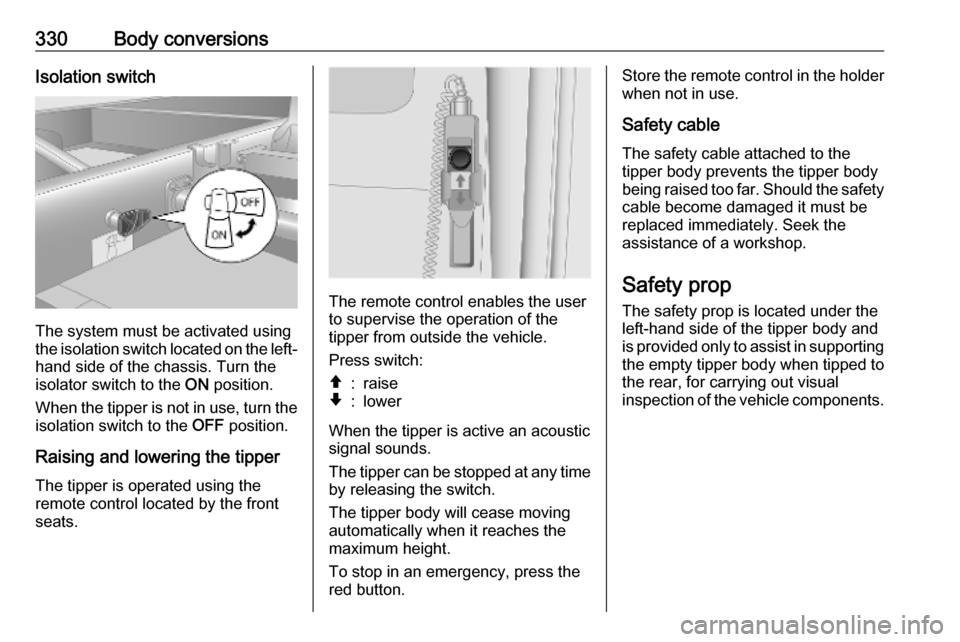
The system must be activated using
the isolation switch located on the left- hand side of the chassis. Turn the
isolator switch to the ON position.
When the tipper is not in use, turn the
isolation switch to the OFF position.
Raising and lowering the tipper
The tipper is operated using the
remote control located by the front
seats.
The remote control enables the user
to supervise the operation of the
tipper from outside the vehicle.
Press switch:
â:raiseã:lower
When the tipper is active an acoustic
signal sounds.
The tipper can be stopped at any time
by releasing the switch.
The tipper body will cease moving
automatically when it reaches the
maximum height.
To stop in an emergency, press the
red button.
Store the remote control in the holder when not in use.
Safety cable The safety cable attached to the
tipper body prevents the tipper body
being raised too far. Should the safety
cable become damaged it must be
replaced immediately. Seek the
assistance of a workshop.
Safety prop
The safety prop is located under the
left-hand side of the tipper body and
is provided only to assist in supporting the empty tipper body when tipped to
the rear, for carrying out visual
inspection of the vehicle components.
Page 336 of 351
334Body conversionsBox body
Keys
The radio remote control only
operates the front door locks.
Additional keys are provided for the
load compartment door locks.
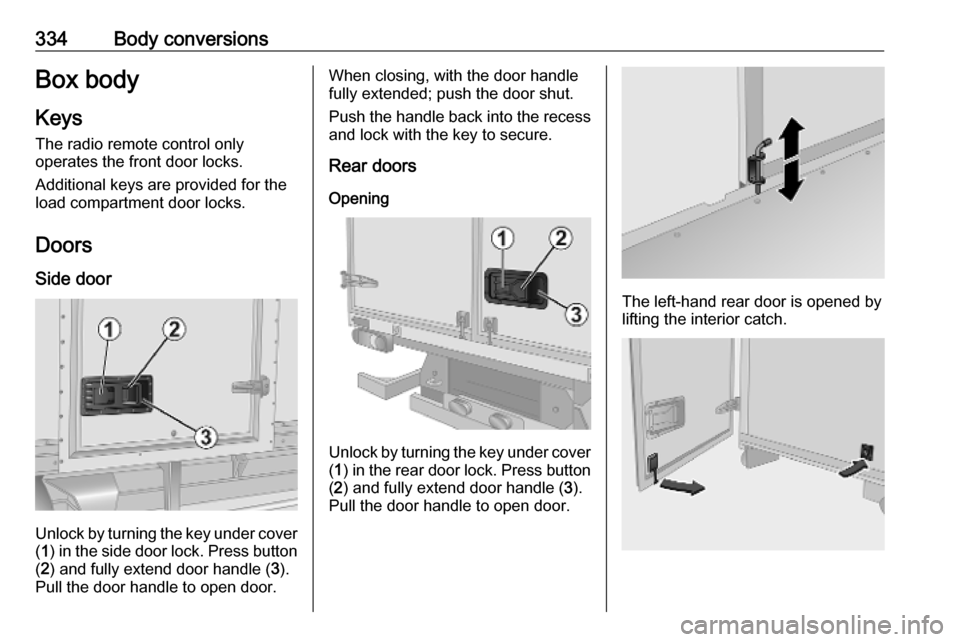
Doors Side door
Unlock by turning the key under cover( 1 ) in the side door lock. Press button
( 2 ) and fully extend door handle ( 3).
Pull the door handle to open door.
When closing, with the door handle
fully extended; push the door shut.
Push the handle back into the recess
and lock with the key to secure.
Rear doors
Opening
Unlock by turning the key under cover( 1 ) in the rear door lock. Press button
( 2 ) and fully extend door handle ( 3).
Pull the door handle to open door.
The left-hand rear door is opened by
lifting the interior catch.
Page 347 of 351

345Oil pressure................................ 101
Onboard computer...................... 128
Operation ............................ 155, 200
Outside temperature ....................86
Overcab storage ..................75, 336
Overhead console .......................74
Overrun cut-off ........................... 227
P Pairing a mobile phone ...............196
Pairing an audio device ..............155
Park Assist.................................. 128
Parking ................................ 18, 230
Parking assist ............................ 254
Parking brake ....................... 99, 244
Parking distance control .............254
Parking ticket holder .....................43
Particulate filter ........................... 232
Pedals......................................... 224
Performing work ........................269
Phone ......................................... 192
Phonebook ................................. 200
Phone connection .......................194
Phone control ............................. 192
Phone controls............................ 192
Phone installation instructions ....206
Phone menu ............................... 200
Phone operating guidelines ........206
Phone projection ........................162
Phone settings ............................ 200Photos........................................ 160
Pictures....................................... 160 Planning preferences .................165
Playing movies ........................... 161
Playing music via Bluetooth .......155
Playing saved audio files ............153
POI categories ............................ 176
Points of interest .........................128
Points of Interest (POI) ...............176
POIs.................................... 128, 176
Portable CD players ...................151
Power door locks ..........................28
Power outlets ............................... 87
Power side step ............................ 29
Power sliding door ........................29
Power steering fluid ....................272
Power take-off ............................ 265
Power windows ............................ 41
Preheating ......................... 100, 226
Prepare route in advance ...........176
PTY (Program type).................... 147
Puncture ............................. 295, 298
Q Quick menu ................................ 165
R Radio .......................................... 143
DAB ......................................... 150
Digital Audio Broadcasting ......150
Radio controls............................. 143Radio data system (RDS) ..........147
Radio Frequency Identification (RFID) ..................................... 324
Radio functions ...................146, 147
Radio reception .......................... 143
Radio remote control ...................20
Radio station name search .........144
Radio text ................................... 147
Rain sensor .................................. 85
RDS ............................................ 147
REACH ....................................... 321
Reading lights ............................ 115
Rear air conditioning system .....214
Rear bench seat storage ..............74
Rear camera ............................... 128
Rear camera view settings .........128
Rear courtesy light...................... 113
Rear doors ................................... 33
Rear fog light .............102, 113, 279
Rear heating system .................. 212
Rear OFF.................................... 136
Rear reading light .......................115
Rear reversing lens ......................41
Rear seats ................................... 51
Bus ............................................ 51
Installing .................................... 51
Rear seat access ......................51
Removing .................................. 51
Rear storage ................................. 75
Rear view camera ...................... 258
Page 348 of 351

346Rear view display.........................40
Rear windows .............................. 41
Rear window wiper setting.......... 128
Recalling a station ......................146
Recalling a stored station ...........144
Receiving calls............................ 200
Recent destinations ....................176
Recommended fluids and lubricants ........................ 311, 315
Refuelling ................................... 262 Region ........................................ 147
Registered trademarks ...............321
Remote control ............................. 20
Restore default settings ..............128
Restore factory settings ..............138
Retractable parking brake ..........244
Reversing lights .........................113
Ride control systems ..........246, 248
Ride height ................................. 230
Roller shutter .............................. 335
Roof .............................................. 43
Glass panel ............................... 43
Roof load ...................................... 81
Roof rack ..................................... 81
Route .......................................... 165
Route information .......................182
Route planning method ..............165
Route settings............................. 165S
Safety alerts................................ 165
Safety belts ................................... 54
Safety net .................................... 79
Safety prop ................................. 330
Save a favourite destination .......176
Saved locations .......................... 176
SD card............................... 163, 165
Search for Bluetooth device .......196
Search radio station name .........144
Seat adjustment ....................... 7, 46 Seat belt ........................................ 8
Seat belt reminder .......................97
Seat belts ..................................... 54
Seat heating ................................. 51
Seat position ................................ 45
Security code .............................. 119
Select a destination ....................176
Selecting the waveband .............143
Selective catalytic reduction .......233
Selector lever ............................. 241
Service ............................... 222, 310
Service display ......................93, 98
Service information ....................310
Services ...................................... 128
Service vehicle soon .................... 98
Settings....................................... 128
Setting the time........................... 128
Setting the volume ......................128
Setting up the navigation system 165Side airbag system ......................62
Side blind spot alert ....................256
Sideboards ................................. 327
Sidelights .................................... 109
Side turn lights ........................... 281
Side wind assist .......................... 247
Side windows................................ 41
Simulcast .................................... 147
Slideshow ................................... 165
Sliding door .................................. 29
Sliding side door ........................... 29
Smartphone Phone projection .....................162
Software version .........................200
Sound optimisation .....................136
Spare wheel ............................... 300
Speed cameras .......................... 165
Speed dependent volume ..........137
Speed limiter....................... 103, 250
Speedometer ............................... 90
Speed warning ........................... 103
Starting and operating ................225
Starting off ................................... 17
Starting the engine .......17, 226, 241
Station search............................. 144
Station storing............................. 146
Steering ...................................... 224
Steering column controls ......84, 121
Steering wheel adjustment ....10, 84
Steering wheel controls ...............84