lock VAUXHALL MOVANO_B 2020 Repair Manual
[x] Cancel search | Manufacturer: VAUXHALL, Model Year: 2020, Model line: MOVANO_B, Model: VAUXHALL MOVANO_B 2020Pages: 351, PDF Size: 9.32 MB
Page 172 of 351
170Infotainment system●Change map colours
● Car symbol
● Advanced
6. NAVIGATION SERVICES
Refer to (NAVI 80 IntelliLink)
"LIVE services" below.
● Traffic
● Speed Cameras
● Local search /TomTom
places
● My TomTom live
● Weather
7. ITINERARIES
Refer to (NAVI 80 IntelliLink) "Edit Itinerary" in the "Guidance"
section 3 182.
8. r : Return to previous screenMap screen
To access the map screen without navigation, on the Home page touch
MENU , then Navigation followed by
View Map .Touch anywhere on the map. The
cursor indicates the current selected
position. To scroll within the map,
drag the cursor in the required
direction.
To access the map screen with
navigation, on the Home page touch
MENU followed by Navigation and
enter a destination. Refer to
(NAVI 80 IntelliLink) "Destination
input" 3 176.
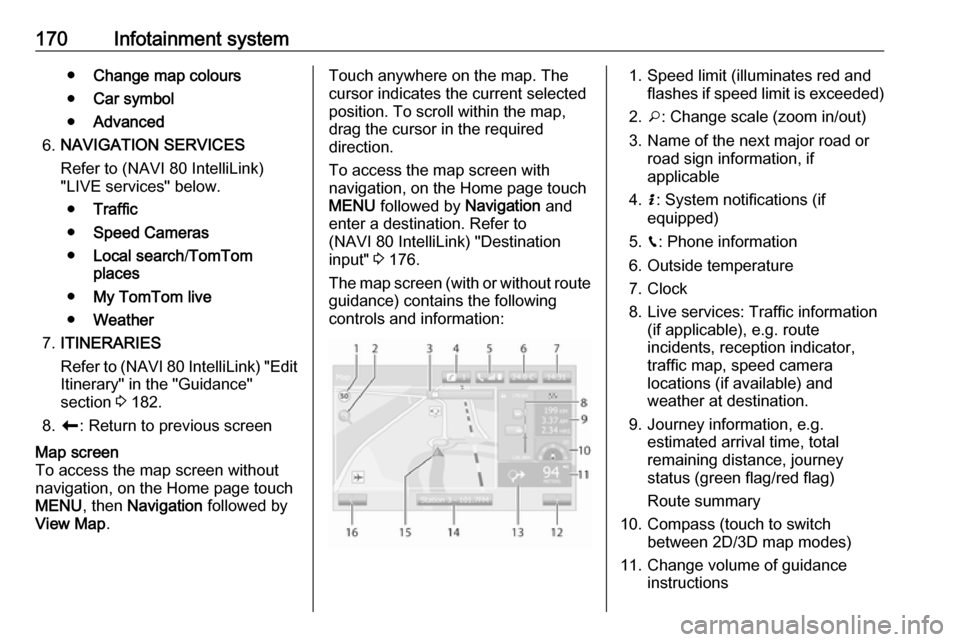
The map screen (with or without route
guidance) contains the following
controls and information:1. Speed limit (illuminates red and flashes if speed limit is exceeded)
2. o: Change scale (zoom in/out)
3. Name of the next major road or road sign information, if
applicable
4. H: System notifications (if
equipped)
5. g: Phone information
6. Outside temperature
7. Clock
8. Live services: Traffic information (if applicable), e.g. route
incidents, reception indicator,
traffic map, speed camera
locations (if available) and
weather at destination.
9. Journey information, e.g. estimated arrival time, total
remaining distance, journey
status (green flag/red flag)
Route summary
10. Compass (touch to switch between 2D/3D map modes)
11. Change volume of guidance instructions
Page 177 of 351

Infotainment system175Coordinate format
Select Coordinate format to change
the format of co-ordinate entries to one of the following options:
● DD.DDDDD
● DD MM.MMM
● DD MM SS.SGPS
Select GPS to view the GPS
information, e.g. available satellites,
their location and signal strength.Map update
Select Map update to display the
following digital map content and
latest update information:
● Alert Points
● Junction View
● Maps
● Places
● Traffic Service
● Address Points
Specific content or all map content
can be updated. Select one of the
options first or touch Options then
Update . Wait for the update to
complete.Refer to "USB memory stick"
(NAVI 50 IntelliLink), "Updating the
USB memory stick and navigation
system" in the "General information"
section 3 163.Traffic
Select Traffic to change the following
traffic information settings:
● Traffic info (On/Off)
● Detour
● Event types
Traffic info : Warnings are given for
incidents that occur along the route.
Detour : Save time by using an
alternative route when a traffic jam or
an incident occurs along the current
route. Select 'On'/'Off' alongside
"Confirm offered route?" as required.
If necessary, update the time value
for the option "Offer detour if the
calculated route saves more than:"
(e.g. five minutes) by touching k/l .
Event types : Select the type of events
to be displayed during route
guidance, e.g. all events, traffic flow
events, closures and blockages,
accidents.NAVI 80 IntelliLink
To access the navigation settings
menu from the Home page, touch
MENU then Navigation , followed by
Settings . The following settings
submenus are displayed:
● Turn off voice guidance :
Switch on/off voice guidance
during navigation.
● Route planning :
Settings for route type, toll roads,
ferries, route summary, carpool
lanes and unpaved roads.
Select a planning preference type; "Fastest route" is
recommended. The eco-route is
designed to save the most fuel.
Then switch on/off "iQ routes™" as required. iQ routes™ enables
routes to be calculated according to average traffic levels during aparticular day and time, and alsothe best route according to actual
traffic speeds.
● Show POI on map :
Show or hide categories of POI
markers on the map.
Page 187 of 351

Infotainment system185Avoidances
To edit the route by avoiding
particular sections, touch 7 followed
by yNAVI / ýNav , Route then
Avoidances .
Select a section from the list on the
display screen to be avoided. The
avoided section is highlighted in red.
Confirm the new route by touching
OK .Alternative routes
To change the route planning
method, touch 7 followed by yNAVI /
ý Nav , Route then Alternative routes .
The following options are available,
each with a distance and estimated
time:
● fast
● short
● eco
Select one of the options and confirm
the new route by touching r.
For further information, refer to
(NAVI 50 IntelliLink) "Setting up the
navigation system" in the "Usage"
section 3 165.NAVI 80 IntelliLink
Journeys can be planned in advance
by selecting both the starting point
and the destination.
From the Home page, touch MENU
then Navigation , followed by
Itineraries .
Select a point of departure in the
same way as entering a destination.
Refer to (NAVI 80 IntelliLink)
"Destination input" 3 176 . Then select
a destination, choose the type of
route and confirm.
The system plans the route and allows you to view the details.Change route
To change the route during active
route guidance, from the Home page, touch MENU then Navigation ,
followed by Change route .
The following options are available: ● Calculate alternative
● Cancel route
● Travel via
● Avoid roadblock
● Avoid part of route
● Minimise delaysCalculate alternative
Select to calculate an alternative
route to the destination.Cancel route
Select to stop the current route
guidance.
To restart guidance, touch Drive to..,
followed by Recent destinations and
select the route again.Travel via (waypoints)
Select to change the calculated route to your destination so that it includes
a particular location (waypoint).
The location to be included is entered
the same way as entering a
destination.
Select from the same list of options,
e.g. "Address", "Saved locations",
"Point of Interest", "Point on map".
Refer to (NAVI 80 IntelliLink)
"Destination input" 3 176.Avoid roadblock
Select this option in the event a
roadblock is not currently indicated by
the Traffic information service.
Refer to (NAVI 80 IntelliLink) "Traffic
information" below.
Page 216 of 351
214Climate control● After 5 seconds the preset dayflashes.
● Adjust the preset day using k or
l .
● The preset time and day are set once the display changes to the
current time.
Set time and weekday Þ
If the vehicle battery is disconnected or its voltage is too low, the unit will
need to be reset.
● Press Þ until the time flashes.
● Press k or l to change the
current time.
● Time is stored when the display stops flashing.
● Wait for weekday to flash.
● Press k or l to change the
weekday.
● Weekday is stored when the display stops flashing.
Heating level
The preferred heating level for
programmed departure times can be set between 10 to 30 ℃.To adjust the temperature of theheating, turn the rotary knob located
on the control panel.turn clockwise:increase
temperatureturn anticlock‐
wise:decrease
temperature
Rear air conditioning
system
The rear air conditioning system is
activated in conjunction with the front passenger compartment air
conditioning system.
Bus
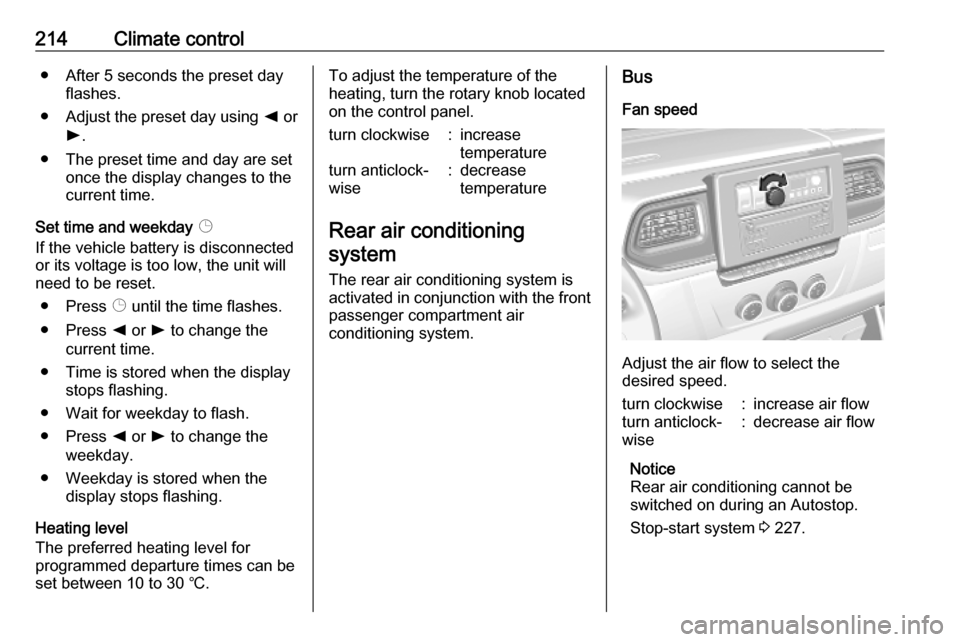
Fan speed
Adjust the air flow to select the
desired speed.
turn clockwise:increase air flowturn anticlock‐
wise:decrease air flow
Notice
Rear air conditioning cannot be
switched on during an Autostop.
Stop-start system 3 227.
Page 218 of 351
216Climate control4 k:Adjusts values down5 d:Long press: switch
heater off, short press:
turns display on or exit
menu
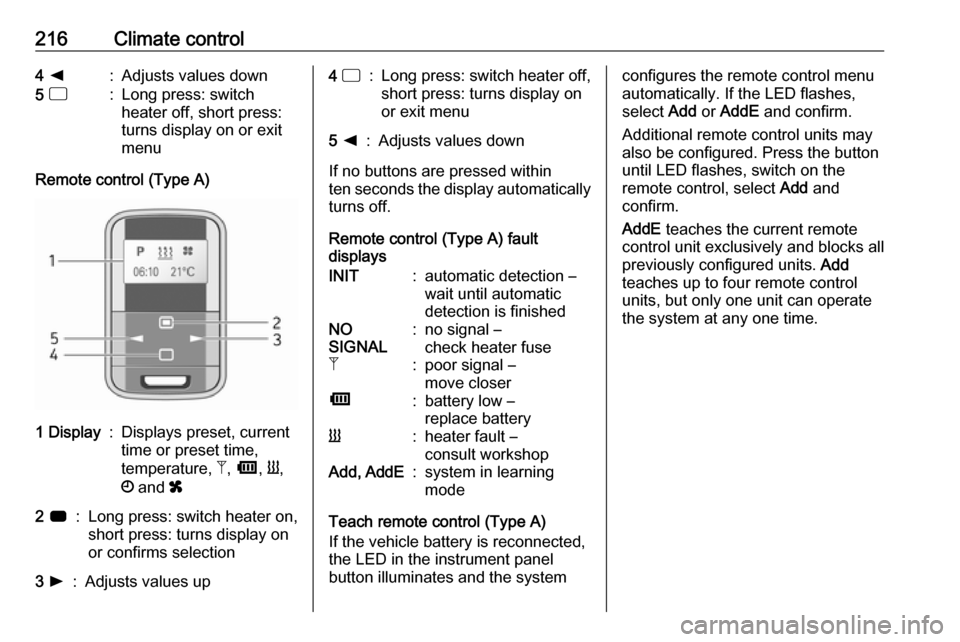
Remote control (Type A)
1 Display:Displays preset, current
time or preset time,
temperature, Z, Ü , Y ,
Ö and x2 7:Long press: switch heater on,
short press: turns display on
or confirms selection3 l:Adjusts values up4 d:Long press: switch heater off,
short press: turns display on
or exit menu5 k:Adjusts values down
If no buttons are pressed within
ten seconds the display automatically
turns off.
Remote control (Type A) fault
displays
INIT:automatic detection –
wait until automatic
detection is finishedNO
SIGNAL:no signal –
check heater fuseZ:poor signal –
move closerÜ:battery low –
replace batteryY:heater fault –
consult workshopAdd, AddE:system in learning
mode
Teach remote control (Type A)
If the vehicle battery is reconnected,
the LED in the instrument panel
button illuminates and the system
configures the remote control menu
automatically. If the LED flashes,
select Add or AddE and confirm.
Additional remote control units may
also be configured. Press the button
until LED flashes, switch on the
remote control, select Add and
confirm.
AddE teaches the current remote
control unit exclusively and blocks all
previously configured units. Add
teaches up to four remote control
units, but only one unit can operate
the system at any one time.
Page 225 of 351

Driving and operating223Driving and
operatingDriving hints ............................... 224
Driving economically ...............224
Control of the vehicle ...............224
Steering ................................... 224
Starting and operating ...............225
New vehicle running-in ............225
Ignition switch positions ...........225
Starting the engine ..................226
Idle speed control ....................227
Overrun cut-off ........................ 227
Stop-start system ....................227
Parking .................................... 230
Air suspension ......................... 230
Engine exhaust .......................... 232
Diesel particle filter ..................232
Catalytic converter ...................233
AdBlue ..................................... 233
Manual transmission ..................240
Manual transmission automa‐ ted .............................................. 240
Transmission display ...............240
Starting the engine ..................241
Selector lever .......................... 241Manual mode........................... 242
Electronic driving programmes 242
Fault ........................................ 243
Interruption of power supply ....243
Brakes ........................................ 243
Antilock brake system .............243
Parking brake .......................... 244
Brake assist ............................. 245
Hill start assist ......................... 245
Ride control systems .................246
Traction Control system ..........246
Electronic Stability Control ......247
Limited-slip rear axle ...............248
Driver assistance systems .........248
Cruise control .......................... 248
Speed limiter ........................... 250
Active emergency braking .......252
Parking assist .......................... 254
Side blind spot alert .................256
Rear view camera ...................258
Lane departure warning ..........260
Fuel ............................................ 261
Fuel for diesel engines ............261
Refuelling ................................ 262
Trailer hitch ................................ 264
General information .................264
Driving characteristics and towing tips .............................. 264
Trailer towing ........................... 264Towing equipment ...................265
Trailer stability assist ...............265
Auxiliary features .......................265
Power take-off ......................... 265
Page 227 of 351

Driving and operating225than 15 seconds, damage mayoccur to the power steering
system and there may be loss of
power steering assist.Starting and operating
New vehicle running-in
Do not brake unnecessarily hard for
the first few journeys and after new
disc brake pads have been fitted.
During the first drive, smoke may
occur because of wax and oil
evaporating off the exhaust system.
Park the vehicle in the open for a
while after the first drive and avoid
inhaling the fumes.
Limit the engine speed to 2,500/min
for the first 900 miles.
During the running-in period fuel and
engine oil consumption may be
higher and the cleaning process of
the diesel particle filter may take
place more often. Autostop may be
inhibited to allow for charging the
vehicle battery.
Stop-start system 3 227.
Diesel particle filter 3 232.
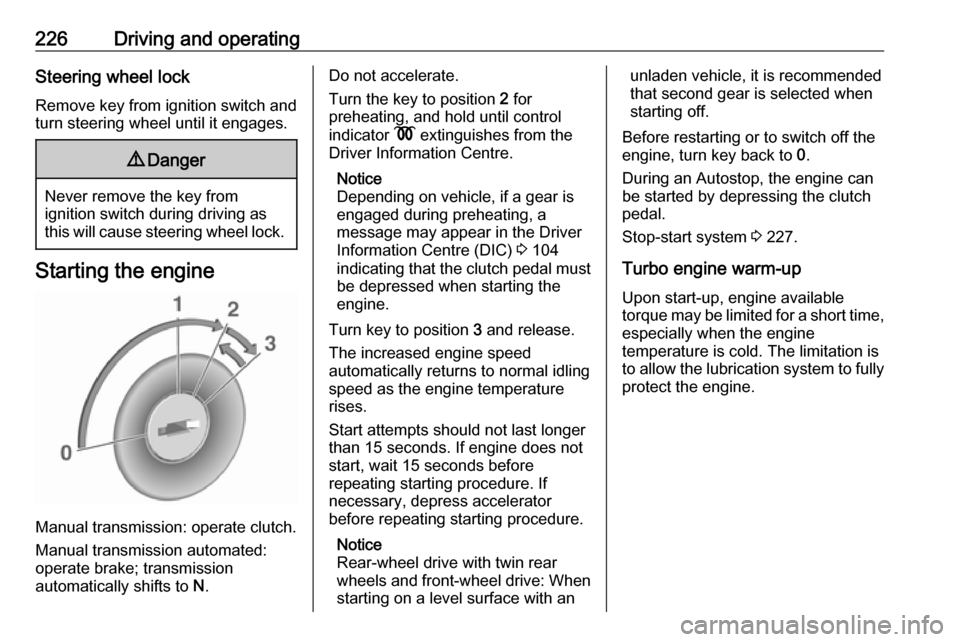
Ignition switch positions Turn key:0:ignition off: Some functions
remain active until key is
removed or driver's door is
opened, provided the ignition was
on previously1:accessory power mode: Steering wheel lock released, some
electrical functions are operable,
ignition is off2:ignition is on, diesel engine is
preheating. Control indicators
illuminate and most electrical
functions are operable3:engine start: Release key after
starting procedure begins
Page 228 of 351
226Driving and operatingSteering wheel lock
Remove key from ignition switch and
turn steering wheel until it engages.9 Danger
Never remove the key from
ignition switch during driving as
this will cause steering wheel lock.
Starting the engine
Manual transmission: operate clutch.
Manual transmission automated:
operate brake; transmission
automatically shifts to N.
Do not accelerate.
Turn the key to position 2 for
preheating, and hold until control
indicator N extinguishes from the
Driver Information Centre.
Notice
Depending on vehicle, if a gear is
engaged during preheating, a
message may appear in the Driver
Information Centre (DIC) 3 104
indicating that the clutch pedal must be depressed when starting the
engine.
Turn key to position 3 and release.
The increased engine speed
automatically returns to normal idling
speed as the engine temperature
rises.
Start attempts should not last longer
than 15 seconds. If engine does not
start, wait 15 seconds before
repeating starting procedure. If
necessary, depress accelerator
before repeating starting procedure.
Notice
Rear-wheel drive with twin rear
wheels and front-wheel drive: When
starting on a level surface with anunladen vehicle, it is recommended
that second gear is selected when
starting off.
Before restarting or to switch off the
engine, turn key back to 0.
During an Autostop, the engine can
be started by depressing the clutch
pedal.
Stop-start system 3 227.
Turbo engine warm-up
Upon start-up, engine available
torque may be limited for a short time, especially when the engine
temperature is cold. The limitation is
to allow the lubrication system to fully
protect the engine.
Page 232 of 351
230Driving and operatingRestart of the engine by the stop-
start system
If one of the conditions for an
Autostop is not fulfilled anymore or
the vehicle starts to move, the engine
may be restarted automatically by the
stop-start system.
An automatic engine restart may not
be possible if a door or the bonnet is
open.
If an electrical accessory, e.g. a
portable CD player, is connected to
the power outlet, a brief power drop
during restart might be noticeable.
If the Infotainment system is active,
audio sound may briefly be reduced
or interrupted during the restart.
Fault
If the LED illuminates in deactivation
button ) without first being pressed
to deactivate the system, there is a
fault in the stop-start system and it is
deactivated. A corresponding
message also appears in the Driver Information Centre 3 104.
Seek the assistance of a workshop.Parking9 Warning
● Do not park the vehicle on an
easily ignitable surface. The
high temperature of the
exhaust system could ignite the
surface.
● Always apply parking brake without pressing release
button. Apply as firmly as
possible on a downhill slope or
uphill slope. Depress brake
pedal at the same time to
reduce operating force.
● Switch off the engine.
● If the vehicle is on a level surface or uphill slope, engage
first gear. On an uphill slope,
turn the front wheels away from
the kerb.
If the vehicle is on a downhill
slope, engage reverse gear.
Turn the front wheels towards the kerb.
● Close the windows.
● Turn the ignition key to position
0 and remove it. Turn the
steering wheel until the
steering wheel lock is felt to
engage.
Lock the vehicle 3 23 and activate the
anti-theft locking system 3 34 and
anti-theft alarm system 3 35.
Air suspension
Operates automatically when the
vehicle is driven. The air suspension
system constantly adjusts the ride
height according to the vehicle load.
Caution
To ensure safe operation of the air
suspension system, do not exceed the maximum permissible gross
vehicle weight rating. Refer to
identification plate 3 314 or the
vehicle documents.
Page 240 of 351
238Driving and operatingvolume of at least 10 l of AdBlue
(depending on AdBlue
consumption).
Avoid minor top-ups (e.g. less than 10 l), otherwise the system may not
detect a refill.
Notice
When unscrewing the protective cap from the filler neck, ammonia fumes
may emerge. Do not inhale as the
fumes have a pungent smell. The
fumes are not harmful by inhalation.
The vehicle must be parked on a level surface.
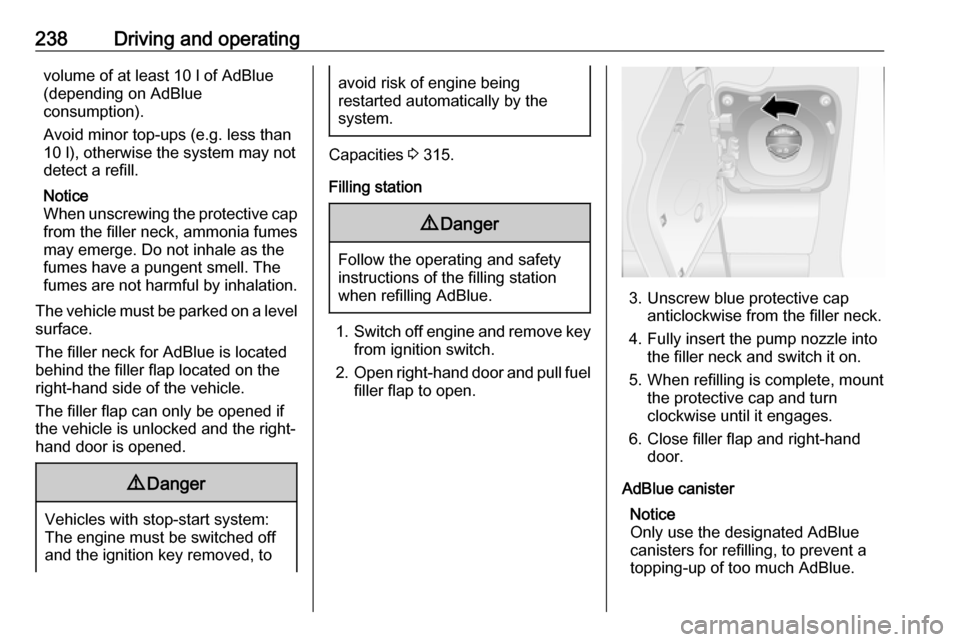
The filler neck for AdBlue is located
behind the filler flap located on the
right-hand side of the vehicle.
The filler flap can only be opened if
the vehicle is unlocked and the right-
hand door is opened.9 Danger
Vehicles with stop-start system:
The engine must be switched off
and the ignition key removed, to
avoid risk of engine being
restarted automatically by the
system.
Capacities 3 315.
Filling station
9 Danger
Follow the operating and safety
instructions of the filling station
when refilling AdBlue.
1. Switch off engine and remove key
from ignition switch.
2. Open right-hand door and pull fuel
filler flap to open.
3. Unscrew blue protective cap anticlockwise from the filler neck.
4. Fully insert the pump nozzle into the filler neck and switch it on.
5. When refilling is complete, mount the protective cap and turn
clockwise until it engages.
6. Close filler flap and right-hand door.
AdBlue canister Notice
Only use the designated AdBlue canisters for refilling, to prevent a
topping-up of too much AdBlue.