USB port VAUXHALL MOVANO_B 2020 Owner's Manual
[x] Cancel search | Manufacturer: VAUXHALL, Model Year: 2020, Model line: MOVANO_B, Model: VAUXHALL MOVANO_B 2020Pages: 351, PDF Size: 9.32 MB
Page 119 of 351

Infotainment system117Infotainment systemIntroduction................................ 117
General information .................117
Theft-deterrent feature ............119
Control elements overview ......121
Usage ...................................... 128
Touch operation overview .......135
Tone settings ........................... 136
Volume settings .......................137
System settings .......................138
Radio ......................................... 143
Usage ...................................... 143
Station search ......................... 144
Autostore lists .......................... 146
Radio data system (RDS) ........147
Digital audio broadcasting .......150
AUX input ................................... 150
General information .................150
Usage ...................................... 151
USB port .................................... 152
General information .................152
Playing saved audio files .........153
Bluetooth music .........................155
General information .................155
Operation ................................. 155External devices........................160
Displaying pictures ..................160
Playing movies ........................ 161
Using smartphone applications ............................ 162
Navigation .................................. 163
General information .................163
Usage ...................................... 165
Destination input ......................176
Guidance ................................. 182
Symbols overview ...................189
Voice recognition .......................190
General information .................190
Navigation control ....................191
Phone control .......................... 192
Phone ........................................ 192
General information .................192
Connection .............................. 194
Bluetooth connection ...............196
Emergency call ........................199
Operation ................................. 200
Mobile phones and CB radio equipment ............................... 206Introduction
General information
The Infotainment system provides
state-of-the-art in-car information and
entertainment.
The radio is equipped with assignable channel presets for FM, AM and also
DAB wavebands (depending on
version).
External data storage devices, e.g.
iPod, MP3 player or USB stick, or a
portable player can be connected to
the Infotainment system. External
audio sources can also be connected
via Bluetooth.
The digital sound processor provides
several preset equalizer modes for
sound optimisation.
The navigation system's dynamic
route planning will reliably guide to
the chosen destination and can help
avoid traffic jams and other traffic
problems.
Optionally, the Infotainment system
can be operated using controls on the steering column or via the voice
recognition system.
Page 124 of 351

122Infotainment system1m - Press: Switch on/off ......128
Turn: Adjust volume ............128
2 Station buttons 1...6 ............144
Short press: Select station ..144
Long press: Save station ....144
3 RADIO - Change audio
source, waveband ...............143
4 MEDIA - Change audio
source ................................. 152
5 Rotary knob ......................... 128
Short press: Confirm an
action .................................. 128
Turn: Access display
menu options ...................... 128
6 / - Return to previous
menu, cancel an action .......128
7 3 - Radio, Short press:
Search for next radio
frequency ............................ 144
Long press: Automatic
station search ...................... 144
8 M USB port .......................... 152
9 SETUP - Short press:
Settings menu .....................12810 TEL - Telephone menu .......192
11 2 - Radio, Short press:
Search for previous radio
frequency ............................ 144
Long press: Automatic
station search ...................... 144
12 TEXT - Display radio text
information .......................... 147
13 AUX input ............................ 150
Page 126 of 351

124Infotainment system1æ: Darken screen (only
clock and audio system
information are displayed) ..128
2 ñRadio : Change audio
source to radio ....................143
3 üMedia : Change audio
source - USB, iPod .............152
BT (Bluetooth) .....................155
AUX ..................................... 150
4 Outside temperature
(depending on version) .......128
5 yPhone : Telephone menu . 192
6 Clock ................................... 128
7 X: Switch on/off ..................128
Increase / decrease volume 128
8 M USB port .......................... 152
9 AUX input ............................ 150
10 ÿSettings : Audio settings,
e.g. Tone settings ...............136
Volume settings ..................137
Connectivity settings ...........128
Display settings ...................128
System settings ................... 13811 ýNav : Navigation menu ......163
12 _Map : Display the map ....163
Page 132 of 351
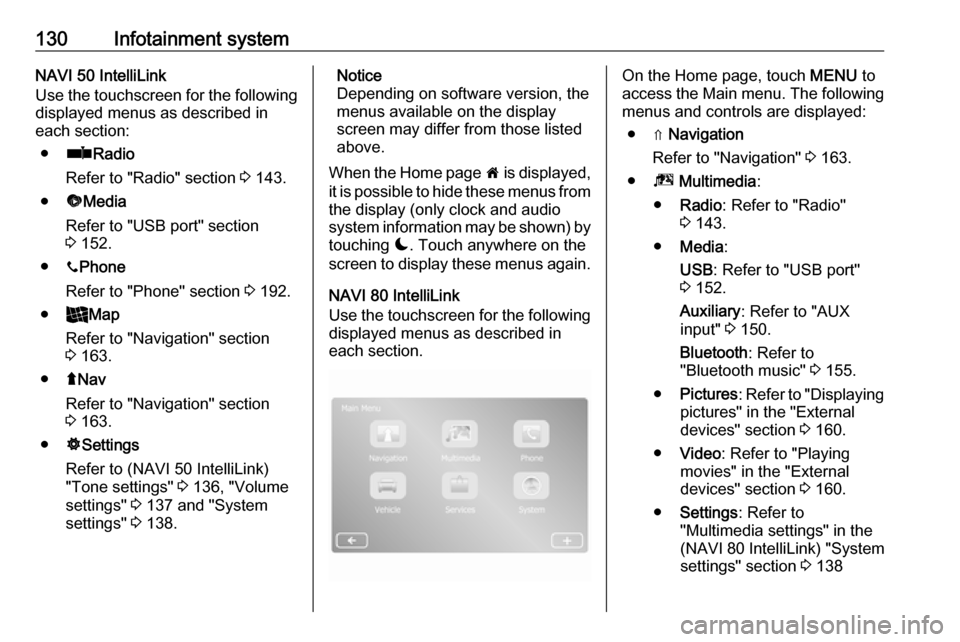
130Infotainment systemNAVI 50 IntelliLink
Use the touchscreen for the following
displayed menus as described in
each section:
● ñ Radio
Refer to "Radio" section 3 143.
● üMedia
Refer to "USB port" section
3 152.
● yPhone
Refer to "Phone" section 3 192.
● _Map
Refer to "Navigation" section
3 163.
● ýNav
Refer to "Navigation" section 3 163.
● ÿSettings
Refer to (NAVI 50 IntelliLink)
"Tone settings" 3 136, "Volume
settings" 3 137 and "System
settings" 3 138.Notice
Depending on software version, the menus available on the display
screen may differ from those listed
above.
When the Home page 7 is displayed,
it is possible to hide these menus from the display (only clock and audio
system information may be shown) by
touching æ. Touch anywhere on the
screen to display these menus again.
NAVI 80 IntelliLink
Use the touchscreen for the following displayed menus as described in
each section.On the Home page, touch MENU to
access the Main menu. The following menus and controls are displayed:
● ⇑ Navigation
Refer to "Navigation" 3 163.
● ª Multimedia :
● Radio : Refer to "Radio"
3 143.
● Media :
USB : Refer to "USB port"
3 152.
Auxiliary : Refer to "AUX
input" 3 150.
Bluetooth : Refer to
"Bluetooth music" 3 155.
● Pictures : Refer to "Displaying
pictures" in the "External
devices" section 3 160.
● Video : Refer to "Playing
movies" in the "External
devices" section 3 160.
● Settings : Refer to
"Multimedia settings" in the
(NAVI 80 IntelliLink) "System
settings" section 3 138
Page 133 of 351

Infotainment system131●g Phone
Refer to "Phone" 3 192.
● J Vehicle
Touch to open Eco Driving, Onboard computer and Settings
menus.
Refer to (NAVI 80 IntelliLink)
"Modes of operation" below.
● ¯ Services
Touch to open Navigation
services and Settings menus.
Refer to (NAVI 80 IntelliLink)
"Modes of operation" below.
● ± System
Refer to (NAVI 80 IntelliLink)
"System settings" 3 138.
Notice
Depending on software version, the menus on the display screen may
differ from the illustrations shown.
● I/←: Move to previous page
● j/→: Move to next page
● ↑: Display lists; Scroll up
● ↓: Display lists; Scroll down● <: Open pop-up menu
● r: Return to previous menu
The display screen can also be
operated using the controls on the
Infotainment system fascia.
Notice
Depending on version, some
controls available on the
Infotainment system fascia do not
operate the features on the display
screen.
Notice
Depending on vehicle, operation of
the touchscreen may be restricted
during driving.
Modes of operation
Radio 15 USB:
To change the audio source to radio,
press RADIO .NAVI 50 IntelliLink:
To access the radio menu at any time, touch 7 followed by ñRadio .NAVI 80 IntelliLink:
To access the radio menu from the
Home page, touch MENU then
Multimedia followed by Radio.Detailed description of the radio
functions 3 143.
Audio players
To change the audio source to USB,
AUX , Bluetooth or iPod (where
applicable), touch MEDIA.
NAVI 50 IntelliLink : To access the
menu for connected auxiliary devices
( USB , iPod , BT (Bluetooth), Video or
AUX ) at any time, touch 7 followed
by üMedia . Touch = in top left
corner and select auxiliary source.
NAVI 80 IntelliLink : To access the
menu for auxiliary devices (e.g. USB,
AUX input, Bluetooth) from the Home page, touch MENU then Multimedia
followed by Media. Select auxiliary
source from the display list.Radio 15 USB
Detailed descriptions of:
● AUX input functions 3 151
● USB port functions 3 152
● Bluetooth music operation 3 155
Page 134 of 351

132Infotainment systemNAVI 50 IntelliLink
Detailed descriptions of:
● AUX input functions 3 151
● USB port (including iPod) functions 3 152
● Bluetooth music operation 3 155NAVI 80 IntelliLink
Detailed descriptions of:
● AUX input functions 3 151
● USB port functions 3 152
● Bluetooth music operation 3 155
Navigation, Map (NAVI 50 IntelliLink,
NAVI 80 IntelliLink)
Detailed description of the navigation
system 3 163, Browse map 3 182.
Phone
Use the display options in the
following menus to connect mobile
phones, make telephone calls, create
contacts lists and adjust various
settings.
Detailed description of the handsfree
phone system functions 3 192.
Radio 15 USB
To access the Phone menu: Press
6 or TEL .
To access the phone settings menu: Press TEL and select Phone settings .NAVI 50 IntelliLink
To access the Phone menu at any
time: Touch 7 followed by yPhone .NAVI 80 IntelliLink
To access the Phone menu from the
Home page, touch MENU followed by
Phone .
Vehicle information
To access the Vehicle menu from the Home page, touch MENU followed by
Vehicle .
Depending on vehicle, the following
menus are displayed:
● Eco Driving
● Onboard computer
● Settings
Eco Driving
The following features are available:
● Trip report
Displays the following data from the last journey:Average fuel consumption,
average speed, total fuel
consumption, total distance, etc.
Within the trip report, Eco
scoring provides an overall score
out of 100 for driving economy.
Higher figures indicate better
driving economy. Ratings are
also given for average
environmental driving
performance (Acceleration),
gearchanging efficiency
(Gearbox) and brake control
(Anticipation).
To save journey data: Touch
'Save' then select the journey
type from the following list:
Home/work, holiday/vacation,
weekend, trip/tour, personal.
To reset journey data: Touch
'Reset'. Confirm or cancel with
'Yes' or 'No'.
Touch < to open pop-up menu
where trip reports can be compared or to show/hide
reports after the completion of a
journey.
Page 145 of 351

Infotainment system143Radio
Usage
Radio reception Radio reception may be disrupted by
static, noise, distortion or loss of
reception due to:
● changes in distance from the transmitter
● multi-path reception due to reflection
● shadowing
Radio 15 USB - Controls The most important buttons for
control of the radio are:
● RADIO : Activate radio, change
waveband
● 2 3 : Station search
● OK: Change frequency
● Station buttons 1...6: Preset station buttons●SETUP : System settings,
automatic station storing
● TEXT : Display radio text
information
Activating the radio
Press RADIO to switch the audio
source to radio.
The station previously selected will be
received.
Selecting the waveband
Press RADIO repeatedly to switch
between the available wavebands
(e.g. FM1, FM2, AM).
The station previously selected in that
waveband will be received.
NAVI 50 IntelliLink - Controls Use the touchscreen to operate the
radio.
The main controls are: ● FM/AM /DAB (depending on
version): Switch between FM and
AM wavebands.
● * /' : Start automatic
search for next/previous radio
station.● ;/: : Change to next/previous
frequency in increments of 0.5.
● R/S : Scroll through a list of
stations.
Activating the radio
To activate the radio at any time,
touch 7 followed by ñRadio . The
station previously selected will be
received.
The following submenus are
displayed at the bottom of the screen:
● Main : Radio station/frequency is
displayed.
● List: Displays an alphabetical list
of available radio stations
(maximum 50 stations).
Notice
Radio stations without RDS: Only
the frequency is displayed. These
stations appear at the end of the list.
● Presets : Displays stored
favourite radio stations.
● Options :
The following settings can be
changed, depending on selected
waveband:
Page 153 of 351

Infotainment system151UsageAn audio source that is connected to
the AUX input can only be operated
via the controls on the audio source,
i.e. not via the Infotainment system.
Only select a track directly on the
audio source when the vehicle is
stationary.Caution
Before connecting or
disconnecting an auxiliary device,
e.g. a portable CD player, switch off the player and the Infotainment system, to avoid sound quality
issues and possible damage to the equipment.
Upon connection via the jack plug, thesystem detects the audio source
automatically. Depending on the
recording volume, there may be a
delay before the audio source is
heard.
The artist or track name are not
shown on the display screen.
Notice
Ensure the auxiliary device is
securely stowed during driving.
Vehicle occupants could be injured
by objects being thrown around in
the event of hard braking, a sudden
change in direction or an accident.
Radio 15 USB
Press MEDIA to change the audio
source to AUX mode, then switch on
the auxiliary device. AUX appears on
the display screen.
AUX settings
Press SETUP to access the settings
menu.
Select AUX IN and turn OK until the
desired setting is selected from:
● HI (300 mV)
● MID (600 mV)
● LO (1200 mV)
NAVI 50 IntelliLink
To access the media menu at any
time, touch 7 followed by t/
ü MEDIA .To switch between auxiliary sources,
touch S in top left corner. The
following options are available:
● USB : Refer to
(NAVI 50 IntelliLink) "USB port"
3 152.
● iPod : Refer to
(NAVI 50 IntelliLink) "USB port" 3 152.
● BT: Refer to
(NAVI 50 IntelliLink) "Bluetooth music" 3 155.
● Video : Refer to
(NAVI 50 IntelliLink) "Video"
3 161.
● AUX : Select to change the audio
source to AUX mode, then switch
on the auxiliary device.
NAVI 80 IntelliLink
Change the audio source to AUX
mode to playback content from a
connected auxiliary device.
To access the media menu from the Home page, touch MENU then
Multimedia , followed by Media.
Page 154 of 351
152Infotainment systemTouch < to open a pop-up menu
(depending on version). The following
options are available:
● Auxiliary socket : Change the
audio source to AUX mode, then
switch on the auxiliary device.
● USB : Refer to
(NAVI 80 IntelliLink) "USB port"
3 152.
● Bluetooth connection : Refer to
(NAVI 80 IntelliLink) "Bluetooth
music" 3 155USB port
General information
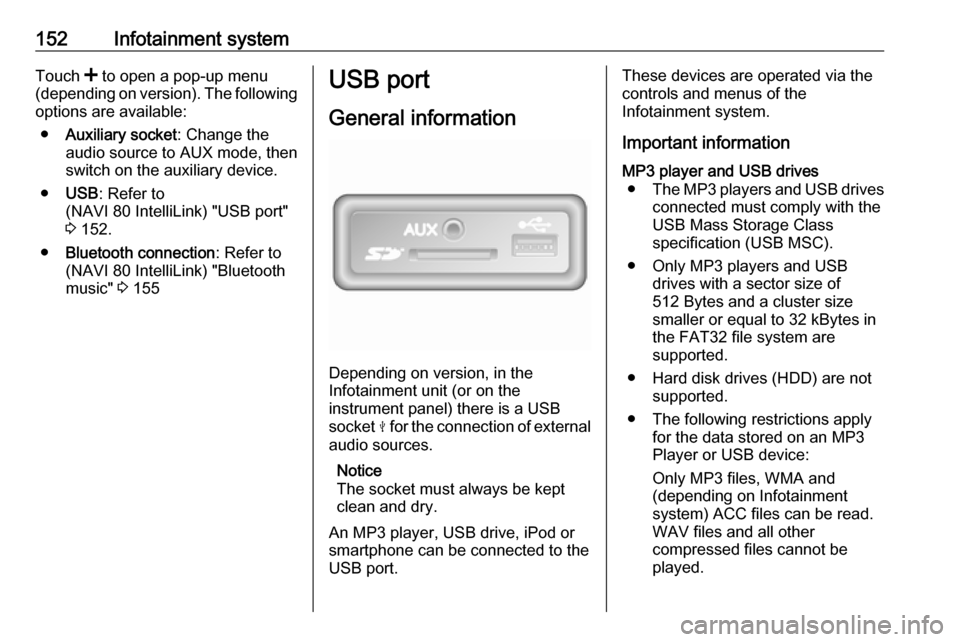
Depending on version, in the
Infotainment unit (or on the
instrument panel) there is a USB
socket M for the connection of external
audio sources.
Notice
The socket must always be kept
clean and dry.
An MP3 player, USB drive, iPod or
smartphone can be connected to the
USB port.
These devices are operated via the
controls and menus of the
Infotainment system.
Important informationMP3 player and USB drives ● The MP3 players and USB drives
connected must comply with the
USB Mass Storage Class
specification (USB MSC).
● Only MP3 players and USB drives with a sector size of
512 Bytes and a cluster size smaller or equal to 32 kBytes in
the FAT32 file system are
supported.
● Hard disk drives (HDD) are not supported.
● The following restrictions apply for the data stored on an MP3
Player or USB device:
Only MP3 files, WMA and
(depending on Infotainment
system) ACC files can be read.
WAV files and all other
compressed files cannot be
played.
Page 155 of 351

Infotainment system153Maximum folder structure depth:
eleven levels.
Maximum number of files that can be saved: 1000 files.
NAVI 50 IntelliLink : Minimum
recommended storage capacity
of USB drive is 4 GB.
Recommended maximum
storage capacity is 32 GB.
WMA files with Digital Rights
Management (DRM) from online music shops may not play
correctly or not at all.
Applicable playlist
extensions: .m3u, .pls.
Playlist entries must be in the
form of relative paths.
Playing saved audio files
Once connected, it is only possible to use the controls and menus of the
Infotainment system to operate the
audio device.Radio 15 USB
MP3 player / iPod / USB drives
The system detects the audio device when a USB device is connected and
the current track is displayed
automatically.
When a new audio device is
connected, the first track in the first
folder is played automatically. When
reconnecting the device, the
previously played track is resumed.
Depending on the audio device
connected, select a folder (MP3
player, USB drive) or a playlist
(portable digital music player).
Selecting a track
To select tracks directly (and change
folders), first access the audio device
menu structure by pressing OK
during playback. Select tracks and
change folders by turning and
pressing the knob.NAVI 50 IntelliLink
MP3 player / USB drives / iPod
The system detects the audio device when a USB device is connected and
the current track is displayed
automatically. The device type (MP3
player/USB drive or iPod) is also
recognised and the relevant audio
source mode (USB or iPod) is
selected automatically.
When the t/ü MEDIA menu is
active, the following submenus are
available:
● Main /Player
● List
● Options
To switch between audio sources,
touch S in top left corner. The
following options are available:
● USB : Select to change the audio
source to USB mode.
Notice
During use, the battery of a
connected USB device is charged or maintained.