ECU VAUXHALL VIVA 2015.75 User Guide
[x] Cancel search | Manufacturer: VAUXHALL, Model Year: 2015.75, Model line: VIVA, Model: VAUXHALL VIVA 2015.75Pages: 222, PDF Size: 4.12 MB
Page 83 of 222
Vauxhall Viva Owner Manual (GMK-Localizing-EU RHD-9231169) - 2016 -
CRC - 5/7/15
82 Instruments and Controls
.If a warning message or a
warning code appears in the
Driver Information Centre.
. If the parking assist detects an
object.
. If reverse gear is engaged and
the rear end carrier is extended.
. If a fault in the automatic locking
system is detected.
When the vehicle is parked
and / or the driver's door is
opened
.With exterior lights on.
During an Autostop
.If the driver's door is opened.
Battery voltage
When the vehicle battery voltage is
running low, a warning message or
warning code 174 will appear in the
Driver Information Centre.
1. Switch off immediately any electrical consumers which are
not required for a safe ride, e.g.
seat heating, heated rear
window or other main
consumers.
2. Charge the vehicle battery by driving continuously for a while
or by using a charging device.
The warning message or warning
code will disappear after the engine
has been started twice
consecutively without a
voltage drop.
If the vehicle battery cannot be
recharged, have the cause of the
fault remedied by a workshop.
Vehicle
Personalisation
The vehicle can be personalised by
changing the settings in the
infotainment display.
Depending on vehicle equipment
some of the functions described
below might not be available.
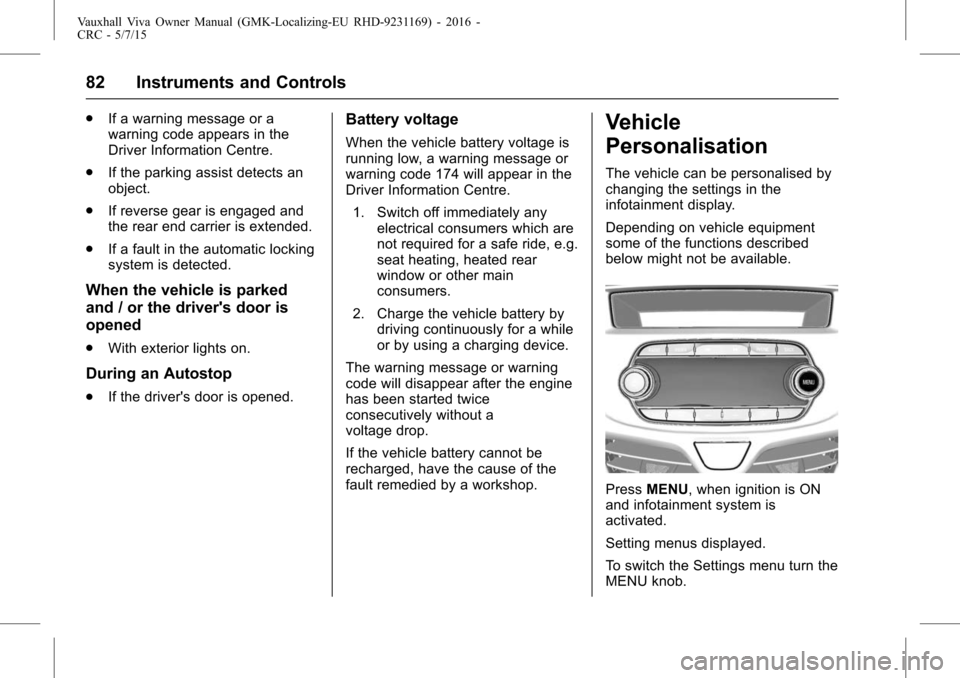
Press MENU, when ignition is ON
and infotainment system is
activated.
Setting menus displayed.
To switch the Settings menu turn the
MENU knob.
Page 93 of 222
Vauxhall Viva Owner Manual (GMK-Localizing-EU RHD-9231169) - 2016 -
CRC - 5/7/15
92 Infotainment System
Infotainment
System
Introduction
Introduction . . . . . . . . . . . . . . . . . . . . 92
Theft-Deterrent Feature . . . . . . . . 92
Overview . . . . . . . . . . . . . . . . . . . . . . 93
Operation . . . . . . . . . . . . . . . . . . . . . . 99
Radio
AM-FM Radio . . . . . . . . . . . . . . . . 102
Radio Data System (RDS) . . . . 106
Audio Players
Auxiliary Devices . . . . . . . . . . . . . 108
Personalisation
Personalisation . . . . . . . . . . . . . . . 115
Phone
Bluetooth ((Type A/B only)) . . . 116
OnStar System
OnStar System . . . . . . . . . . . . . . . 125
Introduction
General
The Infotainment system provides
Infotainment in your car, using the
latest technology.
The radio can be easily used by
registering up to 24 AM-FM radio or
DAB stations with the−(preset)
buttons 1 ~ 4 per every six pages.
The USB player can play connected
USB storage devices or iPod
products.
The function of the Bluetooth phone
connection allows for the use of
wireless hands-free phone calls, as
well as a phone music player.
Connect a portable music player to
the exterior sound input and enjoy
the rich sound of the Infotainment
system.
The digital sound processor
provides a number of preset
equaliser modes for sound
optimisation.
Specifications
‐ Maximum output power : 25 W x
4 channels
‐ Speaker impedance : 4 ohms
The system can be easily adjusted
using the carefully designed
adjusting device, smart display, and
multifunctional menu dial regulator.
. The "Overview " section
provides a simple overview of
the Infotainment system
functions and a summary of all
regulatory devices.
. The "Operation " section
explains the basic controls for
the Infotainment system.
Theft-Deterrent Feature
The Infotainment system is
equipped with an electronic security
system for the purpose of theft
deterrence.
The Infotainment system therefore
functions only in your vehicle and is
worthless to a thief.
Page 126 of 222
Vauxhall Viva Owner Manual (GMK-Localizing-EU RHD-9231169) - 2016 -
CRC - 5/7/15
Infotainment System 125
Text messages
When a Text Message is received
by the connected Bluetooth mobile
phone, the playing track will be cut
off and the phone will display the
relevant information.
.If the sender is registered in the
phone book, the first and last
name are displayed.
. If the number is not stored in the
phone book, the phone number
is displayed.
. The Text Message alert is
displayed as soon as all
information is available.
To display the entire message,
press - directly below the display
labelled “View”. The detail
message screen is now displayed.OnStar System
OnStar Overview
If equipped, this vehicle has a
comprehensive, in-vehicle system
that can connect to a live Advisor
for Emergency, Security, Navigation,
Connection, and Diagnostic
Services.
For safety, some features are
disabled while the vehicle is in
motion.
Control Panel Overview OnStar
Light
The OnStar system status light is
next to the OnStar buttons. If the
status light is :
. Solid Green : The OnStar
system is ready to make calls
. Flashing Green : On a call
. Red : Indicates a problem
. No Light : OnStar subscription
is not active or has expired and
is not functional OnStar Buttons
X(Hands-free calling) button
:
Press to speak to an Advisor
. Make a call, end a call,
or answer an incoming call.
. Give OnStar Hands-Free Calling
voice commands.
. Give OnStar Turn-by-Turn
Direction voice commands.
Requires the available Directions
and Connections service plan.
Q(OnStar) button : Press to
connect to an Advisor
. Verify account information or
update contact information.
. Get driving directions. Requires
the available Directions and
Connections service plan.
. Receive On-Demand
Diagnostics for a check on the
vehicle's key operating systems.
. Receive Roadside Assistance.
](Emergency) button : Press to
connect to an Emergency Advisor
. Get help for an emergency.
Page 163 of 222
Vauxhall Viva Owner Manual (GMK-Localizing-EU RHD-9231169) - 2016 -
CRC - 5/7/15
162 Vehicle Care
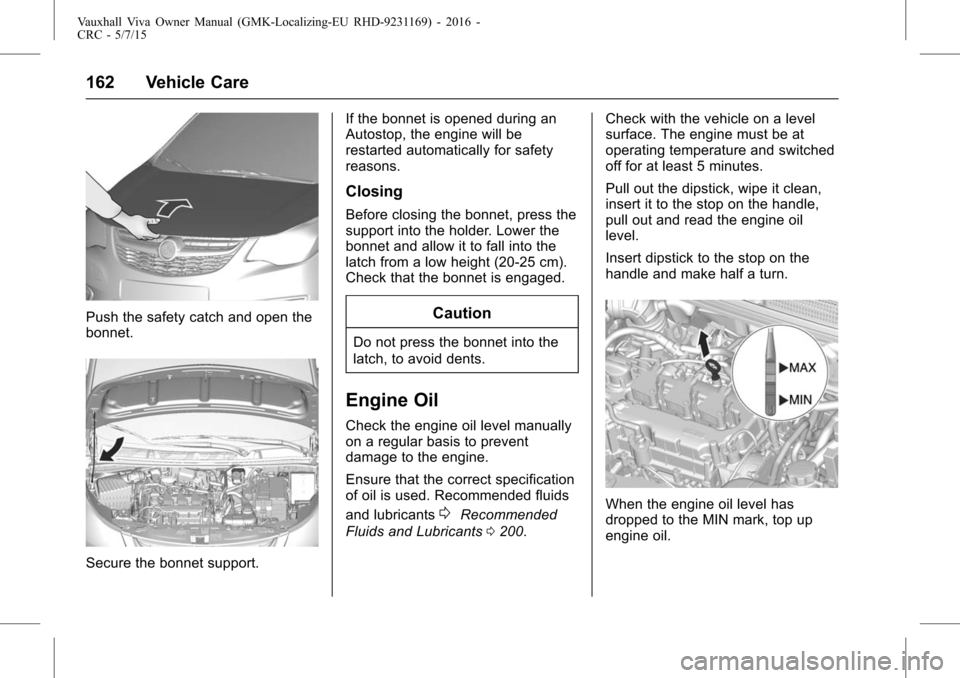
Push the safety catch and open the
bonnet.
Secure the bonnet support.If the bonnet is opened during an
Autostop, the engine will be
restarted automatically for safety
reasons.
Closing
Before closing the bonnet, press the
support into the holder. Lower the
bonnet and allow it to fall into the
latch from a low height (20-25 cm).
Check that the bonnet is engaged.
Caution
Do not press the bonnet into the
latch, to avoid dents.
Engine Oil
Check the engine oil level manually
on a regular basis to prevent
damage to the engine.
Ensure that the correct specification
of oil is used. Recommended fluids
and lubricants
0Recommended
Fluids and Lubricants 0200. Check with the vehicle on a level
surface. The engine must be at
operating temperature and switched
off for at least 5 minutes.
Pull out the dipstick, wipe it clean,
insert it to the stop on the handle,
pull out and read the engine oil
level.
Insert dipstick to the stop on the
handle and make half a turn.When the engine oil level has
dropped to the MIN mark, top up
engine oil.
Page 173 of 222
Vauxhall Viva Owner Manual (GMK-Localizing-EU RHD-9231169) - 2016 -
CRC - 5/7/15
172 Vehicle Care
Number Plate Lamp
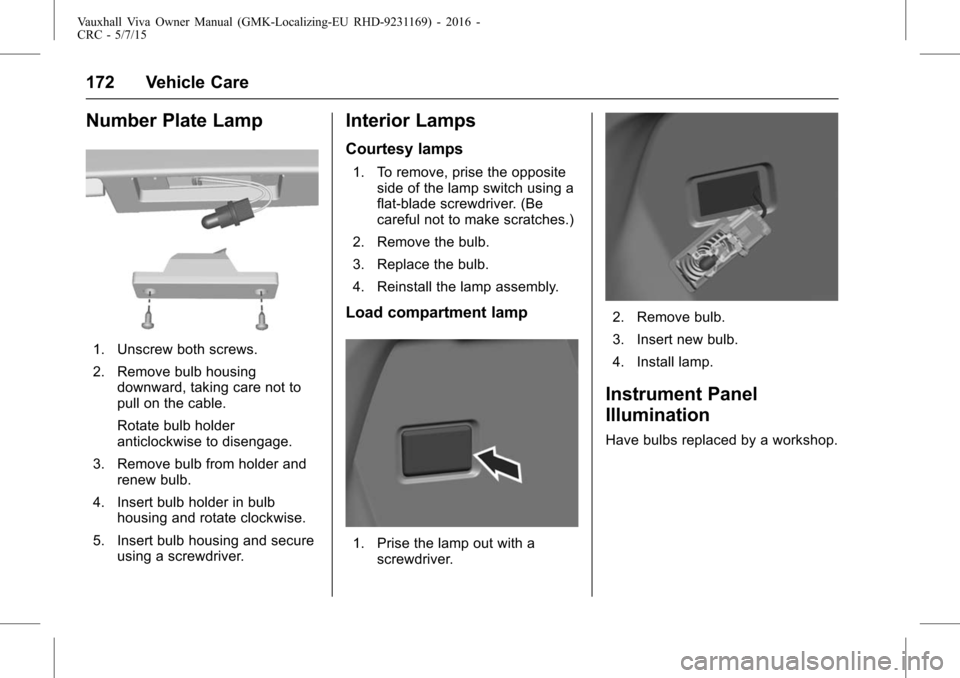
1. Unscrew both screws.
2. Remove bulb housingdownward, taking care not to
pull on the cable.
Rotate bulb holder
anticlockwise to disengage.
3. Remove bulb from holder and renew bulb.
4. Insert bulb holder in bulb housing and rotate clockwise.
5. Insert bulb housing and secure using a screwdriver.
Interior Lamps
Courtesy lamps
1. To remove, prise the oppositeside of the lamp switch using a
flat-blade screwdriver. (Be
careful not to make scratches.)
2. Remove the bulb.
3. Replace the bulb.
4. Reinstall the lamp assembly.
Load compartment lamp
1. Prise the lamp out with a screwdriver.
2. Remove bulb.
3. Insert new bulb.
4. Install lamp.
Instrument Panel
Illumination
Have bulbs replaced by a workshop.
Page 190 of 222
Vauxhall Viva Owner Manual (GMK-Localizing-EU RHD-9231169) - 2016 -
CRC - 5/7/15
Vehicle Care 189
.Take heavy objects out of the
vehicle before jacking up.
. No people or animals may be in
the vehicle when it is jacked-up.
. Never crawl under a jacked-up
vehicle.
. Do not start the vehicle when it
is raised on the jack.
. Clean wheel nuts and thread
with a clean cloth before
mounting the wheel.
{Warning
Do not grease wheel bolt, wheel
nut and wheel nut cone. 1.
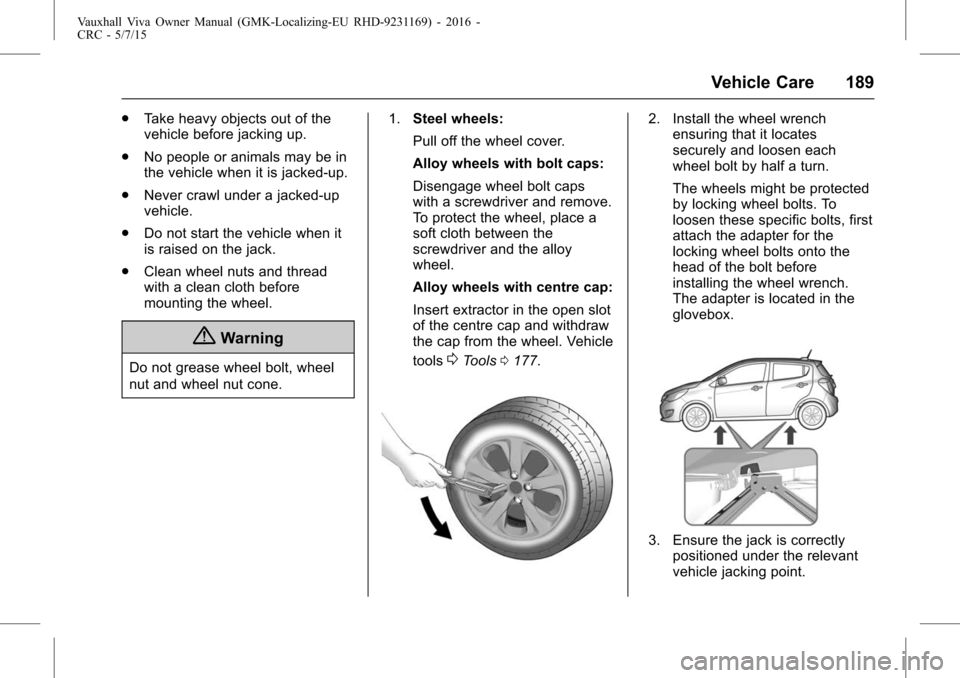
Steel wheels:
Pull off the wheel cover.
Alloy wheels with bolt caps:
Disengage wheel bolt caps
with a screwdriver and remove.
To protect the wheel, place a
soft cloth between the
screwdriver and the alloy
wheel.
Alloy wheels with centre cap:
Insert extractor in the open slot
of the centre cap and withdraw
the cap from the wheel. Vehicle
tools0Tools 0177.
2. Install the wheel wrench
ensuring that it locates
securely and loosen each
wheel bolt by half a turn.
The wheels might be protected
by locking wheel bolts. To
loosen these specific bolts, first
attach the adapter for the
locking wheel bolts onto the
head of the bolt before
installing the wheel wrench.
The adapter is located in the
glovebox.
3. Ensure the jack is correctlypositioned under the relevant
vehicle jacking point.
Page 191 of 222
Vauxhall Viva Owner Manual (GMK-Localizing-EU RHD-9231169) - 2016 -
CRC - 5/7/15
190 Vehicle Care
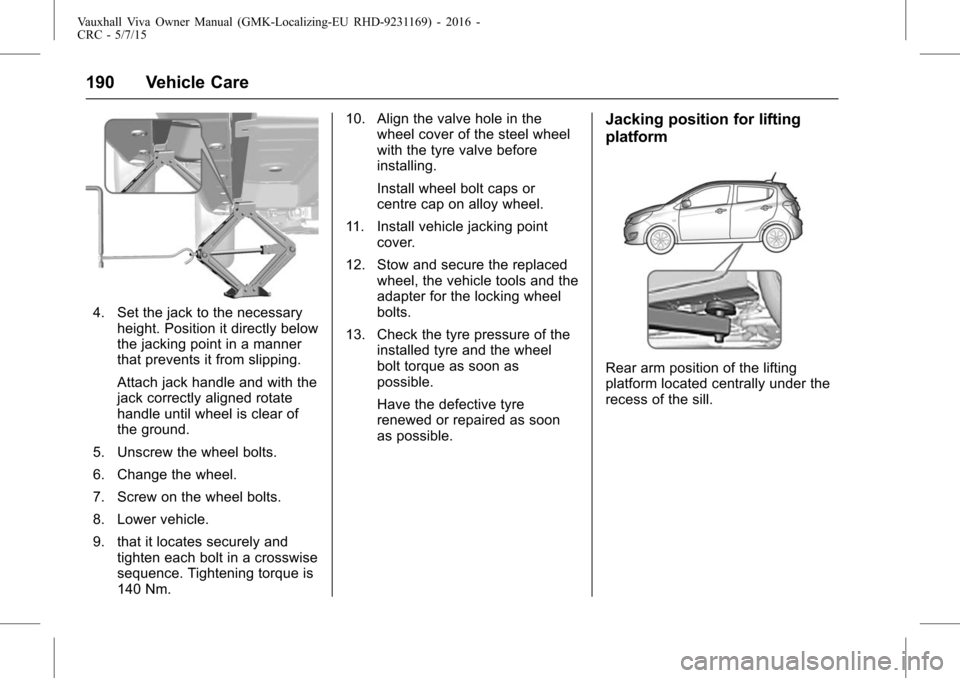
4. Set the jack to the necessaryheight. Position it directly below
the jacking point in a manner
that prevents it from slipping.
Attach jack handle and with the
jack correctly aligned rotate
handle until wheel is clear of
the ground.
5. Unscrew the wheel bolts.
6. Change the wheel.
7. Screw on the wheel bolts.
8. Lower vehicle.
9. that it locates securely and tighten each bolt in a crosswise
sequence. Tightening torque is
140 Nm. 10. Align the valve hole in the
wheel cover of the steel wheel
with the tyre valve before
installing.
Install wheel bolt caps or
centre cap on alloy wheel.
11. Install vehicle jacking point cover.
12. Stow and secure the replaced wheel, the vehicle tools and the
adapter for the locking wheel
bolts.
13. Check the tyre pressure of the installed tyre and the wheel
bolt torque as soon as
possible.
Have the defective tyre
renewed or repaired as soon
as possible.
Jacking position for lifting
platform
Rear arm position of the lifting
platform located centrally under the
recess of the sill.
Page 192 of 222
Vauxhall Viva Owner Manual (GMK-Localizing-EU RHD-9231169) - 2016 -
CRC - 5/7/15
Vehicle Care 191
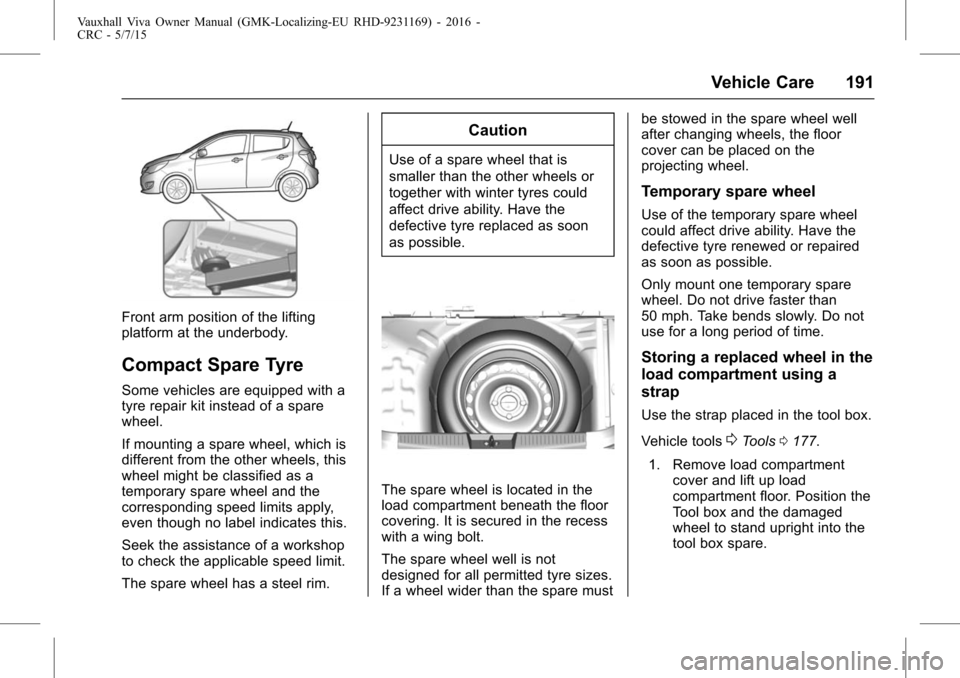
Front arm position of the lifting
platform at the underbody.
Compact Spare Tyre
Some vehicles are equipped with a
tyre repair kit instead of a spare
wheel.
If mounting a spare wheel, which is
different from the other wheels, this
wheel might be classified as a
temporary spare wheel and the
corresponding speed limits apply,
even though no label indicates this.
Seek the assistance of a workshop
to check the applicable speed limit.
The spare wheel has a steel rim.
Caution
Use of a spare wheel that is
smaller than the other wheels or
together with winter tyres could
affect drive ability. Have the
defective tyre replaced as soon
as possible.
The spare wheel is located in the
load compartment beneath the floor
covering. It is secured in the recess
with a wing bolt.
The spare wheel well is not
designed for all permitted tyre sizes.
If a wheel wider than the spare mustbe stowed in the spare wheel well
after changing wheels, the floor
cover can be placed on the
projecting wheel.
Temporary spare wheel
Use of the temporary spare wheel
could affect drive ability. Have the
defective tyre renewed or repaired
as soon as possible.
Only mount one temporary spare
wheel. Do not drive faster than
50 mph. Take bends slowly. Do not
use for a long period of time.
Storing a replaced wheel in the
load compartment using a
strap
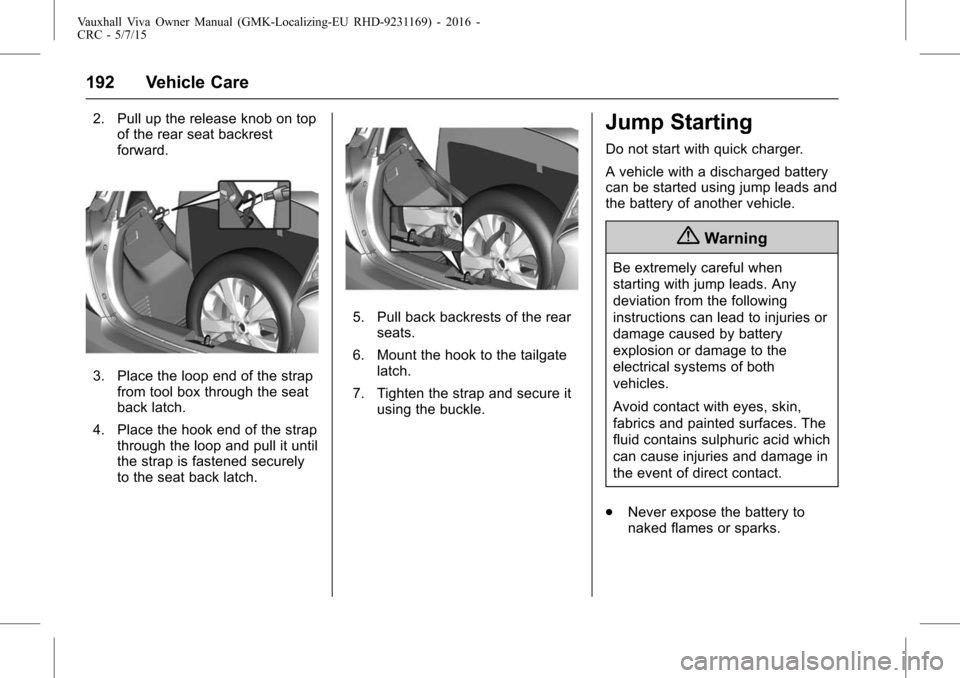
Use the strap placed in the tool box.
Vehicle tools
0Tools
0177.
1. Remove load compartment cover and lift up load
compartment floor. Position the
Tool box and the damaged
wheel to stand upright into the
tool box spare.
Page 193 of 222
Vauxhall Viva Owner Manual (GMK-Localizing-EU RHD-9231169) - 2016 -
CRC - 5/7/15
192 Vehicle Care
2. Pull up the release knob on topof the rear seat backrest
forward.
3. Place the loop end of the strap
from tool box through the seat
back latch.
4. Place the hook end of the strap through the loop and pull it until
the strap is fastened securely
to the seat back latch.
5. Pull back backrests of the rear
seats.
6. Mount the hook to the tailgate latch.
7. Tighten the strap and secure it using the buckle.
Jump Starting
Do not start with quick charger.
A vehicle with a discharged battery
can be started using jump leads and
the battery of another vehicle.
{Warning
Be extremely careful when
starting with jump leads. Any
deviation from the following
instructions can lead to injuries or
damage caused by battery
explosion or damage to the
electrical systems of both
vehicles.
Avoid contact with eyes, skin,
fabrics and painted surfaces. The
fluid contains sulphuric acid which
can cause injuries and damage in
the event of direct contact.
. Never expose the battery to
naked flames or sparks.
Page 195 of 222
Vauxhall Viva Owner Manual (GMK-Localizing-EU RHD-9231169) - 2016 -
CRC - 5/7/15
194 Vehicle Care
3. Allow both engines to idle forapprox. 3 minutes with the
leads connected.
4. Switch on electrical consumers (e.g. headlights, heated rear
window) of the vehicle
receiving the jump start.
5. Reverse above sequence exactly when removing leads.Towing the Vehicle
If towing service is not available in
an emergency, your vehicle may be
temporarily towed by a rope secured
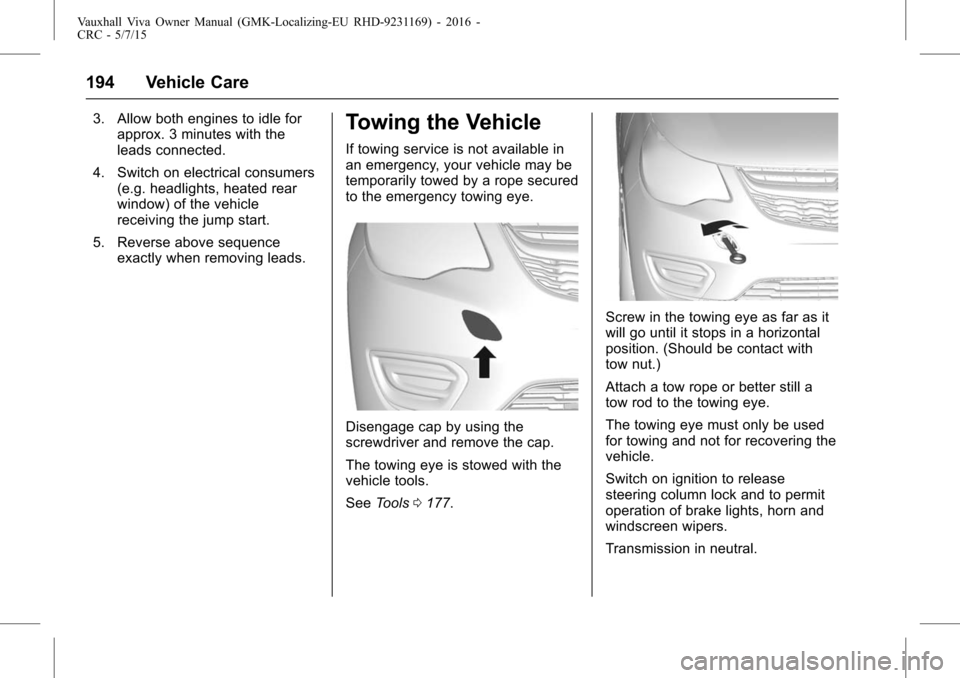
to the emergency towing eye.
Disengage cap by using the
screwdriver and remove the cap.
The towing eye is stowed with the
vehicle tools.
See Tools 0177.
Screw in the towing eye as far as it
will go until it stops in a horizontal
position. (Should be contact with
tow nut.)
Attach a tow rope or better still a
tow rod to the towing eye.
The towing eye must only be used
for towing and not for recovering the
vehicle.
Switch on ignition to release
steering column lock and to permit
operation of brake lights, horn and
windscreen wipers.
Transmission in neutral.