ESP VAUXHALL VIVA 2016.5 Infotainment system
[x] Cancel search | Manufacturer: VAUXHALL, Model Year: 2016.5, Model line: VIVA, Model: VAUXHALL VIVA 2016.5Pages: 81, PDF Size: 1.55 MB
Page 41 of 81
Phone41
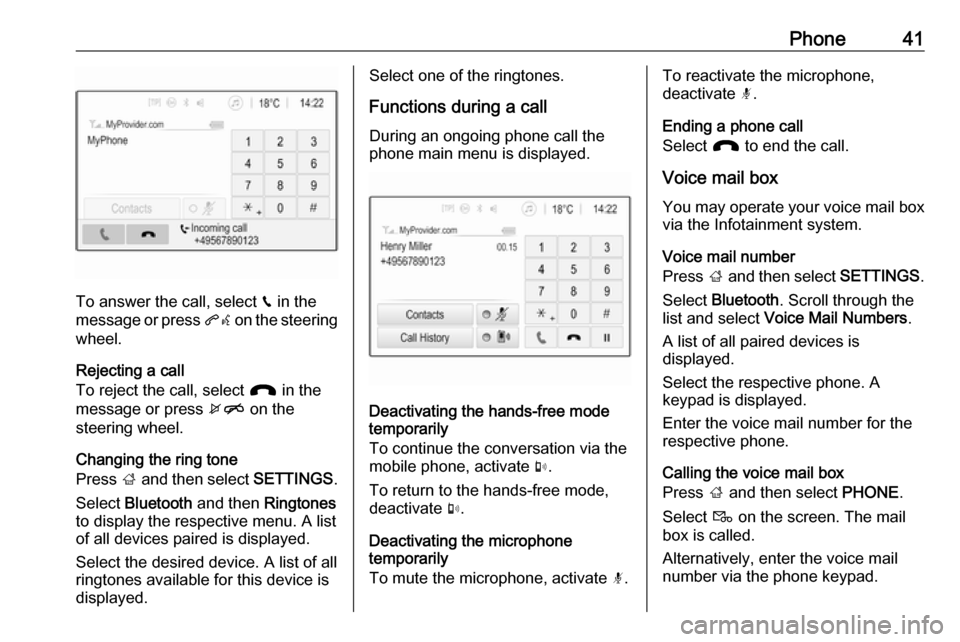
To answer the call, select v in the
message or press qw on the steering
wheel.
Rejecting a call
To reject the call, select J in the
message or press xn on the
steering wheel.
Changing the ring tone
Press ; and then select SETTINGS.
Select Bluetooth and then Ringtones
to display the respective menu. A list
of all devices paired is displayed.
Select the desired device. A list of all
ringtones available for this device is
displayed.
Select one of the ringtones.
Functions during a call During an ongoing phone call the
phone main menu is displayed.
Deactivating the hands-free mode
temporarily
To continue the conversation via the mobile phone, activate m.
To return to the hands-free mode,
deactivate m.
Deactivating the microphone
temporarily
To mute the microphone, activate n.
To reactivate the microphone,
deactivate n.
Ending a phone call
Select J to end the call.
Voice mail box You may operate your voice mail box
via the Infotainment system.
Voice mail number
Press ; and then select SETTINGS.
Select Bluetooth . Scroll through the
list and select Voice Mail Numbers .
A list of all paired devices is
displayed.
Select the respective phone. A
keypad is displayed.
Enter the voice mail number for the
respective phone.
Calling the voice mail box
Press ; and then select PHONE.
Select t on the screen. The mail
box is called.
Alternatively, enter the voice mail
number via the phone keypad.
Page 51 of 81

Introduction511X........................................... 54
If switched off: short press:
switch power on
If switched on: short press: mute system; long press:
switch power off
Turn: adjust volume
2 RADIO
Activate radio or change
waveband .............................. 60
3 MEDIA
Activate media or change
media source ........................ 67
4 t v
Radio: short press: skip to
previous or next station;
press and hold: seek down or up ...................................... 60
External devices: short
press: skip to previous or
next track; press and hold:
rewind or fast forward ...........675PHONE
Short press: open phone
menu ..................................... 70
6 BACK
Menu: one level back ............56
Input: delete last character
or entire entry ........................ 56
7 MENU ................................... 56
Turn: mark screen buttons or menu items; set
numeric values
Press: select/activate a
marked screen button or
menu item; confirm set
value; switch to different
setting option; open
application-specific menu
(if available)8 Softkeys
Favourites: press: select
favourites; press and hold:
save radio stations as
favourites .............................. 61
Menu: press: select corresponding screen
button .................................... 56
9 FAV
Press: display favourites
bar ......................................... 61
Page 53 of 81

Introduction531X........................................... 54
If switched off: short press:
switch power on
If switched on: short press: mute system; long press:
switch power off
Turn: adjust volume
2 RADIO
Activate radio or change
waveband .............................. 60
3 MEDIA
Activate media or change
media source ........................ 67
4 t v
Radio: short press: skip to
previous or next station;
press and hold: seek down or up ...................................... 60
External devices: short
press: skip to previous or
next track; press and hold:
rewind or fast forward ...........67
5 TONE
Display tone settings menu6 BACK Menu: one level back ............56
Input: delete last character
or entire entry ........................ 56
7 MENU ................................... 56
Turn: mark screen buttons or menu items; set
numeric values
Press: select/activate a
marked screen button or
menu item; confirm set
value; switch to different
setting option; open
application-specific menu
(if available)
8 AUX input
9 Softkeys
Favourites: press: select
favourites; press and hold: save radio stations as
favourites .............................. 61
Menu: press: select
corresponding screen
button .................................... 5610 FAV
Press: display favourites
bar ......................................... 61
Page 55 of 81

Introduction55Setting the volumeTurn m; the current setting is shown
on the display.
When the Infotainment system is
switched on, the last selected volume is set, provided that the volume is
lower than the maximum start-up
volume 3 57.
Speed compensated volume
When Auto volume is activated
3 57, the volume is adapted
automatically to make up for the road
and wind noises as you drive.
Mute function
Press m to mute the audio sources.
To cancel the mute function: turn m.
Modes of operation Radio
Press RADIO to open the radio main
menu or to toggle between the
different wavebands.
For a detailed description of the radio
functions 3 60.External devices
Press MEDIA repeatedly to activate
the playback mode for a connected
external device.
For a detailed description on
connecting and operating external
devices 3 65.
Phone
Press PHONE to establish a
Bluetooth connection between the
Infotainment system and a mobile phone.
If a connection can be established,
the main menu of the phone mode is
displayed.
For a detailed description of mobile
phone operation via the Infotainment
system 3 73.
If no connection can be established,
a corresponding menu is displayed.
For a detailed description of
preparing and establishing a
Bluetooth connection between the
Infotainment system and a mobile
phone 3 71.
Page 56 of 81

56Basic operationBasic operationBasic operation............................ 56
Tone settings ............................... 56
Volume settings ........................... 57
System settings ........................... 57Basic operation
Control panel
MENU knob
The MENU knob is one of the central
control elements for menu operation.Turn: ● to select a screen button or menu
item
● to scroll through a list of menu items
● to change a settings valuePress: ● to activate a selected screen button or menu item
● to confirm a changed settings value
● to switch to a different settings option
● to display the application-specific
submenuNotice
In subsequent chapters, the
operating steps for selecting and
activating a screen button or menu
item will be described as "...select
Page 57 of 81

Basic operation57Press MENU , select Settings and
then select Tone Settings to open the
tone settings menu.
Setting bass, midrange, and
treble
Scroll through the list and select
Bass , Midrange or Treble .
Adjust the setting and confirm.
Setting the volume distribution
between front and rear
Scroll through the list and select
Fader .
Adjust the setting and confirm.
Setting the volume distribution
between right and left
Scroll through the list and select
Balance .
Adjust the setting and confirm.
Selecting a tone style Scroll through the list and select EQ
(Equaliser).The EQ options offer optimised bass, middle, and treble presettings for therelevant style of music.
Turn MENU to toggle through the
different options and then press
MENU to confirm the setting.
Volume settings
Adjusting the speed
compensated volume
Press MENU to open the respective
audio menu.
Scroll through the list and select
Settings .
Select Auto Volume Control .
The Auto Volume function can be
deactivated or the degree of volume adaptation can be selected in the
menu displayed.
Scroll through the list and select the
desired option.
Adjusting the maximum startupvolume
Press MENU to open the respective
audio menu.Scroll through the list and select
Settings .
Select Maximum Startup Volume .
Set the desired value.
Volume of traffic announcements
To adjust the volume of traffic
announcements, set the desired
volume while a traffic announcement is given out by the system.
The respective setting is stored by the system.
System settings Various settings and adaptions for theInfotainment system can be
performed via the settings menu.
Time and date settings
Press MENU to open the respective
audio menu.
Page 58 of 81

58Basic operationSelect Time and Date .
Set Time
Select Set Time to enter the
respective submenu.
Select Auto Set at the bottom of the
screen. Activate either On - RDS or
Off (Manual) .
If Off (Manual) is selected, adjust
hours and minutes.
Repeatedly select 12-24 HR at the
bottom of the screen to choose a time mode.
If the 12-hour mode is selected, a
third column for AM and PM selection
is displayed. Select the desired
option.
Set Date
Select Set Date to enter the
respective submenu.
Select Auto Set at the bottom of the
screen. Activate either On - RDS or
Off (Manual) .
If Off (Manual) is selected, adjust the
date settings.Language
Press MENU to open the respective
audio menu.
Select Settings , scroll through the list
and select Vehicle Settings .
Select Languages .
Scroll through the list and select the
desired language.
Restore Factory Settings
Press MENU to open the respective
audio menu.
Select Settings , scroll through the list
and select Vehicle Settings .
Select Restore Factory Settings to
enter the respective submenu.
Select the desired option and confirm the message.
Software Information The Software Information menu
contains specific information on the
software.
Press MENU to open the respective
audio menu.Select Settings , scroll through the list
and select Vehicle Settings .
Select Software Information .
Valet mode
If valet mode is activated, all vehicle
displays are locked and no changes
may be performed within the system.
Notice
Vehicle-related messages remain
enabled.
Locking the system
Press MENU to open the respective
audio menu.
Select Settings , scroll through the list
and select Vehicle Settings .
Select Valet Mode . A keypad is
displayed.
Enter a four-digit code and select
Enter . The keypad is redisplayed.
To confirm the first input, reenter the
four-digit code and select Lock. The
system is locked.
Unlocking the system
Turn the Infotainment system on. A
keypad is displayed.
Page 59 of 81

Basic operation59Enter the respective four-digit code
and select Unlock. The system is
unlocked.
Forgotten PIN code
To reset the PIN code to the default
setting, contact your workshop.
Page 60 of 81

60RadioRadioUsage.......................................... 60
Station search .............................. 60
Favourite lists ............................... 61
Radio data system (RDS) ............62
Digital audio broadcasting ...........63Usage
Activating the radio function
Press RADIO .
Selecting the waveband
Repeatedly press RADIO on the
control panel to toggle between the different wavebands.
Station search Automatic station search
Press t or v to play the previous
or next station.
Manual station search
Press and hold t or v . Release the
button when the required frequency
has almost been reached.
Manual tuning
Press MENU to open the waveband
menu and then select Manual Tuning.
Depending on the waveband selected, a list of all frequencies is displayed.
Select the desired frequency.
Station lists If the station list is updated, turn
MENU to display a list of all stations
currently receivable.
Scroll through the list and select the
desired station.
Category lists
Numerous radio stations broadcast a
PTY code, which specifies the type of programme transmitted (e.g. news).
Some stations also change the PTY
code depending on the content which
is currently transmitted.
The Infotainment system stores these
stations, sorted by programme type in
the corresponding category list.
Page 61 of 81

Radio61Notice
The Categories list item is only
available for the FM and the DAB wavebands.
FM waveband 3 62.
DAB 3 63.
Press MENU to display the respective
waveband menu and select
Categories .
A list of programme type categories currently available is displayed.
Select the desired category. A list of
stations is displayed transmitting a
programme of the selected type.
Select the desired station.
Updating the station lists Press MENU to open the waveband
menu and select Update Station List .
The respective station list is updated.
Notice
If a waveband-specific station list is
updated, the corresponding
category list is also updated.Favourite lists
Stations of all wavebands can be
stored manually in the favourite lists.
24 individual favourite locations are
available, displayed in four favourites per favourites page.
To display the favourites list, select
FAV .
Storing a station
Set the station to be stored.
Select and hold the respective
favourite screen button until a
beeping sound is given out and the
station name is displayed on the
respective favourites screen button.
The station is stored as a favourite.
Retrieving a station
If necessary, repeatedly press FAV to
scroll to the respective favourites
page.
Select the desired favourite screen
button. The respective radio station is
played.
Notice
The active favourite is highlighted.
Defining the number of favourites
shown
Press MENU , scroll through the list
and select Set Number of Favourite
Pages .
Select the desired option.
Notice
If the number of favourites stored
exceeds the number of favourites
activated in the settings menu, the
additionally stored favourites are not
deleted but just hidden from the
view. They may be reactivated by
increasing the number of viewable
favourites.