remote control VAUXHALL VIVA 2016.5 User Guide
[x] Cancel search | Manufacturer: VAUXHALL, Model Year: 2016.5, Model line: VIVA, Model: VAUXHALL VIVA 2016.5Pages: 197, PDF Size: 5.27 MB
Page 86 of 197
84Instruments and controls●Power Door Locks
Unlocked Door Anti Lock Out :
Activates or deactivates the door
locking function while a door is
open.
Delayed Door Lock : Activates or
deactivates the delayed door
locking function. This feature
delays the actual locking of the
doors until all doors are closed.
● Remote Lock, Unlock, Start
Remote Unlock Light Feedback :
Activates or deactivates the
hazard warning flasher feedback
whilst unlocking.
Remote Door Unlock : Changes
the configuration to unlock only
the driver's door or the whole
vehicle whilst unlocking.
Relock Remotely Unlocked
Doors : Activates or deactivates
the automatic relock function
after unlocking without opening
the vehicle.OnStar
OnStar is a personal connectivity and
service assistant with integrated
Wi-Fi hotspot. The OnStar service is
available 24 hours a day, seven days
a week.
Notice
OnStar is not available for all
markets. For further information,
contact your workshop.
Notice
In order to be available and
operational, OnStar needs a valid
OnStar subscription, functioning
vehicle electrics, mobile service and GPS satellite link.
To activate the OnStar services and
set up an account, press Z and speak
with an advisor.
Depending on the equipment of the
vehicle, the following services are available:
● Emergency services and support
in the case of a vehicle
breakdown
● Wi-Fi hotspot● Smartphone application
● Remote control, e.g. location of the vehicle, activation of horn and
lights, control of central locking system
● Stolen vehicle assistance
● Vehicle diagnostics
● Destination download
Notice
The OnStar module of the vehicle is
deactivated after ten days without an
ignition cycle. Functions requiring a
data connection will be available
again after switching on the ignition.
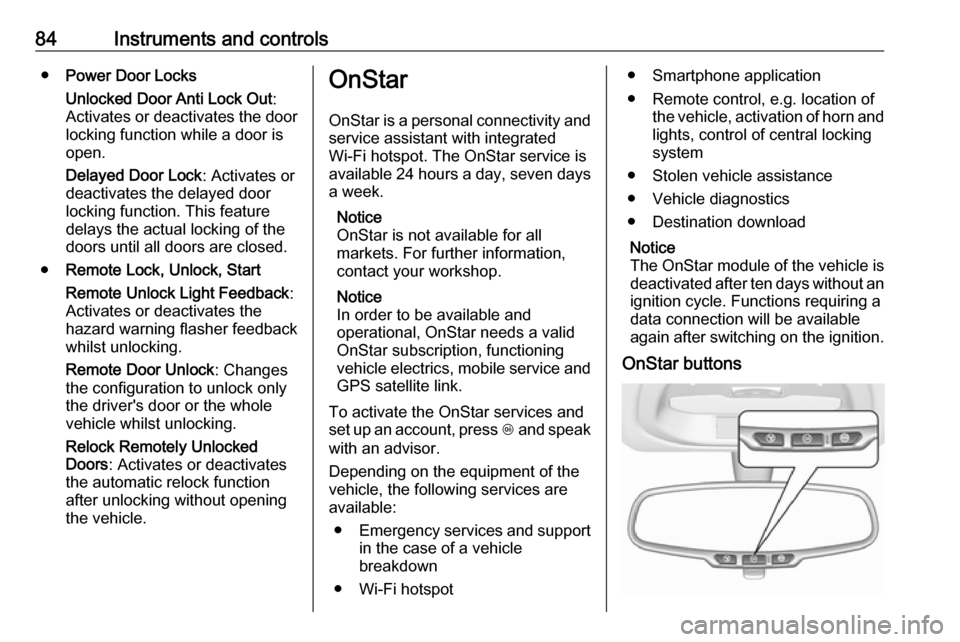
OnStar buttons
Page 88 of 197

86Instruments and controlsSmartphone app
With the My Vauxhall smartphone
app, some vehicle functions can be
operated remotely.
The following functions are available: ● Lock or unlock vehicle.
● Honk horn or flash lights.
● Check fuel level, engine oil life and tyre pressure (only with tyre
pressure monitoring system).
● Send navigation destination to the vehicle, if equipped with a
built-in navigation system.
● Locate vehicle on a map.
● Manage Wi-Fi settings.
To operate these functions, download the app from Apple's App Store or
Google Play Store.
Remote control
If desired, use any phone to call an
advisor, who can remotely operate
specific vehicle functions. Find the
respective OnStar phone number on
our country-specific website.The following functions are available:
● Lock or unlock vehicle.
● Provide information on the vehicle location.
● Honk horn or flash lights.
Stolen vehicle assistance
If the vehicle is stolen, report the theft
to the authorities and request OnStar
stolen vehicle assistance. Use any
phone to call an advisor. Find the
respective OnStar phone number on
our country-specific website.
OnStar can provide support in
locating and recovering the vehicle.Theft alert
When the anti-theft alarm system is
triggered, a notification is sent to
OnStar. You are then informed about
this event by text message or email.Restart prevention
By sending remote signals, OnStar can prevent the vehicle from
restarting once it has been turned off.On-demand diagnostics
At any time e.g. if the vehicle displays a vehicle message, press Z to
contact an advisor and ask to
complete a real-time diagnostic check
to directly determine the issue.
Depending on the results, the advisor
will provide further support.
Diagnostic report
The vehicle automatically transmits
diagnostic data to OnStar which
sends a monthly email report to you
and your preferred workshop.
Notice
The workshop notification function
can be disabled in your account.
The report contains the status of key
operating systems of the vehicle like
engine, transmission, airbags, ABS,
and other major systems. It also
provides information on possible
maintenance items and tyre pressure (only with tyre pressure monitoring
system).
To look at the information in greater
detail, select the link within the email
and log in to your account.
Page 89 of 197

Instruments and controls87Destination download
A desired destination can be directly downloaded to the navigation system.
Press Z to call an advisor and
describe the destination or point of
interest.
The advisor can look up any address
or point of interest and directly send
the destination to the built-in
navigation system.
OnStar settings
OnStar PIN
To have full access to all OnStar
services, a four-digit PIN is required. The PIN has to be personalised when first talking to an advisor.
To change the PIN, press Z to call an
advisor.
Account data
An OnStar subscriber has an account
where all the data is stored. To
request a change of the account
information, press Z and talk to an
advisor or log in to your account.If the OnStar service is used on
another vehicle, press Z and request
that the account be transferred to the
new vehicle.
Notice
In any case, if the vehicle is disposed of, sold or otherwise transferred,
immediately inform OnStar about
the changes and terminate the
OnStar service on this vehicle.
Vehicle location
The vehicle location is transmitted to OnStar when service is requested or
triggered. A message on the Info-
Display informs about this
transmission.
To activate or deactivate the
transmission of the vehicle location,
press and hold j until an audio
message is heard.
The deactivation is indicated by the
status light flashing red and green for
a short period of time and each time
the vehicle is started.
Notice
If the transmission of the vehicle
location is deactivated, some
services are no longer available.Notice
The vehicle location always remains accessible to OnStar in the case of
an emergency.
Find the privacy policy in your
account.
Software updates
OnStar may remotely carry out
software updates without further
notice or consent. These updates are
to enhance or maintain safety and
security or the operation of the
vehicle.
These updates may concern privacy
issues. Find the privacy policy in your account.
Page 190 of 197

188Customer informationWhen using the vehicle, situations
may occur in which these technical
data related to other information
(accident report, damages on the
vehicle, witness statements etc.) may be associated with a specific person -
possibly, with the assistance of an
expert.
Additional functions contractually
agreed upon with the client (e.g.
vehicle location in emergency cases)
allow the transmission of particular vehicle data from the vehicle.
Radio Frequency
Identification (RFID)
RFID technology is used in some
vehicles for functions such as tyre
pressure monitoring and ignition
system security. It is also used in
connection with conveniences such
as radio remote controls for door
locking/unlocking and starting, and in-
vehicle transmitters for garage door
openers. RFID technology in
Vauxhall vehicles does not use or
record personal information or link
with any other Vauxhall system
containing personal information.
Page 194 of 197

192Instrument cluster ........................61
Instrument panel fuse box .........147
Instrument panel illumination .....144
Instrument panel illumination control ...................................... 91
Instrument panel overview ........... 10
Interior care ............................... 168
Interior lighting .............................. 91
Interior lights ........................ 92, 144
Interior mirrors .............................. 27
Introduction .................................... 3
ISOFIX child restraint systems ....48
J
Jump starting ............................. 163
K Key, memorised settings ..............21
Keys ............................................. 19
Keys, locks ................................... 19
L
Lane departure warning .......70, 123
Light switch .................................. 88
Load compartment ................24, 50
Load compartment cover .............52
Loading information .....................54
Low fuel ....................................... 72M
Malfunction indicator light ............69
Manual anti-dazzle ......................27
Manual mode ............................. 113
Manual transmission .................. 110
Manual transmission automated 111
Manual windows ..........................27
Memorised settings ......................21
Mirror adjustment ........................... 8
Mirrors ......................................... 26
Misted light covers .......................91
N
New vehicle running-in ..............104
Number plate light .....................143
O Object detection systems ...........122
Odometer ..................................... 62
Oil, engine .......................... 170, 174
OnStar .......................................... 84
Operate pedal ............................... 69
Outside temperature ....................59
Overrun cut-off ........................... 106
P Parking ................................ 18, 109
Parking assist ............................ 122
Parking brake ............................ 115
Parking lights ............................... 91
Performance .............................. 178Performing work ........................133
Pollen filter ................................. 101
Power outlets ............................... 61
Power steering.............................. 70
Power windows ............................ 28
Puncture ..................................... 159
R
Radio Frequency Identification (RFID) ..................................... 188
Radio remote control ...................20
Reading lights .............................. 92
Rear floor storage cover ..............53
Rear fog light ......................... 72, 90
Rear window wiper/washer .......... 59 Recommended fluids and lubricants ........................ 170, 174
Reduced engine power ................72
Refuelling ................................... 127 Retained power off .....................105
Reversing lights ........................... 91
Ride control systems ..................116
Roof .............................................. 29
Roof load ...................................... 54
S
Safety belts ................................... 35
Seat adjustment ....................... 7, 33 Seat belt ........................................ 8
Seat belt reminder .......................68
Seat belts ..................................... 35