steering VAUXHALL VIVA 2016.5 Owner's Guide
[x] Cancel search | Manufacturer: VAUXHALL, Model Year: 2016.5, Model line: VIVA, Model: VAUXHALL VIVA 2016.5Pages: 197, PDF Size: 5.27 MB
Page 105 of 197

Driving and operating103Driving and
operatingDriving hints ............................... 103
Control of the vehicle ...............103
Steering ................................... 104
Starting and operating ...............104
New vehicle running-in ............104
Ignition switch positions ...........104
Retained power off ..................105
Starting the engine ..................105
Overrun cut-off ........................ 106
Stop-start system ....................106
Parking .................................... 109
Engine exhaust .......................... 110
Catalytic converter ...................110
Manual transmission ..................110
Manual transmission automa‐
ted .............................................. 111
Transmission display ...............111
Starting the engine ..................111
Selector lever .......................... 112
Manual mode ........................... 113
Electronic driving programmes 113
Fault ........................................ 113Brakes........................................ 114
Antilock brake system .............114
Parking brake .......................... 115
Brake assist ............................. 115
Hill start assist ......................... 115
Ride control systems .................116
Traction Control system ..........116
Electronic Stability Control ......117
City mode ................................ 118
Driver assistance systems .........119
Cruise control .......................... 119
Speed limiter ........................... 121
Parking assist .......................... 122
Lane departure warning ..........123
Fuel ............................................ 124
Fuel for petrol engines .............124
Fuel for liquid gas operation ....125
Refuelling ................................ 127
Fuel consumption - CO 2-
Emissions ............................... 130Driving hints
Control of the vehicle
Never coast with engine not
running
Many systems will not function in this situation (e.g. brake servo unit, power
steering). Driving in this manner is a
danger to yourself and others.
All systems function during an
Autostop.
Stop-start system 3 106.
Idle boost
If charging of the vehicle battery is
required due to battery condition, the
power output of the generator must be increased. This will be achieved by an idle boost which may be audible.
A message appears in the Driver
Information Centre.
Pedals
To ensure the pedal travel is
uninhibited, there must be no mats in
the area of the pedals.
Page 106 of 197

104Driving and operatingUse only floor mats, which fit properly
and are fixed by the retainers on the
driver side.
Driving downhill
Engage a gear when driving downhill to ensure that sufficient brake
pressure is available.
Steering If power steering assist is lost
because the engine stops or due to a system malfunction, the vehicle can
be steered but may require increased
effort.
Control indicator c 3 70.Caution
Vehicle equipped with electric
power steering:
If the steering wheel is turned until it reaches the end of its travel and
is held against that position for an
extended period of time, power
steering assistance may be
reduced.
If the steering assistance is used
for an extended period of time,
power assistance may be
reduced.
Power steering assistance should
return back to normal when the
system has cooled down.Starting and operating
New vehicle running-in Do not brake unnecessarily hard for
the first few journeys.
During the first drive, smoke may
occur because of wax and oil
evaporating off the exhaust system.
Park the vehicle in the open for a
while after the first drive and avoid
inhaling the fumes.
During the running-in period, fuel and engine oil consumption may be
higher.
Autostop may be inhibited to allow for
charging of the vehicle battery.
Ignition switch positions
Turn key:
Page 107 of 197
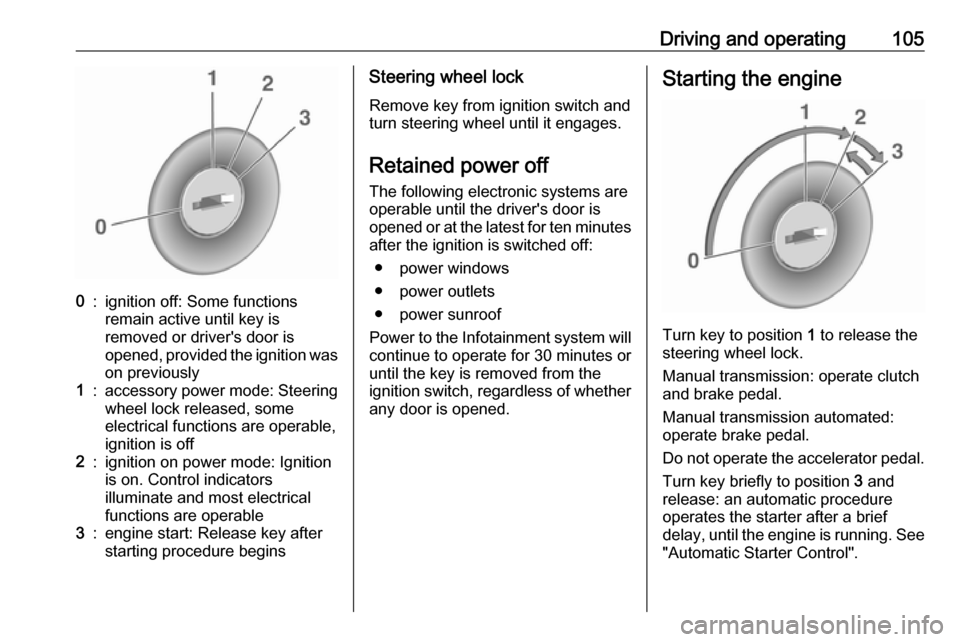
Driving and operating1050:ignition off: Some functions
remain active until key is
removed or driver's door is
opened, provided the ignition was
on previously1:accessory power mode: Steering wheel lock released, some
electrical functions are operable,
ignition is off2:ignition on power mode: Ignition
is on. Control indicators
illuminate and most electrical
functions are operable3:engine start: Release key after
starting procedure beginsSteering wheel lock
Remove key from ignition switch and
turn steering wheel until it engages.
Retained power off The following electronic systems areoperable until the driver's door is
opened or at the latest for ten minutes
after the ignition is switched off:
● power windows
● power outlets
● power sunroof
Power to the Infotainment system will continue to operate for 30 minutes or
until the key is removed from the
ignition switch, regardless of whether
any door is opened.Starting the engine
Turn key to position 1 to release the
steering wheel lock.
Manual transmission: operate clutch
and brake pedal.
Manual transmission automated:
operate brake pedal.
Do not operate the accelerator pedal. Turn key briefly to position 3 and
release: an automatic procedure
operates the starter after a brief
delay, until the engine is running. See
"Automatic Starter Control".
Page 111 of 197
Driving and operating109Parking9Warning
● Do not park the vehicle on an
easily ignitable surface. The
high temperature of the
exhaust system could ignite the
surface.
● Always apply the parking brake. Activate the manual
parking brake without pressing the release button. Apply as
firmly as possible on a downhill slope or uphill slope. Depress
brake pedal at the same time to
reduce operating force.
● Switch off the engine.
● If the vehicle is on a level surface or uphill slope, engage
first gear before removing the ignition key. On an uphill slope,
turn the front wheels away from
the kerb.
If the vehicle is on a downhill
slope, engage reverse gear
before removing the ignition
key. Turn the front wheels
towards the kerb.
● Close the windows and the sunroof.
● Remove the ignition key from the ignition switch. Turn the
steering wheel until the
steering wheel lock is felt to
engage.
For vehicles with manual
transmission automated, the key
can only be removed from the
ignition switch when the parking
brake is applied.
● Lock the vehicle.
● Activate the anti-theft alarm system.
● The engine cooling fans may run
after the engine has been
switched off 3 133.
Caution
After running at high engine
speeds or with high engine loads,
operate the engine briefly at a low
load or run in neutral for
approx. 30 seconds before
switching off, in order to protect
the turbocharger.
Notice
In the event of an accident with airbag deployment, the engine is
switched off automatically if the
vehicle comes to a standstill within a
certain time.
Page 120 of 197
118Driving and operatingESC is reactivated by pressing t
again. If the TC system was
previously disabled, both TC and
ESC are reactivated. k and t
extinguish when TC and ESC are
reactivated.
ESC is also reactivated the next time
the ignition is switched on.
Fault
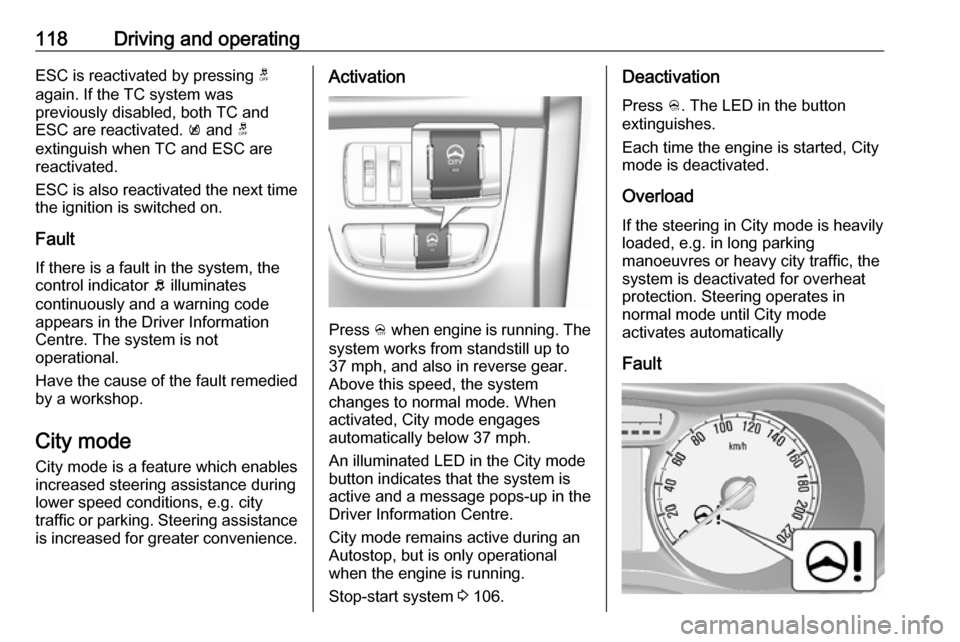
If there is a fault in the system, the control indicator b illuminates
continuously and a warning code
appears in the Driver Information
Centre. The system is not
operational.
Have the cause of the fault remedied
by a workshop.
City mode City mode is a feature which enables
increased steering assistance during
lower speed conditions, e.g. city
traffic or parking. Steering assistance
is increased for greater convenience.Activation
Press B when engine is running. The
system works from standstill up to
37 mph, and also in reverse gear. Above this speed, the system
changes to normal mode. When
activated, City mode engages
automatically below 37 mph.
An illuminated LED in the City mode
button indicates that the system is
active and a message pops-up in the
Driver Information Centre.
City mode remains active during an
Autostop, but is only operational when the engine is running.
Stop-start system 3 106.
Deactivation
Press B. The LED in the button
extinguishes.
Each time the engine is started, City
mode is deactivated.
Overload If the steering in City mode is heavily
loaded, e.g. in long parking
manoeuvres or heavy city traffic, the
system is deactivated for overheat
protection. Steering operates in
normal mode until City mode
activates automatically
Fault
Page 125 of 197

Driving and operating123Fault
In the event of a fault in the system,
control indicator r illuminates in the
instrument cluster 3 70.
Additionally if the system does not
work due to temporary conditions like
snow covered sensors, r
illuminates.
Basic notes on parking assist
systems9 Warning
Under certain circumstances,
various reflective surfaces on
objects or clothing as well as
external noise sources may cause the system to fail to detect
obstacles.
Special attention must be paid to
low obstacles which can damage
the lower part of the bumper.
Caution
Performance of the system can be reduced when sensors are
covered, e.g. by ice or snow.
Performance of the parking assist
system can be reduced due to
heavy loading.
Special conditions apply if there
are taller vehicles in the vicinity
(e.g. off-road vehicles, mini vans,
vans). Object identification and correct distance indication in the
upper part of these vehicles
cannot be guaranteed.
Objects with a very small reflection
cross-section, e.g. objects of
narrow size or soft materials, may
not be detected by the system.
Parking assist systems do not
detect objects outside the
detection range.
Lane departure warning
The lane departure warning system
observes the lane markings between
which the vehicle is driving via a front camera. The system detects lane
changes and warns the driver in the
event of an unintended lane change
via visual and acoustic signals.
Criteria for the detection of an
unintended lane change are:
● No operation of turn signals.
● No brake pedal operation.
● No active accelerator operation or speeding-up.
● No active steering.
If the driver is performing these
actions, no warning will be issued.
Activation
Page 149 of 197

Vehicle care147No.Circuit18Engine control module219Injection system/Ignition20Air conditioning system21Battery sensor22Electric steering column lock23Cooling fan low24–25Exterior mirror switch26Engine control module/Manual
transmission automated
module27Fuel system28Brake switch29Seat occupancy recognition30Headlight range adjustment31Horn32Front fog light33High beam leftNo.Circuit34High beam right35–36Rear wiper37Cornering light left38Washer system39Cornering light right40–41–42Starter 243Instrument panel44Manual transmission auto‐
mated45Starter 146ABS47Cooling fan high48Front wiper49Body control module/Retained
power offAfter having changed defective fuses
close the fuse box cover and press
until it engages.
If the fuse box cover is not closed
correctly, malfunction may occur.
Instrument panel fuse box
The fuse box is located on the driver's
side behind a cover in the instrument
panel.
To open the compartment, compress
the locking tabs, fold cover down and remove.
Page 150 of 197

148Vehicle careNo.Circuit1Onstar2Air conditioning system3Instrument panel4Transmission control module5Infotainment6Body control module7Rear parking assist8Data link connection9Electric steering column lock10Sensing and Diagnostic module11DC transformer12–13Electronic toll collection system14Linear power module15Central locking system/Ignition
system16Ignition systemNo.Circuit17forward collision alert18Instrument panel19Forward collision alert indication20Headlight range adjustment21Power windows, front22Power windows, rear23–24Manual transmission auto‐
mated module25Auxiliary power outlet26Sunroof27–28Body control module 829Body control module 730Body control module 631Body control module 532Body control module 4
Page 151 of 197

Vehicle care149No.Circuit33Body control module 334Body control module 235Body control module 1
–36Ignition system37Steering wheel control LED38–39Logistic/DC transformer40Power window, driver41Blower42Seat heating, front43Air conditioning module44Heated steering wheel45Body control module 2Vehicle tools
Tools
Vehicles with tyre repair kit
The vehicle tools are in the
compartment under the floor cover in
the load compartment, together with
the tyre repair kit.
Vehicles with spare wheel
The jack and the vehicle tools are in
the load compartment.
Page 158 of 197

156Vehicle care9Warning
Use of unsuitable tyres or wheel
covers could lead to sudden
pressure loss and thereby
accidents.
Tyre chains
Tyre chains are only permitted on the
front wheels.
Always use fine mesh chains that add no more than 10 mm to the tyre tread
and the inboard sides (including chain lock).
9 Warning
Damage may lead to tyre blowout.
Tyre chains are only permitted on
tyres of size 165/65 R14.
Tyre chains are not permitted on tyres of size 185/55 R15 and 195/45 R16.
The use of tyre chains is not permitted on the temporary spare wheel.
Tyre repair kit Minor damage to the tyre tread can be
repaired with the tyre repair kit.
Do not remove foreign bodies from
the tyres.
Tyre damage exceeding 4 mm or that is at the tyre's sidewall cannot be
repaired with the tyre repair kit.
9 Warning
Do not drive faster than 50 mph.
Do not use for a lengthy period.
Steering and handling may be
affected.
If you have a flat tyre:
Apply the parking brake and engage
first gear or reverse gear.
The tyre repair kit is in the tool box
under the floor cover in the load
compartment.