change wheel VAUXHALL VIVA 2016.5 Owner's Manual
[x] Cancel search | Manufacturer: VAUXHALL, Model Year: 2016.5, Model line: VIVA, Model: VAUXHALL VIVA 2016.5Pages: 197, PDF Size: 5.27 MB
Page 13 of 197

In brief111Power windows .....................28
Central locking system ..........21
2 Exterior mirrors .....................26
3 Cruise control .....................119
Speed limiter ...................... 121
Heated steering wheel ..........57
4 Turn and lane-change
signals, headlight flash,
low beam and high beam ......90
Exit lighting ........................... 93
Parking lights ........................ 91
5 Side air vents ...................... 100
6 Instruments .......................... 61
7 Driver Information Centre ...... 73
8 Steering wheel controls .......57
9 Windscreen wiper,
windscreen washer
system, rear window
wiper, rear window washer
system ................................... 58
10 Centre air vents .................. 100
11 Hazard warning flashers ......89
12 Info-Display ........................... 7813Anti-theft alarm system
status LED ........................... 25
14 Infotainment system
15 Glovebox .............................. 49
16 Climate control system .......... 94
17 AUX input, USB input
18 Selector lever, manual
transmission ....................... 110
Selector lever, manual
transmission automated ......111
19 Seat heating .......................... 34
20 Parking brake ......................115
21 Ignition switch with
steering wheel lock ............104
22 Horn ..................................... 58
Driver airbag ........................ 40
23 Bonnet release lever ..........133
24 Steering wheel adjustment ..57
25 Fuse box ............................ 147
26 Traction Control system .....116
City mode ............................ 118
Stop-start system ................106
Fuel selector ......................... 63
Lane departure warning .....123Electronic Stability Control . 117
27 Light switch .......................... 88
Headlight range
adjustment ........................... 89
Front fog light ........................ 90
Rear fog light ........................ 90
Brightness of instrument
panel illumination ..................91
Page 51 of 197

Storage49StorageStorage compartments................49
Glovebox ................................... 49
Cupholders ................................ 49
Centre console storage .............50
Load compartment .......................50
Load compartment cover ...........52
Rear floor storage cover ............53
Warning triangle ........................53
First aid kit ................................. 54
Loading information .....................54Storage compartments9Warning
Do not store heavy or sharp
objects in the storage
compartments. Otherwise, the
storage compartment lid could
open and vehicle occupants could be injured by objects being thrown
around in the event of hard
braking, a sudden change in
direction or an accident.
Glovebox
Pull lever to open the glovebox cover.
The glovebox features an adapter for
the locking wheel bolts.
The glovebox should be closed whilst driving.
Cupholders
Cupholders are located in the centre
console.
Page 55 of 197

Storage53Rear floor storage coverRear floor cover
Lift up rear floor cover to gain access
to the tyre repair kit, vehicle tools and
warning triangle.
On versions with spare wheel, the
spare wheel is located under the rear
floor cover together with the vehicle
tools.
Tools 3 149.
General hint9 Warning
For safety reasons, stow all parts
in the load compartment in its
position, always drive with a
closed rear floor cover and, if
possible, with folded up rear
backrests.
Otherwise, vehicle occupants
could be injured by objects being
thrown around in the event of
sharp braking, a sudden change in direction or an accident.
Warning triangle
Vehicles with spare wheel
Stow the warning triangle in the load
compartment.
Page 66 of 197
64Instruments and controlsEngine coolant temperaturegauge
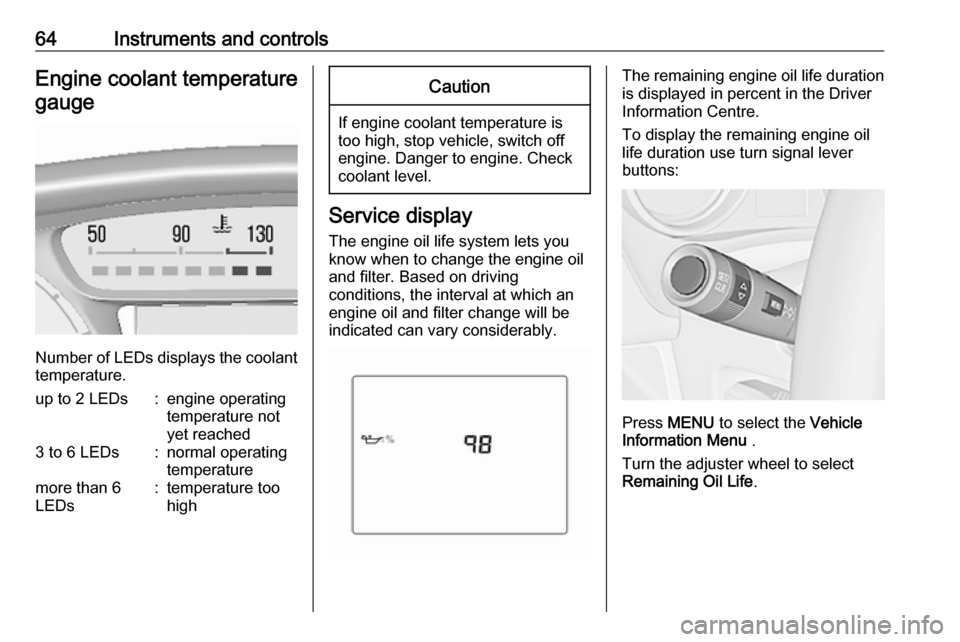
Number of LEDs displays the coolant temperature.
up to 2 LEDs:engine operating
temperature not
yet reached3 to 6 LEDs:normal operating
temperaturemore than 6
LEDs:temperature too
highCaution
If engine coolant temperature is
too high, stop vehicle, switch off
engine. Danger to engine. Check
coolant level.
Service display
The engine oil life system lets you
know when to change the engine oil
and filter. Based on driving
conditions, the interval at which an
engine oil and filter change will be
indicated can vary considerably.
The remaining engine oil life duration
is displayed in percent in the Driver
Information Centre.
To display the remaining engine oil
life duration use turn signal lever
buttons:
Press MENU to select the Vehicle
Information Menu .
Turn the adjuster wheel to select
Remaining Oil Life .
Page 79 of 197

Instruments and controls77Remaining oil life
Indicates an estimate of the oil's
useful life. The number in percentage means the current remaining oil life
and indicates when to change the
engine oil and filter 3 64.
Tyre pressure
Tyre pressures of all wheels are
displayed on this page during driving 3 151.
Tyre learn
This display allows for matching new
tire and wheel by the tyre pressure
monitoring system sensors 3 151.
Page 82 of 197

80Instruments and controlsVehicle messages in Driver
Information Centre
The vehicle messages are displayed
as code numbers.
No.Vehicle message3Engine coolant level low4Air conditioning off11Brakes worn12Vehicle overloaded13Compressor overheatedNo.Vehicle message15Centre high-mounted brake
light failure16Brake light failure17Headlight levelling malfunction18Left low beam failure19Rear fog light failure20Right low beam failure21Left sidelight failure22Right sidelight failure23Reversing light failure24Number plate light failure25Left front turn signal failure26Left rear turn signal failure27Right front turn signal failure28Right rear turn signal failure35Replace battery in radio remote
control36ESC InitialisingNo.Vehicle message49Lane departure warning unavailable52Change timing belt56Tyre pressure imbalance on
front axle57Tyre pressure imbalance on
rear axle59Open, then close driver window60Open, then close front
passenger window61Open, then close left rear
window62Open, then close right rear
window65Theft attempted66Service anti-theft alarm system67Service steering wheel lock68Service power steering75Service air conditioning
Page 92 of 197
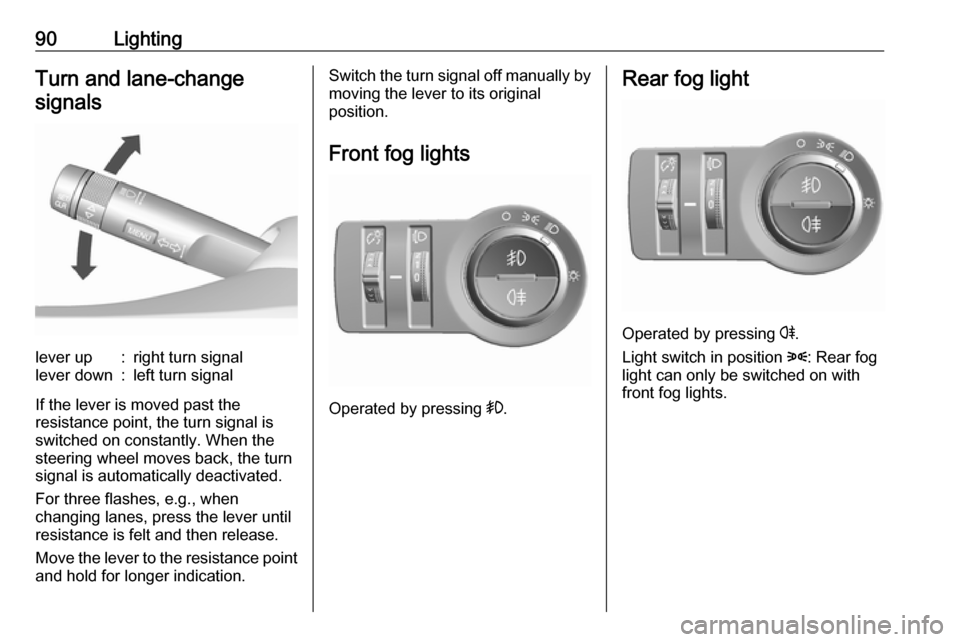
90LightingTurn and lane-changesignalslever up:right turn signallever down:left turn signal
If the lever is moved past the
resistance point, the turn signal is
switched on constantly. When the
steering wheel moves back, the turn
signal is automatically deactivated.
For three flashes, e.g., when
changing lanes, press the lever until
resistance is felt and then release.
Move the lever to the resistance point
and hold for longer indication.
Switch the turn signal off manually by moving the lever to its original
position.
Front fog lights
Operated by pressing >
.
Rear fog light
Operated by pressing r.
Light switch in position 8: Rear fog
light can only be switched on with
front fog lights.
Page 99 of 197
Climate control97Electronic climate controlsystem
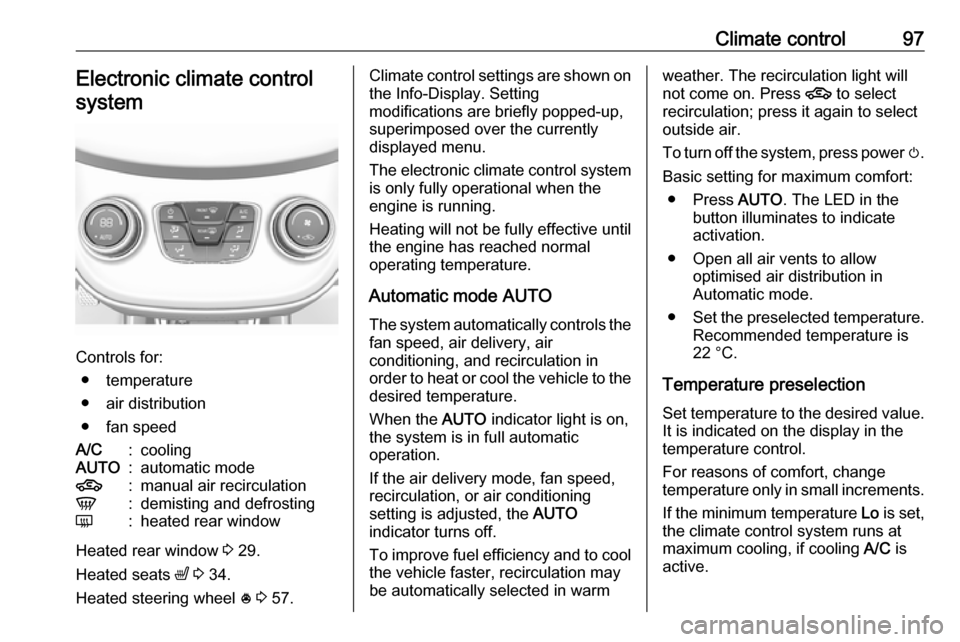
Controls for: ● temperature
● air distribution
● fan speed
A/C:coolingAUTO:automatic mode4:manual air recirculationV:demisting and defrostingÜ:heated rear window
Heated rear window 3 29.
Heated seats ß 3 34.
Heated steering wheel * 3 57.
Climate control settings are shown on
the Info-Display. Setting
modifications are briefly popped-up,
superimposed over the currently
displayed menu.
The electronic climate control system
is only fully operational when the
engine is running.
Heating will not be fully effective until
the engine has reached normal
operating temperature.
Automatic mode AUTO
The system automatically controls the
fan speed, air delivery, air
conditioning, and recirculation in
order to heat or cool the vehicle to the desired temperature.
When the AUTO indicator light is on,
the system is in full automatic
operation.
If the air delivery mode, fan speed,
recirculation, or air conditioning
setting is adjusted, the AUTO
indicator turns off.
To improve fuel efficiency and to cool
the vehicle faster, recirculation may
be automatically selected in warmweather. The recirculation light will
not come on. Press 4 to select
recirculation; press it again to select
outside air.
To turn off the system, press power m.
Basic setting for maximum comfort: ● Press AUTO. The LED in the
button illuminates to indicate activation.
● Open all air vents to allow optimised air distribution in
Automatic mode.
● Set the preselected temperature.
Recommended temperature is
22 °C.
Temperature preselection Set temperature to the desired value.
It is indicated on the display in the
temperature control.
For reasons of comfort, change
temperature only in small increments.
If the minimum temperature Lo is set,
the climate control system runs at
maximum cooling, if cooling A/C is
active.
Page 123 of 197

Driving and operating121Speed limiter
The speed limiter prevents exceeding
a preset maximum speed.
The maximum speed can be set at
speeds above 18 mph.
The driver can only accelerate up to
the preset speed. Deviations from the
limited speed may occur when driving downhill.
The preset speed limit is displayed in
the Driver Information Centre when
the system is active.
ActivationPress L. If cruise control has been
activated before, it is switched off when speed limiter is activated and
control indicator m extinguishes.
Set speed limit With speed limiter active, hold thumb
wheel turned to RES/+ or briefly turn
to RES/+ repeatedly until the desired
maximum speed is displayed in the
Driver Information Centre.
Alternatively, accelerate to the
desired speed and briefly turn thumb
wheel to SET/-: the current speed is
stored as maximum speed. Speed
limit is displayed in the Driver
Information Centre.Change speed limit
With speed limiter active, turn thumb
wheel to RES/+ to increase or SET/-
to decrease the desired maximum
speed.
Exceeding the speed limit
When exceeding the limited speed
without driver input, the speed will
flash in the Driver Information Centre
and a chime sounds during this
period.
In the event of an emergency, it is
possible to exceed the speed limit by
depressing the accelerator pedal
firmly nearly to the final point.
Release the accelerator pedal and
the speed limiter function is
reactivated once a speed lower than
the limit speed is obtained.
Deactivation Press y: speed limiter is deactivated
and the vehicle can be driven without speed limit.
Page 133 of 197

Vehicle care131Vehicle careGeneral Information...................131
Accessories and vehicle modifications .......................... 131
Vehicle storage ........................132
End-of-life vehicle recovery .....132
Vehicle checks ........................... 133
Performing work ......................133
Bonnet ..................................... 133
Engine oil ................................. 134
Engine coolant ......................... 135
Washer fluid ............................ 135
Brakes ..................................... 136
Brake fluid ............................... 136
Vehicle battery ......................... 136
Wiper blade replacement ........138
Bulb replacement .......................138
Halogen headlights ..................139
Fog lights ................................. 140
Front turn signal lights .............141
Tail lights ................................. 141
Side turn signal lights ..............142
Centre high-mounted brake light ......................................... 143
Number plate light ...................143Interior lights ............................ 144
Instrument panel illumination ...144
Electrical system ........................144
Fuses ....................................... 144
Engine compartment fuse box . 146
Instrument panel fuse box .......147
Vehicle tools .............................. 149
Tools ........................................ 149
Wheels and tyres .......................150
Winter tyres ............................. 150
Tyre designations ....................150
Tyre pressure .......................... 150
Tyre pressure monitoring
system .................................... 151
Tread depth ............................. 155
Changing tyre and wheel size . 155 Wheel covers ........................... 155
Tyre chains .............................. 156
Tyre repair kit .......................... 156
Wheel changing .......................159
Spare wheel ............................ 161
Jump starting ............................. 163
Towing ....................................... 165
Towing the vehicle ...................165
Appearance care .......................166
Exterior care ............................ 166
Interior care ............................. 168General Information
Accessories and vehiclemodifications
We recommend the use of genuine
parts and accessories and factory approved parts specific for your
vehicle type. We cannot assess or
guarantee reliability of other products
- even if they have a regulatory or
otherwise granted approval.
Do not make any modifications to the
electrical system, e.g. changes of
electronic control units (chip tuning).Caution
When transporting the vehicle on
a train or on a recovery vehicle, the
mud flaps might be damaged.