window VAUXHALL VIVA 2017.5 Owner's Guide
[x] Cancel search | Manufacturer: VAUXHALL, Model Year: 2017.5, Model line: VIVA, Model: VAUXHALL VIVA 2017.5Pages: 201, PDF Size: 5.3 MB
Page 60 of 201

58Instruments and controlsInstruments and
controlsControls ....................................... 59
Steering wheel adjustment ........59
Steering wheel controls .............59
Heated steering wheel ...............59
Horn ........................................... 60
Windscreen wiper/washer .........60
Rear window wiper/washer .......61
Outside temperature ..................61
Clock ......................................... 61
Power outlets ............................. 63
Cigarette lighter ......................... 63
Ashtrays .................................... 63
Warning lights, gauges and indi‐ cators ........................................... 63
Instrument cluster ......................63
Speedometer ............................. 63
Odometer .................................. 64
Trip odometer ............................ 64
Tachometer ............................... 64
Fuel gauge ................................ 64
Fuel selector .............................. 65
Engine coolant temperature gauge ....................................... 66
Service display .......................... 66Control indicators ......................67
Turn signal ................................. 69
Seat belt reminder .....................70
Airbag and belt tensioners .........70
Airbag deactivation ....................70
Charging system .......................71
Malfunction indicator light ..........71
Service vehicle soon .................71
Brake and clutch system ...........71
Operate pedal ............................ 71
Antilock brake system (ABS) .....72
Gear shifting .............................. 72
Power steering .......................... 72
Lane departure warning ............72
Ultrasonic parking assist ...........72
Electronic Stability Control off ...72
Electronic Stability Control and Traction Control system ...........72
Traction Control system off .......73
Engine coolant temperature ......73
Tyre pressure monitoring system ...................................... 73
Engine oil pressure ....................73
Low fuel ..................................... 74
Immobiliser ................................ 74
Reduced engine power .............74
Exterior light .............................. 74
High beam ................................. 74
Fog light ..................................... 74
Rear fog light ............................. 74Cruise control............................ 74
Speed limiter ............................. 74
Bonnet open .............................. 74
Door open .................................. 75
Information displays .....................75
Driver Information Centre ..........75
Info display ................................ 80
Vehicle messages ........................81
Warning chimes .........................83
Battery voltage .......................... 83
Vehicle personalisation ................84
Telematics service .......................86
OnStar ....................................... 86
Page 63 of 201

Instruments and controls61Rear window wiper/washer
Press the rocker switch to activate the
rear window wiper:
upper position:continuous
operationlower position:intermittent
operationmiddle position:off
Push lever. Washer fluid is sprayed
onto the rear window and the wiper
wipes a few times.
Do not use if the rear window is
frozen.
Switch off in car washes.
The rear window wiper comes on
automatically when the windscreen
wiper is switched on and reverse gear
is engaged.
Activation or deactivation of this
function can be changed in the menu Settings in the Info-Display.
Washer fluid 3 140
Vehicle personalisation 3 84.
Outside temperature
A drop in temperature is indicated
immediately and a rise in temperature
after a time delay.9 Warning
The road surface may already be
icy even though the display
indicates a few degrees above 0
°C.
Clock
Date and time are shown in the
Info-Display.
Info-Display 3 80
Page 84 of 201

82Instruments and controlsVehicle messages in Driver
Information Centre
The vehicle messages are displayed
as code numbers.
No.Vehicle message3Engine coolant level low4Air conditioning off11Brakes worn12Vehicle overloaded13Compressor overheatedNo.Vehicle message15Centre high-mounted brake
light failure16Brake light failure17Headlight levelling malfunction18Left low beam failure19Rear fog light failure20Right low beam failure21Left sidelight failure22Right sidelight failure23Reversing light failure24Number plate light failure25Left front turn signal failure26Left rear turn signal failure27Right front turn signal failure28Right rear turn signal failure35Replace battery in radio remote
control36ESC InitialisingNo.Vehicle message49Lane departure warning unavailable52Change timing belt56Tyre pressure imbalance on
front axle57Tyre pressure imbalance on
rear axle59Open, then close driver window60Open, then close front
passenger window61Open, then close left rear
window62Open, then close right rear
window65Theft attempted66Service anti-theft alarm system67Service steering wheel lock68Service power steering75Service air conditioning
Page 86 of 201

84Instruments and controlsseat heating, heated windscreen
and heated rear window or other
main consumers.
2. Charge the vehicle battery by driving continuously for a while or
by using a charging device.
The warning code will disappear after
the engine has been started twice
consecutively without a voltage drop.
If the vehicle battery cannot be
recharged, have the cause of the fault remedied by a workshop.Vehicle personalisation
The vehicle's behaviour can be
personalised by changing the settings in the Info-Display.
Some of the personal settings for
different drivers can be memorised
individually for each vehicle key.
Memorised settings 3 21.
Depending on vehicle equipment and
country-specific regulations some of
the functions described below may
not be available.
Some functions are only displayed or
active when the engine is running.
Personal settings Graphic-Info-Display
Press MENU , when ignition is on and
infotainment system is activated.
Turn the MENU button to scroll
through the menu list. Press MENU to
select the respective menu. To close
a menu or to go back to previous
page, press BACK.
Select Settings , scroll through the list
and select Vehicle Settings
In the corresponding submenus the
following settings can be changed:
Vehicle Settings ● Park Assist / Collision Detection
Park Assist : Activates or
deactivates the ultrasonic
parking assist.
● Comfort Settings
Chime Volume : Changes the
volume of warning chimes.
Personalisation by Driver :
Activates or deactivates the
personalisation function.
Rear Auto Wipe in Reverse :
Activates or deactivates
Page 87 of 201

Instruments and controls85automatic switching on of the
rear window wiper when reverse
gear is engaged.
● Languages : Scroll through the list
and select the desired language.
● Lighting
Exterior lighting by unlocking :
Activates or deactivates the entry
lighting.
Exit Lighting : Activates or
deactivates exit lighting and
changes lighting duration.
● Power Door Locks
Stop door lock if door open :
Activates or deactivates the door locking function while a door is
open.
Delayed Door Lock : Activates or
deactivates the delayed door
locking function. This feature
delays the actual locking of the
doors until all doors are closed.
● Remote Lock, Unlock, and Start
Remote Unlock Feedback :
Activates or deactivates the
hazard warning flasher feedback
whilst unlocking.Remote Lock Feedback :
Changes what kind of feedback
is given when locking the vehicle.
Remote Door Unlock : Changes
the configuration to unlock only
the driver's door or the whole
vehicle whilst unlocking.
Auto Relock Doors : Activates or
deactivates the automatic relock
function after unlocking without
opening the vehicle.
● Restore Factory Settings :
Resets all settings to the default settings.
● Valet Mode :
Activated, all vehicle displays are locked and no changes may be
performed within the system.
See Infotainment manual.
Personal settings 7" Colour-Info-Display
Press ;, select Settings and
then Vehicle on the touch-screen.
In the corresponding submenus the
following settings can be changed:
Settings ● Climate & Air Quality
Auto Fan Max Speed : Modifies
the level of the cabin airflow of the climate control in automatic
mode.
Air Conditioning Mode : Controls
the state of the cooling compressor when the vehicle is
started. Last setting
(recommended) or at vehicle
start is either always on or always
off.
Page 88 of 201

86Instruments and controlsAuto Defog: Supports
windscreen dehumidification by
automatically selecting the
necessary settings and
automatic air conditioning mode.
Auto Rear Defog : Automatically
activates heated rear window.
● Collision / Detection Systems
Park Assist : Activates or
deactivates the ultrasonic
parking assist.
● Comfort and Convenience
Chime Volume : Changes the
volume of warning chimes.
Personalization By Driver :
Activates or deactivates the
personalisation function.
Auto Wipe in Reverse Gear :
Activates or deactivates
automatic switching on of the
rear window wiper when reverse gear is engaged.
● Lighting
Exit Lighting : Activates or
deactivates and changes the
duration of exit lighting.● Power Door Locks
Unlocked Door Anti Lock Out :
Activates or deactivates the door
locking function while a door is open.
Delayed Door Lock : Activates or
deactivates the delayed door locking function. This feature
delays the actual locking of the
doors until all doors are closed.
● Remote Lock, Unlock, Start
Remote Unlock Light Feedback :
Activates or deactivates the
hazard warning flasher feedback whilst unlocking.
Remote Door Unlock : Changes
the configuration to unlock only
the driver's door or the whole
vehicle whilst unlocking.
Relock Remotely Unlocked
Doors : Activates or deactivates
the automatic relock function
after unlocking without opening
the vehicle.Telematics service
OnStar
OnStar is a personal connectivity and
service assistant with integrated
Wi-Fi hotspot. The OnStar service is available 24 hours a day, seven days a week.
Notice
OnStar is not available for all
markets. For further information,
contact your workshop.
Notice
In order to be available and
operational, OnStar needs a valid
OnStar subscription, functioning
vehicle electrics, mobile service and
GPS satellite link.
To activate the OnStar services and
set up an account, press Z and speak
with an advisor.
Page 99 of 201

Climate control97Climate controlClimate control systems...............97
Heating and ventilation system . 97
Air conditioning system .............98
Electronic climate control system .................................... 100
Air vents ..................................... 103
Adjustable air vents .................103
Fixed air vents ......................... 104
Maintenance .............................. 104
Air intake ................................. 104
Pollen filter ............................... 104
Air conditioning regular operation ................................ 104
Service .................................... 105Climate control systems
Heating and ventilation system
Controls for: ● temperature
● fan speed
● air distribution
4:air recirculationÜ:heated rear window
Heated rear window Ü 3 31.
Heated exterior mirrors Ü 3 28.
Heated seats ß 3 36.
Heated steering wheel * 3 59.
Temperature
Adjust the temperature by turning the
temperature control.red:warmblue:cold
Heating will not be fully effective until
the engine has reached normal
operating temperature.
Fan speed
Adjust the air flow by switching the fan
to the desired speed.
Air distribution
M:to head area via adjustable air
ventsL:to head area and foot wellK:to foot well, with a small amount of air being directed to
windscreen and front door
windowsJ:to windscreen and foot well,
with a small amount of air being
directed to front door windowsV:to windscreen and front door
windows
Page 100 of 201
98Climate controlIntermediate settings are possible.Demisting and defrosting the
windows
● Set air distribution control to V.
● Set temperature control to warmest level.
● Set fan speed to highest speed.
● Switch on heated rear window Ü.
● Open side air vents as required and direct them towards door
windows.
● For simultaneous warming of the
foot well, set air distribution
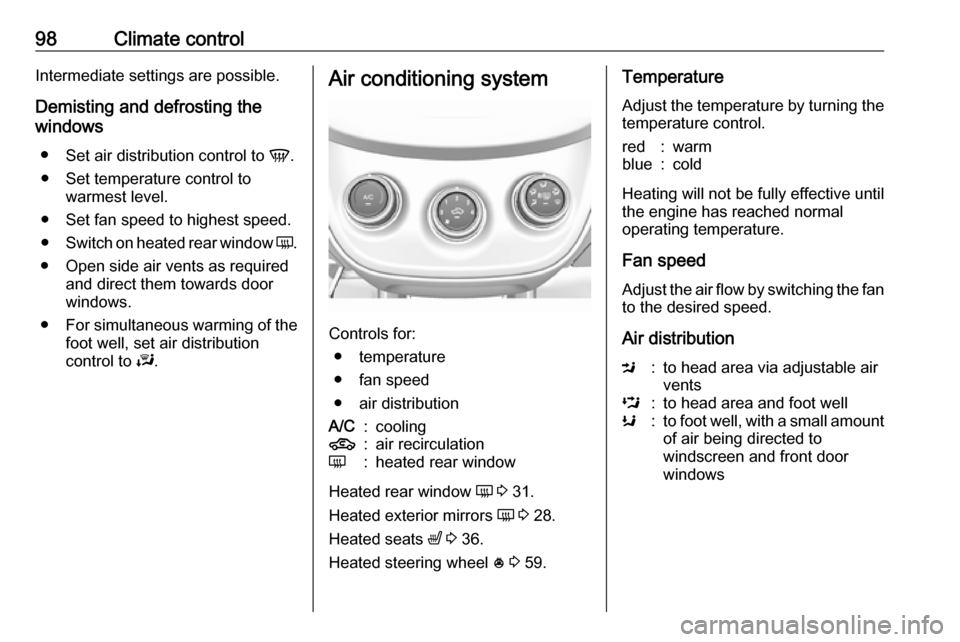
control to J.Air conditioning system
Controls for:
● temperature
● fan speed
● air distribution
A/C:cooling4:air recirculationÜ:heated rear window
Heated rear window Ü 3 31.
Heated exterior mirrors Ü 3 28.
Heated seats ß 3 36.
Heated steering wheel * 3 59.
Temperature
Adjust the temperature by turning the
temperature control.red:warmblue:cold
Heating will not be fully effective until
the engine has reached normal
operating temperature.
Fan speed
Adjust the air flow by switching the fan
to the desired speed.
Air distribution
M:to head area via adjustable air
ventsL:to head area and foot wellK:to foot well, with a small amount of air being directed to
windscreen and front door
windows
Page 101 of 201

Climate control99J:to windscreen and foot well,
with a small amount of air being
directed to front door windowsV:to windscreen and front door
windows (air conditioning is
activated in the background to
help preventing windows from
fogging)
Intermediate settings are possible.
Cooling A/C
Press A/C to switch on cooling. The
LED in the button illuminates to
indicate activation. Cooling is only
functional when the engine is running and climate control fan is switched on.
Press A/C again to switch off cooling.
The air conditioning system cools and
dehumidifies (dries) as soon as the
outside temperature is slightly above
the freezing point. Therefore
condensation may form and drip from under the vehicle.
If no cooling or drying is required,
switch off the cooling system for fuel
saving reasons.
Activated cooling may inhibit
Autostops.
Stop-start system 3 109.
Air recirculation system 4
Press 4 to activate air recirculation
mode. The LED in the button
illuminates to indicate activation.
Press 4 again to deactivate air
recirculation mode.9 Warning
Driving with recirculation mode for
a prolonged period of time can
make you sleepy. Periodically turn to the outside air mode for fresh
air.
The exchange of fresh air is
reduced in air recirculation mode.
In operation without cooling the air humidity increases, so the
windows may mist up. The quality
of the passenger compartment air
deteriorates, which may cause the
vehicle occupants to feel drowsy.
In warm and very humid ambient air
conditions, the windscreen may mist
up from outside, when cold air is
directed towards it. If windscreen
mists up from outside, activate
windscreen wiper and deactivate V.
Maximum cooling Briefly open the windows so that hot
air can disperse quickly.
● Switch on cooling A/C.
● Switch on Air recirculation system 4.
● Set temperature control to coldest level.
● Set fan speed to highest level.
● Set air distribution control to M.
● Open all vents.
Demisting and defrosting the
windows V
● Set air distribution control to V.
● Set temperature control to warmest level.
● Set fan speed to highest level.
● Switch on heated rear window Ü.
● Open side air vents as required and direct them towards the doorwindows.
Page 102 of 201

100Climate controlIf air distribution is set to V, A/C
operates and air recirculation mode will be set to demisting/defrosting
regardless of indicator status.
Notice
If V is pressed while the engine is
running, an Autostop will be inhibited
until V is pressed again.
If V is pressed while the engine is
in an Autostop, the engine will restart
automatically.
Stop-start system 3 109.
Electronic climate control systemControls for: ● temperature
● air distribution
● fan speedA/C:coolingAUTO:automatic mode4:manual air recirculationV:demisting and defrostingÜ:heated rear window
Heated rear window Ü 3 31.
Heated exterior mirrors Ü 3 28.
Heated seats ß 3 36.
Heated steering wheel * 3 59.
Climate control settings are shown on the Info-Display. Setting
modifications are briefly popped-up,
superimposed over the currently
displayed menu.
The electronic climate control system
is only fully operational when the
engine is running.
Heating will not be fully effective until
the engine has reached normal
operating temperature.
Automatic mode AUTO
The system automatically controls the
fan speed, air delivery, air
conditioning, and recirculation in
order to heat or cool the vehicle to the desired temperature.
When the AUTO indicator light is on,
the system is in full automatic
operation.
If the air delivery mode, fan speed,
recirculation, or air conditioning
setting is adjusted, the AUTO
indicator turns off.
To improve fuel efficiency and to cool
the vehicle faster, recirculation may
be automatically selected in warm
weather. The recirculation light will
not come on. Press 4 to select
recirculation; press it again to select
outside air.
To turn off the system, press power m.