remote control VAUXHALL VIVA 2018 User Guide
[x] Cancel search | Manufacturer: VAUXHALL, Model Year: 2018, Model line: VIVA, Model: VAUXHALL VIVA 2018Pages: 203, PDF Size: 5.35 MB
Page 89 of 203
Instruments and controls87Depending on the equipment of the
vehicle, the following services are available:
● Emergency services and support
in the case of a vehicle
breakdown
● Wi-Fi hotspot
● Smartphone application
● Remote control, e.g. location of the vehicle, activation of horn and
lights, control of central locking system
● Stolen vehicle assistance
● Vehicle diagnostics
● Destination download
Notice
The OnStar module of the vehicle is
deactivated after ten days without an
ignition cycle. Functions requiring a
data connection will be available
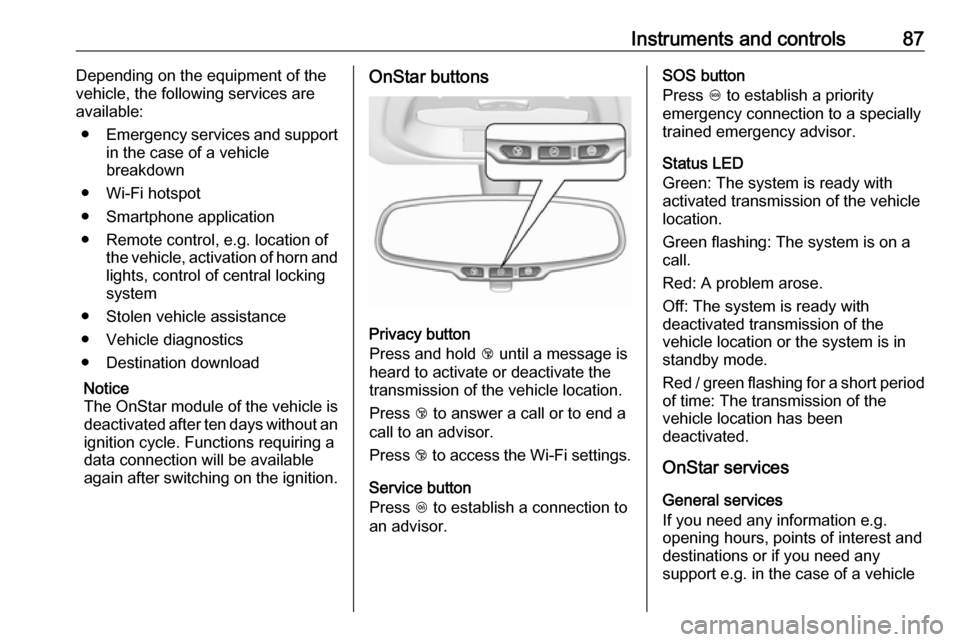
again after switching on the ignition.OnStar buttons
Privacy button
Press and hold j until a message is
heard to activate or deactivate the
transmission of the vehicle location.
Press j to answer a call or to end a
call to an advisor.
Press j to access the Wi-Fi settings.
Service button
Press Z to establish a connection to
an advisor.
SOS button
Press [ to establish a priority
emergency connection to a specially
trained emergency advisor.
Status LED
Green: The system is ready with
activated transmission of the vehicle
location.
Green flashing: The system is on a
call.
Red: A problem arose.
Off: The system is ready with
deactivated transmission of the
vehicle location or the system is in
standby mode.
Red / green flashing for a short period of time: The transmission of the
vehicle location has been
deactivated.
OnStar services
General services
If you need any information e.g.
opening hours, points of interest and
destinations or if you need any
support e.g. in the case of a vehicle
Page 90 of 203

88Instruments and controlsbreakdown, a flat tyre and empty fuel
tank, press Z to establish a
connection to an advisor.
Emergency services
In the case of an emergency situation,
press [ and talk to an advisor. The
advisor then contacts emergency or
assistance service providers and
directs them to your vehicle.
In the case of an accident with
activation of airbags or belt
tensioners, an automatic emergency
call is established. The advisor is
immediately connected to your
vehicle to see whether help is
needed.
Wi-Fi hotspot
The Wi-Fi hotspot of the vehicle
provides internet connectivity with a
maximum speed of 4G/LTE.
Notice
The Wi-Fi hotspot functionality is not available for all markets.
Up to seven devices may be
connected.To connect a mobile device with the
Wi-Fi hotspot:
1. Press j and then select Wi-Fi
settings on the Info-Display. The settings displayed include the Wi- Fi hotspot name (SSID),
password and connection type.
2. Start a Wi-Fi network search on your mobile device.
3. Select your vehicle hotspot (SSID) when listed.
4. When prompted, enter the password on your mobile device.
Notice
To change the SSID or password,
press Z and talk to an advisor or log
in to your account.
To switch off the Wi-Fi hotspot
functionality, press Z to call an
advisor.
Smartphone app
With the My Vauxhall smartphone
app, some vehicle functions can be
operated remotely.The following functions are available:
● Lock or unlock vehicle.
● Honk horn or flash lights.
● Check fuel level, engine oil life and tyre pressure (only with tyre
pressure monitoring system).
● Send navigation destination to the vehicle, if equipped with a
built-in navigation system.
● Locate vehicle on a map.
● Manage Wi-Fi settings.
To operate these functions, download the app from App Store ®
or
Google Play™ Store.
Remote control
If desired, use any phone to call an
advisor, who can remotely operate
specific vehicle functions. Find the respective OnStar phone number on
our country-specific website.
The following functions are available: ● Lock or unlock vehicle.
● Provide information on the vehicle location.
● Honk horn or flash lights.
Page 91 of 203

Instruments and controls89Stolen vehicle assistance
If the vehicle is stolen, report the theft
to the authorities and request OnStar
stolen vehicle assistance. Use any
phone to call an advisor. Find the
respective OnStar phone number on
our country-specific website.
OnStar can provide support in
locating and recovering the vehicle.Theft alert
When the anti-theft alarm system is
triggered, a notification is sent to
OnStar. You are then informed about
this event by text message or email.Restart prevention
By sending remote signals, OnStar can prevent the vehicle from
restarting once it has been turned off.
On-demand diagnostics
At any time e.g. if the vehicle displays a vehicle message, press Z to
contact an advisor and ask to
complete a real-time diagnostic check
to directly determine the issue.
Depending on the results, the advisor
will provide further support.
Diagnostic report
The vehicle automatically transmits
diagnostic data to OnStar which
sends a monthly email report to you
and your preferred workshop.
Notice
The workshop notification function
can be disabled in your account.
The report contains the status of key
operating systems of the vehicle like
engine, transmission, airbags, ABS,
and other major systems. It also
provides information on possible
maintenance items and tyre pressure
(only with tyre pressure monitoring
system).
To look at the information in greater
detail, select the link within the email and log in to your account.
Destination download
A desired destination can be directly
downloaded to the navigation system.
Press Z to call an advisor and
describe the destination or point of
interest.The advisor can look up any address
or point of interest and directly send
the destination to the built-in
navigation system.
OnStar settings
OnStar PIN
To have full access to all OnStar
services, a four-digit PIN is required.
The PIN has to be personalised when first talking to an advisor.
To change the PIN, press Z to call an
advisor.
Account data
An OnStar subscriber has an account
where all the data is stored. To
request a change of the account
information, press Z and talk to an
advisor or log in to your account.
If the OnStar service is used on
another vehicle, press Z and request
that the account be transferred to the
new vehicle.
Page 92 of 203

90Instruments and controlsNotice
In any case, if the vehicle is disposed
of, sold or otherwise transferred,
immediately inform OnStar about the changes and terminate the
OnStar service on this vehicle.
Vehicle location
The vehicle location is transmitted to OnStar when service is requested or triggered. A message on the Info-
Display informs about this
transmission.
To activate or deactivate the
transmission of the vehicle location,
press and hold j until an audio
message is heard.
The deactivation is indicated by the
status light flashing red and green for a short period of time and each time
the vehicle is started.
Notice
If the transmission of the vehicle
location is deactivated, some
services are no longer available.
Notice
The vehicle location always remains
accessible to OnStar in the case of
an emergency.Find the privacy policy in your
account.
Software updates
OnStar may remotely carry out
software updates without further
notice or consent. These updates are to enhance or maintain safety and
security or the operation of the
vehicle.
These updates may concern privacy
issues. Find the privacy policy in your
account.
Page 191 of 203

Customer information189Operation frequency:
2402 - 2480 MHz
Maximum output: 4 dBm EIRP
OnStar module
LGE
LG Electronics European Shared
Service Center B.V., Krijgsman 1,
1186 DM Amstelveen, The
NetherlandsOperation
frequency (MHz)Maximum output
(dBm)2402 - 248042412 - 246218880 - 915331710 - 1785241850 - 1910241920 - 1980242500 - 257023
Radio remote control transmitter
Continental Automotive GmbH
Siemensstraße 12, 93055
Regensburg, Germany
Operation frequency: 433.92 MHz
Maximum output: -5.7 dbm
Robert Bosch GmbH
Robert Bosch Platz 1, 70839
Gerlingen, Germany
Operation frequency: 433.92 MHz
Maximum output: -4 dbm
Radio remote control receiver
Robert Bosch GmbH
Robert Bosch Platz 1, 70839
Gerlingen, Germany
Operation frequency: 433.92 MHz
Maximum output: N/A
Tyre pressure sensors
Schrader Electronics Ltd.
11 Technology Park, Belfast Road,
Antrim BT41 1QS, Northern Ireland,
United Kingdom
Operation frequency: 433.92 MHz
Maximum output: 10 dBm
Page 196 of 203

194Customer informationVehicle data recording
and privacy
Event data recorders Data storage modules in the
vehicle
A large number of electronic
components of your vehicle contain
data storage modules temporarily or
permanently storing technical data
about the condition of the vehicle,
events and errors. In general, this
technical information documents the
condition of parts, modules, systems
or the environment:
● Operating conditions of system components (e.g. filling levels).
● Status messages of the vehicle and its single components (e.g.
number of wheel revolutions /
rotational speed, deceleration,
lateral acceleration).
● Dysfunctions and defects in important system components.● Vehicle reactions in particular driving situations ( e.g. inflation of
an airbag, activation of the
stability regulation system).
● Environmental conditions (e.g. temperature).
These data are exclusively technical
and help identifying and correcting
errors as well as optimizing vehicle
functions.
Motion profiles indicating travelled
routes cannot be created with these
data.
If services are used (e.g. repair
works, service processes, warranty
cases, quality assurance),
employees of the service network
(manufacturer included) are able to
read out this technical information
from the event and error data storage
modules applying special diagnostic
devices. If required, you will receive
further information at these
workshops. After an error has been
corrected, the data are deleted from
the error storage module or they are
constantly overwritten.When using the vehicle, situations
may occur in which these technical
data related to other information
(accident report, damages on the
vehicle, witness statements etc.) may be associated with a specific person -
possibly, with the assistance of an
expert.
Additional functions contractually
agreed upon with the client (e.g.
vehicle location in emergency cases)
allow the transmission of particular vehicle data from the vehicle.
Radio Frequency
Identification (RFID)
RFID technology is used in some
vehicles for functions such as tyre
pressure monitoring and ignition
system security. It is also used in
connection with conveniences such
as radio remote controls for door
locking/unlocking and starting, and in- vehicle transmitters for garage dooropeners. RFID technology in
Vauxhall vehicles does not use or
record personal information or link with any other Vauxhall system
containing personal information.
Page 200 of 203

198Instrument cluster ........................63
Instrument panel fuse box .........152
Instrument panel illumination .....148
Instrument panel illumination control ...................................... 94
Instrument panel overview ........... 10
Interior care ............................... 172
Interior lighting .............................. 94
Interior lights ........................ 95, 148
Interior mirrors .............................. 28
Introduction .................................... 3
J
Jump starting ............................. 168
K Key, memorised settings ..............21
Keys ............................................. 19
Keys, locks ................................... 19
L
Lane departure warning .......72, 126
Light switch .................................. 91
Load compartment ................24, 52
Load compartment cover .............54
Loading information .....................57
Low fuel ....................................... 74
M Malfunction indicator light ............71
Manual adjustment ......................27Manual anti-dazzle ......................28
Manual mode ............................. 116
Manual transmission .................. 113
Manual transmission automated 114
Manual windows ..........................29
Memorised settings ......................21
Mirror adjustment ........................... 8
Mirrors ......................................... 27
Misted light covers .......................94
N
New vehicle running-in ..............107
Number plate light .....................148
O Object detection systems ...........125
Odometer ..................................... 64 Oil, engine .......................... 175, 180
OnStar .......................................... 86
Operate pedal ............................... 71
Outside temperature ....................61
Overrun cut-off ........................... 109
P Parking ................................ 18, 112
Parking assist ............................ 125
Parking brake ............................ 118
Parking lights ............................... 94
Performance .............................. 184
Performing work ........................137
Pollen filter ................................. 104Power outlets ............................... 63
Power steering.............................. 72
Power windows ............................ 29
Puncture ..................................... 163
R
Radio Frequency Identification (RFID) ..................................... 194
Radio remote control ...................20
REACH ....................................... 191
Reading lights .............................. 95
Rear doors ................................... 24
Rear floor storage cover ..............55
Rear fog light ......................... 74, 93
Rear window wiper/washer .......... 61
Recommended fluids and lubricants ........................ 175, 180
Reduced engine power ................74
Refuelling ................................... 130 Registered trademarks ...............193
Retained power off .....................108
Reversing lights ........................... 94
Ride control systems ..................119
Roof .............................................. 31
Roof load ...................................... 57
Roof rack ..................................... 56
S Safety belts ................................... 37
Seat adjustment ....................... 7, 35
Seat belt ........................................ 8