transmission VAUXHALL VIVA 2018 Owner's Manual
[x] Cancel search | Manufacturer: VAUXHALL, Model Year: 2018, Model line: VIVA, Model: VAUXHALL VIVA 2018Pages: 203, PDF Size: 5.35 MB
Page 13 of 203

In brief111Central locking system ..........21
Power windows .....................29
2 Exterior mirrors .....................27
3 Cruise control .....................122
Speed limiter ...................... 123
Heated steering wheel ..........59
4 Turn and lane-change
signals, headlight flash,
low beam and high beam ......93
Exit lighting ........................... 95
Parking lights ........................ 94
5 Side air vents ...................... 103
6 Instruments .......................... 63
7 Driver Information Centre ...... 75
8 Steering wheel controls .......59
9 Windscreen wiper,
windscreen washer
system, rear window
wiper, rear window washer
system ................................... 60
10 Centre air vents .................. 103
11 Hazard warning flashers ......92
12 Info-Display ........................... 8013Anti-theft alarm system
status LED ........................... 25
14 Infotainment system
15 Glovebox .............................. 51
16 Climate control system .......... 97
17 AUX input, USB input
18 Selector lever, manual
transmission ....................... 113
Selector lever, manual
transmission automated ......114
19 Seat heating .......................... 36
20 Parking brake ......................118
21 Ignition switch with
steering wheel lock ............107
22 Horn ..................................... 60
Driver airbag ........................ 42
23 Bonnet release lever ..........137
24 Steering wheel adjustment ..59
25 Fuse box ............................ 152
26 Traction Control system .....119
City mode ............................ 121
Stop-start system ................109
Fuel selector ......................... 65
Lane departure warning .....126Electronic Stability Control . 120
27 Light switch .......................... 91
Headlight range
adjustment ........................... 92
Front fog light ........................ 93
Rear fog light ........................ 93
Brightness of instrument
panel illumination ..................94
Page 17 of 203
In brief15Climate control
Heated rear window
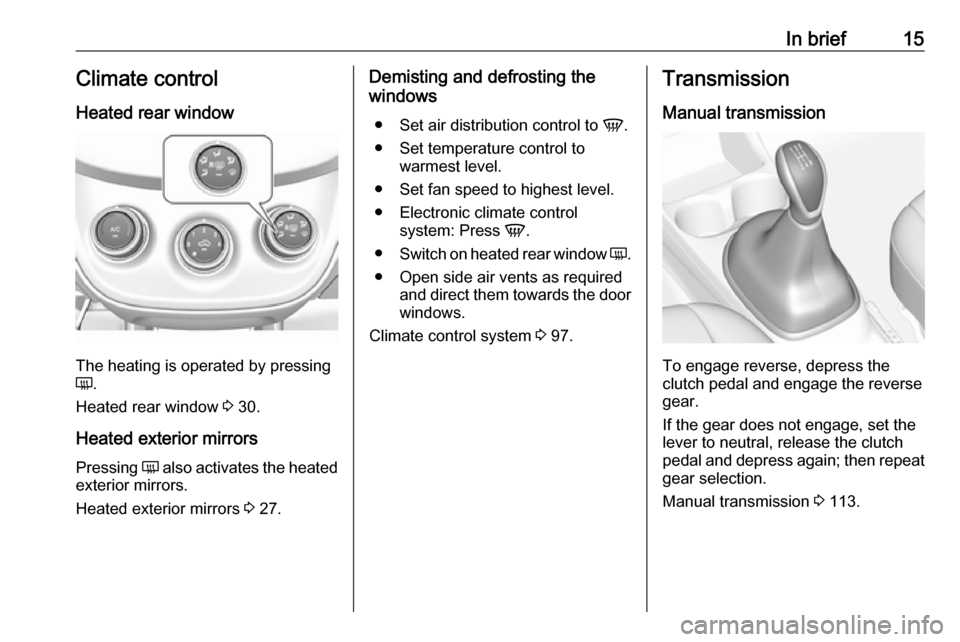
The heating is operated by pressing
Ü .
Heated rear window 3 30.
Heated exterior mirrors
Pressing Ü also activates the heated
exterior mirrors.
Heated exterior mirrors 3 27.
Demisting and defrosting the
windows
● Set air distribution control to V.
● Set temperature control to warmest level.
● Set fan speed to highest level.
● Electronic climate control system: Press V.
● Switch on heated rear window Ü.
● Open side air vents as required and direct them towards the doorwindows.
Climate control system 3 97.Transmission
Manual transmission
To engage reverse, depress the
clutch pedal and engage the reverse
gear.
If the gear does not engage, set the
lever to neutral, release the clutch
pedal and depress again; then repeat
gear selection.
Manual transmission 3 113.
Page 18 of 203
![VAUXHALL VIVA 2018 Owners Manual 16In briefManual transmission automatedR:reverse, engage only when
vehicle is stationaryN:neutralD:automatic modeM:manual mode<:upshift in manual mode]:downshift in manual mode
Manual transmission aut](/img/38/19577/w960_19577-17.png "VAUXHALL VIVA 2018 Owners Manual 16In briefManual transmission automatedR:reverse, engage only when
vehicle is stationaryN:neutralD:automatic modeM:manual mode<:upshift in manual mode]:downshift in manual mode
Manual transmission aut")
16In briefManual transmission automatedR:reverse, engage only when
vehicle is stationaryN:neutralD:automatic modeM:manual mode<:upshift in manual mode]:downshift in manual mode
Manual transmission automated
3 114.
Starting off
Check before starting off ● Tyre pressure and condition 3 155,
3 187.
● Engine oil level and fluid levels 3 138.
● All windows, mirrors, exterior lighting and number plates are
free from dirt, snow and ice and
are operational.
● Proper position of mirrors, seats, and seat belts 3 27, 3 34,
3 38.
● Brake function at low speed, particularly if the brakes are wet.Starting the engine
● Turn key to position 1.
● Move the steering wheel slightly to release the steering wheel
lock.
● Manual transmission: operate clutch and brake pedal.
Manual transmission automated:
operate brake pedal.
Automatic transmission: operate
brake pedal and move selector
lever to P or N.
● Do not operate accelerator pedal.
● Turn key to position 3 and
release.
Page 19 of 203
In brief17Starting the engine 3 108.Stop-start system
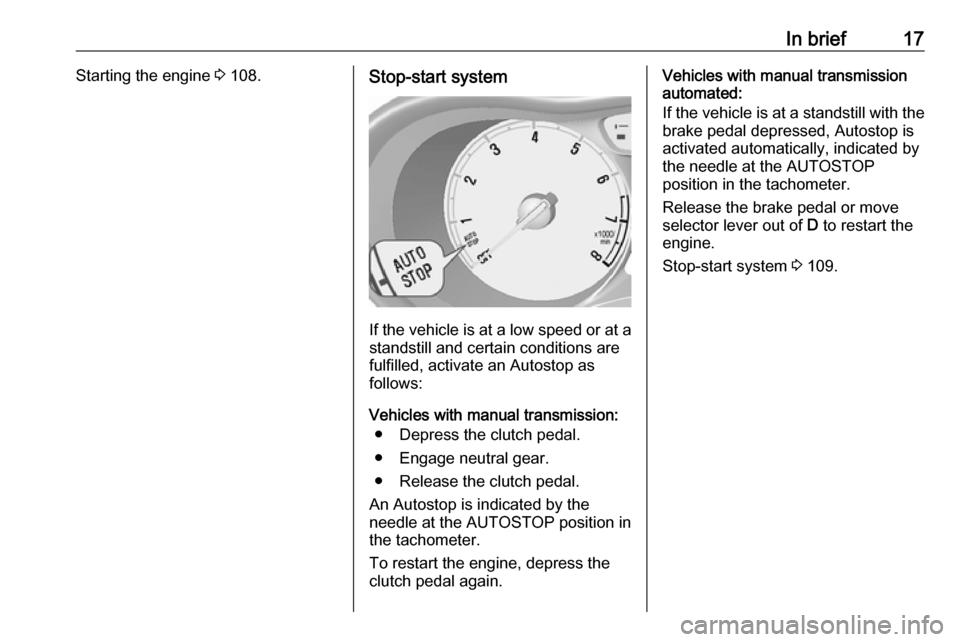
If the vehicle is at a low speed or at a
standstill and certain conditions are
fulfilled, activate an Autostop as
follows:
Vehicles with manual transmission: ● Depress the clutch pedal.
● Engage neutral gear.
● Release the clutch pedal.
An Autostop is indicated by the
needle at the AUTOSTOP position in
the tachometer.
To restart the engine, depress the clutch pedal again.
Vehicles with manual transmission
automated:
If the vehicle is at a standstill with the
brake pedal depressed, Autostop is
activated automatically, indicated by
the needle at the AUTOSTOP position in the tachometer.
Release the brake pedal or move
selector lever out of D to restart the
engine.
Stop-start system 3 109.
Page 20 of 203
18In briefParking9Warning
● Do not park the vehicle on an
easily ignitable surface. The
high temperature of the
exhaust system could ignite the
surface.
● Always apply the parking brake. Activate the manual
parking brake without pressing the release button. Apply as
firmly as possible on a downhill slope or uphill slope. Depress
brake pedal at the same time to
reduce operating force.
● Switch off the engine.
● If the vehicle is on a level surface or uphill slope, engage
first gear before removing the ignition key. On an uphill slope,
turn the front wheels away from
the kerb.
If the vehicle is on a downhill
slope, engage reverse gear
before removing the ignition
key. Turn the front wheels
towards the kerb.
● Close the windows and the sunroof.
● Remove the ignition key from the ignition switch. Turn the
steering wheel until the
steering wheel lock is felt to
engage.
For vehicles with manual
transmission automated, the key
can only be removed from the
ignition switch when the parking
brake is applied.
● Lock the vehicle by pressing e on
the radio remote control.
Activate the anti-theft alarm
system 3 25.
● The engine cooling fans may run
after the engine has been
switched off 3 137.
Caution
After running at high engine
speeds or with high engine loads,
operate the engine briefly at a low load or run in neutral for
approx. 30 seconds before
switching off, in order to protect
the turbocharger.
Keys, locks 3 19, Laying-up the
vehicle for a long period of time
3 136.
Page 85 of 203

Instruments and controls83No.Vehicle message77Service lane departure warning79Top up engine oil81Service transmission / trans‐
mission malfunction
Manual transmission auto‐
mated 3 11582Change engine oil soon84Engine power reduced89Service vehicle soon90Service brake assist95Service airbag145Check washer fluid level151Press clutch to start174Low vehicle battery258Parking assist offVehicle messages on
Colour-Info-Display
Some important messages appear
additionally in the
Colour-Info-Display. Some
messages only pop-up for a few
seconds.
Warning chimes
When starting the engine or whilst driving
Only one warning chime will sound at a time.
The warning chime regarding
unfastened seat belts has priority
over any other warning chime.
● If seat belt is not fastened.
● If a door or the tailgate is not fully
closed when starting off.
● If a certain speed is exceeded with parking brake applied.
● If a programmed speed is exceeded.
● If a warning message appears in the Driver Information Centre orInfo-Display.● If the parking assist detects an object.
● If unintended lane change occurs.
● If a fault in the automatic locking system is detected.
When the vehicle is parked and/or the driver's door is opened
● With exterior lights on.
During an Autostop ● If the driver's door is opened.
Battery voltage
When the vehicle battery voltage is
running low, the warning code 174 will
appear in the Driver Information
Centre.
1. Switch off immediately any electrical consumers which are
not required for a safe drive, e.g.
Page 89 of 203
Instruments and controls87Depending on the equipment of the
vehicle, the following services are available:
● Emergency services and support
in the case of a vehicle
breakdown
● Wi-Fi hotspot
● Smartphone application
● Remote control, e.g. location of the vehicle, activation of horn and
lights, control of central locking system
● Stolen vehicle assistance
● Vehicle diagnostics
● Destination download
Notice
The OnStar module of the vehicle is
deactivated after ten days without an
ignition cycle. Functions requiring a
data connection will be available
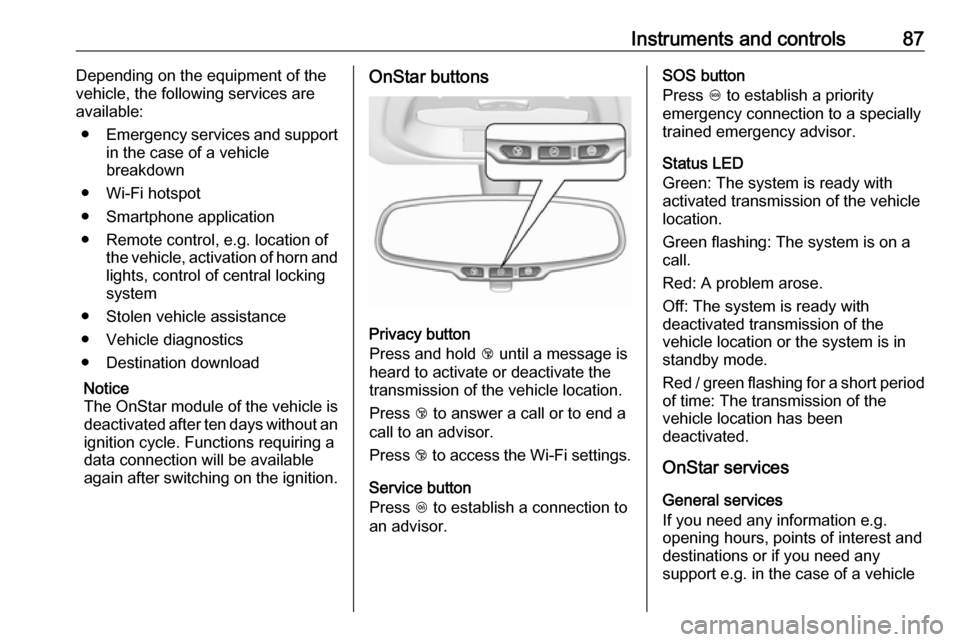
again after switching on the ignition.OnStar buttons
Privacy button
Press and hold j until a message is
heard to activate or deactivate the
transmission of the vehicle location.
Press j to answer a call or to end a
call to an advisor.
Press j to access the Wi-Fi settings.
Service button
Press Z to establish a connection to
an advisor.
SOS button
Press [ to establish a priority
emergency connection to a specially
trained emergency advisor.
Status LED
Green: The system is ready with
activated transmission of the vehicle
location.
Green flashing: The system is on a
call.
Red: A problem arose.
Off: The system is ready with
deactivated transmission of the
vehicle location or the system is in
standby mode.
Red / green flashing for a short period of time: The transmission of the
vehicle location has been
deactivated.
OnStar services
General services
If you need any information e.g.
opening hours, points of interest and
destinations or if you need any
support e.g. in the case of a vehicle
Page 91 of 203

Instruments and controls89Stolen vehicle assistance
If the vehicle is stolen, report the theft
to the authorities and request OnStar
stolen vehicle assistance. Use any
phone to call an advisor. Find the
respective OnStar phone number on
our country-specific website.
OnStar can provide support in
locating and recovering the vehicle.Theft alert
When the anti-theft alarm system is
triggered, a notification is sent to
OnStar. You are then informed about
this event by text message or email.Restart prevention
By sending remote signals, OnStar can prevent the vehicle from
restarting once it has been turned off.
On-demand diagnostics
At any time e.g. if the vehicle displays a vehicle message, press Z to
contact an advisor and ask to
complete a real-time diagnostic check
to directly determine the issue.
Depending on the results, the advisor
will provide further support.
Diagnostic report
The vehicle automatically transmits
diagnostic data to OnStar which
sends a monthly email report to you
and your preferred workshop.
Notice
The workshop notification function
can be disabled in your account.
The report contains the status of key
operating systems of the vehicle like
engine, transmission, airbags, ABS,
and other major systems. It also
provides information on possible
maintenance items and tyre pressure
(only with tyre pressure monitoring
system).
To look at the information in greater
detail, select the link within the email and log in to your account.
Destination download
A desired destination can be directly
downloaded to the navigation system.
Press Z to call an advisor and
describe the destination or point of
interest.The advisor can look up any address
or point of interest and directly send
the destination to the built-in
navigation system.
OnStar settings
OnStar PIN
To have full access to all OnStar
services, a four-digit PIN is required.
The PIN has to be personalised when first talking to an advisor.
To change the PIN, press Z to call an
advisor.
Account data
An OnStar subscriber has an account
where all the data is stored. To
request a change of the account
information, press Z and talk to an
advisor or log in to your account.
If the OnStar service is used on
another vehicle, press Z and request
that the account be transferred to the
new vehicle.
Page 92 of 203

90Instruments and controlsNotice
In any case, if the vehicle is disposed
of, sold or otherwise transferred,
immediately inform OnStar about the changes and terminate the
OnStar service on this vehicle.
Vehicle location
The vehicle location is transmitted to OnStar when service is requested or triggered. A message on the Info-
Display informs about this
transmission.
To activate or deactivate the
transmission of the vehicle location,
press and hold j until an audio
message is heard.
The deactivation is indicated by the
status light flashing red and green for a short period of time and each time
the vehicle is started.
Notice
If the transmission of the vehicle
location is deactivated, some
services are no longer available.
Notice
The vehicle location always remains
accessible to OnStar in the case of
an emergency.Find the privacy policy in your
account.
Software updates
OnStar may remotely carry out
software updates without further
notice or consent. These updates are to enhance or maintain safety and
security or the operation of the
vehicle.
These updates may concern privacy
issues. Find the privacy policy in your
account.
Page 108 of 203

106Driving and operatingDriving and
operatingDriving hints ............................... 106
Control of the vehicle ...............106
Steering ................................... 107
Starting and operating ...............107
New vehicle running-in ............107
Ignition switch positions ...........107
Retained power off ..................108
Starting the engine ..................108
Overrun cut-off ........................ 109
Stop-start system ....................109
Parking .................................... 112
Engine exhaust .......................... 113
Catalytic converter ...................113
Manual transmission ..................113
Manual transmission automa‐ ted .............................................. 114
Transmission display ...............114
Starting the engine ..................114
Selector lever .......................... 115
Manual mode ........................... 116
Electronic driving programmes 116
Fault ........................................ 116Brakes........................................ 117
Antilock brake system .............117
Parking brake .......................... 118
Brake assist ............................. 118
Hill start assist ......................... 118
Ride control systems .................119
Traction Control system ..........119
Electronic Stability Control ......120
City mode ................................ 121
Driver assistance systems .........122
Cruise control .......................... 122
Speed limiter ........................... 123
Parking assist .......................... 125
Lane departure warning ..........126
Fuel ............................................ 127
Fuel for petrol engines .............127
Fuel for liquid gas operation ....128
Refuelling ................................ 130
Fuel consumption - CO 2-
Emissions .............................. 134Driving hints
Control of the vehicle
Never coast with engine not
running
Many systems will not function in this
situation (e.g. brake servo unit, power steering). Driving in this manner is a
danger to yourself and others.
All systems function during an
Autostop.
Stop-start system 3 109.
Idle boost
If charging of the vehicle battery is
required due to battery condition, the
power output of the generator must
be increased. This will be achieved by an idle boost which may be audible.
A message appears in the Driver
Information Centre.
Pedals To ensure the pedal travel is
uninhibited, there must be no mats in
the area of the pedals.