connect VAUXHALL VIVA 2019 User Guide
[x] Cancel search | Manufacturer: VAUXHALL, Model Year: 2019, Model line: VIVA, Model: VAUXHALL VIVA 2019Pages: 189, PDF Size: 5.22 MB
Page 138 of 189
136Vehicle care6.Insert bulb holder into the tail light
assembly and screw into place.
Connect wiring plug. Install tail
light assembly in body and tighten
screws. Close covers and
engage.
7. Switch on ignition, operate and check all lights.
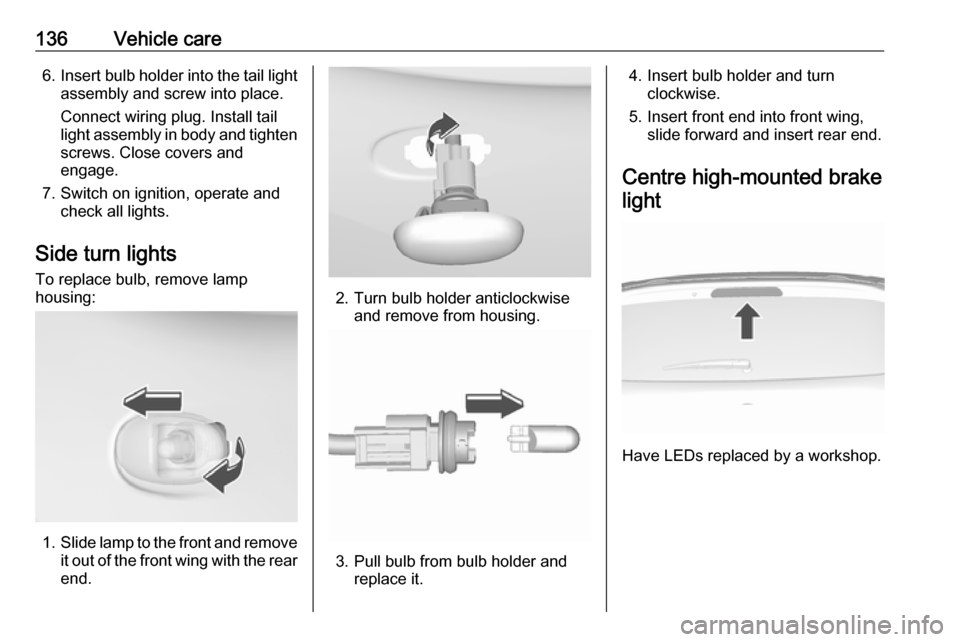
Side turn lights To replace bulb, remove lamp
housing:
1. Slide lamp to the front and remove
it out of the front wing with the rear
end.
2. Turn bulb holder anticlockwise and remove from housing.
3. Pull bulb from bulb holder andreplace it.
4. Insert bulb holder and turn clockwise.
5. Insert front end into front wing, slide forward and insert rear end.
Centre high-mounted brake light
Have LEDs replaced by a workshop.
Page 143 of 189
Vehicle care141After having changed defective fuses
close the fuse box cover and press
until it engages.
If the fuse box cover is not closed
correctly, malfunction may occur.
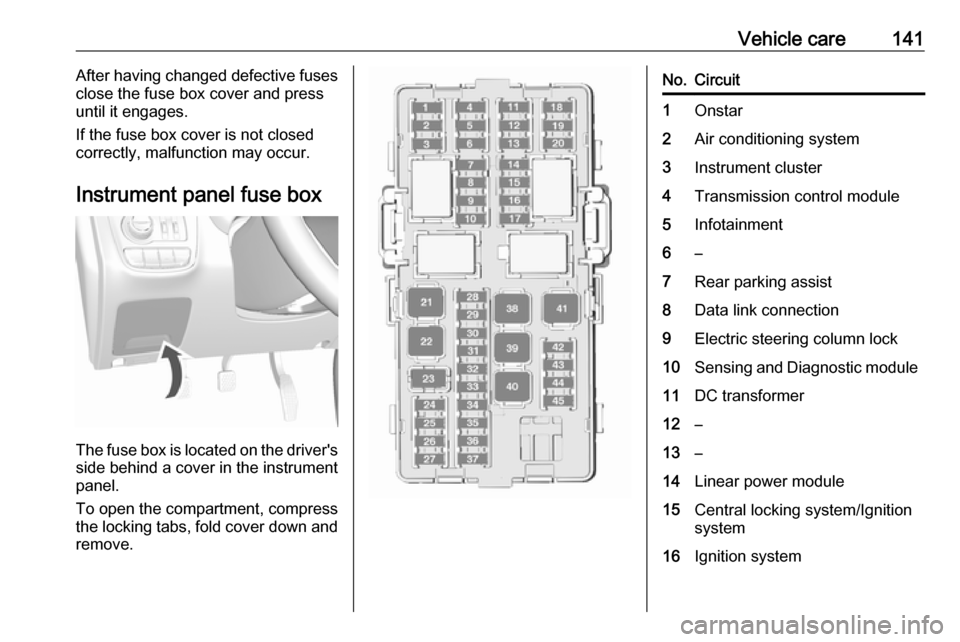
Instrument panel fuse box
The fuse box is located on the driver's
side behind a cover in the instrument
panel.
To open the compartment, compress
the locking tabs, fold cover down and
remove.
No.Circuit1Onstar2Air conditioning system3Instrument cluster4Transmission control module5Infotainment6–7Rear parking assist8Data link connection9Electric steering column lock10Sensing and Diagnostic module11DC transformer12–13–14Linear power module15Central locking system/Ignition
system16Ignition system
Page 152 of 189

150Vehicle care1. Open the floor cover.
2. Remove the compressor and thesealant bottle.
3. Remove the electrical connectioncable and air hose from the
storage compartments on the
underside of the compressor.
4. Screw the compressor air hose to
the connection on the sealant
bottle.
5. Fit the sealant bottle into the retainer on the compressor.
Set the compressor near the tyre
in such a way that the sealant
bottle is upright.
6. Unscrew valve cap from defective
tyre.
7. Screw the filler hose to the tyre valve.
8. The switch on the compressor must be set to J.
9. Connect the compressor plug to the power outlet or cigarette
lighter socket.
To avoid discharging the battery, we recommend running the
engine.
Page 153 of 189

Vehicle care151
Set the rocker switch on the
compressor to I. The tyre is filled
with sealant.
10. The compressor pressure gauge briefly indicates up to 6 bar whilstthe sealant bottle is emptying
(approx. 30 seconds). Then the
pressure starts to drop.
11. All of the sealant is pumped into the tyre. Then the tyre is inflated.
12. The prescribed tyre pressure should be obtained within
10 minutes.
Tyre pressure 3 172.
When the correct pressure is
obtained, switch off the
compressor.
If the prescribed tyre pressure is
not obtained within 10 minutes,
remove the tyre repair kit. Move
the vehicle one tyre rotation.
Reattach the tyre repair kit and
continue the filling procedure for
10 minutes. If the prescribed tyre
pressure is still not obtained, the
tyre is too badly damaged. Seek
the assistance of a workshop.
Drain excess tyre pressure with
the button over the pressure indicator.
Depending on version the button
can be located on the air hose.
Do not run the compressor longer
than 10 min.
13. Detach the tyre repair kit. Push catch on bracket to remove
sealant bottle from bracket. Screw the tyre inflation hose to the freeconnection of the sealant bottle.
This prevents sealant from
escaping. Stow tyre repair kit in
load compartment.
14. Remove any excess sealant using a cloth.
Page 159 of 189
Vehicle care157Jump starting
Do not start with a quick charger.
A vehicle with a discharged vehicle
battery can be started using jump
leads and the vehicle battery of
another vehicle.9 Warning
Be extremely careful when starting
with jump leads. Any deviation
from the following instructions can
lead to injuries or damage caused
by battery explosion or damage to the electrical systems of both
vehicles.
9 Warning
Avoid contact of the battery with
eyes, skin, fabrics and painted
surfaces. The fluid contains
sulphuric acid which can cause
injuries and damage in the event
of direct contact.
● Never expose the battery to naked flames or sparks.
● A discharged vehicle battery canalready freeze at a temperature
of 0 °C. Defrost the frozen battery
before connecting jump leads.
● Wear eye protection and protective clothing when
handling a battery.
● Use a booster battery with the same voltage (12 V). Its capacity
(Ah) must not be much less than
that of the discharged battery.
● Use jump leads with insulated terminals and a cross section of
at least 16 mm 2
.
● Do not disconnect the discharged
vehicle battery from the vehicle.
● Switch off all unnecessary electrical consumers.
● Do not lean over the battery during jump starting.
● Do not allow the terminals of one
lead to touch those of the other
lead.
● The vehicles must not come into contact with each other during
the jump starting process.● Apply the parking brake, transmission in neutral.
● Open the positive terminal protection caps of both vehicle
batteries.
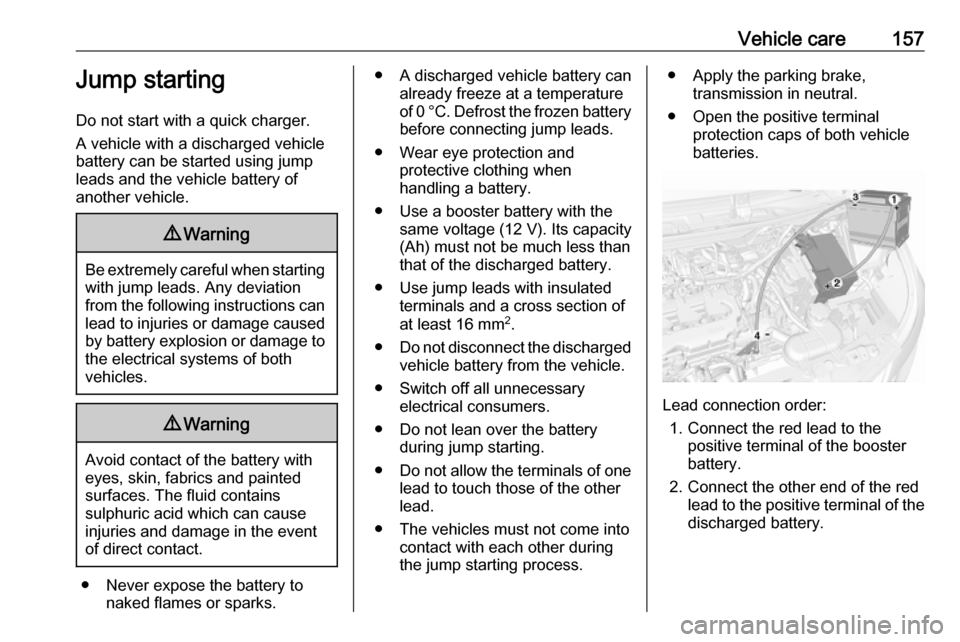
Lead connection order:
1. Connect the red lead to the positive terminal of the booster
battery.
2. Connect the other end of the red lead to the positive terminal of the
discharged battery.
Page 160 of 189

158Vehicle care3. Connect the black lead to thenegative terminal of the booster
battery.
4. Connect the other end of the black
lead to a vehicle grounding point,
such as the engine block or an
engine mounting bolt. Connect as far away from the discharged
vehicle battery as possible,
however at least 60 cm.
Route the leads so that they cannot
catch on rotating parts in the engine
compartment.
To start the engine: 1. Start the engine of the vehicle providing the jump.
2. After 5 minutes, start the other engine. Start attempts should be
made for no longer than
15 seconds at an interval of 1 minute.
3. Allow both engines to idle for approx. 3 minutes with the leads
connected.4. Switch on electrical consumers (e.g. headlights, heated rear
window) of the vehicle receiving
the jump start.
5. Reverse above sequence exactly when removing leads.Towing
Towing the vehicle The towing eye is stowed with the
vehicle tools 3 142.
1. Wrap a cloth around the tip of a flat
screwdriver to prevent paint
damage. Disengage cap by using
the screwdriver and remove the
cap.
Page 178 of 189

176Customer informationREACHRegistration, Evaluation,
Authorisation and Restriction of
Chemicals (REACH) is a European
Union regulation adopted to improve
the protection of human health and
the environment from the risks that
can be posed by chemicals. Visit
www.opel.com/reach for further
information and for access to the
Article 33 communication.
Software acknowledgement Certain OnStar components include
libcurl and unzip software and other
third party software. Below are the
notices and licenses associated with
libcurl and unzip and for other third
party software please see http://
www.lg.com/global/support/
opensource/index.
libcurl Copyright and permission notice
Copyright (c) 1996 - 2010, Daniel
Stenberg,
All rights reserved.Permission to use, copy, modify, and
distribute this software for any
purpose with or without fee is hereby
granted, provided that the above
copyright notice and this permission
notice appear in all copies.
The software is provided "as is",
without warranty of any kind, express
or implied, including but not limited to
the warranties of merchantability,
fitness for a particular purpose and
noninfringement of third party rights.
In no event shall the authors or
copyright holders be liable for any
claim, damages or other liability,
whether in an action of contract, tort
or otherwise, arising from, out of or in connection with the software or the
use or other dealings in the software.
Except as contained in this notice, the
name of a copyright holder shall not
be used in advertising or otherwise to
promote the sale, use or other
dealings in this Software without prior
written authorization of the copyright
holder.unzip
This is version 2005-Feb-10 of the
Info-ZIP copyright and license. The definitive version of this document
should be available at ftp://ftp.info-
zip.org/pub/infozip/license.html
indefinitely.
Copyright (c) 1990-2005 Info-ZIP. All
rights reserved.
For the purposes of this copyright and
license, “Info-ZIP” is defined as the
following set of individuals:
Mark Adler, John Bush, Karl Davis,
Harald Denker, Jean-Michel Dubois,
Jean-loup Gailly, Hunter Goatley, Ed
Gordon, Ian Gorman, Chris Herborth, Dirk Haase, Greg Hartwig, Robert
Heath, Jonathan Hudson, Paul
Kienitz, David Kirschbaum, Johnny
Lee, Onno van der Linden, Igor
Mandrichenko, Steve P. Miller, Sergio Monesi, Keith Owens, George
Petrov, Greg Roelofs, Kai Uwe
Rommel, Steve Salisbury, Dave
Smith, Steven M. Schweda, Christian Spieler, Cosmin Truta, Antoine
Verheijen, Paul von Behren, Rich
Wales, Mike White.
Page 182 of 189

180Customer information● input destinations
● data on the use of online services
This data for comfort and
infotainment functions can be stored
locally in the vehicle or be kept on a
device that you have connected to the vehicle ( e.g. a smartphone, USB stick
or MP3 player). Data that you have
input yourself can be deleted at any
time.
This data can only be transmitted out of the vehicle at your request,
particularly when using online
services in accordance with the
settings selected by you.
Smartphone integration, e.g.
Android Auto or Apple CarPlay
If your vehicle is equipped
accordingly, you can connect your
smartphone or another mobile device
to the vehicle so that you can control
it via the controls integrated in the
vehicle. The smartphone image and
sound can be output via the
multimedia system in this case. At the
same time, specific information is
transmitted to your smartphone.
Depending on the type of integration,this includes data such as position
data, day / night mode and other
general vehicle information. For more information, please see the operating
instructions for the vehicle /
infotainment system.
Integration allows selected
smartphone apps to be used, such as
navigation or music playback. No
further integration is possible
between smartphone and vehicle, in
particular active access to vehicle
data. The nature of further data
processing is determined by the
provider of the app used. Whether
you can define settings, and if so
which ones, is dependent on the app
in question and your smartphone's
operating system.Online services
If your vehicle has a radio networkconnection, this allows data to be exchanged between your vehicle and other systems. The radio network
connection is made possible by
means of a transmitter device in your
vehicle or a mobile device provided
by you (e.g. a smartphone). Online
functions can be used via this radio
network connection. These include
online services and applications /
apps provided to you by the
manufacturer or other providers.
Proprietary services
In the case of the manufacturer's
online services, the relevant functions are described by the manufacturer in
an appropriate location (e.g. Owner's
Manual, the manufacturer's website)
and the associated data protection
information is provided. Personal
data may be used to provide online
services. Data exchange for this
purpose takes place via a protected
connection, e.g. using the
manufacturer's IT systems provided
for the purpose. Collection,
Page 183 of 189

Customer information181processing and use of personal data
for the purposes of preparation of services take place solely on the
basis of legal permission, e.g. in the
case of a legally prescribed
emergency communication system or
a contractual agreement, or by virtue
of consent.
You can activate or deactivate the services and functions (which are
subject to charges to some extent)
and, in some cases, the vehicle's
entire radio network connection. This
does not include statutory functions
and services such as an emergency
communication system.
Third party services
If you make use of online services
from other providers (third parties),
these services are subject to the
liability and data protection and usage conditions of the provider in question.
The manufacturer frequently has no
influence over the content exchanged
in this regard.Therefore, please note the nature,
scope and purpose of the collection
and use of personal data within the
scope of third party services provided by the service provider in question.
Radio Frequency
Identification (RFID)
RFID technology is used in some
vehicles for functions such as tyre
pressure monitoring and immobiliser.
It is also used in connection with
conveniences such as radio remote
controls for door locking / unlocking
and starting. RFID technology in
Vauxhall vehicles does not use or
record personal information or link
with any other Vauxhall system
containing personal information.