Seat VAUXHALL VIVA 2019 Owner's Guide
[x] Cancel search | Manufacturer: VAUXHALL, Model Year: 2019, Model line: VIVA, Model: VAUXHALL VIVA 2019Pages: 189, PDF Size: 5.22 MB
Page 70 of 189
68Instruments and controlsBulb replacement 3 132.
Fuses 3 138.
Turn lights 3 90.
Seat belt reminder
Seat belt reminder on front seats
X for driver's seat illuminates or
flashes red in the speedometer.
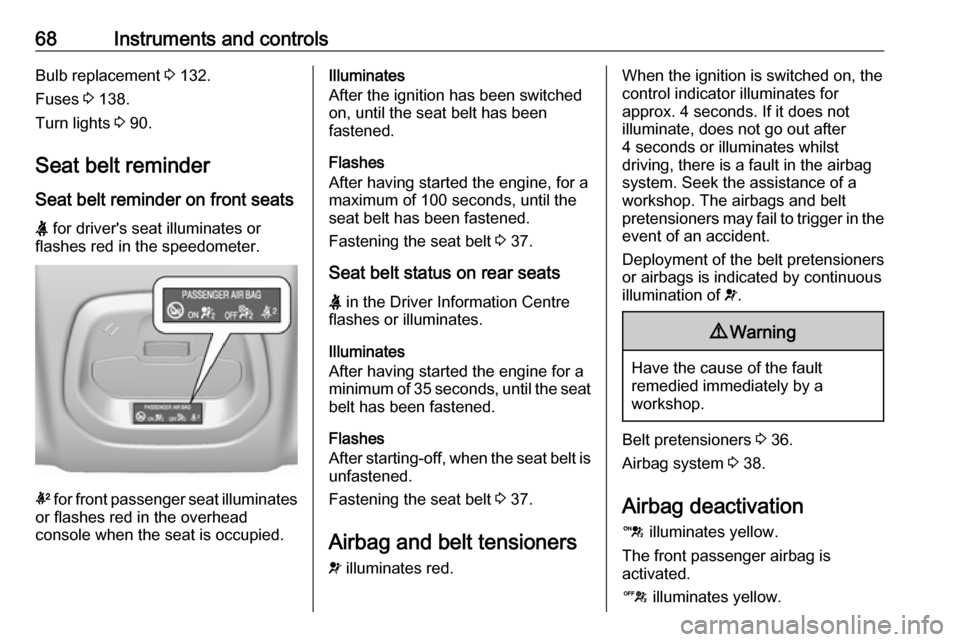
k for front passenger seat illuminates
or flashes red in the overhead
console when the seat is occupied.
Illuminates
After the ignition has been switched on, until the seat belt has been
fastened.
Flashes
After having started the engine, for a
maximum of 100 seconds, until the
seat belt has been fastened.
Fastening the seat belt 3 37.
Seat belt status on rear seats
X in the Driver Information Centre
flashes or illuminates.
Illuminates
After having started the engine for a
minimum of 35 seconds, until the seat belt has been fastened.
Flashes
After starting-off, when the seat belt is
unfastened.
Fastening the seat belt 3 37.
Airbag and belt tensioners
v illuminates red.When the ignition is switched on, the
control indicator illuminates for
approx. 4 seconds. If it does not
illuminate, does not go out after
4 seconds or illuminates whilst
driving, there is a fault in the airbag
system. Seek the assistance of a
workshop. The airbags and belt
pretensioners may fail to trigger in the event of an accident.
Deployment of the belt pretensioners
or airbags is indicated by continuous
illumination of v.9 Warning
Have the cause of the fault
remedied immediately by a
workshop.
Belt pretensioners 3 36.
Airbag system 3 38.
Airbag deactivation d illuminates yellow.
The front passenger airbag is
activated.
c illuminates yellow.
Page 75 of 189
Instruments and controls73Door openN illuminates.
A door or the tailgate is open.Displays
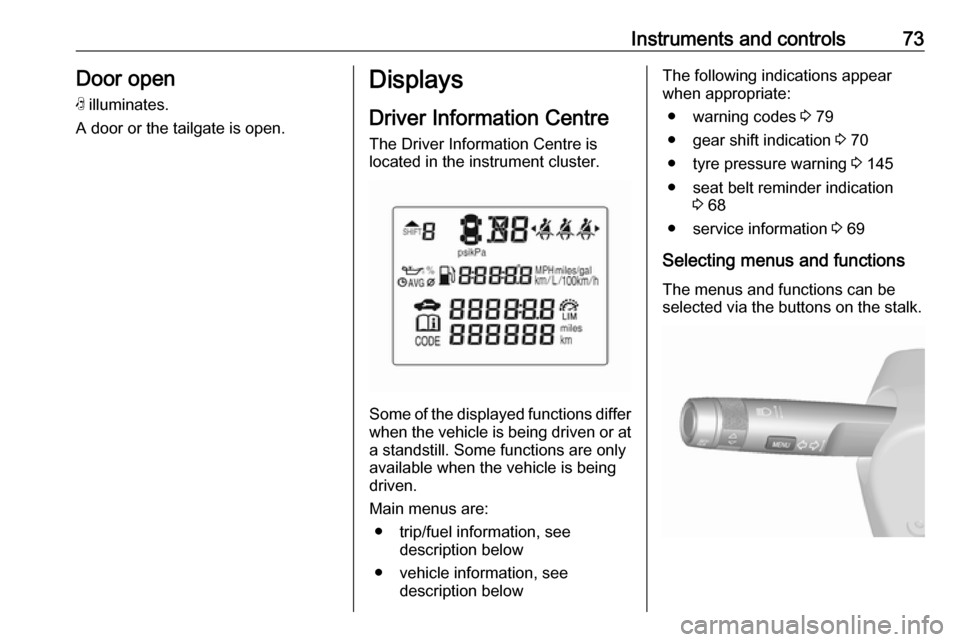
Driver Information Centre The Driver Information Centre is
located in the instrument cluster.
Some of the displayed functions differ
when the vehicle is being driven or at a standstill. Some functions are only
available when the vehicle is being
driven.
Main menus are: ● trip/fuel information, see description below
● vehicle information, see description below
The following indications appear
when appropriate:
● warning codes 3 79
● gear shift indication 3 70
● tyre pressure warning 3 145
● seat belt reminder indication 3 68
● service information 3 69
Selecting menus and functions The menus and functions can be
selected via the buttons on the stalk.
Page 83 of 189

Instruments and controls81Warning chimesIf several warnings appear at the
same time, only one warning chime will sound.
When starting the engine or whilst driving
The warning chime regarding
unfastened seat belts has priority
over any other warning chime.
● If seat belt is not fastened.
● If a door or the tailgate is not fully
closed when starting off.
● If a certain speed is exceeded with parking brake applied.
● If a programmed speed is exceeded.
● If a warning message appears in the Driver Information Centre orInfo Display.
● If the parking assist detects an object.
● If unintended lane change occurs.
● If a fault in the automatic locking system is detected.When the vehicle is parked and/or
the driver's door is opened
● With exterior lights on.
During an Autostop ● If the driver's door is opened.
Battery voltage
When the vehicle battery voltage is
running low, the warning code 174 will
appear in the Driver Information
Centre.
1. Switch off immediately any electrical consumers which are
not required for a safe drive, e.g.
seat heating, heated windscreen
and heated rear window or other
main consumers.
2. Charge the vehicle battery by driving continuously for a while or
by using a charging device.
The warning code will disappear after the engine has been started twice
consecutively without a voltage drop.
If the vehicle battery cannot be
recharged, have the cause of the fault
remedied by a workshop.Vehicle personalisation
The vehicle's behaviour can be
personalised by changing the settings in the Info Display.
Some of the personal settings for
different drivers can be memorised
individually for each vehicle key.
Memorised settings 3 20.
Depending on vehicle equipment and
country-specific regulations some of
the functions described below may
not be available.
Some functions are only displayed or
active when the engine is running.
Personal settings Graphic Info Display
Press MENU , when ignition is on and
infotainment system is activated.
Turn the MENU button to scroll
through the menu list. Press MENU to
select the respective menu. To close a menu or to go back to previous
page, press BACK.
Select Settings , scroll through the list
and select Vehicle Settings
Page 91 of 189
Lighting89Headlight range adjustment
Manual headlight range
adjustment
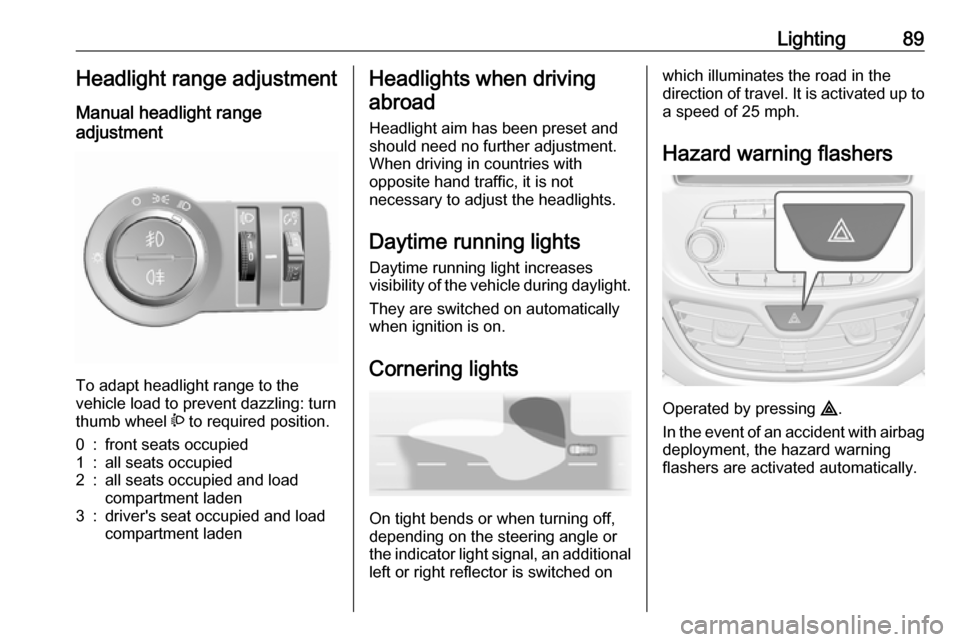
To adapt headlight range to the
vehicle load to prevent dazzling: turn
thumb wheel ? to required position.
0:front seats occupied1:all seats occupied2:all seats occupied and load
compartment laden3:driver's seat occupied and load
compartment ladenHeadlights when driving
abroad
Headlight aim has been preset and
should need no further adjustment.
When driving in countries with
opposite hand traffic, it is not
necessary to adjust the headlights.
Daytime running lights Daytime running light increases
visibility of the vehicle during daylight.
They are switched on automatically
when ignition is on.
Cornering lights
On tight bends or when turning off,
depending on the steering angle or
the indicator light signal, an additional left or right reflector is switched on
which illuminates the road in the
direction of travel. It is activated up to
a speed of 25 mph.
Hazard warning flashers
Operated by pressing ¨
.
In the event of an accident with airbag
deployment, the hazard warning
flashers are activated automatically.
Page 96 of 189
94Climate controlClimate controlClimate control systems...............94
Heating and ventilation system . 94 Air conditioning system .............95
Electronic climate control system ...................................... 97
Air vents ..................................... 100
Adjustable air vents .................100
Fixed air vents ......................... 101
Maintenance .............................. 101
Air intake ................................. 101
Air conditioning regular operation ................................ 101
Service .................................... 101Climate control systems
Heating and ventilation system
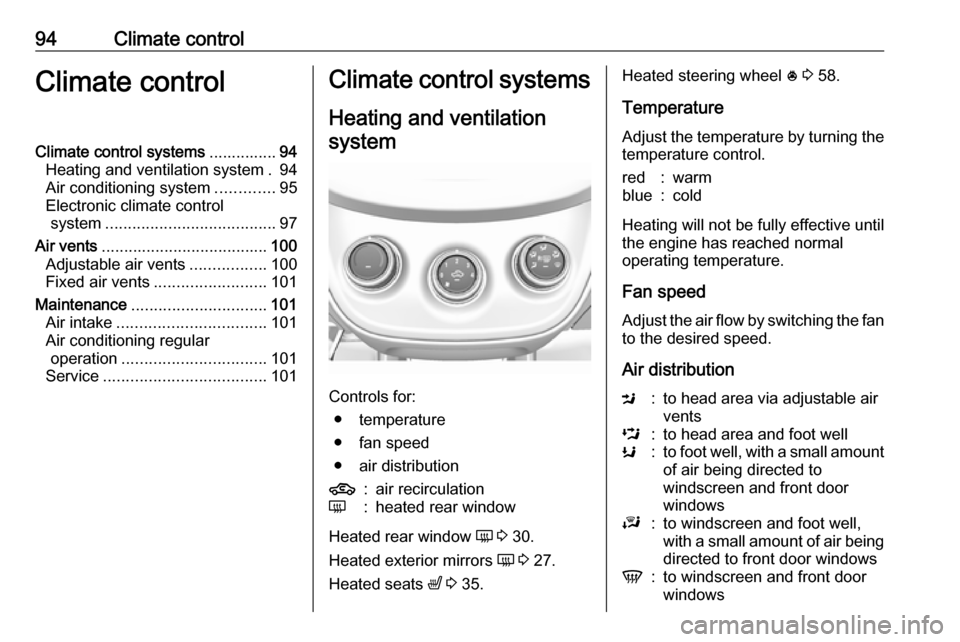
Controls for: ● temperature
● fan speed
● air distribution
4:air recirculationÜ:heated rear window
Heated rear window Ü 3 30.
Heated exterior mirrors Ü 3 27.
Heated seats ß 3 35.
Heated steering wheel * 3 58.
Temperature
Adjust the temperature by turning the
temperature control.red:warmblue:cold
Heating will not be fully effective until
the engine has reached normal
operating temperature.
Fan speed
Adjust the air flow by switching the fan
to the desired speed.
Air distribution
M:to head area via adjustable air
ventsL:to head area and foot wellK:to foot well, with a small amount of air being directed to
windscreen and front door
windowsJ:to windscreen and foot well,
with a small amount of air being
directed to front door windowsV:to windscreen and front door
windows
Page 97 of 189
Climate control95Intermediate settings are possible.Demisting and defrosting the
windows
● Set air distribution control to V.
● Set temperature control to warmest level.
● Set fan speed to highest speed.
● Switch on heated rear window Ü.
● Open side air vents as required and direct them towards door
windows.
● For simultaneous warming of the
foot well, set air distribution
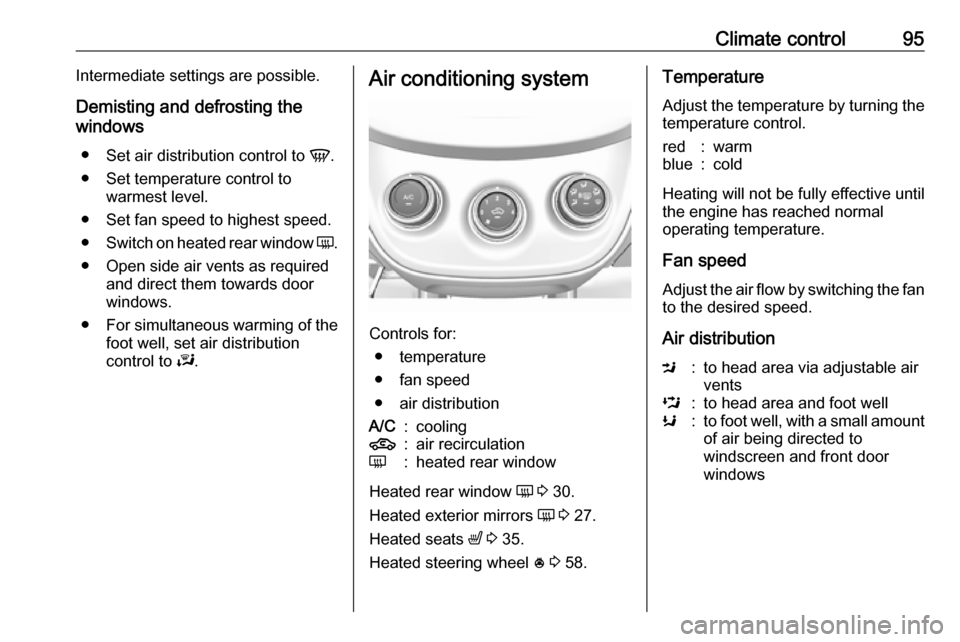
control to J.Air conditioning system
Controls for:
● temperature
● fan speed
● air distribution
A/C:cooling4:air recirculationÜ:heated rear window
Heated rear window Ü 3 30.
Heated exterior mirrors Ü 3 27.
Heated seats ß 3 35.
Heated steering wheel * 3 58.
Temperature
Adjust the temperature by turning the
temperature control.red:warmblue:cold
Heating will not be fully effective until
the engine has reached normal
operating temperature.
Fan speed
Adjust the air flow by switching the fan
to the desired speed.
Air distribution
M:to head area via adjustable air
ventsL:to head area and foot wellK:to foot well, with a small amount of air being directed to
windscreen and front door
windows
Page 99 of 189
Climate control97If air distribution is set to V, A/C
operates and air recirculation mode will be set to demisting / defrosting
regardless of indicator status.
Notice
If V is pressed while the engine is
running, an Autostop will be inhibited
until V is pressed again.
If V is pressed while the engine is
in an Autostop, the engine will restart automatically.
Stop-start system 3 105.
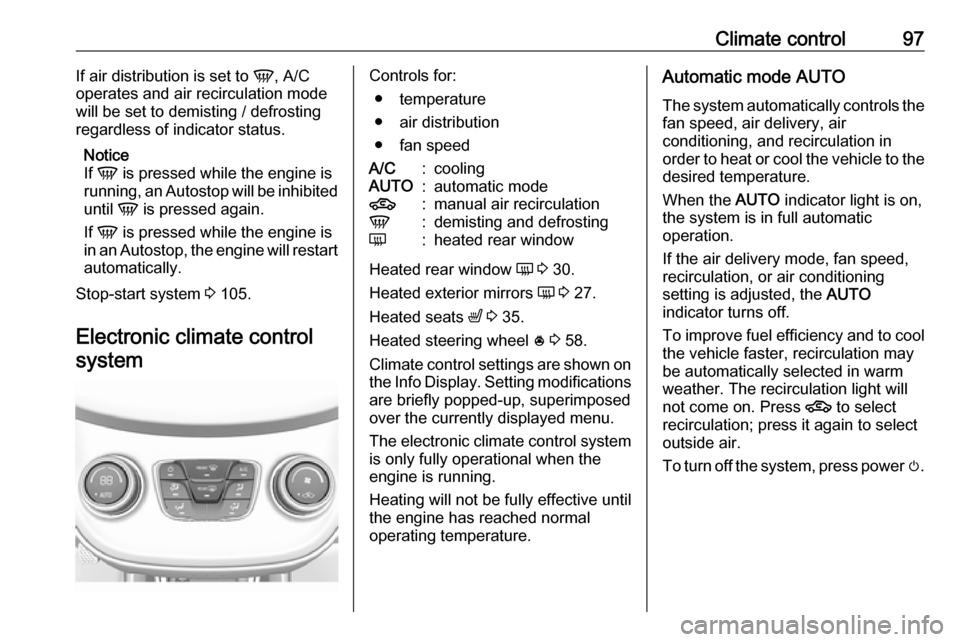
Electronic climate control systemControls for: ● temperature
● air distribution
● fan speedA/C:coolingAUTO:automatic mode4:manual air recirculationV:demisting and defrostingÜ:heated rear window
Heated rear window Ü 3 30.
Heated exterior mirrors Ü 3 27.
Heated seats ß 3 35.
Heated steering wheel * 3 58.
Climate control settings are shown on the Info Display. Setting modifications
are briefly popped-up, superimposed
over the currently displayed menu.
The electronic climate control system is only fully operational when the
engine is running.
Heating will not be fully effective until
the engine has reached normal
operating temperature.
Automatic mode AUTO
The system automatically controls the
fan speed, air delivery, air
conditioning, and recirculation in
order to heat or cool the vehicle to the
desired temperature.
When the AUTO indicator light is on,
the system is in full automatic
operation.
If the air delivery mode, fan speed,
recirculation, or air conditioning
setting is adjusted, the AUTO
indicator turns off.
To improve fuel efficiency and to cool
the vehicle faster, recirculation may
be automatically selected in warm
weather. The recirculation light will
not come on. Press 4 to select
recirculation; press it again to select
outside air.
To turn off the system, press power m.
Page 108 of 189

106Driving and operatingA vehicle battery sensor ensures that
an Autostop is only performed if the
vehicle battery is sufficiently charged
for a restart.
Activation The stop-start system is available as
soon as the engine is started, the
vehicle starts-off and the conditions
as stated below in this section are
fulfilled.
Deactivation
Deactivate the stop-start system
manually by pressing Ï. The
deactivation is indicated when the
LED in the button extinguishes.
Autostop
If the vehicle is at a low speed or at a
standstill, activate an Autostop as
follows:
● Depress the clutch pedal.
● Set the lever in neutral.
● Release the clutch pedal.
The engine will be switched off while
the ignition stays on.
Indication
An Autostop is indicated by the
needle at the AUTOSTOP position in
the tachometer.
During an Autostop, the heating and
brake performance will be
maintained.
Conditions for an Autostop
The stop-start system checks if each
of the following conditions is fulfilled:
● The stop-start system is not manually deactivated.
● The bonnet is fully closed.
● The driver's door is closed or the driver's seat belt is fastened.
● The vehicle battery is sufficiently charged and in good condition.
● The engine is warmed-up.
● The engine coolant temperature is not too high.
● The engine exhaust temperature is not too high, e.g. after driving
with high engine load.
● The ambient temperature is above -5 °C.
● The climate control system allows an Autostop.
Page 109 of 189

Driving and operating107● The brake vacuum is sufficient.
● The vehicle was driven at least at
walking speed since the last
Autostop.
Otherwise an Autostop will be
inhibited.
Certain settings of the climate control
system may inhibit an Autostop. See
"Climate control" chapter for further information 3 97.
Immediately after motorway driving
an Autostop may be inhibited.
New vehicle running-in 3 103.
Vehicle battery discharge protection
To ensure reliable engine restarts,
several vehicle battery discharge
protection features are implemented
as part of the stop-start system.
Power saving measures
During an Autostop, several electrical
features, e.g., the rear window
heating, are disabled or switched into
a power saving mode. The fan speed of the climate control system is
reduced to save power.Restart of the engine by the driver
Depress the clutch pedal to restart the
engine.
If the selector lever is shifted out of
neutral before depressing the clutch
pedal first, control indicator -
illuminates or is shown as a symbol in the Driver Information Centre.
Control indicator - 3 69.
Restart of the engine by the stop- start system
The selector lever must be in neutral to enable an automatic restart.
If one of the following conditions
occurs during an Autostop, the
engine will be restarted automatically by the stop-start system:
● The stop-start system is manually deactivated.
● The bonnet is opened.
● The driver's seat belt is unfastened and the driver's door
is opened.
● The engine temperature is too low.● The charging level of the vehiclebattery is below a defined level.
● The brake vacuum is not sufficient.
● The vehicle is driven at least at walking speed.
● The climate control system requests an engine start.
● The air conditioning is manually switched on.
If the bonnet is not fully closed, a warning message is displayed in the
Driver Information Centre.
If an electrical accessory, e.g. a
portable CD player, is connected to
the power outlet, a brief power drop
during restart might be noticeable.
Parking9 Warning
● Do not park the vehicle on an
easily ignitable surface. The
high temperature of the
exhaust system could ignite the
surface.
Page 124 of 189
122Driving and operating9Danger
Fuel is flammable and explosive.
No smoking. No naked flames or
sparks.
If you can smell fuel in your
vehicle, have the cause of this
remedied immediately by a
workshop.
A label with symbols at the fuel filler
flap is indicating the allowed fuel
types. In Europe the pump nozzles of the filling stations are marked with
these symbols. Refuel only the
allowed fuel type.
Caution
In case of misfuelling, do not
switch on ignition.
1. Stop the engine.
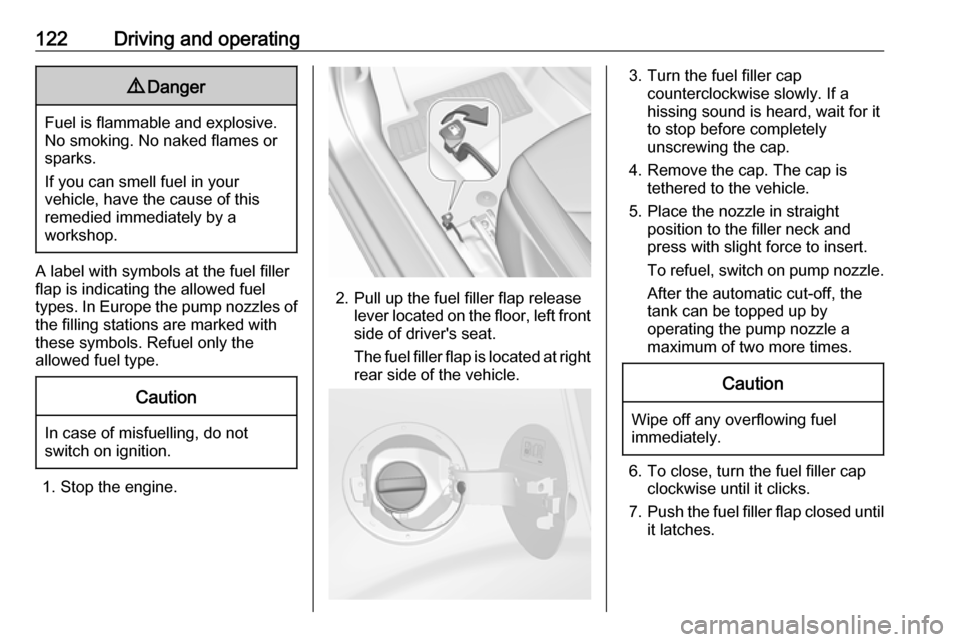
2. Pull up the fuel filler flap release lever located on the floor, left front
side of driver's seat.
The fuel filler flap is located at right
rear side of the vehicle.
3. Turn the fuel filler cap counterclockwise slowly. If a
hissing sound is heard, wait for it
to stop before completely
unscrewing the cap.
4. Remove the cap. The cap is tethered to the vehicle.
5. Place the nozzle in straight position to the filler neck and
press with slight force to insert.
To refuel, switch on pump nozzle. After the automatic cut-off, the
tank can be topped up by
operating the pump nozzle a
maximum of two more times.Caution
Wipe off any overflowing fuel
immediately.
6. To close, turn the fuel filler cap clockwise until it clicks.
7. Push the fuel filler flap closed until
it latches.