wheel VAUXHALL VIVARO 2014.5 Owner's Guide
[x] Cancel search | Manufacturer: VAUXHALL, Model Year: 2014.5, Model line: VIVARO, Model: VAUXHALL VIVARO 2014.5Pages: 189, PDF Size: 4.16 MB
Page 98 of 189
96LightingExit lighting
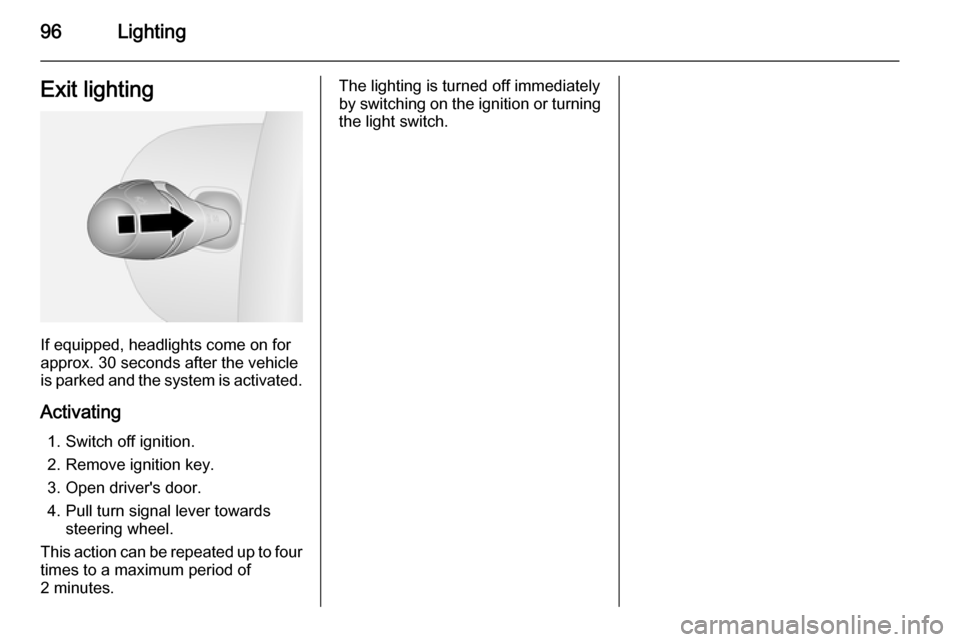
If equipped, headlights come on for
approx. 30 seconds after the vehicle
is parked and the system is activated.
Activating 1. Switch off ignition.
2. Remove ignition key.
3. Open driver's door.
4. Pull turn signal lever towards steering wheel.
This action can be repeated up to four
times to a maximum period of
2 minutes.
The lighting is turned off immediately
by switching on the ignition or turning
the light switch.
Page 108 of 189
106Climate controlAir vents
Adjustable air vents At least one air vent must be open
while cooling is on, in order to prevent
the evaporator from icing up due to lack of air movement.
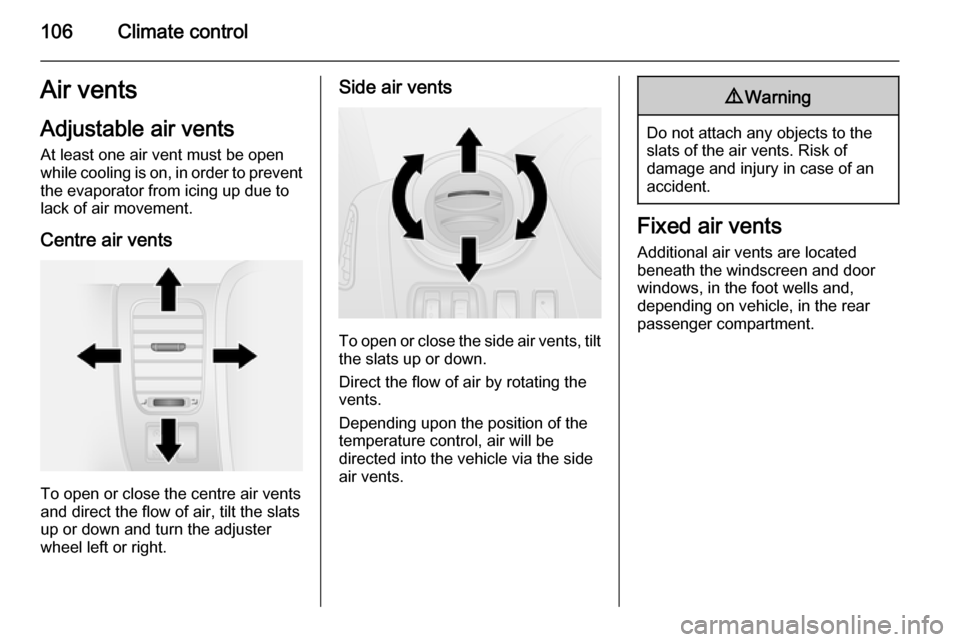
Centre air vents
To open or close the centre air vents
and direct the flow of air, tilt the slats
up or down and turn the adjuster
wheel left or right.
Side air vents
To open or close the side air vents, tilt the slats up or down.
Direct the flow of air by rotating the
vents.
Depending upon the position of the
temperature control, air will be
directed into the vehicle via the side
air vents.
9 Warning
Do not attach any objects to the
slats of the air vents. Risk of
damage and injury in case of an
accident.
Fixed air vents
Additional air vents are located
beneath the windscreen and door windows, in the foot wells and,
depending on vehicle, in the rear passenger compartment.
Page 111 of 189
Driving and operating109
PedalsTo ensure the pedal travel is
uninhibited, there must be no mats in
the area of the pedals.
Steering
If power steering assist is lost
because the engine stops or due to a system malfunction, the vehicle can
be steered but may require increased
effort.Caution
Vehicles equipped with hydraulic
power steering:
If the steering wheel is turned until it reaches the end of its travel, and
is held in that position for more
than 15 seconds, damage may
occur to the power steering
system and there may be loss of
power steering assist.
Starting and operating
New vehicle running-in Do not brake unnecessarily hard for
the first few journeys and after new
disc brake pads have been fitted.
During the first drive, smoke may
occur because of wax and oil
evaporating off the exhaust system.
Park the vehicle in the open for a
while after the first drive and avoid
inhaling the fumes.
During the running-in period fuel and
engine oil consumption may be
higher and the cleaning process of the diesel particle filter may take
place more often.
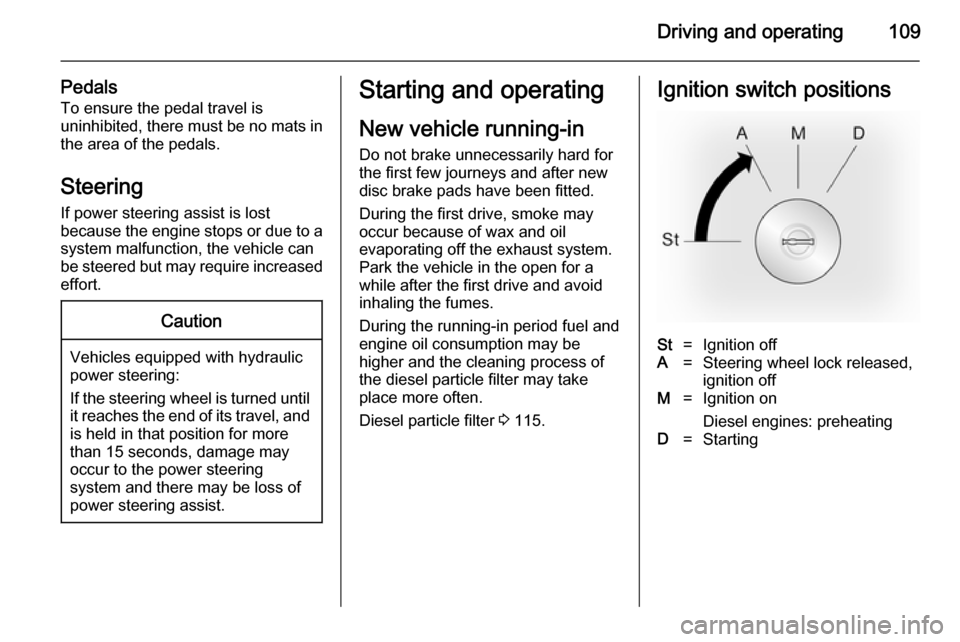
Diesel particle filter 3 115.Ignition switch positionsSt=Ignition offA=Steering wheel lock released,
ignition offM=Ignition on
Diesel engines: preheatingD=Starting
Page 112 of 189
110Driving and operatingPower button
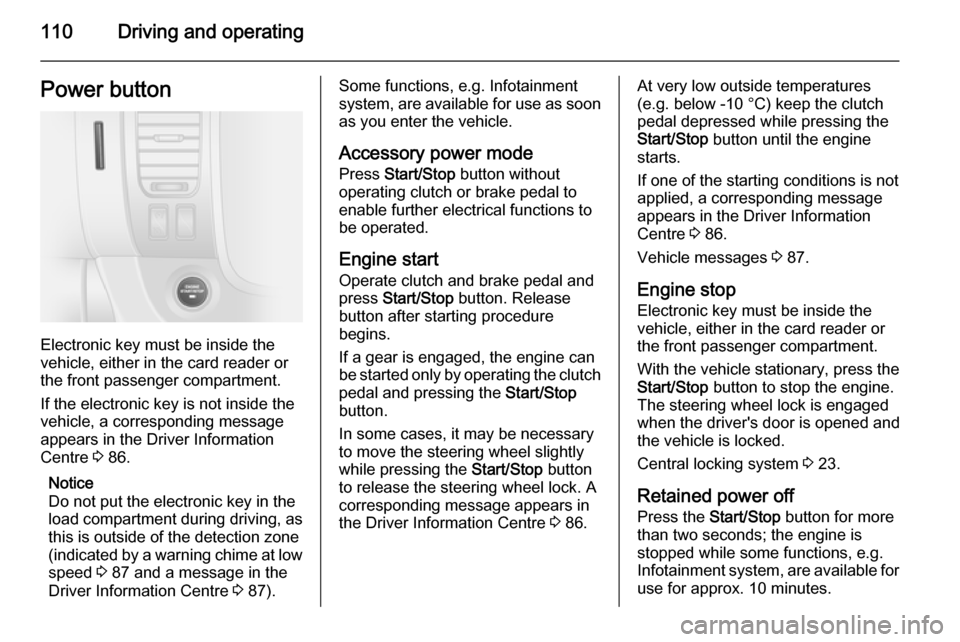
Electronic key must be inside the
vehicle, either in the card reader or
the front passenger compartment.
If the electronic key is not inside the
vehicle, a corresponding message
appears in the Driver Information
Centre 3 86.
Notice
Do not put the electronic key in the
load compartment during driving, as
this is outside of the detection zone
(indicated by a warning chime at low
speed 3 87 and a message in the
Driver Information Centre 3 87).
Some functions, e.g. Infotainment
system, are available for use as soon as you enter the vehicle.
Accessory power mode
Press Start/Stop button without
operating clutch or brake pedal to enable further electrical functions to
be operated.
Engine start Operate clutch and brake pedal and
press Start/Stop button. Release
button after starting procedure
begins.
If a gear is engaged, the engine can
be started only by operating the clutch
pedal and pressing the Start/Stop
button.
In some cases, it may be necessary
to move the steering wheel slightly
while pressing the Start/Stop button
to release the steering wheel lock. A
corresponding message appears in
the Driver Information Centre 3 86.At very low outside temperatures
(e.g. below -10 °C) keep the clutch
pedal depressed while pressing the
Start/Stop button until the engine
starts.
If one of the starting conditions is not
applied, a corresponding message
appears in the Driver Information
Centre 3 86.
Vehicle messages 3 87.
Engine stop Electronic key must be inside the
vehicle, either in the card reader or
the front passenger compartment.
With the vehicle stationary, press the
Start/Stop button to stop the engine.
The steering wheel lock is engaged
when the driver's door is opened and the vehicle is locked.
Central locking system 3 23.
Retained power off
Press the Start/Stop button for more
than two seconds; the engine is
stopped while some functions, e.g.
Infotainment system, are available for
use for approx. 10 minutes.
Page 117 of 189
Driving and operating115Parking■ Do not park the vehicle on an easily
ignitable surface. The high
temperature of the exhaust system
could ignite the surface.
■ Always apply parking brake without
pressing release button. Apply as
firmly as possible on a downhill or
uphill slopes. Operate the foot
brake at the same time to reduce
operating force.
■ Switch off the engine and ignition. Turn the steering wheel until the
steering wheel lock is felt to
engage.
■ If the vehicle is on a level surface or
uphill slope, engage first gear
before switching off the ignition. On
an uphill slope, turn the front
wheels away from the kerb.
If the vehicle is on a downhill slope, engage reverse gear before
switching off the ignition. Turn the
front wheels towards the kerb.
■ Lock the vehicle and activate the anti-theft locking and anti-theft
alarm systems.Engine exhaust9 Danger
Engine exhaust gases contain
poisonous carbon monoxide,
which is colourless and odourless and could be fatal if inhaled.
If exhaust gases enter the interior
of the vehicle, open the windows.
Have the cause of the fault
rectified by a workshop.
Avoid driving with an open load
compartment, otherwise exhaust
gases could enter the vehicle.
Diesel particle filter
The diesel particle filter system filters
harmful soot particles out of the
exhaust gases. The system includes
a self-cleaning function that runs
automatically during driving without
any notification. The filter is cleaned
by periodically burning off the soot
particles at high temperature. This
process takes place automatically
and the emission of smells and
smoke during this process is normal.
If cleaning of the filter is required and automatic cleaning does not occur, it
will be indicated by the illumination of
control indicator F and Z in the
instrument cluster. Seek the
assistance of a workshop
immediately.
Catalytic converter
The catalytic converter reduces the
amount of harmful substances in the
exhaust gases.Caution
Fuel grades other than those listed on page 3 127, 3 172 could
damage the catalytic converter or
electronic components.
Unburnt fuel will overheat and
damage the catalytic converter.
Therefore avoid excessive use of
Page 119 of 189

Driving and operating117Brakes
The brake system comprises two
independent brake circuits.
If a brake circuit fails, the vehicle can
still be braked using the other brake
circuit. However, braking effect is
achieved only when you depress the
brake pedal firmly. You need to use
considerably more force for this. The
braking distance is extended. Seek
the assistance of a workshop before
continuing your journey.
When the engine is not running, the
support of the brake servo unit
disappears once the brake pedal has
been depressed once or twice.
Braking effect is not reduced, but
braking requires significantly greater
force. It is especially important to bear this in mind when being towed.
If control indicator R illuminates in
the instrument cluster while driving and a corresponding message
appears in the Driver Information
Centre, there is a fault in the braking
system. Seek the assistance of a
workshop immediately.Control indicator R 3 83.
Vehicle messages 3 87.
Antilock brake system Antilock brake system (ABS)
prevents the wheels from locking.
ABS starts to regulate brake pressure as soon as a wheel shows a tendency
to lock. The vehicle remains
steerable, even during hard braking.
ABS control is made apparent
through a pulse in the brake pedal
and the noise of the regulation
process.
For optimum braking, keep the brake
pedal fully depressed throughout the
braking process, despite the fact that
the pedal is pulsating. Do not reduce
the pressure on the pedal.
Control indicator u 3 83.
Fault If control indicator u does not go out
a few seconds after the ignition is
switched on, or if it illuminates while driving, there is a fault in the ABS.
Control indicator F 3 82 may alsoilluminate in the instrument cluster
together with a corresponding
message in the Driver Information
Centre. The brake system remains
operational but without ABS
regulation.9 Warning
If there is a fault in the ABS, the
wheels may be liable to lock due
to braking that is heavier than
normal. The advantages of ABS are no longer available. During
hard braking, the vehicle can no longer be steered and may
swerve.
If control indicators u, F , R 3 83
and C 3 82 illuminate, the ABS and
ESP are deactivated and a
corresponding message appears in
the Driver Information Centre. Have
the cause of the fault remedied by a
workshop.
Vehicle messages 3 87.
Page 120 of 189

118Driving and operatingParking brake
Always apply parking brake firmly
without operating the release button,
and apply as firmly as possible on a
downhill or uphill slope.
To release the parking brake, pull the lever up slightly, press the release
button and fully lower the lever.
To reduce the operating forces of the
parking brake, depress the foot brake
at the same time.
Control indicator R 3 83.
Brake assist
If the brake pedal is depressed
quickly and forcefully, maximum
brake force is automatically applied
(full braking).
Maintain steady pressure on the
brake pedal for as long as full braking
is required. Maximum brake force is
automatically reduced when the
brake pedal is released.
Brake assist is not available during an
Autostop.
Stop-start system 3 113.
Hill start assist The system helps prevent unintendedmovement when driving away on
inclines.
When releasing the foot brake after
stopping on an incline, the brakes
remain on for a further 2 seconds. The brakes release automatically as soon
as the vehicle begins to accelerate.Ride control systems
Traction Control system
The Traction Control system (TC) is a
component part of the Electronic
Stability Program (ESP® Plus
) which
improves driving stability when
necessary, regardless of the type of
road surface or tyre grip, by
preventing the drive wheels from
spinning.
As soon as the drive wheels starts to spin, engine output is reduced and
the wheel spinning the most is braked
individually. This considerably
improves the driving stability of the
vehicle on slippery road surfaces.
TC is operational as soon as the
ignition is switched on and control
indicator b extinguishes in the
instrument cluster.
When TC comes into action b
flashes.
Page 121 of 189

Driving and operating1199Warning
Do not let this special safety
feature tempt you into taking risks
when driving.
Adapt speed to the road
conditions.
Control indicator b 3 83.
Deactivation
When spinning of the drive wheels is
required, TC can be deactivated:
Press the Ø button. LED illuminates
in button and a corresponding
message appears in the Driver
Information Centre 3 86.
TC is reactivated by pressing the Ø
button again. LED extinguishes in
button. TC is also reactivated the next time the ignition is switched on.
When vehicle speed reaches
30 mph the TC function will be
restored automatically.
Fault
If the system detects a fault, control indicator b 3 83 illuminates in the
instrument cluster together with F
3 82 and a corresponding message
appears in the Driver Information
Centre 3 86.
Have the cause of the fault remedied
by a workshop.
Vehicle messages 3 87.Electronic stability
program
The Electronic Stability Program
(ESP® Plus
) improves driving stability
when necessary, regardless of the
type of road surface or tyre grip. It also
prevents the drive wheels from
spinning.
As soon as the vehicle starts to
swerve (understeer/oversteer),
engine output is reduced and the
wheels are braked individually. This
considerably improves the driving
stability of the vehicle on slippery road
surfaces.
ESP® Plus
is operational as soon as
the ignition is switched on and control
indicator b extinguishes in the
instrument cluster.
When ESP® Plus
comes into action b
flashes.
Page 122 of 189

120Driving and operating9Warning
Do not let this special safety
feature tempt you into taking risks
when driving.
Adapt speed to the road
conditions.
Control indicator b 3 83.
Deactivation
When spinning of the drive wheels is
required, ESP® Plus
can be
deactivated:
Press the Ø button. LED illuminates
in button and a corresponding
message appears in the Driver
Information Centre 3 86.
ESP® Plus
is reactivated by pressing
the Ø button again. LED
extinguishes in button. ESP® Plus
is
also reactivated the next time the
ignition is switched on.
When vehicle speed reaches
30 mph the ESP® Plus
function will be
restored automatically.
Fault
If the system detects a fault, control indicator b 3 83 illuminates in the
instrument cluster together with F
3 82 and a corresponding message
appears in the Driver Information
Centre 3 86.
Have the cause of the fault remedied by a workshop.
Vehicle messages 3 87.Driver assistance
systems9 Warning
Driver assistance systems are
developed to support the driver
and not to replace the driver's
attention.
The driver accepts full
responsibility when driving the
vehicle.
When using driver assistance
systems, always take care
regarding the current traffic
situation.
Cruise control
The cruise control can store and
maintain speeds of 20 mph and
above. Deviations from the stored speeds may occur when driving uphill or downhill.
For safety reasons the cruise control cannot be activated until the foot
brake has been operated once.
Page 125 of 189

Driving and operating123
Activation
Press switch U, control indicator U
illuminates yellow in the instrument
cluster.
Cruise control speed limiter function
is now in standby mode and a
corresponding message appears in
the Driver Information Centre.
Accelerate to the desired speed and
press switch < or ]. The current
speed is recorded.
The vehicle can be driven normally
but it will not be possible to exceed the programmed speed limit except in an
emergency.
Where the limit speed cannot be
maintained, e.g. when driving on a
steep decline, the limit speed will
flash in the Driver Information Centre.
Increase limit speed
The limit speed can be increased
continuously or in small increments
by holding down or tapping switch <
repeatedly.
Reduce limit speed
The limit speed can be decreased
continuously or in small increments
by holding down or tapping switch ]
repeatedly.
Exceeding the limit speed
In the event of an emergency, it is
possible to exceed the limit speed by
depressing the accelerator pedal
firmly beyond the point of resistance.
The limit speed will flash in the Driver Information Centre during this period.
Release the accelerator pedal and
the speed limiter function is
reactivated once a speed lower than the limit speed is obtained.Deactivation
Press switch §: Speed limiter is
deactivated and the vehicle can be
driven normally.
The limit speed is stored and a
corresponding message appears in
the Driver Information Centre.
Reactivation
Press switch R: The speed limiter
function is reactivated.
Deleting the limit speed
Press switch U: Yellow control
indicator U extinguishes in the
instrument cluster.
Speed limiter Maximum speed limiterIn accordance with local or national
regulations, the vehicle may be
equipped with a fixed maximum
speed limiter that cannot be disabled.
If equipped, a label indicating the
fixed maximum speed limit (55 to
80 mph) is located on the instrument
panel beside the steering wheel.