instrument cluster VAUXHALL VIVARO 2014 Owner's Manual
[x] Cancel search | Manufacturer: VAUXHALL, Model Year: 2014, Model line: VIVARO, Model: VAUXHALL VIVARO 2014Pages: 173, PDF Size: 4.11 MB
Page 49 of 173
Seats, restraints479Warning
Keep the area in which the airbag
inflates clear of obstructions.
Airbag deactivation
Front airbag and side airbag systems for the front passenger seat have to
be deactivated if a child restraint
system is to be fitted on this seat. The curtain airbag system, the belt
tensioners and all driver airbag
systems will remain active.
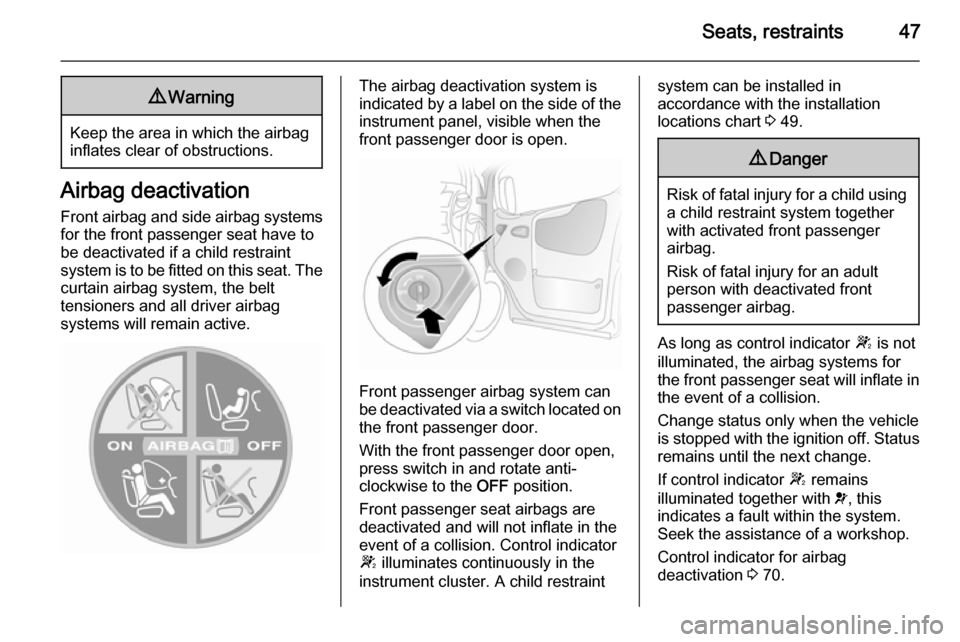
The airbag deactivation system is
indicated by a label on the side of the instrument panel, visible when the
front passenger door is open.
Front passenger airbag system can
be deactivated via a switch located on the front passenger door.
With the front passenger door open,
press switch in and rotate anti-
clockwise to the OFF position.
Front passenger seat airbags are
deactivated and will not inflate in the
event of a collision. Control indicator
W illuminates continuously in the
instrument cluster. A child restraint
system can be installed in
accordance with the installation
locations chart 3 49.9 Danger
Risk of fatal injury for a child using
a child restraint system together
with activated front passenger
airbag.
Risk of fatal injury for an adult
person with deactivated front
passenger airbag.
As long as control indicator W is not
illuminated, the airbag systems for
the front passenger seat will inflate in the event of a collision.
Change status only when the vehicle
is stopped with the ignition off. Status remains until the next change.
If control indicator W remains
illuminated together with v, this
indicates a fault within the system. Seek the assistance of a workshop.
Control indicator for airbag
deactivation 3 70.
Page 68 of 173
66Instruments and controls
seconds with the ignition on. The
display will flash and the value will
reset to zero.
Tachometer
Displays the engine speed.
Drive in a low engine speed range for each gear as much as possible.
Caution
If the needle is in the red warning
zone, the maximum permitted
engine speed is exceeded. Engine at risk.
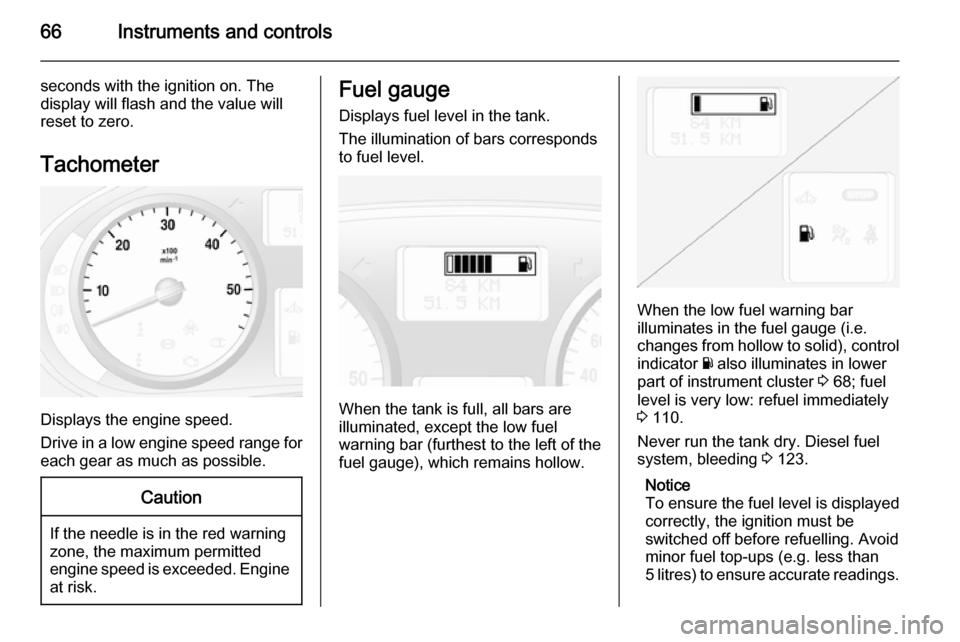
Fuel gauge
Displays fuel level in the tank.
The illumination of bars corresponds
to fuel level.
When the tank is full, all bars are
illuminated, except the low fuel
warning bar (furthest to the left of the fuel gauge), which remains hollow.
When the low fuel warning bar
illuminates in the fuel gauge (i.e.
changes from hollow to solid), control
indicator Y also illuminates in lower
part of instrument cluster 3 68; fuel
level is very low: refuel immediately
3 110.
Never run the tank dry. Diesel fuel
system, bleeding 3 123.
Notice
To ensure the fuel level is displayed
correctly, the ignition must be
switched off before refuelling. Avoid
minor fuel top-ups (e.g. less than
5 litres) to ensure accurate readings.
Page 69 of 173

Instruments and controls67
Because of the fuel remaining in the
tank, the top-up quantity may be less
than the specified tank capacity.
Engine oil level monitor The engine oil level monitor is correct
only if the vehicle is parked on a level
surface with a cold engine.
If the minimum engine oil level is
reached, the message OIL is
displayed in the Driver Information Centre for 30 seconds after the
ignition is switched on. Check and top
up engine oil 3 117.
If the engine oil level is correct when
the ignition is switched on, the
message OIL LEVEL CORRECT
appears briefly in the Driver
Information Centre.
If the engine oil is above the minimum
level, press the trip computer button
on the end of the wiper lever within
30 seconds of switching on the
ignition. The message OIL LEVEL is
displayed in combination with
squares that correspond to the oil
level.As the oil level diminishes, the
squares in the oil level display are
replaced with dashes:▢▢▢▢▢▢=Maximum level▢▢▢- - -=Intermediate level- - - - - -=Minimum level.
To exit the oil level monitor display,
press the trip computer button.
Trip computer 3 76.
Service display
When the ignition is switched on, the remaining distance before the next
service is due may be shown briefly in the Driver Information Centre. Based
on driving conditions, the interval at
which a service will be indicated can
vary considerably.
When the remaining distance before
the next service is less than
1800 miles or 2 months, SERVICE
IN appears in the Driver Information
Centre.
When the distance reaches 0 miles or
the service date is due, control
indicator A and F illuminate in the
instrument cluster and the Driver
Information Centre respectively, and
the corresponding message
SERVICE DUE appears in the Driver
Information Centre.
The vehicle needs a service. Seek the assistance of a workshop.
Resetting the service display After a service, the service display
must be reset. If available, select the
distance before service display in the
Driver Information Centre, then press and hold the button on the end of the
wiper lever for approx. 10 seconds
until the distance before service is
displayed continuously. Trip
computer 3 76.
Driver Information Centre 3 74.
Service information 3 146.
Page 71 of 173
Instruments and controls69
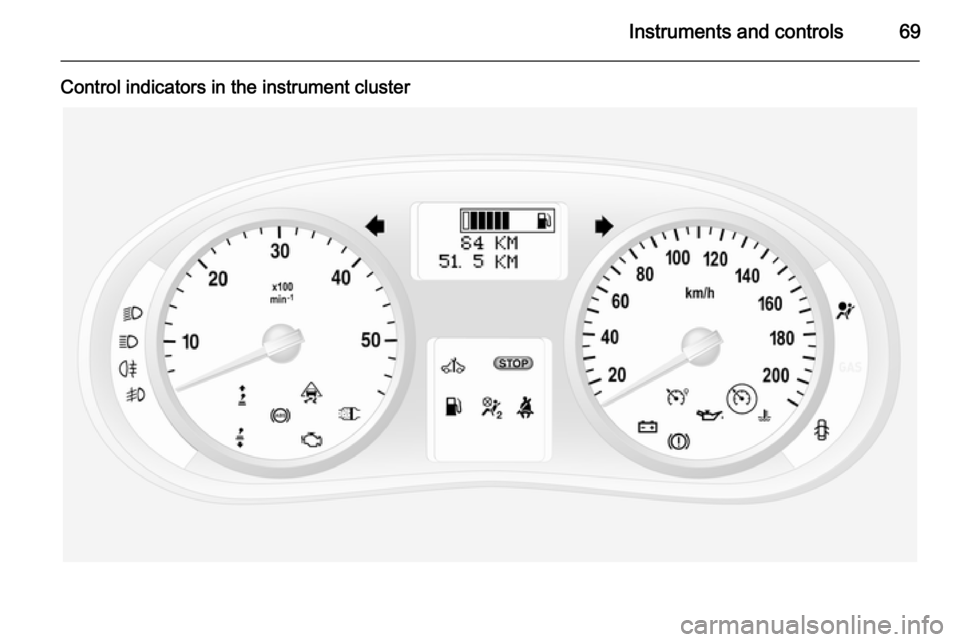
Control indicators in the instrument cluster
Page 74 of 173

72Instruments and controls
If the message BRAKING FAULT
appears in the Driver Information
Centre there is a fault in the braking
system. Seek the assistance of a
workshop immediately.
Brake system 3 101.
Antilock brake system
(ABS)
u illuminates yellow.
Illuminates briefly after the ignition is
switched on. The system is ready for
operation when u goes out.
If control indicator u does not go out
after a few seconds, or if it illuminates while driving, there is a fault in the
ABS. Control indicator A may also
illuminate in the instrument cluster together with the messages CHECK
ABS and CHECK ESP in the Driver
Information Centre. The brake
system remains operational but
without ABS regulation.
If control indicators u, A , R and
C illuminate, the ABS and ESP are
deactivated and the message
BRAKING FAULT appears in theDriver Information Centre. Seek the
assistance of a workshop
immediately.
Antilock brake system 3 101.
Upshift k or j illuminates green.
It is recommended to shift gear when
illuminated to improve fuel economy.
Electronic Stability
Program
v flashes or illuminates yellow.
Illuminates for a few seconds when
the ignition is switched on.
Flashing during driving
The system is actively engaged.
Engine output may be reduced and
the vehicle may be braked
automatically to a small degree.
Illuminates while driving
The system is switched off. The
message ESP OFF will also appear in
the Driver Information Centre.ESP® Plus
3 103.
Engine coolant
temperature W illuminates red.
Illuminates when the engine is running Stop, switch off engine.Caution
Coolant temperature too high.
Check coolant level 3 119.
If there is sufficient coolant, consult a workshop.
Preheating
! illuminates yellow.
Preheating is activated. Only
activates when outside temperature
is low.
Page 77 of 173

Instruments and controls75Vehicle messages
Messages are shown in the Driver
Information Centre, in combination
with illumination of control indicator
A or C in the instrument cluster.
Information messagesInformation messagesBATTERY MODE: ECONOMYESP OFFAUTO LIGHTS DEACTIVATEDOIL LEVEL CORRECT
Fault messages Will be displayed in combination with
control indicator A. Drive with
caution and seek the assistance of a
workshop.
To remove fault message, press the
button on the end of the wiper lever.
After a few seconds the message
may disappear automatically and A
remains illuminated. The fault will
then be stored in the on board
system.Fault messagesCHECK ESPCHECK FUEL FILTERCHECK GEARBOXCHECK AUTO LIGHTS
Warning messages
These appear with control indicator
C . Stop engine immediately and
seek the assistance of a workshop.
Warning messagesINJECTION FAULTENGINE OVERHEATINGGEARBOX OVERHEATINGWarning chimes
When starting the engine or
whilst driving: ■ During operation of the turn and lane-change signals.
■ If seat belt is not fastened.
■ If the parking assist detects an object.
■ If the vehicle has manual transmission automated and the
clutch temperature is too high.
■ In vehicles with manual transmission automated; when a
door is open while neutral is not
selected. A corresponding
message appears in the Driver
Information Centre.
■ If the vehicle speed briefly exceeds
a set limit.
Page 79 of 173

Instruments and controls77
■ Distance travelled
■ Average speed
■ Distance before service
■ Clock
■ Cruise control and speed limiter stored speed
■ Fault and information messages
Fuel used
Displays the amount of fuel
consumed since the last reset.
The measurement can be restarted at
any time by pressing and holding the
button.
Average consumption
The value is displayed after driving a
distance of 0.25 miles.
Average consumption is displayed,
taking into consideration the distance
travelled and the fuel used since the
last reset.
The measurement can be restarted at
any time.Instantaneous consumption
The value is displayed after reaching
a speed of 20 mph.
Range The value is displayed after driving adistance of 0.25 miles.
The range is calculated from the
current contents of the fuel tank and
the average consumption since the
last reset.
The range will not display if control
indicator Y is illuminated in the
instrument cluster 3 73.
The measurement can be restarted at
any time.
Distance travelled Displays the distance driven since the
last reset.
The measurement can be restarted at
any time.
Average speed The value is displayed after driving adistance of 0.25 miles.The average speed since the last
reset is displayed.
The measurement can be restarted at
any time.
Interruptions in the journey with the
ignition off are not included in the
calculations.
Reset trip computer information
To reset the trip computer, select one
of its functions then press and hold
the button on the end of the wiper
lever.
The following trip computer
information will be reset:
■ Fuel used
■ Average consumption
■ Range
■ Distance travelled
■ Average speed
The trip computer will reset
automatically when the maximum
value of any of the parameters is
exceeded.
Page 98 of 173
96Driving and operating
process takes place automatically
and the emission of smells and
smoke during this process is normal.
If cleaning of the filter is required and automatic cleaning does not occur, it
will be indicated by the illumination of
control indicator A and Z in the
instrument cluster. Seek the
assistance of a workshop
immediately.
Catalytic converter
The catalytic converter reduces the
amount of harmful substances in the
exhaust gases.Caution
Fuel grades other than those listed on pages 3 109, 3 154 could
damage the catalytic converter or
electronic components.
Unburnt petrol will overheat and
damage the catalytic converter.
Therefore avoid excessive use of
the starter, running the fuel tank
dry and starting the engine by
pushing or towing.
In the event of misfiring, uneven
engine running, a reduction in engine performance or other unusual
problems, have the cause of the fault
rectified by a workshop as soon as
possible. In an emergency, driving
can be continued for a short period,
keeping vehicle speed and engine
speed low.
If control indicator Z flashes, the
permitted emission limits may be
exceeded. Lift your foot off the
accelerator until Z stops flashing and
is steadily illuminated. Contact a
workshop immediately.
Malfunction indicator light 3 71
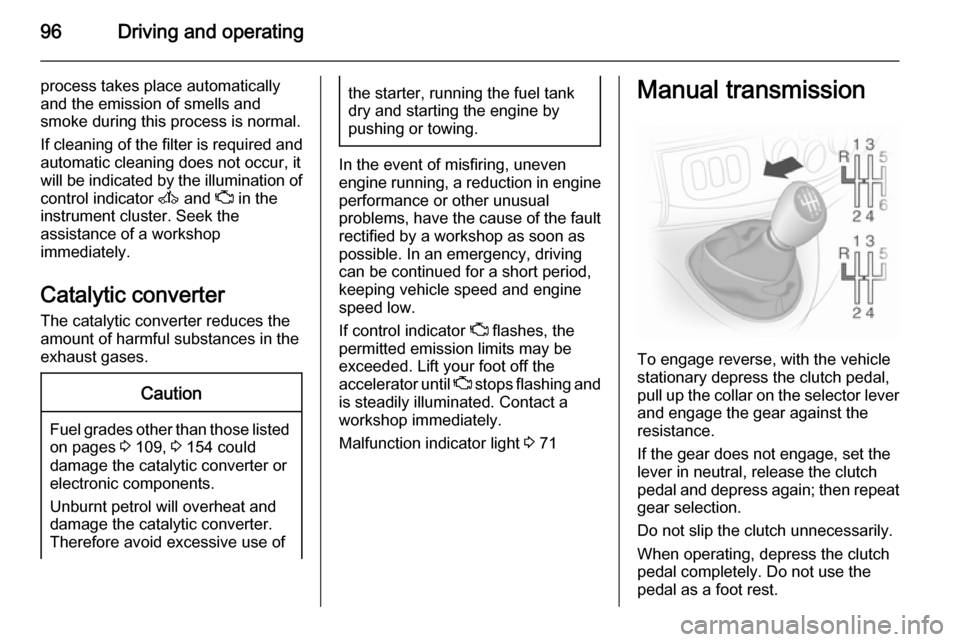
Manual transmission
To engage reverse, with the vehicle
stationary depress the clutch pedal, pull up the collar on the selector lever
and engage the gear against the
resistance.
If the gear does not engage, set the
lever in neutral, release the clutch
pedal and depress again; then repeat
gear selection.
Do not slip the clutch unnecessarily.
When operating, depress the clutch pedal completely. Do not use the
pedal as a foot rest.
Page 103 of 173

Driving and operating101Brakes
The brake system comprises two
independent brake circuits.
If a brake circuit fails, the vehicle can
still be braked using the other brake
circuit. However, braking effect is
achieved only when you depress the
brake pedal firmly. You need to use
considerably more force for this. The
braking distance is extended. Seek
the assistance of a workshop before
continuing your journey.
When the engine is not running, the
support of the brake servo unit
disappears once the brake pedal has
been depressed once or twice.
Braking effect is not reduced, but
braking requires significantly greater
force. It is especially important to bear this in mind when being towed.
If control indicator R illuminates in
the instrument cluster while driving and the message BRAKING FAULT
appears in the Driver Information
Centre there is a fault in the braking
system. Seek the assistance of a
workshop immediately.Control indicator R 3 71.
Vehicle messages 3 75.
Antilock brake system Antilock brake system (ABS)
prevents the wheels from locking.
ABS starts to regulate brake pressure as soon as a wheel shows a tendency
to lock. The vehicle remains
steerable, even during hard braking.
ABS control is made apparent
through a pulse in the brake pedal
and the noise of the regulation
process.
For optimum braking, keep the brake
pedal fully depressed throughout the
braking process, despite the fact that
the pedal is pulsating. Do not reduce
the pressure on the pedal.
Control indicator u 3 72.
Fault If control indicator u does not go out
a few seconds after the ignition is
switched on, or if it illuminates while driving, there is a fault in the ABS.
Control indicator A may alsoilluminate in the instrument cluster
together with the messages CHECK
ABS and CHECK ESP in the Driver
Information Centre. The brake
system remains operational but
without ABS regulation.9 Warning
If there is a fault in the ABS, the
wheels may be liable to lock due
to braking that is heavier than
normal. The advantages of ABS are no longer available. During
hard braking, the vehicle can no longer be steered and may
swerve.
If control indicators u, A , R and
C illuminate, the ABS and ESP are
deactivated and the message
BRAKING FAULT is shown in the
Driver Information Centre. Seek the
assistance of a workshop.
Have the cause of the fault remedied
by a workshop.
Vehicle messages 3 75.
Page 104 of 173
102Driving and operatingParking brake
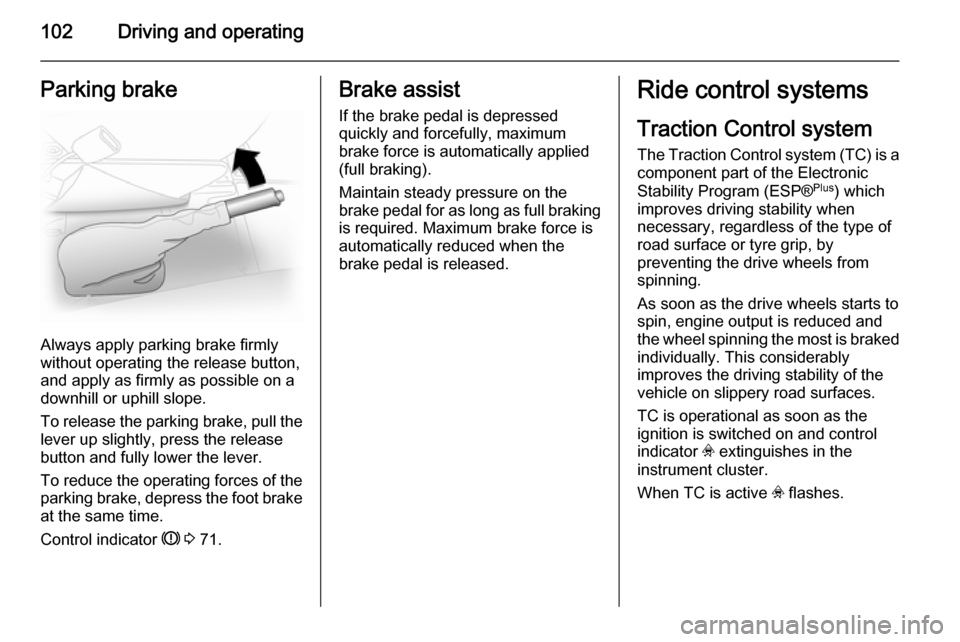
Always apply parking brake firmly
without operating the release button,
and apply as firmly as possible on a
downhill or uphill slope.
To release the parking brake, pull the lever up slightly, press the release
button and fully lower the lever.
To reduce the operating forces of the
parking brake, depress the foot brake
at the same time.
Control indicator R 3 71.
Brake assist
If the brake pedal is depressed
quickly and forcefully, maximum
brake force is automatically applied
(full braking).
Maintain steady pressure on the
brake pedal for as long as full braking
is required. Maximum brake force is
automatically reduced when the
brake pedal is released.Ride control systems
Traction Control system
The Traction Control system (TC) is a
component part of the Electronic
Stability Program (ESP® Plus
) which
improves driving stability when
necessary, regardless of the type of
road surface or tyre grip, by
preventing the drive wheels from
spinning.
As soon as the drive wheels starts to
spin, engine output is reduced and
the wheel spinning the most is braked
individually. This considerably
improves the driving stability of the
vehicle on slippery road surfaces.
TC is operational as soon as the
ignition is switched on and control
indicator v extinguishes in the
instrument cluster.
When TC is active v flashes.