charging VAUXHALL VIVARO 2016.5 Owner's Manual
[x] Cancel search | Manufacturer: VAUXHALL, Model Year: 2016.5, Model line: VIVARO, Model: VAUXHALL VIVARO 2016.5Pages: 211, PDF Size: 5 MB
Page 70 of 211
68Storage
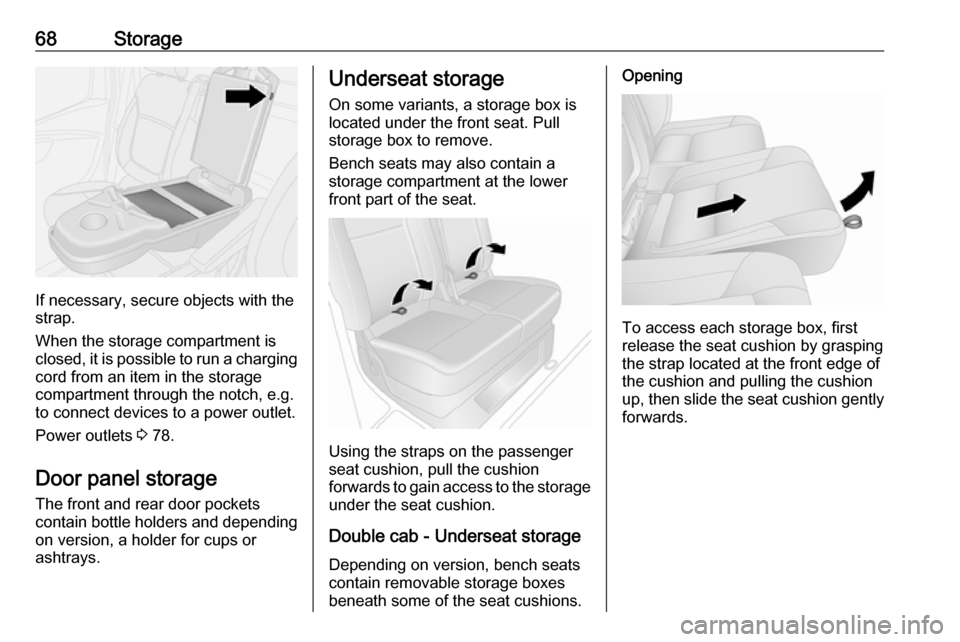
If necessary, secure objects with the
strap.
When the storage compartment is
closed, it is possible to run a charging cord from an item in the storage
compartment through the notch, e.g.
to connect devices to a power outlet.
Power outlets 3 78.
Door panel storage The front and rear door pockets
contain bottle holders and depending
on version, a holder for cups or
ashtrays.
Underseat storage
On some variants, a storage box is
located under the front seat. Pull
storage box to remove.
Bench seats may also contain a
storage compartment at the lower
front part of the seat.
Using the straps on the passenger
seat cushion, pull the cushion
forwards to gain access to the storage
under the seat cushion.
Double cab - Underseat storage
Depending on version, bench seats
contain removable storage boxes
beneath some of the seat cushions.
Opening
To access each storage box, first
release the seat cushion by grasping the strap located at the front edge of
the cushion and pulling the cushion
up, then slide the seat cushion gently forwards.
Page 76 of 211

74Instruments and controlsInstruments and
controlsControls ....................................... 75
Steering wheel adjustment ........75
Steering wheel controls .............75
Horn ........................................... 75
Steering column controls ...........75
Windscreen wiper/washer .........76
Rear window wiper/washer .......77
Outside temperature ..................77
Clock ......................................... 77
Power outlets ............................. 78
Cigarette lighter ......................... 79
Ashtrays .................................... 79
Warning lights, gauges and indi‐ cators ........................................... 79
Instrument cluster ......................79
Speedometer ............................. 79
Odometer .................................. 80
Trip odometer ............................ 80
Tachometer ............................... 80
Fuel gauge ................................ 81
Fuel economy gauge .................81
Service display .......................... 81
Control indicators ......................82
Turn signal ................................. 84Seat belt reminder.....................85
Airbag and belt tensioners .........85
Airbag deactivation ....................85
Charging system .......................86
Malfunction indicator light ..........86
Service vehicle soon .................86
Stop engine ............................... 86
Brake system ............................. 86
Antilock brake system (ABS) .....87
Upshift ....................................... 87
Electronic Stability Program ......87
Electronic Stability Program off ............................................. 87
Engine coolant temperature ......87
Preheating ................................. 88
AdBlue ....................................... 88
Tyre pressure monitoring system ...................................... 88
Engine oil pressure ....................88
Fuel economy mode ..................89
Low fuel ..................................... 89
Autostop .................................... 89
Exterior light .............................. 89
High beam ................................. 89
Fog light ..................................... 90
Rear fog light ............................. 90
Cruise control ............................ 90
Tachograph ............................... 90
Door open .................................. 90Information displays.....................90
Driver Information Centre ..........90
Vehicle messages ........................91
Warning chimes .........................92
Engine oil level .......................... 92
Trip computer ............................... 93
Tachograph .................................. 95
Page 80 of 211

78Instruments and controlsHours and minutes can be adjusted
by pressing the appropriate buttons
by the display or with the Infotainment
system controls.
For further information, refer to the
Infotainment system manual.
DIC:
Display the clock setting function by
pressing the button repeatedly on the end of the wiper lever.
Press and hold the button for approx.
5 seconds:
● hours flash
● press button repeatedly to change hours
● wait for approx. 5 seconds to set hours
● minutes flash
● press button repeatedly to change minutes
● wait for approx. 5 seconds to set minutes
Driver Information Centre (DIC)
3 90.
Power outlets
12 V power outlets are located on the
instrument panel and in the rear of the vehicle. Fold the cover upwards.
Depending on vehicle, additional
outlets may be located at the outer
edge of the bench seat.
Connecting electrical accessories
while the engine is off will discharge
the vehicle battery. Do not exceed the
maximum power consumption of
120 Watts. Do not connect any
current-delivering accessories, e.g.
electrical charging devices or
batteries.
Electrical accessories that are
connected must comply with the
electromagnetic compatibility
requirements laid down in
DIN VDE 40 839.Caution
Do not connect any current- delivering accessories, e.g.
electrical charging devices or
batteries.
Do not damage the outlets by
using unsuitable plugs.
Page 86 of 211
84Instruments and controlsControl indicators in the roof
console
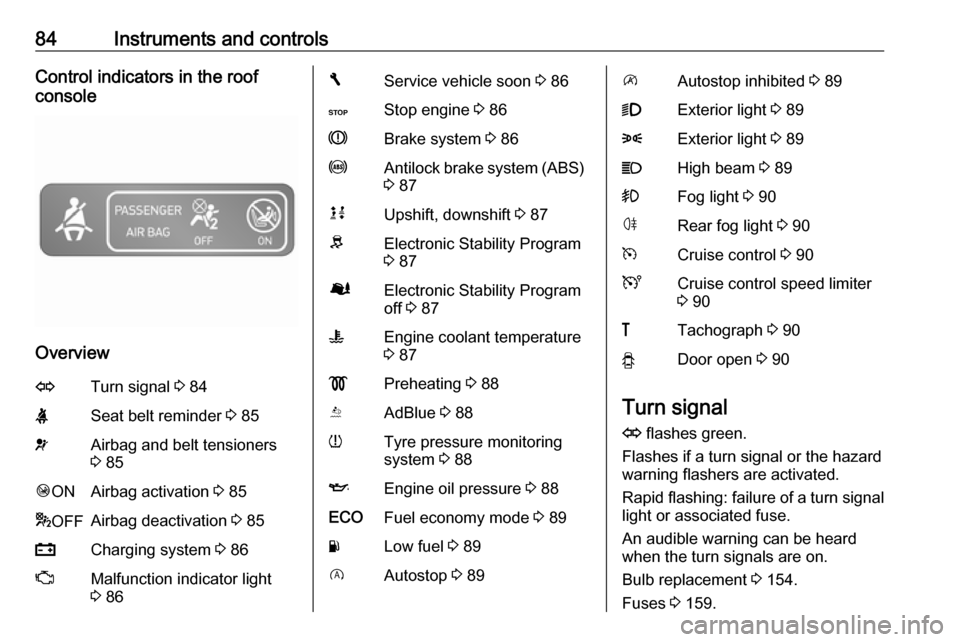
Overview
OTurn signal 3 84XSeat belt reminder 3 85vAirbag and belt tensioners
3 85Ó ONAirbag activation 3 85* OFFAirbag deactivation 3 85pCharging system 3 86ZMalfunction indicator light
3 86FService vehicle soon 3 86CStop engine 3 86RBrake system 3 86uAntilock brake system (ABS)
3 87kjUpshift, downshift 3 87RElectronic Stability Program
3 87ØElectronic Stability Program
off 3 87WEngine coolant temperature
3 87!Preheating 3 88YAdBlue 3 88wTyre pressure monitoring
system 3 88IEngine oil pressure 3 88ECOFuel economy mode 3 89YLow fuel 3 89DAutostop 3 89\Autostop inhibited 3 899Exterior light 3 898Exterior light 3 89CHigh beam 3 89>Fog light 3 90øRear fog light 3 90mCruise control 3 90UCruise control speed limiter
3 90&Tachograph 3 90yDoor open 3 90
Turn signal
O flashes green.
Flashes if a turn signal or the hazard
warning flashers are activated.
Rapid flashing: failure of a turn signal
light or associated fuse.
An audible warning can be heard
when the turn signals are on.
Bulb replacement 3 154.
Fuses 3 159.
Page 88 of 211

86Instruments and controlsCharging systemp illuminates red.
Illuminates briefly when the ignition is
switched on.
Illuminates when the engine is
running
If control indicator p illuminates
when the engine is running (together
with control indicator C and a
warning chime): Stop, switch off
engine.
Vehicle battery is not charging.
Engine cooling may be interrupted.
Power to the brake servo unit may be cut. Seek the assistance of a
workshop.
Malfunction indicator light
Z illuminates or flashes yellow.
Illuminates briefly when the ignition is switched on.Illuminates when the engine is
running
Fault in the emission control system.The permitted emission limits may be
exceeded. Seek the assistance of a
workshop immediately.
Flashes when the engine is
running
Fault that could lead to catalytic
converter damage. Ease up on the
accelerator until the flashing stops.
Seek the immediate assistance of a
workshop.
Service vehicle soon
F illuminates yellow.
Illuminates briefly when the ignition is switched on.
May illuminate together with other
control indicators and a
corresponding message in the Driver
Information Centre (DIC) 3 90.
Seek the assistance of a workshop
immediately.Stop engine
C illuminates red.
Illuminates briefly when the ignition is
switched on.
Illuminates together with other control indicators (e.g., p, I and R),
accompanied by a warning chime and a corresponding message in theDriver Information Centre (DIC)
3 90: stop engine immediately and
seek the assistance of a workshop.
Brake system R illuminates red.
Illuminates after the ignition is
switched on if the parking brake is
applied 3 129 and extinguishes
when the parking brake is released.
Illuminates when the parking brake is
released if the brake fluid level is too
low 3 150.9 Warning
Stop. Do not continue your
journey. Consult a workshop.
Page 93 of 211

Instruments and controls91Info-display
The central display in the
Infotainment system displays the time and Infotainment system information.
For further information, refer to the
Infotainment system manual.
Vehicle messages
Messages are displayed in the Driver
Information Centre (DIC) and may be
accompanied by illumination of
control indicator F or C in the
instrument cluster.
Information messages
Information messages regarding, e.g. engine starting conditions, stop-start
system, parking brake application,
central locking, steering wheel lock
etc. provide the current status of
certain vehicle functions and
instructions for use.
Fault messages
Fault messages regarding, e.g. fuel
filter, airbags, exhaust emissions etc. are displayed together with control
indicator F. Drive with caution and
seek the assistance of a workshop as
soon as possible.
To remove fault messages, e.g.
" CHECK INJECTION ", from the
display, press button on end of wiper
lever. After a few seconds themessage may disappear
automatically and F remains
illuminated. The fault will then be
stored in the on board system.
Warning messages
Warning messages regarding, e.g.
engine, battery or brake system
failure, are displayed together with
control indicator C and may be
accompanied by a warning chime.
Stop engine immediately and seek
the assistance of a workshop.
Warning messages, e.g. " BATTERY
CHARGING FAULT " disappear from
the display automatically when the cause of the fault has been remedied.
Fuel economy messages Fuel economy messages provide tips
to improve fuel efficiency. Journeys
can be saved in the system memory,
enabling you to compare
performances.
Refer to Infotainment system manual
for further information.
Fuel economy rating 3 93.
Page 94 of 211

92Instruments and controlsWarning chimesOnly one warning chime will sound at a time.
A corresponding message may also
appear in the Driver Information
Centre (DIC) when a warning chime
is sounded.
When starting the engine or whilst driving:
● If seat belt is not fastened 3 49.
● During operation of the turn and lane-change signals 3 99.
● During illumination of certain control indicators.
● If the parking assist detects an object 3 136.
● If the vehicle speed briefly exceeds a set limit 3 133,
3 136.
● If a door or the bonnet is not properly closed when vehicle
exceeds a certain speed.
● If there is a fault in the brake system 3 86.● If the vehicle battery is not
charging 3 86.
● If engine lubrication is interrupted
3 88.
● If AdBlue needs to be refilled or a
fault is present 3 123.
● If the electronic key is outside of the detection range.
Electronic key system 3 22,
Power button 3 116.
When the vehicle is parked and/or
the driver's door is opened:
● If the key has been left in the ignition.
● If the electronic key has been left
in the card reader.
Electronic key system 3 22,
Power button 3 116.
● If the vehicle is in an Autostop. Stop-start system 3 119.
● If the exterior lights are on.Engine oil level
If the minimum engine oil level is
reached, a message is displayed in
the Driver Information Centre (DIC)
3 90 for 30 seconds after the engine
is started.
Check oil level 3 147.
Page 118 of 211

116Driving and operatingStarting and operating
New vehicle running-in
Do not brake unnecessarily hard for
the first few journeys and after new
disc brake pads have been fitted.
During the first drive, smoke may
occur because of wax and oil
evaporating off the exhaust system.
Park the vehicle in the open for a
while after the first drive and avoid
inhaling the fumes.
During the running-in period, fuel and engine oil consumption may be
higher and the cleaning process of
the diesel particle filter may take
place more often. Autostop may be
inhibited to allow for charging the
vehicle battery.
Stop-start system 3 119.
Diesel particle filter 3 122.Ignition switch positions0:Ignition off1:Steering wheel lock released,
ignition off2:Ignition on
Diesel engines: preheating3:StartingPower button
Electronic key must be inside the
vehicle, either in the card reader or
the front passenger compartment.
If the electronic key is not inside the
vehicle, a corresponding message
appears in the Driver Information
Centre (DIC) 3 90.
Notice
Do not put the electronic key in the
load compartment during driving, as
this is outside of the detection zone
(indicated by a warning chime at low
speed 3 92 and a message in the
Driver Information Centre (DIC)
3 91).
Page 152 of 211
150Vehicle careWasher fluid
Fill with clean water mixed with a
suitable quantity of windscreen
washer fluid which contains
antifreeze.
Caution
Only washer fluid with a sufficient
antifreeze concentration provides
protection at low temperatures or
a sudden drop in temperature.
Use of washer fluid containing
isopropanol can damage exterior
lamps.
Brakes
A squealing noise indicates that the
brake lining is at its minimum
thickness. Continued driving is
possible but have the brake lining
replaced as soon as possible.
Once new brake linings are installed,
do not brake unnecessarily hard for
the first few journeys.
Brake fluid9 Warning
Brake fluid is poisonous and
corrosive. Avoid contact with eyes, skin, fabrics and painted surfaces.
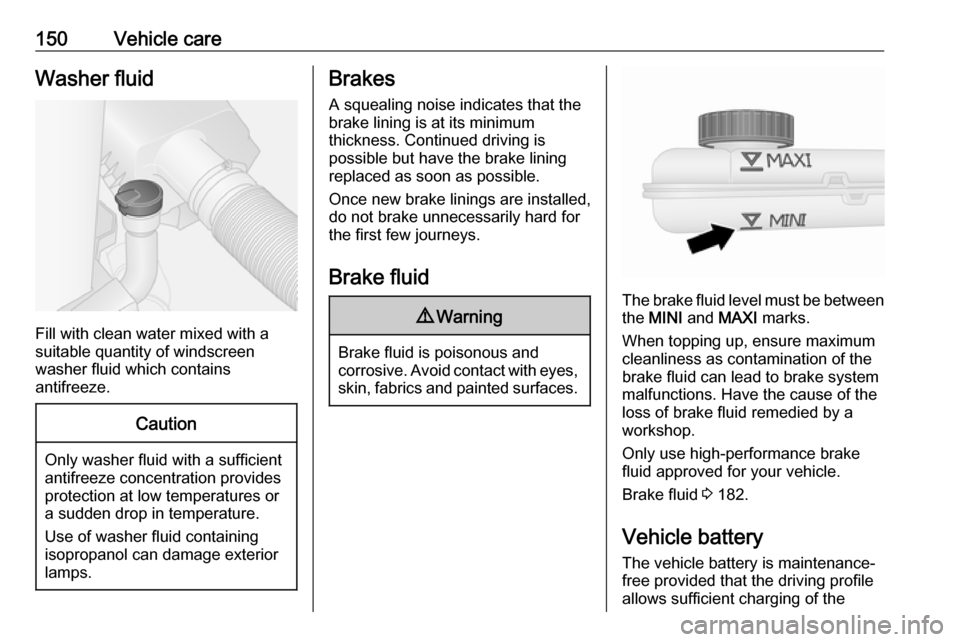
The brake fluid level must be betweenthe MINI and MAXI marks.
When topping up, ensure maximum cleanliness as contamination of the
brake fluid can lead to brake system
malfunctions. Have the cause of the
loss of brake fluid remedied by a
workshop.
Only use high-performance brake
fluid approved for your vehicle.
Brake fluid 3 182.
Vehicle battery
The vehicle battery is maintenance-
free provided that the driving profile
allows sufficient charging of the
Page 153 of 211

Vehicle care151battery. Short-distance driving and
frequent engine starts can discharge
the battery. Avoid the use of
unnecessary electrical consumers.
Batteries do not belong in household
waste. They must be disposed of at
an appropriate recycling collection
point.
Laying up the vehicle for more than
4 weeks can lead to battery
discharge.
Ensure the ignition is switched off
before connecting or disconnecting
the vehicle battery.
Replacing the vehicle battery In vehicles with an AGM (Absorptive
Glass Mat) battery, make sure to
have the battery replaced with
another AGM battery.
An AGM battery can be identified by
the label on the battery. We
recommend the use of an original
Vauxhall battery.
Notice
Using an AGM vehicle battery
different from the original Vauxhall
vehicle battery may result in a lower
performance of the stop-start
system.
We recommend that you have the
vehicle battery replaced by a
workshop.
Stop-start system 3 119.
Charging the vehicle battery9 Warning
On vehicles with stop-start
system, ensure that the charging potential does not exceed
14.6 volts when using a battery
charger. Otherwise the vehicle
battery might be damaged.
9 Danger
Ensure adequate ventilation when
charging the battery. There is a
risk of explosion if gases
generated during charging are
allowed to accumulate!
Jump starting 3 174.