ignition VAUXHALL VIVARO 2016.5 Owner's Manual
[x] Cancel search | Manufacturer: VAUXHALL, Model Year: 2016.5, Model line: VIVARO, Model: VAUXHALL VIVARO 2016.5Pages: 211, PDF Size: 5 MB
Page 11 of 211
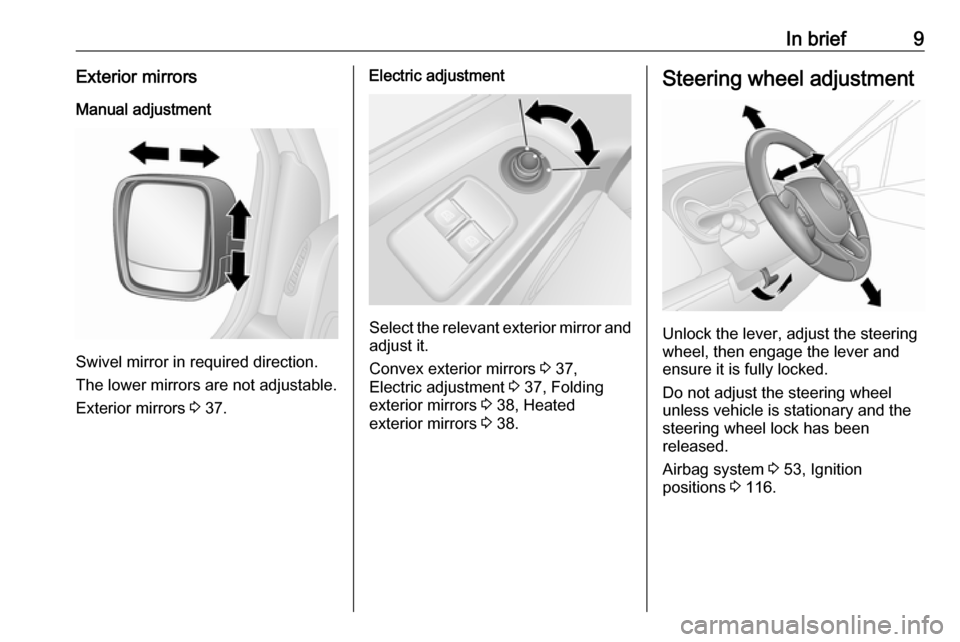
In brief9Exterior mirrorsManual adjustment
Swivel mirror in required direction.
The lower mirrors are not adjustable.
Exterior mirrors 3 37.
Electric adjustment
Select the relevant exterior mirror and
adjust it.
Convex exterior mirrors 3 37,
Electric adjustment 3 37, Folding
exterior mirrors 3 38, Heated
exterior mirrors 3 38.
Steering wheel adjustment
Unlock the lever, adjust the steering
wheel, then engage the lever and
ensure it is fully locked.
Do not adjust the steering wheel
unless vehicle is stationary and the steering wheel lock has been
released.
Airbag system 3 53, Ignition
positions 3 116.
Page 13 of 211

In brief111Side air vents ...................... 112
2 Ashtray .................................. 79
Cupholder ............................ 67
3 Light switch .......................... 96
Rear fog light ......................... 99
Front fog lights .....................99
Exit lighting .......................... 102
Turn and lane-change
signals ................................... 99
Sidelights .............................. 96
Headlight flash, low beam
and high beam ......................97
4 Instruments .......................... 79
Driver Information Centre
(DIC) ..................................... 90
5 Horn ...................................... 75
Driver airbag ......................... 56
6 Windscreen wiper,
windscreen washer system ..76
Rear window wiper, rear
window washer system ........77
Trip computer ....................... 937Card reader for electronic
key system ............................ 22
8 Steering column controls ......75
9 Centre air vents ................... 112
10 Power outlet .......................... 78
Cigarette lighter ..................... 79
Coin tray, USB slot ................ 66
11 Driver Information Centre
(DIC) ..................................... 90
Trip computer ....................... 93
12 Front passenger airbag .........56
13 Glovebox .............................. 66
14 Heated exterior mirrors .........38
Heated rear window ..............41
Idle speed control ...............118
15 Power outlet .......................... 78
Cigarette lighter ..................... 79
16 Climate control system ........ 103
Electronic climate control
system ................................. 105
17 Ashtray .................................. 79
Cupholder ............................ 6718Hazard warning flashers .......98
Central locking system ..........23
19 Power button for electronic
key system .......................... 116
20 Eco button for fuel
economy mode ...................114
21 Stop-start system ................119
Cruise control and speed
limiter ................................. 133
22 Remote control on
steering wheel ......................75
Cruise control .....................133
23 Ignition switch with
steering wheel lock .............116
24 Steering wheel adjustment ...75
25 Bonnet release lever ...........146
26 Fuse box ............................. 160
27 Ultrasonic parking assist ....136
Electronic Stability
Program (ESP® Plus
)............ 131
Traction Control system
(TC) ..................................... 130
Page 20 of 211

18In briefStop-start system
If the vehicle is at low speed or in
standstill and certain conditions are
fulfilled, activate an Autostop as
follows:
● Depress the clutch pedal.
● Move the selector lever to neutral.
● Release the clutch pedal.
An Autostop is indicated when Ï
illuminates in the instrument cluster
3 89.
To restart the engine, depress the
clutch pedal again.
Stop-start system 3 119.
Parking9 Warning
● Do not park the vehicle on an
easily ignitable surface. The
high temperature of the
exhaust system could ignite the
surface.
● Always apply parking brake without pressing release
button. Apply as firmly as
possible on a downhill slope or
uphill slope. Depress brake
pedal at the same time to
reduce operating force.
● Switch off the engine.
● If the vehicle is on a level surface or uphill slope, engage
first gear. On an uphill slope,
turn the front wheels away from
the kerb.
If the vehicle is on a downhill
slope, engage reverse gear.
Turn the front wheels towards the kerb.
● Close the windows.
● Remove the ignition key from the ignition switch. Turn the
steering wheel until the
steering wheel lock is felt to
engage.
● Lock the vehicle by pressing e on
the remote control 3 23.
Activate the anti-theft alarm
system 3 35.
● The engine cooling fans may run
after the engine has been
switched off 3 146.
Caution
After running at high engine
speeds or with high engine loads,
operate the engine briefly at a low load or run in neutral for approx.30 seconds before switching off, in
order to protect the turbocharger.
Keys, locks 3 19, Laying the vehicle
up for a long period of time 3 145.
Page 23 of 211

Keys, doors and windows212-button and 3-button remote control
Remove screw and open battery
compartment by inserting a coin into
the slot and twisting.
Replace the battery (battery type
CR 2016), paying attention to the
installation position.
Reattach both halves of the cover,
ensuring they engage correctly.
Replace screw and tighten.
Electronic key
The need for battery replacement is
indicated by a message in the Driver
Information Centre (DIC) 3 91.
Press and hold the release button on
the side of the electronic key and pull out the emergency manual key from
the top. Unclip the battery cover
located on the rear of the electronic
key, then press one side of the battery
to release and remove the battery.
Replace the battery (battery type
CR 2016), paying attention to the
installation position.
Reattach battery cover and reinsert
the emergency manual key.
Electronic key synchronisation
Press any button on the electronic
key four times within range of the
detection zone (approx. one metre) of the front doors or load compartment.
The electronic key will be
synchronised when the ignition is
switched on.
Page 24 of 211

22Keys, doors and windowsElectronic key system
Enables a handsfree operation of thefollowing functions:
● central locking system 3 23
● load compartment 3 32
● ignition switching on and starting the engine 3 116
The electronic key simply needs to be on the driver's person.
Notice
Always take the electronic key with
you when exiting the vehicle.
The electronic key being left in the
card reader is indicated by a warning
chime 3 92 and a message in the
Driver Information Centre (DIC)
3 91 when the driver's door is
opened.
Additionally, the electronic key
includes the functionality of the radio
remote control 3 20 and an entry
lighting function 3 101.
Handle with care, protect from
moisture and high temperatures and
avoid unnecessary operation.
Notice
Do not put the electronic key in the
load compartment during driving, as
this is outside of the detection zone
(indicated by a warning chime at low
speed 3 92 and a message in the
Driver Information Centre (DIC)
3 91).
Handsfree operation is automatically disabled when the electronic key
buttons have been operated or the
central locking switch e 3 23 is
pressed. To re-enable handsfree
operation, restart the engine.
Power button 3 116.Replacing battery in electronic
key
Replace the battery as soon as the
system no longer operates properly
or the range is reduced. The need for
battery replacement is indicated by a
message in the DIC 3 91.
Battery replacement, see Radio
remote control 3 20.
Fault
If the central locking system cannot
be operated or the engine cannot be
started, the cause may be one of the
following:
● fault in electronic key
● electronic key out of reception range
● battery voltage too low
● overload of the central locking system by operating at frequent
intervals, the power supply is
interrupted for a short time
● interference from higher-power radio waves from other sources
Page 26 of 211
24Keys, doors and windowsWith the 3-button remote control, the
front doors and load compartment/
sliding side doors (where fitted) can
be unlocked and locked separately.
For safety reasons, the vehicle
cannot be locked if the key is in the
ignition switch.
Notice
If no door is opened within approx.
2 minutes after the vehicle has been unlocked, the vehicle is re-locked
automatically.
Close doors and load compartment. If
the doors are not closed properly, the central locking system will not work.
Refer to "Manual key operation"
below for further information.
Remote control operation
Operation of central locking system
with the remote control is confirmed
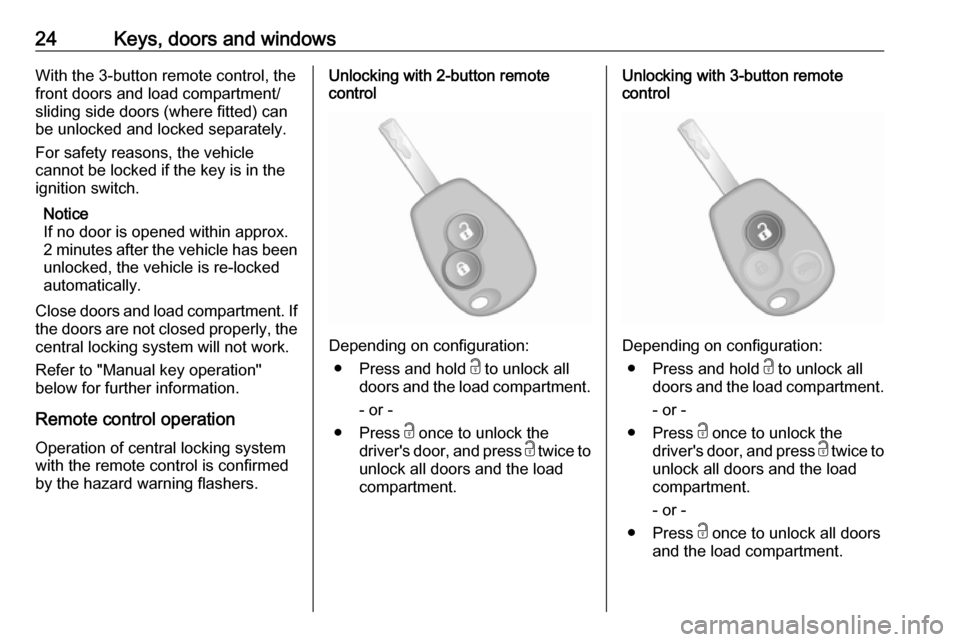
by the hazard warning flashers.Unlocking with 2-button remote
control
Depending on configuration:
● Press and hold c to unlock all
doors and the load compartment.
- or -
● Press c once to unlock the
driver's door, and press c twice to
unlock all doors and the load compartment.
Unlocking with 3-button remote
control
Depending on configuration:
● Press and hold c to unlock all
doors and the load compartment.
- or -
● Press c once to unlock the
driver's door, and press c twice to
unlock all doors and the load compartment.
- or -
● Press c once to unlock all doors
and the load compartment.
Page 30 of 211

28Keys, doors and windowsAfter manually unlocking the rear
doors when the rest of the vehicle is
locked, it may be necessary to press
e twice to lock the entire vehicle.
Central locking switch Locks or unlocks the doors and loadcompartment from the passenger
compartment.
Press e to lock the vehicle. Activation
is indicated by the LED in the button.
When closing any open door, the door
is locked automatically.
Press e again to unlock the vehicle.
If the vehicle is driven with an open
load compartment, the front doors
(and sliding side doors) can still be
locked. With the ignition switched on,
press and hold e for approx.
5 seconds. When closing the rear
doors/tailgate, they are locked
automatically.
Automatic locking 3 28.
Handsfree operation is automatically disabled when e is pressed. To re-
enable handsfree operation, restart
the engine.
Electronic key system 3 22.
Slam door locks
Certain models feature load
compartment locks which are isolated for added security.
With slam door locks, while the doors can be locked and unlocked using the
remote control or electronic key, the
load compartment must be manually
opened by turning the key in the lock.
Rear doors 3 30.Automatic locking
Automatic locking after driving off
This security feature can be
configured to automatically lock the
doors and load compartment as soon as the vehicle is driven.
Activation
With the ignition switched on, press and hold e on the central locking
switch for approx. 5 seconds. An
audible signal confirms activation.
Deactivation
With the ignition switched on, press and hold e on the central locking
switch for approx. 5 seconds. An
audible signal confirms deactivation.
Central locking switch 3 23.
Page 37 of 211

Keys, doors and windows35Anti-theft alarm systemThe anti-theft alarm system is
operated in conjunction with the
central locking system 3 23.
It monitors: ● doors, tailgate, bonnet
● passenger compartment
● load compartment
● ignition
● interruption of alarm siren power supply
Activation All doors and the bonnet must be
closed.
Hazard warning lights flash to confirm activation. If the hazard warning lights
do not flash upon activation, a door or the bonnet is not fully closed.2-button and 3-button remote control
Press e to activate the anti-theft alarm
system.
Electronic key
For handsfree operation, the
electronic key must be outside the
vehicle, within a range of approx.
one metre of the front doors or load compartment.
Press the button on any exterior door
handle.
- or -
Page 38 of 211

36Keys, doors and windowsPress e to activate the anti-theft alarm
system.
Electronic key system 3 22.
Deactivation Unlocking the vehicle (with c or the
button on any exterior door handle) or switching on the ignition deactivates
the anti-theft alarm system. Hazard
warning lights flash to confirm
deactivation.
The system is not deactivated when
unlocking the driver's door with the
key or with the central locking switch in the passenger compartment.
Notice
If the alarm has been triggered,
unlocking the vehicle with the key
will not stop the alarm siren. To stop the siren, switch on the ignition. The
hazard warning lights will not flash
upon deactivation if the alarm has
been triggered.Activation without monitoring of
passenger compartment
Disable monitoring of the passenger
compartment, e.g. when animals are being left in the vehicle, or if the
auxiliary heater has been set for a
timed or remote controlled start
3 108.
Press and hold e on the remote
control or electronic key; an audible signal will sound as confirmation.
The status will remain until the doors
are unlocked.
AlarmWhen triggered, the alarm sounds via
a separate battery-backed power
sounder, and the hazard warning
lights flash simultaneously. The
number and duration of alarm signals are stipulated by legislation.
If the vehicle battery is disconnected
or its power supply is interrupted, the
alarm siren will be triggered. First
deactivate the anti-theft alarm system
if the vehicle battery must be
disconnected.To silence the alarm siren (if
triggered) and therefore deactivate
the anti-theft alarm system, reconnect vehicle battery and unlock the vehicle
or switch on the ignition.
Immobiliser
The immobiliser is part of the ignition
switch and checks whether the
vehicle is allowed to be started with
the key being used.
The immobiliser is activated
automatically after the key has been
removed from the ignition switch and
also if the key is left in the ignition
switch when the engine is turned off.
If the engine cannot be started, switch off the ignition and remove key, wait
approx. 2 seconds and then repeat
the start attempt. If start attempt is
unsuccessful, attempt to start the
engine using the spare key and seek
the assistance of a workshop.
Page 42 of 211
40Keys, doors and windowsWindscreen stickers
Do not attach stickers such as toll
road stickers or similar on the
windscreen in the area of the interior
mirror.
Power windows9 Warning
Take care when operating the
power windows. Risk of injury,
particularly to children.
Keep a close watch on the
windows when closing them.
Ensure that nothing becomes
trapped in them as they move.
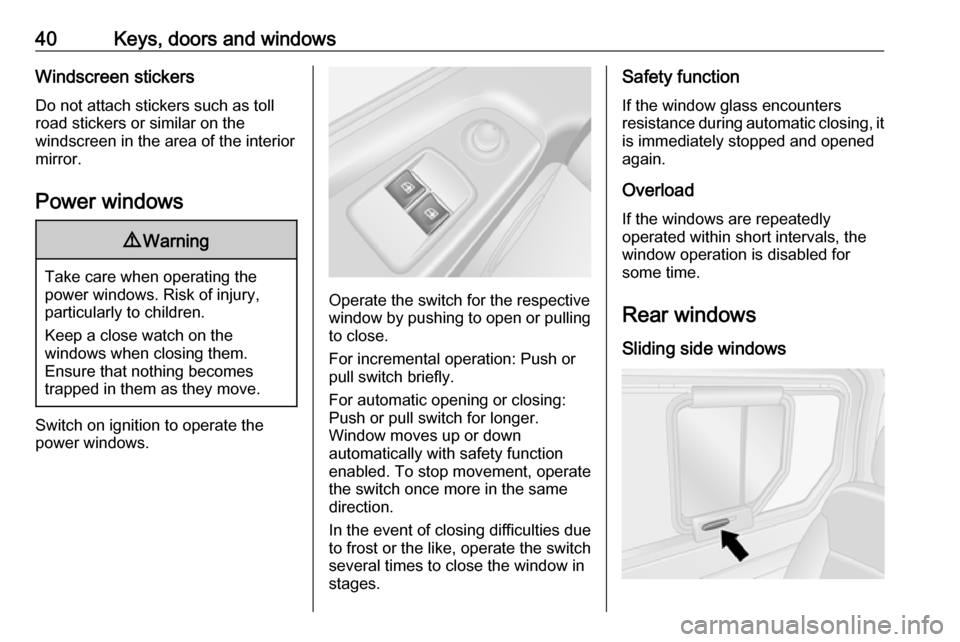
Switch on ignition to operate the power windows.
Operate the switch for the respective
window by pushing to open or pulling to close.
For incremental operation: Push or
pull switch briefly.
For automatic opening or closing:
Push or pull switch for longer.
Window moves up or down
automatically with safety function
enabled. To stop movement, operate
the switch once more in the same
direction.
In the event of closing difficulties due
to frost or the like, operate the switch
several times to close the window in
stages.
Safety function
If the window glass encounters
resistance during automatic closing, it is immediately stopped and opened
again.
Overload
If the windows are repeatedly
operated within short intervals, the window operation is disabled for
some time.
Rear windows Sliding side windows