reset VAUXHALL VIVARO 2016.5 Owner's Manual
[x] Cancel search | Manufacturer: VAUXHALL, Model Year: 2016.5, Model line: VIVARO, Model: VAUXHALL VIVARO 2016.5Pages: 211, PDF Size: 5 MB
Page 21 of 211

Keys, doors and windows19Keys, doors and
windowsKeys, locks ................................... 19
Keys .......................................... 19
Car Pass .................................... 20
Radio remote control .................20
Electronic key system ................22
Door locks ................................. 23
Central locking system ..............23
Automatic locking ......................28
Child locks ................................. 29
Doors ........................................... 29
Sliding door ............................... 29
Rear doors ................................. 30
Load compartment ....................32
Vehicle security ............................ 33
Anti-theft locking system ...........33
Anti-theft alarm system ..............35
Immobiliser ................................ 36
Exterior mirrors ............................ 37
Convex shape ........................... 37
Manual adjustment ....................37
Electric adjustment ....................37
Folding mirrors .......................... 38
Heated mirrors ........................... 38Interior mirrors............................. 38
Manual anti-dazzle ....................38
Automatic anti-dazzle ................39
Windows ...................................... 39
Windscreen ............................... 39
Power windows ......................... 40
Rear windows ............................ 40
Heated rear window ..................41
Sun visors .................................. 41Keys, locks
Keys Replacement keys
The key number is specified on the key or on a detachable tag.
The key number must be quoted
when ordering replacement keys as it
is a component of the immobiliser
system.
Locks 3 177, Radio remote control
3 20, Electronic key system 3 22,
Central locking 3 23, Starting the
engine 3 118.
Lock cylinders
Designed to free-wheel if they are forcefully rotated without the correct
key or if the correct key is not fully
inserted. To reset, turn cylinder with
the correct key until its slot is vertical, remove key and then re-insert it. If the
cylinder still free-wheels, turn the key
through 180° and repeat operation.
Page 29 of 211

Keys, doors and windows27Handsfree operation is automatically
disabled when the electronic key buttons have been operated. To re-
enable handsfree operation, restart
the engine.
Locking with electronic key buttons
Press e to lock all doors and the load
compartment.
Load compartment locking and
unlocking with electronic key -
handsfree operation
Press the button on the exterior door
handle to lock or unlock the rear
doors/tailgate (and sliding side doors)
when the electronic key is within
range of the detection zone (approx.
one metre).
The rear doors/tailgate (and sliding side doors) only lock/unlock when at
least 3 seconds have passed since
the button was last pressed.
Handsfree operation is automatically
disabled when the electronic key buttons have been operated. To re-
enable handsfree operation, restart
the engine.
Load compartment locking and
unlocking with electronic key buttonsPress G to lock/unlock the rear
doors/tailgate (and sliding side
doors).
Electronic key system 3 22.
Manual key operation
Manually lock or unlock the doors by
turning the key in the lock.
Rear doors
In the event the rear doors are locked
manually after the vehicle has been
unlocked with remote control button
c , lock the entire vehicle again by
pressing e to reset central locking
system. Otherwise pressing c may
not unlock the rest of the vehicle.
Page 60 of 211
58Seats, restraints
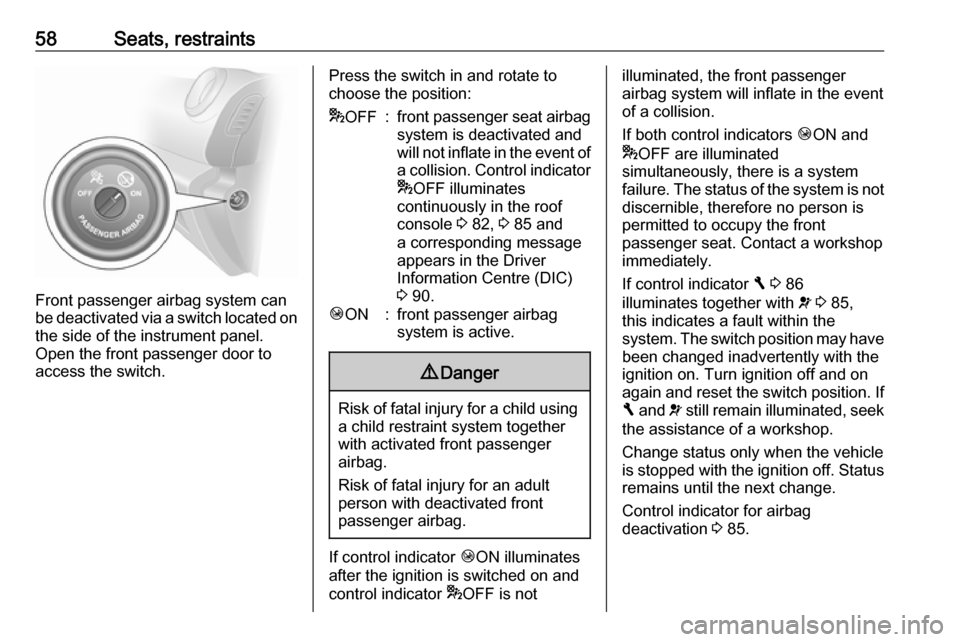
Front passenger airbag system can
be deactivated via a switch located on the side of the instrument panel.
Open the front passenger door to
access the switch.
Press the switch in and rotate to
choose the position:* OFF:front passenger seat airbag
system is deactivated and
will not inflate in the event of
a collision. Control indicator
* OFF illuminates
continuously in the roof
console 3 82, 3 85 and
a corresponding message
appears in the Driver
Information Centre (DIC)
3 90.Ó ON:front passenger airbag
system is active.9 Danger
Risk of fatal injury for a child using
a child restraint system together
with activated front passenger
airbag.
Risk of fatal injury for an adult
person with deactivated front
passenger airbag.
If control indicator ÓON illuminates
after the ignition is switched on and
control indicator *OFF is not
illuminated, the front passenger
airbag system will inflate in the event
of a collision.
If both control indicators ÓON and
* OFF are illuminated
simultaneously, there is a system
failure. The status of the system is not discernible, therefore no person is
permitted to occupy the front
passenger seat. Contact a workshop immediately.
If control indicator F 3 86
illuminates together with v 3 85,
this indicates a fault within the
system. The switch position may have been changed inadvertently with the
ignition on. Turn ignition off and on
again and reset the switch position. If
F and v still remain illuminated, seek
the assistance of a workshop.
Change status only when the vehicle
is stopped with the ignition off. Status remains until the next change.
Control indicator for airbag
deactivation 3 85.
Page 82 of 211
80Instruments and controlsSpeed limiterMaximum speed may be restricted by
a speed limiter. As a visible indication
of this, a warning label is located on
the instrument panel.
A warning buzzer will sound for
10 seconds every 40 seconds if the vehicle briefly exceeds the set limit.
Notice
Under certain conditions (e.g. steep
inclines), the vehicle speed may
exceed the set limit.
Speed limiter 3 136, cruise control
speed limiter 3 133.Odometer
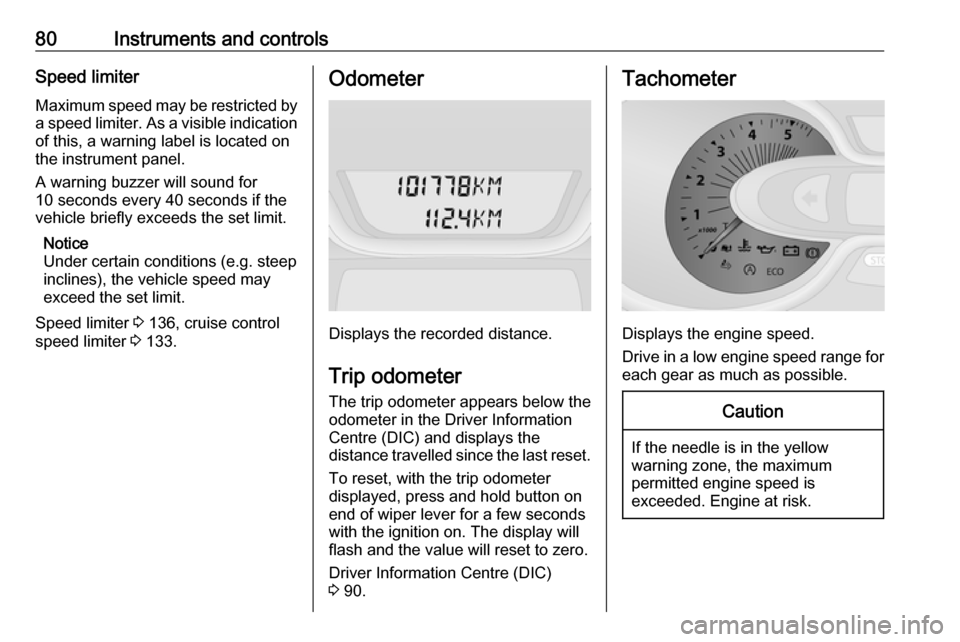
Displays the recorded distance.
Trip odometer The trip odometer appears below the
odometer in the Driver Information
Centre (DIC) and displays the
distance travelled since the last reset.
To reset, with the trip odometer
displayed, press and hold button on
end of wiper lever for a few seconds
with the ignition on. The display will
flash and the value will reset to zero.
Driver Information Centre (DIC)
3 90.
Tachometer
Displays the engine speed.
Drive in a low engine speed range for each gear as much as possible.
Caution
If the needle is in the yellow
warning zone, the maximum
permitted engine speed is
exceeded. Engine at risk.
Page 84 of 211

82Instruments and controlsWhen the remaining distance before
the next service is less than
1000 miles or 1 month, a message
appears in the DIC.
When the distance reaches 0 miles or
the service date is due, control
indicator F illuminates in the
instrument cluster and the DIC
respectively, and a corresponding
message appears in the DIC.
The vehicle needs a service. Seek the assistance of a workshop.
Resetting the service display After a service, the service display
must be reset:
Select the distance before service
display in the DIC, then press and
hold button on end of wiper lever for
approx. 10 seconds.
Trip computer 3 93.
Driver Information Centre (DIC)
3 90.
Service information 3 181.Control indicators
The control indicators described are
not present in all vehicles. The
description applies to all instrument
versions.
Depending on the equipment the
position of the control indicators may
vary.
When the ignition is switched on,
most control indicators will illuminate
briefly as a functionality test.
The control indicator colours mean:red:danger, important reminderyellow:warning, information, faultgreen:confirmation of activationblue:confirmation of activationwhite:confirmation of activation
Page 95 of 211

Instruments and controls93Trip computer
The trip computer provides
information on driving data, which is
continually recorded and evaluated electronically.
Depending on vehicle, the following
functions can be selected by pressing button repeatedly on end of wiper
lever:
● odometer 3 80
● fuel used
● average consumption
● instantaneous consumption
● range
● trip odometer
● average speed
● distance before service 3 81
● clock 3 77, outside temperature
3 77
● cruise control and speed limiter stored speed 3 133
● fuel economy rating
● Adblue percentage remaining 3 123
● fault and information messages
Fuel used Displays the amount of fuel
consumed since the last reset.
The measurement can be restarted at any time by pressing and holding the
button.
Average consumption The value is displayed after driving a
distance of 0.25 miles.
Average consumption is displayed, taking into consideration the distance
travelled and the fuel used since the
last reset.The measurement can be restarted at
any time.
Instantaneous consumption
The value is displayed after reaching
a speed of 20 mph.
Range The value is displayed after driving a
distance of 0.25 miles.
The range is calculated from the
current contents of the fuel tank and
the average consumption since the
last reset.
The range will not display if control
indicator Y is illuminated in the
instrument cluster 3 89.
Trip odometer Displays the distance driven since the
last reset.
The measurement can be restarted at
any time.
Trip odometer 3 80.
Page 96 of 211

94Instruments and controlsAverage speedThe value is displayed after driving a
distance of 0.25 miles.
The average speed since the last
reset is displayed.
The measurement can be restarted at
any time.
Interruptions in the journey with the
ignition off are not included in the
calculations.
Reset trip computer information
To reset the trip computer, select one of its functions then press and hold
the button on the end of the wiper
lever.
The following trip computer
information will be reset:
● fuel used
● average consumption
● trip odometer
● average speed
The trip computer will reset
automatically when the maximum
value of any of the parameters is
exceeded.Fuel economy rating (ecoScoring)
If equipped, a rating of 0 to 100 is
shown in the Info-Display to help
evaluate fuel efficiency, based on your driving style.
Higher ratings indicate better fuel economy.
Tips to improve fuel economy are also given in the Info-Display. Journeys
can be saved in the system memory,
enabling you to compare
performances. Refer to Infotainment
system manual for further
information.
Vehicle messages 3 91.
Journey record
When the engine is switched off, a record of the last journey is shown in
the Info-Display.
The following information is
displayed:
● average fuel consumption
● total fuel consumption
● trip odometer
● fuel saved in milesUnit of measurement
To change the unit of measurementfor the duration of a journey:
Vehicles with power button:
With ignition off, simultaneously press and hold button on end of wiper lever
and press the power button 3 116;
the central display flashes for approx.
10 seconds until the new unit is
displayed. Release button on end of
wiper lever when the display stops
flashing.
Vehicles without power button:
With ignition off, simultaneously press and hold button on end of wiper lever
and switch on the ignition; the central display flashes for approx.
10 seconds until the new unit is
displayed. Release button on end of
wiper lever when the display stops
flashing.
When the engine is switched off, the
trip computer automatically returns to
the original unit of measurement.
Page 110 of 211

108Climate controlAuxiliary heater
Coolant heater The Eberspächer engine-
independent, fuel-powered coolant
heater provides rapid heating of the
engine coolant to enable heating of
the vehicle interior without the engine
running.9 Warning
Do not operate the system when
refuelling, when dust or
combustible vapours are present
or in enclosed spaces (e.g.
garage).
Before starting or programming the
system to start, turn the vehicle's
climate control system to heat, set the
air distribution to V and turn the fan
on.
Switch off when not required. Heating stops automatically after the
programmed runtime. It will also
cease to operate if the vehicle fuel
level drops too low.
During operation, power from the
vehicle battery is used. The driving
time should therefore be at least as
long as the heating time. For short
journey times, check the vehicle
battery regularly and recharge if
necessary.
To ensure efficient performance,
briefly operate the auxiliary heater
once a month.
Control units
The timer or remote control unit turns the system on and off, and is used to
programme specific departure times.
Timer1 Display:Displays preset,
weekday or preset
day, current time or preset time,
temperature, Z and
Y2 Temperature:Selects
temperature3 l:Adjusts values up4 k:Adjusts values
down5 Y:Selects heat
settings6 P:Selects preset
settings7 Þ:Selects time and
weekday settings
Page 111 of 211
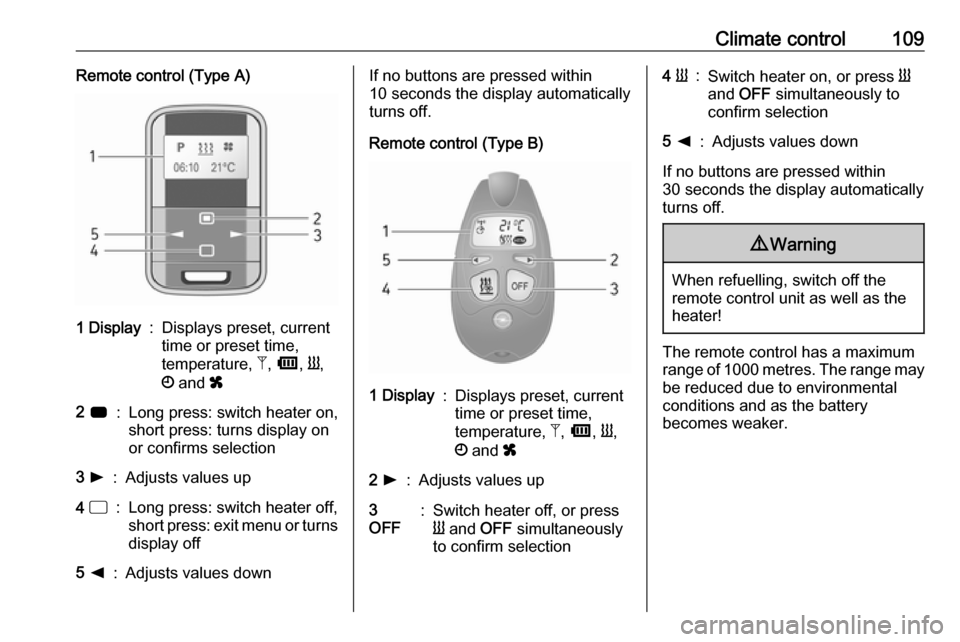
Climate control109Remote control (Type A)1 Display:Displays preset, current
time or preset time,
temperature, Z, Ü , Y ,
Ö and x2 7:Long press: switch heater on,
short press: turns display on
or confirms selection3 l:Adjusts values up4 d:Long press: switch heater off,
short press: exit menu or turns
display off5 k:Adjusts values downIf no buttons are pressed within
10 seconds the display automatically
turns off.
Remote control (Type B)1 Display:Displays preset, current
time or preset time,
temperature, Z, Ü , Y ,
Ö and x2 l:Adjusts values up3
OFF:Switch heater off, or press
Y and OFF simultaneously
to confirm selection4 Y:Switch heater on, or press Y
and OFF simultaneously to
confirm selection5 k:Adjusts values down
If no buttons are pressed within
30 seconds the display automatically
turns off.
9 Warning
When refuelling, switch off the
remote control unit as well as the
heater!
The remote control has a maximum
range of 1000 metres. The range may
be reduced due to environmental
conditions and as the battery
becomes weaker.
Page 113 of 211

Climate control111To change the default predeterminedheating duration, ensure the heater is switched off, press and hold k until
the display flashes and adjust with
k or l.
Programming P
Up to 3 preset departure times during
one day, or one preset departure time over one week can be programmed.
● Press P once to select preset
memory number 1.
● Press P twice to select preset
memory number 2.
● Press P three times to select
preset memory number 3.
● Press P again to exit the preset
memory.
Start heating within 24 hours ● Press P to select desired preset
memory number 1, 2 or 3.
● Briefly press k or l; the preset
time flashes.
● Adjust the preset time with k or
l .
● Press P to confirm and exit the
preset memory.Start heating up to 7 days
● Press P to select desired preset
memory number 1, 2 or 3.
● Briefly press k or l; the preset
time flashes.
● Adjust the preset time with k or
l .
● After 5 seconds the preset day flashes.
● Adjust the preset day with k or
l .
● The preset time and day are set once the display changes to the
current time.
Set time and weekday Þ
If the vehicle battery is disconnected
or its voltage is too low, the unit will
need to be reset.
● Press Þ until the time flashes.
● Press k or l to change the
current time.
● Time is stored when the display stops flashing.
● Wait for weekday to flash.● Press k or l to change the
weekday.
● Weekday is stored when the display stops flashing.
Heating level
The preferred heating level for
programmed departure times can be set between 10 to 30℃.
Adjust using the temperature
preselection dial.