warning light VAUXHALL VIVARO 2016 User Guide
[x] Cancel search | Manufacturer: VAUXHALL, Model Year: 2016, Model line: VIVARO, Model: VAUXHALL VIVARO 2016Pages: 209, PDF Size: 4.86 MB
Page 67 of 209

Storage65StorageStorage compartments................65
Instrument panel storage ...........65
Glovebox ................................... 65
Cupholders ................................ 66
Front storage ............................. 66
Underseat storage .....................67
Overcab storage ........................68
Load compartment .......................68
Load compartment cover ...........68
Lashing eyes ............................. 69
Safety net .................................. 69
Warning triangle ........................70
First aid kit ................................. 70
Roof rack system .........................71
Roof rack ................................... 71
Loading information .....................71Storage compartments9Warning
Do not store heavy or sharp
objects in the storage
compartments. Otherwise, the
storage compartment lid could
open and vehicle occupants could be injured by objects being thrown
around in the event of hard
braking, a sudden change in
direction or an accident.
Instrument panel storage
Storage compartments, pockets and
trays are located in the instrument
panel.
A coin holder, a phone holder, and a
tablet holder may be located on the
instrument panel.
The tray located on top of the
instrument panel has a lid.
Glovebox
To open, pull the handle.
Depending on version, the glovebox
may feature a light that comes on
when the glovebox is opened, and
may also be lockable.
The glovebox should be closed while
driving.
Page 75 of 209

Instruments and controls73Instruments and
controlsControls ....................................... 74
Steering wheel adjustment ........74
Steering wheel controls .............74
Horn ........................................... 74
Steering column controls ...........74
Windscreen wiper/washer .........75
Rear window wiper/washer .......76
Outside temperature ..................76
Clock ......................................... 76
Power outlets ............................. 77
Cigarette lighter ......................... 78
Ashtrays .................................... 78
Warning lights, gauges and indi‐ cators ........................................... 78
Instrument cluster ......................78
Speedometer ............................. 78
Odometer .................................. 79
Trip odometer ............................ 79
Tachometer ............................... 79
Fuel gauge ................................ 80
Fuel economy gauge .................80
Service display .......................... 80
Control indicators ......................81
Turn signal ................................. 83Seat belt reminder.....................84
Airbag and belt tensioners .........84
Airbag deactivation ....................84
Charging system .......................84
Malfunction indicator light ..........85
Service vehicle soon .................85
Stop engine ............................... 85
Brake system ............................. 85
Antilock brake system (ABS) .....86
Upshift ....................................... 86
Electronic Stability Program ......86
Electronic Stability Program off ............................................. 86
Engine coolant temperature ......86
Preheating ................................. 87
AdBlue ....................................... 87
Tyre pressure monitoring system ...................................... 87
Engine oil pressure ....................87
Fuel economy mode ..................88
Low fuel ..................................... 88
Autostop .................................... 88
Exterior light .............................. 88
High beam ................................. 88
Fog light ..................................... 88
Rear fog light ............................. 88
Cruise control ............................ 88
Tachograph ............................... 89
Door open .................................. 89Information displays.....................89
Driver Information Centre ..........89
Vehicle messages ........................90
Warning chimes .........................90
Engine oil level .......................... 91
Trip computer ............................... 91
Tachograph .................................. 93
Page 80 of 209

78Instruments and controlsCigarette lighter
The cigarette lighter is located on theinstrument panel.
Press in cigarette lighter. It switches
off automatically once the element is
glowing. Pull out lighter.
Ashtrays
Caution
To be used only for ash and not for combustible rubbish.
Portable ashtray
Ashtray container for mobile use in
the vehicle. To use, open cover.
Ashtrays can be placed in the
cupholders at both ends of the
instrument panel, centrally in the
lower instrument panel and in the rear
seat area.
Cupholders 3 66.
Warning lights, gauges
and indicators
Instrument cluster
In some versions, the needles of the
instruments briefly rotate to the end
position when the ignition is switched on.
Speedometer
Indicates vehicle speed.
Page 85 of 209
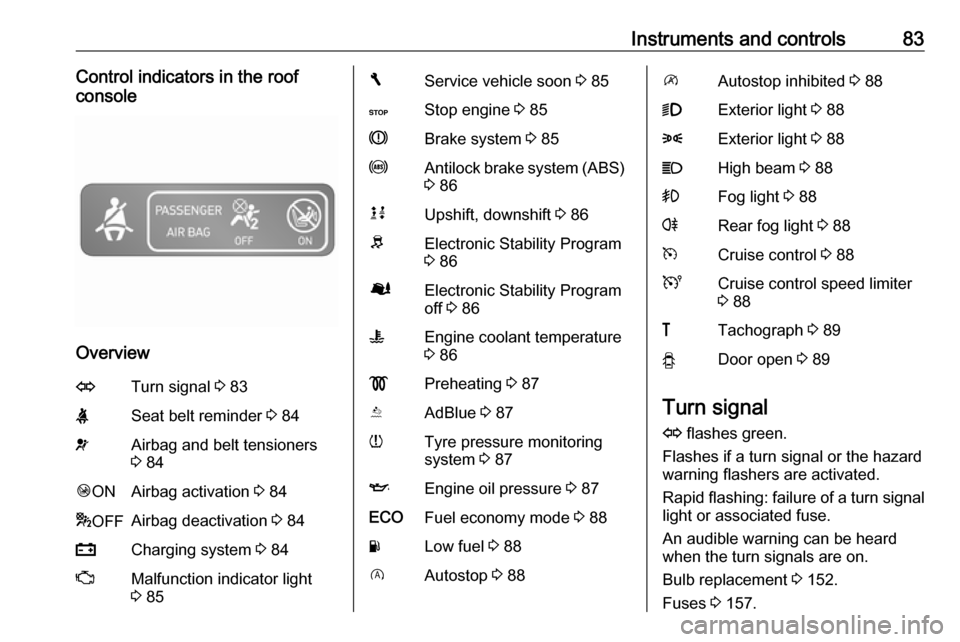
Instruments and controls83Control indicators in the roof
console
Overview
OTurn signal 3 83XSeat belt reminder 3 84vAirbag and belt tensioners
3 84Ó ONAirbag activation 3 84* OFFAirbag deactivation 3 84pCharging system 3 84ZMalfunction indicator light
3 85FService vehicle soon 3 85CStop engine 3 85RBrake system 3 85uAntilock brake system (ABS)
3 86kjUpshift, downshift 3 86RElectronic Stability Program
3 86ØElectronic Stability Program
off 3 86WEngine coolant temperature
3 86!Preheating 3 87YAdBlue 3 87wTyre pressure monitoring
system 3 87IEngine oil pressure 3 87ECOFuel economy mode 3 88YLow fuel 3 88DAutostop 3 88\Autostop inhibited 3 889Exterior light 3 888Exterior light 3 88CHigh beam 3 88>Fog light 3 88rRear fog light 3 88mCruise control 3 88UCruise control speed limiter
3 88&Tachograph 3 89yDoor open 3 89
Turn signal
O flashes green.
Flashes if a turn signal or the hazard
warning flashers are activated.
Rapid flashing: failure of a turn signal
light or associated fuse.
An audible warning can be heard
when the turn signals are on.
Bulb replacement 3 152.
Fuses 3 157.
Page 87 of 209

Instruments and controls85Illuminates when the engine is
running
If control indicator p illuminates
when the engine is running (together
with control indicator C and a
warning chime): Stop, switch off
engine.
Vehicle battery is not charging.
Engine cooling may be interrupted.
Power to the brake servo unit may be
cut. Seek the assistance of a
workshop.
Malfunction indicator light
Z illuminates or flashes yellow.
Illuminates briefly when the ignition is switched on.
Illuminates when the engine is
running
Fault in the emission control system. The permitted emission limits may be exceeded. Seek the assistance of a
workshop immediately.Flashes when the engine is
running
Fault that could lead to catalyticconverter damage. Ease up on the
accelerator until the flashing stops.
Seek the immediate assistance of a
workshop.
Service vehicle soon F illuminates in yellow.
Illuminates briefly when the ignition is
switched on.
May illuminate together with other
control indicators and a
corresponding message in the Driver
Information Centre (DIC) 3 89.
Seek the assistance of a workshop
immediately.
Stop engine
C illuminates in red.
Illuminates briefly when the ignition is
switched on.
Illuminates together with other control indicators (e.g., p, I and R),
accompanied by a warning chime anda corresponding message in the
Driver Information Centre (DIC)
3 89: stop engine immediately and
seek the assistance of a workshop.
Brake system
R illuminates red.
Illuminates when the parking brake is released if the brake fluid level is too
low 3 148.9 Warning
Stop. Do not continue your
journey. Consult a workshop.
Illuminates after the ignition is
switched on if the parking brake is
applied 3 127 and extinguishes
when the parking brake is released.
If R illuminates together with control
indicator C and a warning chime,
there is a fault in the braking system.
A corresponding message also
appears in the Driver Information
Centre (DIC) 3 89. Seek the
assistance of a workshop
immediately.
Page 90 of 209

88Instruments and controls9Warning
When the engine is off,
considerably more force is needed
to brake and steer.
Do not remove key until vehicle is stationary, otherwise the steeringwheel lock could engage
unexpectedly.
Check oil level before seeking
assistance of a workshop 3 145.
Fuel economy mode
ECO illuminates green when ECO
mode is engaged to reduce fuel
consumption.
ECO mode, driving economically
3 112.
Low fuel Y illuminates yellow.
Illuminates briefly when the ignition is
switched on.
Illuminates when level in fuel tank is
low (range of approx. 30 miles); refuel immediately 3 138.
Catalytic converter 3 121.
Bleeding the diesel fuel system
3 151.
Autostop D illuminates when engine is in an
Autostop.
\ illuminates when an Autostop is
inhibited when certain conditions are
not fulfilled.
Stop-start system 3 117.
Exterior light
9 illuminates green.
Illuminated when the headlights are
on.
8 illuminates green.
Illuminated when the sidelights are
on.
Lighting 3 95.
High beam
P illuminates blue.
Illuminated when high beam is on and during headlight flash 3 96.Fog light
> illuminates green.
Illuminated when the front fog lights
are on 3 98.
Rear fog light r illuminates green.
Illuminated when the rear fog light is
on 3 98.
Cruise control
m , U illuminates green or yellow.
m illuminates green when a certain
speed is stored.
U illuminates green when the system
is on.
Speed limiter U illuminates yellow.
U illuminates yellow when the
system is on.
Cruise control and speed limiter
3 131.
Page 97 of 209
Lighting95LightingExterior lighting............................ 95
Light switch ................................ 95
Automatic light control ...............95
High beam ................................. 96
Headlight flash ........................... 96
Headlight range adjustment ......96
Headlights when driving abroad ...................................... 96
Daytime running lights ...............97
Adaptive forward lighting ...........97
Hazard warning flashers ............97
Turn and lane-change signals ...97
Front fog lights ........................... 98
Rear fog lights ........................... 98
Reversing lights .........................98
Misted light covers .....................98
Interior lighting ............................. 98
Instrument panel illumination control ....................................... 98
Interior lights .............................. 99
Load compartment lighting ........99
Glove box lighting ......................99
Lighting features ........................100
Entry lighting ............................ 100
Exit lighting .............................. 100Exterior lighting
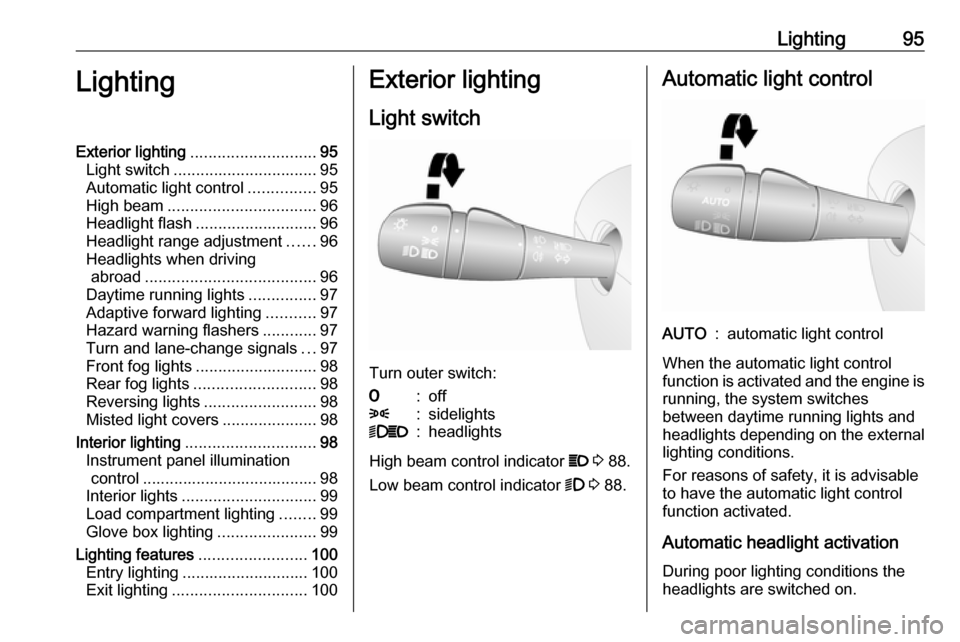
Light switch
Turn outer switch:
7:off8:sidelights9P:headlights
High beam control indicator P 3 88.
Low beam control indicator 9 3 88.
Automatic light controlAUTO:automatic light control
When the automatic light control
function is activated and the engine is running, the system switches
between daytime running lights and headlights depending on the external lighting conditions.
For reasons of safety, it is advisable
to have the automatic light control
function activated.
Automatic headlight activation During poor lighting conditions the
headlights are switched on.
Page 99 of 209
![VAUXHALL VIVARO 2016 User Guide Lighting97Using a screwdriver, turn the screw
by a 1
/4 turn towards the
] symbol to
lower the beams or towards the <
symbol to raise the beams.
Ensure the headlight beams are
returned to their or](/img/38/19590/w960_19590-98.png "VAUXHALL VIVARO 2016 User Guide Lighting97Using a screwdriver, turn the screw
by a 1
/4 turn towards the
] symbol to
lower the beams or towards the <
symbol to raise the beams.
Ensure the headlight beams are
returned to their or")
Lighting97Using a screwdriver, turn the screw
by a 1
/4 turn towards the
] symbol to
lower the beams or towards the <
symbol to raise the beams.
Ensure the headlight beams are
returned to their original positions
when required.
Daytime running lights
Daytime running lights increase
visibility of the vehicle during daylight. They are switched on automatically
when the ignition is switched on.
If required, the daytime running lights
can be deactivated via the
Infotainment system. For further
information, refer to Infotainment
system manual.
Automatic light control 3 95.Adaptive forward lighting
Cornering light
With the low beam switched on,
depending on the steering angle, vehicle speed and gear selected
when cornering, the front fog light will also switch on, to illuminate the
corner of the road on the respective
side.
Hazard warning flashers
Operated with the ¨ button.
In the event of hard braking, the
hazard warning flashers may turn on
automatically. Switch off by pressing
the ¨ button.
Turn and lane-change signalslever up:right turn signallever down:left turn signal
When the steering wheel is turned
back, the lever automatically returns
to its original position and the turn
signal is deactivated. This will not
Page 117 of 209

Driving and operating115Some functions, e.g. Infotainment
system, are available for use as soon
as you enter the vehicle.
Accessory power mode
Press START/STOP without
operating clutch or brake pedal to
enable further electrical functions to
be operated.
Engine start
Operate clutch and brake pedal and press START/STOP . Release button
after starting procedure begins.
If a gear is engaged, the engine can
be started only by operating the clutch
pedal and pressing the
START/STOP button.
In some cases, it may be necessary
to move the steering wheel slightly
while pressing START/STOP to
release the steering wheel lock. A
corresponding message appears in
the DIC 3 89.
At very low outside temperatures (e.g. below -10 °C) keep the clutch pedal
depressed while pressing
START/STOP until the engine starts.If one of the starting conditions is not
applied, a corresponding message
appears in the DIC 3 89.
Vehicle messages 3 90.
Engine stop
Electronic key must be inside the
vehicle, either in the card reader or the front passenger compartment.
With the vehicle stationary, press
START/STOP to stop the engine. The
steering wheel lock is engaged when
the driver's door is opened and the
vehicle is locked.
If the electronic key is not detected, a
corresponding message appears in
the DIC 3 89. In this event, press
START/STOP for 2 seconds to stop
the engine.
Central locking system 3 23.
Retained power off
Press START/STOP for more than
two seconds; the engine is stopped
while some functions, e.g.
Infotainment system, are available for
use for approx. 10 minutes.These functions stop working when
the driver's door is opened and the vehicle is locked.
Notice
Always take the electronic key with
you when exiting the vehicle.
The electronic key being left in the
card reader is indicated by a warning chime 3 90 and a message in the
Driver Information Centre (DIC)
3 90 when the driver's door is
opened.9 Danger
Never leave an electronic key
inside the vehicle when children or animals are left in the vehicle, to
avoid unintended operation of
windows, doors or engine. Risk of
fatal injury.
Fault
If the engine cannot be started, the
cause may be one of the following:
● Fault in electronic key.
● Electronic key out of reception range.
Page 119 of 209

Driving and operating117Notice
When the fast idle function is
activated, the stop-start system is
automatically deactivated.
Stop-start system 3 117.
Vehicle shutdown
Fuel cut-off system
If the vehicle runs out of fuel, the fuel
system is cut-off and must be reset
after refuelling. A corresponding
warning message may also appear in
the Driver Information Centre (DIC)3 89.9 Danger
If you can smell fuel in the vehicle,
or a fuel leak is present, have thecause of this remedied
immediately by a workshop. Do
not reset the fuel cut-off system, to avoid the risk of fire.
Resetting with remote control
key / manual key
To reset the fuel cut-off system and
enable the vehicle to be driven:
1. Turn the ignition key to position 2
3 114.
2. Wait a few minutes to allow the fuel system to be reset.
3. Turn key to position 3 to start the
engine.
If the engine does not start, repeat the
procedure.
Resetting with electronic key
system
To reset the fuel cut-off system and
enable the vehicle to be driven:
1. Insert the electronic key in the card reader 3 114.
2. Press START/STOP without
depressing any pedals.
3. Wait a few minutes to allow the fuel system to be reset.
If the engine does not start, repeat the procedure.
Electronic key system 3 22.Power button 3 114.
Refuelling 3 138.
Overrun cut-off The fuel supply is automatically cut off
during overrun, i.e. when the vehicle
is driven with a gear engaged but
accelerator is released.
Stop-start system The stop-start system helps to save
fuel and to reduce the exhaust
emissions. When conditions allow, it
switches off the engine as soon as the
vehicle is at a low speed or at a
standstill, e.g. at a traffic light or in a
traffic jam. It restarts the engine
automatically as soon as the clutch
pedal is depressed.
A vehicle battery sensor ensures that
an Autostop is only performed if the
vehicle battery is sufficiently charged
for a restart.