ignition VAUXHALL VIVARO 2016 Owner's Guide
[x] Cancel search | Manufacturer: VAUXHALL, Model Year: 2016, Model line: VIVARO, Model: VAUXHALL VIVARO 2016Pages: 209, PDF Size: 4.86 MB
Page 83 of 209

Instruments and controls81When the remaining distance before
the next service is less than
1000 miles or 1 month, a message
appears in the DIC.
When the distance reaches 0 miles or
the service date is due, control
indicator F illuminates in the
instrument cluster and the DIC
respectively, and a corresponding message appears in the DIC.
The vehicle needs a service. Seek the assistance of a workshop.
Resetting the service display After a service, the service display
must be reset:
Select the distance before service display in the DIC, then press and
hold button on end of wiper lever for
approx. 10 seconds.
Trip computer 3 91.
Driver Information Centre (DIC)
3 89.
Service information 3 180.Control indicators
The control indicators described are
not present in all vehicles. The
description applies to all instrument
versions.
Depending on the equipment the
position of the control indicators may
vary.
When the ignition is switched on,
most control indicators will illuminate
briefly as a functionality test.
The control indicator colours mean:red:danger, important reminderyellow:warning, information, faultgreen:confirmation of activationblue:confirmation of activationwhite:confirmation of activation
Page 86 of 209

84Instruments and controlsTurn signals 3 97.
Seat belt reminder X illuminates or flashes in red.
If the seat belt is not fastened, control
indicator X will flash when vehicle
speed exceeds approx. 10 mph. A
warning chime also sounds for upto
2 minutes.9 Warning
Fasten seat belt before each trip.
In the event of an accident, people
not wearing seat belts endanger their fellow occupants and
themselves.
Notice
Heavy objects on the front seats
may cause control indicator X to
illuminate. Remove the object from
the seat or fasten the seat belt.
Airbag and belt tensioners
v illuminates yellow.
Illuminates briefly when the ignition is switched on.
If it does not illuminate or illuminates
whilst driving, there is a fault in the
belt tensioner or the airbag system.
The airbags and belt tensioners may
fail to trigger in the event of an
accident.
Deployment of the belt tensioners or airbags is indicated by continuous
illumination of v.9 Warning
Have the cause of the fault
remedied immediately by a
workshop.
Belt tensioners, airbag system 3 48,
3 52.
Airbag deactivation Ó ON illuminates yellow.
The front passenger airbag is
activated.
* OFF illuminates yellow.
The front passenger airbag is
deactivated 3 56.
If both control indicators ÓON and
* OFF are illuminated
simultaneously, there is a system
failure. The status of the system is not discernible, therefore no person is
permitted to occupy the front
passenger seat. Contact a workshop
immediately.
If illuminated in conjunction with v or
F , seek the assistance of a workshop.9 Danger
Risk of fatal injury for a child using
a child restraint system together
with activated front passenger
airbag.
Risk of fatal injury for an adult
person with deactivated front
passenger airbag.
Airbag system 3 52, belt tensioners
3 48, airbag deactivation 3 56.
Charging system p illuminates red.
Illuminates briefly when the ignition is
switched on.
Page 87 of 209

Instruments and controls85Illuminates when the engine is
running
If control indicator p illuminates
when the engine is running (together
with control indicator C and a
warning chime): Stop, switch off
engine.
Vehicle battery is not charging.
Engine cooling may be interrupted.
Power to the brake servo unit may be
cut. Seek the assistance of a
workshop.
Malfunction indicator light
Z illuminates or flashes yellow.
Illuminates briefly when the ignition is switched on.
Illuminates when the engine is
running
Fault in the emission control system. The permitted emission limits may be exceeded. Seek the assistance of a
workshop immediately.Flashes when the engine is
running
Fault that could lead to catalyticconverter damage. Ease up on the
accelerator until the flashing stops.
Seek the immediate assistance of a
workshop.
Service vehicle soon F illuminates in yellow.
Illuminates briefly when the ignition is
switched on.
May illuminate together with other
control indicators and a
corresponding message in the Driver
Information Centre (DIC) 3 89.
Seek the assistance of a workshop
immediately.
Stop engine
C illuminates in red.
Illuminates briefly when the ignition is
switched on.
Illuminates together with other control indicators (e.g., p, I and R),
accompanied by a warning chime anda corresponding message in the
Driver Information Centre (DIC)
3 89: stop engine immediately and
seek the assistance of a workshop.
Brake system
R illuminates red.
Illuminates when the parking brake is released if the brake fluid level is too
low 3 148.9 Warning
Stop. Do not continue your
journey. Consult a workshop.
Illuminates after the ignition is
switched on if the parking brake is
applied 3 127 and extinguishes
when the parking brake is released.
If R illuminates together with control
indicator C and a warning chime,
there is a fault in the braking system.
A corresponding message also
appears in the Driver Information
Centre (DIC) 3 89. Seek the
assistance of a workshop
immediately.
Page 88 of 209

86Instruments and controlsBrake system 3 126.
Antilock brake system
(ABS)
u illuminates yellow.
Illuminates briefly after the ignition is
switched on. The system is ready for
operation when u extinguishes.
If control indicator u does not go out
after a few seconds, or if it illuminates while driving, there is a fault in the
ABS. Control indicator F may also
illuminate in the instrument cluster
together a corresponding message in
the Driver Information Centre (DIC)
3 89. The brake system remains
operational but without ABS
regulation.
If control indicators u, F , R and C
illuminate, there is a fault in the
braking system. A corresponding
message appears in the DIC. Seek
the assistance of a workshop
immediately.
Antilock brake system (ABS) 3 126.Upshift
k or j illuminates.
It is recommended to shift gear when
illuminated to improve fuel economy.
Electronic Stability Program R flashes or illuminates yellow.
Illuminates briefly when the ignition is
switched on.
Flashing during driving
The system is actively engaged.
Engine output may be reduced and
the vehicle may be braked
automatically to a small degree.
Illuminates while driving The system is not available. A
corresponding message also
appears in the Driver Information
Centre (DIC) 3 89.
ESP® Plus
3 129, Traction Control
system 3 128.Electronic Stability Program
off
Ø illuminates yellow.
If ESP ®Plus
has been deactivated with
Ø on the instrument panel, control
indicator Ø illuminates and a
corresponding message appears in
the Driver Information Centre (DIC) 3 89.
ESP® Plus
3 129, Traction Control
system 3 128.
Engine coolant temperature
W illuminates blue or red.
Illuminates red briefly when the
ignition is switched on, then turns
blue.
Illuminates red when the engine is
running
Stop, switch off engine.Caution
Coolant temperature too high.
Check coolant level 3 147.
Page 89 of 209

Instruments and controls87If there is sufficient coolant, consult a
workshop.
The control indicator must be blue
before continuing driving.
Preheating
! illuminates yellow.
Preheating is activated. Only
activates when outside temperature
is low.
AdBlue
Y illuminates yellow.
AdBlue level is low. Refill AdBlue as
soon as possible, to avoid prevention
of engine starts.
Illuminates together with control
indicator F to indicate a system
failure or as a warning that engine
starting may not be possible after a
certain distance. Seek the assistance
of a workshop immediately.
A corresponding message appears in the Driver Information Centre (DIC)
3 89.Adblue percentage remaining can
also be checked by pressing button
repeatedly on end of wiper lever. Trip computer 3 91.
AdBlue 3 121.
Tyre pressure monitoring system
w illuminates or flashes.
Illuminates
Tyre pressure loss. Stop immediately
and check tyre pressure.
Flashes
Fault in system or tyre without
pressure sensor mounted (e.g. spare wheel). After a delay the control
indicator illuminates continuously.
Consult a workshop.
Tyre pressure monitoring system (TPMS) 3 164.
Engine oil pressure
I illuminates red.Illuminates briefly when the ignition is
switched on.
Illuminates when the engine is
running
If control indicator I illuminates
when the engine is running (together
with control indicator C and a
warning chime): Stop, switch off
engine.Caution
Engine lubrication may be
interrupted. This may result in
damage to the engine and/or
locking of the drive wheels.
1. Depress clutch.
2. Select neutral gear (or move selector lever to N).
3. Move out of the flow of traffic as quickly as possible without
impeding other vehicles.
4. Switch off ignition.
Page 90 of 209

88Instruments and controls9Warning
When the engine is off,
considerably more force is needed
to brake and steer.
Do not remove key until vehicle is stationary, otherwise the steeringwheel lock could engage
unexpectedly.
Check oil level before seeking
assistance of a workshop 3 145.
Fuel economy mode
ECO illuminates green when ECO
mode is engaged to reduce fuel
consumption.
ECO mode, driving economically
3 112.
Low fuel Y illuminates yellow.
Illuminates briefly when the ignition is
switched on.
Illuminates when level in fuel tank is
low (range of approx. 30 miles); refuel immediately 3 138.
Catalytic converter 3 121.
Bleeding the diesel fuel system
3 151.
Autostop D illuminates when engine is in an
Autostop.
\ illuminates when an Autostop is
inhibited when certain conditions are
not fulfilled.
Stop-start system 3 117.
Exterior light
9 illuminates green.
Illuminated when the headlights are
on.
8 illuminates green.
Illuminated when the sidelights are
on.
Lighting 3 95.
High beam
P illuminates blue.
Illuminated when high beam is on and during headlight flash 3 96.Fog light
> illuminates green.
Illuminated when the front fog lights
are on 3 98.
Rear fog light r illuminates green.
Illuminated when the rear fog light is
on 3 98.
Cruise control
m , U illuminates green or yellow.
m illuminates green when a certain
speed is stored.
U illuminates green when the system
is on.
Speed limiter U illuminates yellow.
U illuminates yellow when the
system is on.
Cruise control and speed limiter
3 131.
Page 93 of 209

Instruments and controls91● If the vehicle battery is notcharging 3 84.
● If engine lubrication is interrupted
3 87.
● If AdBlue needs to be refilled or a
fault is present 3 121.
● If the electronic key is outside of the detection range.
Electronic key system 3 22,
Power button 3 114.
When the vehicle is parked and/or
the driver's door is opened:
● If the key has been left in the ignition.
● If the electronic key has been left
in the card reader.
Electronic key system 3 22,
Power button 3 114.
● If the vehicle is in an Autostop. Stop-start system 3 117.
● If the exterior lights are on.Engine oil level
If the minimum engine oil level is
reached, a message is displayed in
the Driver Information Centre (DIC)
3 89 for 30 seconds after the engine
is started.
Check oil level 3 145.Trip computer
The trip computer provides
information on driving data, which is
continually recorded and evaluated electronically.
Depending on vehicle, the following
functions can be selected by pressing button repeatedly on end of wiper
lever:
● odometer 3 79
● fuel used
● average consumption
● instantaneous consumption
● range
Page 94 of 209

92Instruments and controls● trip odometer
● average speed
● distance before service 3 80
● clock 3 76, outside temperature
3 76
● cruise control and speed limiter stored speed 3 131
● fuel economy rating
● tyre pressures 3 164
● Adblue percentage remaining 3 121
● fault and information messages
Fuel used Displays the amount of fuel
consumed since the last reset.
The measurement can be restarted at
any time by pressing and holding the
button.
Average consumption The value is displayed after driving a
distance of 0.25 miles.Average consumption is displayed,
taking into consideration the distance
travelled and the fuel used since the
last reset.
The measurement can be restarted at
any time.
Instantaneous consumption
The value is displayed after reaching
a speed of 20 mph.
Range The value is displayed after driving a
distance of 0.25 miles.
The range is calculated from the
current contents of the fuel tank and
the average consumption since the
last reset.
The range will not display if control
indicator Y is illuminated in the
instrument cluster 3 88.
Trip odometer
Displays the distance driven since the
last reset.
The measurement can be restarted at
any time.Trip odometer 3 79.
Average speed The value is displayed after driving a
distance of 0.25 miles.
The average speed since the last
reset is displayed.
The measurement can be restarted at
any time.
Interruptions in the journey with the
ignition off are not included in the
calculations.
Reset trip computer information
To reset the trip computer, select one of its functions then press and hold
the button on the end of the wiper
lever.
The following trip computer
information will be reset:
● fuel used
● average consumption
● trip odometer
● average speed
Page 95 of 209
Instruments and controls93The trip computer will reset
automatically when the maximum
value of any of the parameters is
exceeded.
Fuel economy rating (ecoScoring)
If equipped, a rating of 0 to 100 is
shown in the Info-Display to help evaluate fuel efficiency, based on
your driving style.
Higher ratings indicate better fuel
economy.
Tips to improve fuel economy are also given in the Info-Display. Journeys
can be saved in the system memory,
enabling you to compare
performances. Refer to Infotainment
system manual for further
information.
Vehicle messages 3 90.
Journey record
When the engine is switched off, a record of the last journey is shown in
the Info-Display.The following information is
displayed:
● average fuel consumption
● total fuel consumption
● trip odometer
● fuel saved in miles
Unit of measurement To change the unit of measurement
for the duration of a journey:
With ignition off, simultaneously press
the power button 3 114 and press
and hold button on end of wiper lever; the Driver Information Centre (DIC)
3 89 flashes for approx. 10 seconds
until the new unit is displayed.
Release button on end of wiper lever.
When the engine is switched off, the
trip computer automatically returns to the original unit of measurement.
Interruption of power supply
If the power supply has been
interrupted or if the vehicle battery
voltage has dropped too low, the
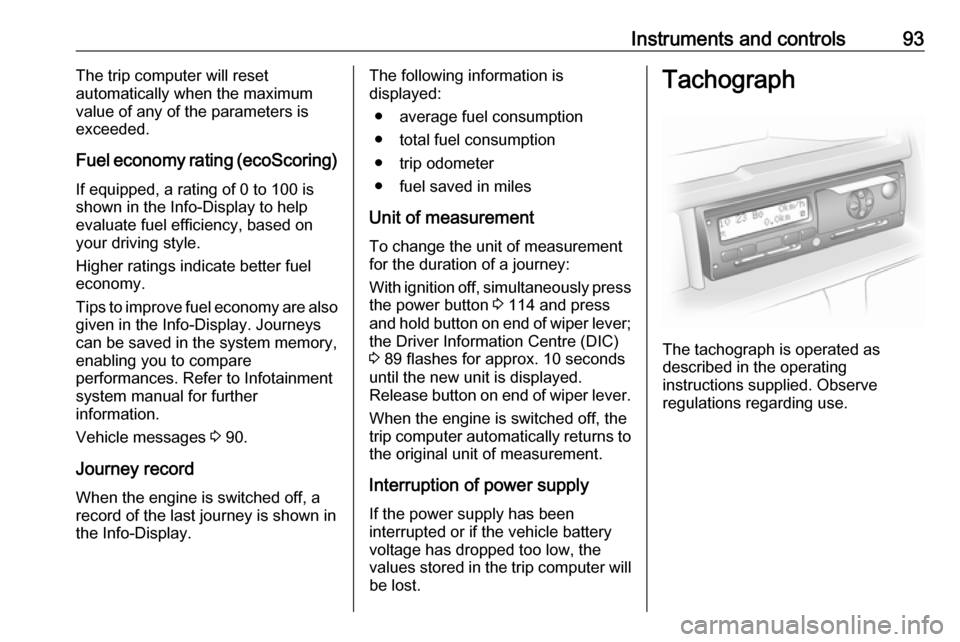
values stored in the trip computer will be lost.Tachograph
The tachograph is operated as
described in the operating
instructions supplied. Observe
regulations regarding use.
Page 99 of 209
![VAUXHALL VIVARO 2016 Owners Guide Lighting97Using a screwdriver, turn the screw
by a 1
/4 turn towards the
] symbol to
lower the beams or towards the <
symbol to raise the beams.
Ensure the headlight beams are
returned to their or](/img/38/19590/w960_19590-98.png "VAUXHALL VIVARO 2016 Owners Guide Lighting97Using a screwdriver, turn the screw
by a 1
/4 turn towards the
] symbol to
lower the beams or towards the <
symbol to raise the beams.
Ensure the headlight beams are
returned to their or")
Lighting97Using a screwdriver, turn the screw
by a 1
/4 turn towards the
] symbol to
lower the beams or towards the <
symbol to raise the beams.
Ensure the headlight beams are
returned to their original positions
when required.
Daytime running lights
Daytime running lights increase
visibility of the vehicle during daylight. They are switched on automatically
when the ignition is switched on.
If required, the daytime running lights
can be deactivated via the
Infotainment system. For further
information, refer to Infotainment
system manual.
Automatic light control 3 95.Adaptive forward lighting
Cornering light
With the low beam switched on,
depending on the steering angle, vehicle speed and gear selected
when cornering, the front fog light will also switch on, to illuminate the
corner of the road on the respective
side.
Hazard warning flashers
Operated with the ¨ button.
In the event of hard braking, the
hazard warning flashers may turn on
automatically. Switch off by pressing
the ¨ button.
Turn and lane-change signalslever up:right turn signallever down:left turn signal
When the steering wheel is turned
back, the lever automatically returns
to its original position and the turn
signal is deactivated. This will not