light VAUXHALL VIVARO 2016 Owner's Guide
[x] Cancel search | Manufacturer: VAUXHALL, Model Year: 2016, Model line: VIVARO, Model: VAUXHALL VIVARO 2016Pages: 209, PDF Size: 4.86 MB
Page 87 of 209

Instruments and controls85Illuminates when the engine is
running
If control indicator p illuminates
when the engine is running (together
with control indicator C and a
warning chime): Stop, switch off
engine.
Vehicle battery is not charging.
Engine cooling may be interrupted.
Power to the brake servo unit may be
cut. Seek the assistance of a
workshop.
Malfunction indicator light
Z illuminates or flashes yellow.
Illuminates briefly when the ignition is switched on.
Illuminates when the engine is
running
Fault in the emission control system. The permitted emission limits may be exceeded. Seek the assistance of a
workshop immediately.Flashes when the engine is
running
Fault that could lead to catalyticconverter damage. Ease up on the
accelerator until the flashing stops.
Seek the immediate assistance of a
workshop.
Service vehicle soon F illuminates in yellow.
Illuminates briefly when the ignition is
switched on.
May illuminate together with other
control indicators and a
corresponding message in the Driver
Information Centre (DIC) 3 89.
Seek the assistance of a workshop
immediately.
Stop engine
C illuminates in red.
Illuminates briefly when the ignition is
switched on.
Illuminates together with other control indicators (e.g., p, I and R),
accompanied by a warning chime anda corresponding message in the
Driver Information Centre (DIC)
3 89: stop engine immediately and
seek the assistance of a workshop.
Brake system
R illuminates red.
Illuminates when the parking brake is released if the brake fluid level is too
low 3 148.9 Warning
Stop. Do not continue your
journey. Consult a workshop.
Illuminates after the ignition is
switched on if the parking brake is
applied 3 127 and extinguishes
when the parking brake is released.
If R illuminates together with control
indicator C and a warning chime,
there is a fault in the braking system.
A corresponding message also
appears in the Driver Information
Centre (DIC) 3 89. Seek the
assistance of a workshop
immediately.
Page 90 of 209

88Instruments and controls9Warning
When the engine is off,
considerably more force is needed
to brake and steer.
Do not remove key until vehicle is stationary, otherwise the steeringwheel lock could engage
unexpectedly.
Check oil level before seeking
assistance of a workshop 3 145.
Fuel economy mode
ECO illuminates green when ECO
mode is engaged to reduce fuel
consumption.
ECO mode, driving economically
3 112.
Low fuel Y illuminates yellow.
Illuminates briefly when the ignition is
switched on.
Illuminates when level in fuel tank is
low (range of approx. 30 miles); refuel immediately 3 138.
Catalytic converter 3 121.
Bleeding the diesel fuel system
3 151.
Autostop D illuminates when engine is in an
Autostop.
\ illuminates when an Autostop is
inhibited when certain conditions are
not fulfilled.
Stop-start system 3 117.
Exterior light
9 illuminates green.
Illuminated when the headlights are
on.
8 illuminates green.
Illuminated when the sidelights are
on.
Lighting 3 95.
High beam
P illuminates blue.
Illuminated when high beam is on and during headlight flash 3 96.Fog light
> illuminates green.
Illuminated when the front fog lights
are on 3 98.
Rear fog light r illuminates green.
Illuminated when the rear fog light is
on 3 98.
Cruise control
m , U illuminates green or yellow.
m illuminates green when a certain
speed is stored.
U illuminates green when the system
is on.
Speed limiter U illuminates yellow.
U illuminates yellow when the
system is on.
Cruise control and speed limiter
3 131.
Page 93 of 209
Instruments and controls91● If the vehicle battery is notcharging 3 84.
● If engine lubrication is interrupted
3 87.
● If AdBlue needs to be refilled or a
fault is present 3 121.
● If the electronic key is outside of the detection range.
Electronic key system 3 22,
Power button 3 114.
When the vehicle is parked and/or
the driver's door is opened:
● If the key has been left in the ignition.
● If the electronic key has been left
in the card reader.
Electronic key system 3 22,
Power button 3 114.
● If the vehicle is in an Autostop. Stop-start system 3 117.
● If the exterior lights are on.Engine oil level
If the minimum engine oil level is
reached, a message is displayed in
the Driver Information Centre (DIC)
3 89 for 30 seconds after the engine
is started.
Check oil level 3 145.Trip computer
The trip computer provides
information on driving data, which is
continually recorded and evaluated electronically.
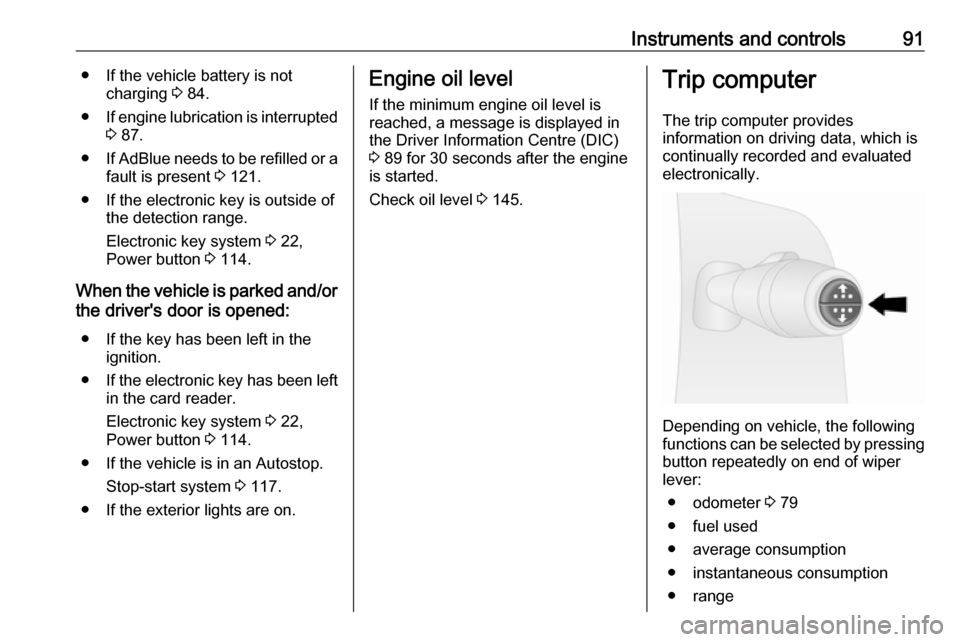
Depending on vehicle, the following
functions can be selected by pressing button repeatedly on end of wiper
lever:
● odometer 3 79
● fuel used
● average consumption
● instantaneous consumption
● range
Page 97 of 209
Lighting95LightingExterior lighting............................ 95
Light switch ................................ 95
Automatic light control ...............95
High beam ................................. 96
Headlight flash ........................... 96
Headlight range adjustment ......96
Headlights when driving abroad ...................................... 96
Daytime running lights ...............97
Adaptive forward lighting ...........97
Hazard warning flashers ............97
Turn and lane-change signals ...97
Front fog lights ........................... 98
Rear fog lights ........................... 98
Reversing lights .........................98
Misted light covers .....................98
Interior lighting ............................. 98
Instrument panel illumination control ....................................... 98
Interior lights .............................. 99
Load compartment lighting ........99
Glove box lighting ......................99
Lighting features ........................100
Entry lighting ............................ 100
Exit lighting .............................. 100Exterior lighting
Light switch
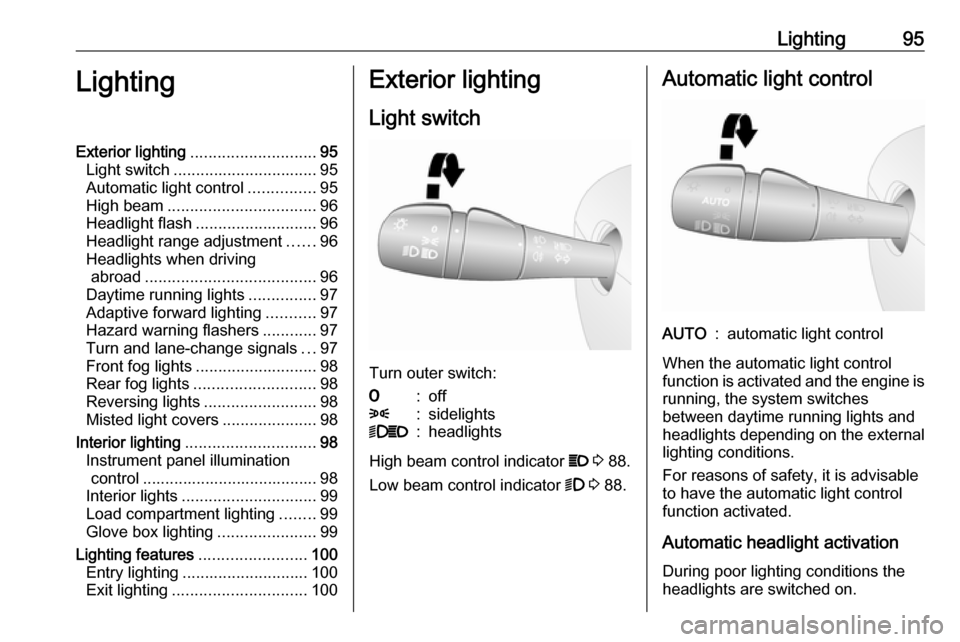
Turn outer switch:
7:off8:sidelights9P:headlights
High beam control indicator P 3 88.
Low beam control indicator 9 3 88.
Automatic light controlAUTO:automatic light control
When the automatic light control
function is activated and the engine is running, the system switches
between daytime running lights and headlights depending on the external lighting conditions.
For reasons of safety, it is advisable
to have the automatic light control
function activated.
Automatic headlight activation During poor lighting conditions the
headlights are switched on.
Page 98 of 209
96LightingDaytime running lights 3 97.
High beam
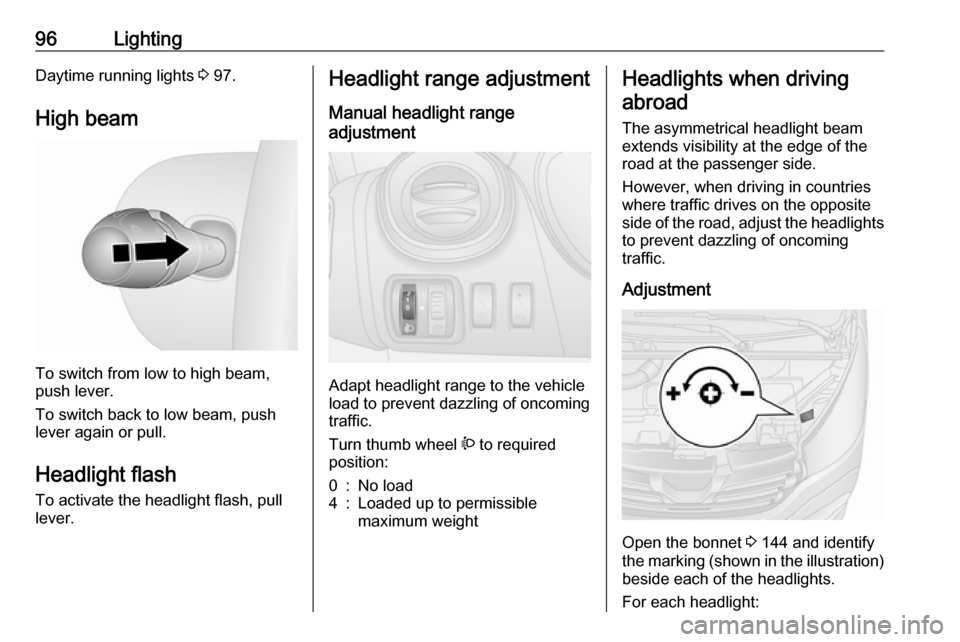
To switch from low to high beam,
push lever.
To switch back to low beam, push
lever again or pull.
Headlight flash To activate the headlight flash, pull
lever.
Headlight range adjustment
Manual headlight range
adjustment
Adapt headlight range to the vehicle
load to prevent dazzling of oncoming
traffic.
Turn thumb wheel ? to required
position:
0:No load4:Loaded up to permissible
maximum weightHeadlights when driving
abroad
The asymmetrical headlight beam
extends visibility at the edge of the
road at the passenger side.
However, when driving in countries
where traffic drives on the opposite
side of the road, adjust the headlights to prevent dazzling of oncoming
traffic.
Adjustment
Open the bonnet 3 144 and identify
the marking (shown in the illustration)
beside each of the headlights.
For each headlight:
Page 99 of 209
![VAUXHALL VIVARO 2016 Owners Guide Lighting97Using a screwdriver, turn the screw
by a 1
/4 turn towards the
] symbol to
lower the beams or towards the <
symbol to raise the beams.
Ensure the headlight beams are
returned to their or](/img/38/19590/w960_19590-98.png "VAUXHALL VIVARO 2016 Owners Guide Lighting97Using a screwdriver, turn the screw
by a 1
/4 turn towards the
] symbol to
lower the beams or towards the <
symbol to raise the beams.
Ensure the headlight beams are
returned to their or")
Lighting97Using a screwdriver, turn the screw
by a 1
/4 turn towards the
] symbol to
lower the beams or towards the <
symbol to raise the beams.
Ensure the headlight beams are
returned to their original positions
when required.
Daytime running lights
Daytime running lights increase
visibility of the vehicle during daylight. They are switched on automatically
when the ignition is switched on.
If required, the daytime running lights
can be deactivated via the
Infotainment system. For further
information, refer to Infotainment
system manual.
Automatic light control 3 95.Adaptive forward lighting
Cornering light
With the low beam switched on,
depending on the steering angle, vehicle speed and gear selected
when cornering, the front fog light will also switch on, to illuminate the
corner of the road on the respective
side.
Hazard warning flashers
Operated with the ¨ button.
In the event of hard braking, the
hazard warning flashers may turn on
automatically. Switch off by pressing
the ¨ button.
Turn and lane-change signalslever up:right turn signallever down:left turn signal
When the steering wheel is turned
back, the lever automatically returns
to its original position and the turn
signal is deactivated. This will not
Page 100 of 209

98Lightinghappen when making a minor
steering manoeuvre such as lane
changing.
For three flashes, e.g. when changing
lanes, move lever part way to first
stop and then release.
If the lever is moved past the first stop, the turn signal is switched on
constantly. Switch the turn signal off
manually by moving the lever to its
original position.
Front fog lights
Turn inner switch to position >.
Front fog lights will only operate when
the ignition and headlights are
switched on.
Rear fog lights
Turn inner switch to position r.
Rear fog light comes on together with front fog lights and will only operate
when the ignition and headlights are
switched on.
Reversing lights The reversing lights come on when
the ignition is on and reverse gear is
selected.
Misted light covers
The inside of the light covers may mist up briefly in poor, wet and cold
weather conditions, in heavy rain or
after washing. The mist disappears
quickly by itself; to help, switch on the headlights.Interior lighting
Instrument panel illumination control
Brightness of the following lights can
be adjusted when the exterior lights
are on:
● instrument panel illumination
● info-display
● illuminated switches and operation elements.
Turn thumb wheel b until the desired
brightness is obtained.
Page 101 of 209

Lighting99Interior lights
Courtesy lights
During entry and exit of the vehicle,
depending on switch position the front
and rear courtesy lights automatically switch on, together with the foot well
lights, then switch off after a delay.
Front courtesy lights
Operate rocker switch:
press 7:offcentre posi‐
tion:automatic switching
on and offpress d:onWith the rocker switch in its central
position, the light functions as a
courtesy light and illuminates when
the front doors are opened.
When the front doors are closed, the
courtesy light extinguishes after a
delay.
Rear courtesy lights
The upper load compartment lights
can be set to illuminate when the side or rear doors are opened, or switchedon constantly.
Depending on vehicle, adjustable LED spotlights, also including rocker
switch, may be present.Operate rocker switch:press 7:offcentre posi‐
tion:automatic switching
on and offpress d:on
With the rocker switch in its central
position, the light functions as a
courtesy light and illuminates when
the side or rear doors are opened.
When the doors are closed, the
courtesy light extinguishes after a
delay.
Load compartment lighting
The lower load compartment lights
come on when the load compartment is opened.
Glove box lighting
The glovebox light comes on when
the glovebox is opened.
Page 102 of 209
100LightingLighting featuresEntry lighting
Welcome lighting Vehicle lights are switched on for a
short time to facilitate locating the
vehicle when it is dark.
Remote control operation
Lights switch on when unlocking the
vehicle with the remote control.
Electronic key system operation
Press t. Press again to switch off.
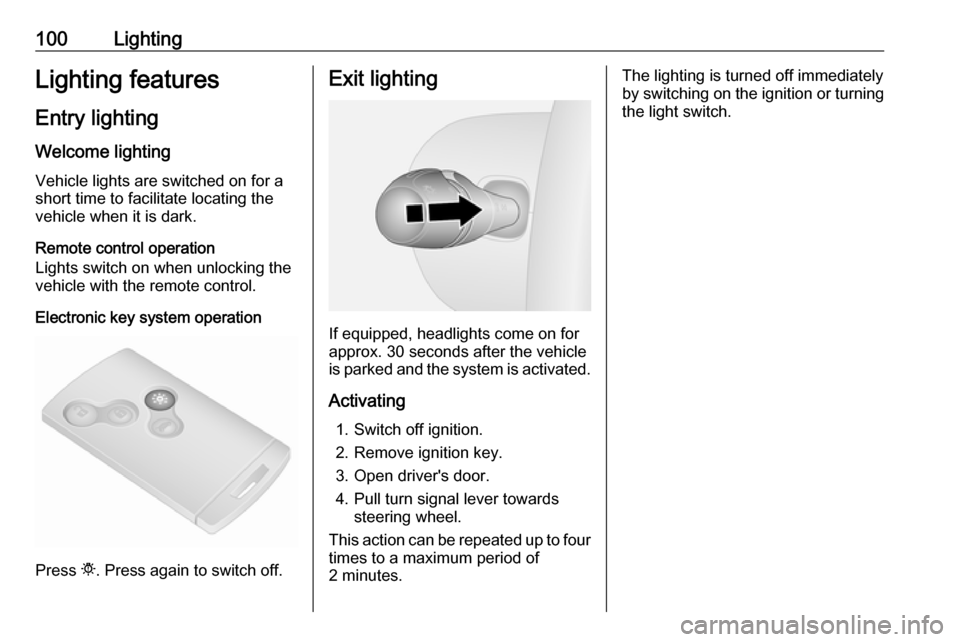
Exit lighting
If equipped, headlights come on for
approx. 30 seconds after the vehicle
is parked and the system is activated.
Activating 1. Switch off ignition.
2. Remove ignition key.
3. Open driver's door.
4. Pull turn signal lever towards steering wheel.
This action can be repeated up to four times to a maximum period of
2 minutes.
The lighting is turned off immediately
by switching on the ignition or turning
the light switch.
Page 117 of 209

Driving and operating115Some functions, e.g. Infotainment
system, are available for use as soon
as you enter the vehicle.
Accessory power mode
Press START/STOP without
operating clutch or brake pedal to
enable further electrical functions to
be operated.
Engine start
Operate clutch and brake pedal and press START/STOP . Release button
after starting procedure begins.
If a gear is engaged, the engine can
be started only by operating the clutch
pedal and pressing the
START/STOP button.
In some cases, it may be necessary
to move the steering wheel slightly
while pressing START/STOP to
release the steering wheel lock. A
corresponding message appears in
the DIC 3 89.
At very low outside temperatures (e.g. below -10 °C) keep the clutch pedal
depressed while pressing
START/STOP until the engine starts.If one of the starting conditions is not
applied, a corresponding message
appears in the DIC 3 89.
Vehicle messages 3 90.
Engine stop
Electronic key must be inside the
vehicle, either in the card reader or the front passenger compartment.
With the vehicle stationary, press
START/STOP to stop the engine. The
steering wheel lock is engaged when
the driver's door is opened and the
vehicle is locked.
If the electronic key is not detected, a
corresponding message appears in
the DIC 3 89. In this event, press
START/STOP for 2 seconds to stop
the engine.
Central locking system 3 23.
Retained power off
Press START/STOP for more than
two seconds; the engine is stopped
while some functions, e.g.
Infotainment system, are available for
use for approx. 10 minutes.These functions stop working when
the driver's door is opened and the vehicle is locked.
Notice
Always take the electronic key with
you when exiting the vehicle.
The electronic key being left in the
card reader is indicated by a warning chime 3 90 and a message in the
Driver Information Centre (DIC)
3 90 when the driver's door is
opened.9 Danger
Never leave an electronic key
inside the vehicle when children or animals are left in the vehicle, to
avoid unintended operation of
windows, doors or engine. Risk of
fatal injury.
Fault
If the engine cannot be started, the
cause may be one of the following:
● Fault in electronic key.
● Electronic key out of reception range.