phone VAUXHALL VIVARO 2017.5 Infotainment system
[x] Cancel search | Manufacturer: VAUXHALL, Model Year: 2017.5, Model line: VIVARO, Model: VAUXHALL VIVARO 2017.5Pages: 129, PDF Size: 1.73 MB
Page 23 of 129

Introduction231m - Press: Switch on/off ........30
Turn: Change volume ...........30
2 2 - Radio, Short press:
Search for previous radio
frequency .............................. 50
Long press: Automatic
station search ........................ 50
Audio/MP3/WMA CD,
Short press: Skip track
backwards ............................. 58
Long press: Fast rewind .......58
3 CD slot .................................. 58
4 3 - Radio, Short press:
Search for next radio
frequency .............................. 50
Long press: Automatic
station search ........................ 50
Audio/MP3 CD, Short
press: Skip track forwards ..... 58
Long press: Fast forward ......58
5 d - CD ejection .....................58
6 TEL - Telephone menu .......107
7 AUDIO - Change audio
source ................................... 588
<: Pop-up menu ...................30
9 Central rotary knob ...............30
Press: Confirm an action ....... 30
Turn: Access display
menu options ........................ 30
Turn: Access the stored
radio station list .....................48
Turn: Select next/previous
station ................................... 50
Turn: Change CD/MP3
track ...................................... 58
10 r - Return to previous
menu, cancel an action .........30
11 MENU : Access Main menu ...30
12 7: Go to Home page ............30
Page 25 of 129

Introduction251Audio information, e.g.
Radio ..................................... 48
Auxiliary devices ...................61
M USB devices ...................... 63
Bluetooth music ....................67
2 H: System notifications (if
equipped) .............................. 30
3 y: Telephone status ...........107
Call log ................................ 115
4 Outside temperature .............30
5 Clock ..................................... 30
6 Traffic information (if
applicable) ............................. 96
7 Navigation: Direction and
distance to next change of
direction ................................ 75
8 <: Pop-up menu ...................30
9 Navigation display .................75
Map ....................................... 96
10 f: Favourites, e.g. for
Navigation ⇑ ......................... 75
Media t (e.g. Radio) ............48Phone g.............................. 107
Services N........................... 78
11 Driving economy (Eco
Driving) .................................. 30
12 Menu : Access Main menu ..... 30
Page 28 of 129

28Introduction1 MEDIA - Change audio
source ................................... 30
2 RADIO - Change radio
waveband .............................. 48
3 ! - Increase volume .............30
4 @ - Mute/unmute ...................30
5 78 - Take/end phone call ..115
6 # - Decrease volume ............30
7 5 - Voice recognition ........... 106
8 Turn: Move up/down in
display menus, select
next/previous radio
preset / radio frequency /
audio track ........................... 50
Press: Confirm actions ..........48Steering column controls -
Type B1 MEDIA - Change audio
source ................................... 30
2 RADIO - Change radio
waveband .............................. 48
3 ! - Increase volume .............30
4 @ - Mute/unmute ...................30
5 78 - Take/end phone call ..115
6 # - Decrease volume ............30
7 Turn: Move up/down in
display menus, select
next/previous radio
preset / radio frequency /
audio track ........................... 50
Press: Confirm actions ..........48
Page 29 of 129

Introduction29Steering column controls -
Type C1 SOURCE/AUDIO -
Change audio source ............30
2 78 ...................................... 107
Take/end phone call ...........115
@ - Mute/unmute ...................30
3 ! - Increase volume,
mute/unmute ......................... 30
4 # - Decrease volume,
mute/unmute ......................... 30
5 MODE/OK - Confirm
actions, change audio
mode ..................................... 48
Take/end phone call ...........115
6 Turn: Access display
menu options, next/
previous radio preset /
radio frequency / audio
track ..................................... 48Notice
If equipped, the voice recognition
button 5 may be located on the
steering wheel or on the steering
column controls.
Theft-deterrent feature
Depending on Infotainment system,
an electronic security system is
included for the purpose of theft
deterrence. The Infotainment system
functions only in your vehicle and is
therefore worthless to a thief.
The security code (supplied
separately) must be entered upon
first use of the system and after
prolonged interruptions to the power
supply.
Notice
The security code is not required for
R16 BT USB, CD18 BT USB.
Entering the security code
When first switching on the
Infotainment system, an enter
security code message, e.g. Radio
code followed by 0000 appears on the
Page 31 of 129

Introduction31Notice
The clock and/or outside
temperature may be displayed when
the Infotainment system is switched
off (depending on version).NAVI 50 IntelliLink:
The Infotainment system
automatically switches on/off when
the ignition is switched on/off. Press
X instead, if required.NAVI 80 IntelliLink:
The Infotainment system switches on
automatically when the ignition is
switched on (depending on version).
Press X instead, if required.
The following options may be
displayed (depending on version):
● Change settings (to authorise or
reject data sharing)
Notice
When data sharing is switched off,
certain features may not operate
correctly.
● Language (to change the system
language)
● Done (to continue to the Home
page)The Infotainment system
automatically switches off when the
ignition is switched off and the driver's door is opened. Press X instead, if
required.
Automatic switch-off
With the ignition off, if the
Infotainment system is switched on
with X, it will switch-off automatically
a short period after the last user input.
Depending on Infotainment system,
automatic switch-off occurs after approx. 5 to 20 minutes.
Pressing X again will allow the
Infotainment system to remain on for
a further 5 to 20 minutes, depending
on Infotainment system.
Setting the volumeTurn X/volume rotary knob, or press
< or ].
Alternatively (with the steering
column controls), press ! or #.NAVI 50 IntelliLink:
Depending on version, it is possible to
set various volume levels individually (including audio players, trafficannouncements, navigation
instructions, phone calls and
ringtone).
From the Home page, touch
ÿ Setting(s) then Audio followed by
Sound .
Refer to (NAVI 50 IntelliLink) "Volume
settings" 3 42.NAVI 80 IntelliLink:
To set various volume levels
individually (e.g. navigation
instructions, traffic announcements,
phone calls) from the Home page,
touch MENU then System followed by
Sound .
Refer to (NAVI 80 IntelliLink) "System
settings" 3 43.
Stored volume
When the Infotainment system is
switched off, the current volume is
stored.
Speed dependent volume
When speed dependent volume
( 3 43) is activated, the volume is
adapted automatically to compensate
for road and wind noise.
Page 32 of 129

32IntroductionMute
To mute the current audio source (depending on Infotainment system),press X briefly or turn knob fully
anticlockwise.
Alternatively (with the steering
column controls), press @ or 8 or
press ! and # simultaneously.
Unmute
To unmute (depending on
Infotainment system), briefly press
X again or turn clockwise.
Alternatively (with the steering
column controls): Press @ again or
press ! and # simultaneously again.
Notice
When a traffic announcement is
broadcast, the system is
automatically unmuted.
For further information, refer to
"Radio data system" 3 53.Display screen operation
R15 BT USB, R16 BT USB,
CD16 BT USB, CD18 BT USB -
Display screen operation
● To move up/down in the display: Turn OK.
● To confirm actions: Press OK.
● To cancel actions (and return to previous menu): Press /.
NAVI 50 IntelliLink - Display screen operation
Use the touchscreen for the following displayed menus as described in
each section:
● è/ñ RADIO
Refer to "Radio" section 3 48.
● t/ü MEDIA
Refer to "USB port" section
3 63.
● yPHONE
Refer to "Phone" section 3 107.
● sMAP / yMap
Refer to "Navigation" section
3 75.● yNAVI / ýNav
Refer to "Navigation" section
3 75.
● ÿSETTING(S)
Refer to (NAVI 50 IntelliLink)
"Tone settings" 3 40, "Volume
settings" 3 42 and "System
settings" 3 43.
Notice
Depending on software version, the
menus available on the display
screen may differ from those listed
above.
When the Home page 7 is displayed,
it is possible to hide these menus from
the display (only clock and audio
system information may be shown) by
touching æ. Touch anywhere on the
screen to display these menus again.
NAVI 80 IntelliLink - Display screenoperation
Use the touchscreen for the following displayed menus as described in
each section.
Page 33 of 129
Introduction33
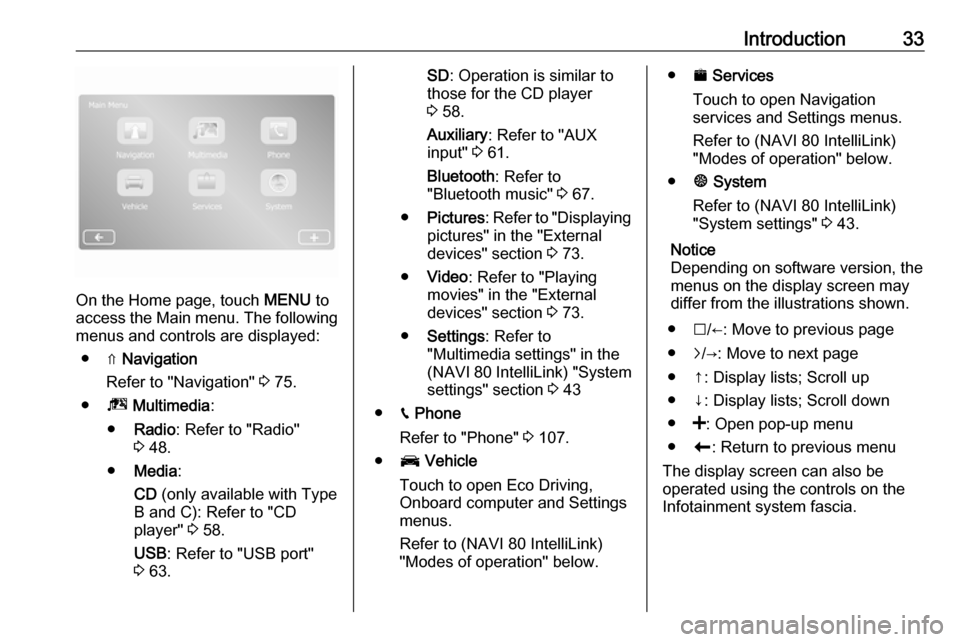
On the Home page, touch MENU to
access the Main menu. The following menus and controls are displayed:
● ⇑ Navigation
Refer to "Navigation" 3 75.
● ª Multimedia :
● Radio : Refer to "Radio"
3 48.
● Media :
CD (only available with Type
B and C): Refer to "CD player" 3 58.
USB : Refer to "USB port"
3 63.
SD : Operation is similar to
those for the CD player
3 58.
Auxiliary : Refer to "AUX
input" 3 61.
Bluetooth : Refer to
"Bluetooth music" 3 67.
● Pictures : Refer to "Displaying
pictures" in the "External
devices" section 3 73.
● Video : Refer to "Playing
movies" in the "External
devices" section 3 73.
● Settings : Refer to
"Multimedia settings" in the
(NAVI 80 IntelliLink) "System
settings" section 3 43
● g Phone
Refer to "Phone" 3 107.
● J Vehicle
Touch to open Eco Driving,
Onboard computer and Settings
menus.
Refer to (NAVI 80 IntelliLink)
"Modes of operation" below.● ¯ Services
Touch to open Navigation
services and Settings menus.
Refer to (NAVI 80 IntelliLink)
"Modes of operation" below.
● ± System
Refer to (NAVI 80 IntelliLink)
"System settings" 3 43.
Notice
Depending on software version, the menus on the display screen may
differ from the illustrations shown.
● I/←: Move to previous page
● j/→: Move to next page
● ↑: Display lists; Scroll up
● ↓: Display lists; Scroll down
● <: Open pop-up menu
● r: Return to previous menu
The display screen can also be
operated using the controls on the
Infotainment system fascia.
Page 35 of 129

Introduction35● USB port functions 3 63
● Bluetooth music operation 3 67
Navigation, Map (NAVI 50 IntelliLink,
NAVI 80 IntelliLink)
Detailed description of the Navigation
system 3 75, Browse map 3 96.
Phone
Use the display options in the
following menus to connect mobile
phones, make telephone calls, create
contacts lists and adjust various
settings.
Detailed description of the handsfree phone system functions 3 107.R15 BT USB, R16 BT USB,
CD16 BT USB, CD18 BT USB -
Phone
To access the Phone menu: Press
6 or TEL .
To access the phone settings menu:
Press TEL and select Phone settings .NAVI 50 IntelliLink - Phone
To access the Phone menu at any
time: Touch 7 followed by yPhone .NAVI 80 IntelliLink - Phone
To access the Phone menu from the
Home page, touch MENU followed by
Phone .
Vehicle information
(NAVI 80 IntelliLink)
To access the Vehicle menu from the Home page, touch MENU followed by
Vehicle .
Depending on vehicle, the following
menus are displayed:
● Eco Driving
● Onboard computer
● SettingsEco Driving
The following features are available:
● Trip report
Displays the following data from the last journey:
Average fuel consumption,
average speed, total fuel
consumption, total distance.
Within the trip report, Eco
scoring provides an overall score
out of 100 for driving economy.
Higher figures indicate better
driving economy. Ratings arealso given for average
environmental driving
performance (Acceleration),
gearchanging efficiency
(Gearbox) and brake control
(Anticipation).
To save journey data: Touch
'Save' then select the journey
type from the following list:
Home/work, holiday/vacation,
weekend, trip/tour, personal.
To reset journey data: Touch
'Reset'. Confirm or cancel with
'Yes' or 'No'.
Touch < to open pop-up menu
where trip reports can be
compared or to show/hide
reports after the completion of a
journey.
● My preferred trips
Displays changes in your driving
style (when journey data has
been saved).
The 'Summary' tab for each
journey type (e.g. Home/work)
displays the following: Total route
distance, distance covered, date
of information update and
Page 37 of 129

Introduction37● Daytime running lights(switch on/off).
● Unlock the driver's door only when opening the door
(switch on/off).
● Easy access (switch on/off). ● Driving style indicator (fuel economy gauge) (switch on/
off).
● Eco score (switch on/off).
● Show report after trip (switch on/off).
After the settings are changed, touch Done to confirm.
Services (NAVI 80 IntelliLink)
To access the Services menu from
the Home page, touch MENU
followed by Services.
The following menus are displayed: ● Navigation services
● SettingsNavigation services
In addition to the free navigation
services (e.g. traffic information, fixed
speed cameras), extra features can
be added by subscribing to paid LIVE services.
Refer to (NAVI 80 IntelliLink) "LIVE
services" in the "Navigation" section
3 78.Settings
The following menus are displayed:
● Applications manager
Select to manage Bluetooth
auxiliary devices.
● Navigation services
Select to access navigation
related features, e.g. traffic,
speed cameras, local search,
My TomTom LIVE, weather.
Refer to (NAVI 80 IntelliLink)
"LIVE services" in the
"Navigation" section 3 78.
Notice
A compatible SD card must be
inserted to access LIVE services.● Update applications
Select to update current
applications.
● Data sharing settings
Select to switch data sharing on/
off.
Notice
When data sharing is switched off,
certain features may not operate
correctly.
Favourites (NAVI 80 IntelliLink)
When the Home page is displayed,
touch f to view, add or delete
favourites for the following features:
● ⇑ Navigation 3 75.
● ª Multimedia - refer to "Radio"
3 48.
● g Phone 3 107.
● ¯ Services 3 78.Navigation favourites
Select an empty slot in the display or
touch < (to open a pop-up menu),
then select Add Favourite .
Choose from the displayed list to add a saved destination to the favourites.
Page 38 of 129

38IntroductionFor further information, refer to
(NAVI 80 IntelliLink) "Destination
input" in the "Navigation" section
3 90.Multimedia favourites
Select an empty slot in the display or
touch < (to open a pop-up menu),
then Add Favourite .
Choose from the displayed list to add a preset FM radio station to the
favourites.Phone favourites
Select an empty slot in the display or
touch < (to open a pop-up menu),
then Add Favourite .
Choose from the displayed list to add
a phone contact to the favourites.
For further information, refer to
(NAVI 80 IntelliLink) "Phonebook" in
the "Phone" section 3 115.Services favourites
Select an empty slot in the display or
touch < (to open a pop-up menu),
then Add Favourite .
Choose from the displayed list to add a service item to the favourites.Delete favourites
Touch < and select Remove all
Favourites or Remove a Favourite .
Then select a favourite from the
displayed list. A confirmation
message is displayed. Touch Delete
and confirm if prompted.
Additional features
(NAVI 50 IntelliLink)
Depending on version, the following
additional features are available:
● Rear camera view settings.
● AhaⓇ application (for smartphones).Rear camera view settings
When the rear camera view is shown on the display, touch ÿSetting(s) to
open the settings menu.
The following settings can be
updated:
● Switch the rear camera view display Off/On .
● Colours
Touch ]/< to adjust level.● Brightness
Touch ]/< to adjust level.
● Contrast
Touch ]/< to adjust level.
For further information, refer to "Rear view camera" section in the vehicle
Owner's Manual.Aha Ⓡ application
The AhaⓇ app enables you to
organise favourite smartphone
internet content (e.g. podcasts, audio
books, internet radio, social network
sites etc.) and access favourites
instantly. AhaⓇ can also be used
during navigation, to suggest e.g.
hotels and restaurants in the vicinity,
and provide weather information and
current GPS position.
AhaⓇ must first be downloaded onto
your smartphone. Launch the app on
your smartphone and create a user
account to enable use via the
Infotainment system.
To connect to AhaⓇ via the
Infotainment system, a bluetooth
connection must be set up between