display VAUXHALL VIVARO 2018 User Guide
[x] Cancel search | Manufacturer: VAUXHALL, Model Year: 2018, Model line: VIVARO, Model: VAUXHALL VIVARO 2018Pages: 233, PDF Size: 5.73 MB
Page 103 of 233

Instruments and controls101steering column controls, the voice
recognition system (if available) or via
the touchscreen display.
Touchscreen operation Make the appropriate selection from
the available menus and options by
touching the display screen with the
finger.
For further information, refer to the
Infotainment manual.Vehicle messages
Messages are displayed in the Driver
Information Centre and may be
accompanied by illumination of
control indicator F or C in the
instrument cluster.
Information messages
Information messages regarding, e.g. engine starting conditions, stop-start
system, parking brake application,
central locking, steering wheel lock
etc. provide the current status of
certain vehicle functions and
instructions for use.
Fault messages
Fault messages regarding, e.g. fuel
filter, airbags, exhaust emissions etc.
are displayed together with control
indicator F. Drive with caution and
seek the assistance of a workshop as soon as possible.
To remove fault messages, e.g.
" CHECK INJECTION ", from the
display, press button on end of wiper lever. After a few seconds themessage may disappear
automatically and F remains
illuminated. The fault will then be
stored in the on board system.
Warning messages
Warning messages regarding, e.g.
engine, battery or brake system
failure, are displayed together with
control indicator C and may be
accompanied by a warning chime.
Stop engine immediately and seek
the assistance of a workshop.
Warning messages, e.g. " BATTERY
CHARGING FAULT " disappear from
the display automatically when the
cause of the fault has been remedied.
Fuel economy messages
Fuel economy messages provide tips to improve fuel efficiency. Journeys
can be saved in the system memory,
enabling you to compare
performances.
Refer to Infotainment manual for
further information.
Fuel economy rating 3 103.
Page 104 of 233

102Instruments and controlsWarning chimesOnly one warning chime will sound at a time.
A corresponding message may also
appear in the Driver Information
Centre when a warning chime is
sounded.
When starting the engine or whilst driving:
● If seat belt is not fastened 3 53.
● If the parking assist detects an object 3 153.
● If the vehicle speed briefly exceeds a set limit 3 150,
3 153.
● If a door or the bonnet is not properly closed when vehicle
exceeds a certain speed.
● During activation and deactivation of alarm monitoring
of vehicle inclination 3 36.
● If there is a fault in the brake system 3 96.
● If the vehicle battery is not charging 3 96.● If engine lubrication is interrupted
3 98.
● If AdBlue needs to be refilled or a
fault is present 3 139.
● If the electronic key is outside of the detection range.
Electronic key system 3 22.
Power button 3 130.
When the vehicle is parked and / or the driver's door is opened:
● If the key has been left in the ignition.
● If the electronic key has been left
in the card reader.
Electronic key system 3 22.
Power button 3 130.
● If the vehicle is in an Autostop. Stop-start system 3 134.
● If the exterior lights are on 3 106.Engine oil level
If the minimum engine oil level is
reached, a message is displayed in
the Driver Information Centre 3 100
for 30 seconds after the engine is
started.
Check oil level 3 165.
Page 105 of 233
Instruments and controls103Trip computer
The trip computer provides
information on driving data, which is
continually recorded and evaluated electronically.
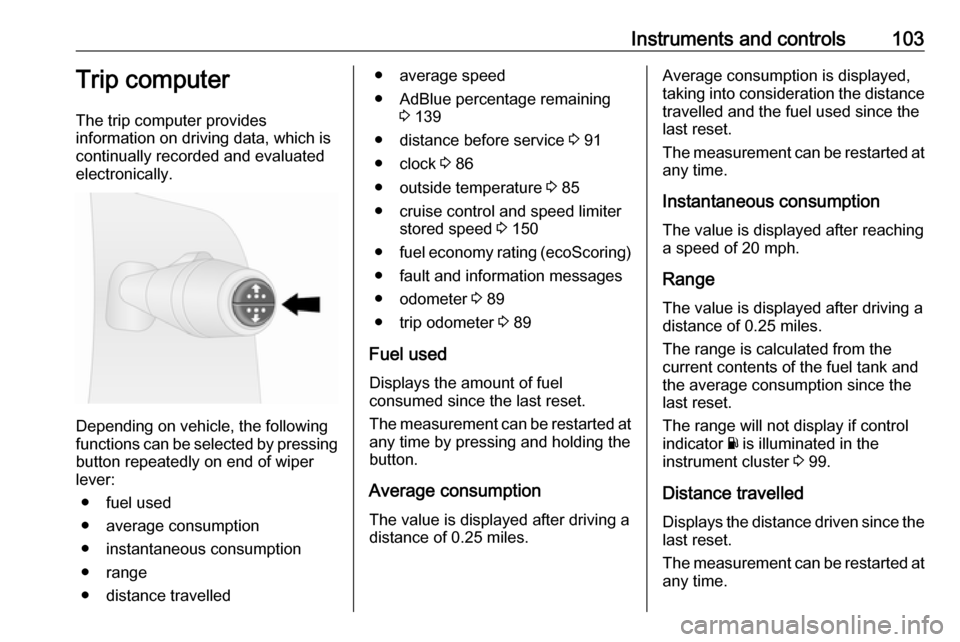
Depending on vehicle, the following
functions can be selected by pressing button repeatedly on end of wiper
lever:
● fuel used
● average consumption
● instantaneous consumption
● range
● distance travelled
● average speed
● AdBlue percentage remaining 3 139
● distance before service 3 91
● clock 3 86
● outside temperature 3 85
● cruise control and speed limiter stored speed 3 150
● fuel economy rating (ecoScoring)
● fault and information messages
● odometer 3 89
● trip odometer 3 89
Fuel used Displays the amount of fuel
consumed since the last reset.
The measurement can be restarted at
any time by pressing and holding the
button.
Average consumption The value is displayed after driving a
distance of 0.25 miles.Average consumption is displayed,
taking into consideration the distance
travelled and the fuel used since the
last reset.
The measurement can be restarted at
any time.
Instantaneous consumption
The value is displayed after reaching
a speed of 20 mph.
Range The value is displayed after driving a
distance of 0.25 miles.
The range is calculated from the
current contents of the fuel tank and
the average consumption since the
last reset.
The range will not display if control
indicator Y is illuminated in the
instrument cluster 3 99.
Distance travelled Displays the distance driven since the
last reset.
The measurement can be restarted at
any time.
Page 106 of 233

104Instruments and controlsAverage speedThe value is displayed after driving a
distance of 0.25 miles.
The average speed since the last
reset is displayed.
The measurement can be restarted at
any time.
Interruptions in the journey with the
ignition off are not included in the
calculations.
Reset trip computer information
To reset the trip computer, select one of its functions then press and hold
the button on the end of the wiper
lever.
The following trip computer
information can be reset:
● fuel used
● average consumption
● distance travelled
● average speed
The trip computer will reset
automatically when the maximum
value of any of the parameters is
exceeded.Fuel economy rating (ecoScoring)
If equipped, a rating of 0 to 100 is
shown in the Info-Display to help
evaluate fuel efficiency, based on your driving style.
Higher ratings indicate better fuel economy.
Tips to improve fuel economy are also given in the Info-Display. Journeys
can be saved in the system memory,
enabling you to compare
performances. Refer to Infotainment
manual for further information.
Vehicle messages 3 101.
Journey record
When the engine is switched off, a
record of the last journey may be
shown in the Info-Display.
The following information is
displayed:
● average fuel consumption
● total fuel consumption
● trip odometer
● fuel saved in milesUnit of measurement
To change the unit of measurement
for the duration of a journey:
Vehicles with power button:
With ignition off, simultaneously press
and hold button on end of wiper lever
and press the power button 3 130;
the central display flashes for approx. ten seconds until the new unit is
displayed. Release button on end of
wiper lever when the display stops
flashing.
Vehicles without power button:
With ignition off, simultaneously press and hold button on end of wiper lever
and switch on the ignition; the central
display flashes for approx.
ten seconds until the new unit is
displayed. Release button on end of
wiper lever when the display stops
flashing.
When the engine is switched off, the
trip computer automatically returns to the original unit of measurement.
Page 107 of 233
Instruments and controls105Interruption of power supply
If the power supply has been
interrupted or if the vehicle battery
voltage has dropped too low, the
values stored in the trip computer will be lost.Tachograph
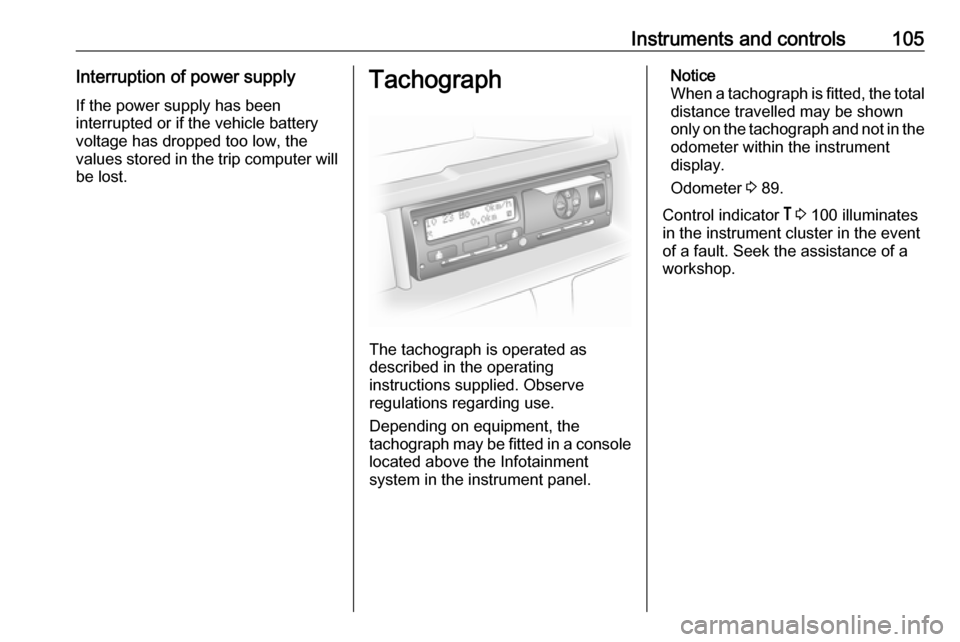
The tachograph is operated as
described in the operating
instructions supplied. Observe
regulations regarding use.
Depending on equipment, the
tachograph may be fitted in a console located above the Infotainment
system in the instrument panel.
Notice
When a tachograph is fitted, the total
distance travelled may be shown
only on the tachograph and not in the odometer within the instrument
display.
Odometer 3 89.
Control indicator & 3 100 illuminates
in the instrument cluster in the event
of a fault. Seek the assistance of a
workshop.
Page 112 of 233
110LightingRear fog lights
Turn inner switch to position ø;
control indicator ø illuminates in the
instrument cluster.
Rear fog light comes on together with
front fog lights and will only operate
when the ignition and headlights are
switched on.
Reversing lights
The reversing lights come on when
the ignition is on and reverse gear is
selected.
Misted light covers
The inside of the light covers may mist up briefly in poor, wet and cold
weather conditions, in heavy rain or
after washing. The mist disappears
quickly by itself; to help, switch on the headlights.Interior lighting
Instrument panel illumination control
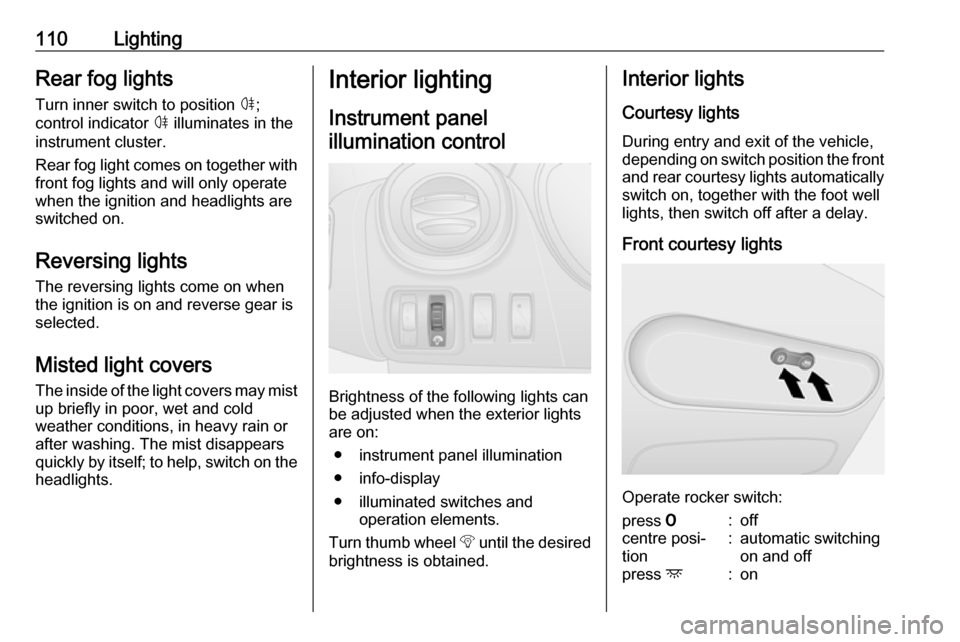
Brightness of the following lights can
be adjusted when the exterior lights
are on:
● instrument panel illumination
● info-display
● illuminated switches and operation elements.
Turn thumb wheel b until the desired
brightness is obtained.
Interior lights
Courtesy lights
During entry and exit of the vehicle,
depending on switch position the front and rear courtesy lights automaticallyswitch on, together with the foot well
lights, then switch off after a delay.
Front courtesy lights
Operate rocker switch:
press 7:offcentre posi‐
tion:automatic switching
on and offpress d:on
Page 122 of 233
120Climate controlSet the fan < to regulate the amount
of cooled air to be flown into the rear
passenger compartment.
Auxiliary heater Coolant heater
The engine-independent, fuel-
powered coolant heater provides
rapid heating of the engine coolant to
enable heating of the vehicle interior
without the engine running.9 Warning
Do not operate the system when
refuelling, when dust or
combustible vapours are present
or in enclosed spaces (e.g.
garage).
Before starting or programming the
system to start, turn the vehicle's
climate control system to heat, set the
air distribution to V and turn the fan
on.
Switch off when not required. Heating stops automatically after the
programmed runtime. It will also
cease to operate if the vehicle fuel
level drops too low.
During operation, power from the
vehicle battery is used. The driving
time should therefore be at least as
long as the heating time. For short
journey times, check the vehicle
battery regularly and recharge if
necessary.
To ensure efficient performance,
briefly operate the auxiliary heater
once a month.
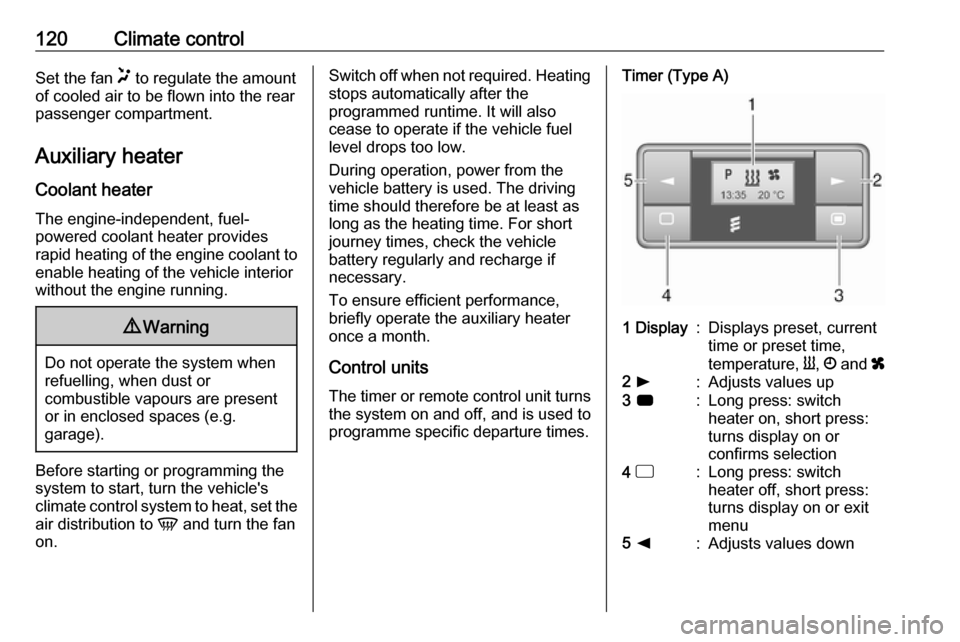
Control units
The timer or remote control unit turns the system on and off, and is used to
programme specific departure times.Timer (Type A)1 Display:Displays preset, current
time or preset time,
temperature, Y, Ö and x2 l:Adjusts values up3 7:Long press: switch
heater on, short press:
turns display on or
confirms selection4 d:Long press: switch
heater off, short press:
turns display on or exit
menu5 k:Adjusts values down
Page 123 of 233
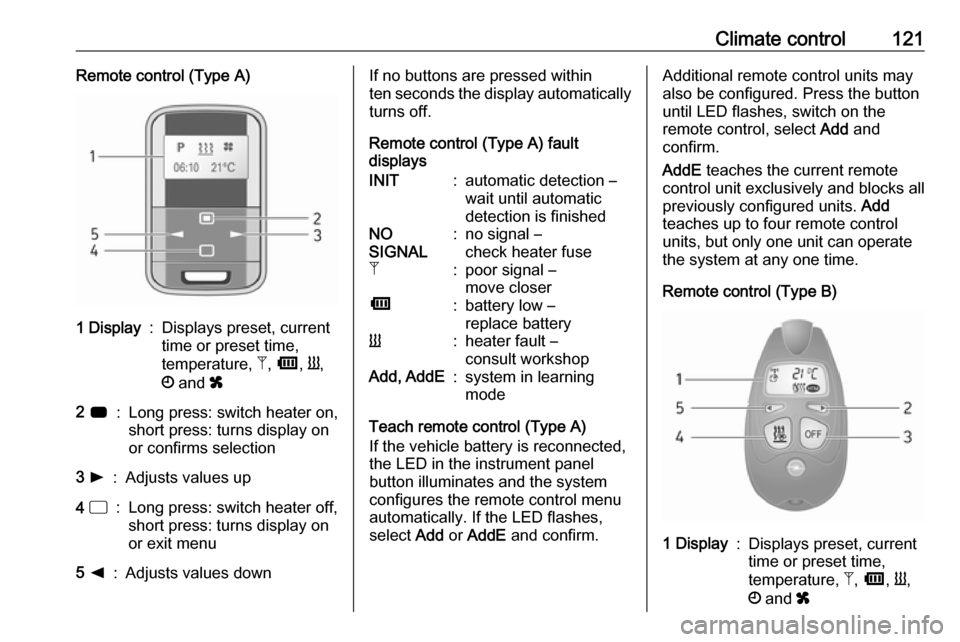
Climate control121Remote control (Type A)1 Display:Displays preset, current
time or preset time,
temperature, Z, Ü , Y ,
Ö and x2 7:Long press: switch heater on,
short press: turns display on
or confirms selection3 l:Adjusts values up4 d:Long press: switch heater off,
short press: turns display on
or exit menu5 k:Adjusts values downIf no buttons are pressed within
ten seconds the display automatically
turns off.
Remote control (Type A) fault
displaysINIT:automatic detection –
wait until automatic
detection is finishedNO
SIGNAL:no signal –
check heater fuseZ:poor signal –
move closerÜ:battery low –
replace batteryY:heater fault –
consult workshopAdd, AddE:system in learning
mode
Teach remote control (Type A)
If the vehicle battery is reconnected, the LED in the instrument panel
button illuminates and the system
configures the remote control menu
automatically. If the LED flashes,
select Add or AddE and confirm.
Additional remote control units may
also be configured. Press the button
until LED flashes, switch on the
remote control, select Add and
confirm.
AddE teaches the current remote
control unit exclusively and blocks all
previously configured units. Add
teaches up to four remote control
units, but only one unit can operate
the system at any one time.
Remote control (Type B)1 Display:Displays preset, current
time or preset time,
temperature, Z, Ü , Y ,
Ö and x
Page 124 of 233
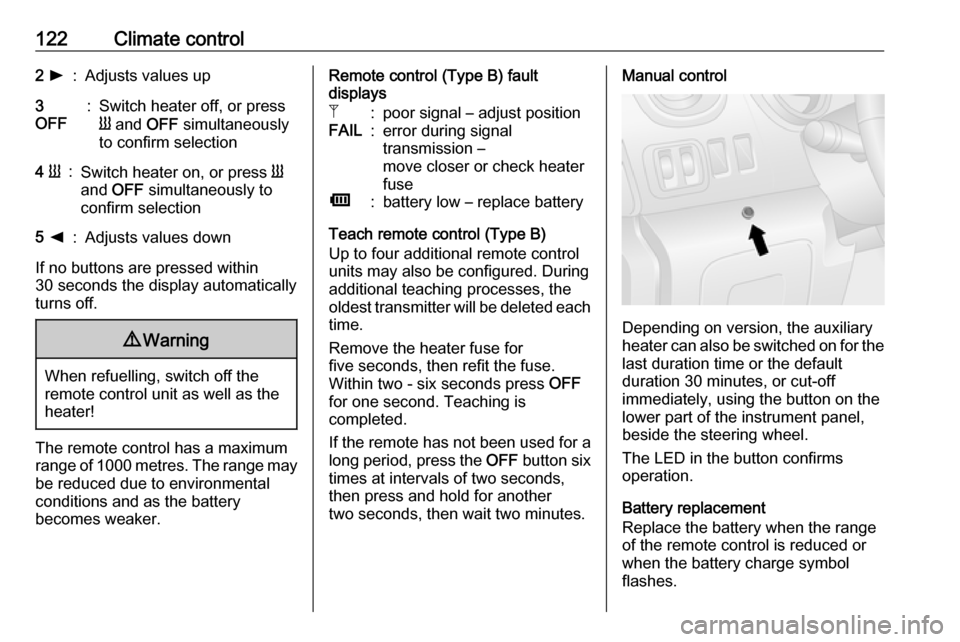
122Climate control2 l:Adjusts values up3
OFF:Switch heater off, or press
Y and OFF simultaneously
to confirm selection4 Y:Switch heater on, or press Y
and OFF simultaneously to
confirm selection5 k:Adjusts values down
If no buttons are pressed within
30 seconds the display automatically
turns off.
9 Warning
When refuelling, switch off the
remote control unit as well as the
heater!
The remote control has a maximum
range of 1000 metres. The range may
be reduced due to environmental
conditions and as the battery
becomes weaker.
Remote control (Type B) fault
displaysZ:poor signal – adjust positionFAIL:error during signal
transmission –
move closer or check heater
fuseÜ:battery low – replace battery
Teach remote control (Type B)
Up to four additional remote control
units may also be configured. During
additional teaching processes, the
oldest transmitter will be deleted each
time.
Remove the heater fuse for
five seconds, then refit the fuse.
Within two - six seconds press OFF
for one second. Teaching is
completed.
If the remote has not been used for a long period, press the OFF button six
times at intervals of two seconds,
then press and hold for another
two seconds, then wait two minutes.
Manual control
Depending on version, the auxiliary
heater can also be switched on for the
last duration time or the default
duration 30 minutes, or cut-off
immediately, using the button on the
lower part of the instrument panel,
beside the steering wheel.
The LED in the button confirms
operation.
Battery replacement
Replace the battery when the range
of the remote control is reduced or when the battery charge symbol
flashes.
Page 125 of 233

Climate control123Open the cover and replace the
battery (Type A: CR 2430, Type B:
2CR 11108, or equivalent), ensuring
the new battery is correctly installed
with the positive ( <) side facing the
positive terminals. Replace the cover securely.
Dispose of old batteries in
accordance with environmental
regulations.
Batteries do not belong in household
waste. They must be disposed of at
an appropriate recycling collection
point.
Operation (Type A)
Heating Y
Select Y in the menu bar and press
G to confirm. The predetermined
heating duration, e.g. L 30, flashes in
the display. The factory setting is 30 minutes.
Adjust the heating duration using k
or l and confirm. The value can be
set from ten to 120 minutes. Due to
the power consumption, note the
heating duration.
To switch off, select Y in the menu bar
again and press d.
Ventilation x
Select x in the menu bar and press
G to confirm.
Adjust the ventilation duration using k or l and confirm. The value can
be set from ten to 120 minutes. Due
to the power consumption, note the
heating duration.
To switch off, select x in the menu bar
again and press d.
Programming P
Up to three preset departure times
can be programmed, either during
one day or over one week.
● Select P in the menu bar and
press G to confirm.
● Select desired preset memory number P1, P2 or P3 and
confirm.● Select F and confirm.
● Select weekday or weekday group and confirm.
● Select hour and confirm.
● Select minutes and confirm.
● Select Y or x and confirm.
● Select ECO or HIGH and confirm.
● Select duration and confirm.
● Press d to exit.
Repeat the procedure to programme
the other preset memory numbers if
required.
To activate a desired preset memory
number select P1, P2 or P3, then
select On and confirm.
When a program is activated P and
Y will be displayed together.
To deactivate a preset memory,
select P1, P2 or P3, then select Off
and confirm.
Heating stops automatically
five minutes after the programmed
departure time.