infotainment VAUXHALL VIVARO 2019 User Guide
[x] Cancel search | Manufacturer: VAUXHALL, Model Year: 2019, Model line: VIVARO, Model: VAUXHALL VIVARO 2019Pages: 231, PDF Size: 5.82 MB
Page 134 of 231

132Driving and operatingIf the electronic key is not inside the
vehicle, a corresponding message appears in the Driver Information
Centre 3 101.
Notice
Do not put the electronic key in the
load compartment during driving, as
this is outside of the detection zone
(indicated by a warning chime at low
speed 3 103 and a message in the
Driver Information Centre 3 102).
Notice
In the event the electronic key is kept in the front passenger compartment
and a message appears in the Driver
Information Centre (possibly
accompanied by a warning chime)
indicating that it is out of reception
range, we recommend inserting the
electronic key in the card reader.
Some functions, e.g. Infotainment
system, are available for use as soon
as you enter the vehicle.Accessory power mode
Press START/STOP without
operating clutch or brake pedal to
enable further electrical functions to
be operated.
These functions switch off
automatically after a delay.
Engine start
Operate clutch and brake pedal and press START/STOP . Release button
after starting procedure begins.
If a gear is engaged, the engine can
be started only by operating the clutch pedal and pressing the
START/STOP button.
In some cases, it may be necessary
to move the steering wheel slightly
while pressing START/STOP to
release the steering wheel lock. A
corresponding message appears in
the Driver Information Centre 3 101.
At very low outside temperatures (e.g. below -10 °C) keep the clutch pedal
depressed while pressing
START/STOP until the engine starts.If one of the starting conditions is not
applied, a corresponding message appears in the Driver Information
Centre 3 101.
Vehicle messages 3 102.
Engine stop
Electronic key must be inside the
vehicle, either in the card reader or
the front passenger compartment.
With the vehicle stationary, press
START/STOP to stop the engine. The
steering wheel lock is engaged when
the driver's door is opened and the
vehicle is locked.
If the electronic key is not detected, a corresponding message appears in
the Driver Information Centre 3 101.
In this event, press START/STOP for
2 seconds to stop the engine.
Central locking system 3 24.
Retained power off Press START/STOP for more than
2 seconds. The engine is stopped
while some functions, e.g.
Infotainment system, are available for
use for approx. 10 minutes.
Page 140 of 231

138Driving and operatingIf the Infotainment system is active,
audio sound may briefly be reduced
or interrupted during the restart.
Fault
If a fault occurs in the stop-start
system, the LED in Î illuminates,
and a corresponding message
appears in the Driver Information
Centre 3 101 . Seek the assistance of
a workshop.
Vehicle messages 3 102.
Warning chimes 3 103.
Parking9 Warning
● Do not park the vehicle on an
easily ignitable surface. The
high temperature of the
exhaust system could ignite the
surface.
● Always apply parking brake without pressing release
button. Apply as firmly as
possible on a downhill slope or
uphill slope. Depress brake
pedal at the same time to
reduce operating force.
● Switch off the engine.
● If the vehicle is on a level surface or uphill slope, engage
first gear. On an uphill slope,
turn the front wheels away from
the kerb.
If the vehicle is on a downhill
slope, engage reverse gear.
Turn the front wheels towards the kerb.
● Close the windows.
● Remove the ignition key from the ignition switch. Turn the
steering wheel until the
steering wheel lock is felt to
engage.
● Lock the vehicle by pressing e on
the remote control 3 24.
Activate the anti-theft alarm
system 3 36.
● The engine cooling fans may run
after the engine has been
switched off 3 166.
Caution
After running at high engine
speeds or with high engine loads,
operate the engine briefly at a low load or run in neutral for approx.30 seconds before switching off, in
order to protect the turbocharger.
Vehicle storage 3 165.
Page 157 of 231
Driving and operating155Notice
In versions with Info Display
indication, the volume of the chimes
can be adjusted via the Infotainment system. Refer to Infotainment
manual for further information.
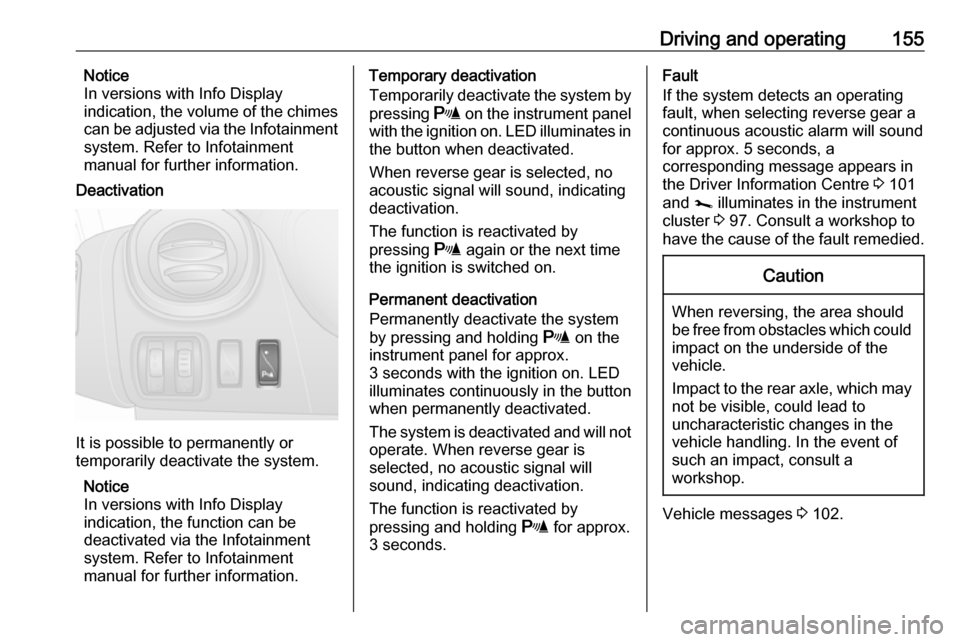
Deactivation
It is possible to permanently or
temporarily deactivate the system.
Notice
In versions with Info Display
indication, the function can be
deactivated via the Infotainment
system. Refer to Infotainment
manual for further information.
Temporary deactivation
Temporarily deactivate the system by
pressing r on the instrument panel
with the ignition on. LED illuminates in
the button when deactivated.
When reverse gear is selected, no
acoustic signal will sound, indicating
deactivation.
The function is reactivated by
pressing r again or the next time
the ignition is switched on.
Permanent deactivation
Permanently deactivate the system
by pressing and holding r on the
instrument panel for approx.
3 seconds with the ignition on. LED illuminates continuously in the button
when permanently deactivated.
The system is deactivated and will not
operate. When reverse gear is
selected, no acoustic signal will
sound, indicating deactivation.
The function is reactivated by
pressing and holding r for approx.
3 seconds.Fault
If the system detects an operating fault, when selecting reverse gear a
continuous acoustic alarm will sound
for approx. 5 seconds, a
corresponding message appears in
the Driver Information Centre 3 101
and j illuminates in the instrument
cluster 3 97. Consult a workshop to
have the cause of the fault remedied.Caution
When reversing, the area should
be free from obstacles which could impact on the underside of the
vehicle.
Impact to the rear axle, which may
not be visible, could lead to
uncharacteristic changes in the
vehicle handling. In the event of
such an impact, consult a
workshop.
Vehicle messages 3 102.
Page 161 of 231

Driving and operating159The guide line intervals are as
follows:3 (red):30 cm4 (yellow):70 cm5 (green):150 cmSettings
Settings, e.g. brightness, contrast and colours can be changed via the
Infotainment system. The feature
may also be switched off
permanently. Refer to Infotainment
manual for further information.
Deactivation
The camera is deactivated after a
delay if reverse gear is not engaged
for approx. 5 seconds.
Fault
The rear view camera may not
operate properly when:
● the surrounding is dark
● the sun or the beam of headlights
is shining directly into the camera
lens
● ice, snow, mud, or anything else covers the camera lens. Clean
the lens, rinse it with water, and
wipe it with a soft cloth
● the rear doors / tailgate are not closed correctly
● the vehicle had a rear-end accident
● there are extreme temperature changesFuel
Fuel for diesel engines The Diesel engines are compatible
with fuels that conform to current and future European standards and can
be obtained from filling stations:
Diesel fuel that meets standard
EN590 mixed with a biofuel that
meets standard EN14214 (possibly
containing up to 7 % Fatty Acid Methyl Ester).
Page 220 of 231

218Customer informationREACHRegistration, Evaluation,
Authorisation and Restriction of
Chemicals (REACH) is a European
Union regulation adopted to improve
the protection of human health and
the environment from the risks that
can be posed by chemicals. Visit
www.opel.com/reach for further
information and for access to the
Article 33 communication.
Registered trademarksApple Inc.
Apple CarPlay™ is a trademark of
Apple Inc.
App Store ®
and iTunes Store ®
are
registered trademarks of Apple Inc.
iPhone ®
, iPod ®
, iPod touch ®
, iPod
nano ®
, iPad ®
and Siri ®
are registered
trademarks of Apple Inc.Bluetooth SIG, Inc.
Bluetooth ®
is a registered trademark
of Bluetooth SIG, Inc.DivX, LLC
DivX ®
and DivX Certified ®
are
registered trademarks of DivX, LLC.EnGIS Technologies, Inc.
BringGo ®
is a registered trademark of
EnGIS Technologies, Inc.Google Inc.
Android™ and Google Play™ Store
are trademarks of Google Inc.Stitcher Inc.
Stitcher™ is a trademark of Stitcher,
Inc.Verband der Automobilindustrie e.V.
AdBlue ®
is a registered trademark of
the VDA.Vehicle data recording
and privacy
Event data recorders
Electronic control units are installed in
your vehicle. Control units process
data which is received by vehicle
sensors, for example, or which they
generate themselves or exchange
amongst themselves. Some control
units are necessary for the safe
functioning of your vehicle, others
assist you while you drive (driver
assistance systems), while others
provide comfort or infotainment
functions.
The following contains general
information about data processing in
the vehicle. You will find additional
information as to which specific data
is uploaded, stored and passed on to third parties and for what purpose in
your vehicle under the key word Data Protection closely linked to the
references for the affected functional
characteristics in the relevant owner's
manual or in the general terms of
sale. These are also available online.
Page 222 of 231

220Customer informationComfort and infotainment
functions
Comfort settings and custom settings
can be stored in the vehicle and
changed or reset at any time.
Depending on the equipment level in
question, these include
● seat and steering wheel position settings
● chassis and air conditioning settings
● custom settings such as interior lighting
You can input your own data in the
infotainment functions for your
vehicle as part of the selected
features.
Depending on the equipment level in
question, these include
● multimedia data such as music, videos or photos for playback in
an integrated multimedia system
● address book data for use with an
integrated hands-free system or an integrated navigation system● input destinations
● data on the use of online services
This data for comfort and
infotainment functions can be stored
locally in the vehicle or be kept on a
device that you have connected to the
vehicle ( e.g. a smartphone, USB stick
or MP3 player). Data that you have
input yourself can be deleted at any
time.
This data can only be transmitted out
of the vehicle at your request,
particularly when using online
services in accordance with the
settings selected by you.
Smartphone integration, e.g.
Android Auto or Apple CarPlay
If your vehicle is equipped
accordingly, you can connect your
smartphone or another mobile device
to the vehicle so that you can control
it via the controls integrated in the
vehicle. The smartphone image and
sound can be output via the
multimedia system in this case. At the same time, specific information is
transmitted to your smartphone.
Depending on the type of integration,this includes data such as position
data, day / night mode and other
general vehicle information. For more
information, please see the operating
instructions for the vehicle /
infotainment system.
Integration allows selected
smartphone apps to be used, such as
navigation or music playback. No
further integration is possible
between smartphone and vehicle, in particular active access to vehicle
data. The nature of further data
processing is determined by the
provider of the app used. Whether
you can define settings, and if so
which ones, is dependent on the app
in question and your smartphone's
operating system.
Page 226 of 231

224F
Fault messages .......................... 102
First aid kit ................................... 80
Fixed air vents ........................... 128
Fog lights .................................... 111
Fog tail light ............................... 179
Folding centre seatback ...............73
Folding front centre passenger seat ........................................... 48
Folding mirrors ............................. 39
Foot well lights ............................ 112
Front airbag system .....................61
Front courtesy lights ...................112
Front door pockets........................ 74
Front fog lights ...........101, 111, 176
Front reading light....................... 114
Front seats.................................... 45
Front storage ................................ 73
Front turn lights .......................... 176
Fuel cut-off system .....................134
Fuel economy gauge ....................91
Fuel economy mode ...................100
Fuel economy rating ...........102, 104
Fuel for diesel engines ..............159
Fuel gauge ................................... 90 Fuel tank ..................................... 212
Fuse box ..................................... 182
Fuses ......................................... 181G
Gauges ......................................... 89
Gear shifting ................................. 98
General information ...................162
Glovebox ..................................... 72
Glovebox cooler ......................... 128
Glove box lighting .......................114
Grab handles ................................ 76
H Hand brake ................................. 146
Hand brake - see Parking brake. 147
Hazard warning flashers ............111
Headlight flash ........................... 109
Headlight range adjustment ......109
Headlights .................. 108, 109, 175
Headlights when driving abroad 110
Head restraint adjustment .............8
Head restraints ............................ 44
Heated exterior mirrors .................15
Heated mirrors ............................. 40
Heated rear window ...............15, 43
Heating ........................................ 48
Heating and ventilation system . 116
Heat-reflecting windscreen ...........41
High beam ......................... 100, 109
Hill start assist ........................... 147
Horn ....................................... 14, 83I
Identification plate .....................207
Idle speed control .......................134
Ignition switch positions .............131
Immobiliser .................................. 38
Indicators ...................................... 89
Info Display ................................. 102
Information displays.................... 101
Infotainment system ...................102
Initial drive information.................... 6
Instrument cluster ........................89
Instrument panel fuse box .........182
Instrument panel illumination .....181
Instrument panel illumination control .................................... 112
Instrument panel overview ........... 10
Instrument panel storage ..............71
Instrument panel tray ....................71
Interior care ............................... 202
Interior lighting ............................ 112
Interior lights ...................... 112, 180
Interior mirrors .............................. 40
Introduction .................................... 3
ISOFIX .......................................... 64
J Jack ............................................ 185
Journey record............................ 104
Jump starting ............................. 197