Engine compartment VAUXHALL VIVARO 2019 Owner's Manual
[x] Cancel search | Manufacturer: VAUXHALL, Model Year: 2019, Model line: VIVARO, Model: VAUXHALL VIVARO 2019Pages: 231, PDF Size: 5.82 MB
Page 19 of 231
In brief17Starting offCheck before starting off ● Tyre pressure 3 186 and
condition 3 213.
● Engine oil level and fluid levels 3 167.
● All windows, mirrors, exterior lighting and number plates are
free from dirt, snow and ice and
are operational.
● Proper position of mirrors 3 39,
seats 3 45 and seat belts
3 54.
● Brake function at low speed, particularly if the brakes are wet.Starting the engine with key
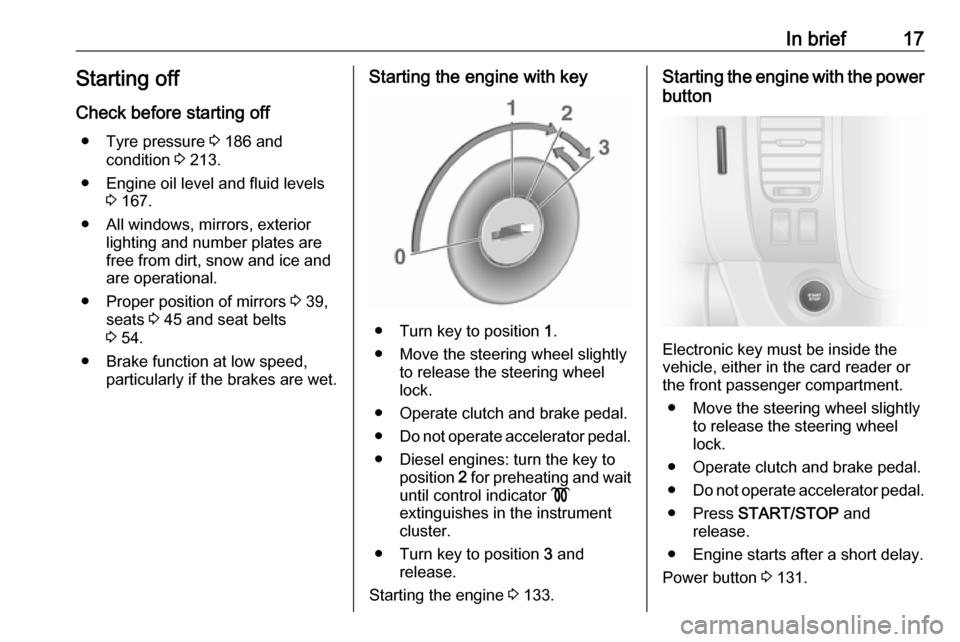
● Turn key to position 1.
● Move the steering wheel slightly to release the steering wheel
lock.
● Operate clutch and brake pedal. ● Do not operate accelerator pedal.
● Diesel engines: turn the key to position 2 for preheating and wait
until control indicator !
extinguishes in the instrument
cluster.
● Turn key to position 3 and
release.
Starting the engine 3 133.
Starting the engine with the power
button
Electronic key must be inside the
vehicle, either in the card reader or
the front passenger compartment.
● Move the steering wheel slightly to release the steering wheel
lock.
● Operate clutch and brake pedal.
● Do not operate accelerator pedal.
● Press START/STOP and
release.
● Engine starts after a short delay.
Power button 3 131.
Page 21 of 231

Keys, doors and windows19Keys, doors and
windowsKeys, locks ................................... 19
Keys .......................................... 19
Car Pass .................................... 20
Radio remote control .................20
Electronic key system ................21
Door locks ................................. 24
Central locking system ..............24
Automatic locking ......................30
Child locks ................................. 30
Doors ........................................... 31
Sliding door ............................... 31
Rear doors ................................. 31
Load compartment ....................33
Vehicle security ............................ 35
Anti-theft locking system ...........35
Anti-theft alarm system ..............36
Immobiliser ................................ 38
Exterior mirrors ............................ 39
Convex shape ........................... 39
Manual adjustment ....................39
Electric adjustment ....................39
Folding mirrors .......................... 39
Heated mirrors ........................... 40Interior mirrors............................. 40
Manual anti-dazzle ....................40
Automatic anti-dazzle ................41
Windows ...................................... 41
Windscreen ............................... 41
Power windows ......................... 42
Rear windows ............................ 42
Heated rear window ..................43
Sun visors .................................. 43Keys, locks
KeysCaution
Do not attach heavy or bulky items to the ignition key.
Replacement keys
The key number is specified on the
key or on a detachable tag.
The key number must be quoted
when ordering replacement keys as it
is a component of the immobiliser
system.
If the electronic key needs to be
replaced, the vehicle must be taken to a workshop.
Locks 3 200.
Radio remote control 3 20.
Electronic key system 3 21.
Central locking system 3 24.
Starting the engine 3 133.
Page 23 of 231
Keys, doors and windows21Remote control battery
replacement
Replace the battery as soon as the
range reduces.
Batteries do not belong in household
waste. They must be disposed of at
an appropriate recycling collection
point.
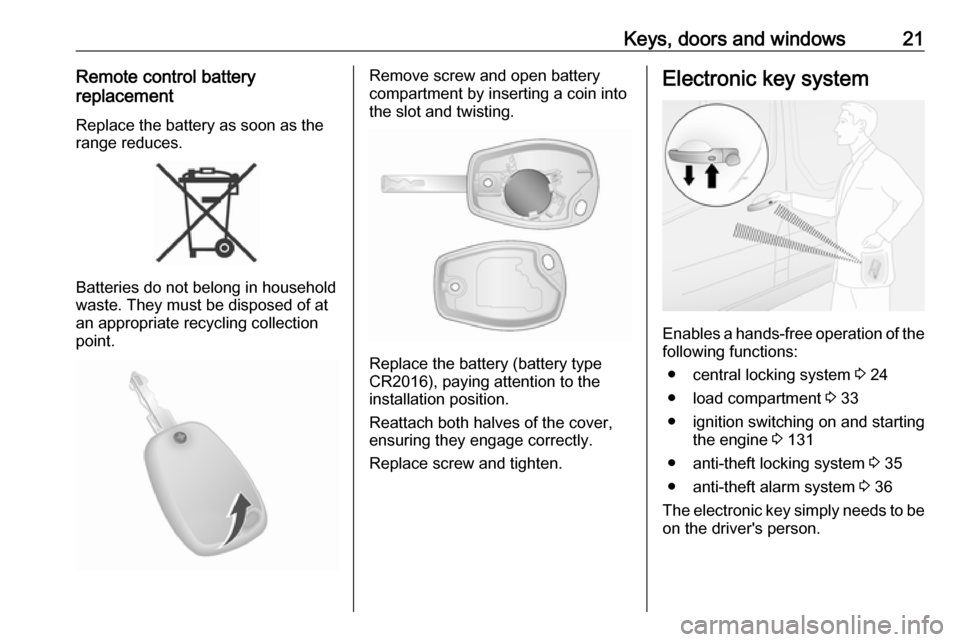
Remove screw and open battery
compartment by inserting a coin into
the slot and twisting.
Replace the battery (battery type
CR2016), paying attention to the
installation position.
Reattach both halves of the cover,
ensuring they engage correctly.
Replace screw and tighten.
Electronic key system
Enables a hands-free operation of the following functions:
● central locking system 3 24
● load compartment 3 33
● ignition switching on and starting the engine 3 131
● anti-theft locking system 3 35
● anti-theft alarm system 3 36
The electronic key simply needs to be on the driver's person.
Page 24 of 231

22Keys, doors and windowsNotice
Always take the electronic key with you when exiting the vehicle.
The electronic key being left in the
card reader is indicated by a warning chime 3 103 and a message in the
Driver Information Centre 3 102
when the driver's door is opened.
Additionally, the electronic key
includes the functionality of the
remote control 3 20 and an entry
lighting function 3 114.
For hands-free operation, the
electronic key must be outside the
vehicle, within a range of approx.
1 m of the front doors or load
compartment. The range of operation
for the electronic key buttons can be
restricted by external influences. The
hazard warning flashers confirm
operation.
Handle with care, protect from
moisture and high temperatures and
avoid unnecessary operation.
Notice
Do not put the electronic key in the
load compartment during driving, as
this is outside of the detection zone(indicated by a warning chime at low
speed 3 103 and a message in the
Driver Information Centre 3 102).
Notice
In the event the electronic key is kept in the front passenger compartment
and a message appears in the Driver
Information Centre (possibly
accompanied by a warning chime)
indicating that it is out of reception
range, we recommend inserting the
electronic key in the card reader.
Notice
If the electronic key is not detected
in the front passenger compartment
after opening and closing a door with
the engine running, a message appears in the Driver Information
Centre (accompanied by a warning
chime when a certain speed is
exceeded), indicating that it is out of reception range.
This helps you avoid, e.g., driving off
after dropping off a passenger who
has the electronic key.
The message disappears when the
electronic key is detected again.Hands-free operation is automatically
disabled when the electronic key
buttons have been operated or the
central locking switch e 3 24 is
pressed. To re-enable hands-free
operation, restart the engine.
Power button 3 131.
Electronic key battery
replacement
Replace the battery as soon as the
system no longer operates properly
or the range is reduced. The need for
battery replacement is indicated by a
message in the Driver Information
Centre 3 102.
Batteries do not belong in household
waste. They must be disposed of at
an appropriate recycling collection
point.
Page 25 of 231
Keys, doors and windows23The need for battery replacement is
indicated by a message in the Driver Information Centre 3 102.
Notice
In an emergency, the vehicle can still
be locked / unlocked using the
emergency manual key in the
housing of the electronic key 3 21.
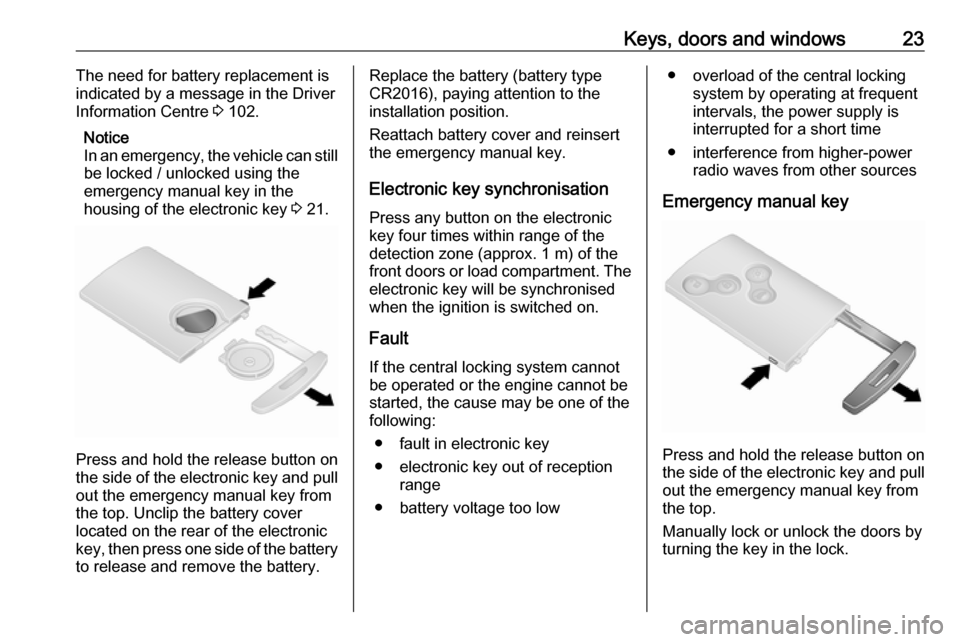
Press and hold the release button on
the side of the electronic key and pull out the emergency manual key from
the top. Unclip the battery cover
located on the rear of the electronic
key, then press one side of the battery
to release and remove the battery.
Replace the battery (battery type
CR2016), paying attention to the
installation position.
Reattach battery cover and reinsert
the emergency manual key.
Electronic key synchronisation
Press any button on the electronic
key four times within range of the
detection zone (approx. 1 m) of the front doors or load compartment. The electronic key will be synchronised
when the ignition is switched on.
Fault
If the central locking system cannot
be operated or the engine cannot be started, the cause may be one of the
following:
● fault in electronic key
● electronic key out of reception range
● battery voltage too low● overload of the central locking system by operating at frequent
intervals, the power supply is
interrupted for a short time
● interference from higher-power radio waves from other sources
Emergency manual key
Press and hold the release button on
the side of the electronic key and pull out the emergency manual key from
the top.
Manually lock or unlock the doors by turning the key in the lock.
Page 29 of 231
Keys, doors and windows27Electronic key system operation
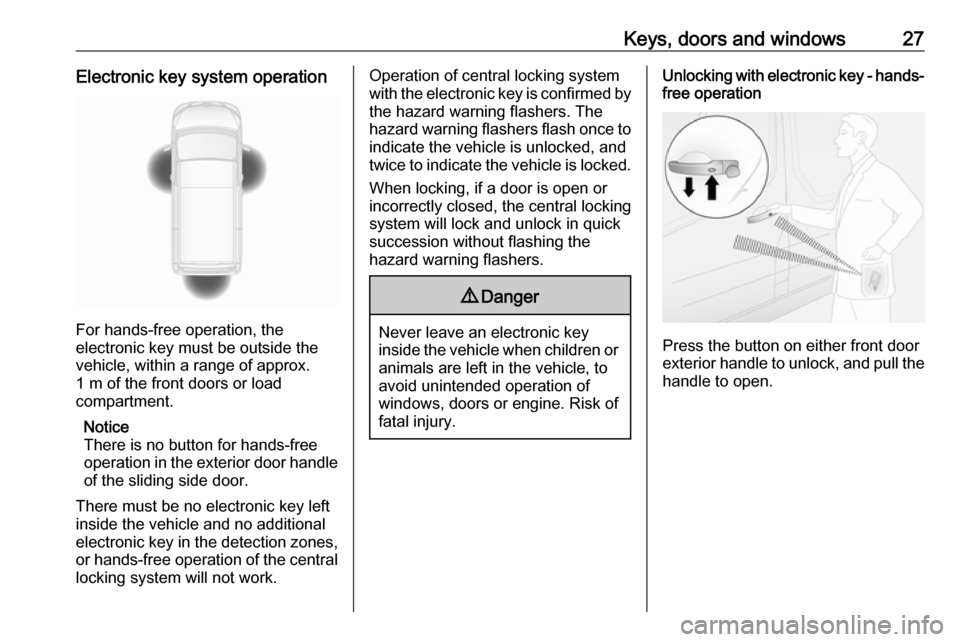
For hands-free operation, the
electronic key must be outside the
vehicle, within a range of approx.
1 m of the front doors or load
compartment.
Notice
There is no button for hands-free
operation in the exterior door handle
of the sliding side door.
There must be no electronic key left
inside the vehicle and no additional
electronic key in the detection zones, or hands-free operation of the centrallocking system will not work.
Operation of central locking system
with the electronic key is confirmed by
the hazard warning flashers. The
hazard warning flashers flash once to
indicate the vehicle is unlocked, and
twice to indicate the vehicle is locked.
When locking, if a door is open or
incorrectly closed, the central locking
system will lock and unlock in quick
succession without flashing the
hazard warning flashers.9 Danger
Never leave an electronic key
inside the vehicle when children or animals are left in the vehicle, to
avoid unintended operation of
windows, doors or engine. Risk of
fatal injury.
Unlocking with electronic key - hands-
free operation
Press the button on either front door
exterior handle to unlock, and pull the
handle to open.
Page 30 of 231
28Keys, doors and windows
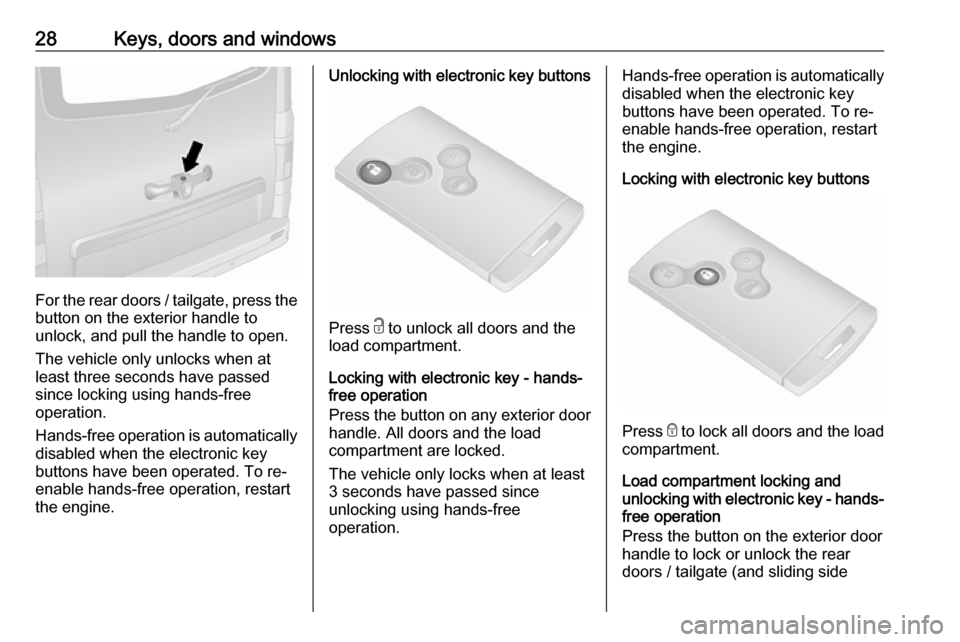
For the rear doors / tailgate, press thebutton on the exterior handle to
unlock, and pull the handle to open.
The vehicle only unlocks when at
least three seconds have passed
since locking using hands-free
operation.
Hands-free operation is automatically
disabled when the electronic key
buttons have been operated. To re-
enable hands-free operation, restart
the engine.
Unlocking with electronic key buttons
Press c to unlock all doors and the
load compartment.
Locking with electronic key - hands-
free operation
Press the button on any exterior door
handle. All doors and the load
compartment are locked.
The vehicle only locks when at least 3 seconds have passed since
unlocking using hands-free
operation.
Hands-free operation is automatically disabled when the electronic key
buttons have been operated. To re-
enable hands-free operation, restart
the engine.
Locking with electronic key buttons
Press e to lock all doors and the load
compartment.
Load compartment locking and
unlocking with electronic key - hands-
free operation
Press the button on the exterior door
handle to lock or unlock the rear
doors / tailgate (and sliding side
Page 31 of 231
Keys, doors and windows29doors) when the electronic key is
within range of the detection zone
(approx. 1 m).
The rear doors / tailgate (and sliding
side doors) only lock / unlock when at
least 3 seconds have passed since
the button was last pressed.
Hands-free operation is automatically disabled when the electronic key
buttons have been operated. To re-
enable hands-free operation, restart
the engine.
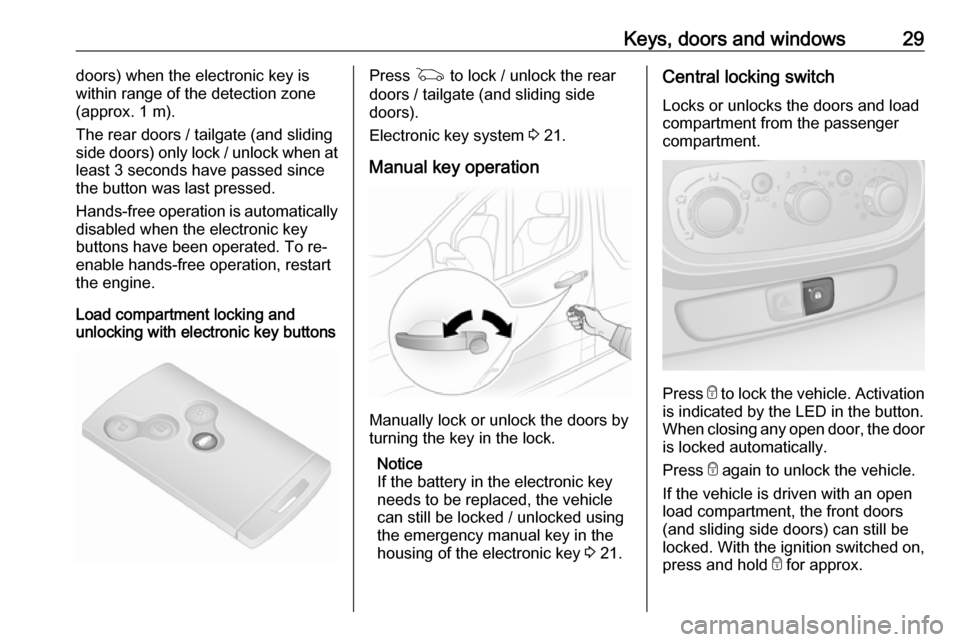
Load compartment locking and
unlocking with electronic key buttonsPress G to lock / unlock the rear
doors / tailgate (and sliding side
doors).
Electronic key system 3 21.
Manual key operation
Manually lock or unlock the doors by
turning the key in the lock.
Notice
If the battery in the electronic key
needs to be replaced, the vehicle
can still be locked / unlocked using
the emergency manual key in the
housing of the electronic key 3 21.
Central locking switch
Locks or unlocks the doors and loadcompartment from the passenger
compartment.
Press e to lock the vehicle. Activation
is indicated by the LED in the button.
When closing any open door, the door is locked automatically.
Press e again to unlock the vehicle.
If the vehicle is driven with an open
load compartment, the front doors
(and sliding side doors) can still be
locked. With the ignition switched on,
press and hold e for approx.
Page 32 of 231
30Keys, doors and windows5 seconds. When closing the rear
doors / tailgate, they are locked
automatically.
Automatic locking 3 30.
Hands-free operation is automatically disabled when e is pressed. To re-
enable hands-free operation, restart
the engine.
Electronic key system 3 21.
Automatic locking Automatic locking after driving off
This security feature can be
configured to automatically lock the
doors and load compartment as soon as the vehicle is driven.
Activation
With the engine running, press and
hold e on the central locking switch for
approx. 5 seconds. An audible signal
confirms activation.Deactivation
With the engine running, press and
hold e on the central locking switch for
approx. 5 seconds. An audible signal
confirms deactivation.
Central locking switch 3 24.
Child locks
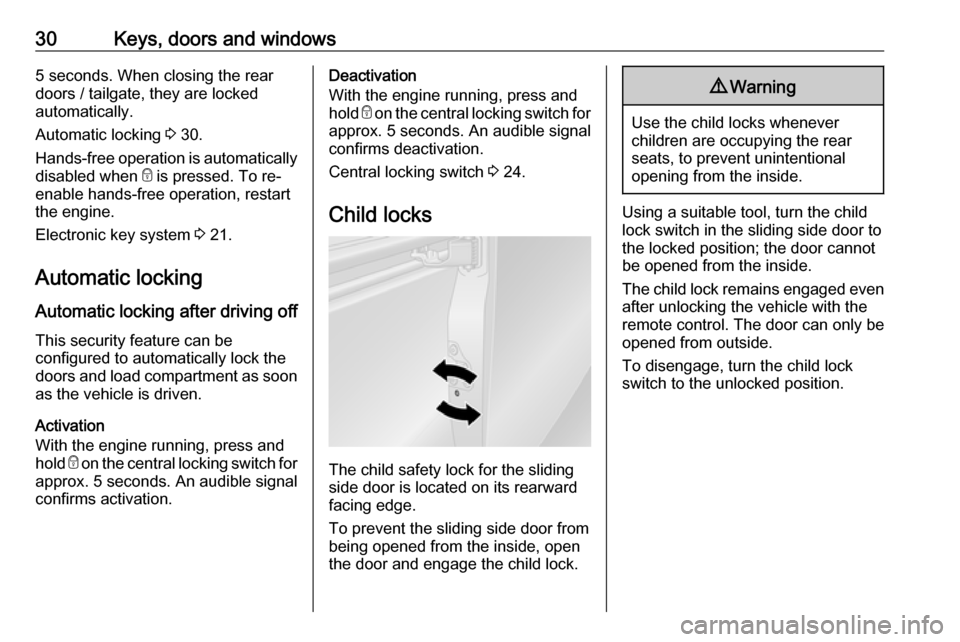
The child safety lock for the sliding
side door is located on its rearward
facing edge.
To prevent the sliding side door from being opened from the inside, open
the door and engage the child lock.
9 Warning
Use the child locks whenever
children are occupying the rear
seats, to prevent unintentional
opening from the inside.
Using a suitable tool, turn the child
lock switch in the sliding side door to
the locked position; the door cannot
be opened from the inside.
The child lock remains engaged even after unlocking the vehicle with the
remote control. The door can only be
opened from outside.
To disengage, turn the child lock
switch to the unlocked position.
Page 35 of 231
Keys, doors and windows33
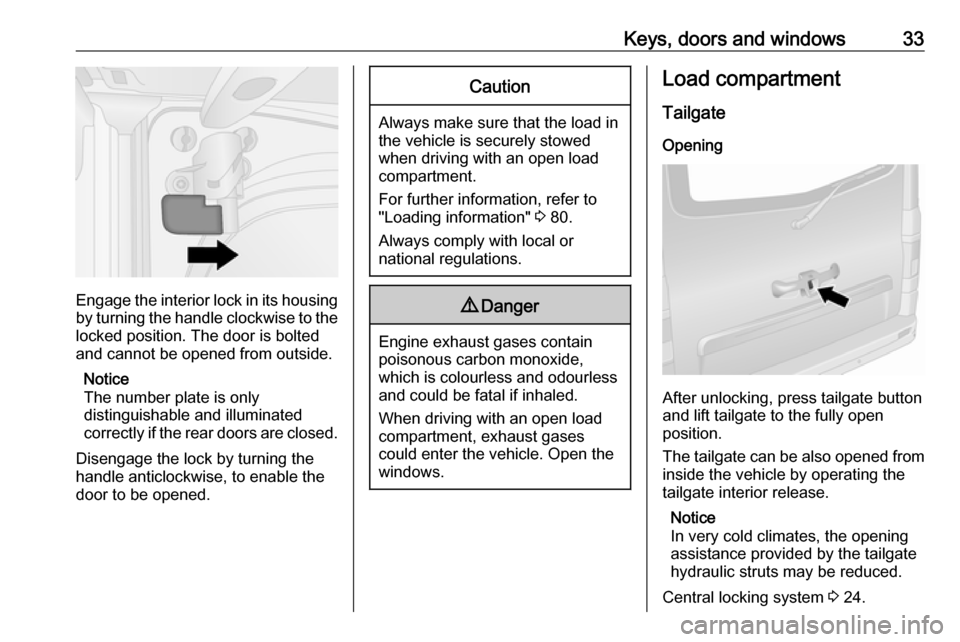
Engage the interior lock in its housing
by turning the handle clockwise to the locked position. The door is bolted
and cannot be opened from outside.
Notice
The number plate is only
distinguishable and illuminated
correctly if the rear doors are closed.
Disengage the lock by turning the
handle anticlockwise, to enable the
door to be opened.
Caution
Always make sure that the load in
the vehicle is securely stowed
when driving with an open load compartment.
For further information, refer to
"Loading information" 3 80.
Always comply with local or national regulations.
9 Danger
Engine exhaust gases contain
poisonous carbon monoxide,
which is colourless and odourless and could be fatal if inhaled.
When driving with an open load
compartment, exhaust gases
could enter the vehicle. Open the
windows.
Load compartment
Tailgate Opening
After unlocking, press tailgate button
and lift tailgate to the fully open
position.
The tailgate can be also opened from inside the vehicle by operating the
tailgate interior release.
Notice
In very cold climates, the opening
assistance provided by the tailgate
hydraulic struts may be reduced.
Central locking system 3 24.