CD player VAUXHALL ZAFIRA 2014.5 Infotainment system
[x] Cancel search | Manufacturer: VAUXHALL, Model Year: 2014.5, Model line: ZAFIRA, Model: VAUXHALL ZAFIRA 2014.5Pages: 133, PDF Size: 2.34 MB
Page 109 of 133

CD Player109
To open a menu with additional
options for track search and
selection: select Search. The options
available depend on the data saved
on the MP3 CD.
The search process on the MP3 CD
may take several minutes. During this
time the station last played will be
received.
Removing a CDPress the d button.
The CD is pushed out of the CD slot. If the CD is not removed after
ejection, it will be drawn back in again
automatically after a few seconds.
Page 110 of 133
110AUX inputAUX inputGeneral information...................110
Usage ........................................ 110General information
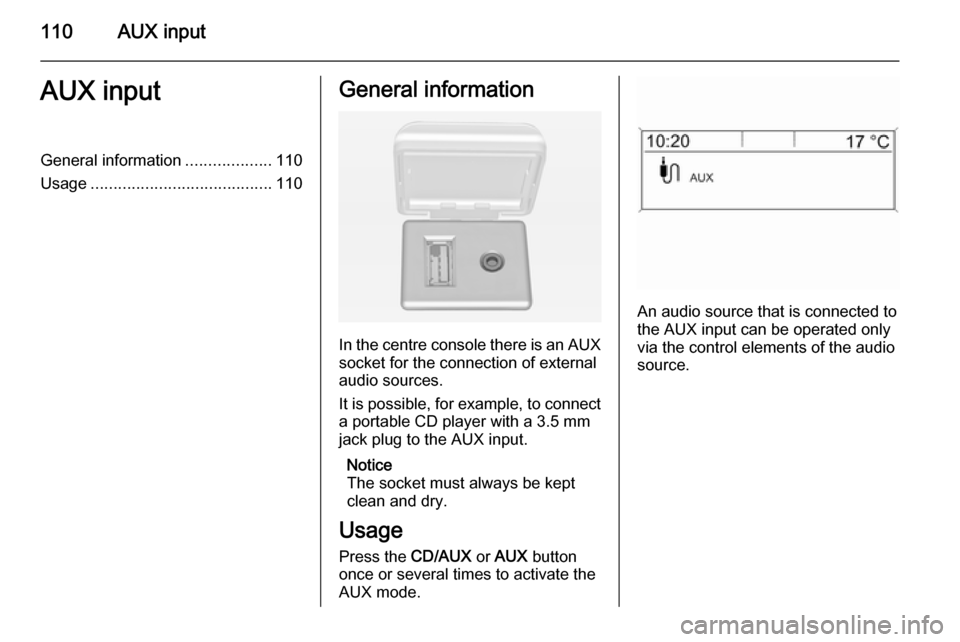
In the centre console there is an AUX
socket for the connection of external
audio sources.
It is possible, for example, to connect a portable CD player with a 3.5 mm
jack plug to the AUX input.
Notice
The socket must always be kept
clean and dry.
Usage Press the CD/AUX or AUX button
once or several times to activate the
AUX mode.
An audio source that is connected to
the AUX input can be operated only
via the control elements of the audio
source.
Page 130 of 133

130IndexAActivating CD player ...................107
Activating speech recognition .....114
Activating the radio .......................97
Autostore lists ............................... 98
B BACK button ................................. 89
Basic operation ............................. 89
Bluetooth .................................... 118
Bluetooth connection ..................119
C CD player activating ................................. 107
important information ..............106
usage ...................................... 107
Configuring DAB .........................104
Configuring RDS......................... 102
Control elements overview ...........82
D
DAB ............................................ 104
Digital audio broadcasting ..........104
E Emergency call ........................... 123
Enhanced Other Networks .........102
EON ............................................ 102F
Favourite lists ............................... 98
G
General information ...................
.......... 80, 106, 110, 111, 113, 118
H Handsfree mode .........................119
I
Infotainment system control elements ........................82
instrument panel........................ 82
maximum startup volume ..........94
Multifunction unit .......................82
personalisation .......................... 95
speed dependent volume ..........94
steering wheel audio controls ...82
tone settings .............................. 93
volume of the traffic
announcements ........................ 94
volume settings ......................... 94
M
Menu operation............................. 89 Mobile phones and CB radio equipment .............................. 127
Multifunction knob......................... 89
Mute.............................................. 88
Page 131 of 133

131
O
Operation .................................... 124
P Personalisation ............................. 95
Phone adjusting ring tones .................119
Bluetooth ................................. 118
Bluetooth connection ..............119
call lists.................................... 124
control elements ......................118
dialling a number .....................124
emergency calls ......................123
functions during a call .............124
handsfree mode ......................119
important information ..............118
messaging functions ...............124
recharging the battery .............118
setting the volume ...................124
SIM Access Profile (SAP) .......119
telephone book ....................... 124
Phone control ............................. 114
Playing saved audio files ............111
R Radio Radio data system (RDS) .......102
activating ................................... 97
autostore lists ............................ 98Digital audio broadcasting
(DAB) ...................................... 104
favourite lists ............................. 98
selecting the waveband ............97
station lists ................................ 99
station search ............................ 97
usage ........................................ 97
waveband menus ......................99
Radio data system (RDS) ..........102
RDS ............................................ 102
Recharging the phone battery ....118
Regionalization ........................... 102
Retrieving stations ........................98
S SAP mode .................................. 119
Selecting the waveband ...............97
Setting the volume ........................88
SIM Access Profile (SAP) ...........119
Speech recognition .............113, 114
activating ................................. 114
phone control .......................... 114
usage ...................................... 114
volume for voice output ...........114
Speed compensated volume ........88
Starting CD replay ......................107
Station search............................... 97
Storing stations ............................. 98Switching the Infotainment
system on or off......................... 88
Switching the radio on ..................97
T
Theft-deterrent feature ................. 81
Tone settings ................................ 93
Traffic announcements .................94
U
Updating station lists ....................99
Usage ..................... 88, 97, 107, 110
Using the AUX input ...................110
Using the CD player ...................107
Using the Infotainment system .....88
Using the radio ............................. 97
Using the USB port .....................111
V Voice recognition ........................113
Volume for voice output ..............114
Volume settings ............................ 94
W
Waveband menus......................... 99