phone VAUXHALL ZAFIRA 2014.5 Infotainment system
[x] Cancel search | Manufacturer: VAUXHALL, Model Year: 2014.5, Model line: ZAFIRA, Model: VAUXHALL ZAFIRA 2014.5Pages: 133, PDF Size: 2.34 MB
Page 66 of 133
66Phone
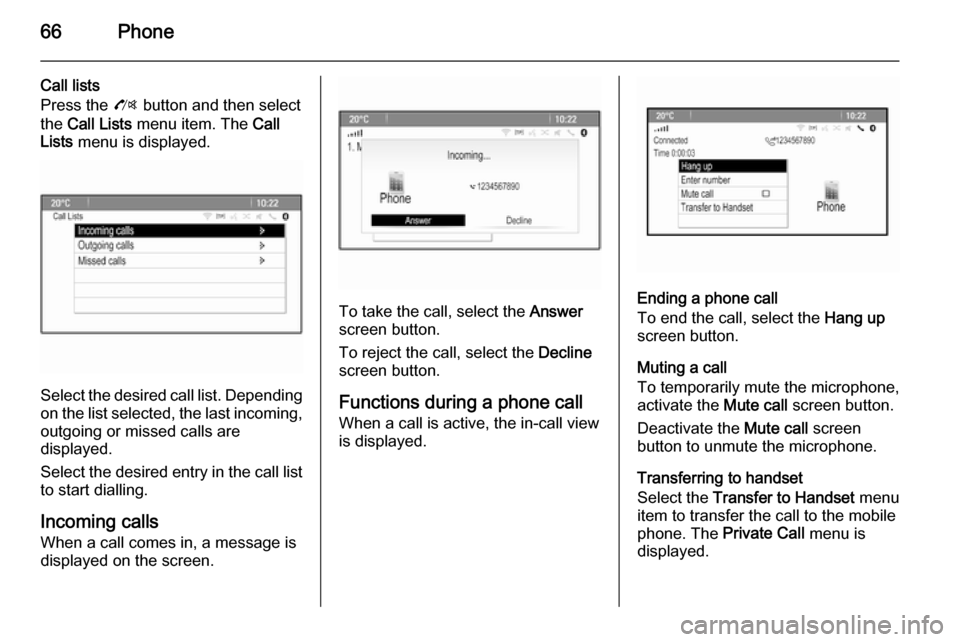
Call lists
Press the O button and then select
the Call Lists menu item. The Call
Lists menu is displayed.
Select the desired call list. Depending
on the list selected, the last incoming, outgoing or missed calls are
displayed.
Select the desired entry in the call list
to start dialling.
Incoming calls
When a call comes in, a message is
displayed on the screen.
To take the call, select the Answer
screen button.
To reject the call, select the Decline
screen button.
Functions during a phone call
When a call is active, the in-call view
is displayed.Ending a phone call
To end the call, select the Hang up
screen button.
Muting a call
To temporarily mute the microphone,
activate the Mute call screen button.
Deactivate the Mute call screen
button to unmute the microphone.
Transferring to handset
Select the Transfer to Handset menu
item to transfer the call to the mobile
phone. The Private Call menu is
displayed.
Page 67 of 133

Phone67
To transfer the call back to the
Infotainment system, select the
Transfer call menu item in the Private
Call menu.
Second phone call Initiating a second phone call
While a call is active, select the Enter
number menu item in the in-call view.
The keypad is displayed. You may enter a number or select a number
from the phone book, see above.
Second incoming phone call
When a second call comes in, a
message is displayed at the bottom of
the screen.
Select the desired option.
If the call is taken, the first call is put
on hold and the second call becomes
active.
Both calls are displayed in the in-call
view.
To switch between the calls, select
the Switch calls menu item.
Conference call
Select the Merge calls screen button
to activate both calls at the same time.
The Merge calls screen button
changes to Detach call.
To end a conference call, select the
Detach call screen button.
Ending phone calls
In a conference call, select the Hang
up screen button to end both phone
calls.
Text messages
As soon as a connection via
Bluetooth has been set up between
your mobile phone and the
Infotainment system, you can operate
the messages inbox of your mobile phone via the Infotainment system.
Not every phone supports the text
messages function of the
Infotainment system.
Activating the messages
application on the mobile phone The transmission of text message
data to the Infotainment system must
be activated on the mobile phone.
In the Bluetooth menu of your mobile phone, select the name of the paired
Infotainment system to display the
respective submenu.
To display the text messages in the
messages application of the
Infotainment system, activate the
respective function in the submenu
on the mobile phone.
Page 68 of 133

68Phone
The Messages icon in the Home
menu of the Infotainment system is then selectable.
Incoming text message When a new text message is
received, you are prompted with a
message indicating the name or
number of the sender.
Select one of the options in the
message.
Listen
If you wish the system to read out the
message, select the Listen screen
button.
View
To display the message on the
screen, select the respective screen
button.
Notice
Messages are only displayed on the
screen when the vehicle is parked.
Dismiss
To dismiss the message, select the
respective screen button.Reply
To directly answer the message,
select the Reply screen button. A list
of predefined messages is displayed.
Select the desired message and
confirm your input.
The message is sent.
Notice
New predefined messages may be
created in the settings menu.
Call
To call the sender of the text
message, select the Call screen
button.
Inbox
Press the ; button and then select
the Messages icon to display the
respective menu.
Select the Inbox menu item to display
a list of all inbox messages.
Select the desired message. The
message is displayed on the screen.
Notice
Messages are only displayed on the screen when the vehicle is parked.
If desired, select one of the options at
the bottom of the screen (see above).
Settings Press the ; button and then select
the Messages icon to display the
respective menu.
Select the Settings menu item to
display the respective submenu.
Adjust the settings as desired.
Page 69 of 133

Phone69Mobile phones and CB
radio equipment
Installation instructions and operating guidelines The vehicle specific installation
instructions and the operating
guidelines of the mobile phone and
handsfree manufacturer must be
observed when installing and
operating a mobile telephone. Failure to do so could invalidate the vehicle
type approval (EU directive 95/54/
EC).
Recommendations for fault-free
operation:
■ Professionally installed exterior antenna to obtain the maximumrange possible,
■ Maximum transmission power 10 watts,
■ Installation of the phone in a suitable spot, consider relevant
Note in the Owner's Manual,
chapter Airbag system .Seek advice on predetermined
installation points for the external
antenna or equipment holder and
ways of using devices with a
transmission power exceeding
10 watts.
Use of a handsfree attachment
without external antenna with mobile
telephone standards
GSM 900/1800/1900 and UMTS is
only permitted if the maximum
transmission power of the mobile telephone is 2 watts for GSM 900 or
1 watt for the other types.
For reasons of safety, do not use the
phone while driving. Even use of a handsfree set can be a distraction
while driving.9 Warning
Operation of radio equipment and
mobile telephones which fail to
meet above mentioned mobile
telephone standards is only
permitted using an antenna
located outside of the vehicle.
Caution
Mobile telephones and radio
equipment may lead to
malfunctions in the vehicle
electronics when operated inside
the vehicle with no exterior
antenna, unless the above
mentioned regulations are
observed.
Page 70 of 133

70Frequently asked questionsFrequently asked
questionsFrequently asked questions .........70Frequently asked
questions
Speech recognition? The speech recognition function
does not work very well. How can I improve its performance?
! Wait for the beep and then try to
speak the command naturally.
Avoid long pauses, use little
accentuation and speak at a
moderate volume.
Detailed description 3 58.? The voice prompts given out by the
speech recognition system are too long. How can I interrupt them to
directly speak a command?
! To interrupt the voice prompt of the
speech recognition system, press
the w button on the steering wheel.
Wait for the beep and then speak
your command.
Detailed description 3 58.? I cannot select a phone contact via
speech recognition. What am I
doing wrong?
! The Infotainment system
accesses the phone book entries
as they are stored. If the sorting
order is set to "last name, first
name", the correct command for
calling John Smith is "Smith,
John".
Detailed description 3 57.? I cannot enter an address located
in another country via speech
recognition. What am I doing
wrong?
! Via speech recognition, you can
only enter addresses for
destinations located in the country
whose language is selected as
system language, e.g. if the
system is set to German, you
cannot enter a destination located
in France.
Detailed description 3 57.
Page 71 of 133

Frequently asked questions71
Phone?How can I pair my phone with the
Infotainment system?
! In order to pair a phone, press the
O button, select the Phone
Settings menu item and then
Bluetooth . Select Pair device and
follow the instrucation on the Infotainment system and your
mobile phone. Make sure
Bluetooth is enabled.
Detailed description 3 62.? How can I access my phone book
or recent calls list via the
Infotainment system?
! Depending on the phone, you have
to allow access to the respective
data in the settings of your mobile
phone. In general, the download of the phone book and recent calls list is not supported by all mobile
phones.
Detailed description 3 62.? Although access to my phone book
has been granted, not all contacts
are available in the Infotainment
system. Why is that?
! Depending on the phone, contacts
stored on the SIM card cannot be read by the Infotainment system.
Detailed description 3 62.
Navigation? How can I toggle between total
driving time or remaining driving
time and total distance or partial
distance?
! When the navigation application is
active, press the multifunction
knob to display the Navigation
Menu . Select Switch Route Time/
Destination and adjust the settings
as desired.
Detailed description 3 40.? When pressing the DEST/NAV
button, different menus are
displayed sometimes. Why is that?
! If route guidance is active, the
destination application is
displayed for you to select a
destination.
Detailed description 3 44.
If route guidance is not active, the
Route Menu is displayed.
Detailed description 3 52.
Audio? When playing media files from a
device connected via Bluetooth,
the track title and artist are not
displayed in the Infotainment
system and the media browse
function is not available. Why is
that?
! When connecting a device via
Bluetooth, due to the Bluetooth
protocol supported only restricted
functions are available.
Detailed description 3 34.
Page 74 of 133

74IndexAActivating AUX.............................. 34
Activating Bluetooth music ...........34
Activating CD player .....................31
Activating radio ............................. 24
Activating the Infotainment system 14
Activating the navigation system ..40
Activating the phone portal ...........64
Activating USB audio ....................34
Activating USB picture ..................35
Address book................................ 44
Audio CUE volume .......................20
Audio files ..................................... 32
Autostore lists ............................... 25
Retrieving stations..................... 25
Storing stations ......................... 25
Auto volume.................................. 20
AUX .............................................. 32
B BACK button ................................. 16
Balance......................................... 19
Basic operation ............................. 16
Bass.............................................. 19 Bluetooth connection ....................62
Bluetooth music ............................ 32
Bread crumbs ............................... 52C
Category list.................................. 24
CD player...................................... 30
Chime volume............................... 20
Control elements Infotainment system ....................8
Steering wheel ............................ 8
Control elements overview .............8
D DAB .............................................. 29
Date .............................................. 21
Destination input ..........................44
Digital audio broadcasting ............29
Display .......................................... 21
Displaying pictures .......................35
E Emergency call ............................. 63
EQ ................................................ 19
Equaliser....................................... 19
F
Factory defaults ............................ 21
Fader ............................................ 19
Favourite lists ............................... 26
Retrieving stations..................... 26
Storing stations ......................... 26
File formats ................................... 30
Page 75 of 133

75
Audio files.................................. 32
Picture files................................ 32
Frequently asked questions .........70
G General information 30, 32 , 39 , 57 , 61
AUX ........................................... 32
Bluetooth music......................... 32
CD ............................................. 30
Infotainment system ....................6
Navigation ................................. 39
Phone portal .............................. 61
Radio ......................................... 24
USB ........................................... 32
Guidance ..................................... 52
H Home address .............................. 44
Home Page............................. 16, 21
I
Infotainment control panel ..............8
K Keyboard ...................................... 44
L
Language ..................................... 21M
Maps ............................................. 40
Maximum startup volume .............20
Menu operation............................. 16
Messages ..................................... 16
Midrange....................................... 19 Mobile phones and CB radio equipment ................................ 69
Multifunction knob......................... 16
Mute.............................................. 14
N Navigation Address book ............................ 44
Bread crumbs ............................ 52
Coordinates ............................... 44
Current location ......................... 40
Destination input .......................44
Favourite routes ........................44
General settings ........................40
Guidance alerts ......................... 52
Home address ........................... 44
Keyboard ................................... 44
Map display ............................... 40
Map manipulation ......................40
POIs .......................................... 44
Recent destinations ..................44
Route guidance ......................... 52
Route options ............................ 52Route simulation.......................40
Route tracking ........................... 52
TMC stations ............................. 52
Traffic incidents ......................... 52
Turn list ..................................... 52
Voice prompts ........................... 52
Waypoint trip ............................. 44
Navigation system ........................39
Navigation volume ........................20
O Operation ...................................... 64
AUX ........................................... 34
Blueotooth music....................... 34
CD ............................................. 31
Infotainment system ..................14
Menu ......................................... 16
Navigation system .....................40
Phone ........................................ 64
Radio ......................................... 24
USB ..................................... 34, 35
P Pairing .......................................... 62
Phone Bluetooth ................................... 61
Bluetooth connection ................62
Conference call ......................... 64
Emergency calls ........................63
Functions during a call ..............64
Page 76 of 133

76
Phone book............................... 64
Recent calls............................... 64
Text messages .......................... 67
Phone book ............................ 44, 64
Phone call Initiating ..................................... 64
Taking ....................................... 64
Picture files ................................... 32
Pictures......................................... 35
Playing audio ................................ 34
POIs.............................................. 44
R
Radio Autostore lists............................ 25
Category list .............................. 24
DAB ........................................... 29
DAB announcements ................29
Digital Audio Broadcasting ........29
Favourite lists ............................ 26
Radio Data System ...................27
RDS........................................... 27
RDS Options menu ...................27
Regional .................................... 27
Retrieving stations ..............25, 26
Station list.................................. 24
Station search ........................... 24
Storing stations ...................25, 26
TP.............................................. 27Traffic Programme ....................27
Waveband selection ..................24
Radio data system (RDS) ............27
Regionalisation ............................. 27
Route guidance ............................ 52
Route simulation ........................... 40
S Software update ........................... 21
Speech recognition .......................57
Station list ..................................... 24
Station search............................... 24
Switching the Infotainment system on .................................. 14
System settings ............................ 21
Display ...................................... 21
Home Page ............................... 21
Language .................................. 21
Software .................................... 21
Time and Date........................... 21
T
TA ................................................. 27
TA volume .................................... 20
Text messages ............................. 67
Theft-deterrent feature ................... 7
Time.............................................. 21
Time format .................................. 21
TMC .............................................. 52
Tone settings ................................ 19TP................................................. 27
Traffic incidents ............................ 52
Traffic programme ........................27
Treble ........................................... 19
Turn list ......................................... 52
U Usage ................... 14, 24, 31, 40, 58
AUX ........................................... 34
Bluetooth music......................... 34
CD ............................................. 31
Infotainment system ..................14
Navigation system .....................40
Phone ........................................ 64
USB ..................................... 34, 35
USB .............................................. 32
Using apps.................................... 36
V
Voice recognition ..........................57
Volume Audio Cue volume .....................20
Auto volume .............................. 20
Chime volume ........................... 20
Maximum startup volume ..........20
Mute function............................. 14
Navigation volume..................... 20
Volume of traffic
announcements ........................ 20
Volume settings ............................ 20
Page 79 of 133

Introduction.................................. 80
Radio ........................................... 97
CD Player .................................. 106
AUX input ................................... 110
USB port .................................... 111
Speech recognition ....................113
Phone ........................................ 118
Index .......................................... 130CD 400plus/400/300