ECU VAUXHALL ZAFIRA 2014.5 User Guide
[x] Cancel search | Manufacturer: VAUXHALL, Model Year: 2014.5, Model line: ZAFIRA, Model: VAUXHALL ZAFIRA 2014.5Pages: 219, PDF Size: 7.83 MB
Page 138 of 219

136Driving and operating
Starting off
Depress the foot brake and move the selector lever to A, + or -. The
transmission is in automatic mode
and first gear is engaged. If R is
selected, reverse gear is engaged.
The vehicle starts to move when the
brake is released.
To start off without depressing the
foot brake, accelerate immediately
after engaging a gear.
If neither the accelerator nor the
brake pedal are depressed, no gear is engaged and A or R flashes for a
brief time in the display.
Stopping the vehicle In A, first gear is engaged and the
clutch is released when the vehicle is
stopped. In R, reverse gear remains
engaged.
Engine braking Automatic mode
When driving downhill, the manual
transmission automated does not shift into higher gears until a fairlyhigh engine speed has been reached. It shifts down in good time when
braking.
Manual mode
To utilise the engine braking effect, select a lower gear in good time when
driving downhill.
Rocking the vehicle
Rocking the vehicle is only
permissible if the vehicle is stuck in
sand, mud or snow. Move the selector
lever between R and A in a repeat
pattern. Do not race the engine and avoid sudden acceleration.
Parking Apply the parking brake. The most
recently engaged gear (see
transmission display) remains
engaged. With N, no gear is engaged.
When the ignition is switched off the
transmission no longer responds to
movement of the selector lever.Manual mode
If a higher gear is selected when the
engine speed is too low, or a lower
gear when the speed is too high, the
shift is not executed. This prevents
the engine from running at too low or too high an engine speed.
If engine speed is too low, the
transmission automatically shifts to a
lower gear.
If engine speed is too high, the
transmission only switches to a higher gear via kickdown.
When + or - is selected in automatic
mode, the transmission switches to
manual mode and shifts accordingly.
Electronic driving
programmes ■ Following a cold start, the operating
temperature programme increasesengine speed to quickly bring the
catalytic converter to the required
temperature.
Page 156 of 219

154Vehicle care9Danger
The ignition system and Xenon
headlights use extremely high
voltage. Do not touch.
The caps for topping up the engine oil, the coolant, the washing fluid and theoil dipstick handle are yellow for ease
of identification.
Bonnet
Opening
Pull the release lever and return it to
its original position.
Lift the safety catch upwards and
open the bonnet.
Air intake 3 124.
Secure the bonnet support.
Closing Before closing the bonnet, press the
support into the holder.
Lower the bonnet and allow it to drop into the catch. Check that the bonnet
is engaged.
Engine oil Check the engine oil level manuallyon a regular basis to prevent damage
to the engine. Ensure that the correct specification of oil is used.
Recommended fluids and lubricants
3 194.
Page 162 of 219
160Vehicle care
To replace bulbs on the right side of
the engine compartment, detach the
air hose from the air filter. On the left
side, detach the plug to the fuse box.
Halogen headlights
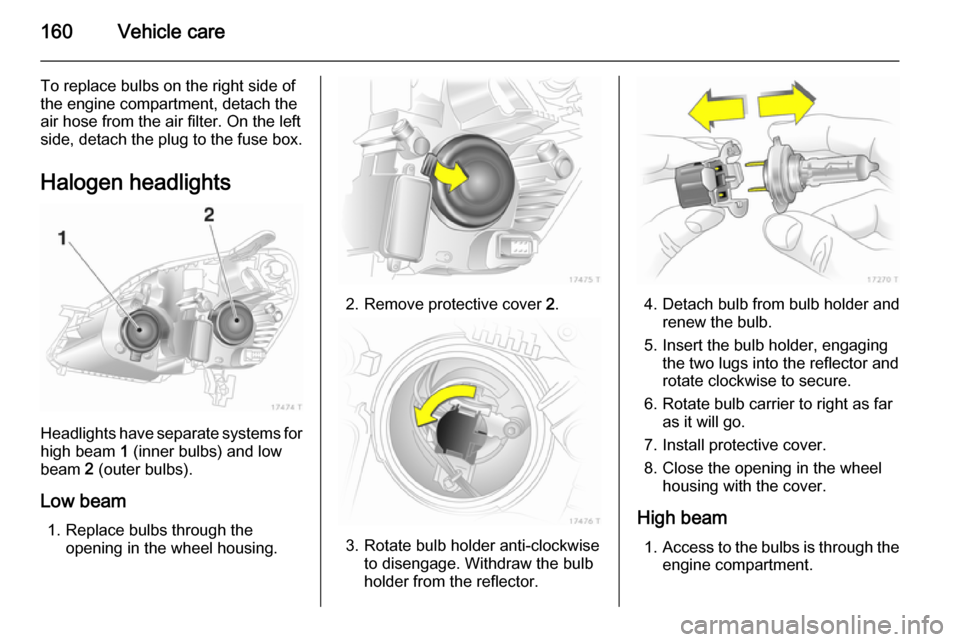
Headlights have separate systems forhigh beam 1 (inner bulbs) and low
beam 2 (outer bulbs).
Low beam 1. Replace bulbs through the opening in the wheel housing.
2. Remove protective cover 2.
3. Rotate bulb holder anti-clockwise
to disengage. Withdraw the bulb
holder from the reflector.
4. Detach bulb from bulb holder and renew the bulb.
5. Insert the bulb holder, engaging the two lugs into the reflector androtate clockwise to secure.
6. Rotate bulb carrier to right as far as it will go.
7. Install protective cover.
8. Close the opening in the wheel housing with the cover.
High beam 1. Access to the bulbs is through the
engine compartment.
Page 166 of 219
164Vehicle care
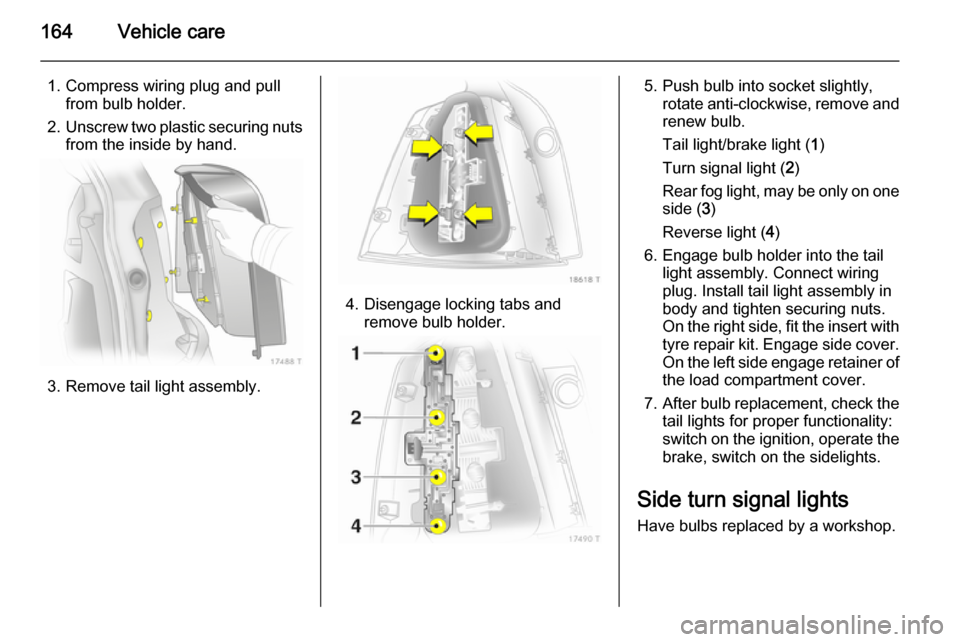
1. Compress wiring plug and pullfrom bulb holder.
2. Unscrew two plastic securing nuts
from the inside by hand.
3. Remove tail light assembly.
4. Disengage locking tabs and remove bulb holder.
5. Push bulb into socket slightly,rotate anti-clockwise, remove and
renew bulb.
Tail light/brake light ( 1)
Turn signal light ( 2)
Rear fog light, may be only on one side ( 3)
Reverse light ( 4)
6. Engage bulb holder into the tail light assembly. Connect wiring
plug. Install tail light assembly in
body and tighten securing nuts.
On the right side, fit the insert with
tyre repair kit. Engage side cover.
On the left side engage retainer of the load compartment cover.
7. After bulb replacement, check the
tail lights for proper functionality:
switch on the ignition, operate the brake, switch on the sidelights.
Side turn signal lights
Have bulbs replaced by a workshop.
Page 175 of 219
Vehicle care173Vehicle tools
Tools
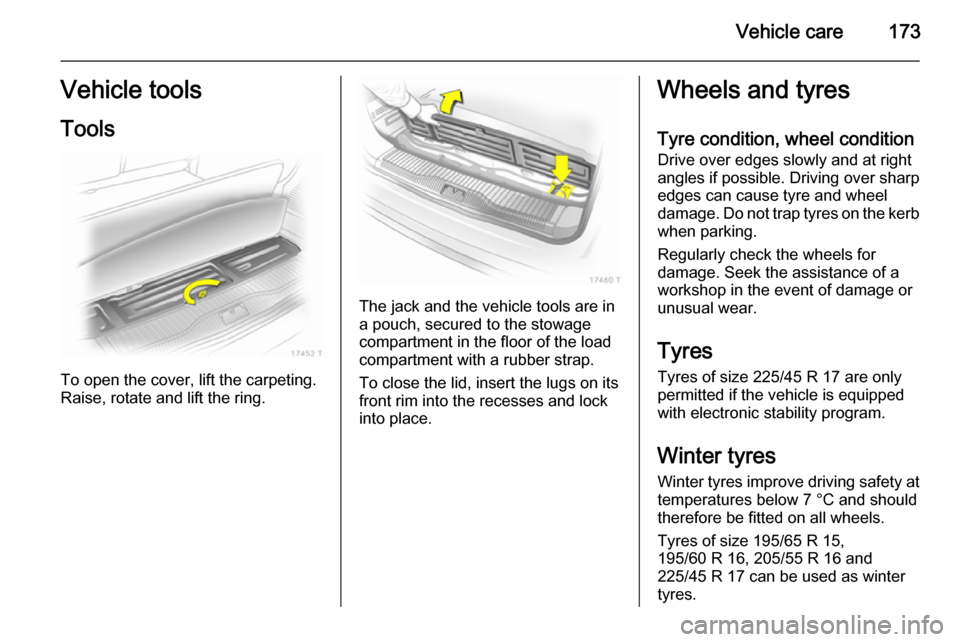
To open the cover, lift the carpeting.
Raise, rotate and lift the ring.
The jack and the vehicle tools are in
a pouch, secured to the stowage
compartment in the floor of the load
compartment with a rubber strap.
To close the lid, insert the lugs on its
front rim into the recesses and lock
into place.
Wheels and tyres
Tyre condition, wheel condition
Drive over edges slowly and at right
angles if possible. Driving over sharp
edges can cause tyre and wheel
damage. Do not trap tyres on the kerb when parking.
Regularly check the wheels for
damage. Seek the assistance of a
workshop in the event of damage or
unusual wear.
Tyres
Tyres of size 225/45 R 17 are only permitted if the vehicle is equipped
with electronic stability program.
Winter tyres
Winter tyres improve driving safety at temperatures below 7 °C and should
therefore be fitted on all wheels.
Tyres of size 195/65 R 15,
195/60 R 16, 205/55 R 16 and
225/45 R 17 can be used as winter
tyres.
Page 185 of 219

Vehicle care183
2. Install the wheel wrench ensuringthat it locates securely and
slacken each bolt by half a turn.
3. Ensure the jack is positioned correctly with the vehicle jacking
points.
4. Set the jack to the necessary height. Position it directly below
the jacking point in a manner that
prevents it from slipping.
Attach jack handle and with the
jack correctly aligned rotate handle until wheel is clear of theground.
5. Unscrew the wheel bolts.
6. Change the wheel.
7. Screw in the wheel bolts.
8. Lower vehicle.
9. Install the wheel wrench ensuring that it locates securely and tighten
each bolt in a crosswise
sequence. Tightening torque is
110 Nm.
10. Align the valve hole in the wheel cover with the tyre valve before
installing.
Page 212 of 219

210Customer information
■ Vehicle reactions in particulardriving situations (e.g. inflation of
an airbag, activation of the stability
regulation system)
■ Environmental conditions (e.g. temperature)
These data are exclusively technical
and help identifying and correcting
errors as well as optimizing vehicle
functions.
Motion profiles indicating travelled
routes cannot be created with these
data.
If services are used (e.g. repair
works, service processes, warranty
cases, quality assurance),
employees of the service network
(manufacturer included) are able to
read out this technical information
from the event and error data storage
modules applying special diagnostic
devices. If required, you will receive
further information at these
workshops. After an error has been
corrected, the data are deleted from
the error storage module or they are
constantly overwritten.When using the vehicle, situations
may occur in which these technical
data related to other information
(accident report, damages on the
vehicle, witness statements etc.) may be associated with a specific person -
possibly, with the assistance of an
expert.
Additional functions contractually
agreed upon with the client (e.g.
vehicle location in emergency cases)
allow the transmission of particular vehicle data from the vehicle.Radio Frequency
Identification (RFID) RFID technology is used in somevehicles for functions such as tyre
pressure monitoring and ignition
system security. It is also used in
connection with conveniences such
as radio remote controls for door
locking/unlocking and starting, and in-
vehicle transmitters for garage door
openers. RFID technology in
Vauxhall vehicles does not use or
record personal information or link with any other Vauxhall system
containing personal information.
Page 218 of 219

216
Trip computer in Board-Info-Display ................................... 103
Trip computer in Graphic-Info- Display or Colour-Info-Display 105
Triple-Info-Display .......................94
Trip odometer .............................. 84
Turn and lane-change signals ...112
Turn signal ................................... 88
Tyre chains ................................ 178
Tyre designations ......................174
Tyre pressure ....................102, 175
Tyre pressure monitoring system ........................ 23, 91, 176
Tyre pressures ................... 107, 206
Tyre repair kit ............................. 179
Tyres .......................................... 173
U Ultrasonic parking assist .............. 90
Underseat storage .......................69
Upholstery .................................. 191
Upshift .......................................... 90
Using this manual ..........................3
V Vehicle battery ........................... 157
Vehicle checks............................ 153
Vehicle data ................................ 199
Vehicle data recording and privacy ..................................... 209Vehicle dimensions .................... 205
Vehicle Identification Number ....197
Vehicle jack ................................ 173
Vehicle messages .....................101
Vehicle security ............................ 34
Vehicle specific data ......................3
Vehicle storage ........................... 152
Vehicle tools ............................... 173
Vehicle unlocking ........................... 6 Vehicle weight ........................... 204
Ventilation ................................... 117
W
Warning chimes .........................101
Warning lights ............................... 84
Warning triangle .......................... 75
Washer and wiper systems .........13
Washer fluid ............................... 156
Washer fluid level ......................103
Wheel changing .........................182
Wheel covers ............................. 178
Wheels and tyres .......................173
Windows ....................................... 39
Windscreen................................... 39
Windscreen wiper/washer ...........79
Winter mode ................................ 90
Winter tyres ............................... 173
Wiper blade replacement ..........158X
Xenon headlights .......................162