AUX VAUXHALL ZAFIRA 2015 Infotainment system
[x] Cancel search | Manufacturer: VAUXHALL, Model Year: 2015, Model line: ZAFIRA, Model: VAUXHALL ZAFIRA 2015Pages: 175, PDF Size: 2.84 MB
Page 77 of 175

77
Audio files.................................. 32
Picture files................................ 32
Frequently asked questions .........73
G General information 30, 32 , 37 , 55 , 64
AUX ........................................... 32
Bluetooth music......................... 32
CD ............................................. 30
Infotainment system ....................6
Navigation ................................. 37
Phone portal .............................. 64
Radio ......................................... 24
USB ........................................... 32
Gracenote ..................................... 32
Guidance ..................................... 50
H Home address .............................. 42
Home Page............................. 16, 21
I
Infotainment control panel ..............8
K
Keyboard ...................................... 42
L
Language ..................................... 21M
Maps ............................................. 38
Maximum startup volume .............20
Menu operation............................. 16
Messages ..................................... 16
Midrange....................................... 19 Mobile phones and CB radio equipment ................................ 72
Multifunction knob......................... 16
Mute.............................................. 14
N Navigation Address book ............................ 42
Bread crumbs ............................ 50
Coordinates ............................... 42
Current location ......................... 38
Destination input .......................42
Favourite routes ........................42
General settings ........................38
Guidance alerts ......................... 50
Home address ........................... 42
Keyboard ................................... 42
Map display ............................... 38
Map manipulation ......................38
POIs .......................................... 42
Recent destinations ..................42
Route guidance ......................... 50
Route options ............................ 50Route simulation.......................38
Route tracking ........................... 50
TMC stations ............................. 50
Traffic incidents ......................... 50
Turn list ..................................... 50
Voice prompts ........................... 50
Waypoint trip ............................. 42
Navigation system ........................37
Navigation volume ........................20
O
Operation ...................................... 67
AUX ........................................... 34
Blueotooth music....................... 34
CD ............................................. 31
Infotainment system ..................14
Menu ......................................... 16
Navigation system .....................38
Phone ........................................ 67
Radio ......................................... 24
USB ..................................... 34, 35
P Pairing .......................................... 65
Phone Bluetooth ................................... 64
Bluetooth connection ................65
Conference call ......................... 67
Emergency calls ........................66
Functions during a call ..............67
Page 78 of 175

78
Phone book............................... 67
Recent calls............................... 67
Text messages .......................... 70
Phone book ............................ 42, 67
Phone call Initiating ..................................... 67
Taking ....................................... 67
Picture files ................................... 32
Pictures......................................... 35
Playing audio ................................ 34
POIs.............................................. 42
R
Radio Autostore lists............................ 25
Category list .............................. 24
DAB ........................................... 29
DAB announcements ................29
Digital Audio Broadcasting ........29
Favourite lists ............................ 26
Radio Data System ...................27
RDS........................................... 27
RDS Options menu ...................27
Regional .................................... 27
Retrieving stations ..............25, 26
Station list.................................. 24
Station search ........................... 24
Storing stations ...................25, 26
TP.............................................. 27Traffic Programme ....................27
Waveband selection ..................24
Radio data system (RDS) ............27
Regionalisation ............................. 27
Route guidance ............................ 50
Route simulation ........................... 38
S Software update ........................... 21
Speech commands overview........ 59
Speech recognition .......................55
Station list ..................................... 24
Station search............................... 24
Switching the Infotainment system on .................................. 14
System settings ............................ 21
Display ...................................... 21
Home Page ............................... 21
Language .................................. 21
Software .................................... 21
Time and Date........................... 21
T
TA ................................................. 27
TA volume .................................... 20
Text messages ............................. 70
Theft-deterrent feature ................... 7
Time.............................................. 21
Time format .................................. 21
TMC .............................................. 50Tone settings................................ 19
TP ................................................. 27
Traffic incidents ............................ 50
Traffic programme ........................27
Treble ........................................... 19
Turn list ......................................... 50
U Usage ................... 14, 24, 31, 38, 56
AUX ........................................... 34
Bluetooth music......................... 34
CD ............................................. 31
Infotainment system ..................14
Navigation system .....................38
Phone ........................................ 67
USB ..................................... 34, 35
USB .............................................. 32
V
Voice recognition ..........................55
Volume Audio Cue volume .....................20
Auto volume .............................. 20
Chime volume ........................... 20
Maximum startup volume ..........20
Mute function............................. 14
Navigation volume..................... 20
Volume of traffic
announcements ........................ 20
Volume settings ............................ 20
Page 81 of 175

Introduction.................................. 82
Radio ........................................... 98
CD Player .................................. 107
AUX input ................................... 111
USB port .................................... 112
Speech recognition ....................114
Phone ........................................ 119
Index .......................................... 130CD 400plus (1)/400/300
Page 86 of 175

86Introduction
18 AUX..................................... 111
Change to external audio
source ................................. 111
Page 89 of 175
Introduction89
20 AUX..................................... 111
Change to external audio
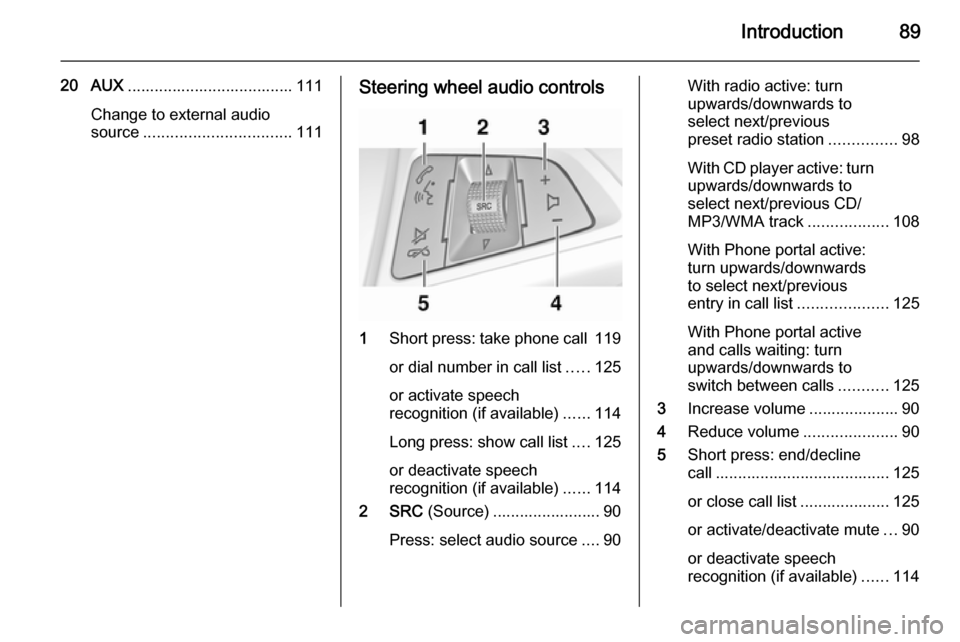
source ................................. 111Steering wheel audio controls
1Short press: take phone call 119
or dial number in call list .....125
or activate speech
recognition (if available) ......114
Long press: show call list ....125
or deactivate speech
recognition (if available) ......114
2 SRC (Source) ........................ 90
Press: select audio source ....90
With radio active: turn
upwards/downwards to
select next/previous
preset radio station ...............98
With CD player active: turn
upwards/downwards to
select next/previous CD/
MP3/WMA track ..................108
With Phone portal active: turn upwards/downwards
to select next/previous
entry in call list ....................125
With Phone portal active
and calls waiting: turn
upwards/downwards to
switch between calls ...........125
3 Increase volume .................... 90
4 Reduce volume .....................90
5 Short press: end/decline
call ....................................... 125
or close call list .................... 125
or activate/deactivate mute ...90
or deactivate speech
recognition (if available) ......114
Page 90 of 175

90IntroductionUsageControl elements
The Infotainment system is operated
via function buttons, multifunctional
knobs and menus that are shown on
the display.
Inputs are made optionally via: ■ the central control unit in the instrument panel 3 84
■ controls on the steering wheel 3 84
■ the speech recognition system 3 114
Switching the Infotainment
system on or off Press the X knob briefly. After
switching on, the last selected
Infotainment source is active.
Automatic switch-off
If the Infotainment system has been switched on using the X knob when
the ignition was switched off, it will switch off again automatically after
30 minutes.Setting the volume
Turn the X knob. The current setting
is shown on the display.
When the Infotainment system is
switched on, the last selected volume
is set, provided that volume is lower
than the maximum start-up volume.
The following can be set separately: ■ the maximum start-up volume 3 96
■ the volume of the traffic announcements 3 96
Speed compensated volume
When speed compensated volume is
activated 3 96 the volume is
adapted automatically to make up for the road and wind noise as you drive.
Mute
Press the 7 / i button (if Phone
portal is available: press for a few
seconds) to mute the audio sources.
To cancel mute again: turn the X
knob or press the 7 / i button again
(if Phone portal is available: press for a few seconds).Volume limitation at high
temperatures
At very high temperatures inside the
vehicle the Infotainment system limits
the maximum adjustable volume. If
necessary the volume is decreased
automatically.
Modes of operation
Radio
Press the RADIO button to open the
radio main menu or to change
between the different wavebands.
Press the multifunction knob to open
a submenu with options for station
selection.
Detailed description of the radio
functions 3 98.
Audio players
Press the CD / AUX button to open
the CD, USB, iPod or AUX menus or
to switch between these menus.
Press the multifunction knob to open
a submenu with options for track
selection.
Page 91 of 175

Introduction91
Detailed description of:■ CD player functions 3 108
■ AUX input functions 3 111
■ USB port functions 3 112
Phone
Press the 7 / i button to open the
telephone menu.
Press the multifunction knob to open
a submenu with options for the input
or selection of numbers.
Detailed description of the mobile
phone portal functions 3 119.
Basic operation
Multifunction knob The multifunction knob is the central
control element for the menus.
Turn the multifunction knob: ■ CD 400 / CD 400plus: to mark a menu option
■ CD 300: to display a menu option
■ to set a numeric value.Press the multifunction knob: ■ CD 400 / CD 400plus: to select or activate the marked option
■ CD 300: to select or activate the option displayed
■ to confirm a set value
■ to switch a system function on/off.
BACK button Press the BACK button briefly to:
■ exit a menu
■ return from a submenu to the next higher menu level
■ delete the last character in a character sequence.
Press and hold the BACK button for a
few seconds to delete the entire entry.Examples of menu operation
CD 400 / CD 400plusSelecting an option
Turn the multifunction knob to move
the cursor (= coloured background) to the desired option.
Press the multifunction knob to select
the marked option.
Submenus
An arrow on the right-hand edge of
the menu indicates that after
selection of the option a submenu
with further options will be opened.
Page 111 of 175
AUX input111AUX inputGeneral information...................111
Usage ........................................ 111General information
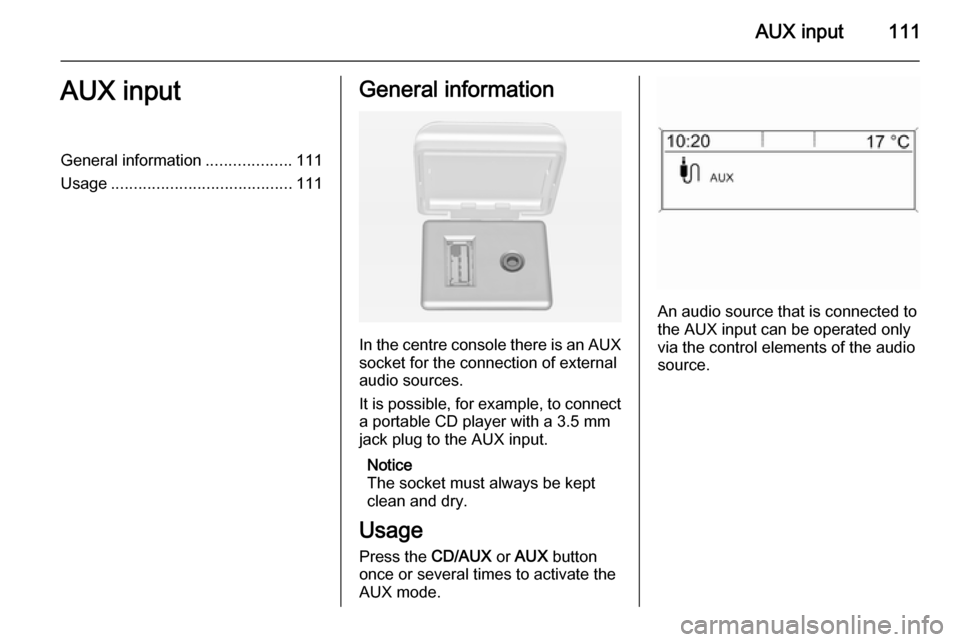
In the centre console there is an AUX
socket for the connection of external
audio sources.
It is possible, for example, to connect a portable CD player with a 3.5 mm
jack plug to the AUX input.
Notice
The socket must always be kept
clean and dry.
Usage Press the CD/AUX or AUX button
once or several times to activate the
AUX mode.
An audio source that is connected to
the AUX input can be operated only
via the control elements of the audio
source.
Page 113 of 175
USB port113
Press the AUX button once or several
times to activate the USB mode.
Playback of the audio data stored on
the USB device is started.
The operation of data sources
connected via USB is generally the
same as for an audio MP3 CD 3 108.
On the following pages only the
aspects of operation that are
different/additional are described.
Operation and the screen displays
are described for USB drives only. Operation of other devices, e.g. iPod
or Zune is generally the same.Selecting tracks using the USB
menu
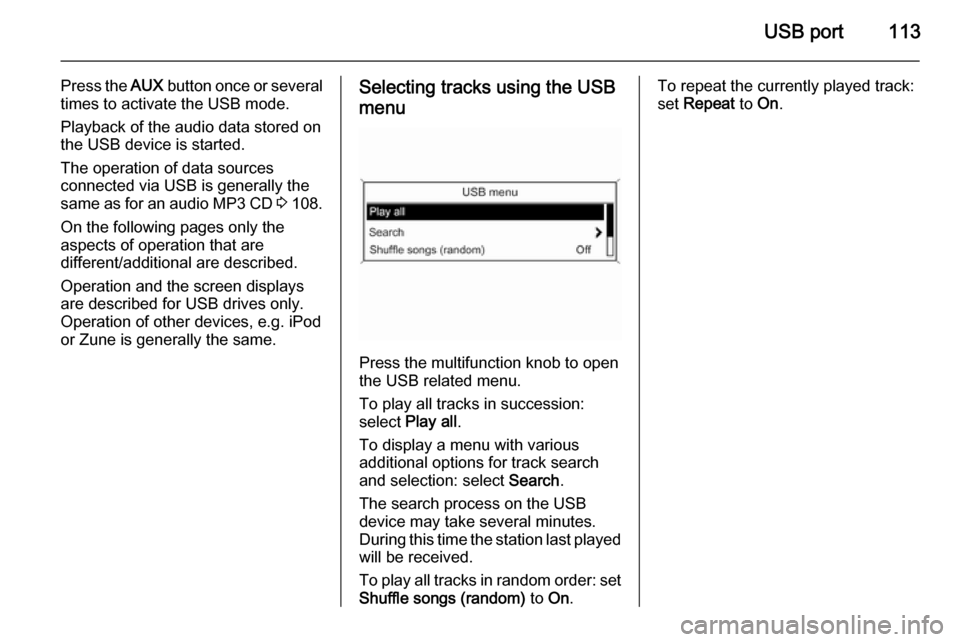
Press the multifunction knob to open
the USB related menu.
To play all tracks in succession:
select Play all .
To display a menu with various
additional options for track search and selection: select Search.
The search process on the USB
device may take several minutes.
During this time the station last played will be received.
To play all tracks in random order: set
Shuffle songs (random) to On.
To repeat the currently played track:
set Repeat to On.
Page 131 of 175

131
O
Operation .................................... 125
P Phone adjusting ring tones .................120
Bluetooth ................................. 119
Bluetooth connection ..............120
call lists.................................... 125
control elements ......................119
dialling a number .....................125
emergency calls ......................124
functions during a call .............125
handsfree mode ......................120
important information ..............119
messaging functions ...............125
recharging the battery .............119
setting the volume ...................125
SIM Access Profile (SAP) .......120
telephone book ....................... 125
Phone control ............................. 115
Playing saved audio files ............112
R Radio Radio data system (RDS) .......103
activating ................................... 98
autostore lists ............................ 99
Digital audio broadcasting
(DAB) ...................................... 105favourite lists............................. 99
selecting the waveband ............98
station lists .............................. 100
station search ............................ 98
usage ........................................ 98
waveband menus ....................100
Radio data system (RDS) ..........103
RDS ............................................ 103
Recharging the phone battery ....119
Regionalization ........................... 103
Retrieving stations ........................99
S SAP mode .................................. 120
Selecting the waveband ...............98
Setting the volume ........................90
SIM Access Profile (SAP) ...........120
Speech recognition .............114, 115
activating ................................. 115
phone control .......................... 115
usage ...................................... 115
volume for voice output ...........115
Speed compensated volume ........90
Starting CD playback ..................108
Station search............................... 98 Storing stations ............................. 99
Switching the Infotainment system on or off......................... 90
Switching the radio on ..................98T
Theft-deterrent feature ................. 83
Tone settings ................................ 95
Traffic announcements .................96
U Updating station lists ..................100
Usage ..................... 90, 98, 108, 111
Using the AUX input ...................111
Using the CD player ...................108
Using the Infotainment system .....90
Using the radio ............................. 98
Using the USB port .....................112
V
Voice recognition ........................114
Volume for voice output ..............115
Volume settings ............................ 96
W
Waveband menus....................... 100