USB VAUXHALL ZAFIRA 2015 Infotainment system
[x] Cancel search | Manufacturer: VAUXHALL, Model Year: 2015, Model line: ZAFIRA, Model: VAUXHALL ZAFIRA 2015Pages: 175, PDF Size: 2.84 MB
Page 6 of 175

6IntroductionIntroductionGeneral information.......................6
Theft-deterrent feature ...................7
Control elements overview ............8
Usage .......................................... 14General information
The Infotainment system provides
you with state-of-the-art in-car
infotainment.
The radio can easily be used by
registering a large number of FM, AM
and DAB (Digital Audio Broadcasting) radio stations with the 1...6 preset
buttons.
You can connect external data
storage devices, e.g. iPod, USB
devices, or other auxiliary devices to
the Infotainment system as further
audio sources; either via cable or via
Bluetooth.
The navigation system reliably guides
you to your destination and, if desired, automatically avoids traffic jams or
other traffic problems.
In addition, the Infotainment system is
equipped with a phone application
that allows for comfortable and safe
use of your mobile phone in the
vehicle.Optionally, the Infotainment system
can be operated using the instrument panel controls, the controls on the
steering wheel or the speech
recognition function.
The well-thought-out design of the
control elements and the clear
displays enable you to control the
system easily and intuitively.
Information on operation details and
news on software updates can be
obtained on our website.
Notice
This manual describes all options
and features available for the
various Infotainment systems.
Certain descriptions, including those for display and menu functions, may
not apply to your vehicle due to
model variant, country
specifications, special equipment or
accessories.
Page 10 of 175

10Introduction
16 BACK button
Menu: one level back ............16
Input: delete last character or entire entry ........................ 16
17 RPT / NAV button
Repeat last navigation
message ............................... 50
18 CD slot .................................. 31
19 O button
Take phone call or
activate/deactivate mute .......67
20 NAV button
Display map ......................... 38
21 SRCE (Source) button
Press to toggle through the different audio sources
CD/MP3 player ...................... 30
USB ....................................... 32
AUX ....................................... 32
Bluetooth ............................... 32
AM ......................................... 24FM ......................................... 24
DAB ....................................... 24
Page 13 of 175
Introduction13
18 SRCE (Source) button
Press to toggle through the
different audio sources
CD/MP3 player ...................... 30
USB ....................................... 32
AUX ....................................... 32
Bluetooth ............................... 32
AM ......................................... 24
FM ......................................... 24
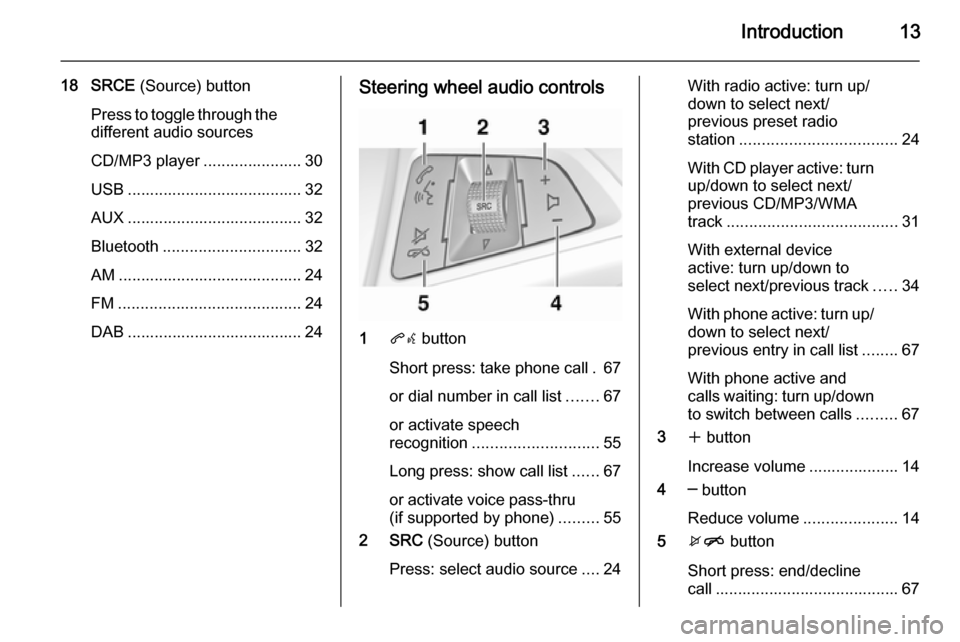
DAB ....................................... 24Steering wheel audio controls
1 qw button
Short press: take phone call . 67
or dial number in call list .......67
or activate speech
recognition ............................ 55
Long press: show call list ......67
or activate voice pass-thru
(if supported by phone) .........55
2 SRC (Source) button
Press: select audio source ....24
With radio active: turn up/
down to select next/
previous preset radio
station ................................... 24
With CD player active: turn
up/down to select next/
previous CD/MP3/WMA
track ...................................... 31
With external device
active: turn up/down to
select next/previous track .....34
With phone active: turn up/
down to select next/
previous entry in call list ........67
With phone active and
calls waiting: turn up/down
to switch between calls .........67
3 w button
Increase volume .................... 14
4 ─ button
Reduce volume .....................14
5 xn button
Short press: end/decline
call ......................................... 67
Page 15 of 175

Introduction15
Auto volume
When auto volume is activated
3 20, the volume is adapted
automatically to compensate for the
road and wind noise as you drive.
Mute
Press the O button (if Phone portal
is available: press for a few seconds) to mute the audio sources.
To cancel mute again: turn the X
VOL knob or press the O button
again (if Phone portal is available: press for a few seconds).
Volume limitation at high
temperatures
At very high temperatures inside the
vehicle, the Infotainment system
limits the maximum adjustable
volume. If necessary, the volume is
decreased automatically.Modes of operation
Audio players
Repeatedly press the SRCE button to
toggle between the AM, FM, CD, USB, AUX, Bluetooth or DAB main
menus.
For detailed descriptions of: ■ CD/MP3 player 3 30
■ USB port 3 32
■ AUX input 3 32
■ Bluetooth audio 3 32
■ AM radio 3 24
■ FM radio 3 24
■ DAB radio 3 29.
Navigation
Press the NAV button to display the
map of the navigation application.
Press the multifunction knob to open
a submenu with options for the input
of destinations and the structuring of
a route.
For a detailed description of the
navigation functions 3 37.Phone
Press the O button to display the
phone main menu with options for the input or selection of numbers.
For a detailed description of the
mobile phone functions 3 64.
Notice
Brief information on the audio
sources and the current navigation
session may be displayed via the
Quick Info application.
Page 32 of 175
32External devicesExternal devicesGeneral information.....................32
Playing audio ............................... 34
Displaying pictures ....................... 35General information
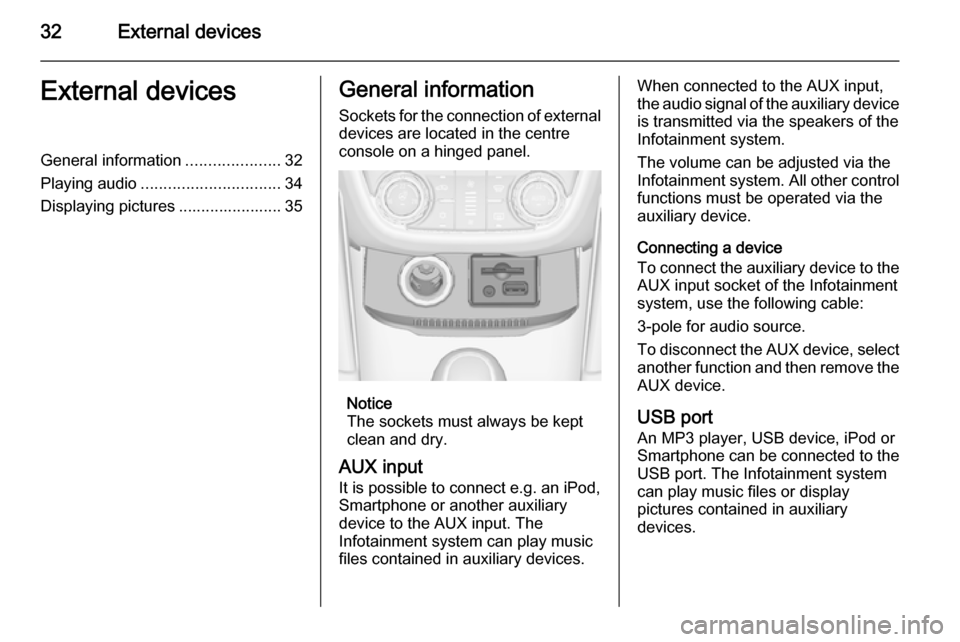
Sockets for the connection of external
devices are located in the centre
console on a hinged panel.
Notice
The sockets must always be kept
clean and dry.
AUX input
It is possible to connect e.g. an iPod,
Smartphone or another auxiliary
device to the AUX input. The
Infotainment system can play music
files contained in auxiliary devices.
When connected to the AUX input,
the audio signal of the auxiliary device is transmitted via the speakers of the
Infotainment system.
The volume can be adjusted via the Infotainment system. All other control functions must be operated via the
auxiliary device.
Connecting a device
To connect the auxiliary device to the
AUX input socket of the Infotainment
system, use the following cable:
3-pole for audio source.
To disconnect the AUX device, select
another function and then remove the AUX device.
USB port
An MP3 player, USB device, iPod or
Smartphone can be connected to the USB port. The Infotainment system
can play music files or display
pictures contained in auxiliary
devices.
Page 33 of 175
External devices33
When connected to the USB port, thedevices mentioned above can be
operated via the controls and menus
of the Infotainment system.
Notice
Not all MP3 players, USB drives,
iPod models or Smartphones are
supported by the Infotainment
system.
Connecting/disconnecting a device
Connect the device to the USB port.
For the iPod, use the appropriate
connection cable.
Notice
If a non-readable USB device or
iPod is connected, a corresponding
error message will appear and the
Infotainment system will
automatically switch to the previous
function.
To disconnect the USB device or
iPod, select another function and then
remove the USB storage device.Caution
Avoid disconnecting the device
during playback. This may
damage the device or the
Infotainment system.
Bluetooth
Bluetooth enabled audio sources
(e.g. music mobile phones, MP3
players featuring Bluetooth, etc.),
which support the Bluetooth music profiles A2DP and AVRCP can be
connected wirelessly to the
Infotainment system.
The Infotainment system can play
music files contained in Bluetooth
devices, e.g. iPod or Smartphone.
Connecting a device
For a detailed description on the Bluetooth connection 3 65.
File formats
Audio files
Only devices formatted in the FAT32,
NTFS and HFS+ file systems are supported.
Notice
Some files may not be played
properly. This might be due to a
different recording format or the
condition of the file.
Files from online shops to which
Digital Rights Management (DRM)
has been applied cannot be played.
The playable audio file formats
are .mp3, .wma, .aac and .m4a.
When playing a file with ID3 tag
information, the Infotainment system
can display information, e.g. on the
track title and artist.
Picture files
The displayable picture file formats
are .jpg, .jpeg, .bmp, .png and .gif.
The files must have a maximum size
of 2048 pixels in width and
2048 pixels in height (4MP).
Page 34 of 175
34External devices
Gracenote
The Gracenote database contains
information on media data currently
available on the market.
When connecting external devices,
the tracks or files are recognised by
the Gracenote function.
If the Gracenote normalisation
function is activated, spelling
mistakes in MP3 tag data are
automatically corrected. Due to this,
media search results may be
improved.
Press the CONFIG button and then
select the Radio Settings menu item.
Select Gracenote Options to display
the respective submenu.
Activate the Gracenote normalisation function.
Playing audio Starting playbackIf not connected, connect the device
3 32.
Press the ; button and then select
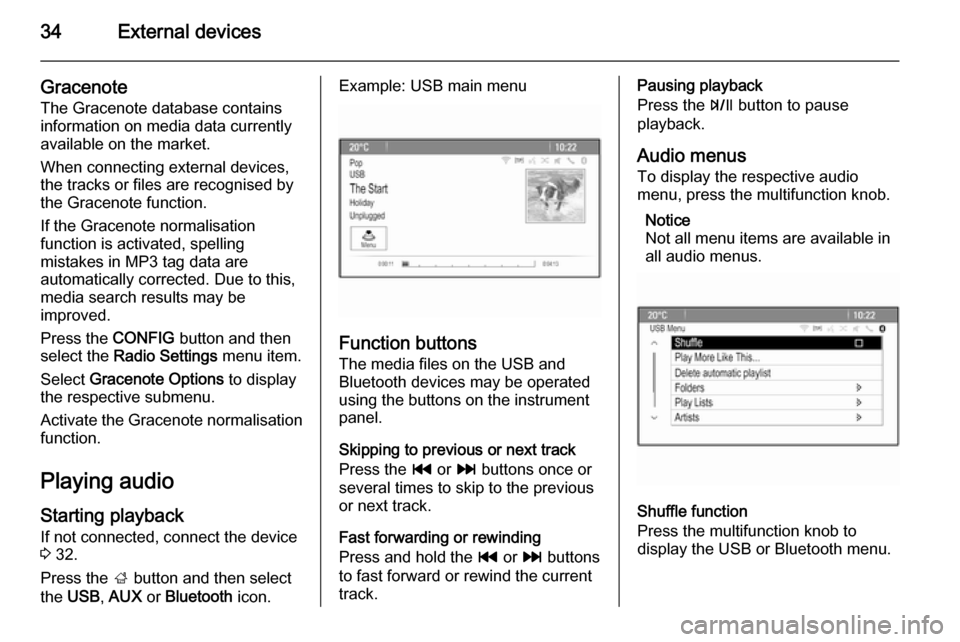
the USB , AUX or Bluetooth icon.Example: USB main menu
Function buttons
The media files on the USB and
Bluetooth devices may be operated
using the buttons on the instrument
panel.
Skipping to previous or next track
Press the t or v buttons once or
several times to skip to the previous
or next track.
Fast forwarding or rewinding
Press and hold the t or v buttons
to fast forward or rewind the current
track.
Pausing playback
Press the T button to pause
playback.
Audio menus To display the respective audio
menu, press the multifunction knob.
Notice
Not all menu items are available in
all audio menus.
Shuffle function
Press the multifunction knob to
display the USB or Bluetooth menu.
Page 35 of 175

External devices35
To play the tracks on the respective
device in random order, activate the
Shuffle menu item.
To return to the normal playing order,
deactivate the Shuffle menu item.
Browsing
(only available in USB menus)
To search for a track within the
structure, select one of the menu
items, e.g. Folders, Play Lists or
Albums .
Browse through the structure until
you find the desired track.
Select the track to start playback.
Individual playlists
The system allows new playlists to be created via the Gracenote function.
Similar tracks are put together on a
list automatically generated by the
system.
Select the track around which you
wish to create a new playlist.
Select the Play More Like This...
menu item in the respective audio menu. A new playlist is created and stored in the Play Lists menu.To delete a playlist generated by the
system, select the Delete automatic
playlist menu item. A list of all
generated playlists is displayed.
Select the playlist you wish to delete.
The playlist is deleted.
Displaying pictures Viewing pictures
Connect a USB device 3 32.
Press the ; button and then select
the Pictures icon to open the Picture
Viewer USB menu.
A list of all pictures and picture folders found on the USB device is displayed.
Browse through the pictures and
folders until you find the desired
picture and select it. The picture is
displayed.
Function buttons
Info button
Select the Info screen button at the
bottom of the screen to display
information on the picture stored on the USB device, e.g. a name or
number. The respective information is displayed above the picture.
Skipping to the previous or next
picture
Select the < or > screen buttons at
the bottom of the screen to display the previous or next picture.
Page 76 of 175

76IndexAActivating AUX.............................. 34
Activating Bluetooth music ...........34
Activating CD player .....................31
Activating radio ............................. 24
Activating the Infotainment system 14
Activating the navigation system ..38
Activating the phone portal ...........67
Activating USB audio ....................34
Activating USB picture ..................35
Address book................................ 42
Audio CUE volume .......................20
Audio files ..................................... 32
Autostore lists ............................... 25
Retrieving stations..................... 25
Storing stations ......................... 25
Auto volume.................................. 20
AUX .............................................. 32
B BACK button ................................. 16
Balance......................................... 19
Basic operation ............................. 16
Bass.............................................. 19 Bluetooth connection ....................65
Bluetooth music ............................ 32
Bread crumbs ............................... 50C
Category list.................................. 24
CD player...................................... 30
Chime volume............................... 20
Control elements Infotainment system ....................8
Steering wheel ............................ 8
Control elements overview .............8
D DAB .............................................. 29
Date .............................................. 21
Destination input ..........................42
Digital audio broadcasting ............29
Display .......................................... 21
Displaying pictures .......................35
E Emergency call ............................. 66
EQ ................................................ 19
Equaliser....................................... 19
F
Factory defaults ............................ 21
Fader ............................................ 19
Favourite lists ............................... 26
Retrieving stations..................... 26
Storing stations ......................... 26
File formats ................................... 30
Page 77 of 175

77
Audio files.................................. 32
Picture files................................ 32
Frequently asked questions .........73
G General information 30, 32 , 37 , 55 , 64
AUX ........................................... 32
Bluetooth music......................... 32
CD ............................................. 30
Infotainment system ....................6
Navigation ................................. 37
Phone portal .............................. 64
Radio ......................................... 24
USB ........................................... 32
Gracenote ..................................... 32
Guidance ..................................... 50
H Home address .............................. 42
Home Page............................. 16, 21
I
Infotainment control panel ..............8
K
Keyboard ...................................... 42
L
Language ..................................... 21M
Maps ............................................. 38
Maximum startup volume .............20
Menu operation............................. 16
Messages ..................................... 16
Midrange....................................... 19 Mobile phones and CB radio equipment ................................ 72
Multifunction knob......................... 16
Mute.............................................. 14
N Navigation Address book ............................ 42
Bread crumbs ............................ 50
Coordinates ............................... 42
Current location ......................... 38
Destination input .......................42
Favourite routes ........................42
General settings ........................38
Guidance alerts ......................... 50
Home address ........................... 42
Keyboard ................................... 42
Map display ............................... 38
Map manipulation ......................38
POIs .......................................... 42
Recent destinations ..................42
Route guidance ......................... 50
Route options ............................ 50Route simulation.......................38
Route tracking ........................... 50
TMC stations ............................. 50
Traffic incidents ......................... 50
Turn list ..................................... 50
Voice prompts ........................... 50
Waypoint trip ............................. 42
Navigation system ........................37
Navigation volume ........................20
O
Operation ...................................... 67
AUX ........................................... 34
Blueotooth music....................... 34
CD ............................................. 31
Infotainment system ..................14
Menu ......................................... 16
Navigation system .....................38
Phone ........................................ 67
Radio ......................................... 24
USB ..................................... 34, 35
P Pairing .......................................... 65
Phone Bluetooth ................................... 64
Bluetooth connection ................65
Conference call ......................... 67
Emergency calls ........................66
Functions during a call ..............67