turn signal VAUXHALL ZAFIRA TOURER 2015 Owner's Guide
[x] Cancel search | Manufacturer: VAUXHALL, Model Year: 2015, Model line: ZAFIRA TOURER, Model: VAUXHALL ZAFIRA TOURER 2015Pages: 297, PDF Size: 8.99 MB
Page 202 of 297
200Driving and operating
Display indication
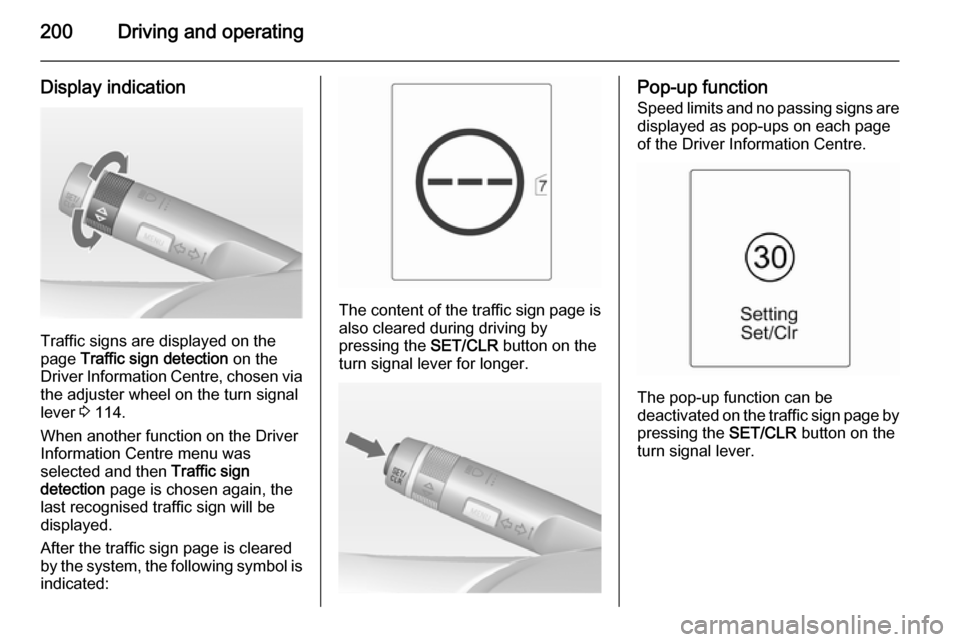
Traffic signs are displayed on the
page Traffic sign detection on the
Driver Information Centre, chosen via the adjuster wheel on the turn signal
lever 3 114.
When another function on the Driver
Information Centre menu was
selected and then Traffic sign
detection page is chosen again, the
last recognised traffic sign will be displayed.
After the traffic sign page is cleared
by the system, the following symbol is
indicated:
The content of the traffic sign page is
also cleared during driving by
pressing the SET/CLR button on the
turn signal lever for longer.
Pop-up function
Speed limits and no passing signs are
displayed as pop-ups on each page
of the Driver Information Centre.
The pop-up function can be
deactivated on the traffic sign page by
pressing the SET/CLR button on the
turn signal lever.
Page 204 of 297
202Driving and operating
Criteria for the detection of an
unintended lane change are:
■ no operation of turn signals
■ no brake pedal operation
■ no active accelerator operation or speeding-up
■ no active steering
If the driver is active, no warning will
be issued.
Activation
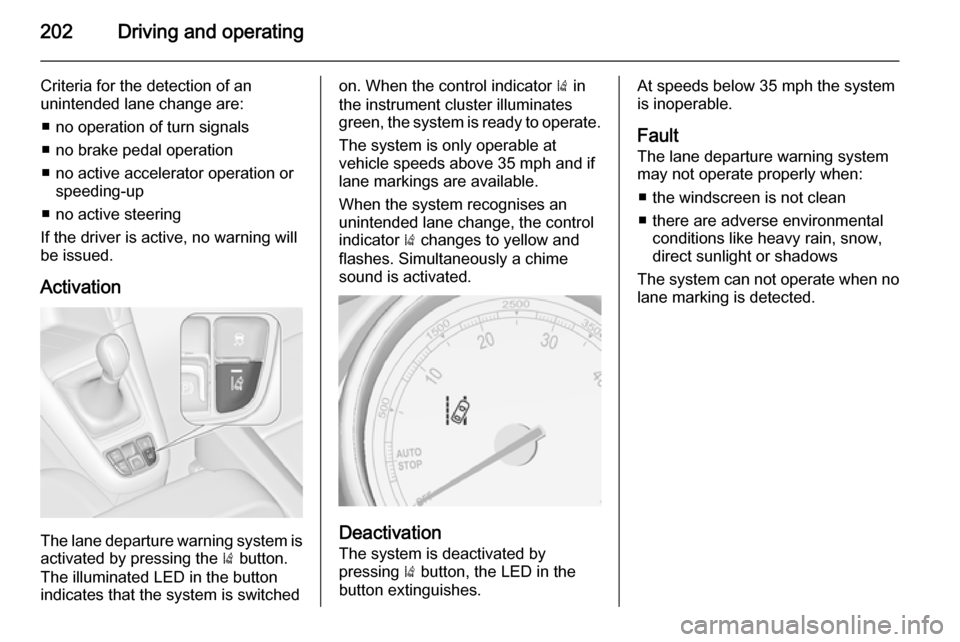
The lane departure warning system is activated by pressing the ) button.
The illuminated LED in the button
indicates that the system is switched
on. When the control indicator ) in
the instrument cluster illuminates
green, the system is ready to operate.
The system is only operable at
vehicle speeds above 35 mph and if
lane markings are available.
When the system recognises an
unintended lane change, the control
indicator ) changes to yellow and
flashes. Simultaneously a chime
sound is activated.
Deactivation
The system is deactivated by
pressing ) button, the LED in the
button extinguishes.
At speeds below 35 mph the system
is inoperable.
Fault
The lane departure warning system
may not operate properly when:
■ the windscreen is not clean
■ there are adverse environmental conditions like heavy rain, snow,
direct sunlight or shadows
The system can not operate when no
lane marking is detected.
Page 228 of 297
226Vehicle careBulb replacement
Switch off the ignition and switch off
the relevant switch or close the doors.
Only hold a new bulb at the base. Do not touch the bulb glass with bare
hands.
Use only the same bulb type for
replacement.
Replace headlight bulbs from within
the engine compartment.
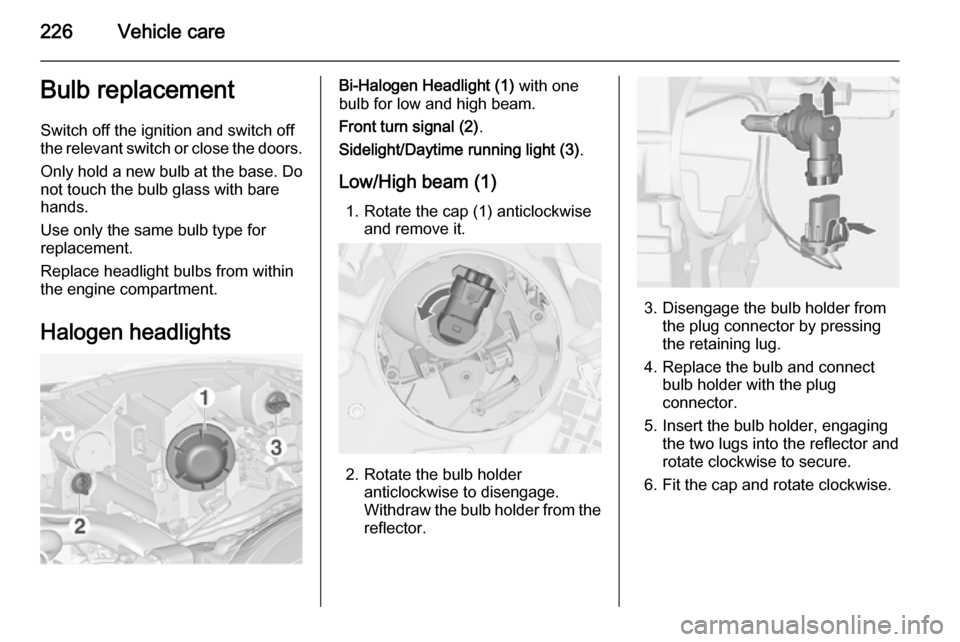
Halogen headlightsBi-Halogen Headlight (1) with one
bulb for low and high beam.
Front turn signal (2) .
Sidelight/Daytime running light (3) .
Low/High beam (1) 1. Rotate the cap (1) anticlockwise and remove it.
2. Rotate the bulb holder anticlockwise to disengage.
Withdraw the bulb holder from the
reflector.
3. Disengage the bulb holder from the plug connector by pressing
the retaining lug.
4. Replace the bulb and connect bulb holder with the plug
connector.
5. Insert the bulb holder, engaging the two lugs into the reflector and
rotate clockwise to secure.
6. Fit the cap and rotate clockwise.
Page 229 of 297
Vehicle care227
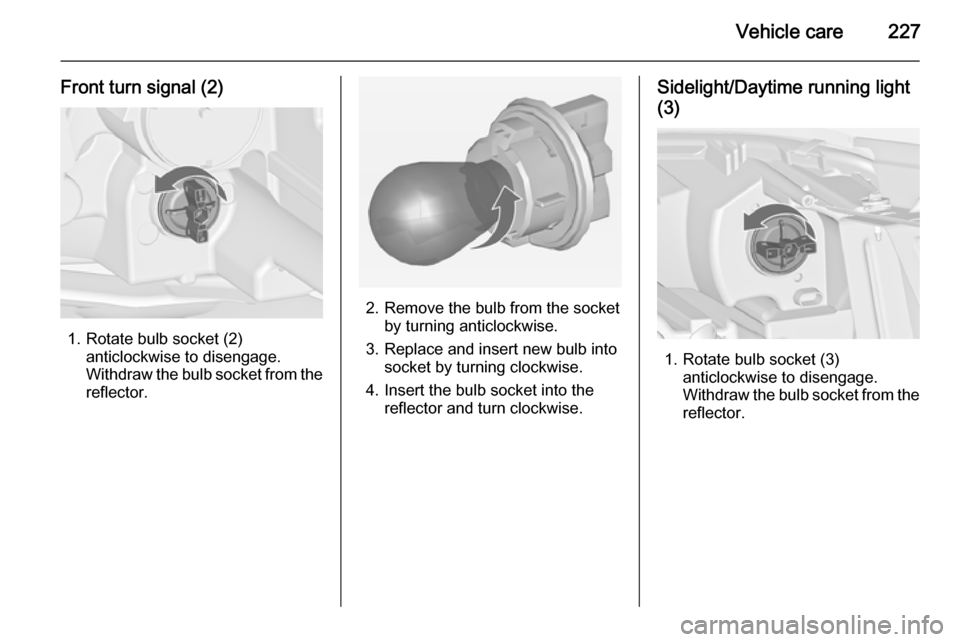
Front turn signal (2)
1. Rotate bulb socket (2)anticlockwise to disengage.
Withdraw the bulb socket from the
reflector.
2. Remove the bulb from the socket by turning anticlockwise.
3. Replace and insert new bulb into socket by turning clockwise.
4. Insert the bulb socket into the reflector and turn clockwise.
Sidelight/Daytime running light
(3)
1. Rotate bulb socket (3) anticlockwise to disengage.
Withdraw the bulb socket from the
reflector.
Page 230 of 297
228Vehicle care
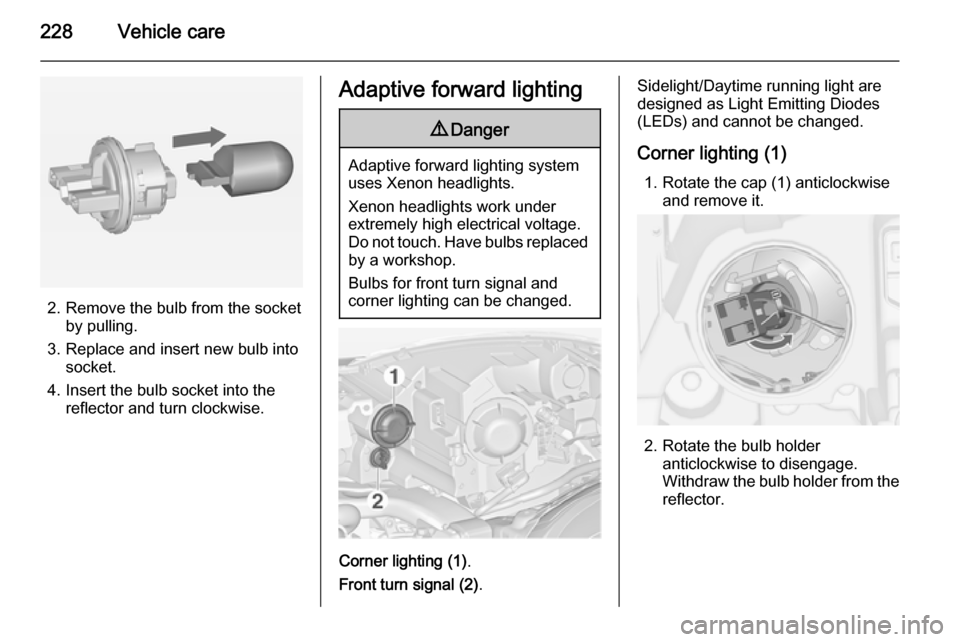
2. Remove the bulb from the socketby pulling.
3. Replace and insert new bulb into socket.
4. Insert the bulb socket into the reflector and turn clockwise.
Adaptive forward lighting9 Danger
Adaptive forward lighting system
uses Xenon headlights.
Xenon headlights work under
extremely high electrical voltage.
Do not touch. Have bulbs replaced by a workshop.
Bulbs for front turn signal and
corner lighting can be changed.
Corner lighting (1) .
Front turn signal (2) .
Sidelight/Daytime running light are
designed as Light Emitting Diodes
(LEDs) and cannot be changed.
Corner lighting (1) 1. Rotate the cap (1) anticlockwise and remove it.
2. Rotate the bulb holder anticlockwise to disengage.
Withdraw the bulb holder from the
reflector.
Page 231 of 297
Vehicle care229
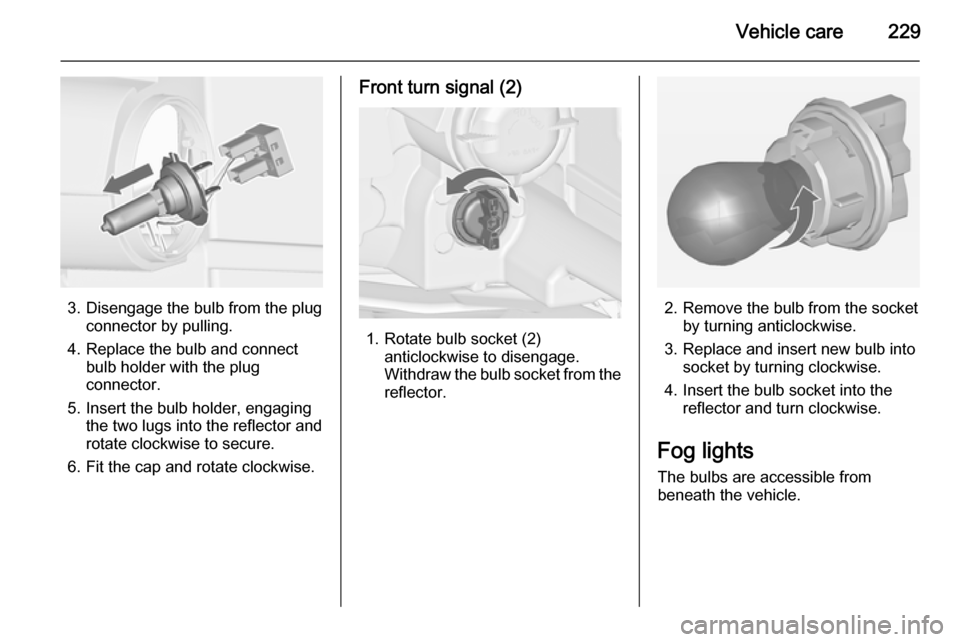
3. Disengage the bulb from the plugconnector by pulling.
4. Replace the bulb and connect bulb holder with the plug
connector.
5. Insert the bulb holder, engaging the two lugs into the reflector and
rotate clockwise to secure.
6. Fit the cap and rotate clockwise.
Front turn signal (2)
1. Rotate bulb socket (2) anticlockwise to disengage.
Withdraw the bulb socket from the
reflector.
2. Remove the bulb from the socket by turning anticlockwise.
3. Replace and insert new bulb into socket by turning clockwise.
4. Insert the bulb socket into the reflector and turn clockwise.
Fog lights The bulbs are accessible from
beneath the vehicle.
Page 233 of 297
Vehicle care231
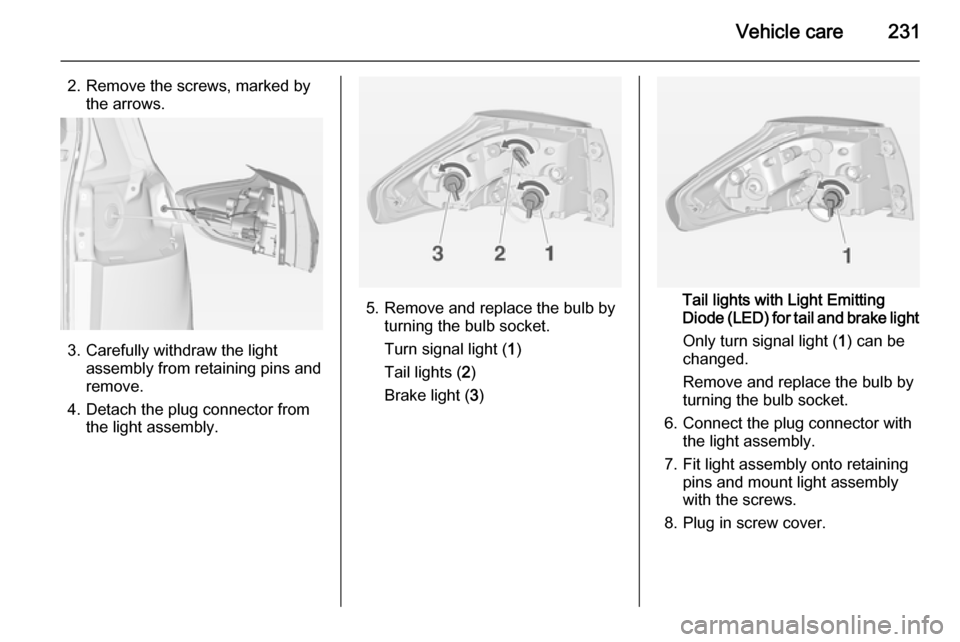
2. Remove the screws, marked bythe arrows.
3. Carefully withdraw the light assembly from retaining pins and
remove.
4. Detach the plug connector from the light assembly.
5. Remove and replace the bulb byturning the bulb socket.
Turn signal light ( 1)
Tail lights ( 2)
Brake light ( 3)Tail lights with Light Emitting
Diode (LED) for tail and brake light
Only turn signal light ( 1) can be
changed.
Remove and replace the bulb by
turning the bulb socket.
6. Connect the plug connector with the light assembly.
7. Fit light assembly onto retaining pins and mount light assembly
with the screws.
8. Plug in screw cover.
Page 235 of 297
Vehicle care233
2. Remove the bulb from the socketby turning anticlockwise.
3. Replace and insert new bulb into the socket by turning clockwise.
4. Insert the bulb socket into the reflector, turn clockwise andengage.
Bulb check Switch on the ignition, operate and
check all lights.
Side turn signal lights
To replace bulb, remove lamp
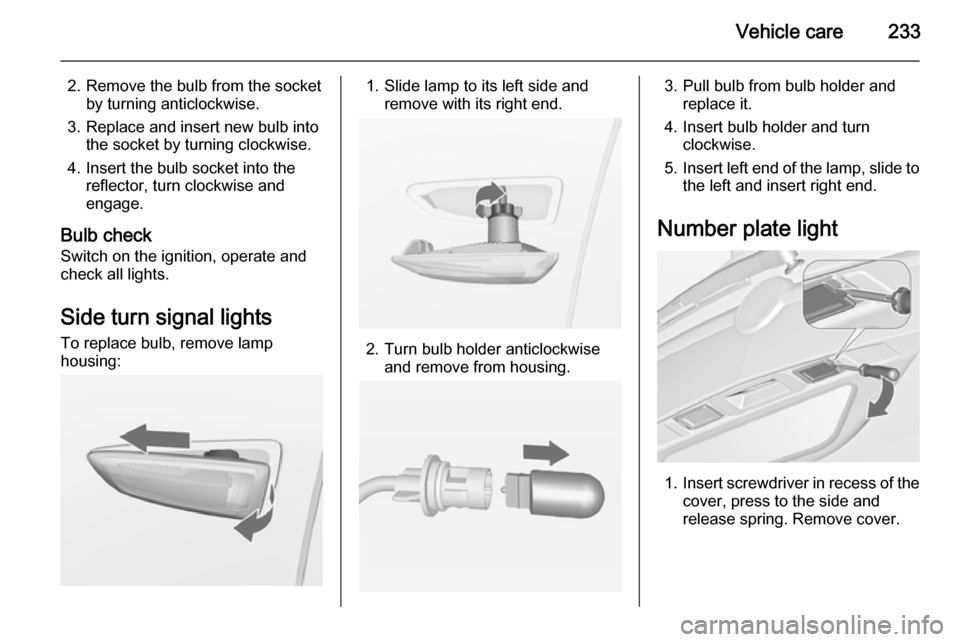
housing:1. Slide lamp to its left side and remove with its right end.
2. Turn bulb holder anticlockwiseand remove from housing.
3. Pull bulb from bulb holder andreplace it.
4. Insert bulb holder and turn clockwise.
5. Insert left end of the lamp, slide to
the left and insert right end.
Number plate light
1. Insert screwdriver in recess of the
cover, press to the side and
release spring. Remove cover.
Page 245 of 297
Vehicle care243
The driver is responsible for correct
adjustment of tyre pressure.9 Warning
If the pressure is too low, this can
result in considerable tyre warm-
up and internal damage, leading to tread separation and even to tyre
blow-out at high speeds.
If the tyre pressure must be reduced
or increased on a vehicle with tyre
pressure monitoring system, switch
off ignition. After adjusting tyre
pressure, switch on ignition and
select the appropriate setting on the
page Tyre load in the Driver
Information Centre, 3 114.
Tyre pressure monitoring system
The tyre pressure monitoring system
(TPMS) checks the pressure of all
four wheels once a minute when
vehicle speed exceeds a certain limit.
Caution
Tyre pressure monitoring system
warns only about low tyre pressure condition and does not replace
regular tyre maintenance by the
driver.
All wheels must be equipped with pressure sensors and the tyres must
have the prescribed pressure.
Notice
In countries where the tyre pressure
monitoring system is legally
required, the use of wheels without
pressure sensors will invalidate the
vehicle type approval.
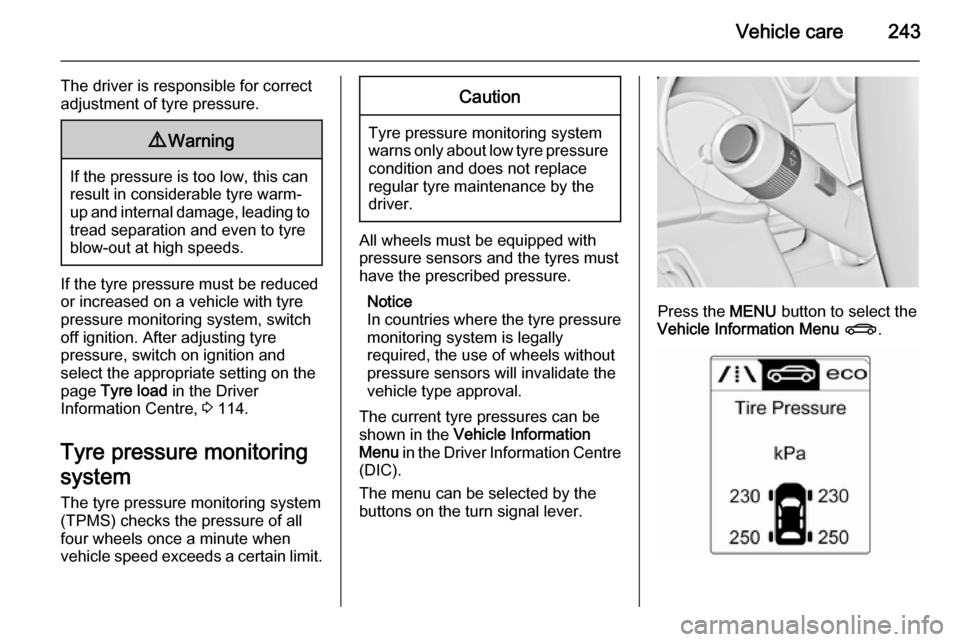
The current tyre pressures can be
shown in the Vehicle Information
Menu in the Driver Information Centre
(DIC).
The menu can be selected by the
buttons on the turn signal lever.
Press the MENU button to select the
Vehicle Information Menu X .
Page 247 of 297
Vehicle care245
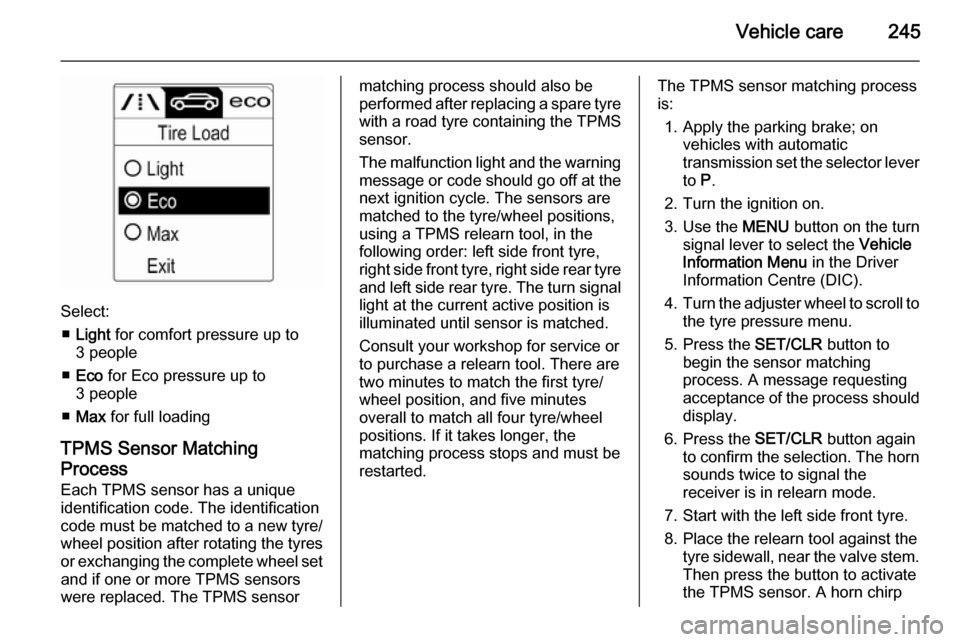
Select:■ Light for comfort pressure up to
3 people
■ Eco for Eco pressure up to
3 people
■ Max for full loading
TPMS Sensor Matching
Process
Each TPMS sensor has a unique
identification code. The identification
code must be matched to a new tyre/
wheel position after rotating the tyres
or exchanging the complete wheel set and if one or more TPMS sensors
were replaced. The TPMS sensor
matching process should also be
performed after replacing a spare tyre
with a road tyre containing the TPMS
sensor.
The malfunction light and the warning
message or code should go off at the
next ignition cycle. The sensors are
matched to the tyre/wheel positions,
using a TPMS relearn tool, in the
following order: left side front tyre,
right side front tyre, right side rear tyre and left side rear tyre. The turn signal
light at the current active position is
illuminated until sensor is matched.
Consult your workshop for service or
to purchase a relearn tool. There are
two minutes to match the first tyre/
wheel position, and five minutes
overall to match all four tyre/wheel
positions. If it takes longer, the
matching process stops and must be
restarted.The TPMS sensor matching process
is:
1. Apply the parking brake; on vehicles with automatic
transmission set the selector lever
to P.
2. Turn the ignition on.
3. Use the MENU button on the turn
signal lever to select the Vehicle
Information Menu in the Driver
Information Centre (DIC).
4. Turn the adjuster wheel to scroll to
the tyre pressure menu.
5. Press the SET/CLR button to
begin the sensor matching
process. A message requesting
acceptance of the process should
display.
6. Press the SET/CLR button again
to confirm the selection. The horn sounds twice to signal the
receiver is in relearn mode.
7. Start with the left side front tyre.
8. Place the relearn tool against the tyre sidewall, near the valve stem.Then press the button to activate
the TPMS sensor. A horn chirp