instrument panel VAUXHALL ZAFIRA TOURER 2016.5 Infotainment system
[x] Cancel search | Manufacturer: VAUXHALL, Model Year: 2016.5, Model line: ZAFIRA TOURER, Model: VAUXHALL ZAFIRA TOURER 2016.5Pages: 171, PDF Size: 2.83 MB
Page 128 of 171

128IndexAActivating CD player ...................106
Activating speech recognition .....112
Activating the radio .......................96
Autostore lists ............................... 97
B BACK button ................................. 89
Basic operation ............................. 89
Bluetooth .................................... 116
Bluetooth connection ..................117
C CD player activating ................................. 106
important information ..............105
usage ...................................... 106
Configuring DAB .........................103
Configuring RDS......................... 101
Control elements overview ...........82
D
DAB ............................................ 103
Digital audio broadcasting ..........103
E Emergency call ........................... 121
Enhanced Other Networks .........101
EON ............................................ 101
F
Favourite lists ............................... 97G
General information .....80, 105,
108, 109, 111, 116
H Handsfree mode .........................117
I
Infotainment system control elements ........................82
instrument panel........................ 82
maximum startup volume ..........95
Multifunction unit .......................82
speed dependent volume ..........95
steering wheel audio controls ...82
tone settings .............................. 93
volume of the traffic
announcements ........................ 95
volume settings ......................... 95
M
Menu operation............................. 89 Mobile phones and CB radio equipment .............................. 125
Multifunction knob......................... 89
Mute.............................................. 88
O
Operation .................................... 122
Page 140 of 171
140IntroductionSwitching a function on or off
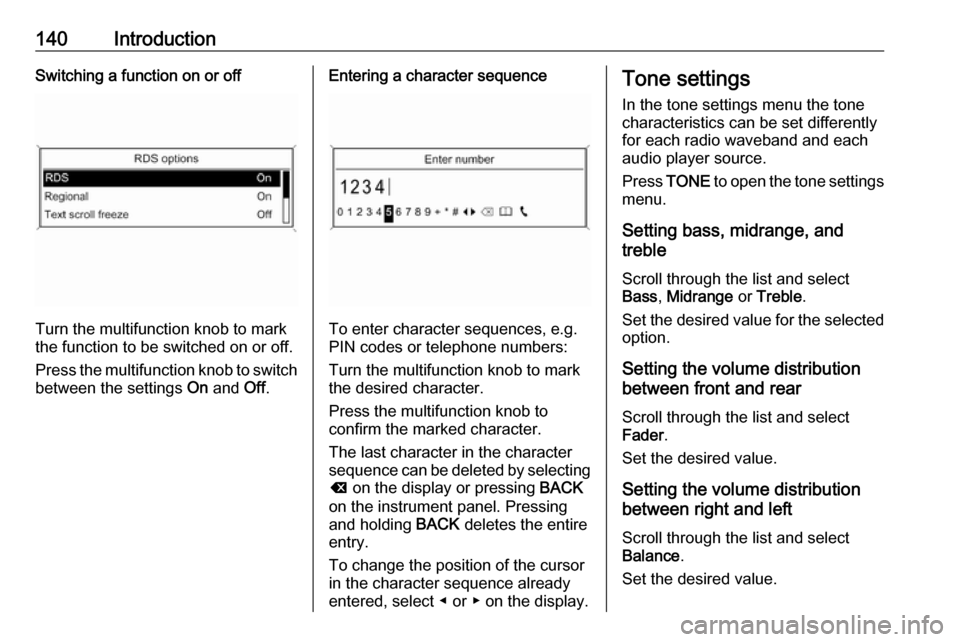
Turn the multifunction knob to mark
the function to be switched on or off.
Press the multifunction knob to switch
between the settings On and Off.
Entering a character sequence
To enter character sequences, e.g.
PIN codes or telephone numbers:
Turn the multifunction knob to mark
the desired character.
Press the multifunction knob to
confirm the marked character.
The last character in the character
sequence can be deleted by selecting
k on the display or pressing BACK
on the instrument panel. Pressing
and holding BACK deletes the entire
entry.
To change the position of the cursor
in the character sequence already
entered, select ◀ or ▶ on the display.
Tone settings
In the tone settings menu the tone characteristics can be set differently
for each radio waveband and each
audio player source.
Press TONE to open the tone settings
menu.
Setting bass, midrange, and
treble
Scroll through the list and select
Bass , Midrange or Treble .
Set the desired value for the selected
option.
Setting the volume distribution
between front and rear
Scroll through the list and select
Fader .
Set the desired value.
Setting the volume distribution
between right and left
Scroll through the list and select
Balance .
Set the desired value.