horn VAUXHALL ZAFIRA TOURER 2016 Owner's Manual
[x] Cancel search | Manufacturer: VAUXHALL, Model Year: 2016, Model line: ZAFIRA TOURER, Model: VAUXHALL ZAFIRA TOURER 2016Pages: 305, PDF Size: 9.15 MB
Page 13 of 305

In brief111Power windows .....................31
2 Exterior mirrors .....................28
3 Cruise control .....................179
Speed limiter ....................... 180
Adaptive cruise control .......181
Forward collision alert .........188
4 Side air vents ...................... 156
5 Windscreen wiper,
windscreen washer
system, headlight washer
system, rear wiper, rear
washer system ......................98
6 Instruments ........................ 104
7 Steering wheel controls .......97
8 Driver Information Centre .... 116
9 Turn and lane-change
signals, headlight flash,
low beam and high beam,
high beam assist .................145
Exit lighting ......................... 149
Parking lights ...................... 146
Buttons for Driver
Information Centre ..............11610Central locking system ..........21
Hazard warning flashers ....145
Sport mode ........................ 177
Tour mode .......................... 177
Fuel selector ....................... 105
Control indicator for airbag
deactivation ........................ 111
Control indicator for front
passenger seat belt ...........110
11 Info-Display ........................ 120
12 Centre air vents .................. 156
13 Anti-theft alarm system
status LED ........................... 26
14 Glovebox .............................. 66
Fuse box ............................. 242
15 Climate control system ........ 150
16 AUX input, USB input, SD
card slot ................................ 10
Power outlet ........................ 102
17 Selector lever, manual
transmission ....................... 172
Automatic transmission ......16918Traction Control system .....175
Electronic Stability Control . 176
Lane departure warning .....207
19 Electric parking brake .........173
20 Parking assist systems .......194
Stop-start button .................161
21 Ignition switch with
steering wheel lock ............160
22 Horn ..................................... 98
Driver airbag ........................ 57
23 Bonnet release lever ..........224
24 Storage compartment ..........68
25 Steering wheel adjustment ..97
26 Light switch ........................ 138
Headlight range
adjustment ......................... 141
Front fog lights ...................146
Rear fog light ...................... 146
Instrument illumination .......147
Page 15 of 305
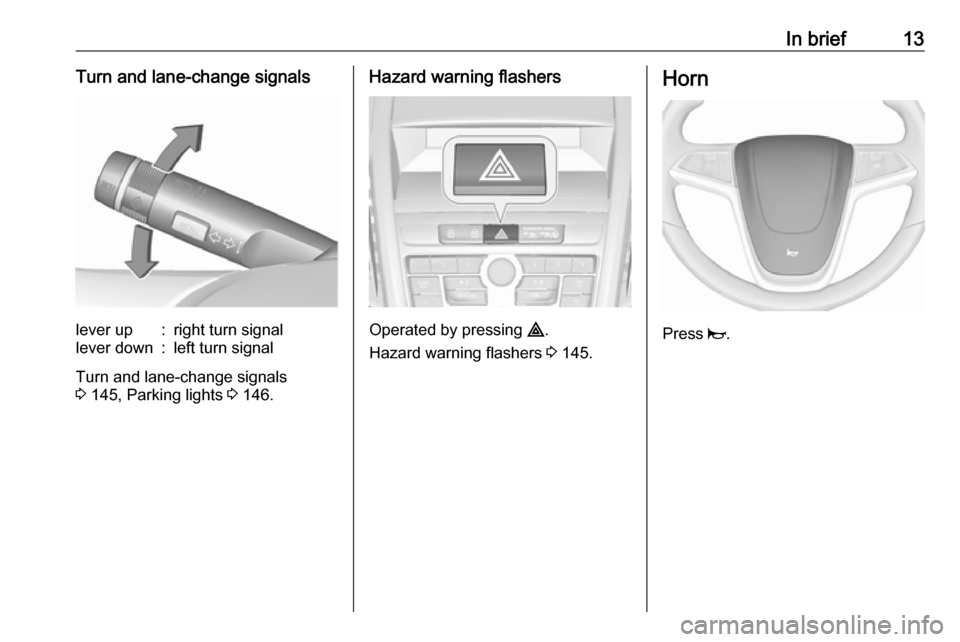
In brief13Turn and lane-change signalslever up:right turn signallever down:left turn signal
Turn and lane-change signals
3 145, Parking lights 3 146.
Hazard warning flashers
Operated by pressing ¨.
Hazard warning flashers 3 145.
Horn
Press j.
Page 29 of 305
Keys, doors and windows27Notice
Changes to the vehicle interior such
as the use of seat covers, and open
windows or sunroof, could impair the
function of passenger compartment
monitoring.
Activation without monitoring of
passenger compartment and
vehicle inclination
Switch off the monitoring of
passenger compartment and vehicle
inclination when animals are being
left in the vehicle, because of high
volume ultrasonic signals or
movements triggering the alarm. Also switch off when the vehicle is on a
ferry or train.
1. Close tailgate, bonnet and windows.
2. Press o. LED in the button
illuminates for a maximum of
10 minutes.
3. Close doors.
4. Activate the anti-theft alarm system.
Status message is displayed in the
Driver Information Centre.
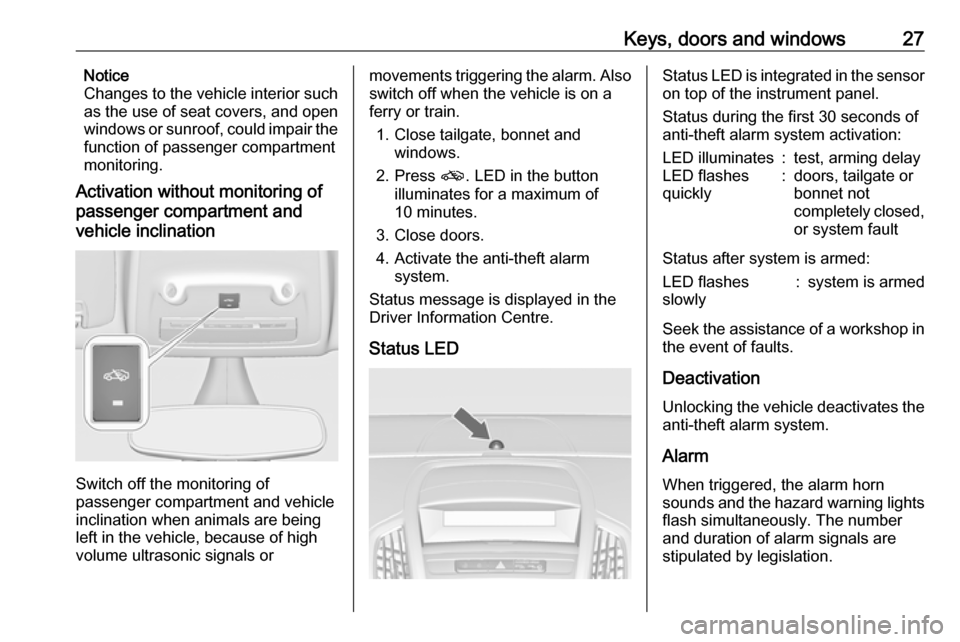
Status LEDStatus LED is integrated in the sensor
on top of the instrument panel.
Status during the first 30 seconds of
anti-theft alarm system activation:LED illuminates:test, arming delayLED flashes
quickly:doors, tailgate or
bonnet not
completely closed,
or system fault
Status after system is armed:
LED flashes
slowly:system is armed
Seek the assistance of a workshop in the event of faults.
Deactivation Unlocking the vehicle deactivates the
anti-theft alarm system.
Alarm When triggered, the alarm hornsounds and the hazard warning lights
flash simultaneously. The number
and duration of alarm signals are
stipulated by legislation.
Page 98 of 305

96Instruments and controlsInstruments and
controlsControls ....................................... 97
Steering wheel adjustment ........97
Steering wheel controls .............97
Heated steering wheel ...............97
Horn ........................................... 98
Windscreen wiper/washer .........98
Rear window wiper/washer .....100
Outside temperature ................100
Clock ....................................... 101
Power outlets ........................... 102
Cigarette lighter .......................103
Ashtrays .................................. 103
Warning lights, gauges and indi‐ cators ......................................... 104
Instrument cluster ....................104
Speedometer ........................... 104
Odometer ................................ 104
Trip odometer .......................... 104
Tachometer ............................. 104
Fuel gauge .............................. 105
Fuel selector ............................ 105
Engine coolant temperature gauge ..................................... 106
Service display ........................ 106Control indicators ....................107
Turn signal ............................... 110
Seat belt reminder ...................110
Airbag and belt tensioners .......110
Airbag deactivation ..................111
Charging system .....................111
Malfunction indicator light ........111
Service vehicle soon ...............111
Brake and clutch system .........111
Operate pedal .......................... 112
Electric parking brake ..............112
Electric parking brake fault ......112
Antilock brake system (ABS) ...112
Upshift ..................................... 113
Power steering ........................ 113
Lane departure warning ..........113
Ultrasonic parking assist .........113
Electronic Stability Control off . 113
Electronic Stability Control and Traction Control system .........113
Traction Control system off .....114
Preheating ............................... 114
Diesel particle filter ..................114
AdBlue ..................................... 114
Tyre pressure monitoring system .................................... 114
Engine oil pressure ..................114
Low fuel ................................... 115
Immobiliser .............................. 115
Reduced engine power ...........115Exterior light ............................ 115
High beam ............................... 115
High beam assist .....................115
Adaptive forward lighting .........115
Fog light ................................... 116
Rear fog light ........................... 116
Low washer fluid ......................116
Cruise control .......................... 116
Adaptive cruise control ............116
Vehicle detected ahead ...........116
Door open ................................ 116
Information displays ...................116
Driver Information Centre ........116
Graphic-Info-Display, Colour- Info-Display ............................ 120
Vehicle messages ......................122
Warning chimes .......................125
Battery voltage ........................ 126
Trip computer ............................. 126
Vehicle personalisation ..............129
OnStar ....................................... 133
Page 100 of 305
98Instruments and controlsThe recommended grip areas of the
steering wheel are heated quicker
and to a higher temperature than the
other areas.
Heating is operational when the
engine is running and during an
Autostop.
Stop-start system 3 161.
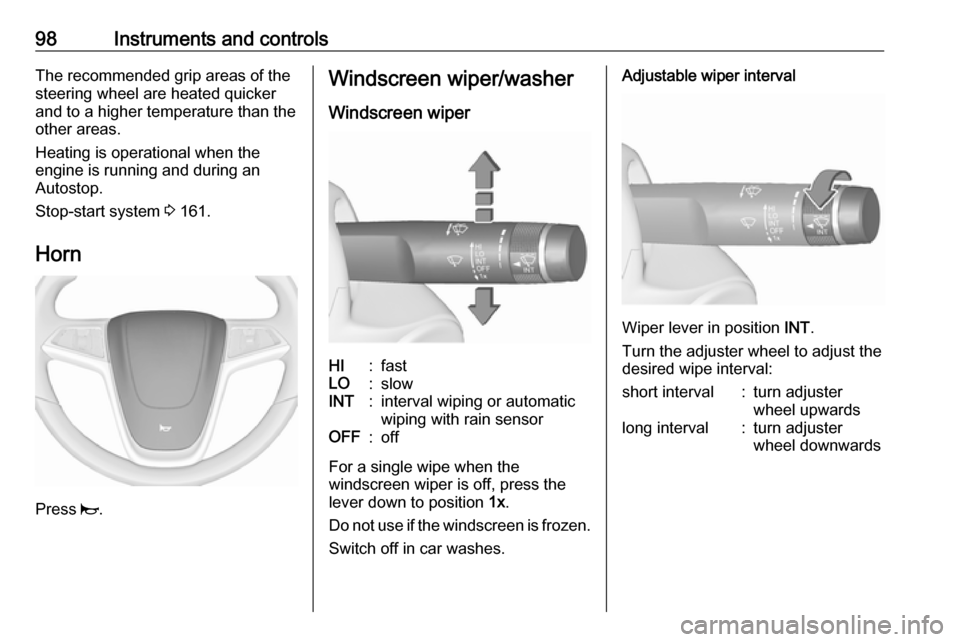
Horn
Press j.
Windscreen wiper/washer
Windscreen wiperHI:fastLO:slowINT:interval wiping or automatic
wiping with rain sensorOFF:off
For a single wipe when the
windscreen wiper is off, press the
lever down to position 1x.
Do not use if the windscreen is frozen.
Switch off in car washes.
Adjustable wiper interval
Wiper lever in position INT.
Turn the adjuster wheel to adjust the
desired wipe interval:
short interval:turn adjuster
wheel upwardslong interval:turn adjuster
wheel downwards
Page 136 of 305
134Instruments and controls● OnStar smartphone application
● OnStar remote services, e.g. location of the vehicle, activation
of horn and lights, control of
central locking system
● Stolen vehicle assistance
● Vehicle health check
● Destination download
Notice
All functions requiring data
connection to the vehicle are no
longer available if the vehicle ignition
has not been turned on for ten days.
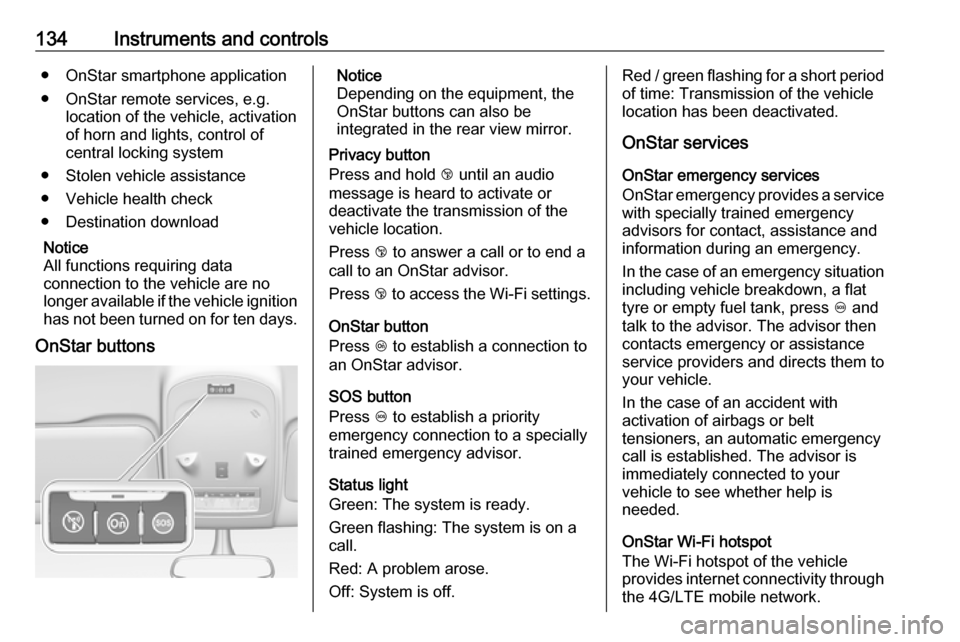
OnStar buttonsNotice
Depending on the equipment, the
OnStar buttons can also be
integrated in the rear view mirror.
Privacy button
Press and hold j until an audio
message is heard to activate or
deactivate the transmission of the
vehicle location.
Press j to answer a call or to end a
call to an OnStar advisor.
Press j to access the Wi-Fi settings.
OnStar button
Press Z to establish a connection to
an OnStar advisor.
SOS button
Press [ to establish a priority
emergency connection to a specially trained emergency advisor.
Status light
Green: The system is ready.
Green flashing: The system is on a
call.
Red: A problem arose.
Off: System is off.Red / green flashing for a short period of time: Transmission of the vehicle
location has been deactivated.
OnStar services
OnStar emergency services
OnStar emergency provides a service with specially trained emergency
advisors for contact, assistance and
information during an emergency.
In the case of an emergency situation
including vehicle breakdown, a flat
tyre or empty fuel tank, press [ and
talk to the advisor. The advisor then
contacts emergency or assistance
service providers and directs them to
your vehicle.
In the case of an accident with
activation of airbags or belt
tensioners, an automatic emergency
call is established. The advisor is
immediately connected to your
vehicle to see whether help is
needed.
OnStar Wi-Fi hotspot
The Wi-Fi hotspot of the vehicle
provides internet connectivity through
the 4G/LTE mobile network.
Page 137 of 305

Instruments and controls135Notice
The Wi-Fi hotspot functionality is not
available for all markets.
Up to seven devices may be
connected.
To connect a mobile device with the
OnStar Wi-Fi hotspot:
1. Press j and then select Wi-Fi
settings on the Info-Display. The
settings displayed include the Wi- Fi hotspot name (SSID),
password and connection type.
2. Start a Wi-Fi network search on your mobile device.
3. Select your vehicle hotspot (SSID) when listed.
4. When prompted, enter the password on your mobile device.
Notice
To change the SSID or password, select Z and talk to an OnStar
advisor or logon to your account.
To switch off the Wi-Fi hotspot
functionality, press Z to call an
OnStar advisor.Smartphone app
With the My Vauxhall smartphone
app, some vehicle functions can be
operated via a smartphone.
The following functions are available: ● Lock or unlock doors.
● Honk horn or flash lights.
● Check fuel level, engine oil life and tyre pressure (only with tyre
pressure monitoring system).
● Send navigation destination to the vehicle, if equipped with a
built-in navigation system.
● Locate vehicle on a map.
● Manage Wi-Fi settings.
To operate these functions, download
the app from the respective app store.
Remote service
If desired, use any phone to call an
OnStar advisor, who can remotely
operate specific vehicle functions.
Find the respective OnStar phone
number on our country-specific
website.The following functions are available:
● Lock or unlock doors.
● Provide information on the vehicle location.
● Honk horn or flash lights.
Stolen vehicle assistance
If a vehicle is stolen, the OnStar
stolen vehicle assistance service can
provide support in locating and
recovering the vehicle.Theft alert
When the anti-theft alarm system is triggered, a notification is sent to
OnStar. You are then informed about
this event by text message or email.
If required, report the theft to the
authorities and request OnStar stolen
vehicle assistance. Use any phone to call an OnStar advisor. Find the
respective OnStar phone number on
our country-specific website.Remote ignition block
By sending remote signals, OnStar
can block the ignition cycle
preventing the vehicle from restarting once it has been turned off.
Page 244 of 305

242Vehicle careNo.Circuit33Adaptive forward lighting/Auto‐
matic light control34Exhaust gas recirculation35Exterior mirror/Rain sensor36Climate control37Canister vent solenoid38Vacuum pump39Central control module40Windscreen washer/Rear
window washer system41Right high beam (Halogen)42Radiator fan43Windscreen wiper44Windscreen wiper45Radiator fan46–47Horn48Radiator fanNo.Circuit49Fuel pump50Headlamp levelling/Adaptive
forward lighting51Air shutter52Auxiliary heater/Diesel engine53Transmission control module/
Engine control module54Vacuum pump/Instrument
panel cluster/Heating ventila‐
tion/Air conditioning system
After having changed defective fuses,
close the fuse box cover and press
until it engages.
If the fuse box cover is not closed
correctly, malfunctions may occur.
Instrument panel fuse box
In left-hand drive vehicles, the fuse
box is behind the storage
compartment in the instrument panel.
Open the compartment and push it to the left to unlock. Fold the
compartment down and remove it.
Page 252 of 305

250Vehicle care3. Press MENU on the turn signal
lever to select the Vehicle
Information Menu in the Driver
Information Centre.
4. Turn the adjuster wheel to scroll to
the tyre pressure menu.
5. Press SET/CLR to begin the
sensor matching process. A
message requesting acceptance
of the process should display.
6. Press SET/CLR again to confirm
the selection. The horn sounds
twice to signal the receiver is in
relearn mode.
7. Start with the left side front wheel.
8. Place the relearn tool against the tyre sidewall, near the valve stem.Then press the button to activatethe TPMS sensor. A horn chirp
confirms that the sensor
identification code has been
matched to this wheel position.
9. Proceed to the right side front wheel, and repeat the procedure
in Step 8.
10. Proceed to the right side rear wheel, and repeat the procedure
in Step 8.11. Proceed to the left side rear wheel, and repeat the procedure
in Step 8. The horn sounds twice
to indicate the sensor
identification code has been
matched to the left side rear tyre,
and the TPMS sensor matching
process is no longer active.
12. Turn off the ignition.
13. Set all four tyres to the recommended air pressure level
as indicated on the tyre pressure
label.
14. Ensure the tyre loading status is set according selected pressure
3 116.
Temperature dependency The tyre pressure depends on the
temperature of the tyre. During
driving, tyre temperature and
pressure increase. Tyre pressure
values provided on the tyre
information label and tyre pressure
chart are valid for cold tyres, which means at 20 °C. The pressure
increases by nearly 10 kPa for a10 °C temperature increase. This
must be considered when warm tyres are checked.
The tyre pressure value displayed in
the Driver Information Centre shows
the real tyre pressure. A cooled down
tyre will show a decreased value,
which does not indicate an air leak.
Tread depthCheck tread depth at regular
intervals.
Tyres should be replaced for safety
reasons at a tread depth of 2-3 mm
(4 mm for winter tyres).
For safety reasons, it is
recommended that the tread depth of
the tyres on one axle should not vary
by more than 2 mm.
Page 264 of 305
262Vehicle care4. Switch on electrical consumers(e.g. headlights, heated rear
window) of the vehicle receiving
the jump start.
5. Reverse above sequence exactly when removing leads.Towing
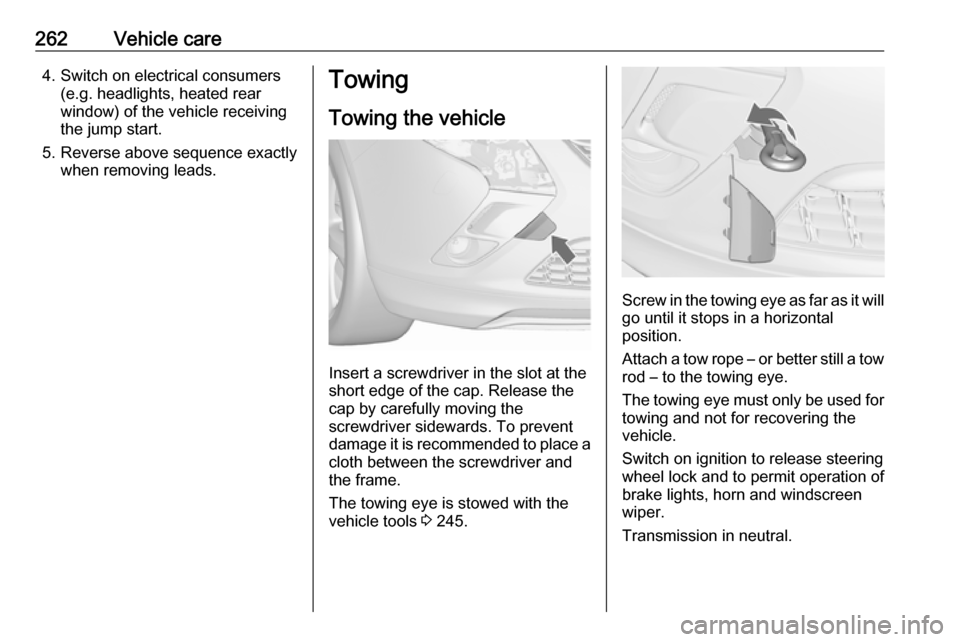
Towing the vehicle
Insert a screwdriver in the slot at the
short edge of the cap. Release the
cap by carefully moving the
screwdriver sidewards. To prevent
damage it is recommended to place a cloth between the screwdriver and
the frame.
The towing eye is stowed with the vehicle tools 3 245.
Screw in the towing eye as far as it will
go until it stops in a horizontal
position.
Attach a tow rope – or better still a tow
rod – to the towing eye.
The towing eye must only be used for towing and not for recovering the
vehicle.
Switch on ignition to release steering wheel lock and to permit operation of
brake lights, horn and windscreen
wiper.
Transmission in neutral.