brake VAUXHALL ZAFIRA TOURER 2017 Owner's Guide
[x] Cancel search | Manufacturer: VAUXHALL, Model Year: 2017, Model line: ZAFIRA TOURER, Model: VAUXHALL ZAFIRA TOURER 2017Pages: 289, PDF Size: 8.91 MB
Page 163 of 289
Driving and operating161Automatic transmission
The automatic transmission permits
automatic gearshifting (automatic
mode) or manual gearshifting
(manual mode).
Manual shifting is possible in manual mode M by tapping the selector lever
to + or - 3 162.
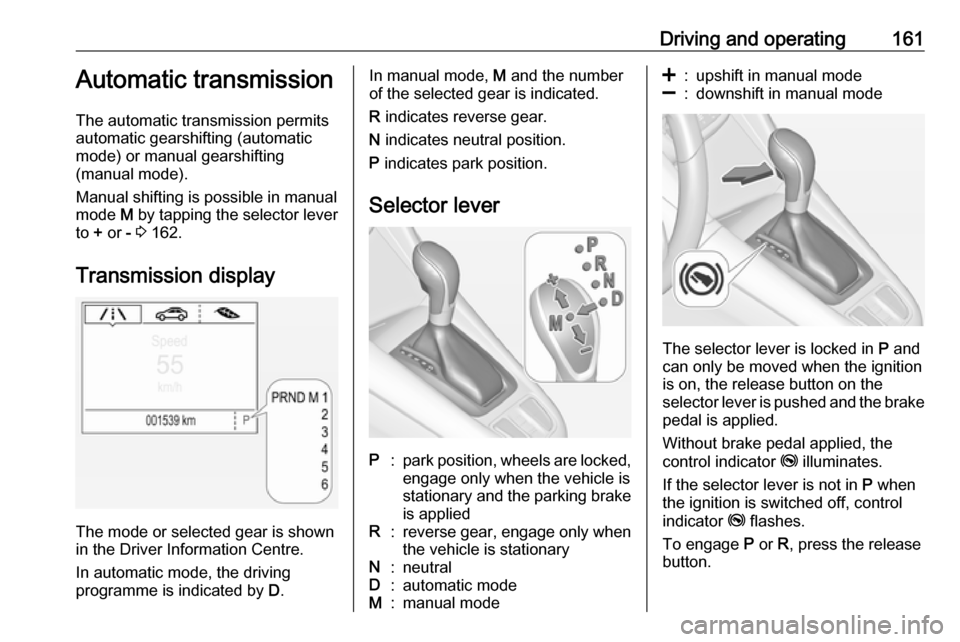
Transmission display
The mode or selected gear is shown
in the Driver Information Centre.
In automatic mode, the driving
programme is indicated by D.
In manual mode, M and the number
of the selected gear is indicated.
R indicates reverse gear.
N indicates neutral position.
P indicates park position.
Selector leverP:park position, wheels are locked, engage only when the vehicle is
stationary and the parking brake
is appliedR:reverse gear, engage only when
the vehicle is stationaryN:neutralD:automatic modeM:manual mode<:upshift in manual mode]:downshift in manual mode
The selector lever is locked in P and
can only be moved when the ignition
is on, the release button on the
selector lever is pushed and the brake
pedal is applied.
Without brake pedal applied, the
control indicator j illuminates.
If the selector lever is not in P when
the ignition is switched off, control
indicator j flashes.
To engage P or R, press the release
button.
Page 164 of 289

162Driving and operatingThe engine can only be started with
the lever in position P or N. When
position N is selected, press the brake
pedal or apply the parking brake
before starting.
Do not accelerate while engaging a
gear. Never depress the accelerator
pedal and brake pedal at the same
time.
When a gear is engaged, the vehicle
slowly begins to creep when the
brake is released.
Engine braking To utilise the engine braking effect,select a lower gear in good time when
driving downhill, see manual mode.
Rocking the vehicle
Rocking the vehicle is only
permissible if the vehicle is stuck in
sand, mud or snow. Move the selector
lever between D and R in a repeat
pattern. Do not race the engine and
avoid sudden acceleration.Parking
Apply the parking brake and engage
P .
The ignition key can only be removed
when the selector lever is in position
P .
Manual mode
Move selector lever out of position D
towards the left in position M.
Tap selector lever upwards + to shift
to a higher gear.
Tap the selector lever downwards - to
shift to a lower gear.
If a higher gear is selected when
vehicle speed is too low, or a lower
gear when vehicle speed is too high,
the shift is not executed. This can
cause a message in the Driver
Information Centre.
In manual mode, no automatic
shifting to a higher gear takes place
at high engine revolutions.
Gear shift indication
The symbol R with a number beside
it is indicated when gearshifting is
recommended for fuel saving
reasons.
Shift indication appears only in
manual mode.
Electronic driving programmes
● Following a cold start, the operating temperature
programme increases engine
speed to quickly bring the
catalytic converter to the required
temperature.
Page 165 of 289
Driving and operating163● The automatic neutral shiftfunction automatically shifts gear
to idling when the vehicle is
stopped with a forward gear
engaged and the brake pedal is
pressed.
● When SPORT mode is engaged,
the vehicle shifts at higher engine speeds (unless cruise control is
on). SPORT mode 3 170.
● Special programmes automatically adapt the gearshift
points when driving up inclines or
down hills.
● In snowy or icy conditions or on other slippery surfaces, the
electronic transmission control
enables the driver to select
manually first, second or third
gear for starting off.
Kickdown
If the accelerator pedal is pressed
down completely in automatic mode, the transmission shifts to a lower gear
depending on engine speed.Fault
In the event of a fault a message is
displayed in the Driver Information
Centre. Vehicle messages 3 122.
The transmission no longer shifts automatically. Continued travel is
possible with manual shifting.
Only the highest gear is available.
Depending on the fault, 2nd gear may also be available in manual mode.
Shift only when vehicle is at a
standstill.
Have the cause of the fault remedied by a workshop.
Interruption of power supply In the event of an interruption of
power supply, the selector lever
cannot be moved out of the P
position. The ignition key cannot be removed from the ignition switch.
If the vehicle battery is discharged,
start the vehicle using jump leads
3 250.
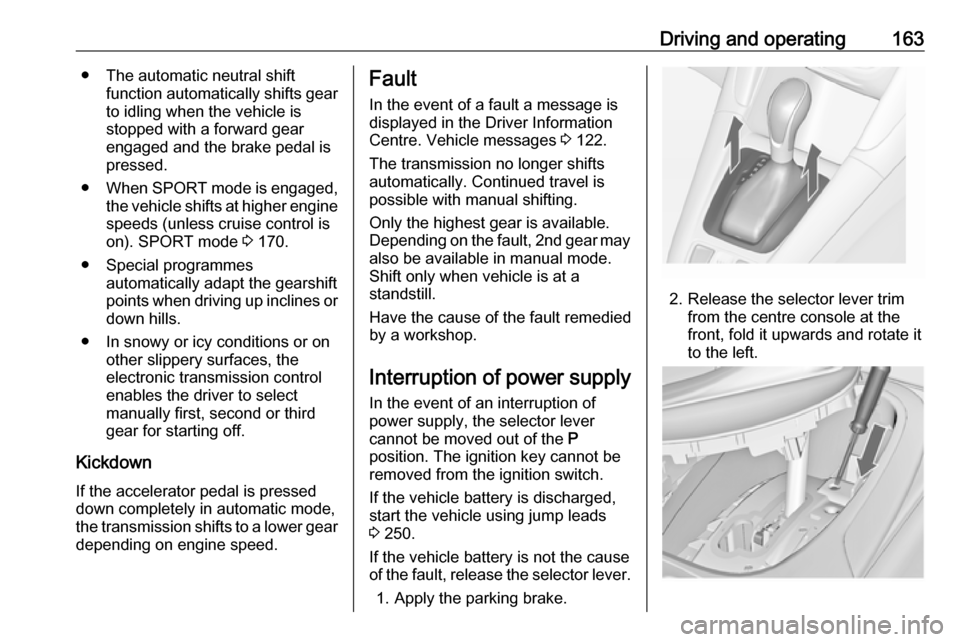
If the vehicle battery is not the cause
of the fault, release the selector lever.
1. Apply the parking brake.
2. Release the selector lever trim from the centre console at the
front, fold it upwards and rotate it
to the left.
Page 167 of 289
Driving and operating165Brakes
The brake system comprises two
independent brake circuits.
If a brake circuit fails, the vehicle can
still be braked using the other brake
circuit. However, braking effect is
achieved only when the brake pedal
is depressed firmly. Considerably
more force is needed for this. The
braking distance is extended. Seek the assistance of a workshop before
continuing your journey.
When the engine is not running, the
support of the brake servo unit
disappears once the brake pedal has
been depressed once or twice.
Braking effect is not reduced, but
braking requires significantly greater
force. It is especially important to bear this in mind when being towed.
Control indicator R 3 111.
Antilock brake system
Antilock brake system (ABS)
prevents the wheels from locking.ABS starts to regulate brake pressure as soon as a wheel shows a tendency to lock. The vehicle remains
steerable, even during hard braking.
ABS control is made apparent
through a pulse in the brake pedal
and the noise of the regulation
process.
For optimum braking, keep the brake
pedal fully depressed throughout the
braking process, despite the fact that
the pedal is pulsating. Do not reduce
the pressure on the pedal.
After starting off the system performs
a self-test which may be audible.
Control indicator u 3 112.
Adaptive brake light During full braking, all three brake
lights flash for the duration of ABS
control.
Fault9 Warning
If there is a fault in the ABS, the
wheels may be liable to lock due
to braking that is heavier than
normal. The advantages of ABS are no longer available. During
hard braking, the vehicle can no longer be steered and may
swerve.
Have the cause of the fault remedied
by a workshop.
Parking brake
9 Warning
Before leaving the vehicle, check
parking brake status. Control
indicator R (manual parking
brake) or m (electrical parking
brake) must illuminate constantly.
Page 168 of 289
166Driving and operatingManual parking brake9Warning
Always apply parking brake firmly
without operating the release
button, and apply as firmly as
possible on a downhill or uphill
slope.
To release the parking brake, pull
the lever up slightly, press the
release button and fully lower the
lever.
To reduce the operating forces of
the parking brake, depress the
foot brake at the same time.
Control indicator R 3 111.
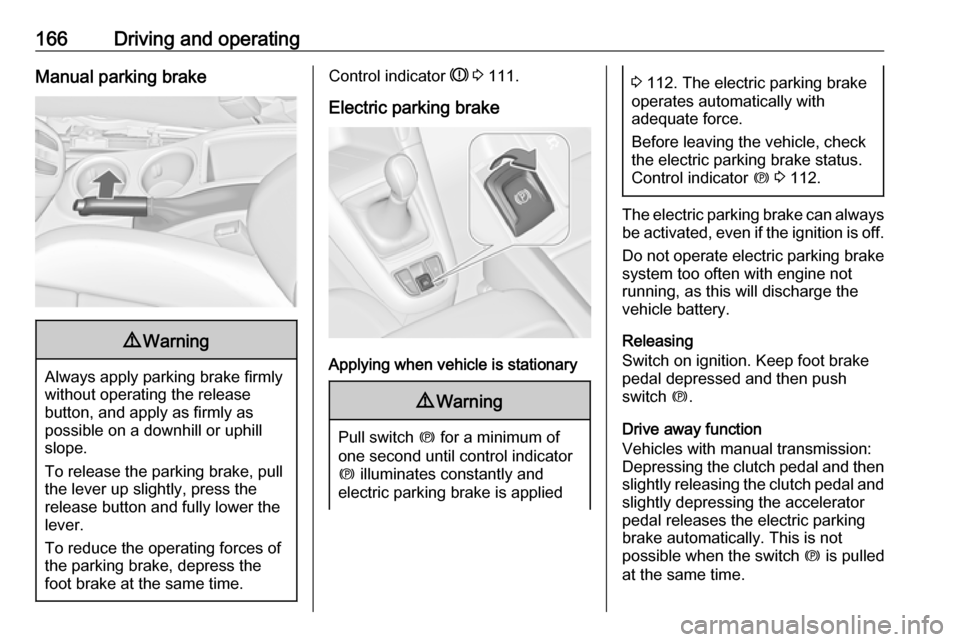
Electric parking brake
Applying when vehicle is stationary
9 Warning
Pull switch m for a minimum of
one second until control indicator
m illuminates constantly and
electric parking brake is applied
3 112. The electric parking brake
operates automatically with
adequate force.
Before leaving the vehicle, check
the electric parking brake status.
Control indicator m 3 112.
The electric parking brake can always
be activated, even if the ignition is off.
Do not operate electric parking brake
system too often with engine not
running, as this will discharge the
vehicle battery.
Releasing
Switch on ignition. Keep foot brake
pedal depressed and then push
switch m.
Drive away function
Vehicles with manual transmission:
Depressing the clutch pedal and then
slightly releasing the clutch pedal and slightly depressing the accelerator
pedal releases the electric parking
brake automatically. This is not
possible when the switch m is pulled
at the same time.
Page 169 of 289

Driving and operating167Vehicles with automatic transmission:
Engaging D and then depressing the
accelerator pedal releases the
electric parking brake automatically. This is not possible when the switch
m is pulled at the same time.
Dynamic braking when vehicle is
moving
When the vehicle is moving and the
switch m is kept pulled, the electric
parking brake system will decelerate the vehicle, but will not apply
statically.
As soon as the switch m is released,
dynamic braking will be stopped.
Functionality check
When the vehicle is not moving, the electric parking brake might be
applied automatically. This is done to
check the system.
Fault
Failure mode of electric parking brake
is indicated by a control indicator j
and by a vehicle message which is
displayed in the Driver Information
Centre. Vehicle messages 3 122.Apply electric parking brake: pull and
hold switch m for more than five
seconds. If control indicator m
illuminates, electric parking brake is
applied.
Release electric parking brake: push and hold the switch m for more than
two seconds. If control indicator m
extinguishes, electric parking brake is
released.
Control indicator m flashes: electric
parking brake is not fully applied or
released. When continuously
flashing, release electric parking
brake and retry applying.
Brake assist If brake pedal is depressed quickly
and forcefully, maximum brake force
is automatically applied.
Operation of brake assist might
become apparent by a pulse in the
brake pedal and a greater resistance
when depressing the brake pedal.Maintain steady pressure on the
brake pedal as long as full braking is
required. Maximum brake force is
automatically reduced when brake
pedal is released.
Hill start assist The system helps prevent unintendedmovement when driving away on
inclines.
When releasing the brake pedal after
stopping on an incline, the brakes
remain on for a further two seconds.
The brakes release automatically as
soon as the vehicle begins to
accelerate or the two seconds holding
time is over.
The hill start assist is not active during
an Autostop.
Page 170 of 289
168Driving and operatingRide control systems
Traction Control system
The Traction Control system (TC) is a component of the Electronic Stability
Control.
TC improves driving stability when
necessary, regardless of the type of
road surface or tyre grip, by
preventing the drive wheels from
spinning.
As soon as the drive wheels starts to
spin, engine output is reduced and
the wheel spinning the most is braked
individually. This considerably
improves the driving stability of the
vehicle on slippery road surfaces.
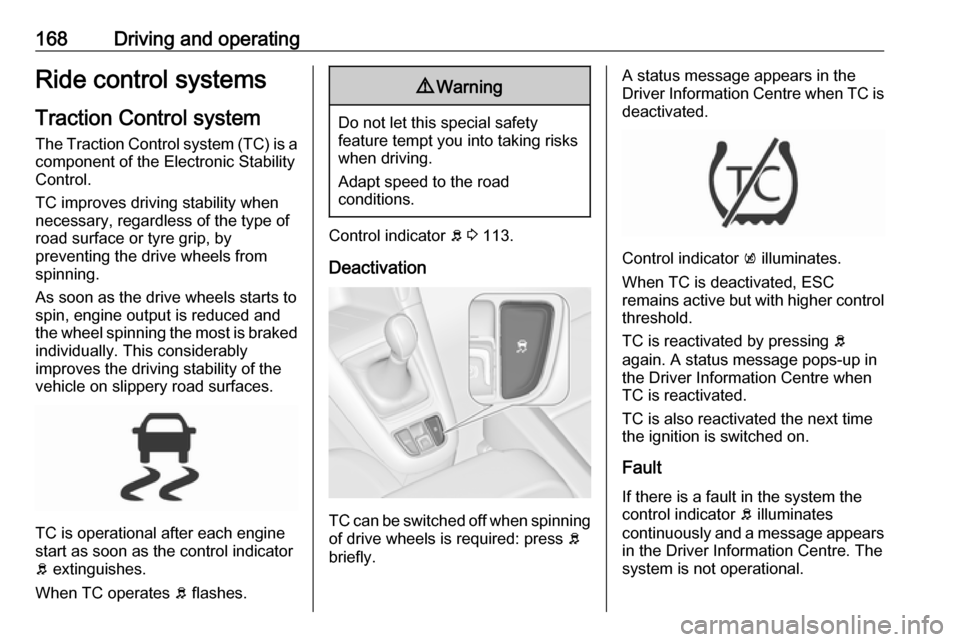
TC is operational after each engine
start as soon as the control indicator
b extinguishes.
When TC operates b flashes.
9 Warning
Do not let this special safety
feature tempt you into taking risks
when driving.
Adapt speed to the road
conditions.
Control indicator b 3 113.
Deactivation
TC can be switched off when spinning of drive wheels is required: press b
briefly.
A status message appears in the
Driver Information Centre when TC is
deactivated.
Control indicator k illuminates.
When TC is deactivated, ESC
remains active but with higher control
threshold.
TC is reactivated by pressing b
again. A status message pops-up in
the Driver Information Centre when
TC is reactivated.
TC is also reactivated the next time
the ignition is switched on.
Fault
If there is a fault in the system the
control indicator b illuminates
continuously and a message appears in the Driver Information Centre. The
system is not operational.
Page 171 of 289
Driving and operating169Have the cause of the fault remedied
by a workshop.
Electronic Stability Control
Electronic Stability Control (ESC)
improves driving stability when
necessary, regardless of the type of
road surface or tyre grip.
As soon as the vehicle starts to
swerve (understeer/oversteer),
engine output is reduced and the wheels are braked individually.
ESC operates in combination with the Traction Control system (TC). It
prevents the drive wheels from
spinning.
ESC is operational after each engine
start as soon as the control indicator
b extinguishes.
When ESC operates b flashes.
9 Warning
Do not let this special safety
feature tempt you into taking risks
when driving.
Adapt speed to the road
conditions.
Control indicator b 3 113.
Deactivation
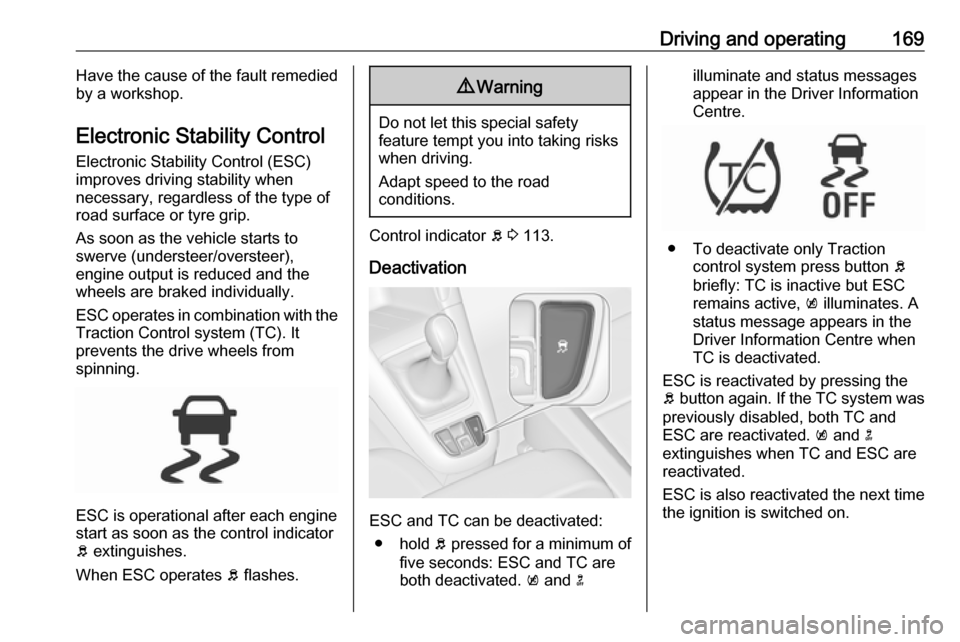
ESC and TC can be deactivated: ● hold b pressed for a minimum of
five seconds: ESC and TC are
both deactivated. k and n
illuminate and status messages
appear in the Driver Information
Centre.
● To deactivate only Traction control system press button b
briefly: TC is inactive but ESC
remains active, k illuminates. A
status message appears in the
Driver Information Centre when
TC is deactivated.
ESC is reactivated by pressing the
b button again. If the TC system was
previously disabled, both TC and
ESC are reactivated. k and n
extinguishes when TC and ESC are
reactivated.
ESC is also reactivated the next time
the ignition is switched on.
Page 173 of 289

Driving and operating171The settings of the systems are
adapted to a comfort driving style:
● Damping of shock absorbers reacts more softly.
● Accelerator pedal reacts with standard settings.
● Steering support is in standard mode.
● Shift points of automatic transmission occur in a comfort
mode.
Normal mode
All settings of the systems are
adapted to standard values.
Drive mode control
Within each manual selected driving
mode SPORT, TOUR or Normal, the
Drive Mode Control (DMC) detects
and analyses continuously the real
driving characteristics, responses by
the driver, and the active dynamic
state of the vehicle. If necessary, the
control unit of DMC automatically
changes the settings within the
selected driving mode or, whenrecognising greater variations, the
driving mode is changed for the
length of variation.
If, for example, Normal mode is
selected and DMC detects a sporty
driving behaviour, DMC changes
several settings of the Normal mode
into sporty settings. The DMC
changes to SPORT mode in case of
very sporty driving behaviour.
If, for example, TOUR mode is
selected and whilst driving on a
winding road a sudden hard brake is
necessary, DMC will detect the
dynamic vehicle condition and
changes the settings for suspension
to SPORT mode to increase vehicle
stability.
When the driving characteristic or the dynamic vehicle state returns to
former state, DMC will change the
settings to the preselected driving
mode.
Personalised settings in the Sport
mode
The driver can select the functions of
the SPORT mode when SPORT is
pressed.Select the relevant settings in
Settings in the Info-Display.
Info-Display 3 121.
Vehicle personalisation 3 124.
Page 174 of 289
172Driving and operatingDriver assistance
systems9 Warning
Driver assistance systems are
developed to support the driver
and not to replace the driver's
attention.
The driver accepts full
responsibility when driving the
vehicle.
When using driver assistance
systems, always take care
regarding the current traffic
situation.
Cruise control
The cruise control can store and
maintain speeds of approx. 20 mph to maximum vehicle speed. Deviations
from the stored speeds may occur
when driving uphill or downhill.
For safety reasons, the cruise control cannot be activated until the foot
brake has been operated once.
Activation in first gear is not possible.
Do not use the cruise control if it is not advisable to maintain a constant
speed.
With automatic transmission, only
activate cruise control in automatic
mode.
Control indicator m 3 115.
Switching on
Press m; control indicator m in
instrument cluster illuminates white.
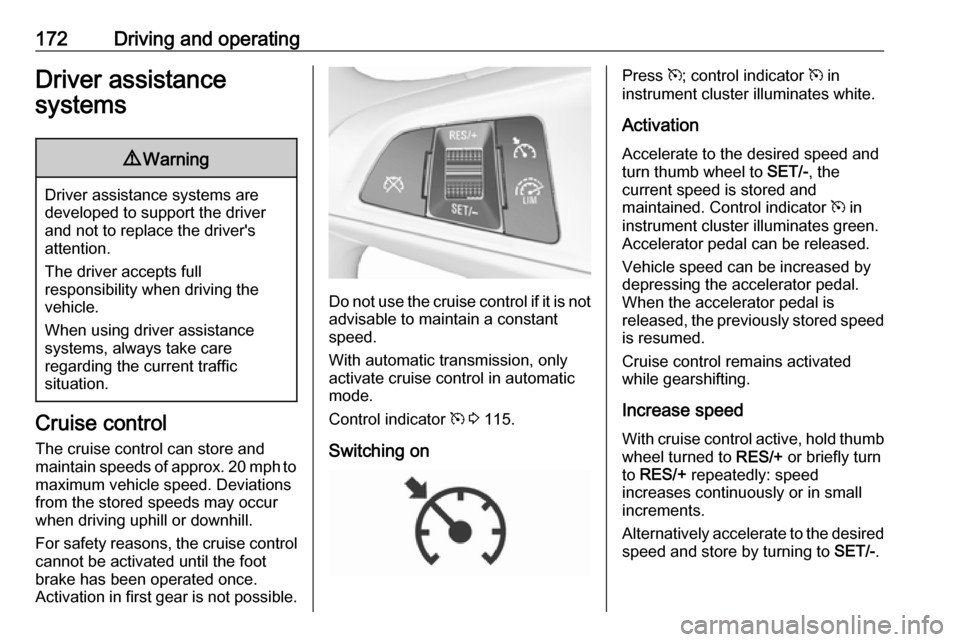
Activation Accelerate to the desired speed and
turn thumb wheel to SET/-, the
current speed is stored and
maintained. Control indicator m in
instrument cluster illuminates green. Accelerator pedal can be released.
Vehicle speed can be increased by depressing the accelerator pedal.
When the accelerator pedal is
released, the previously stored speed
is resumed.
Cruise control remains activated
while gearshifting.
Increase speed
With cruise control active, hold thumb wheel turned to RES/+ or briefly turn
to RES/+ repeatedly: speed
increases continuously or in small
increments.
Alternatively accelerate to the desired speed and store by turning to SET/-.