bluetooth VAUXHALL ZAFIRA TOURER 2018.5 User Guide
[x] Cancel search | Manufacturer: VAUXHALL, Model Year: 2018.5, Model line: ZAFIRA TOURER, Model: VAUXHALL ZAFIRA TOURER 2018.5Pages: 339, PDF Size: 10.02 MB
Page 183 of 339
Infotainment system181
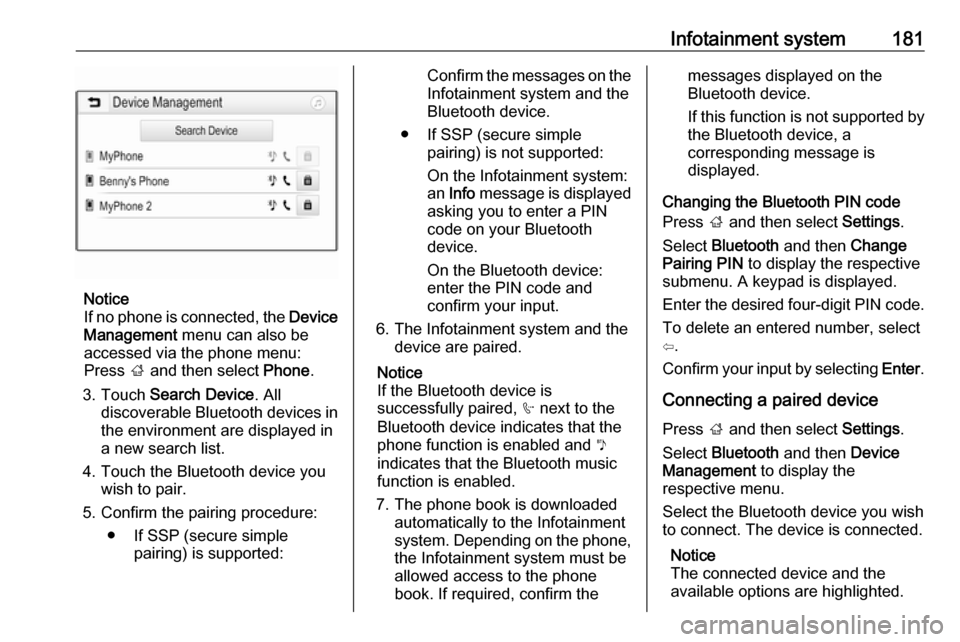
Notice
If no phone is connected, the Device
Management menu can also be
accessed via the phone menu:
Press ; and then select Phone.
3. Touch Search Device . All
discoverable Bluetooth devices in
the environment are displayed in a new search list.
4. Touch the Bluetooth device you wish to pair.
5. Confirm the pairing procedure: ● If SSP (secure simple pairing) is supported:
Confirm the messages on the
Infotainment system and the
Bluetooth device.
● If SSP (secure simple pairing) is not supported:
On the Infotainment system: an Info message is displayed
asking you to enter a PIN
code on your Bluetooth
device.
On the Bluetooth device: enter the PIN code and
confirm your input.
6. The Infotainment system and the device are paired.
Notice
If the Bluetooth device is
successfully paired, h next to the
Bluetooth device indicates that the
phone function is enabled and y
indicates that the Bluetooth music
function is enabled.
7. The phone book is downloaded automatically to the Infotainment
system. Depending on the phone, the Infotainment system must be
allowed access to the phone
book. If required, confirm themessages displayed on the
Bluetooth device.
If this function is not supported by
the Bluetooth device, a
corresponding message is
displayed.
Changing the Bluetooth PIN code
Press ; and then select Settings.
Select Bluetooth and then Change
Pairing PIN to display the respective
submenu. A keypad is displayed.
Enter the desired four-digit PIN code.
To delete an entered number, select
⇦.
Confirm your input by selecting Enter.
Connecting a paired device
Press ; and then select Settings.
Select Bluetooth and then Device
Management to display the
respective menu.
Select the Bluetooth device you wish
to connect. The device is connected.
Notice
The connected device and the
available options are highlighted.
Page 184 of 339
182Infotainment systemDisconnecting a devicePress ; and then select Settings.
Select Bluetooth and then Device
Management to display the
respective menu.
Select the Bluetooth device currently connected. You are prompted with a
message.
Select Yes to disconnect the device.
Deleting a device Press ; and then select Settings.
Select Bluetooth and then Device
Management to display the
respective menu.
Select e next to the Bluetooth device.
You are prompted with a message.
Select Yes to delete the device.
Device info Press ; and then select Settings.
Select Bluetooth and then Device
Information to display the respective
menu.The information displayed includes
Device Name , Address , and PIN
Code .
Emergency call9 Warning
Connection setup cannot be
guaranteed in all situations.For this reason you should not rely
exclusively on a mobile phone
when a vitally important
communication (e.g. a medical
emergency) is concerned.
In some networks it may be
necessary for a valid SIM card to
be properly inserted in the mobile
phone.
9 Warning
Bear in mind that you can make
and receive calls with the mobile
phone if it is in a service area with
a sufficiently strong signal. Under
certain circumstances,
emergency calls cannot be made
in all mobile phone networks;
problems may occur when certain
network services and / or
telephone functions are active.
You can enquire about this with
the local network operators.
The emergency call number can
differ depending on the region and
country. Please enquire
beforehand about the correct
emergency call number for the
relevant region.
Making an emergency call
Dial the emergency call number (e.g.
112 ).
The telephone connection to the
emergency call centre is set up.
Answer when the service personnel
questions you about the emergency.
9 Warning
Do not end the call until you are
requested to do so by the
emergency call centre.
Page 185 of 339
Infotainment system183Operation
As soon as a connection via
Bluetooth has been set up between
your mobile phone and the
Infotainment system, you can operate many functions of your mobile phone
via the Infotainment system.
Notice
In the hands-free mode, mobile
phone operation is still possible, e.g.
taking a call or adjusting the volume.
After setup of a connection between
the mobile phone and the
Infotainment system, mobile phone
data is transmitted to the Infotainment system. This can take some time
depending on the mobile phone and
the amount of data to be transferred.
During this period, operation of the
mobile phone via the Infotainment
system is possible only to a limited extent.
Notice
Not every mobile phone fully
supports the phone function.
Therefore, deviations from the range
of functions described below are
possible.Phone main menu
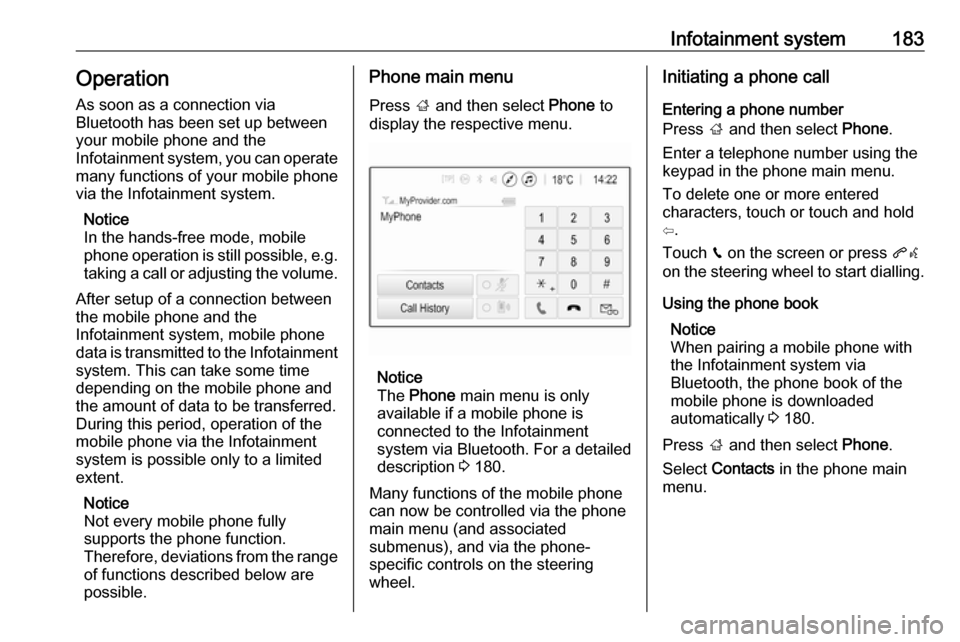
Press ; and then select Phone to
display the respective menu.
Notice
The Phone main menu is only
available if a mobile phone is connected to the Infotainment
system via Bluetooth. For a detailed
description 3 180.
Many functions of the mobile phone can now be controlled via the phone
main menu (and associated
submenus), and via the phone-
specific controls on the steering
wheel.
Initiating a phone call
Entering a phone number
Press ; and then select Phone.
Enter a telephone number using the
keypad in the phone main menu.
To delete one or more entered
characters, touch or touch and hold
⇦.
Touch v on the screen or press qw
on the steering wheel to start dialling.
Using the phone book Notice
When pairing a mobile phone with
the Infotainment system via
Bluetooth, the phone book of the
mobile phone is downloaded
automatically 3 180.
Press ; and then select Phone.
Select Contacts in the phone main
menu.
Page 187 of 339
Infotainment system185Contacts settings
The contacts list can be sorted by last name or first name.
Press ; and then select Settings to
display the respective menu.
Select Bluetooth and then Sort
Order . Activate the desired option.
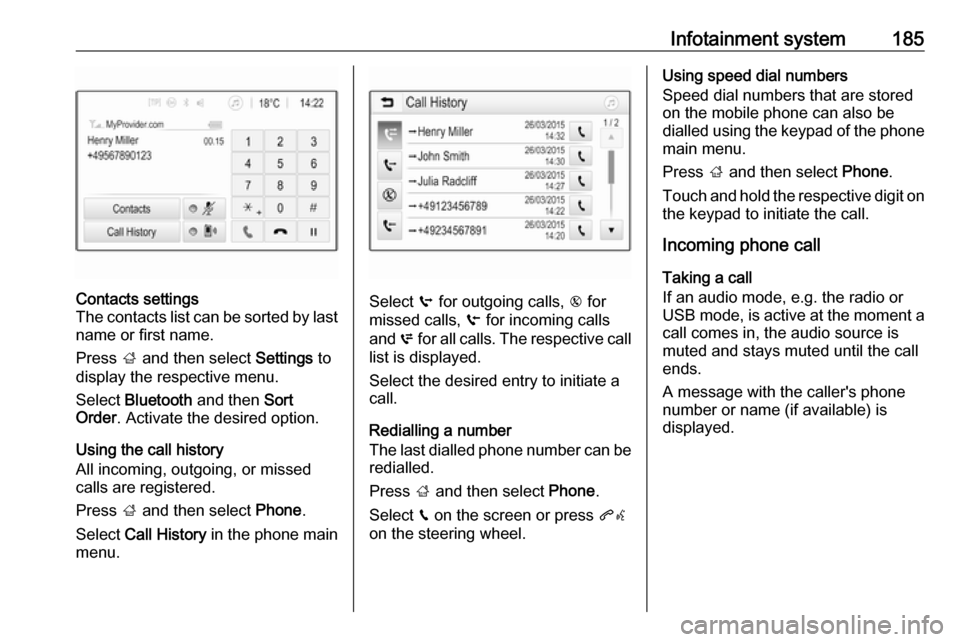
Using the call history
All incoming, outgoing, or missed calls are registered.
Press ; and then select Phone.
Select Call History in the phone main
menu.
Select q for outgoing calls, r for
missed calls, s for incoming calls
and p for all calls. The respective call
list is displayed.
Select the desired entry to initiate a
call.
Redialling a number
The last dialled phone number can be
redialled.
Press ; and then select Phone.
Select v on the screen or press qw
on the steering wheel.
Using speed dial numbers
Speed dial numbers that are stored
on the mobile phone can also be
dialled using the keypad of the phone
main menu.
Press ; and then select Phone.
Touch and hold the respective digit on the keypad to initiate the call.
Incoming phone call
Taking a call
If an audio mode, e.g. the radio or
USB mode, is active at the moment a
call comes in, the audio source is
muted and stays muted until the call
ends.
A message with the caller's phone
number or name (if available) is
displayed.
Page 188 of 339
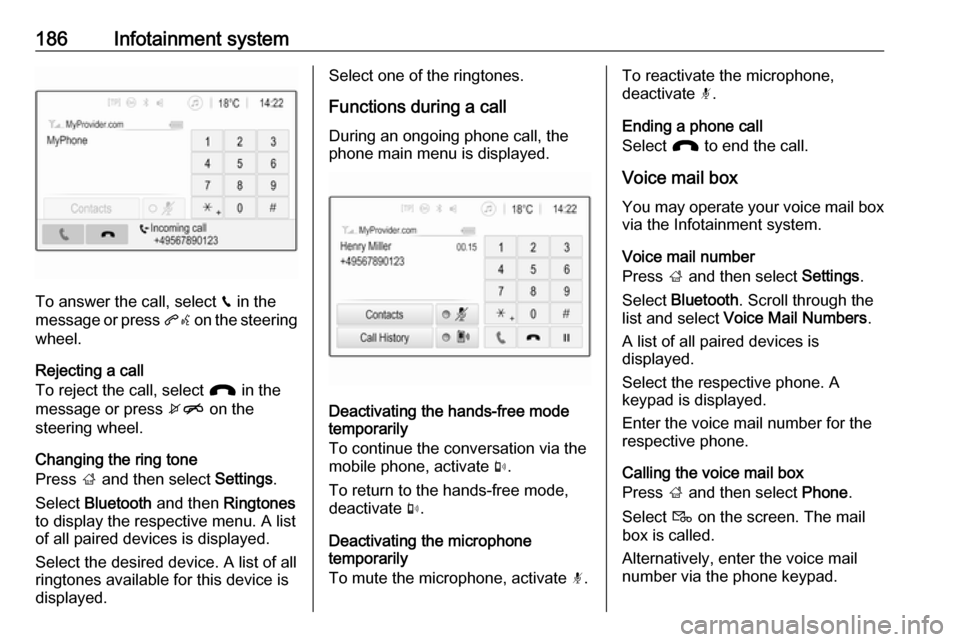
186Infotainment system
To answer the call, select v in the
message or press qw on the steering
wheel.
Rejecting a call
To reject the call, select J in the
message or press xn on the
steering wheel.
Changing the ring tone
Press ; and then select Settings.
Select Bluetooth and then Ringtones
to display the respective menu. A list
of all paired devices is displayed.
Select the desired device. A list of all
ringtones available for this device is
displayed.
Select one of the ringtones.
Functions during a call
During an ongoing phone call, the
phone main menu is displayed.
Deactivating the hands-free mode
temporarily
To continue the conversation via the mobile phone, activate m.
To return to the hands-free mode,
deactivate m.
Deactivating the microphone
temporarily
To mute the microphone, activate n.
To reactivate the microphone,
deactivate n.
Ending a phone call
Select J to end the call.
Voice mail box You may operate your voice mail box
via the Infotainment system.
Voice mail number
Press ; and then select Settings.
Select Bluetooth . Scroll through the
list and select Voice Mail Numbers .
A list of all paired devices is
displayed.
Select the respective phone. A
keypad is displayed.
Enter the voice mail number for the
respective phone.
Calling the voice mail box
Press ; and then select Phone.
Select t on the screen. The mail
box is called.
Alternatively, enter the voice mail
number via the phone keypad.
Page 328 of 339

326Customer informationoriginal source. Such altered
versions also must not be
misrepresented as being Info-ZIP
releases--including, but not
limited to, labeling of the altered
versions with the names “Info-
ZIP” (or any variation thereof,
including, but not limited to,
different capitalizations), “Pocket
UnZip,” “WiZ” or “MacZip” without
the explicit permission of Info-ZIP. Such altered versions are further
prohibited from misrepresentative
use of the Zip-Bugs or Info-ZIP e- mail addresses or of the Info-ZIP
URL(s).
4. Info-ZIP retains the right to use the names “Info-ZIP,” “Zip,”
“UnZip,” “UnZipSFX,” “WiZ,” “Pocket UnZip,” “Pocket Zip,” and
“MacZip” for its own source and
binary releases.
Registered trademarksApple Inc.
Apple CarPlay™ is a trademark of
Apple Inc.
App Store ®
and iTunes Store ®
are
registered trademarks of Apple Inc.iPhone ®
, iPod ®
, iPod touch ®
, iPod
nano ®
, iPad ®
and Siri ®
are registered
trademarks of Apple Inc.Aupeo! GmbH
AUPEO ®
is a registered trademark of
the Aupeo! GmbH.Bluetooth SIG, Inc.
Bluetooth ®
is a registered trademark
of Bluetooth SIG, Inc.DivX, LLC
DivX ®
and DivX Certified ®
are
registered trademarks of DivX, LLC.EnGIS Technologies, Inc.
BringGo ®
is a registered trademark of
EnGIS Technologies, Inc.Google Inc.
Android™ and Google Play™ Store
are trademarks of Google Inc.Stitcher Inc.
Stitcher™ is a trademark of Stitcher,
Inc.Verband der Automobilindustrie e.V.
AdBlue ®
is a registered trademark of
the VDA.Vehicle data recording
and privacy
Event data recorders
Electronic control units are installed in
your vehicle. Control units process
data which is received by vehicle
sensors, for example, or which they
generate themselves or exchange
amongst themselves. Some control
units are necessary for the safe
functioning of your vehicle, others
assist you while you drive (driver
assistance systems), while others
provide comfort or infotainment
functions.
Operating data in the vehicle Control units process data for
operation of the vehicle.
Page 332 of 339

330IndexAAccessories and vehicle modifications .......................... 258
Activating Bluetooth music .........160
Activating phone .........................183
Activating radio ........................... 152
Activating the navigation system 166
Activating USB audio ..................160
Activating USB movie .................162
Activating USB picture ................161
Active Emergency Braking .........232
Active head restraints ...................36
Adaptive cruise control .......116, 221
AdBlue ........................ 114, 205, 303
Adjustable air vents ...................194
Airbag and belt tensioners .........110
Airbag deactivation ..............58, 111
Airbag label................................... 53 Airbag system .............................. 53
Air conditioning regular operation ................................ 195
Air conditioning system .............. 189
Air intake .................................... 195
Air vents...................................... 194
Antilock brake system ................ 212
Antilock brake system (ABS) .....112
Anti-theft alarm system ................26
Anti-theft locking system .............. 25
Appearance care ........................299
Armrest ......................................... 41Armrest storage ........................... 68
Ashtrays ..................................... 101
Audio files ................................... 158
Automatic anti-dazzle ..................30
Automatic light control ...............130
Automatic locking ........................24
Automatic transmission .............208
Autostop ..................................... 200
Auto volume................................ 149
Auxiliary heater ........................... 194
B Basic operation ........................... 146
Battery discharge protection ......138
Battery voltage ........................... 123
Bicycle rack .................................. 69
BlueInjection ............................... 205
Bluetooth Bluetooth connection ..............180
Bluetooth music menu ............160
Connecting device ..................158
General information ................158
Pairing ..................................... 180
Phone ...................................... 183
Bluetooth connection ..................180
Bonnet ....................................... 259
Brake and clutch fluid .................303
Brake and clutch system ...........111
Brake assist ............................... 214
Brake fluid .................................. 263
Page 334 of 339

332Entry lighting .............................. 137
Event data recorders ..................326
Exhaust filter ....................... 114, 203
Exit lighting ................................ 137
Exterior care .............................. 299
Exterior light ............................... 115
Exterior lighting ....................12, 129
Exterior mirrors ............................. 28
F Fault ........................................... 210
Favourite lists ............................. 154
Retrieving stations................... 154
Storing stations .......................154
Favourites ................................... 170
File formats Audio files................................ 158
Movie files ............................... 158
Picture files.............................. 158
First aid kit ................................... 91
Fixed air vents ........................... 195
Flex-Fix system ............................ 69
Fog light ..................................... 115
Fog lights ................................... 268
Folding mirrors ............................. 28
Folding tray .................................. 91
Following distance ......................113
Following distance indication ......231
Forward collision alert................. 228
Front airbag system .....................56Front fog lights ........................... 134
Front seats.................................... 37
Front storage ................................ 67
Fuel............................................. 244
Fuel for diesel engines ..............245
Fuel for liquid gas operation .......246
Fuel for natural gas operation ...246
Fuel for petrol engines ...............244
Fuel gauge ................................. 103
Fuel selector .............................. 104
Funnel......................................... 247
Fuses ......................................... 273
G Gauges ....................................... 102
Gear shifting ............................... 113
General information ...158, 164,
178, 179, 252
Bluetooth ................................. 158
DAB ......................................... 156
Infotainment system ................139
Navigation ............................... 164
Phone ...................................... 179
Smartphone applications ........158
USB ......................................... 158
Glass panel .................................. 33
Glovebox ..................................... 65
Guidance ................................... 175H
Halogen headlights ....................266
Hand brake ................................. 212
Hazard warning flashers ............134
Headlight flash ........................... 131
Headlight range adjustment ......131
Headlights................................... 129
Headlights when driving abroad 132
Head restraint adjustment .............8
Head restraints ............................ 35
Heated mirrors ............................. 29
Heated rear window ..................... 33
Heated steering wheel .................96
Heating ........................................ 42
Heating and ventilation system . 188
High beam ......................... 115, 130
High beam assist ................115, 130
Hill start assist ........................... 214
Home menu ................................ 146
Horn ....................................... 13, 97
I
Identification plate .....................305
Ignition switch positions .............197
Immobiliser .......................... 28, 115
Indicators .................................... 102
Info Display ................................. 121
Information displays.................... 116
Infotainment control panel ..........141
Instrument cluster ......................102
Page 336 of 339

334Performance .............................. 312
Performing work ........................259
Phone Bluetooth ................................. 179
Bluetooth connection ..............180
Call history .............................. 183
Emergency calls ......................182
Entering a number ..................183
Functions during a call ............183
General information ................179
Incoming call ........................... 183
Phone book ............................. 183
Phone main menu ...................183
Selecting the ring tone ............183
Speed dial number ..................183
Phone book ................................ 183
Phone projection ........................163
Picture files ................................. 158
Playing audio .............................. 160
Playing movies ........................... 162
POIs............................................ 170
Power outlets ............................. 100
Power seat adjustment ................40
Power steering............................ 113
Power steering fluid ....................262
Power windows ............................ 31
Preheating ................................. 114
Puncture ..................................... 289Q
Quickheat ................................... 194
R Radio Activating................................. 152
Configuring DAB .....................156
Configuring RDS .....................155
DAB announcements ..............156
Digital audio broadcasting
(DAB) ...................................... 156
Favourite lists .......................... 154
Intellitext .................................. 156
Radio data system (RDS) .......155
Regional .................................. 155
Regionalisation ....................... 155
Retrieving stations................... 154
Selecting the waveband ..........152
Station search ......................... 153
Station tuning .......................... 153
Storing stations .......................154
Usage ...................................... 152
Radio data system .....................155
Radio Frequency Identification (RFID) ..................................... 329
Radio remote control ...................20
RDS ............................................ 155
REACH ....................................... 324
Reading lights ............................ 137
Rear carrier system ......................69Rear floor storage cover ..............82
Rear fog light .....................115, 135
Rear seats .................................... 43
Rear storage ................................. 80
Rear view camera ...................... 238
Rear window wiper and washer ..98
Recommended fluids and lubricants ........................ 303, 307
Refuelling ................................... 247
Regional ..................................... 155
Regionalisation ........................... 155
Registered trademarks ...............326
Retained power off .....................198
Retrieving stations ......................154
Reversing lights .........................135
Ride control system ....................215
Ring tone Changing the ring tone ............183
Ring tone volume ....................149
Roller blinds ................................. 33
Roof .............................................. 33
Roof load ...................................... 93
Roof rack ..................................... 92
Route guidance .......................... 175
S Safety net .................................... 89
Seat adjustment ............................. 6
Seat belt ........................................ 8
Seat belt reminder .....................110
Page 337 of 339

335Seat belts ..................................... 49
Seat heating ................................. 42
Seat position ................................ 37
Second row seats ........................43
Selective catalytic reduction .......205
Selector lever ............................. 208
Service ............................... 195, 302
Service display .......................... 106
Service information ....................302
Side airbag system ......................57
Side blind spot alert ....................236
Sidelights .................................... 129
Side turn lights ........................... 272
Smartphone ................................ 158
Phone projection .....................163
Software acknowledgement .......324
Spare wheel ............................... 292
Speech recognition .....................178
Speed dial numbers ...................183
Speed limiter....................... 116, 220
Speedometer ............................. 102
Starting and operating ................197
Starting off ................................... 16
Starting the engine ....................198
Station search............................. 153
Steering ...................................... 197
Steering wheel adjustment ......9, 96
Steering wheel audio controls ....141
Steering wheel controls ...............96
Stop-start system........................ 200Storage ......................................... 65
Storage compartments .................65
Storing stations ........................... 154
Sunvisor lights ........................... 137
Sun visors .................................... 33
Switching the Infotainment system on ................................ 144
Symbols ......................................... 4
System settings .......................... 150
T Tachometer ............................... 103
Tail lights ................................... 269
Theft-deterrent feature ..............140
Third row seats ............................ 47
Three-point seat belt .................... 50
TMC stations .............................. 164
Tone settings .............................. 148
Tools .......................................... 280
Touch beep volume ....................149
Tow bar....................................... 252
Towing ................................ 252, 297
Towing another vehicle .............298
Towing equipment .....................253
Towing the vehicle .....................297
TP volume .................................. 149
Traction Control system ............. 215
Traction Control system off......... 113
Traffic incidents .......................... 175
Traffic sign assistant ...........116, 239Trailer coupling ........................... 252
Trailer stability assist .................255
Trailer towing ............................. 252
Transmission ............................... 15
Transmission display .................208
Tread depth ............................... 285
Trip odometer ............................ 102
Turn lights .......................... 109, 134
Turn list ....................................... 175
Tyre chains ................................ 286
Tyre designations ......................280
Tyre pressure ............................ 281
Tyre pressure monitoring system ............................. 114, 282
Tyre pressures ........................... 317
Tyre repair kit ............................. 286
U Ultrasonic parking assist............. 233
Underseat storage .......................67
Upholstery .................................. 301
Usage ................. 144, 152, 166, 178
Bluetooth ................................. 158
Menu ....................................... 146
Navigation system ...................166
Phone ...................................... 183
Radio ....................................... 152
USB ......................................... 158