phone VAUXHALL ZAFIRA TOURER 2018.5 Owner's Manual
[x] Cancel search | Manufacturer: VAUXHALL, Model Year: 2018.5, Model line: ZAFIRA TOURER, Model: VAUXHALL ZAFIRA TOURER 2018.5Pages: 339, PDF Size: 10.02 MB
Page 52 of 339
50Seats, restraintsThree-point seat beltFasten
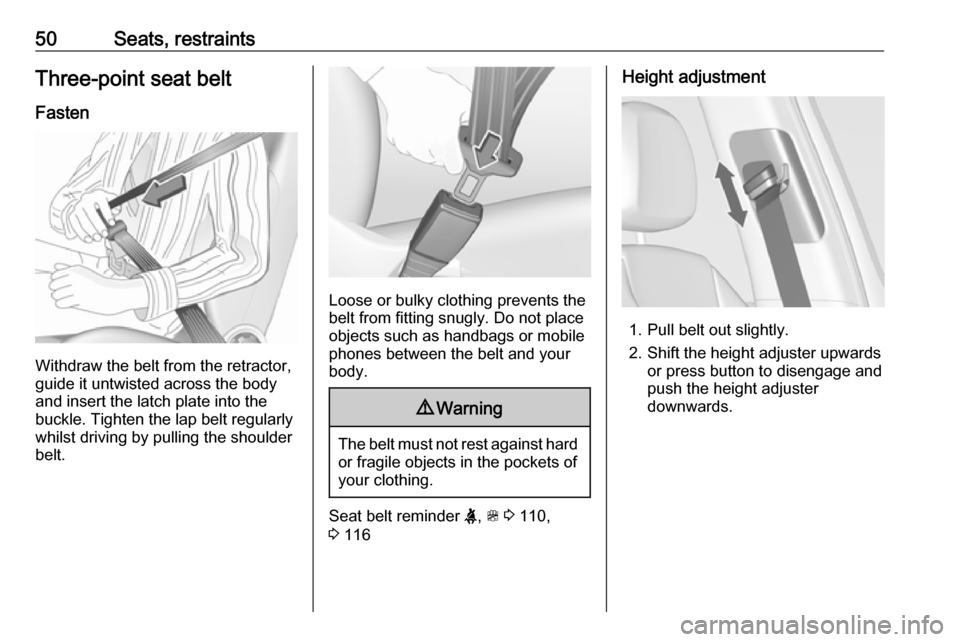
Withdraw the belt from the retractor,
guide it untwisted across the body
and insert the latch plate into the
buckle. Tighten the lap belt regularly
whilst driving by pulling the shoulder
belt.
Loose or bulky clothing prevents the
belt from fitting snugly. Do not place
objects such as handbags or mobile
phones between the belt and your body.
9 Warning
The belt must not rest against hard
or fragile objects in the pockets of
your clothing.
Seat belt reminder X, > 3 110,
3 116
Height adjustment
1. Pull belt out slightly.
2. Shift the height adjuster upwards or press button to disengage and
push the height adjuster
downwards.
Page 69 of 339
Storage67Front storage
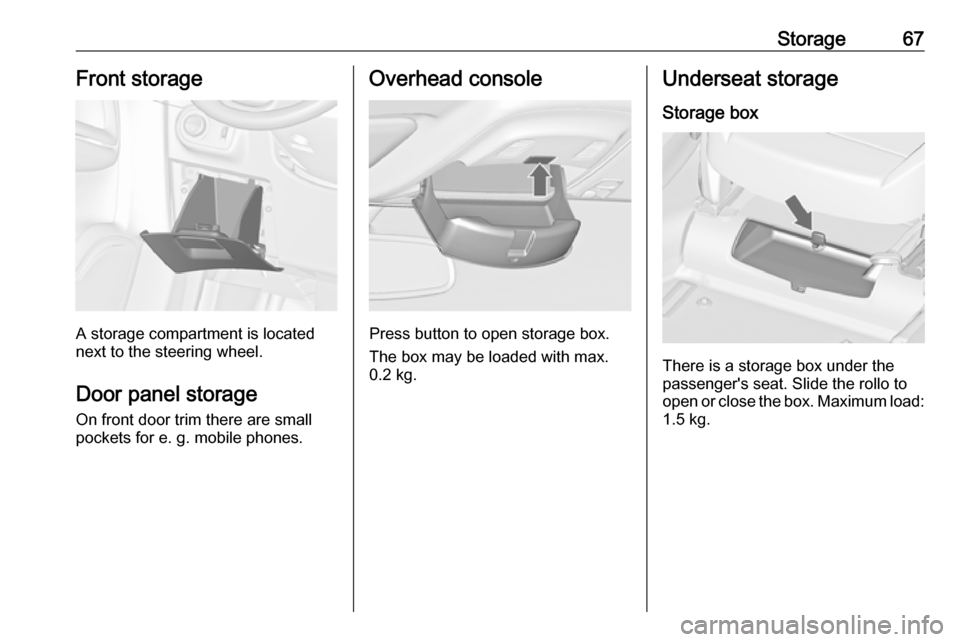
A storage compartment is located
next to the steering wheel.
Door panel storage On front door trim there are small
pockets for e. g. mobile phones.
Overhead console
Press button to open storage box.
The box may be loaded with max.
0.2 kg.
Underseat storage
Storage box
There is a storage box under the
passenger's seat. Slide the rollo to
open or close the box. Maximum load: 1.5 kg.
Page 98 of 339
96Instruments and controlsControlsSteering wheel adjustment
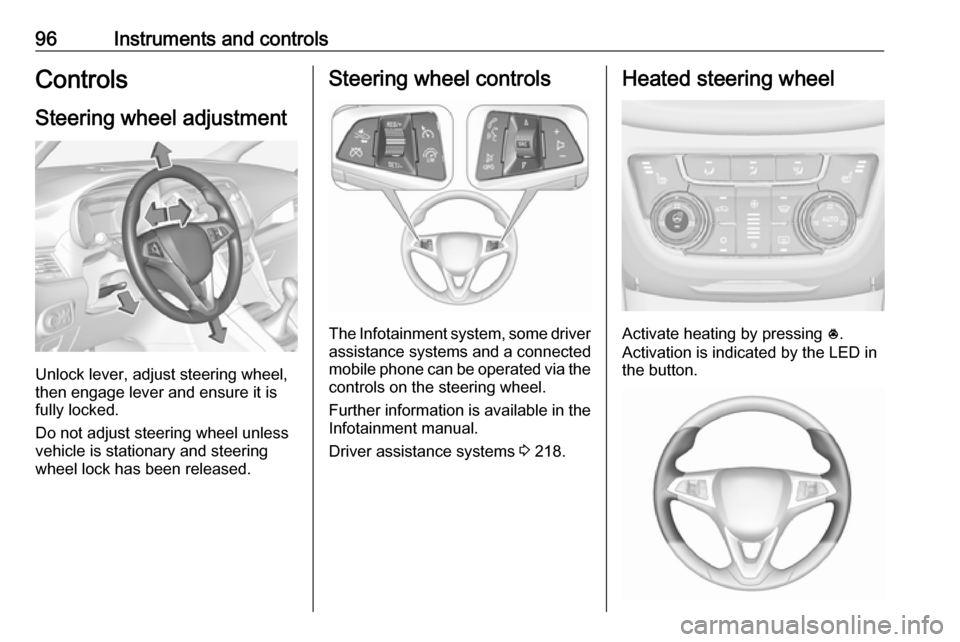
Unlock lever, adjust steering wheel,
then engage lever and ensure it is
fully locked.
Do not adjust steering wheel unless
vehicle is stationary and steering
wheel lock has been released.
Steering wheel controls
The Infotainment system, some driver assistance systems and a connected
mobile phone can be operated via the
controls on the steering wheel.
Further information is available in the
Infotainment manual.
Driver assistance systems 3 218.
Heated steering wheel
Activate heating by pressing *.
Activation is indicated by the LED in
the button.
Page 127 of 339

Instruments and controls125Telematics service
OnStar
OnStar is a personal connectivity and
service assistant with integrated
Wi-Fi hotspot. The OnStar service is
available 24 hours a day, seven days
a week.
Notice
OnStar is not available for all
markets. For further information,
contact your workshop.
Notice
In order to be available and
operational, OnStar needs a valid
OnStar subscription, functioning
vehicle electrics, mobile service and GPS satellite link.
To activate the OnStar services and
set up an account, press Z and speak
with an advisor.Depending on the equipment of the
vehicle, the following services are available:
● Emergency services and support
in the case of a vehicle
breakdown
● Wi-Fi hotspot
● Smartphone application
● Remote control, e.g. location of the vehicle, activation of horn and
lights, control of central locking
system
● Stolen vehicle assistance
● Vehicle diagnostics
● Destination download
Notice
The OnStar module of the vehicle is
deactivated after ten days without an
ignition cycle. Functions requiring a
data connection will be available
again after switching on the ignition.OnStar buttons
Notice
Depending on the equipment, the
OnStar buttons can also be
integrated in the rear view mirror.
Privacy button
Press and hold j until a message is
heard to activate or deactivate the transmission of the vehicle location.
Press j to answer a call or to end a
call to an advisor.
Press j to access the Wi-Fi settings.
Service button
Press Z to establish a connection to
an advisor.
Page 129 of 339

Instruments and controls127Notice
To change the SSID or password,
press Z and talk to an advisor or log
in to your account.
To switch off the Wi-Fi hotspot
functionality, press Z to call an
advisor.
Smartphone app
With the My Vauxhall smartphone
app, some vehicle functions can be
operated remotely.
The following functions are available: ● Lock or unlock vehicle.
● Honk horn or flash lights.
● Check fuel level, engine oil life and tyre pressure (only with tyre
pressure monitoring system).
● Send navigation destination to the vehicle, if equipped with a
built-in navigation system.
● Locate vehicle on a map.
● Manage Wi-Fi settings.
To operate these functions, download the app from App Store ®
or
Google Play™ Store.Remote control
If desired, use any phone to call an
advisor, who can remotely operate
specific vehicle functions. Find the
respective OnStar phone number on
our country-specific website.
The following functions are available: ● Lock or unlock vehicle.
● Provide information on the vehicle location.
● Honk horn or flash lights.
Stolen vehicle assistance
If the vehicle is stolen, report the theft
to the authorities and request OnStar
stolen vehicle assistance. Use any
phone to call an advisor. Find the
respective OnStar phone number on
our country-specific website.
OnStar can provide support in
locating and recovering the vehicle.Theft alert
When the anti-theft alarm system is
triggered, a notification is sent to
OnStar. You are then informed about
this event by text message or email.Restart prevention
By sending remote signals, OnStar
can prevent the vehicle from
restarting once it has been turned off.
On-demand diagnostics
At any time e.g. if the vehicle displays a vehicle message, press Z to
contact an advisor and ask to
complete a real-time diagnostic check
to directly determine the issue.
Depending on the results, the advisor
will provide further support.
Diagnostic report
The vehicle automatically transmits
diagnostic data to OnStar which
sends a monthly email report to you
and your preferred workshop.
Notice
The workshop notification function
can be disabled in your account.
The report contains the status of key
operating systems of the vehicle like
engine, transmission, airbags, ABS,
and other major systems. It also
provides information on possible
Page 141 of 339

Infotainment system139Infotainment systemIntroduction................................ 139
General information .................139
Theft-deterrent feature ............140
Control elements overview ......141
Usage ...................................... 144
Basic operation .......................... 146
Tone settings ........................... 148
Volume settings .......................149
System settings .......................150
Radio ......................................... 152
Usage ...................................... 152
Station search ......................... 153
Favourite lists .......................... 154
Radio data system ...................155
Digital audio broadcasting .......156
External devices ........................158
General information .................158
Playing audio ........................... 160
Displaying pictures ..................161
Playing movies ........................ 162
Using smartphone applications ............................ 163
Navigation .................................. 164
General information .................164
Usage ...................................... 166Destination input......................170
Guidance ................................. 175
Speech recognition ....................178
General information .................178
Usage ...................................... 178
Phone ........................................ 179
General information .................179
Bluetooth connection ...............180
Emergency call ........................182
Operation ................................. 183
Mobile phones and CB radio equipment ............................... 187Introduction
General information
The Infotainment system provides
you with state-of-the-art in-car
infotainment.
Using radio tuner functions, you may
register up to 25 stations on five
favourite lists.
You can connect external data
storage devices to the Infotainment
system as further audio sources;
either via cable or via Bluetooth ®
.
The navigation system with dynamic
route planning will reliably guide you
to your destination, and, if desired,
automatically avoid traffic jams or
other traffic problems.
In addition, the Infotainment system allows comfortable and safe use of
your mobile phone in the vehicle.
You can also operate specific
smartphone applications via the
Infotainment system.
Optionally, the Infotainment system
can be operated using the touch
screen and buttons on the control
Page 142 of 339
140Infotainment systempanel, the controls on the steeringwheel, or - if provided by your mobile
phone - via speech recognition.
The well-thought-out design of the
control elements, the touch screen
and the clear display enable you to
control the system easily and
intuitively.
Notice
This manual describes all options
and features available for the
various Infotainment systems.
Certain descriptions, including those
for display and menu functions, may
not apply to your vehicle due to
model variant, country
specifications, special equipment or
accessories.
Important information on
operation and traffic safety9 Warning
The Infotainment system must be
used so that the vehicle can be
driven safely at all times. If in
doubt, stop the vehicle and
operate the Infotainment system
while the vehicle is stationary.9 Warning
In some areas one-way streets
and other roads and entrances
(e.g. pedestrian zones) that you
are not allowed to turn into are not marked on the map. In such areas
the Infotainment system may
issue a warning that must be
accepted. Here you must pay
particular attention to one-way
streets, roads and entrances that
you are not allowed to drive into.
Radio reception
Radio reception may be disrupted by
static, noise, distortion or loss of
reception due to:
● changes in distance from the transmitter
● multipath reception due to reflection
● shadowing
Theft-deterrent feature
The Infotainment system is equipped
with an electronic security system for
the purpose of theft deterrence.
The Infotainment system therefore
functions only in your vehicle and is
worthless to a thief.
Page 144 of 339

142Infotainment system1Info Display / Touch screen 146
2 Home menu ........................ 146
Screen buttons for access to:
Audio : audio functions
Gallery : picture and movie
functions
Phone : mobile phone functions
Projection : phone projection
or Nav : BringGo ®
app
Navigation : embedded
navigation
Settings : system settings
OnStar : OnStar Wi-Fi
settings ................................ 144
3 Time, date and
temperature indicators ........150
4 g
Short press: open phone
menu ................................... 183or open phone projection
function (if activated) ...........163
Long press: activate
speech recognition ..............178
5 v
Short press: skip to next
station when radio active ....153
or skip to next track when
external devices active .......160
Long press: seek up when
radio active .......................... 153
or fast forward when
external devices active .......160
6 m
Short press: switch on
Infotainment system if
turned off ............................. 144
or mute system if turned on 144
Long press: switch off
Infotainment system ............144
Turn: adjust volume ............1447t
Short press: skip to
previous station when
radio active .......................... 153
or skip to previous track
when external devices
active ................................... 160
Long press: seek down
when radio active ................153
or fast rewind when
external devices active .......160
8 ;
Short press: open home
menu ................................... 144
Long press: open phone
projection function (if
activated) ............................ 163
Page 145 of 339
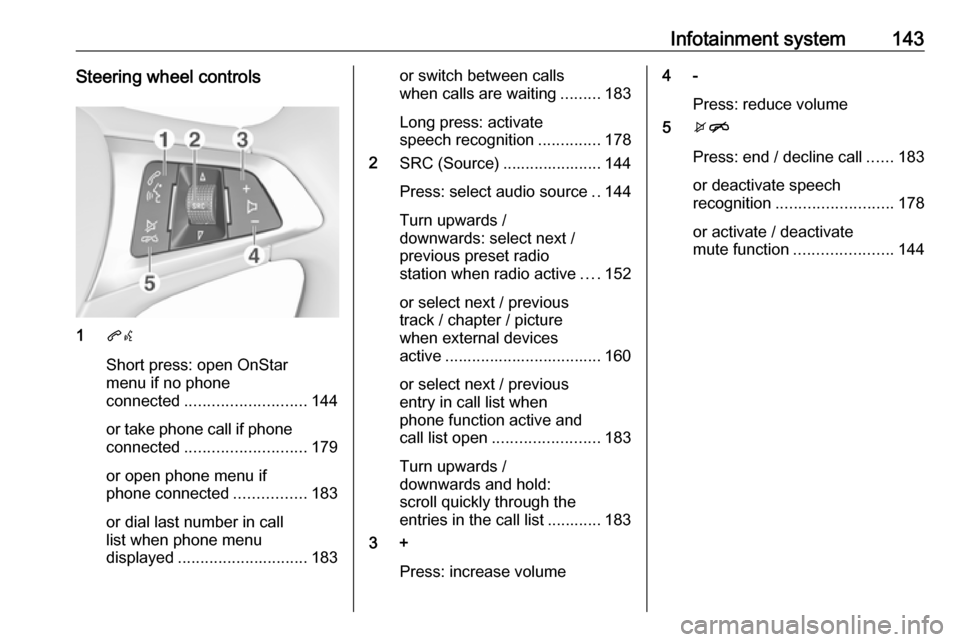
Infotainment system143Steering wheel controls
1qw
Short press: open OnStar
menu if no phone
connected ........................... 144
or take phone call if phone connected ........................... 179
or open phone menu if
phone connected ................183
or dial last number in call
list when phone menu
displayed ............................. 183
or switch between calls
when calls are waiting .........183
Long press: activate
speech recognition ..............178
2 SRC (Source) ...................... 144
Press: select audio source ..144
Turn upwards /
downwards: select next /
previous preset radio
station when radio active ....152
or select next / previous
track / chapter / picture
when external devices
active ................................... 160
or select next / previous
entry in call list when
phone function active and
call list open ........................ 183
Turn upwards /
downwards and hold:
scroll quickly through the
entries in the call list ............ 183
3 +
Press: increase volume4 -Press: reduce volume
5 xn
Press: end / decline call ......183
or deactivate speech
recognition .......................... 178
or activate / deactivate
mute function ...................... 144
Page 147 of 339
Infotainment system145For a detailed description of:● Radio functions 3 152
● External devices 3 160
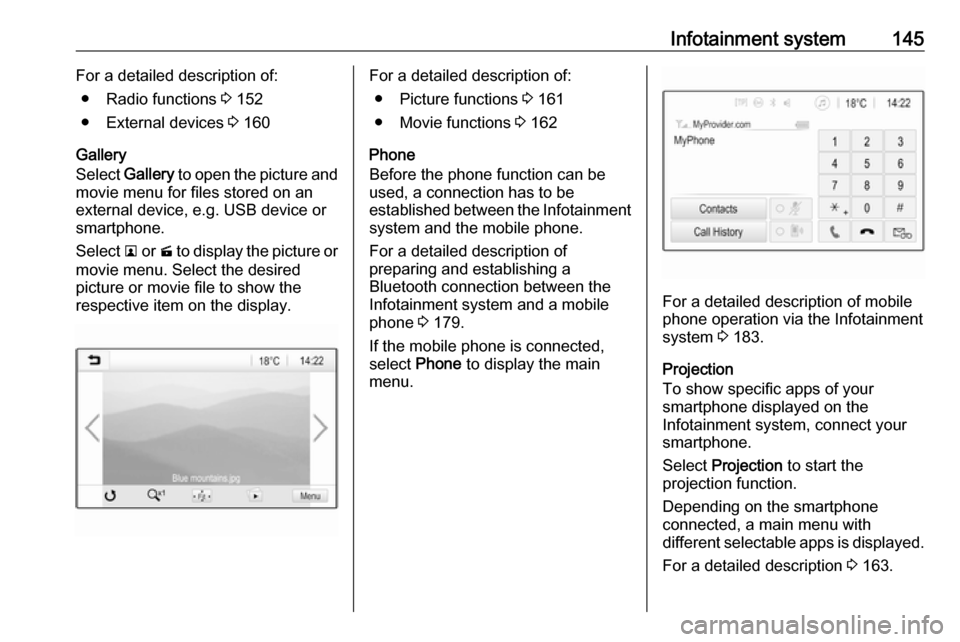
Gallery
Select Gallery to open the picture and
movie menu for files stored on an
external device, e.g. USB device or
smartphone.
Select l or m to display the picture or
movie menu. Select the desired
picture or movie file to show the
respective item on the display.For a detailed description of:
● Picture functions 3 161
● Movie functions 3 162
Phone
Before the phone function can be
used, a connection has to be
established between the Infotainment system and the mobile phone.
For a detailed description of
preparing and establishing a
Bluetooth connection between the Infotainment system and a mobilephone 3 179.
If the mobile phone is connected,
select Phone to display the main
menu.
For a detailed description of mobile
phone operation via the Infotainment
system 3 183.
Projection
To show specific apps of your
smartphone displayed on the
Infotainment system, connect your
smartphone.
Select Projection to start the
projection function.
Depending on the smartphone
connected, a main menu with
different selectable apps is displayed.
For a detailed description 3 163.