lights VAUXHALL ZAFIRA TOURER 2018 User Guide
[x] Cancel search | Manufacturer: VAUXHALL, Model Year: 2018, Model line: ZAFIRA TOURER, Model: VAUXHALL ZAFIRA TOURER 2018Pages: 341, PDF Size: 9.89 MB
Page 117 of 341
Instruments and controls1159Warning
When the engine is off,
considerably more force is needed
to brake and steer. During an
Autostop the brake servo unit will still be operational.
Do not remove key until vehicle is stationary, otherwise the steeringwheel lock could engage
unexpectedly.
Check oil level before seeking the
assistance of a workshop 3 261.
Low fuel
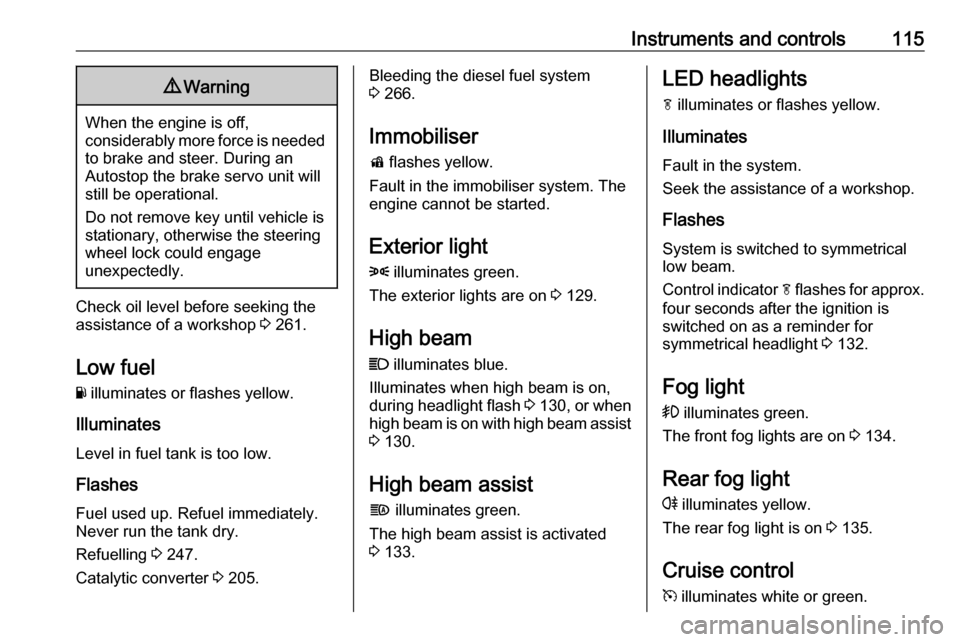
Y illuminates or flashes yellow.
Illuminates
Level in fuel tank is too low.
Flashes
Fuel used up. Refuel immediately.
Never run the tank dry.
Refuelling 3 247.
Catalytic converter 3 205.
Bleeding the diesel fuel system
3 266.
Immobiliser d flashes yellow.
Fault in the immobiliser system. The
engine cannot be started.
Exterior light 8 illuminates green.
The exterior lights are on 3 129.
High beam
C illuminates blue.
Illuminates when high beam is on,
during headlight flash 3 130 , or when
high beam is on with high beam assist
3 130.
High beam assist f illuminates green.
The high beam assist is activated
3 133.LED headlights
f illuminates or flashes yellow.
Illuminates
Fault in the system.
Seek the assistance of a workshop.
Flashes
System is switched to symmetrical
low beam.
Control indicator f flashes for approx.
four seconds after the ignition is
switched on as a reminder for
symmetrical headlight 3 132.
Fog light > illuminates green.
The front fog lights are on 3 134.
Rear fog light
r illuminates yellow.
The rear fog light is on 3 135.
Cruise control m illuminates white or green.
Page 124 of 341
122Instruments and controlsVehicle messagesMessages are indicated mainly in the
Driver Information Centre, in some
cases together with a warning and
signal chime.
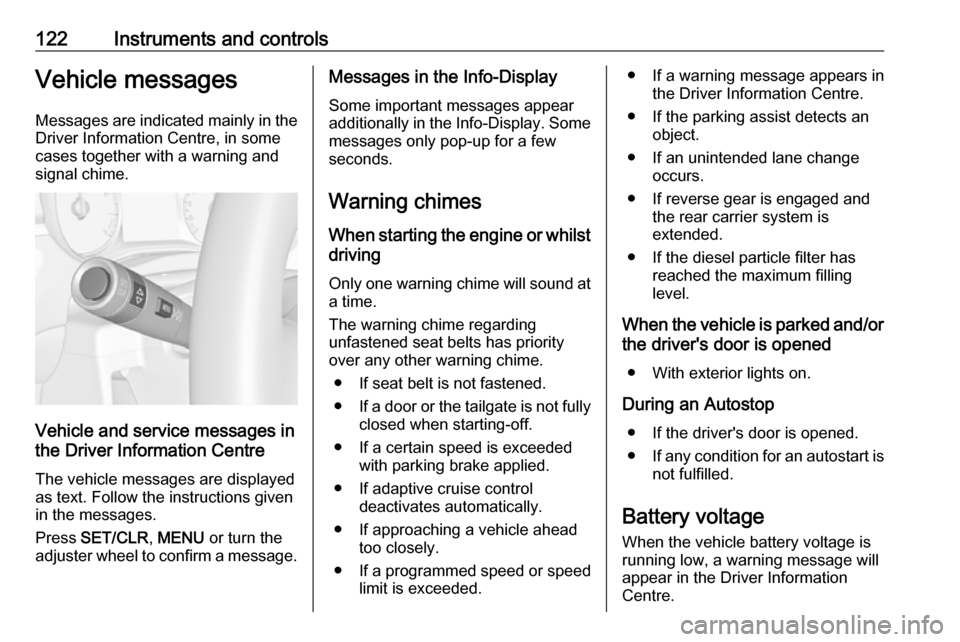
Vehicle and service messages in
the Driver Information Centre
The vehicle messages are displayed
as text. Follow the instructions given
in the messages.
Press SET/CLR , MENU or turn the
adjuster wheel to confirm a message.
Messages in the Info-Display
Some important messages appear
additionally in the Info-Display. Some messages only pop-up for a few
seconds.
Warning chimes When starting the engine or whilst
driving
Only one warning chime will sound at a time.
The warning chime regarding
unfastened seat belts has priority
over any other warning chime.
● If seat belt is not fastened.
● If a door or the tailgate is not fully
closed when starting-off.
● If a certain speed is exceeded with parking brake applied.
● If adaptive cruise control deactivates automatically.
● If approaching a vehicle ahead too closely.
● If a programmed speed or speed
limit is exceeded.● If a warning message appears in the Driver Information Centre.
● If the parking assist detects an object.
● If an unintended lane change occurs.
● If reverse gear is engaged and the rear carrier system is
extended.
● If the diesel particle filter has reached the maximum filling
level.
When the vehicle is parked and/or the driver's door is opened
● With exterior lights on.
During an Autostop ● If the driver's door is opened.
● If any condition for an autostart is
not fulfilled.
Battery voltage
When the vehicle battery voltage is
running low, a warning message will
appear in the Driver Information
Centre.
Page 126 of 341

124Instruments and controlsAuto Rear Defog: Automatically
activates heated rear window.
● Collision / Detection Systems
Park Assist : Activates or
deactivates the ultrasonic
parking assist. Activation is
selectable with or without
attached trailer coupling.
Auto Collision Preparation :
Activates or deactivates the
automatic brake functionality of
the vehicle in the event of
imminent collision danger. The
following is selectable: the
system will take over brake
control, warn by chimes only or is
deactivated completely.
Side Blind Zone Alert : Activates
or deactivates side blind zone
alert.
● Comfort and Convenience
Chime Volume : Changes the
volume of warning chimes.
Personalization By Driver :
Activates or deactivates the
personalisation function.
Auto Wipe in Reverse Gear :
Activates or deactivatesautomatic switching on of the
rear window wiper when reverse gear is engaged.
● Lighting
Vehicle Locator Lights : Activates
or deactivates the entry lighting.
Exit Lighting : Activates or
deactivates and changes the duration of exit lighting.
● Power Door Locks
Unlocked Door Anti Lock Out :
Activates or deactivates the door
locking function while a door is open.
Auto Door Lock : Activates or
deactivates the automatic door
unlocking function after switching off ignition. Activates or
deactivates the automatic door
locking function after driving-off.
Delayed Door Lock : Activates or
deactivates the delayed door
locking function.
● Remote Lock, Unlock, Start
Remote Unlock Light Feedback :
Activates or deactivates thehazard warning flasher feedback
whilst unlocking.
Remote Lock Feedback :
Changes what kind of feedback
is given when locking the vehicle.
Remote Door Unlock : Changes
the configuration to unlock only
the driver's door or the whole
vehicle whilst unlocking.
Relock Remotely Unlocked
Doors : Activates or deactivates
the automatic relock function
after unlocking without opening
the vehicle.
Page 127 of 341
Instruments and controls125Telematics service
OnStar
OnStar is a personal connectivity and
service assistant with integrated
Wi-Fi hotspot. The OnStar service is
available 24 hours a day, seven days
a week.
Notice
OnStar is not available for all
markets. For further information,
contact your workshop.
Notice
In order to be available and
operational, OnStar needs a valid
OnStar subscription, functioning
vehicle electrics, mobile service and GPS satellite link.
To activate the OnStar services and
set up an account, press Z and speak
with an advisor.Depending on the equipment of the
vehicle, the following services are available:
● Emergency services and support
in the case of a vehicle
breakdown
● Wi-Fi hotspot
● Smartphone application
● Remote control, e.g. location of the vehicle, activation of horn and
lights, control of central locking
system
● Stolen vehicle assistance
● Vehicle diagnostics
● Destination download
Notice
The OnStar module of the vehicle is
deactivated after ten days without an
ignition cycle. Functions requiring a
data connection will be available
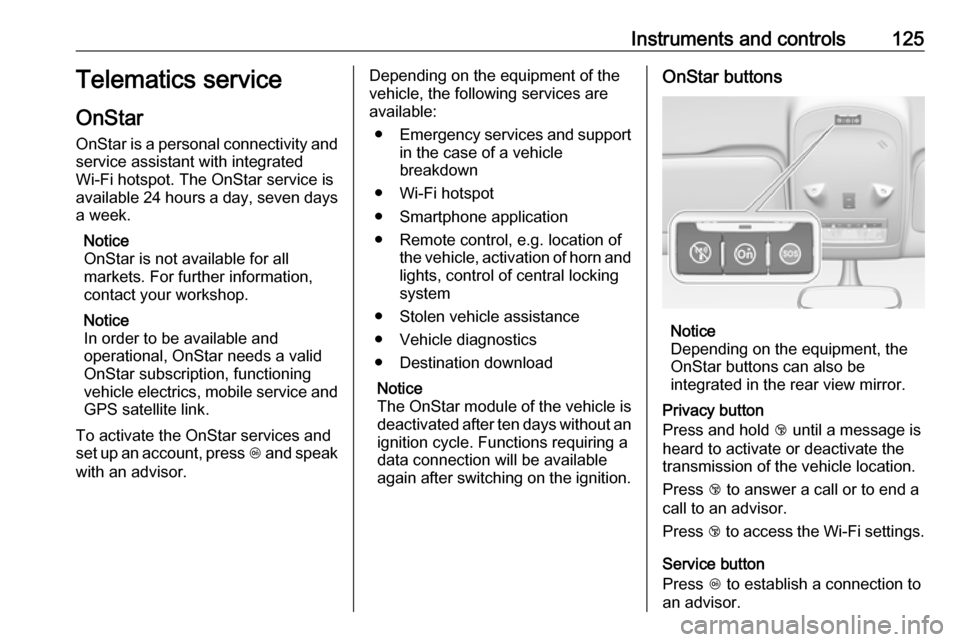
again after switching on the ignition.OnStar buttons
Notice
Depending on the equipment, the
OnStar buttons can also be
integrated in the rear view mirror.
Privacy button
Press and hold j until a message is
heard to activate or deactivate the transmission of the vehicle location.
Press j to answer a call or to end a
call to an advisor.
Press j to access the Wi-Fi settings.
Service button
Press Z to establish a connection to
an advisor.
Page 129 of 341

Instruments and controls127The following functions are available:● Lock or unlock vehicle.
● Honk horn or flash lights.
● Check fuel level, engine oil life and tyre pressure (only with tyre
pressure monitoring system).
● Send navigation destination to the vehicle, if equipped with a
built-in navigation system.
● Locate vehicle on a map.
● Manage Wi-Fi settings.
To operate these functions, download the app from App Store ®
or
Google Play™ Store.
Remote control
If desired, use any phone to call an
advisor, who can remotely operate
specific vehicle functions. Find the respective OnStar phone number on
our country-specific website.
The following functions are available: ● Lock or unlock vehicle.
● Provide information on the vehicle location.
● Honk horn or flash lights.Stolen vehicle assistance
If the vehicle is stolen, report the theft
to the authorities and request OnStar
stolen vehicle assistance. Use any
phone to call an advisor. Find the respective OnStar phone number on
our country-specific website.
OnStar can provide support in
locating and recovering the vehicle.Theft alert
When the anti-theft alarm system is
triggered, a notification is sent to
OnStar. You are then informed about
this event by text message or email.Restart prevention
By sending remote signals, OnStar
can prevent the vehicle from
restarting once it has been turned off.
On-demand diagnostics
At any time e.g. if the vehicle displays a vehicle message, press Z to
contact an advisor and ask to
complete a real-time diagnostic check
to directly determine the issue.
Depending on the results, the advisor
will provide further support.
Diagnostic report
The vehicle automatically transmits
diagnostic data to OnStar which
sends a monthly email report to you
and your preferred workshop.
Notice
The workshop notification function
can be disabled in your account.
The report contains the status of key
operating systems of the vehicle like
engine, transmission, airbags, ABS,
and other major systems. It also
provides information on possible
maintenance items and tyre pressure
(only with tyre pressure monitoring
system).
To look at the information in greater
detail, select the link within the email
and log in to your account.
Destination download
A desired destination can be directly
downloaded to the navigation system.
Press Z to call an advisor and
describe the destination or point of
interest.
Page 131 of 341
Lighting129LightingExterior lighting.......................... 129
Light switch .............................. 129
Automatic light control .............130
High beam ............................... 130
High beam assist .....................130
Headlight flash ......................... 131
Headlight range adjustment ....131
Headlights when driving abroad .................................... 132
Daytime running lights .............132
LED headlights ........................ 133
Hazard warning flashers ..........134
Turn and lane-change signals . 134
Front fog lights ......................... 134
Rear fog light ........................... 135
Parking lights ........................... 135
Reversing lights .......................135
Misted light covers ...................135
Interior lighting ........................... 136
Instrument panel illumination control ..................................... 136
Interior lights ............................ 136
Reading lights .......................... 137
Sunvisor lights ......................... 137Lighting features ........................137
Centre console lighting ............137
Entry lighting ............................ 137
Exit lighting .............................. 137
Battery discharge protection ....138Exterior lighting
Light switch
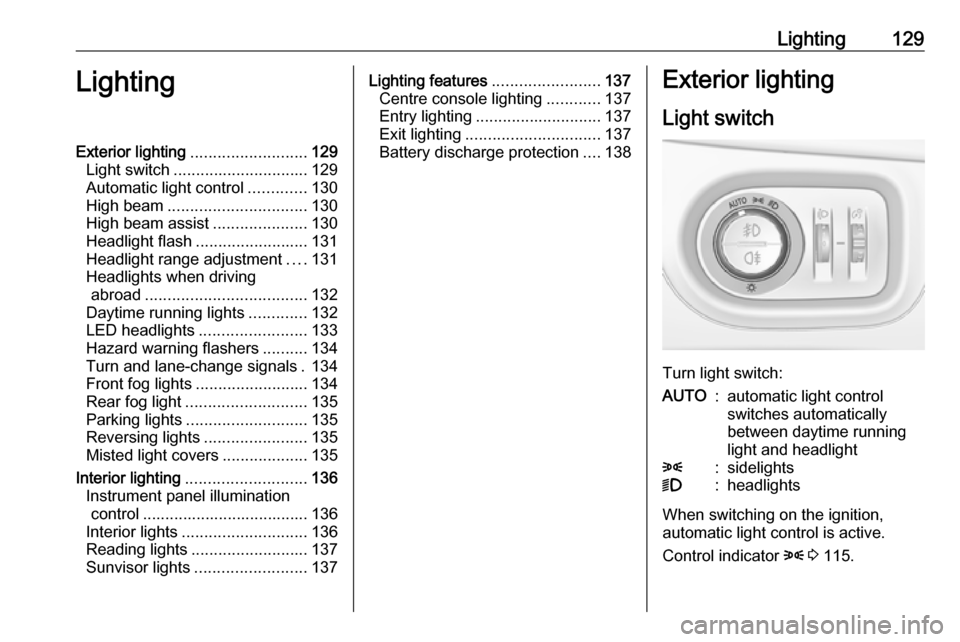
Turn light switch:
AUTO:automatic light control
switches automatically
between daytime running
light and headlight8:sidelights9:headlights
When switching on the ignition,
automatic light control is active.
Control indicator 8 3 115.
Page 132 of 341
130LightingTail lightsTail lights are illuminated together
with low/high beam and sidelights.
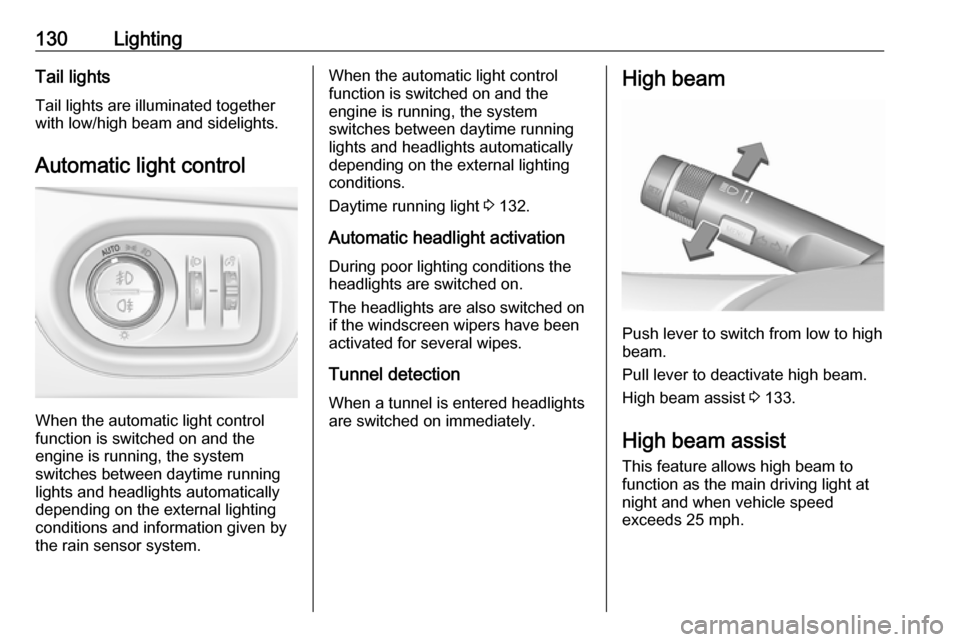
Automatic light control
When the automatic light control
function is switched on and the
engine is running, the system
switches between daytime running
lights and headlights automatically
depending on the external lighting
conditions and information given by
the rain sensor system.
When the automatic light control
function is switched on and the
engine is running, the system
switches between daytime running
lights and headlights automatically
depending on the external lighting
conditions.
Daytime running light 3 132.
Automatic headlight activation During poor lighting conditions the
headlights are switched on.
The headlights are also switched on
if the windscreen wipers have been
activated for several wipes.
Tunnel detection
When a tunnel is entered headlights
are switched on immediately.High beam
Push lever to switch from low to high
beam.
Pull lever to deactivate high beam.
High beam assist 3 133.
High beam assist This feature allows high beam to
function as the main driving light at
night and when vehicle speed
exceeds 25 mph.
Page 133 of 341
Lighting131It switches automatically to low beam
when:
● The camera or a sensor in the windscreen detects the lights of
oncoming or preceding vehicles.
● The vehicle speed drops below 12 mph.
● It is foggy or snowy.
● Driving in urban areas.
If there are no restrictions detected, the system switches back to high
beam.
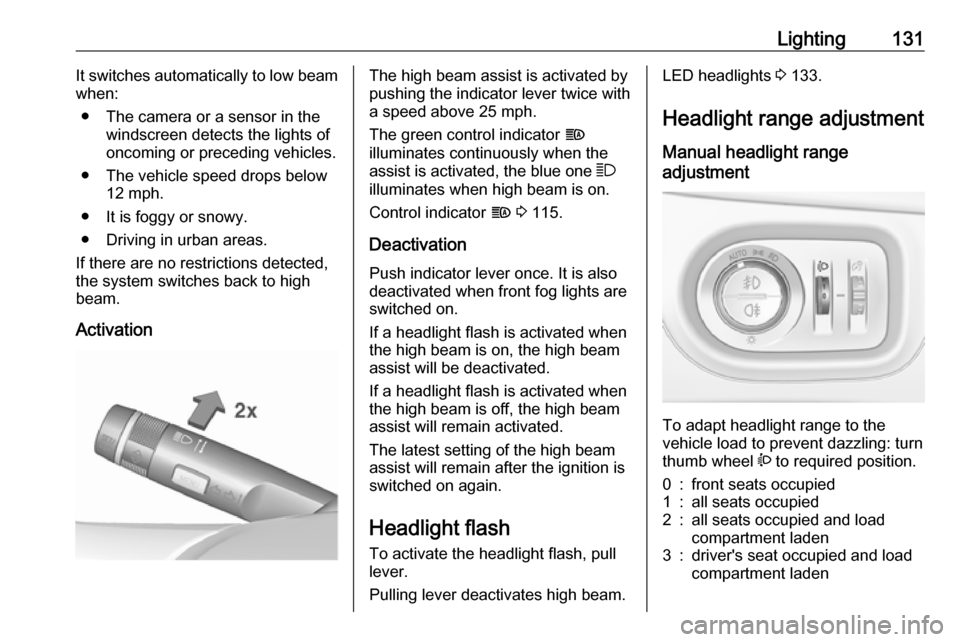
ActivationThe high beam assist is activated by
pushing the indicator lever twice with
a speed above 25 mph.
The green control indicator f
illuminates continuously when the
assist is activated, the blue one 7
illuminates when high beam is on.
Control indicator f 3 115.
Deactivation
Push indicator lever once. It is also
deactivated when front fog lights are
switched on.
If a headlight flash is activated when the high beam is on, the high beam
assist will be deactivated.
If a headlight flash is activated when
the high beam is off, the high beam
assist will remain activated.
The latest setting of the high beam
assist will remain after the ignition is
switched on again.
Headlight flash
To activate the headlight flash, pull
lever.
Pulling lever deactivates high beam.LED headlights 3 133.
Headlight range adjustment Manual headlight range
adjustment
To adapt headlight range to the
vehicle load to prevent dazzling: turn
thumb wheel ? to required position.
0:front seats occupied1:all seats occupied2:all seats occupied and load
compartment laden3:driver's seat occupied and load
compartment laden
Page 134 of 341
132LightingDynamic automatic headlight
levelling 3 133.
Headlights when driving abroad
The asymmetrical headlight beam
extends visibility at the edge of the
road at the passenger side.
However, when driving in countries
where traffic drives on the opposite
side of the road, adjust the headlights to prevent dazzling of oncoming
traffic.
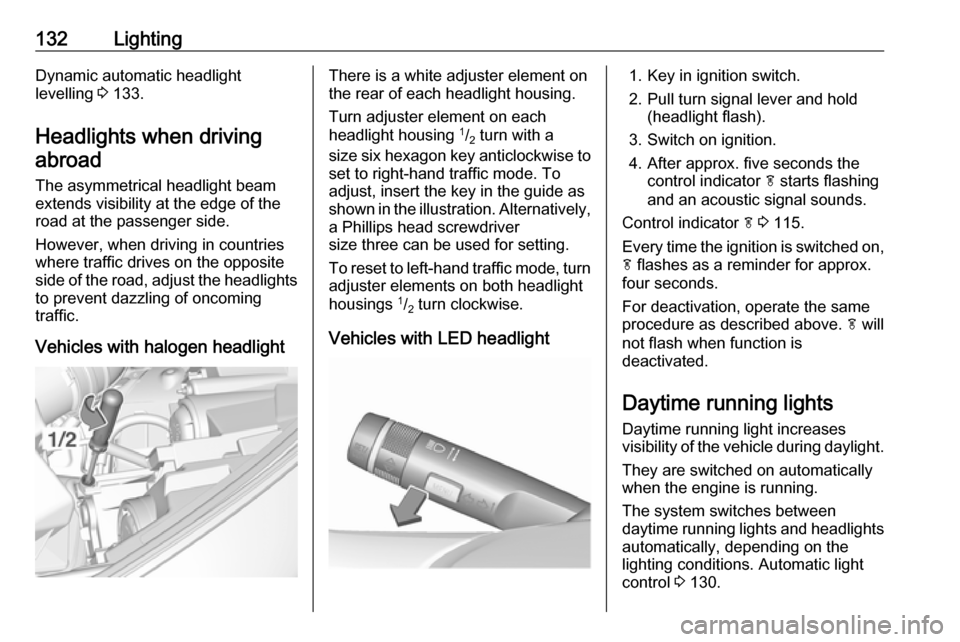
Vehicles with halogen headlightThere is a white adjuster element on
the rear of each headlight housing.
Turn adjuster element on each
headlight housing 1
/2 turn with a
size six hexagon key anticlockwise to set to right-hand traffic mode. To
adjust, insert the key in the guide as
shown in the illustration. Alternatively,
a Phillips head screwdriver
size three can be used for setting.
To reset to left-hand traffic mode, turn
adjuster elements on both headlight
housings 1
/2 turn clockwise.
Vehicles with LED headlight1. Key in ignition switch.
2. Pull turn signal lever and hold (headlight flash).
3. Switch on ignition.
4. After approx. five seconds the control indicator f starts flashing
and an acoustic signal sounds.
Control indicator f 3 115.
Every time the ignition is switched on,
f flashes as a reminder for approx.
four seconds.
For deactivation, operate the same
procedure as described above. f will
not flash when function is
deactivated.
Daytime running lights Daytime running light increases
visibility of the vehicle during daylight.
They are switched on automatically
when the engine is running.
The system switches between
daytime running lights and headlights automatically, depending on the
lighting conditions. Automatic light
control 3 130.
Page 135 of 341
Lighting133LED headlightsLED lighting system includes: ● LED headlights for low and high beam
● cornering lights
● town light
● high beam assist
● reverse parking function
● eco mode
● dynamic automatic headlight levelling
LED headlights for low and
highbeam
LED headlights for low and high beam
ensure better visibility under all
conditions.
Operation is the same as for halogen headlights.
Light switch 3 129 , high beam 3 130,
headlight flash 3 131, headlights
when driving abroad 3 132.
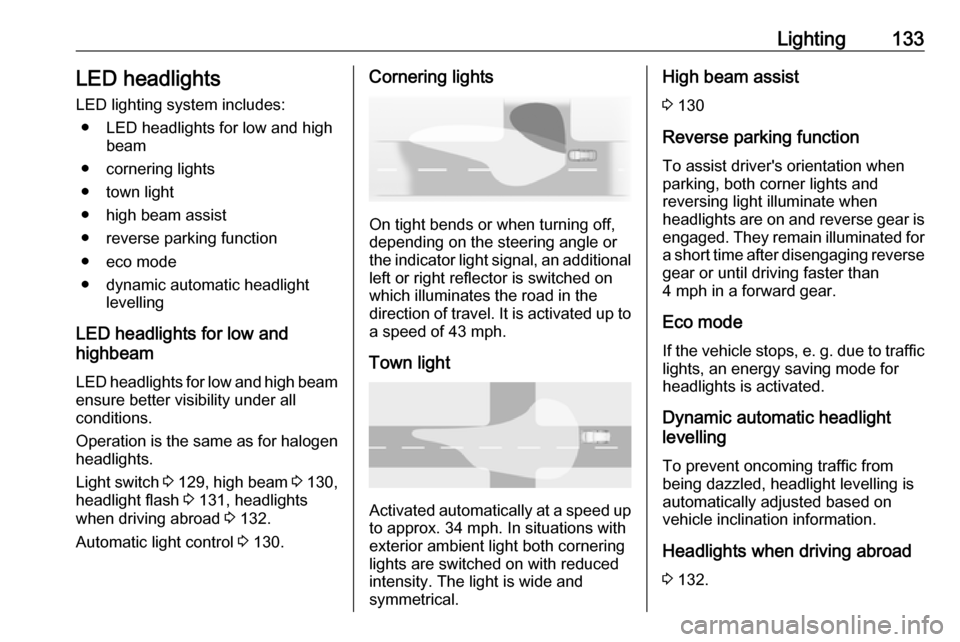
Automatic light control 3 130.Cornering lights
On tight bends or when turning off,
depending on the steering angle or
the indicator light signal, an additional left or right reflector is switched on
which illuminates the road in the
direction of travel. It is activated up to
a speed of 43 mph.
Town light
Activated automatically at a speed up to approx. 34 mph. In situations with
exterior ambient light both cornering
lights are switched on with reduced
intensity. The light is wide and
symmetrical.
High beam assist
3 130
Reverse parking function
To assist driver's orientation when
parking, both corner lights and
reversing light illuminate when
headlights are on and reverse gear is
engaged. They remain illuminated for a short time after disengaging reverse
gear or until driving faster than
4 mph in a forward gear.
Eco mode If the vehicle stops, e. g. due to traffic lights, an energy saving mode for
headlights is activated.
Dynamic automatic headlight
levelling
To prevent oncoming traffic frombeing dazzled, headlight levelling is
automatically adjusted based on
vehicle inclination information.
Headlights when driving abroad3 132.