door locking VOLKSWAGEN BEETLE 2008 Owners Manual
[x] Cancel search | Manufacturer: VOLKSWAGEN, Model Year: 2008, Model line: BEETLE, Model: VOLKSWAGEN BEETLE 2008Pages: 138, PDF Size: 48.59 MB
Page 2 of 138
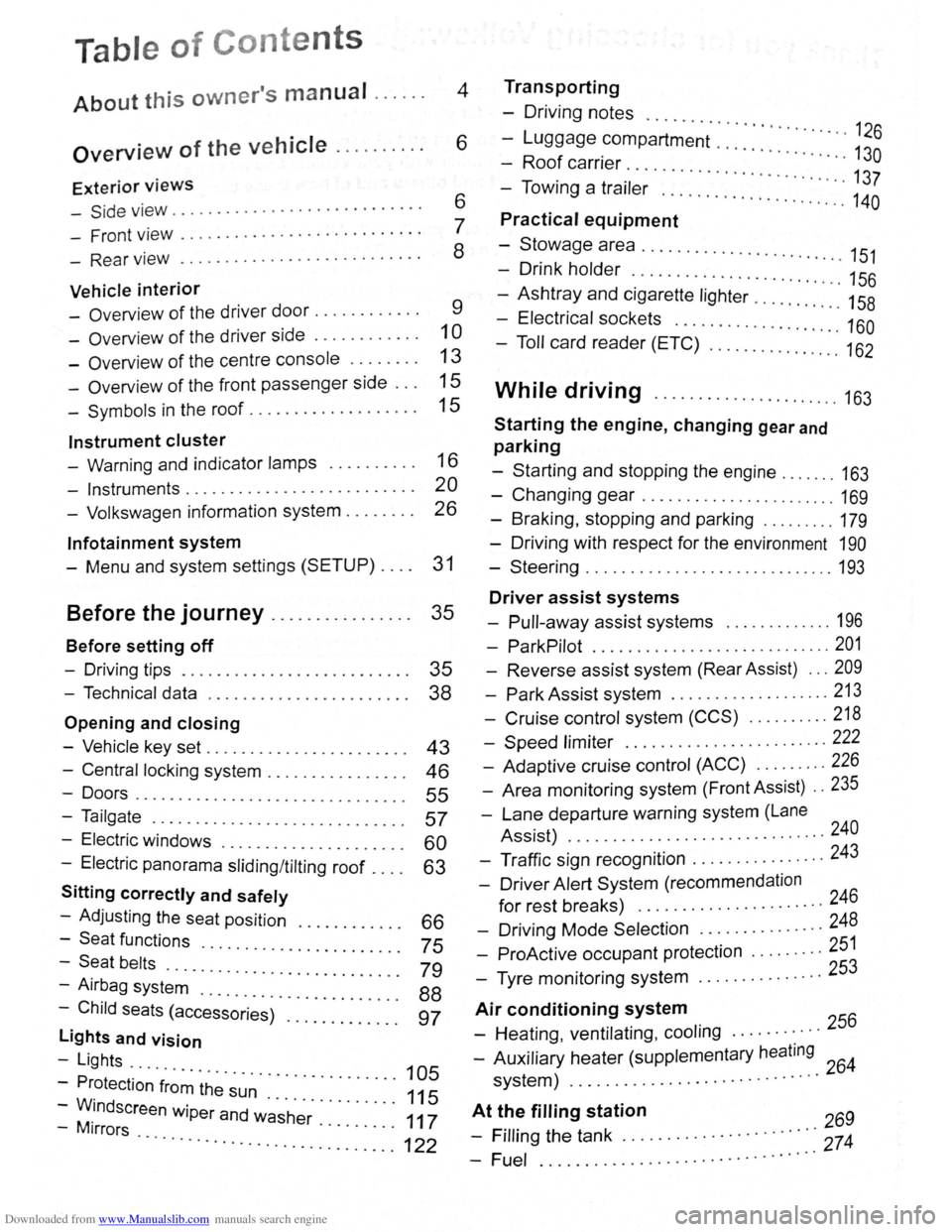
Downloaded from www.Manualslib.com manuals search engine Table of Conte nts
About this owner's manual . . . . . . 4
Overview of the vehicle . . . . . . . . . . 6
Exterior views
-Side v iew . . . . . . . . . . . . . . . . . . . . . . . . . . . . 6
- Front view . . . . . . . . . . . . . . . . . . . . . . . . . . . 7
- Rear view . . . . . . . . . . . . . . . . . . . . . . . . . . . 8
Vehicle interior
- Overview of the driver door........... . 9
-Overv iew of the driver side . . . . . . . . . . . . 1 0
- Overview of the centre console . . . . . . . . 13
- Overview of the front passenger side . . . 15
-Symbols in the roof . . . . . . . . . . . . . . . . . . . 15
Instrument cluster
- Warning and indicator lamps . . . . . . . . . . 16
- Instruments.......................... 20
- Volkswagen information system . . . . . . . . 26
lnfotainment system
- Menu and system settings (SETUP) . . . . 31
Before the journey . . . . . . . . . . . . . . . . 35
Before setting off
- Driving tips . . . . . . . . . . . . . . . . . . . . . . . . . . 35
- Technical data . . . . . . . . . . . . . . . . . . . . . . . 38
Opening and closing
-Vehicle key set . . . . . . . . . . . . . . . . . . . . . . . 43
- Central locking system . . . . . . . . . . . . . . . . 46
-Doors....................... .. . 55
-Tailgate . . . . . . . . . . . . . . . . . . . . . . . . . . . . . 57
- Electric windows . . . . . . . . . . . . . . . . 60
- Electric panorama sliding/tilting roof . : : : : 63
Sitting correctly and safely
- Adjusting the seat position . . . . 66
-Seat functions · · · · · · · · 75 -Seat belts ..... · · · · · · · · · · · · · · · · · ·
- Airbag syst~~ . : : : : · · · · · · · · · · · · · · · 79
-Child seats (access~;;~~)· :::::::::::: : ~~
lights and vision
-Lights ...
- Protection
·f~~~ ~h~· ~~~ · · · · · · · · · · · 105
-WM.indscreen wiper and w~·s·h~r· . . . . . . . . . 111175
-1rrors · · · · · · · .. ............. ...... ........... 122
Transporting
- Driving notes ..........
-Luggage compartment · · · · · · · · · · · · · · 126
-Roof carrier · · · · · · · · · · · · · · · · 130
- Towing a trai·l~; .. ... · · · · · · · · · · · · · · · · · · 137
..... ................. 140
Practical equipment
-Stowage area ........... .. .
- Drink holder
.. · · · · · .. · 151 . . . . . . . . . . . . . . . . . . . . . . . 156
-Ashtray and cigarette lighter ......... : ." 158
- Electrical sockets ........ .. .......... 160
- Toll card reader (ETC) .............. .. 162
While driving ...................... 163
Starting the engine, changing gear and
parking
-Starting and stopping the engine ....... 163
-Changing gear ....................... 169
-Braking , stopping and parking ........ . 179
- Driving with respect for the environment 190
-Steering ............................. 193
Driver assist systems
- Pull-away assist systems ............. 196
- ParkPilot ............................ 201
- Reverse assist system (Rear Assist) ... 209
-Park Assist system ................... 213
-Cruise control system (CCS) .......... 218
-Speed limiter ........ .. .............. 222
- Adaptive cruise control (ACC) ........ . 226
- Area monitoring system (Front Assist) .. 235
-Lane departure warning system (Lane
Assist) .
.......... ................... 240
- Traffic sign recognition ................ 243
- Driver Alert System (recommendation
for rest breaks) ........... ........... 246
- Driving Mode Selection ............... 248
- ProActive occupant protection ..... .... 251
- Tyre monitoring system .. ............. 253
Air conditioning system
- Heating , ventilating, cooling ........... 256
- Auxiliary heater (supplementary heating 64 system) ................. ............ 2
At t~~ filling station 269
- Frllrng the tank ............. · · · · · · ·::: 274
-Fuel ................ .. · · · · · · · · ·· ·
Page 8 of 138
Downloaded from www.Manualslib.com manuals search engine 0 N ,..; 0
'e h ic le interior
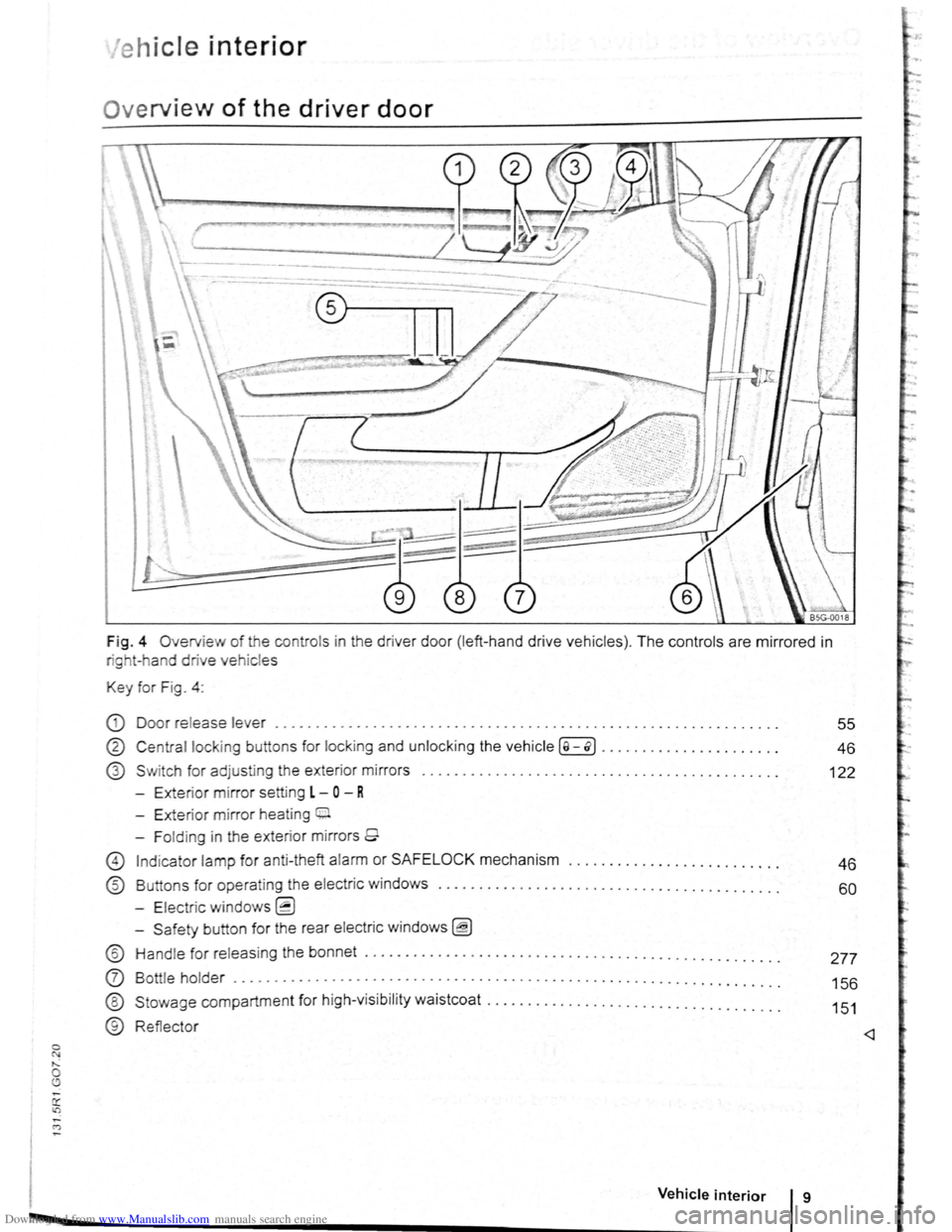
Ov erview of the driver door
Fig . 4 Overv ie w of the contro ls in the drive r doo r (left -ha nd dr ive ve hicles ). The controls are mirrored in
rig t- h and drive vehic le s
Key for Fig . 4 :
CD Door release lever ........................... ............ ..... . ................ .
® Centra l lock ing butt on s for locking and unlo cking the vehicle ( a -o>] ............... ...... .
G) S w itch for adjusting the exter ior mirror s
- Exte ri
or mirror setting L -0 - R
- Exterior mirror heat ing 0.
- Fo ld ing in the exterior mirrors 9
55
46
122
G) Ind icator lamp for anti -theft alarm or SAFELOCK mechanism . . . . . . . . . . . . . . . . . . . . . . . . . . 4 6
® Buttons for oper atin g t he electric windows . . . . . . . . . . . . . . . . . . . . . . . . . . . . . . . . . . . . . . . . . . 60
- Electric windows~
-S afety button for the rear electric windo ws ~
® Hand le for releas ing the bonne t ....................................... .... ...... . .
0 Bott le holder ................................... . .............................. .
®
®
Stowage compartmen t for high-visi bility waist coa t .. ................................. .
Reflecto r
Vehicle interior g
277
156
151
Page 29 of 138
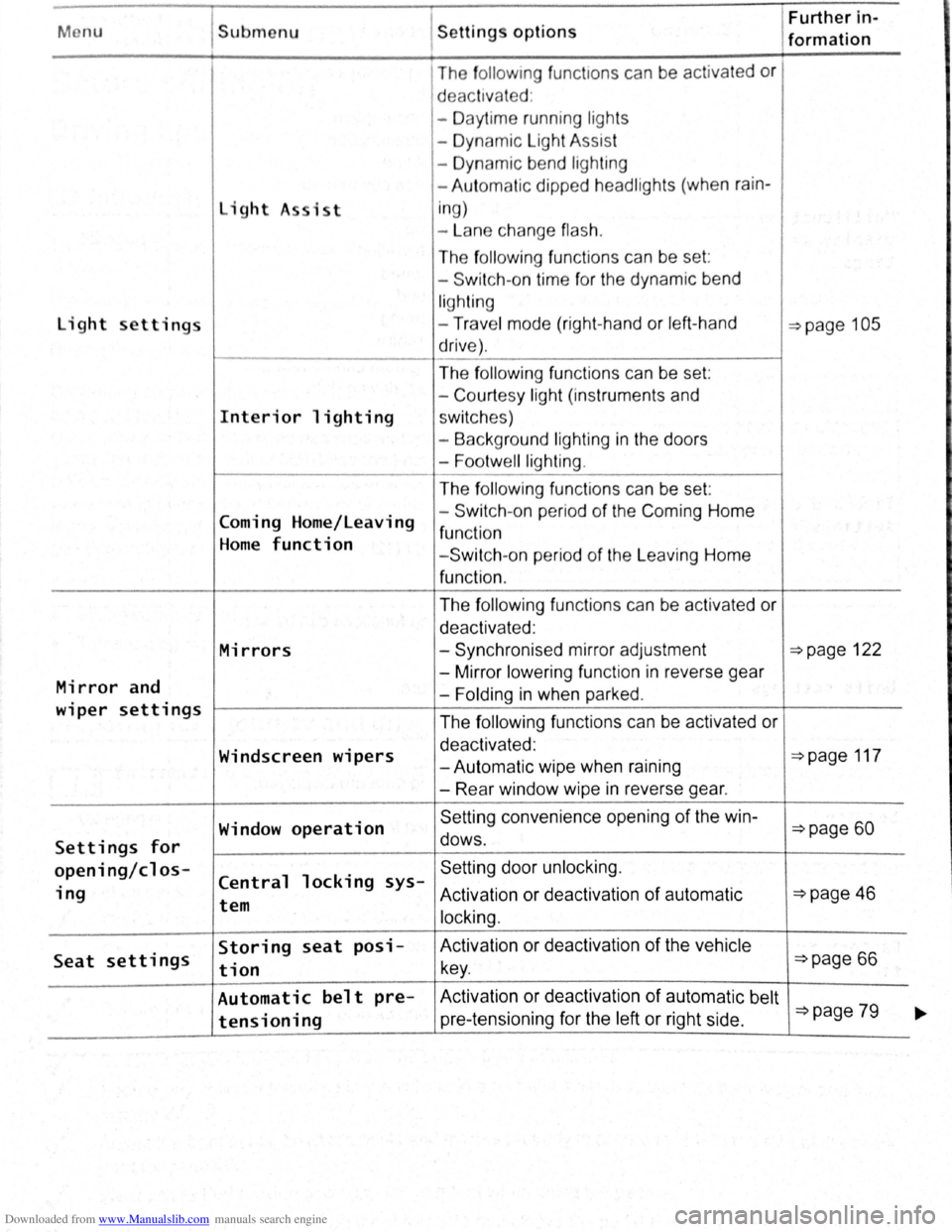
Downloaded from www.Manualslib.com manuals search engine Menu Submenu Further in-Settings options formation
The fo llo w ing func t1ons can be activated or
d eac tivated :
- Daytime running ligh ts
- Dynamic Light Assist
- Dynamic bend lighting
- Aut omatic dipped headlights (when
rain-
light A sist i
n g)
- La n e change
flash.
The following func tio ns can be set :
- Switch -on time for the dynamic bend
lighting
light settings -Trav e l mode (right-hand or left -hand ~page 105
drive) .
The
f ollo win g functions can be set:
- Court
esy light (instruments and
Interior lighting sw itc hes)
- Background lighting
in the doors
-
Footwell lighting .
The following fun ctions can be set:
Coming Home/Leaving -
Switch -
on pe riod of the Com ing Home
function Home function - Switch -on period of the L eaving Home
function .
The
f ollowing fun ctions can be activated or
deactivated :
Mirrors -Synchronised mirror adjustment ~page 122
Mirror and -
Mirror lower ing function in reverse gear
-Folding in when parked .
wiper settings The following functions can be activated or
Windscreen wipers deactivated : ~page 117 -Autom atic wipe when raining
- Rear window wipe
in reverse gear.
Window
operation Se tting convenience opening of the win-~page 60
Settings for dows .
opening/cl os-Central locking sys-Setting door unlock ing.
ing Activation or deact ivat ion of automatic ~page 46 tem
locking.
Seat settings Storing seat posi- Activation
or deactivation of the vehicle
tion key . ~page 66
Automatic belt pre- Activ ation or deactivation of automatic belt ~page 79 tensioning pre-tensioning for the left or right side . ~
Page 33 of 138
Downloaded from www.Manualslib.com manuals search engine -r n -"') ...
Ope ning and closing
Vehi cle key set
ClJJ Introduction
Th is c hapte r contai ns info rmatio n on th e fo llo wi ng
subj ects:
V eh
icle ke y . . . . . . . . . . . . . . . . . . . . . . . . . . . . . 43
I
ndicator l amp in th e ve hi cle key . . . . . . . . . . . 44
Replacing the battery . . . . . . . . . . . . . . . . . . . . 45
S yn ch ronis ing the ve hicle key . . . . . . . . . . . . . 45
Additional information and warnings:
• Settin g s in the Volkswagen inform atio n system
=>page 26
• Central locking sys te m =>page 46
• S tarti ng and stopping the engine =>page 163
• Consumer info rmation =>page 328
• Manua lly closin g or open ing =>page 339
Swallowing batteries with a diameter of
20 mm or other lithium batteries can result in
severe or even fatal injuries within a very
short period of time.
• Always keep the vehicle key, key ring w ith
batteries, spare batteries, round cells and
other batteries that are larger than 20 mm out
of the reach of children.
Vehicle key
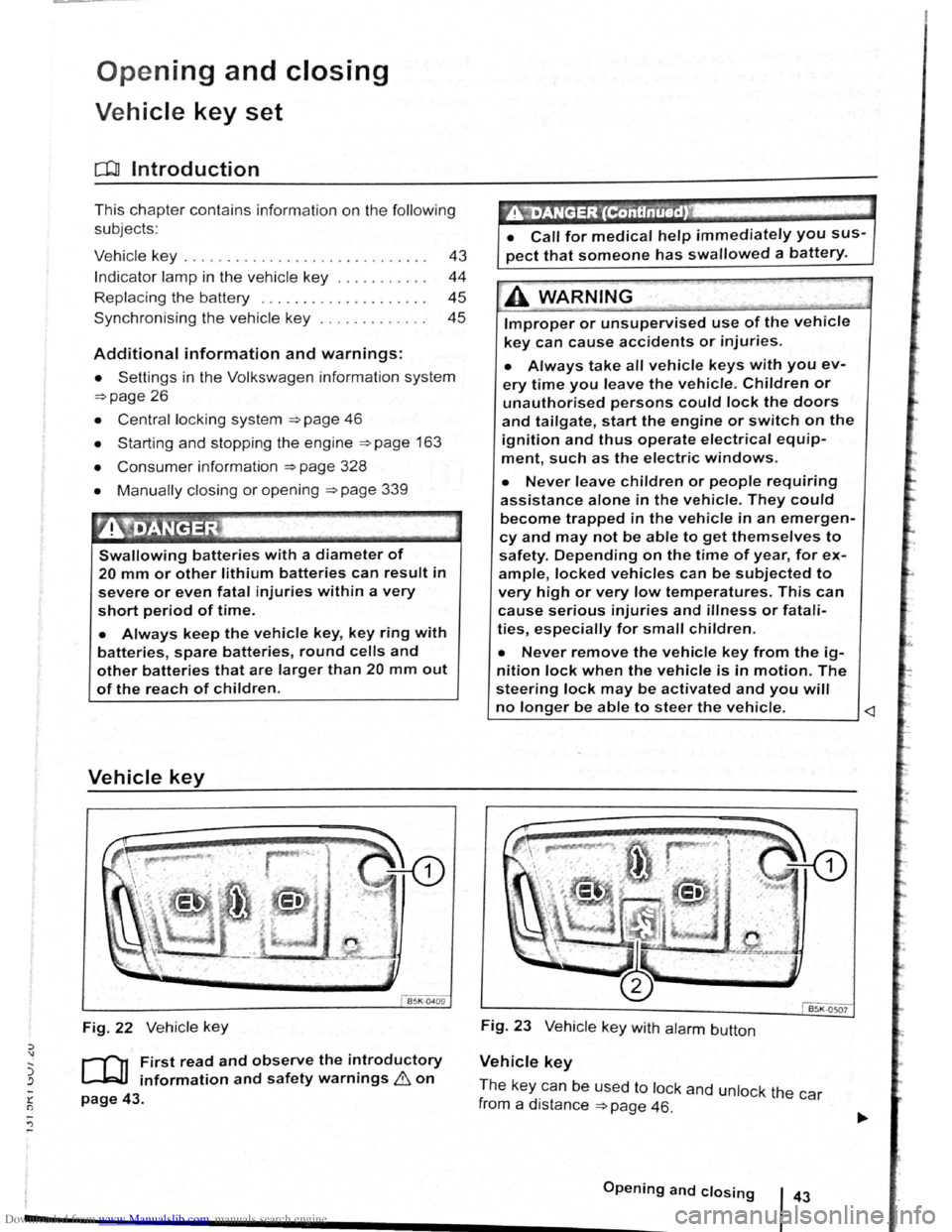
Fig. 22 Ve hicle key
r-('n First read and observe the introductory
L-J.=J.I information and safety warnings & on
page 43.
~"iDANGER '(ContinUed) .
• Call for medical help immediately you sus
pect that someone has swallowed a battery.
A WARNING . .,~
Improper or unsupervised use of the vehicle
key can cause accidents or injuries.
• Always take all vehicle keys with you ev
ery time you leave the vehicle. Children or
unauthorised persons could lock the doors
and tailgate, start the engine or switch on the
ignition and thus operate electrical equip
ment, such as the electric windows.
• Never leave children or people requiring
assistance alone in the vehicle. They could
become trapped in the vehicle in an emergen
cy and may not be able to get themselves to
safety. Depending on the time of year, for ex
ample, locked vehicles can be subjected to
very high or very low temperatures. This can
cause serious injuries and illness or fatali
ties, especially for small children.
• Never remove the vehicle key from the ig
nition Jock when the vehicle is in motion. The
steering Jock may be activated and you will
no longer be able to steer the vehicle.
Vehicle key
Th e ke y ca n b e used t o lock and unlock th e car
f rom a
distance =>page 46.
------------------.............................................. O•p•e•n•i•n•g•a•n•d--c-lo_s_i_n_g ___ l 43
Page 36 of 138
Downloaded from www.Manualslib.com manuals search engine Central locking system
c:DJ Introduction
This chapter contains information on the following
subjects:
Description
of the central locking system 46
Locking and unlocking the vehicle from the
outside . . . . . . . . . . . . . . . . . . . . . . . . . . . . . . . .
47
Locking and unlocking the vehicle from the
inside . . . . . . . . . . . . . . . . . . . . . . . . . . . . . . . . .
48
Locking and unlocking the vehicle with
Keyless Access . . . . . . . . . . . . . . . . . . . . . . . . . 49
SAFELOCK mechanism . . . . . . . . . . . . . . . . . . 51
Anti-theft alarm . . . . . . . . . . . . . . . . . . . . . . . . . 52
Interior monitoring system and anti-tow alarm 53
The central locking system
will only work correctly
when all doors and the tailgate are closed properly.
The
vehicle cannot be locked with the key if the
driver door is open .
In vehicles with the Keyless Access locking and
starting system, the
veh icle can only be locked
when the ignition has been switched
off and the
driver door is closed .
If the vehicle is unlocked and not used for a long
time (e.g. in your own garage) the
vehicle battery
could discharge
or the engine may not start.
Additional information and warnings:
• Exterior views ~page 6
• lnfotainment system ~page 31
• Vehicle key set ~page 43
• Doors ~page 55
• Tailgate ~page 57
• Electric windows ~page 60 •
Electric
panorama sliding/tilting roof
~page 63
• Towing a trailer ~page 140
•
Manual opening or closing ~page 339
A WARNING
Improper use of the central locking system
could cause serious injury.
• The central locking system locks all
doors. Locking the vehicle from the inside
may prevent the doors from being opened
unintentionally and unauthorised persons
from entering the vehicle . However, locked
doors can delay assistance to passengers in
side the vehicle in the event of an accident or
emergency.
• Never leave children or people requiring
assistance alone in the vehicle. All doors can
be
locked from the inside using the central
locking button. This may mean that people
lock themselves in the vehicle. People locked
in the vehicle may be subjected to very high
or very low temperatures.
• Depending on the time of year, locked ve
hicles can be subjected to very high or very
low temperatures. This can cause serious in
juries and illness or fatalities, especially for
small children.
• Never leave anyone inside a locked vehi
cle. People in the vehicle could become trap
ped in an emergency and may not be able to
get themselves to safety.
Description of the central locking system
r-('n First read and observe the introductory
L-Jr=JJ information and safety warnings & on
page 46.
The central locking system enables you to lock and
unlock
all the doors, the tailgate and tank flap from
one central point:
• From outside the vehi cle with the vehicle key
~page 47.
• From outside the vehicle with Keyless-Access
~page 49.
• From inside the vehicle with the central locking
button ~page 48.
Certain central locking functions can be activated
or deactivated in the infotainm ent system using the
@ill button and the~ and (Open and Clos e) function
buttons =>page 31, or the vehicle can be taken to a~
qualifi ed work shop .
--~--------------------~~
Page 37 of 138
Downloaded from www.Manualslib.com manuals search engine h{' ,~ 'I,'. U rl lC1tlJc'lt nd th tank flap cnn be
· r 1 unhx I n tFinuHII if th e ve hic le k e y or
"'~' tf,\1 1-. • "'J, ~lhml fdll •.
ut 'llH\ tl kin (Aut ock)
~~t nMtl lml , k in g (Auto Unlock)
\~ '•l$~1$, th h i ~le a ut tTinticn lly unl ocks
1$ '" 1 th lc1tlJ<'lto ~ pnge 1 wh en:
A c
tion
• Th e ve hi cle comes to a s tandst ill and th e veh i
c le
k e y is removed .
• In v e hic le s with an au to m atic gearbox: w hen
th e se lec to r le v
er is in p ositio n P and the ignitio n is
s wi tc h ed o ff.
Locking the vehicle after the airbags have
been triggered
The entire vehic le is un locked if the air bags are ac
tiva ted d uring an accide nt. Depe ndi ng o n the level
of damage,
the veh icle can b e locked after an a cc i
d ent as fo llows .
-
Swi tc h off the ig ntt ion.
l · 1ng th veh1 le using the ve
hl lt) ~e :
-Open and close one of the ve hicle doors once .
- Press
~e cent~lockin~_b_u_tt_o_n-.:@)=o_. -------------
- Swi tc h off th e ignitio n .
OR: remove the key from the igni tio n lock.
-Open one of the ve hicle doo rs o nce .
- Lock
the ve hicle with the vehicle key.
If tho butt ns n the vehic le ke y ~ Fig . 27 or
·' Ft , 28 r ne of the centrnl locking bu tto ns
i, , 9 r press d repeatedly within a short pe
t tim~. th central lo k ing sys te m wi ll swi tc h o
ff brie fly to pre vent ove
rloading . Th e ve hic le is
th en u nlocked fo r app roxima tel y
30 seco nds . If the
d oors or th e
ta1lga te a re no t opene d during this
tim e th e vehic le
w ill lock again au to m atically .
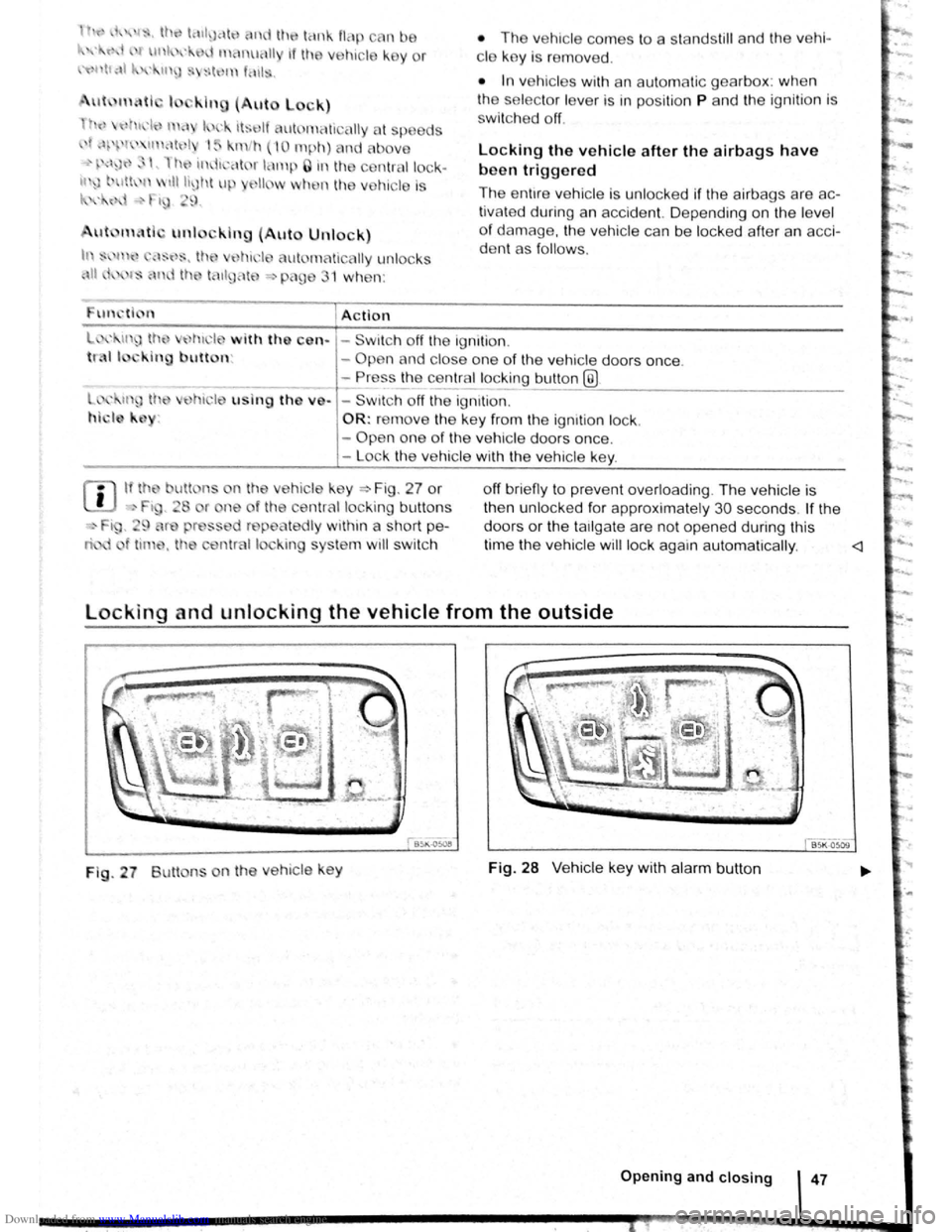
Fig . 27 Butt ns on th e ve h icle ke y Fig. 28 V e hic le ke y with alarm button
Opening and closing 47
Page 38 of 138
![VOLKSWAGEN BEETLE 2008 Owners Manual Downloaded from www.Manualslib.com manuals search engine [Q] First read and observe the introductory information and safety warnings .et. on page 46.
Function Buttons to be used on the vehicle key =>](/img/18/55758/w960_55758-37.png "VOLKSWAGEN BEETLE 2008 Owners Manual Downloaded from www.Manualslib.com manuals search engine [Q] First read and observe the introductory information and safety warnings .et. on page 46.
Function Buttons to be used on the vehicle key =>")
Downloaded from www.Manualslib.com manuals search engine [Q] First read and observe the introductory information and safety warnings .et. on page 46.
Function Buttons to be used on the vehicle key =>Fig. 27 or =>Fig. 28-
Unlocking the vehicle . Press the@ button . Press and hold for convenience opening. -
Lo cking the vehicle .
Pres s the@) button . Press and hold for convenience closing. In
vehicles with a SAFELOCK mechanism , press the@) button
once to lo ck the vehicle us ing the SAFELOCK mech anism .
Press the @) button twice to lock the vehicle without the SAFE
LOCK mechanism .
Unlocking the tailgate .
Press the~ button =>page 57.
Please note: depending on the central locking
function that has been set in the infotainment sys
tem ,
all of the doors and the tailgate may only be
unlocked when the
@ button is press ed twice
=>page 31.
The vehicle key
will lock or unlock the vehicle only
when the battery has enough power and the key
is
located within a few metr es of the vehi cle .
• When the vehicle is locked , all turn signals will
flash
once as confirmation.
• When the vehicle is unlocked, all turn signals
will flash twice as confirmation .
If the turn signals do not flash as confirmation, at
least one
of the doors or the tailgate is not closed. The v
ehic le cannot be locked using the
vehicle key
if the driver door is still open . The vehic le will lock
again automatically within a few seconds of being
unlocked if you do not open one of the doors
or the
tailgate . This function prevents the vehicle from re
maining unlocked if the unlocking button is pressed
by mistake .
Convenience opening and closing
• See electric windows -functions =>page 60 .
• See fun ction of the electric panorama sliding/
tilting roof
=>page 63. ~
Locking and unlocking the vehicle from the inside
Fig. 29 In the driver door: central locking button
r-fl1 First read and observe the introductory
L-l=.U information and safety warnings £on
page 46.
Press the
button =>Fig. 29:
a Unlocks the vehicle . The
centr al lo ck ing button functions with the igni
tion switched on or
off only when all doors are
closed.
If the vehicle has been locked with the vehicle key,
the central locki
ng button does not work .
Please note the following when using the central
lo cking button to lock the veh ic le :
~ The indicator lamp Q in the button =>Fig. 29
lights up yellow when all doors and the tailg ate are
closed and locked .
• In vehicles with SAFELOCK mechanism: the
SAFELOCK mec hanism is not activated
=>page 51.
• The anti-theft alarm will not be activa ted.
• lt is not possible to open the doors or tailgate
from the outside, for instance when stopped at traf
fic lights .
'
Q Locks the ve hicle .
• The doors can be unlocked and opened from
the inside by pulling the door release handle . The ~
indicator lamp Q in all doors switches off. You maY ~ ~
~l .... ~.-gz-. ........ 4•8·'~•B•e•f•or•e•t•h•e•jo•u•r•n•ey ............................ ______________ .... ~ .... .-.-Jr-
Page 39 of 138
Downloaded from www.Manualslib.com manuals search engine In s m
11 d or
n
d
d =-~ i . 29.
stA nd still nd th v hi -
• In
v 111 I s wit11 n ut m tic g arbox : when
v r is In p iti n P nd th ign ition is
I ~K-012~
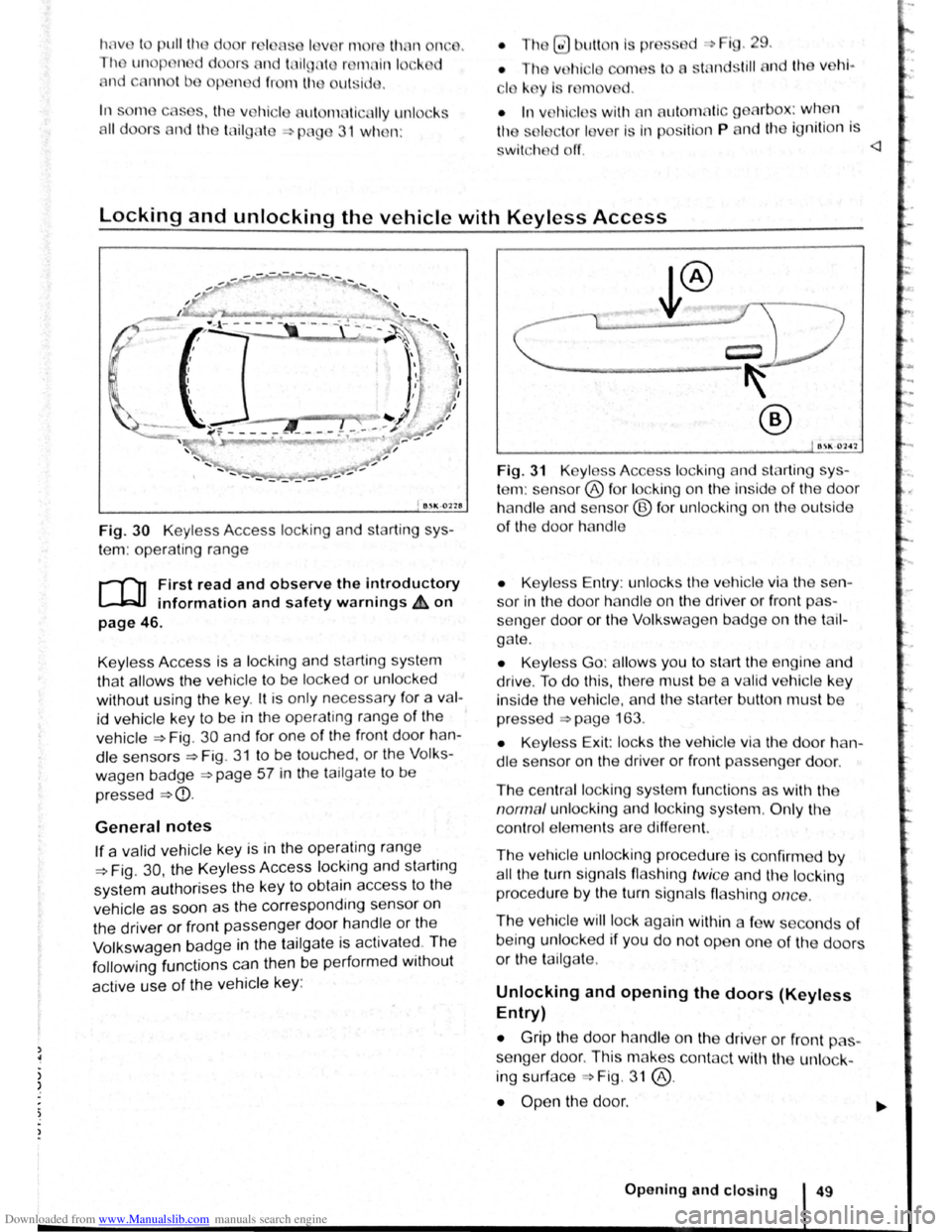
Fig. 30 Keyless Access locking and starti ng sys
te m : operating range
r-f"n First read and observe the introductory
1.-.W.J information and safety warnings & on
page 46.
Keyl ess Access is a lock ing and starting sys te m
th at
allows the ve hicle to be locked or unl ocked
without using the key . lt is only necessa ry f
or a va l
id veh ic le key to be in the operat ing range of th e
vehi cle ~Fig. 30 and for one of the front door han
dl e
sen sors~ Fig . 31 to be touched, or t he V olks
wagen badge ~page 57 in the tailga te to be
pres sed
~CD.
General notes
If a valid vehicle key is in the oper ating range
~Fig. 30, the Keyless Access locking and starting
system authorises the ke y to obtain access to the
vehicle as soon as the corresp ond ing sensor on
the driver
or front passenger door handl e or the
Volkswagen b
adge in the ta ilg ate is activate~. The
following functions can then be performed w1thout
active use of the vehicle key:
B~K-OlH
Fig. 31 K yl ss Access loc king and starting sys
te m : se nsor® fo r loc king on the inside of th e door
ha nd le and s nsor@ fo r unl ockin g on the outside
of the door ha ndl e
• Keyl ess Entry : unlo cks th e ve hi cle v i the sen
sor in the door ha ndl e on t11e driv er or front pas
senger door or the Volk sw age n b dge on the tai l
g a te .
• Keyl ess Go: allow s you to sta rt th e e ngin e and
driv e . To do this, there mus t be a va lid ve hi cle k e y
insid e th e ve hicle, and the sta
rte r bu tton mu st be
pr essed
=>page 163.
• Keyl ess Exit: locks the v e hi cle vi a t he door h an
dl e sensor on the driver or front passe nger door.
Th e cen tral l ocking syste m fun c
tions as with the
norm al u nl ocking and loc kin g s yste m . Only the
co ntrol ele m ents are differe nt.
Th e
ve hic le unl ocking procedure is confirm ed by
all the turn signals flas hing twi ce and the locking
proc edure by the turn sig na ls flas hing once .
The ve hicl e will lock aga in within a fe w s conds of
being unl ocked if y ou do no t open one of the doors
or the tai lgate .
Unlocking and opening the doors (Keyless
Entry)
• Grip the door ha nd le on th e driv er or front pas
seng er door . Th is makes con tac t wit11 the unlock-
ing surface Fig . 31 @ .
• Open th e door. ..,.
Op ening and closing 49
Page 40 of 138
Downloaded from www.Manualslib.com manuals search engine In vehicles without a SAFELOCK
mechanism: closing and locking the doors
(Keyless Exit)
• Close the driver door.
• Touch the locking sensor@ on the outside of
the driver or front passenger door ha ndle once .
The door being used must be closed.
In vehicles with a SAFELOCK mechanism:
closing and locking the doors (Keyless Exit)
• Close the driver door.
• Touch the locking sensor@ on the outside of
the driver or front passenger door handle once .
The car is locked with the SAFELOCK mechan ism
=>page 51 active. The door be ing used must be
closed.
• Touch the locking sensor@ (arrow) on the out
side of the driver or fron t passenger door handle
twice to lock the vehicle without activating the
SAFE LOCK mechanism =>page 51.
Locking and unlocking the tailgate
If the vehicle is locked, the tailgate will be unlocke d
automatically when you open it if a valid vehicle
key is located within the operating range of the tail
gate =>Fig . 30.
Open and close the tailgate as normal
=>page 57.
The tailgate is locked automat ically after it is
closed. This al so applies if a val id vehicle key is lo
cated on the luggage compart ment cover or in the
luggage compartment.
The tailgate will not lock automat ically after closing
if one of the following criteria applies :
• The vehicle is complete ly un locked .
• A valid vehicle key is located near the front or
rear seats in the v ehicle .
Response when locking the vehicle with a
second vehicle key
If a vehicle key is loca ted inside the vehicle, the
vehicle w ill only lock from the outside if a se cond
valid vehicle key is located outside the vehicle,
within the operating range of the Keyless Access
system.
Automatic switch-off of the sensors
If an exterior sensor in one of the door handles on
a locked
vehicle is activated more often than usual ,
e .g.
if branches from a hedge rub against it, the
proxim i
ty sensor will be switched off for a short
t ime .
The sensors are reactivated if any of the following
takes place:
• Some time has passed.
• OR: the vehicle is unlocked using the 0 button
on the vehicle key.
• OR: the tailgate is opened.
• OR: the vehicle is unlocked with the vehicle
key .
Convenience functions
To use convenience closing for all electric win
dows and the electric panorama sliding/tilting roof,
hold a finger on the locking sensor
=>Fig . 31 @on
the outside of the driver or front passenger door
handle for a few seconds until the windows and/or
the electric panorama sliding/tilting r
oof have
closed.
When the sensor on the
door handle is to uched ,
the
door will open in accordance with the settings
activated in the infotainment system using
the~
button, and the~ and (Open ing and closing ) function
buttons
=>page 31.
lt is possible that the sensors in the door han
dles will be activated by a powerful jet of water
or steam if a valid vehicle key is within its oper
ating range at the same time. If at least one
window is open and the sensor@ (arrow) in a
door handle is activated permanently, all win
dows close. lt is possible that all windows will
open if the jet of water or steam is moved away
from the door handle sensor® (arrow) briefly
and then moved back onto it =>page 50, Con
venience functions.
m lt may not be possible to lock or unlock the
L!J vehicle using Keyless Access if the vehicle
battery or battery
in the vehicle key is weak or dis
charged . The vehicle can be locked or unlocked
manually
=>page 339 .
m If there is no valid vehicle key in the vehicle
L!J or if it is not detected , a co rre spond ing dis
play w ill be shown in the instrum ent cluster display.
T his may occur if the vehicle key is obstructed
by
another radio signal or is cov ered by another item,
e .g . an aluminium suitcase or briefcase.
m The function of the door handle sens?rs maY
L!J be limited by dirt, e.g . by salty depos1ts.
Clean the vehi cle as necessary =>page 294 .
m A veh icle with an automatic gearbox c~~ only
Page 41 of 138
Downloaded from www.Manualslib.com manuals search engine -
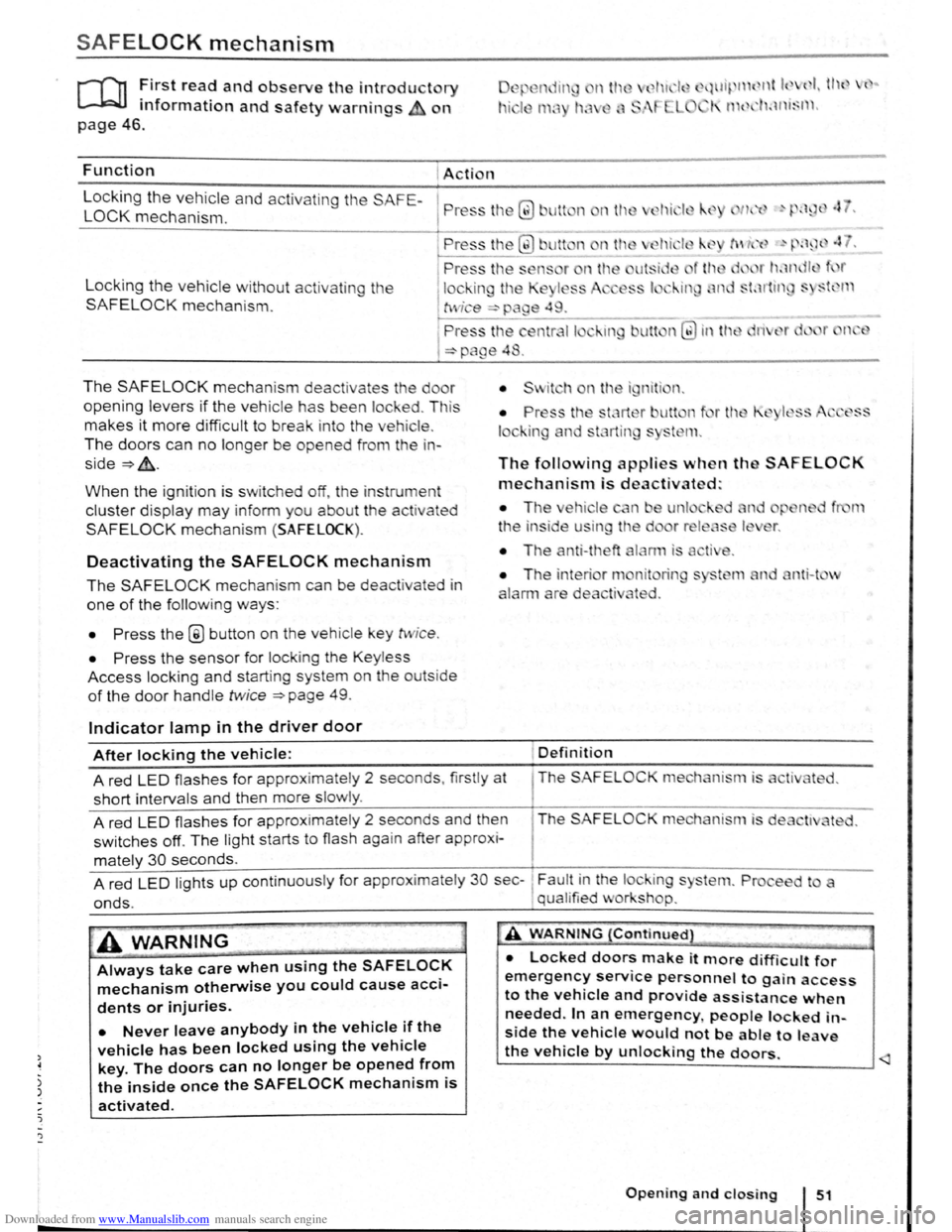
SAFELOCK mechanism
ro ~irst rea? and observe the introductory
mformat1on and safety warnings on
~.wl~ 11 { nt k ( I I tl l { ..
I' 1 t 1'klnt~l l .
page 46.
Function Action
L
ocking the vehicle and activating the SAFE-
LOCK mechanism. P ress tl1 Q) Jlt n nth
Locking the vehicle without activat in g the
SAFELOCK mechanis m .
The SAFELOCK mechanis m deactivates the do r
opening levers if the v e hic le has been lock ed . Th is
makes it more d ifficult to break in to the vehicle .
The doors can no longer be opened from th e in
side~&..
When the ignition is switched off, th e instrum ent
cluster display may inform you about t he activated
SAFELOCK mechani sm (SAFELOCK).
Deactivating the SAFELOCK mechanism
The SAFELOCK mechanis m can be deactivated in
one of the following ways:
• Press the @ button on the veh icle key twic e .
• Press the sensor fo r lock ing the Keyless
Access locking and s tarting system on the outs ide
of the door handle twice ~page 49.
Indicator lamp in the driver door
The following applies when th SAFELOCK
mechanism is deactivated:
• The ehi le n e unl
t
he in side u in the d
• The anti-theft
nit rin
ted .
nti-t v
After locking the vehicle: Definition
A red LED flash es for approximately 2 seconds , firstly at The SAFELOC
short intervals and then more slowly .
A red
LED flashes for approximate ly 2 seconds and then The SAFELOCK me hanism is de
switches off. The light starts to flash again after approx i-
mately 30 seconds.
A red
LED lights up cont inuous ly for approx imate ly 30 sec-~ Fault in the lock ing s
onds. , qual ified v or shop.
A WARNING
Always take care when using the SAFELOCK
mechanism otherwise you could cause acci
dents or injuries.
• Never leave anybody in the vehicle if the
vehicle has been locked using the vehicle
key. The doors can no longer be opened from
the inside once the SAFELOCK mechanism is
activated.
A WARNING {Continued}
• Locked doors make it more difficult for
emergency service personnel to gain access
to the vehicle and provide assistance when
needed. In an emergency people locked in
side the vehicle would not be able to leave
the vehicle by unlocking the doors.