brake light VOLKSWAGEN BEETLE 2011 Owner´s Manual
[x] Cancel search | Manufacturer: VOLKSWAGEN, Model Year: 2011, Model line: BEETLE, Model: VOLKSWAGEN BEETLE 2011Pages: 138, PDF Size: 49.24 MB
Page 106 of 138
Downloaded from www.Manualslib.com manuals search engine Speed lirniter
~~~~n~t~ro~d~t~tc~t~io~r~,-----------------------------------------------
hi , h:.1~t r ntains inf nn3tion on th e fo llo wing
subjt 't ~:
lmd indi 1t r I mp . . . . . . . 222
d
limit er . . . . . . . . . . . . . . . 223
h s~ d limit r hel~ t11e driv er n ot to excee d an
individua l ~t r d ~ d wh en driving forwards at
~ t ds f 3~pr im ate ly 30 km /h (20 m ph) and
~1b -
Addition3l Information and w arnings:
• IKm in g g r page 169
• ruls Co ntro l Syst em (CCS) ==-page 218
• dnptive Cruise Con trol (ACC ) ~page 226
• Ac -s ri s, m odifications , re pairs and re newa l
f parts ~ pRge 320
Display & warning and indicator lamp
®
©
' B~K Oot06
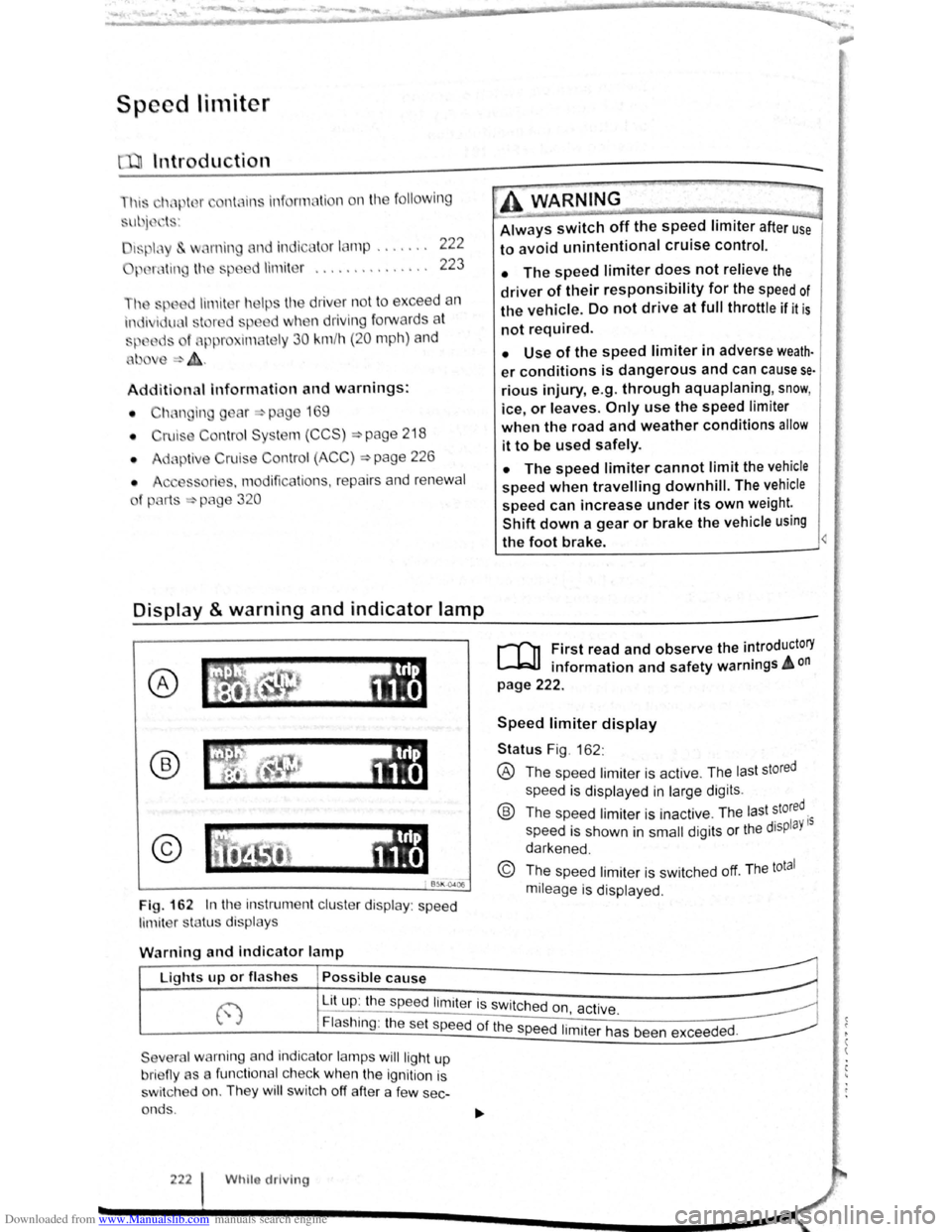
Fig. 162 In th e instrument clu ste r display : speed
limit er sta tus disp lays
·~ ~ ' -
~~~_W_A_R_N_IN_G ________ ~~----~
Always switch off the speed limiter after use
to avoid unintentional cruise control.
• The speed limiter does not relieve the
driver of their responsibility for the speed of
the vehicle. Do not drive at full throttle if it is
not required.
• Use of the speed limiter in adverse weath·
er conditions is dangerous and can cause se
rious injury, e.g. through aquaplaning, snow,
ice, or leaves. Only use the speed limiter
when the road and weather conditions allow
it to be used safely.
• The speed limiter cannot limit the vehicle
speed when travelling downhill. The vehicle
speed can increase under its own weight.
Shift down a gear or brake the vehicle using
the foot brake.
r-f'n First read and observe the introductory
L-JcJ.I information and safety warnings A on
page 222.
Speed limiter display
Status Fig . 162 :
® The spee d limiter is active . The las t stored
speed is displayed in large dig its .
® Th e speed limiter is ina ctive . Th e last stored.
speed is shown in
small digits or the displaY 15
darkened .
© The speed limiter is sw itched off. The total
mileage is displayed .
W
arning and indicator lamp
r~~~fucl,~~~~~---------------------~ Lights up or fl as hes Possible cause
j-~~----~~==~==~~---------------~ ~ L_it;u~p~:~th~e~sp~e:e:d~l:im:i:te:r~is~sw~itc~h~e~d~o~n~~~·~~---------------~ t.,.; :1 , ac 1ve. ~
Flashing : the set speed of the speed 1. .
t h d d
Severa l warning and indicator lamps will ligh t up
bri eny as a func tiona l c h ec k
when the ignition is
s wi tc h ed on. They
wi ll swi tc h off after a few sec
onds .
222 Whilo driving
1m1 er as been excee e .
Page 115 of 138
Downloaded from www.Manualslib.com manuals search engine ,,nti pttllinfl W• y I not wnllniJI for tdl vo h l-
fltllOI · and cOtllltJJ(' ciOS ·
. g th o clist::tnco lo vo l sett Ill
P d -d O I nclt nt dl st:1n
lhe s t t o n of 5 I v front can b -
vo hl cl In
lnfot in-
n,ent sy stem ,.-;. Pt g 3 1 .
w et road con d ill n , y u llo uld alw y s s t a
:~rger distn nce lh c n wl 1 n drivl11g In dry road con-
ditions.
lt1e following di sta nc s c n b pre-s I cle d :
• very sm 11
• Small
• Medium
• Large
• V ery large
The dis ta nce le ve l to the ve hi cle ahead is se t u sing
the© button on the multifun ction stee ring wheel
~Fig. 168 . The ACC disp la y appears whe n the
button is pressed ~page 227. To se t th e dis ta nce
level, press the (1) button .
When the hig hes t lev el is reached, the distance re
turns to the low est level when th e butt on is press
ed again.
The distance level can also be set usi ng the Q or
8 buttons on the mult ifun ction stee ring wheel im
mediately after the (1) button on the mult ifunction
steering whee l ~Fig. 168 has been pressed .
The~ button and the G and (Dnver ass1stance )
function buttons in the infotainment system can be
used to set the dista nce level that should be selec
ted when the ACC is sw itched on ~page 31 .
Setting the driving programme
In vehicles with Driving Mode Selection , the selec
t~d driving mode can affect the vehicle 's accelera
tion response ~page 248.
The following driving modes can be selected :
• Normal
• Sport
• Eco
In v h' . e lcles Without Driving Mode Selection , the ac-
Celeration response can be affected by the driving
rnode s I IT.Dl ~a e ected by pressing the ~ butto.n and _ the
I . nd @nver assistance ) function buttons 1n the 1nfoa1nrne t n system ~page 31 .
The following conditions can prevent the
adaptive cruise control from reacting:
• If the the acce le rator is depressed.
• If no g ear is selected .
• If the ESC is taking corre ctive action .
• If the driv er h as no t f astened seat belt.
• If there is a fau lt in seve ral brake lights on the
v e hicle or on a traile r with an electrical
connection
to the vehic le .
• If the vehicle is reve rsing .
• If the vehicle is travelling faster than approxi
mately 160 km/h (100 mph).
A WARNING
If you close the gap to a vehicle in front and
the difference in speed between the two vehi
cles is so great that the braking action of the
ACC is insufficient, you are in danger of col
liding with the vehicle in front. You should re
duce the vehicle speed immediately with the
foot brake.
• The ACC may not be able to recognise all
driving situations correctly.
• Leaving your foot on the accelerator will
mean that the ACC will not brake automatical
ly. This is because manual acceleration over
rides the system.
• You should always be prepared to brake
the vehicle yourself.
• Observe country-specific regulations re
garding the minimum distance.
rn
The set speed will be deleted if the ig nition or
the ACC is switched off.
rn
The ACC is automatically deactivated when
the tract ion control system (T CS ) is deactiva-
ted .
rn
In vehicles with a start/stop system, the e n
g ine is switched off automatical ly during the
stat ionary phase of ACC and is then restarted for
moving off.
Page 122 of 138
Downloaded from www.Manualslib.com manuals search engine Activating and deactlv ting th ' r ,
monitoring sy stcn1
Front Assis t can be active t d o r ciE, cllv to d L fnl ..
lo w s when th e igniti on Is witcl1 d on :
• U sing the butt on f or drlv r c , sl." l y.._ \c 1n~~, " n ..
lect the corresp o ndin g m nu opti on ~ pr a ·
• OR : activate or d Clctlv ate tho • s tc n1 ll! I no
the (c AR ) button and the G a nd Drlvtll ,:,: l: ' '"''c ., fun , ..
t ion buttons in the
fo la inm nt sy s t( 111 • png 3 1.
Activating and deactivating advanced
warning
The adv a nced w arning ca n be ocllv nto d or dO;"lCti
va te d using the (tAR) butto n and the G and
(Driver a ss istf m ce ) function buttons in the lnf ot._ lnrn Jlll
syst en1 ~pag e 31.
IIHJ y: lrH ll tl: n ru t:iln· lt1n fH J(Jnnr1111,J tl .
I , •,lltw~
wiH 11 tiH lq11ltlnn "' x t wltt,h n d rJt ':f
V n il . w : t(JOfl r fH,Oir IItH HId ttu d tt HJ ; 1dvqw 1 • '
J W·Hrt
In n yt 1t '"I wlt<.IHJd on tl tlllllrw,·,,
A c
tlvntln J or do a tlv atlnu th <.JI itt"tnc;o
w. r u in g
1 ho <11 tn nc< wru nlno (11 pi:Jy c :u1 b o tu ,llv;''' 'd r1r
d< \cllvnl( cl I If lrl(J ttll ( tARj tHJliCJt ' Hlfj lhtJ f "J ~Httj
Q >rlvnt ru1 iJ ,I,.r~e:t, fune11on t) IJlt CHl In U1 irlfCJ!:Jir tt n rsnt
y~torn >pno 3 1.
h l y! torn nit o r lHir H lho proor:srnrnnrJ (,lt1n g
wi H n l11 lunlll or I noxl witch od or,
V olk . w . oon ror,ornrnf nd UHtl Ulo tJI tnrtt,(j W~rrt·
lng 1:1 'w lt c t lO d on Ht oil tlm' ( .
Temporarily switch off the area monitoring system (Front Assist) in the
following situations
r-f'n First read and observe the introductory
L-Wl information and safety warnings £ on
page 235.
The area monitoring system (Front Assist) s h o uld
b e switched off
in the following situations due to
syst em limit
ations ~ £ .:
• If the ve hicl e is being towed.
• If the ve hicl e is on a rolling road test be d .
• If the radar senso r is faulty.
• On exter na l force on the radar sensor, e .g . afte r
a
rea r-end collision . •
In
the ev nt of mu ltip le unwanted intorventioM
• If tt1e ra d or se nso r Is co ve red tornpo rarily by
a ny a uxili nry equipm ent , e.g . a uxiliury headlights.
• If the vehic le i s being loaded onto a lorry, car
f e rry or m oto rail tr ain.
Failure to switch off Front Assist In the
named situations can cause accident s and
serious injuries.
't ' 1 situa· • Switch off Front Assist In en tea <
tions.
System limits ~
---------------------------------------------------
[Q] ~irst rea~ and observe the introductory
anformatton and safety warnings & on
page 235.
The ~rea monitoring system (Front Assist) has
phys1cal and syste~-relate.d limit s. The driv er m ay
there for e feel that, 1n certa m circums tances s
F
t A . t
. , ome
r o n
ssls react ions occur unexpec te dly or with a
de la y. You should the re fore alw ays be prepare d t
take full control of the vehicle if necessar y. 0
The .following conditions can prevent Front
Assast from reacting, or cause a dela . .
reaction: Y 1
" Its
• In tig ht bends .
• If the acce lerato r is fully depressed .
. a fault
• If Front Ass is t i s s wit c h e d off or there 15
• If TCS is m anu ally swit ch ed off .
• If the ESC is ta king corrective action. tne
• If there is a fa ult in se vera l brake lightsnonnectioO
. · al eo vehtcle or on a traile r with an electnc
to the ve hi cle .
• If the ra d ar senso r is dirty or cove red.
• If the vehicle is re ve rsing .
• Under hard acce le ra tion .
• In snow or hea vy ra in . bikeS·
motor
• In case of n a rrow ve hicl es, e.g . left or
• If ve hicl es are tr ave lling slightly to the
right
of y o ur ve hicl e. vehicle·
• If vehic les are crossing in front of your